• Python SDK Examples: Tiny request

    Cinema 4D SDK python s26
    1
    0 Votes
    1 Posts
    331 Views
    No one has replied
  • 0 Votes
    3 Posts
    1k Views
    eZioPanE
    It works like a charm! Thanks a lot!
  • Tangent of Point in Spline

    Cinema 4D SDK python
    3
    1
    0 Votes
    3 Posts
    682 Views
    ferdinandF
    Hello @Djoneeeee, without any further questions and other postings, we will consider this topic as solved and flag it as such by Friday, 17/06/2022. Thank you for your understanding, Ferdinand
  • 0 Votes
    7 Posts
    854 Views
    ferdinandF
    Hello @thecomishy, without any further questions and other postings, we will consider this topic as solved and flag it as such by Friday, 17/06/2022. Thank you for your understanding, Ferdinand
  • 0 Votes
    7 Posts
    1k Views
    CairynC
    Aaaand of course I forgot a crucial point: After modifying the clone positions in marr, you need to write them back to the MoData, but the last parameter apply_strength must be False: moData.SetArray(c4d.MODATA_MATRIX, marr, False) This is at first glance unintuitive since we want the strength to be present but when looking closely, you can fathom that the function will internally multiply with the falloff strength that it calculated itself, and that probably comes from GetFalloffs() again, so it's 0 and nothing is won. We do not want SetArray to do that at all, because we have already applied the falloffs that we calculated ourselves, and SetArray should keep its buggy hands off it!
  • PYTHONPATH not appended to sys.path in Cinema 4D 24

    Cinema 4D SDK s24 python
    6
    0 Votes
    6 Posts
    2k Views
    F
    Excellent! Thanks you a lot Regards,
  • How to get Redshift material assignments

    Cinema 4D SDK python
    4
    1
    0 Votes
    4 Posts
    936 Views
    ManuelM
    hi, I got some feedback from the devs. The function ObjectFromIndex have a parameter to define the document. That mean the list can contain material tags from a different document. The "problem" is that ObjectFromIndex return the number of tags in the list, and not only the number of tags in the list that are present in the current document. Old Redshift materials have a mechanism to optimized and avoid rendering the preview thumbnail on the attribut manager when it is not necessary. That mechanism renders the material on a different document. That is why the entry on the list is "None" because the tag is not present in the document passed to the function ObjectFromIndex. Cheers, Manuel
  • 0 Votes
    3 Posts
    746 Views
    W
    Hi! One more question, why does it process the command gui.MessageDialog('Hide Object[s]') first, is it pretty much last in the order of commands?? How do I have to install the command so that the program runs according to the order in which it was entered? Thank you very much!
  • How can I make a simple input form for my Python script?

    Moved Cinema 4D SDK
    3
    0 Votes
    3 Posts
    1k Views
    ferdinandF
    Hello @delizade, thank you for reaching out to us. I am a bit confused when you say: I'm new about Python and Cinema 4D scripting. You have more than 20 postings in your account, asking Python questions which I would hardly classify as being new? Nonetheless, windows or 'input forms' are called dialogs in Cinema 4D and represented by the type c4d.gui.GeDialog. There is also another form of GUI definitions called descriptions, but they are tied to classic API nodes, e.g., a Cube object or a Noise shader. Dialogs can be modal and non-modal. In a 'Script [Manager script]' you are bound to modal dialogs, i.e., the user can only interact with the dialog until the dialog has been closed. We also have a series of GeDialog related example scripts on GitHub. I also provided a small example which probably does some things you want to do. Cheers, Ferdinand The result: [image: 1649416639788-simple_dialog.gif] The code: """Simple example for a custom dialog in Cinema 4D. The example will contain a file selection element and a button, as well as a multiline text box. Pressing the button will load the content of a selected file into the text box. Windows are represented by the class c4d.gui.GeDialog in Cinema 4D. There are two ways to define dialogs, programmatically, as shown here, or with the help of something which is called a resource file. Resource files work similarly to other GUI markups, as for example XAML for C# or QT-XML for QT. The dialog raised here is modal, i.e., the user must focus on the dialog. For async, i.e., non-modal dialogs you must write a plugin and cannot use a script (there are ways to wiggle around that restriction, but it is not recommended to do that.) For more information, see the Python and C++ documentation of Cinema 4D on dialogs and dialog ressources. """ import c4d import os class MyDialog(c4d.gui.GeDialog): """Defines a dialog. """ ID_TEXT = 1000 ID_CHECKBOX = 1001 ID_FILENAME = 1002 ID_MULTILINE = 1003 ID_BUTTON = 1004 ID_GROUP = 10000 def CreateLayout(self) -> bool: """Called by Cinema 4D to populate the dialog with gadgets. """ # Set the title of the dialog. self.SetTitle("My Dialog") # Open a container to put other elements into. self.GroupBegin(id=MyDialog.ID_GROUP, flags=c4d.BFH_SCALEFIT, cols=1) self.GroupSpace(spacex=5, spacey=5) # Add a text box and a check box. self.AddEditText(id=MyDialog.ID_TEXT, flags=c4d.BFH_SCALEFIT) self.AddCheckbox(id=MyDialog.ID_CHECKBOX, flags=c4d.BFH_SCALEFIT, initw=0, inith=0, name="Check") # A Filename, i.e., an interface to select a file is a bit more fringe and must be added # over its custom GUI. self.AddCustomGui(id=MyDialog.ID_FILENAME, pluginid=c4d.CUSTOMGUI_FILENAME, name="Path", flags=c4d.BFH_SCALEFIT, minw=0, minh=0, customdata=c4d.BaseContainer()) # Add text box spanning multiple lines (that is set to read only mode). self.AddMultiLineEditText(id=MyDialog.ID_MULTILINE, flags=c4d.BFH_SCALEFIT, inith=50, style=c4d.DR_MULTILINE_READONLY) # Add a button. self.AddButton(id=MyDialog.ID_BUTTON, flags=c4d.BFH_SCALEFIT, name="Run") # Close the lyaout group. self.GroupEnd() return super().CreateLayout() def InitValues(self) -> bool: """Called by Cinema 4D to initialize a layout. """ self.SetString(MyDialog.ID_TEXT, "Hello World!") self.SetBool(MyDialog.ID_CHECKBOX, True) self.SetFilename(MyDialog.ID_FILENAME, "") self.SetString(MyDialog.ID_MULTILINE, "") return super().InitValues() @staticmethod def ReadFile(filename: str) -> str: """Custom static function to read the content of a file into a string. """ if not os.path.exists(filename): raise OSError("Could not access file.") try: with open(filename, mode="rt") as f: return f.read() except Exception as e: raise OSError(f"Could not read access file {filename}.") def Command(self, mid: int, msg: c4d.BaseContainer) -> bool: """Called by Cinema 4D when the user interacts with one of the gadgets in the dialog. """ # The "Run" button has been pressed. if mid == MyDialog.ID_BUTTON: # Read the content of the file if it has been selected and put it into the multiline # text box, otherwise open an error dialog. filename = self.GetFilename(MyDialog.ID_FILENAME) if filename: self.SetString(MyDialog.ID_MULTILINE, MyDialog.ReadFile(filename)) else: c4d.gui.MessageDialog("Please select a file first.") return super().Command(mid, msg) def main(): """Opens the dialog. """ # Instantiate the dialog. dialog = MyDialog() # Open the dialog in modal mode, i.e., it will be the only thing the user can focus on. dialog.Open(dlgtype=c4d.DLG_TYPE_MODAL_RESIZEABLE, defaultw=400, xpos=-2, ypos=-2) if __name__=='__main__': main()

  • 0 Votes
    4 Posts
    933 Views
    a_blockA
    Well, helping out is generally my business. Although I have to admit, I have some problems understanding the actual goal. If you like, contact me via job AT andreasblock DOT de
  • Joint Orientation Math Challenge

    Cinema 4D SDK r21 python
    9
    2
    0 Votes
    9 Posts
    2k Views
    ManuelM
    hi, ho, sorry, so yes that is the correct way to combine matrix. ps : I marked my thread as the right answer. Cheers, Manuel
  • 3 Votes
    1 Posts
    380 Views
    No one has replied
  • Python Plugin Development

    General Talk python r21
    3
    0 Votes
    3 Posts
    781 Views
    FSSF
    Hi Ferdinand, thank you for your reply. You were indeed correct, my imports were not working due to bugs. If software bugs had protein, i alone could end world hunger. I was able to solve them after providing the -nogui argument, which then piped out the errors again to the commandline. This worked without in the old version of the plugin, due to it not using any imports besides the local ones (none in the \AppData\Roaming\Python\{PYTHON_VERSION}). As a result the commandline put out errors. If using imports though, the commandline swallowed the output (error+stacktrace) and stayed blank until the plugin was erroring out and the system continued with other plugin calls and the CONSTRING NOT FREED at the end.
  • Message for closed documents?

    Cinema 4D SDK python r25
    9
    0 Votes
    9 Posts
    1k Views
    fwilleke80F
    Ah, damn, I forgot that Python doesn't have SceneHookData. Sorry.
  • Selected object to selected layer

    Cinema 4D SDK python r25
    5
    1
    0 Votes
    5 Posts
    2k Views
    ferdinandF
    Hello @ROMAN, without any further questions and other postings, we will consider this topic as solved and flag it as such by Friday, 17/06/2022. Thank you for your understanding, Ferdinand
  • 0 Votes
    4 Posts
    602 Views
    ferdinandF
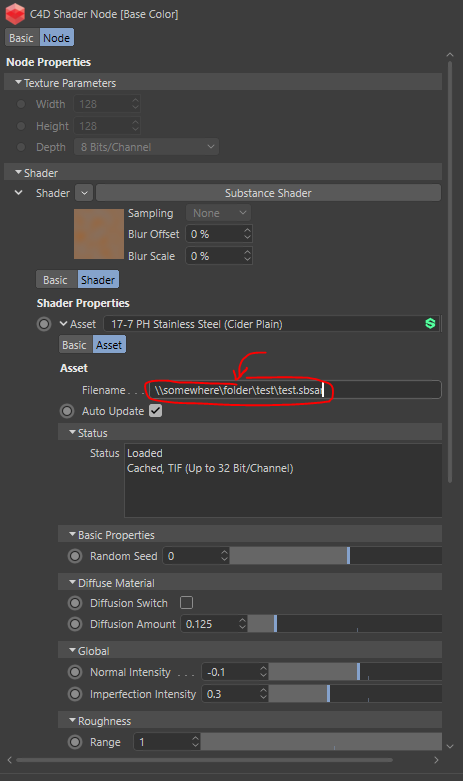
    Dear community, this question has been answered by mail and is unfortunately not available for the public in its entirety. The core of the answer was: if node.GetName() == 'Base Color' and node.GetTypeName() == 'C4D Shader': # Import the new substance as an asset into the document. res, asset, _ = c4d.modules.substance.ImportSubstance( doc, substance_path, c4d.SUBSTANCE_IMPORT_COPY_NO, False, False, False) if res != c4d.SUBSTANCE_IMPORT_RESULT_SUCCESS: raise IOError(f"Could not load substance file: {substance_path}") # Create a shader for the substance asset. shader = c4d.modules.substance.CreateSubstanceShader(asset) if not isinstance(shader, c4d.BaseShader): raise MemoryError("Unable to allocate substance shader.") # Insert the new shader into the material and set the shader # as the shader of the C4D Shader node. material.InsertShader(shader) node[c4d.GV_REDSHIFT_BAKER_SHADER] = shader Cheers, Ferdinand
  • How to select an Edge

    Cinema 4D SDK s22 python
    8
    1
    0 Votes
    8 Posts
    2k Views
    chuanzhenC
    @ferdinand Thanks your reply!
  • 1 Votes
    3 Posts
    849 Views
    H
    Ok, thanks for the confirmation. Already fixed it manually myself.
  • 0 Votes
    6 Posts
    1k Views
    ferdinandF
    Hello @JH23, without any further questions and other postings, we will consider this topic as solved and flag it as such by Friday, 17/06/2022. Thank you for your understanding, Ferdinand
  • Python Cinema4d GeDialog List

    Cinema 4D SDK
    4
    2
    0 Votes
    4 Posts
    861 Views
    ferdinandF
    Hello @render_exe, without any further questions and other postings, we will consider this topic as solved and flag it as such by Friday, 17/06/2022. Thank you for your understanding, Ferdinand