• 1 Votes
    3 Posts
    452 Views
    AnlvA
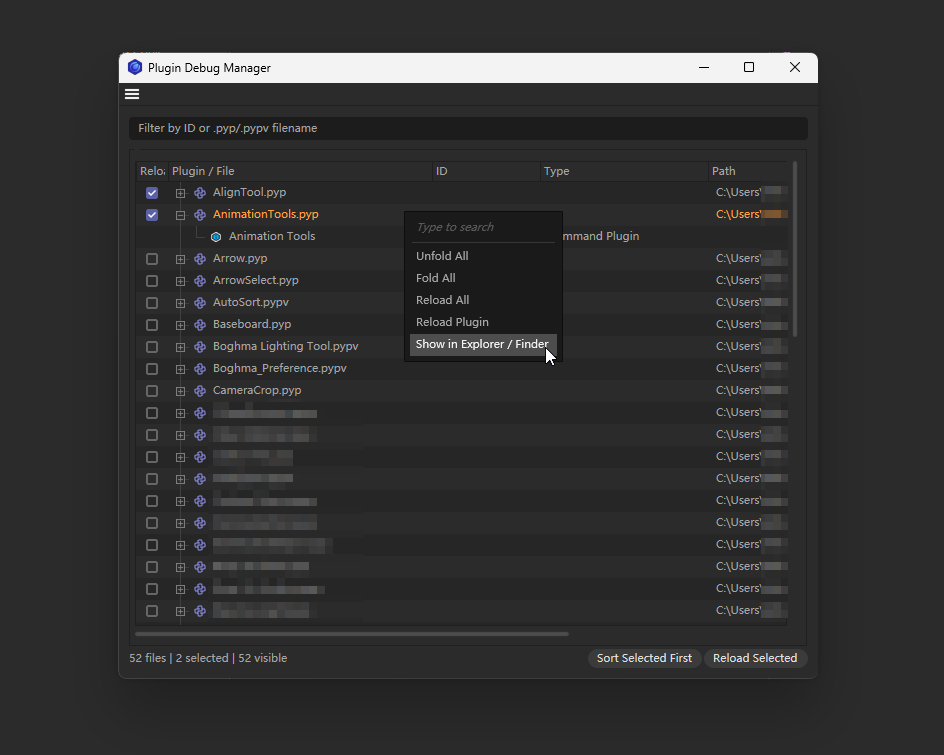
    @ferdinand Thank you so much! I made some minor adjustments to the plugin, adding support for CTRL hotkey activation, which allows quick reloading of previously checked plugins that need to be reloaded without opening the window. As always, open source, and will continue to be open source. Download: Plugin Debug Manager v1.5.0.zip Cheers, Anlv
  • 9 Votes
    23 Posts
    35k Views
    DunhouD
    Hi community! Add Basic CentiLeo Material support, also with ConvertPorts data, This a "new" GPU Renderer and in active development. I am very interested in it. Not add AOV due to still being in the early stages of development, waiting for this. Cheers~ DunHou
  • This topic is deleted!

    Pinned
    1
    1 Votes
    1 Posts
    2k Views
    No one has replied
  • VS Code -> Cinema 4D Connector -> Agent

    programming
    3
    0 Votes
    3 Posts
    62 Views
    M
    I guess I asked a question I do not have the knowledge yet In my ideal world: Agent -> python code -> plugin runs with console output (in the future executed by mcp) -> agents sees console output -> fixes bugs or verifies its code I also just could activate *.log writing and save the log in the repo ... thank you for your answer
  • 0 Votes
    2 Posts
    65 Views
    ferdinandF
    Hey @Marite, Welcome to the Maxon developers forum and its community, it is great to have you with us! Getting Started Before creating your next postings, we would recommend making yourself accustomed with our forum and support procedures. You did not do anything wrong, we point all new users to these rules. Forum Overview: Provides a broad overview of the fundamental structure and rules of this forum, such as the purpose of the different sub-forums or the fact that we will ban users who engage in hate speech or harassment. Support Procedures: Provides a more in detail overview of how we provide technical support for APIs here. This topic will tell you how to ask good questions and limits of our technical support. Forum Features: Provides an overview of the technical features of this forum, such as Markdown markup or file uploads. It is strongly recommended to read the first two topics carefully, especially the section Support Procedures: How to Ask Questions. About your First Posting Thank you for sharing your project! And please excuse the long wait time in the posting queue, I somehow managed to overlook your posting. Cheers, Ferdinand
  • 0 Votes
    2 Posts
    117 Views
    ferdinandF
    Hello @davidz, Welcome to the Maxon developers forum and its community, it is great to have you with us! Getting Started Before creating your next postings, we would recommend making yourself accustomed with our forum and support procedures. You did not do anything wrong, we point all new users to these rules. Forum Overview: Provides a broad overview of the fundamental structure and rules of this forum, such as the purpose of the different sub-forums or the fact that we will ban users who engage in hate speech or harassment. Support Procedures: Provides a more in detail overview of how we provide technical support for APIs here. This topic will tell you how to ask good questions and limits of our technical support. Forum Features: Provides an overview of the technical features of this forum, such as Markdown markup or file uploads. It is strongly recommended to read the first two topics carefully, especially the section Support Procedures: How to Ask Questions. About your First Question Please excuse the long delay. Please also have a look at our Support Procedures: How to Ask Questions, topics should not contain multiple questions as this tends to produce chaotic topics. Thread Safety & UI Blocking: How are you structuring long-running operations (like heavy geometry processing or batch asset syncs) to ensure C4D’s UI remains fluid? Cinema 4D does not offer true parallelism in its API in the sense of Python's multiprocessing, only simple de-blocking threading. I.e., you cannot make things faster, you can only make them not block things. This can be achieved via c4d.threading, specifically C4DThread. Examples: https://developers.maxon.net/docs/py/2027_0_0/search.html?q=C4DThread https://developers.maxon.net/forum/topic/14395/c4d-threading-in-python-doesn-t-work-as-expect/5 Module Live-Reloading: When building complex multi-file plugins, what is your preferred approach for hot-reloading modified code without constantly restarting C4D? You can use mxutils.LocalImportPath, it has a builtin module reload feature within the bounds of trivial import processes, i.e., imports that do not have to happen in a certain order. When you have: with LocalImportPath(__file__, autoReload=IS_DEBUG): import a import b import c It will of course still reload first a, then b, and then c. But for the relative local imports inside a, b, and c (if there are any) it does not know in which order it has to do them, so it just imports them in discovery order. For code where the import order of relative modules matters (which is not great code but also rather common), you have to write a manual reloader which reloads things in order (or just flush all relevant sys.modules entries). External Integrations: For those connecting Cinema 4D with external dashboards, cloud assets, or custom web development systems, what protocols or lightweight local servers (e.g., WebSocket, REST endpoints) are you finding most reliable? This is an extremely broad question which cannot be answered as is. You can make anything work at the end of day, it depends on what you want to do. When you want to connect web services with an UI (i.e., you have to represent the data somehow), I would recommend having a look at py_cmd_gui_html which showcases how to establish a two-way binding to an HTML page. The example runs the html page locally, but this could of course also be some service on the web. When you need an UI-less data transfer, I would probably go with REST and ship a bit better requests library with your plugin than what Python offers out of the box. You can technically also use the networking classes in the Maxon API Core, particularly UrlInterface but this is a low level API, not a convenience interfaces such as requests or urllib3 for Python, and more a barebones system like the bultin urllib of Python. Cheers, Ferdinand

  • 1 Votes
    1 Posts
    48 Views
    No one has replied
  • 1 Votes
    1 Posts
    82 Views
    No one has replied
  • List of selected edges

    off-topic-question
    2
    0 Votes
    2 Posts
    359 Views
    ferdinandF
    Hey @Kantronin, you might want to look at geometry_polgyon_edges_2024.0.py, it should answer all your questions. The TLDR is: full-edge maps as you hint at in your posting do exist in Cinema via helper functions, but they are often also not very useful. Internally, Cinema is operating as any other DCC application with the concept of what is often called a "half-edge" data structure. So, when you have the two polygons A and B: a---b---e | A | B | d---c---f Which share an edge over the vertices b and c, this is actually two edges and not one, due to how normals work. For both polygons to have a normal facing in the same direction, they must have opposite winding orders, which means that the edge b-c is actually two edges: b->c and c->b. So, A could for example index the edge as bc, and B as cb. The example goes into more detail with this. Cheers, Ferdinand
  • 0 Votes
    4 Posts
    684 Views
    ferdinandF
    There seems to be some solution, please stay tuned until the RS team has sorted out things. I will then update this topic.
  • Support for Material X?

    Moved c++ 2024
    3
    0 Votes
    3 Posts
    1k Views
    M
    Material X has been part of the Redshift Trello for years now with no movement. It feels like it is not a priority at the moment
  • V-Ray Materials Not Detected by Project Asset Inspector

    programming
    7
    0 Votes
    7 Posts
    2k Views
    R
    @ferdinand Alright, thank you for your reply.
  • 0 Votes
    3 Posts
    987 Views
    AnlvA
    @ferdinand Thanks for the encouragement, much appreciated!
  • Command to create a Nodes Modifier

    programming
    3
    0 Votes
    3 Posts
    1k Views
    I
    @ferdinand Thanks for the reply. This will help immensely thank you.
  • Xref Material reference

    Moved windows 2026 2025 c++
    2
    0 Votes
    2 Posts
    964 Views
    ferdinandF
    Hello @Jespersather, thank you for reaching out to us. This is a developer forum, not an end user support forum. We cannot help you here with your end user issues. Please use our Support Center to get end user support for Cinema 4D. I have moved your topic into General Talk. Cheers, Ferdinand
  • Deadline Issues: TeamRender PRO

    off-topic programming learning-resource
    4
    0 Votes
    4 Posts
    1k Views
    ferdinandF
    I did not see this as a rant or rude, if I had, I would have reacted differently. I understand your concerns, but this is a developer forum and we cannot help you here with your issue.
  • 0 Votes
    8 Posts
    3k Views
    ferdinandF
    Hey @mogh, I forgot this thread a bit, sorry. That sounds all very mysterious. When I summarize your issue, I would describe it as follows. I assume that is the gist of it? I have a workstation and experience there micro- and macro-stutters in the viewport performance. This happens primarily in low performing scenes with a heavy payload. The odd thing is though, that these performance dips only happen on one machine. On other comparable machines I have an an order of magnitude better performance. This is very hard to debug, but I would say there are two main cases of what could be going wrong. Your GPU is damaged or you use corrupted drivers. Outdated drivers alone cannot explain the numbers you report. It could also be the mainboard, although somewhat unlikely. You have another VRAM intensive app running on this machine. Cinema 4D and this app then play the VRAM memory battle, causing data to be constantly cycled in and out of VRAM, causing the performance dips. But this is somewhat unlikely as you probably would be aware of this. What I would do: Update all your drivers. Go into Preferences/Viewport Hardware and start dialing knobs to see if you can make a difference. Cinema 4D has unfortunately not a software viewport renderer anymore with which you could do a baseline test. Use a GPU monitoring tool (like MSI Afterburner) to see if your GPU is running at full load, or if there are spikes in VRAM usage. There are also more fancy tools with which you can monitor memory allocations over time. Run GPU tests such as FurMark or 3DMark to see if your GPU behaves stable there. Install a different GPU (not fun to do, but the best way to rule out hardware issues). There could also be a bug in Cinema 4D but with numbers as shown below that strikes me as a very unlikely cause. This sounds more like damaged hardware or a really nasty driver issue. laptop with ~60 FPS (Quadro 2000) on my workstation with ~8 FPS (RTX 3090) Cheers, Ferdinand
  • 0 Votes
    2 Posts
    1k Views
    ferdinandF
    Hey @CJtheTiger, Thank you for reaching out to us. That seems to be part of what the Cinversity team did before I joined Maxon. This was never a project of the SDK team. And more over, this seems to have been a private project of Niklas Rosenstein, an ex Maxon employe, because the link points to his GitHub. Niklas is still on GitHub, maybe you can send him a message if he still has his old code? But this looks like an R25 or even older project, so this will for sure require some update work. There are also the Cinversity legacy downloads on Maxon's downloads page, but it does not seem to contain it either. Cheers, Ferdinand
  • String to Spline (cast)

    programming
    2
    0 Votes
    2 Posts
    1k Views
    ferdinandF
    Hey @Kantronin, Thank you for reaching out to us. Unfortunately, I do not understand your question. The print out you provided, <c4d.SplineObject object ..., already indicates that the object is a c4d.SplineObject. So, I do not really understand what you mean with 'get a spline-type variable'. To get the underlying editable spline object for a spline generator, e.g., get a spline with editable vertices and tangents for a Flower Spline generator, you should use BaseObject.GetRealSpline. But that is only necessary when you have a BaseObject which under the hood represents a spline. It does not apply when you already have a SplineObject as you do. Cheers, Ferdinand
  • 0 Votes
    13 Posts
    7k Views
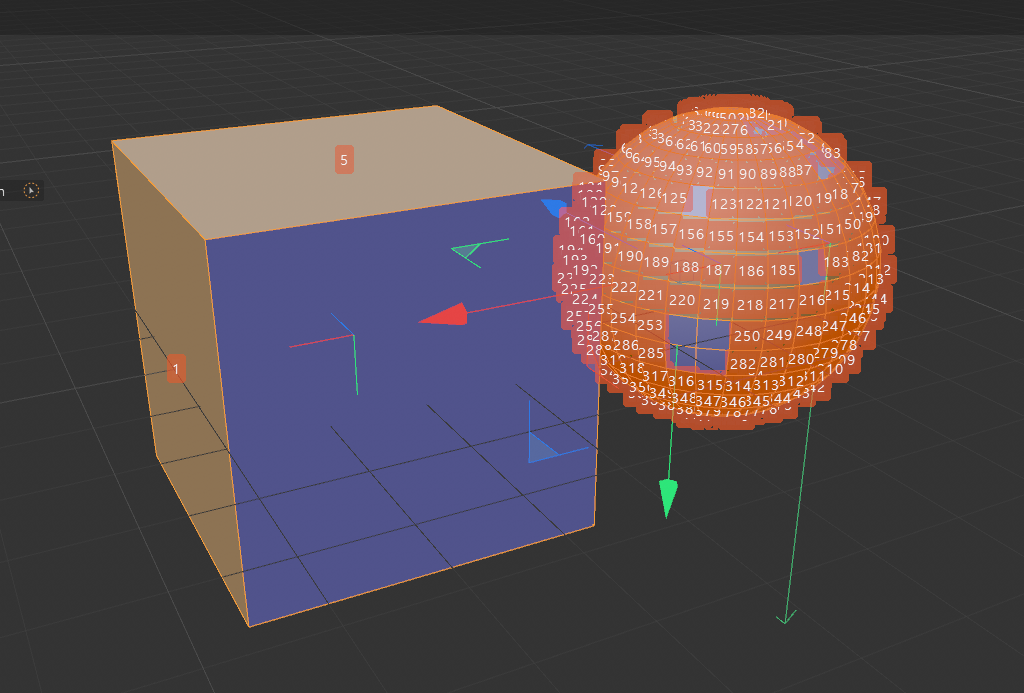
    KantroninK
    @ferdinand I'm showing an example with a curved surface composed of 8 zones. Each zone is the union of several polygons with normals oriented in the same direction (represented by an arrow). I think C4D should be able to identify this type of tiling and colorize these areas to highlight them. Depending on the case, this tiling could be important, but most often, creators assemble the faces logically. A window could then offer the option to select each tiling, in order to invert the normals with a single click. A plugin could also do this kind of work, which would save creators time. [image: 1751317789481-surface.jpg]