Your browser does not seem to support JavaScript. As a result, your viewing experience will be diminished, and you have been placed in read-only mode.
Please download a browser that supports JavaScript, or enable it if it's disabled (i.e. NoScript).
rigger
Hi,in another post I found a way to achieve my goal of converting the coordinate position to camera space and then scaling it to a small size so that he appears first.
this is new code:
def Draw(self,op, drawpass, bd, bh):


    if not op[c4d.S_MOTIONTRAIL_GTWO_DRAWENABLE]:
        return c4d.DRAWRESULT_OK
    #bd.SetMatrix_Matrix(None, c4d.Matrix())
    pmg = ~bd.GetMg()
    bd.SetMatrix_Camera()

    all_pos = self.parameters['all_pos']
    color_lis = self.parameters['color_lis']
    point_size = op[c4d.S_MOTIONTRAIL_GTWO_POINTSIZE]
    bd.SetPointSize(point_size)
    for per_pos,color in zip(all_pos,color_lis):
        bd.SetPen(color)
        cnt = len(per_pos)
        temp_lis = []
        for i in xrange(cnt-1):
            c = (pmg * per_pos[i]).GetNormalized() * 20
            f = (pmg * per_pos[i+1]).GetNormalized() * 20
            bd.DrawLine(c,f,c4d.NOCLIP_D)
            temp_lis.append(c)
        temp_lis.append(f)
        bd.DrawPoints(temp_lis)


    return c4d.DRAWRESULT_OK
why * 20 will work, * 1or 2 not work (c = (pmg * per_pos[i]).GetNormalized() * 20)?
I found a solution in other posts, and this is an video example:
example code: import c4d from c4d import bitmaps,gui class DraggingArea(c4d.gui.GeUserArea): def __init__(self): self.startx = 0 self.starty = 0 def DrawMsg(self, x1, y1, x2, y2, msg): # Initializes draw region self.OffScreenOn() self.SetClippingRegion(x1, y1, x2, y2) icon_bmp = bitmaps.InitResourceBitmap(5159) icon_clip = bitmaps.GeClipMap() icon_clip.InitWithBitmap(icon_bmp,icon_bmp.GetInternalChannel()) clip = bitmaps.GeClipMap() w,h = self.GetWidth(),self.GetHeight() clip.Init(w,h) clip.BeginDraw() clip.SetColor(0,0,180) clip.FillRect(0,0,w,int(h*0.4)) clip.SetColor(180,0,0) clip.FillRect(0,int(h*0.4),w,h) clip.SetDrawMode(c4d.GE_CM_DRAWMODE_BLEND,255) clip.Blit(self.startx,self.starty,icon_clip,0,0,icon_clip.GetBw(),icon_clip.GetBh(),c4d.GE_CM_BLIT_COL) clip.EndDraw() # Get default Background color bmp = clip.GetBitmap() self.DrawBitmap(bmp,0,0,w,h,0,0,w,h,c4d.BMP_NORMAL) def InputEvent(self, msg): """ Called by Cinema 4D, when there is a user interaction (click) on the GeUserArea. This is the place to catch and handle drag interaction. :param msg: The event container. :type msg: c4d.BaseContainer :return: True if the event was handled, otherwise False. :rtype: bool """ # Do nothing if its not a left mouse click event if msg[c4d.BFM_INPUT_DEVICE] != c4d.BFM_INPUT_MOUSE and msg[c4d.BFM_INPUT_CHANNEL] != c4d.BFM_INPUT_MOUSELEFT: return True # Retrieves the initial position of the click mouseX = msg[c4d.BFM_INPUT_X] mouseY = msg[c4d.BFM_INPUT_Y] mouse_pos_dict = self.Global2Local() x, y = mouse_pos_dict['x'] + msg.GetInt32(c4d.BFM_INPUT_X), mouse_pos_dict['y'] + msg.GetInt32( c4d.BFM_INPUT_Y) self.startx = x self.starty = y # Initializes the start of the dragging process (needs to be initialized with the original mouseX, mouseY). self.MouseDragStart(c4d.KEY_MLEFT, mouseX, mouseY, c4d.MOUSEDRAGFLAGS_DONTHIDEMOUSE | c4d.MOUSEDRAGFLAGS_NOMOVE) isFirstTick = True # MouseDrag needs to be called all time to update information about the current drag process. # This allow to catch when the mouse is released and leave the infinite loop. while True: # Updates the current mouse information result, deltaX, deltaY, channels = self.MouseDrag() if result != c4d.MOUSEDRAGRESULT_CONTINUE: break # The first tick is ignored as deltaX/Y include the mouse clicking behavior with a deltaX/Y always equal to 4.0. # However it can be useful to do some initialization or even trigger single click event if isFirstTick: isFirstTick = False continue # If the mouse didn't move, don't need to do anything if deltaX == 0.0 and deltaY == 0.0: continue # Updates mouse position with the updated delta mouseX -= deltaX mouseY -= deltaY x -= deltaX y -= deltaY self.startx = int(x) self.starty = int(y) # Redraw the GeUserArea (it will call DrawMsg) self.Redraw() # Asks why we leave the while loop endState = self.MouseDragEnd() return True class MyDialog(c4d.gui.GeDialog): """ Creates a Dialog with only a GeUserArea within. """ def __init__(self): # It's important to stores our Python implementation instance of the GeUserArea in class variable, # This way we are sure the GeUserArea instance live as long as the GeDialog. self.area = DraggingArea() def CreateLayout(self): """ This method is called automatically when Cinema 4D Create the Layout (display) of the Dialog. """ self.AddUserArea(1000, c4d.BFH_SCALEFIT | c4d.BFV_SCALEFIT) self.AttachUserArea(self.area, 1000) return True def main(): # Creates a new dialog dialog = MyDialog() # Opens it dialog.Open(dlgtype=c4d.DLG_TYPE_MODAL_RESIZEABLE, defaultw=500, defaulth=500) if __name__ == '__main__': main()
example code:
import c4d

from c4d import bitmaps,gui


class DraggingArea(c4d.gui.GeUserArea):
    def __init__(self):
        self.startx = 0
        self.starty = 0

    def DrawMsg(self, x1, y1, x2, y2, msg):


        # Initializes draw region
        self.OffScreenOn()
        self.SetClippingRegion(x1, y1, x2, y2)
        icon_bmp = bitmaps.InitResourceBitmap(5159)
        icon_clip = bitmaps.GeClipMap()
        icon_clip.InitWithBitmap(icon_bmp,icon_bmp.GetInternalChannel())

        clip = bitmaps.GeClipMap()
        w,h = self.GetWidth(),self.GetHeight()
        clip.Init(w,h)
        clip.BeginDraw()
        clip.SetColor(0,0,180)
        clip.FillRect(0,0,w,int(h*0.4))
        clip.SetColor(180,0,0)
        clip.FillRect(0,int(h*0.4),w,h)

        clip.SetDrawMode(c4d.GE_CM_DRAWMODE_BLEND,255)
        clip.Blit(self.startx,self.starty,icon_clip,0,0,icon_clip.GetBw(),icon_clip.GetBh(),c4d.GE_CM_BLIT_COL)


        clip.EndDraw()
        # Get default Background color
        bmp = clip.GetBitmap()
        self.DrawBitmap(bmp,0,0,w,h,0,0,w,h,c4d.BMP_NORMAL)


    def InputEvent(self, msg):
        """
        Called by Cinema 4D, when there is a user interaction (click) on the GeUserArea.
        This is the place to catch and handle drag interaction.

        :param msg: The event container.
        :type msg: c4d.BaseContainer
        :return: True if the event was handled, otherwise False.
        :rtype: bool
        """
        # Do nothing if its not a left mouse click event
        if msg[c4d.BFM_INPUT_DEVICE] != c4d.BFM_INPUT_MOUSE and msg[c4d.BFM_INPUT_CHANNEL] != c4d.BFM_INPUT_MOUSELEFT:
            return True

        # Retrieves the initial position of the click
        mouseX = msg[c4d.BFM_INPUT_X]
        mouseY = msg[c4d.BFM_INPUT_Y]
        mouse_pos_dict = self.Global2Local()
        x, y = mouse_pos_dict['x'] + msg.GetInt32(c4d.BFM_INPUT_X), mouse_pos_dict['y'] + msg.GetInt32(
            c4d.BFM_INPUT_Y)
        self.startx = x
        self.starty = y

        # Initializes the start of the dragging process (needs to be initialized with the original mouseX, mouseY).
        self.MouseDragStart(c4d.KEY_MLEFT, mouseX, mouseY, c4d.MOUSEDRAGFLAGS_DONTHIDEMOUSE | c4d.MOUSEDRAGFLAGS_NOMOVE)
        isFirstTick = True

        # MouseDrag needs to be called all time to update information about the current drag process.
        # This allow to catch when the mouse is released and leave the infinite loop.
        while True:

            # Updates the current mouse information
            result, deltaX, deltaY, channels = self.MouseDrag()
            if result != c4d.MOUSEDRAGRESULT_CONTINUE:
                break

            # The first tick is ignored as deltaX/Y include the mouse clicking behavior with a deltaX/Y always equal to 4.0.
            # However it can be useful to do some initialization or even trigger single click event
            if isFirstTick:
                isFirstTick = False
                continue

            # If the mouse didn't move, don't need to do anything
            if deltaX == 0.0 and deltaY == 0.0:
                continue

            # Updates mouse position with the updated delta
            mouseX -= deltaX
            mouseY -= deltaY
            x -= deltaX
            y -= deltaY
            self.startx = int(x)
            self.starty = int(y)


            # Redraw the GeUserArea (it will call DrawMsg)
            self.Redraw()

        # Asks why we leave the while loop
        endState = self.MouseDragEnd()


        return True


class MyDialog(c4d.gui.GeDialog):
    """
    Creates a Dialog with only a GeUserArea within.
    """

    def __init__(self):
        # It's important to stores our Python implementation instance of the GeUserArea in class variable,
        # This way we are sure the GeUserArea instance live as long as the GeDialog.
        self.area = DraggingArea()

    def CreateLayout(self):
        """
        This method is called automatically when Cinema 4D Create the Layout (display) of the Dialog.
        """
        self.AddUserArea(1000, c4d.BFH_SCALEFIT | c4d.BFV_SCALEFIT)
        self.AttachUserArea(self.area, 1000)
        return True


def main():
    # Creates a new dialog
    dialog = MyDialog()

    # Opens it
    dialog.Open(dlgtype=c4d.DLG_TYPE_MODAL_RESIZEABLE, defaultw=500, defaulth=500)


if __name__ == '__main__':
    main()
@gheyret Thanks for your help! i use "c4d.CallCommand(12147) # Redraw" to replace c4d.EventAdd() or c4d.Redraw(), it also work!
change code:
        if id == 1001:
            for obj in doc.GetObjects():
                obj.ChangeNBit(c4d.NBIT_EHIDE,c4d.NBITCONTROL_CLEAR)
            c4d.CallCommand(12147) # Redraw
            return True
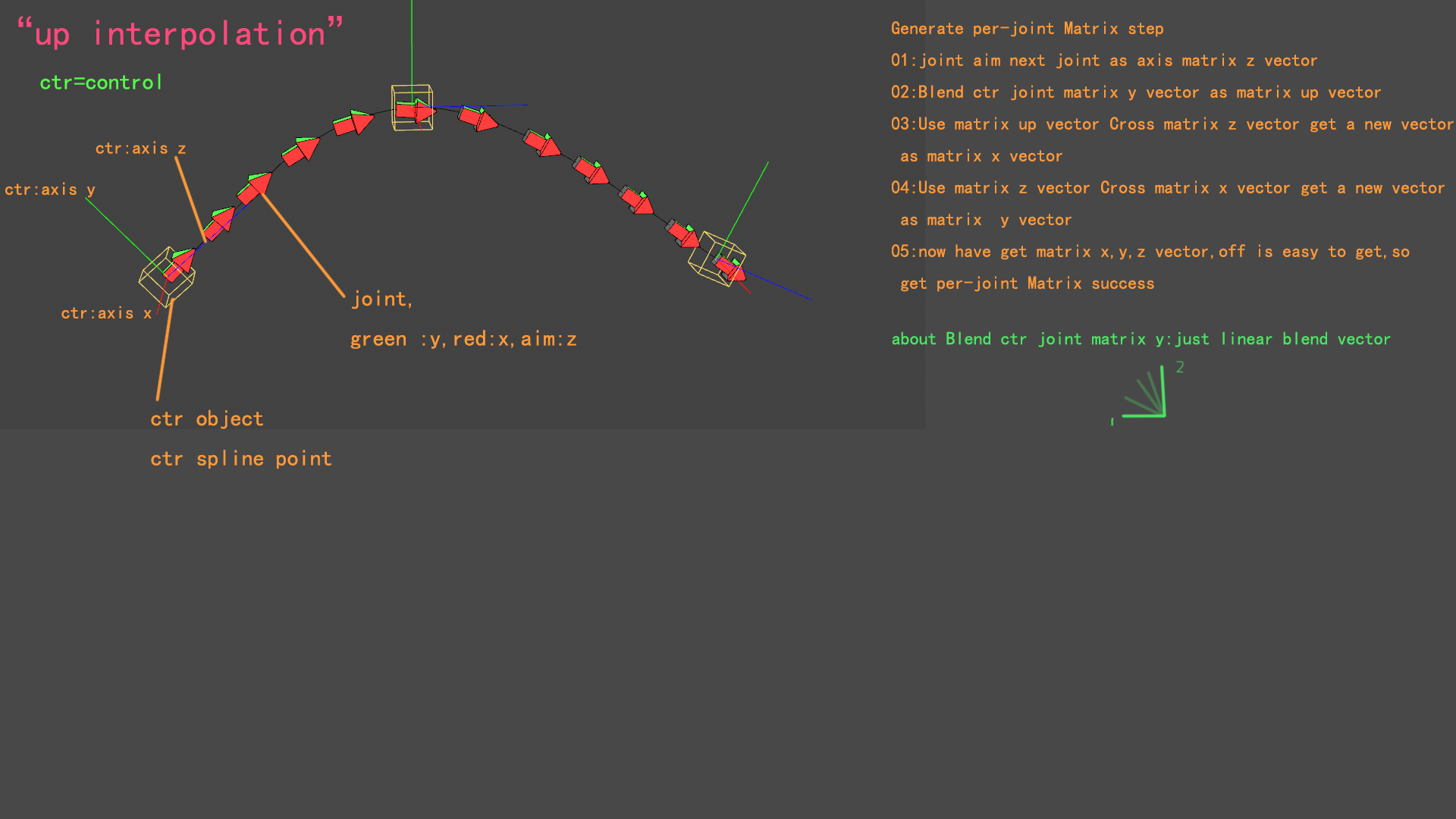
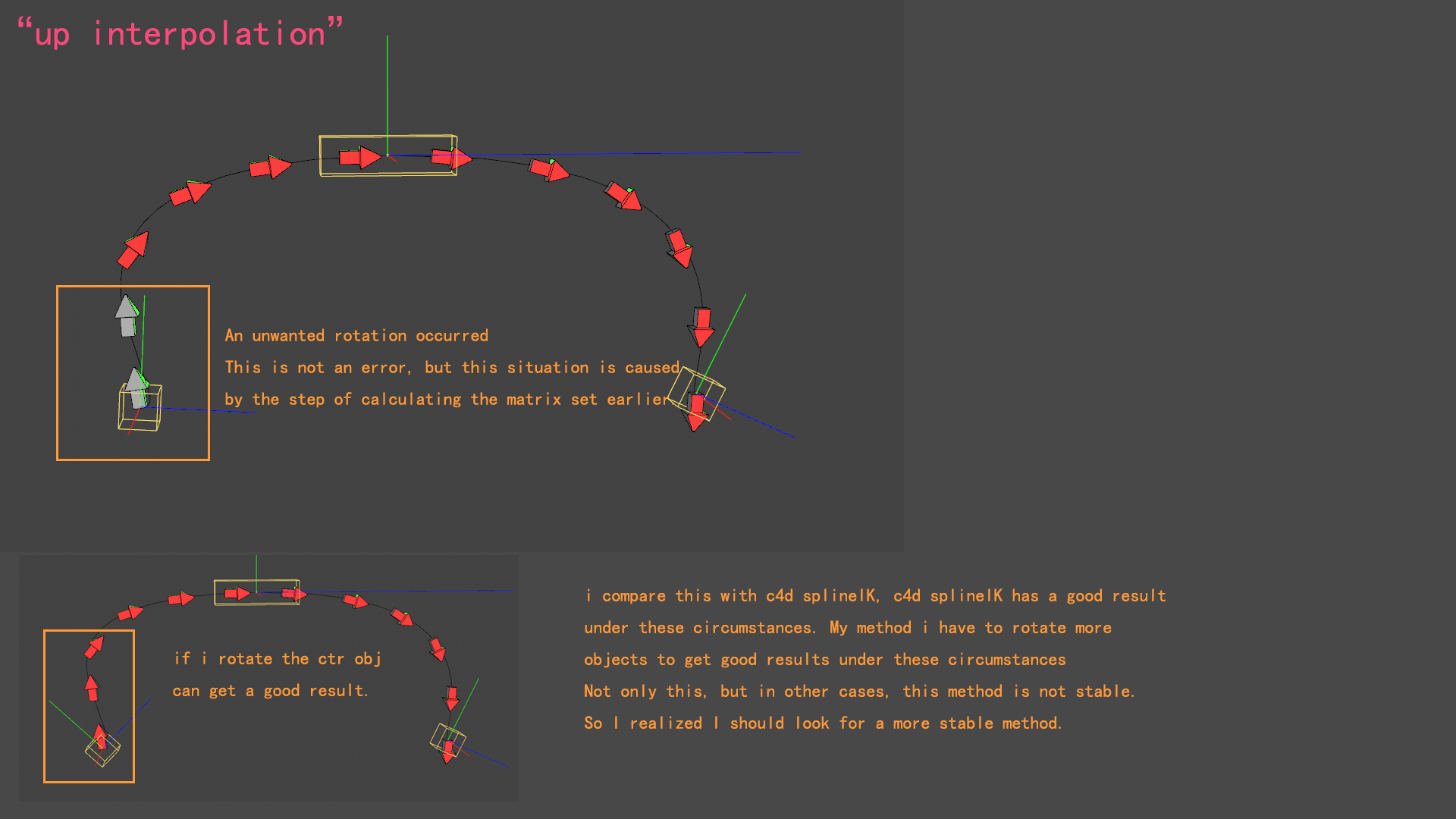
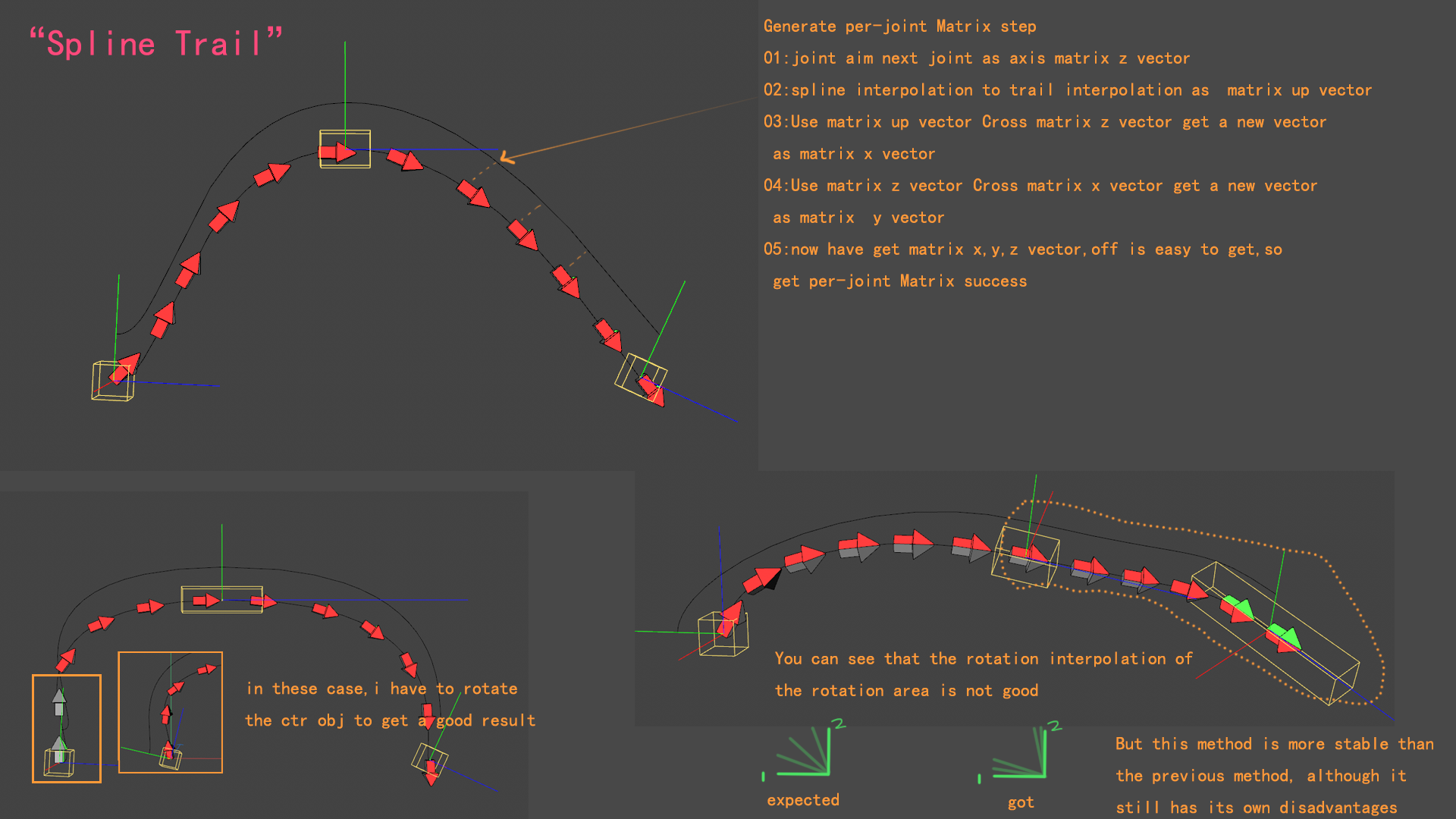
@r_gigante @zipit The detailed explanation is shown below “up interpolattion” Try use "spline trail"
I read some papers, but always been very slow, just only expanded know, such as Frenet–Serret formulas etc. But I did not directly find a better way to replace my current method, and I have been looking for it.
Computation of Rotation Minimizing Frames This seems to be a good paper, I will read it carefully.
@m_adam Thank you for your team's reply. I will share my exploration in this post in the future.
The problem has been resolved, reinstall the graphics driver and perform a custom clean installation!
try use GetDirty(DIRTYFLAGS_CACHE),compare last dirty and current dirty
@i_mazlov Thank you for your detailed reply, it was really helpful! The following video shows the results, which work well. The blue polygon uses GetPolyPointST()
Hi, you can read this thread
Hi @i_mazlov Through exploring these two pages,page1,page2, I have converted them into Python code Inverse_Bilinear_Interpolation(), which can replace GetPolyPointST(). I am not sure why GetPolyPointST() may obtain incorrect values in certain situations, but Inverse_Bilinear_Interpolation() does not go wrong in complex situations.
video use Inverse_Bilinear_Interpolation() code: import math # algorithm_InverseBilinearInterpolation 逆双线性插值 的算法 def Wedge2D(v:c4d.Vector,w:c4d.Vector): return v[0] * w[1] - v[1] * w[0] def Inverse_Bilinear_Interpolation(p:c4d.Vector,p0:c4d.Vector,p1:c4d.Vector,p3:c4d.Vector,p2:c4d.Vector): """ 注意对点顺序的定义 Attention : points Order p2 --- p3 | | | | p0 --- p1 """ q = p - p0 b1 = p1 - p0 b2 = p2 - p0 b3 = p0 - p1 - p2 + p3 A = Wedge2D(b2,b3) B = Wedge2D(b3,q) - Wedge2D(b1,b2) C = Wedge2D(b1,q) # 求V - solve v if abs(A) < 0.00000001: v = -C / B else: discrim = B * B - 4.0 * A * C v = 0.5 * (-B - math.sqrt(discrim)) / A # CCW #v = 0.5 * (-B + math.sqrt(discrim)) / A # CW # 求 u - solve u denom = b1 + v * b3 if abs(denom[0]) > abs(denom[1]): u = (q[0] - b2[0] * v) / denom[0] else: u = (q[1] - b2[1] * v) / denom[1] return u,v # example use CPolygon point position a,b,c,d, and point p in quard(CPolygon) # u,v = Inverse_Bilinear_Interpolation(p,a,b,c,d) sample file: custom-quadrilateral.c4d But for the code part, there are still some doubts about the difference between CCW and CW. When I understand what's going on, I will come back and reply. If any friend can explain, that's the best!
code:
import math


# algorithm_InverseBilinearInterpolation 逆双线性插值 的算法

def Wedge2D(v:c4d.Vector,w:c4d.Vector):
    return v[0] * w[1] - v[1] * w[0]

def Inverse_Bilinear_Interpolation(p:c4d.Vector,p0:c4d.Vector,p1:c4d.Vector,p3:c4d.Vector,p2:c4d.Vector):

    """
    注意对点顺序的定义
    Attention :  points Order

    p2 --- p3
    |      |
    |      |
    p0 --- p1

    """

    q = p - p0
    b1 = p1 - p0
    b2 = p2 - p0
    b3 = p0 - p1 - p2 + p3

    A = Wedge2D(b2,b3)
    B = Wedge2D(b3,q) - Wedge2D(b1,b2)
    C = Wedge2D(b1,q)
    # 求V - solve v
    if abs(A) < 0.00000001:
        v = -C / B
    else:
        discrim = B * B - 4.0 * A * C
        v = 0.5 * (-B - math.sqrt(discrim)) / A  # CCW
        #v = 0.5 * (-B + math.sqrt(discrim)) / A  # CW

    # 求 u - solve u
    denom = b1 + v * b3

    if abs(denom[0]) > abs(denom[1]):
        u = (q[0] - b2[0] * v) / denom[0]
    else:
        u = (q[1] - b2[1] * v) / denom[1]

    return u,v
# example use CPolygon point position a,b,c,d, and point p in quard(CPolygon)
# u,v = Inverse_Bilinear_Interpolation(p,a,b,c,d)
sample file: custom-quadrilateral.c4d
But for the code part, there are still some doubts about the difference between CCW and CW. When I understand what's going on, I will come back and reply. If any friend can explain, that's the best!
@ferdinand Okay, I will handle the plugins and files at an appropriate time.Thanks reply
@ferdinand Thanks for your detailed explanation. Although the precision conversion leading to value changes is not an error, it is indeed not what we want in terms of the results. For example, when dealing with the weight of some points, using SetWeightMap() will update the weights of other points, resulting in numerical changes. Only using SetWeight() can at least ensure that the weights of unoperated points do not undergo numerical changes (but using SetWeight() must tolerate the print warnings outputted by the console)
@ferdinand Thanks for your detailed explanation.
@ferdinand Thanks for reply. I tested a simple C4D file (such as one with only a cube, where the merge command works well). But I still have a question. If it's a plugin issue ( CopyTo Read Write function is not implemented), then why can the Merge command in C4D merge files normally?
(As an aside, I found this issue in one of my plugins (which uses MergeDocument). This plugin was developed in C4D 2024, and the same code worked in older versions but crashes in 2026. Even with the same script code and merge same file, it works normally in 2024 but crashes in 2026)
c4d.documents.MergeDocument(doc, path_str,c4d.SCENEFILTER_OBJECTS | c4d.SCENEFILTER_MATERIALS,c4d.threading.GeGetCurrentThread())
@ferdinand Hi, I used your file for the demonstration. (Opening your file and running the code directly not cause any issues.) The problem occurred after smooth weights. In the demonstration, only the smoothing operation of weights was performed. Running the code again, you can see the change in the weight values
@Anlv Thanks for your reply.can't reproduce this issue on your side, it seems I need to test it on other computers. It's a puzzling problem
@Anlv Hi Here is a video demonstrating how C4D crashes. For a saved document (or a loaded document), using MergeDocument() is fine, but for a new document that hasn't been saved, using MergeDocument() will definitely crash 2026.3.3 win11
Hi,
c4d.documents.MergeDocument(doc, path_str,c4d.SCENEFILTER_OBJECTS | c4d.SCENEFILTER_MATERIALS,None)
this code,c4d always crashed
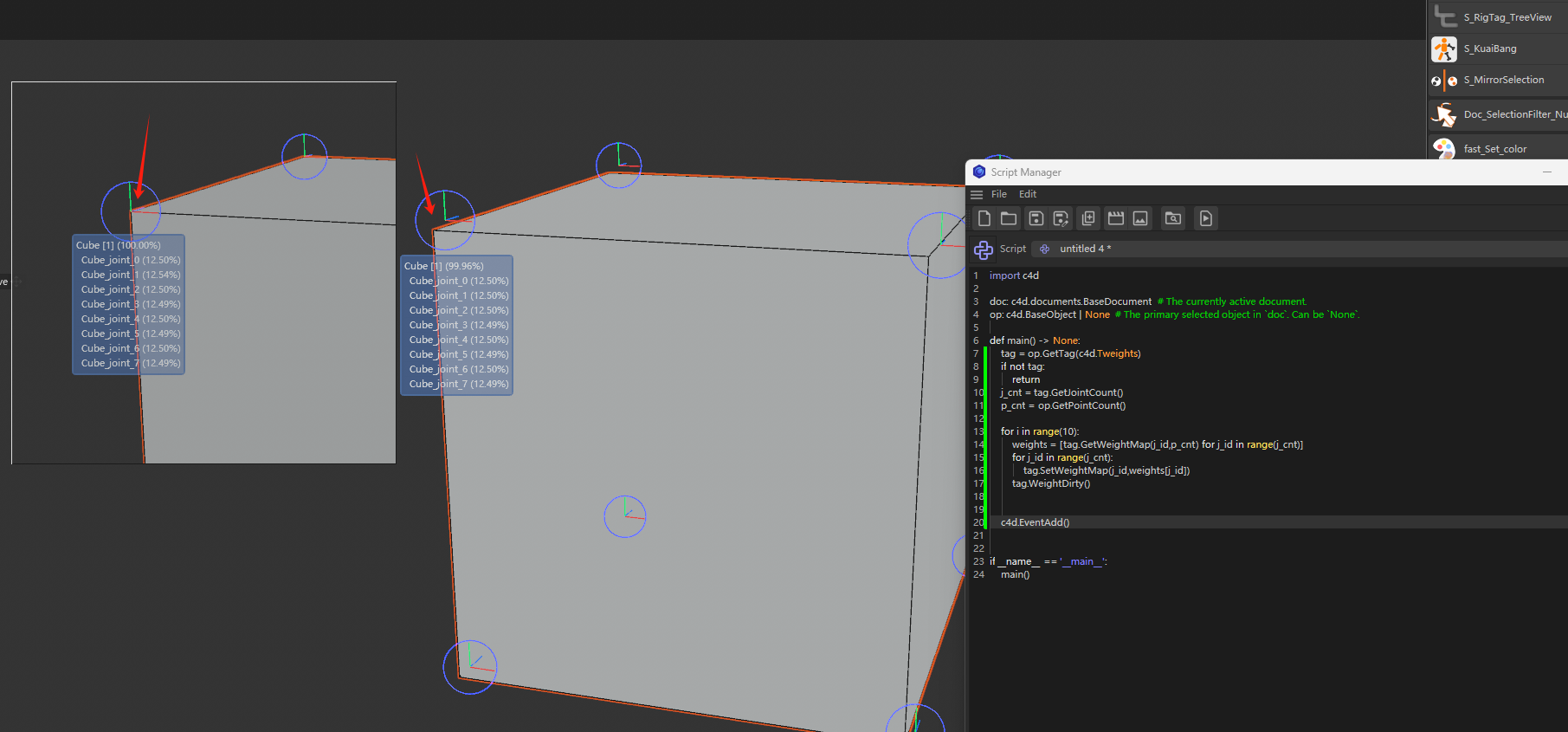
@ferdinand Hi,The simple demo I made: 1:Create a standard cube (with 8 vertices), 2:Create 8 joint (point_id 1 -> joint 1 ),bind it,then offset all joints (x:10000,y:10000,z:10000 cm) 3:Each point is 100% bound to a bone, 4: Then, apply smooth 1-2 times to all bones and points to obtain a result where each point is influenced by all bones (facilitating the observation of the code execution results) 5: normalize weights 6:Then execute the code 2-3 times, and you can clearly see the result
import c4d

doc: c4d.documents.BaseDocument  # The currently active document.
op: c4d.BaseObject | None  # The primary selected object in `doc`. Can be `None`.

def main() -> None:
    tag = op.GetTag(c4d.Tweights)
    if not tag:
        return
    j_cnt = tag.GetJointCount()
    p_cnt = op.GetPointCount()

    for i in range(10):
        weights = [tag.GetWeightMap(j_id,p_cnt) for j_id in range(j_cnt)]
        for j_id in range(j_cnt):
            tag.SetWeightMap(j_id,weights[j_id])
        tag.WeightDirty()


    c4d.EventAdd()


if __name__ == '__main__':
    main()
video:
Hi, Previously, I had been using the SetWeight() method to set weight values, and it worked very stably. However, after seeing the deprecation notice for SetWeight() in the python api documentation, I switched to using SetWeightMap() instead. However, there were some issues with this function. When I used SetWeightMap() multiple times to set values, its values would gradually change.
Below is a simple example of my video, using a standard cube (with 8 points), where each point is equally influenced by all bones.
However, when I repeatedly obtain the weight values using GetWeightMap()without making any changes, and then set the weights using SetWeightMap() again, I can see that the weight values have undergone slight changes, with the sum of weights changing from 1 --> 0.998