• Maxon API for Python

    Cinema 4D SDK python 2025 windows
    3
    0 Votes
    3 Posts
    642 Views
    ThomasBT
    @ferdinand Thank you for your detailed explanation, it shed some light on the whole matter for me.
  • Set RenderData framerate causing C4D to crash

    Moved Bugs python 2025
    4
    0 Votes
    4 Posts
    21k Views
    M
    Hi I was able to reproduce the issue and fix it for the next version. The bug is that setting RDATA_FRAMERATE require the RenderData to be part of a document in case the "Use Project Frame Rate" is enabled on the render settings. If this is enabled and this is enabled by default the value you enter will be disregarded. "Use Project Frame Rate" is a new setting added in 2025.2. I will ping you once the fix is available. Cheers, Maxime.
  • 0 Votes
    5 Posts
    1k Views
    i_mazlovI
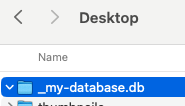
    Hi @d_keith, I would kindly ask you to check our Support Procedures, namely the "How To Ask Questions" paragraph: Singular Question: The initial posting of a support topic must contain a singular question. Do not ask ten things at once, that makes it extremely hard to answer topics. Break up your questions into multiple topics. Here you effectively have 4 different questions about Asset Browser, and these are candidates for 4 different threads on the forum. In your further postings please try to follow the aforementioned rules. Regarding your questions: Should I be able to mount a directory and have it auto-create a DB? Mounting database is effectively executing the AssetDataBasesInterface.SetDatabases. It has nothing to do with creating database neither semantically, nor is this mentioned in the docu. If you need to create repository, please use maxon.AssetInterface.CreateRepositoryFromUrl(), it will scan the directory for being already a database and create proper dir structure if it's not. Any idea why I need to re-try creating the Repo for it to work? If you face any errors in the script, please always attach at least the error message! In this case I assume you receive the following error, when executing the maxon.AssetRepositoryTypes.AssetDatabase() for the first time after Cinema 4D started. Looks like a bug to me, I've created a bug report for that (ITEM#585831). The error message: Traceback (most recent call last): File "console", line 1, in <module> File "C:\Program Files\Maxon Cinema 4D 2025\resource\modules\python\libs\python311\maxon\interface.py", line 5049, in __call__ self._cachedObj.R = _maxon_mapping.GetAssociatedDataType(dt) ^^^^^^^^^^^^^^^^^^^^^^^^^^^^^^^^^^^^^^^^ Exception: unable to find datatype As a workaround you can just execute the following line first in your main(): maxon.AssetRepositoryTypes.AssetDatabase() ... about multiple DBs ... You're giving your databases unique IDs with the line repo_id = maxon.AssetInterface.MakeUuid(str(url), True). If you need them to be the same, just pick one instead, e.g. repo_id = maxon.Id('net.maxon.sdk.cool.things.repo') ... revealing assets doesn't work... I've created a bug report for that, as it looks like a bug with refreshing in the Asset Browser. As a workaround you can reload databases and reopen the AB before reveling your assets, e.g.: def RepenAssetBrowser(): CID_ASSET_BROWSER = 1054225 # Close the Asset Browser if it's alredy opened if c4d.IsCommandChecked(CID_ASSET_BROWSER): c4d.CallCommand(CID_ASSET_BROWSER) # Open again c4d.CallCommand(CID_ASSET_BROWSER) def main(): # ... # assets = [] # ... # assets.append(asset) # ... maxon.AssetDataBasesInterface.ReloadAssetRepositories(True) RepenAssetBrowser() maxon.AssetManagerInterface.RevealAsset(assets) Cheers, Ilia
  • 0 Votes
    3 Posts
    873 Views
    K
    Hi @ferdinand , Thanks for the clarification. I will contact user support and request this as a feature.
  • 0 Votes
    3 Posts
    619 Views
    I
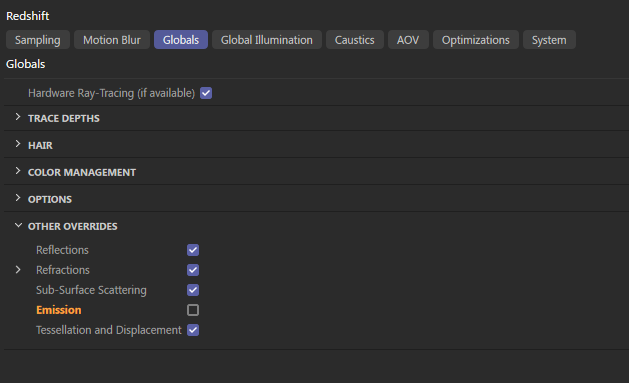
    Hi Ferdinand, Thanks a lot for the clear explanation and for taking the time to share the code. The part about accessing BaseVideoPost and using REDSHIFT_RENDERER_EMISSION_ENABLE was spot on. Exactly what I needed. Works perfectly! Really appreciate it. Anthony
  • 0 Votes
    7 Posts
    1k Views
    chuanzhenC
    @i_mazlov Thanks,it works!
  • 0 Votes
    3 Posts
    706 Views
    I
    Hi Ilia, Thanks a lot for the quick and clear reply! That makes sense. I had a feeling it might be a limitation of the current API. I’ll definitely follow up with the Redshift team on their forum to confirm whether there’s any workaround or future support planned for accessing those fields. Appreciate your help and the reference to the related thread! Cheers, Anthony
  • connect material to reference node

    Cinema 4D SDK 2025 python
    6
    0 Votes
    6 Posts
    1k Views
    ferdinandF
    Hey, Node attributes are things that are directly present on a GraphNode. You could also call them fields, because a GraphNode like many things in our API has qualities of a DataDictionay, i.e., you can write values over keys into it, just like for Python's own dict. Such node attributes (for true nodes) are then rendered out quite similarly to port values in the Attribute Manager but they are fundamentally different from ports, as users cannot drive their value with a connection, i.e., the value of a port of another node. And a port also always requires another GraphNode attached to the true node¹ for which they are a port, while the attribute sits directly on the true node. An attribute, e.g., the name of a node, will also never show up in the node representation in the graph. In the screen below I for example right clicked on the RS Reference node and invoked Add Input > All; but things like Name, Color, Show Preview etc. are alle not listed. [image: 1744368637847-174097cf-d777-49d2-b0ea-0057c8474a5e-image.png] That is because they are all attributes and not ports. There is unfortunately no absolute rule like 'everything in Basic is attributes and everything else is ports'. While it holds (for now) true that everything in Basic is an attribute, especially Redshift also puts attributes into other tabs. They usually only appear in more complex scenarios when dealing with port bundles and variadic ports, but they exist. And just for clarity, attributes do not only exist on nodes that are what our API calls 'true nodes'¹, but also on other GraphNode types, e.g., a GraphNode representing a port. It is just that they are usually not rendered out to the GUI there and more of an internal nature (nodes have a lot of internal attributes). Cheers, Ferdinand ¹ GraphNode instances that represent what the end user would consider a 'node', e.g., the RS Reference node, and with that excluding GraphNode instances that for example represent an input port.
  • 0 Votes
    3 Posts
    756 Views
    chuanzhenC
    @i_mazlov Thanks
  • Xpresso python tag issue

    Cinema 4D SDK 2025 python
    5
    0 Votes
    5 Posts
    959 Views
    A
    Ah, super! thank you.
  • DrawHUDText issue with viewport camera navigation

    Moved Bugs 2024 python
    5
    3
    0 Votes
    5 Posts
    2k Views
    FlavioDinizF
    Thanks a lot @i_mazlov ! The issue is solved !
  • BaseDraw.DrawTexture Issue

    Cinema 4D SDK 2025 python
    3
    0 Votes
    3 Posts
    849 Views
    FlavioDinizF
    Fantastic @i_mazlov ! Both issues are solved, thank you so much ! Cheers, Flavio Diniz
  • Reading from the Project Settings

    Cinema 4D SDK c++ 2024
    3
    1
    0 Votes
    3 Posts
    782 Views
    D
    Hi @ferdinand, Sorry about missing that post. This exactly solved my problem, thanks. Dam
  • 0 Votes
    3 Posts
    757 Views
    D
    @ferdinand said in SAVEDOCUMENTFLAGS_AUTOSAVE still added to the recent file list?: But please provide instructions on how to use your code when required in the future. oh shit, i'm so sorry. you're right. completly missed this one. ... and of cause thanks for the explaination / clarification.
  • How to draw HDR bitmaps into a dialog?

    Cinema 4D SDK 2025 c++
    4
    0 Votes
    4 Posts
    918 Views
    ferdinandF
    Hey @T1001, I am still not 100% sure how you all mean that. But in short what you are doing is not possible in the public API and also only to some degree in the internal API. First of all, Cinema 4D only supports HDR in the viewport and it must be enabled by the user: [image: 1744104813146-f4036fae-fdc3-44bd-bd44-b876a51f4699-image.png] I.e., viewport effectively means Drawport API. What the docs write there about the only the viewport is only semi true, because you can embed a drawport into a GeDialog (but that functionality is still not even semi-public I think, but we could change that in a future release). I am not quite sure what you mean by 'integrating a custom OpenGL pipeline into a plugin'. When I take this at face value, I would say you cannot do this. The Drawport API is an abstraction around effectively Vulkan and Metal. We do not write OS specific graphics API code anymore. This goes as far as that we have (sort of) our own shading language (MSL). You cannot just draw with OpenGL into a GeDialog, because that dialog will not be drawn with OpenGL and we also do not offer a direct access point to drawing handlers. I assume this all has something to do with implementing some kind of render buffer? I really would recommend then applying for the Maxon Registered Developer program to get access to the Drawport API. Just as a warning ahead, the Drawport API is not totally undocumented but not documented to the same degree as our fully public API. It is an API from graphics API experts for graphics API experts. You seem fairly knowledgeable there, so this might be just your thing, but you have been warned, there will be less hand-holding there. Cheers, Ferdinand
  • How to simulate a drag behavior with UA?

    Cinema 4D SDK windows python 2025
    5
    0 Votes
    5 Posts
    1k Views
    DunhouD
    @ferdinand said in How to simulate a drag behavior with UA?: All it it does when the users starts to drag, according to Maxime, is inject the asset object into the document, make sure there is no object selected and then enable the place tool (and probably set the mouse cursor) This is my solution in my mind, definitely take a try after work.
  • 0 Votes
    6 Posts
    1k Views
    i_mazlovI
    Hi Sebastian, correct, it hasn't been included into 2025.2.0. The next minor release will likely have it fixed though. Cheers, Ilia
  • 0 Votes
    15 Posts
    3k Views
    ferdinandF
    Hey @hSchoenberger, as I said, what we provided is mostly a workaround, we'll have to streamline things. I cannot talk much about the details, since I do not yet know myself how we will solve this. Please open new topics for new questions in the future, especially bug reports should remain clean. Our render pipeline, and that includes commissioning third party renders, converges into a singular point. There are currently four entry points into that pipeline: The built-in commands such as "Render to Picture Viewer", "Render View", "Render Region", etc. For them this pipeline has been built initially. Also headless Cinema 4D instances such as the command line or c4dpy use this mechanism when invoked for a rendering. The c4d.document.BatchRender, uses mostly the same route as (1), but the drawback compared to RenderDocument is that you must always operate with files on disk. I.e., you cannot just change a document im memory and then render it, you must first save it to disk, and also your output will provided on disk and not as bitmaps in memory. As stated before, this is the way I recommend. You should not have to apply an OCIO hacks here, we are at least not aware of any issues. The .net Renderer, a.k.a, Team Render, similar to (2) functionally, just more complicated. And other than for (2), not all third party renderers do support Team Render. RenderDocument differs from these three in that it does not take the full length of our render pipeline, but just a subsection of it. RenderDocument is used internally to render icons and preview images and was never intended to be the 'programmatic rendering interface' it unfortunately has been marketed as and is used as by many third parties. The advantage of RenderDocument is that you can easily operate in memory only without any disk activity. Whenever I was asked in the past, I always told people that using RenderDocument as a render pipeline endpoint is not such a good idea because that is not what it is designed for. Mainly because there are also other short-comings due to it not taking the full route in the render pipeline (animations for example or the render data handling). With OCIO this worsened, as we have intertwined the render pipeline, the Picture Viewer, and saving output to disk even more, i.e., things RenderDocument is naturally left out of. I simply do not know yet how we will fix this, as this is largely not my code. But for me it is clear that this must be simplified in Python. This could either happen in the form of fixing RenderDocument regrading its Picture Viewer and BaseBitmap.Save, i.e., BitmapSaver interactions, or by giving the BatchRender more RenderDocument like qualities. The solution to this will not be super simple, and it will likely not arrive within 2025. For now there is a somewhat functional workaround for RenderDocument and you can always use the BatchRender. Cheers, Ferdinand

  • 2025.2.0 SDK Release

    News & Information news cinema 4d c++ python sdk information
    2
    2 Votes
    2 Posts
    6k Views
    DunhouD
    Love the mxutils and GeDialog Changes, I use these features almost every time, thank you for having a more refined official version. Thank you to the SDK team for their work achievements Cheers~ DunHou
  • 0 Votes
    6 Posts
    1k Views
    indexofrefractionI
    hi, i came up with this now... def hasGenFlag(op): description = op.GetDescription(c4d.DESCFLAGS_DESC_NONE) bc = description.GetParameter(c4d.ID_BASEOBJECT_GENERATOR_FLAG) return not bc[c4d.DESC_HIDE] if bc else False also its clear that "Generator" is a wide definition which doesn't match the Green Checkmark / Enabled GUI Element. in this sense the topic title is wrong bc i was just searching for a way to distinct objects having this GUI element from others which don't. (i can't change the topic title, i guess)