Maxon Developers Maxon Developers
    • Documentation
      • Cinema 4D Python API
      • Cinema 4D C++ API
      • Cineware API
      • ZBrush Python API
      • ZBrush GoZ API
      • Code Examples on Github
    • Forum
    • Downloads
    • Support
      • Support Procedures
      • Registered Developer Program
      • Plugin IDs
      • Contact Us
    • Categories
      • Overview
      • News & Information
      • Cinema 4D SDK Support
      • Cineware SDK Support
      • ZBrush 4D SDK Support
      • Bugs
      • General Talk
    • Recent
    • Tags
    • Users
    • Register
    • Login
    1. Maxon Developers Forum
    2. itstanthony
    I
    Offline
    • Profile
    • Following 0
    • Followers 0
    • Topics 7
    • Posts 19
    • Groups 0

    itstanthony

    @itstanthony

    0
    Reputation
    6
    Profile views
    19
    Posts
    0
    Followers
    0
    Following
    Joined
    Last Online

    itstanthony Unfollow Follow

    Latest posts made by itstanthony

    • RE: Creating custom asset nodes via Python API

      Hi Ferdinand,

      Thanks a lot for the detailed explanation! Your insights on GraphDescription were super helpful.

      Just wanted to share what finally worked for me, in case it helps others. I found that a hybrid approach was the most reliable for my custom asset:

      Creation: graph.AddChild() worked best to instantiate the custom asset itself (I had some "missing type" errors trying to do this via description).

      Wiring: GraphDescription was absolutely the key for connections! Standard connect methods were failing on my custom ports, but your description syntax worked perfectly.

      So: AddChild to build it, GraphDescription to wire it. Best of both worlds!

      Thanks again for guiding me there.

      Cheers,
      Anthony

      posted in Cinema 4D SDK
      I
      itstanthony
    • Creating custom asset nodes via Python API

      Hey folks,

      I'm working on a Python script to automate Redshift AOV setups in C4D 2026. Everything works fine with standard RS nodes (Store Color To AOV, Bump Maps, etc.) using GraphDescription.ApplyDescription().

      However, I'm stuck with a custom node I created and saved to the Asset Browser called "Normal Blender AOV". I can drag it into the Node Editor manually, but I can't figure out how to instantiate it programmatically via Python.

      Here's what the node looks like:
      alt text

      The Node Editor shows these IDs:

      • Asset ID: 76fe7ff03ad648d0b63ba1bb0bb05157@b905183b22b84cbe8793eec9029494c6
      • Instance ID (when created): 76fe7ff03ad648d0b63ba1bb0bb05157@BIWmc46OMVztmLGP18FR9_

      I've tried using these IDs in different ways:

      # Attempt 1: Using asset ID as type
      create_setup = {
          "NormalBlenderAOV": {
              "$type": "76fe7ff03ad648d0b63ba1bb0bb05157@b905183b22b84cbe8793eec9029494c6"
          }
      }
      maxon.GraphDescription.ApplyDescription(graph, create_setup)
      # Missing node type declaration
      
      # Attempt 2: With asset: prefix
      # Same error
      
      # Attempt 3: Using base ID only (before @)
      # Same error
      

      The node exists in my Asset Browser and I can use it manually, but I'd like to dynamically instantiate it from the script (similar to how the script creates other Redshift nodes).

      Right now my workaround is to detect if the node already exists in the material and connect to it, which works fine. But I'd love to be able to create it programmatically from the Asset Browser.

      Is there a way to instantiate custom Asset Browser nodes via Python in Redshift material graphs? If anyone has experience with this, I'd really appreciate any guidance.

      Thanks!
      Anthony

      Setup: Cinema 4D 2026.1, Redshift 2026.2.1

      posted in Cinema 4D SDK 2026 python windows
      I
      itstanthony
    • RE: Connect existing PBR outputs to StoreColorToAOV

      Hey Ferdinand,

      Thanks for the quick reply, that already helps clarify things.
      Looking forward to your more detailed answer next week, whenever you get a chance.

      Thanks again for your support!

      Cheers,
      Anthony

      posted in Cinema 4D SDK
      I
      itstanthony
    • RE: Connect existing PBR outputs to StoreColorToAOV

      Hey Ferdinand,

      Thanks again for your help, and apologies if my initial message was unclear.

      The goal is to reproduce the setup shown on the right, starting from the existing material on the left.

      The script I shared earlier builds the whole setup from scratch. What I’m actually trying to do is extend an existing Standard Material graph by generating a Store Color To AOV node that reuses the existing PBR outputs.

      Conceptually it makes sense, but I’m unsure how to best access and reuse those existing PBR outputs on a selected material using the 2025 Nodes API.

      Really appreciate your time and support!

      Cheers,
      Anthony

      2025-06-03 08_23_50-Node Editor.jpg

      posted in Cinema 4D SDK
      I
      itstanthony
    • Connect existing PBR outputs to StoreColorToAOV

      Hi everyone,

      I am writing a script that scans a Standard Material with existing PBR connections (Base Color, Roughness, etc.) and connects those outputs to a new Store Color To AOV node, based on AOVs already present in the scene.

      The goal is to mirror the current PBR setup to AOV outputs without altering the original material.

      What I am currently unsure about is how to reliably trace the existing PBR connections and wire them to the appropriate input ports of the Store Color To AOV node.

      What would be the recommended approach for this using the 2025 Nodes API?

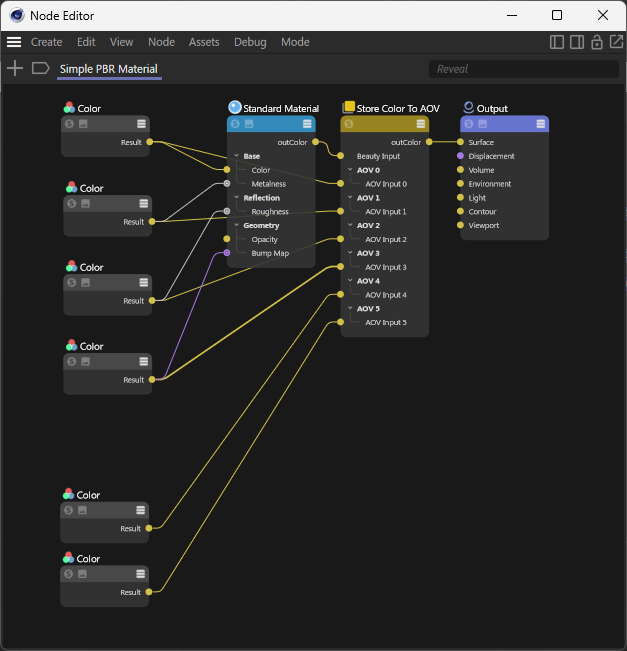
      Below is a minimal example where everything is created from scratch:

      import c4d
      import maxon
      
      def main() -> None:
          graph: maxon.NodesGraphModelRef = maxon.GraphDescription.GetGraph(
              name="Simple PBR Material", nodeSpaceId=maxon.NodeSpaceIdentifiers.RedshiftMaterial)
      
          maxon.GraphDescription.ApplyDescription(graph,
              [
                  {
                      "$type": "Color",
                      "Basic/Name": "Base Color",
                      "Inputs/Color": maxon.Vector(1, 1, 1),
                      "$id": "base_color"
                  },
                  {
                      "$type": "Color",
                      "Basic/Name": "Metallic",
                      "Inputs/Color": maxon.Vector(0.0, 0.0, 0.0),
                      "$id": "metallic_color"
                  },
                  {
                      "$type": "Color",
                      "Basic/Name": "Roughness",
                      "Inputs/Color": maxon.Vector(0.5, 0.5, 0.5),
                      "$id": "roughness_color"
                  },
                  {
                      "$type": "Color",
                      "Basic/Name": "Normal",
                      "Inputs/Color": maxon.Vector(0.5, 0.5, 1),
                      "$id": "normal_color"
                  },
                  {
                      "$type": "Color",
                      "Basic/Name": "AO",
                      "Inputs/Color": maxon.Vector(1, 1, 1),
                      "$id": "ao_color"
                  },
                  {
                      "$type": "Color",
                      "Basic/Name": "Emissive",
                      "Inputs/Color": maxon.Vector(0, 0, 0),
                      "$id": "emissive_color"
                  },
                  {
                  "$type": "Output",
                  "Surface": {
                      "$type": "Store Color To AOV",
      
                      "AOV Input 0": "#base_color",
                      "AOV Name 0": "BaseColor",
      
                      "AOV Input 1": "#metallic_color",
                      "AOV Name 1": "Metallic",
      
                      "AOV Input 2": "#roughness_color",
                      "AOV Name 2": "Roughness",
      
                      "AOV Input 3": "#normal_color",
                      "AOV Name 3": "Normal",
      
                      "AOV Input 4": "#ao_color",
                      "AOV Name 4": "AO",
      
                      "AOV Input 5": "#emissive_color",
                      "AOV Name 5": "Emissive",
      
                      "Beauty Input": {
                          "$type": "Standard Material",
      
                          "Base/Color": "#base_color",
                          "Base/Metalness": "#metallic_color",
                          "Reflection/Roughness": "#roughness_color",
                          "Geometry/Bump Map": "#normal_color",
                          "Geometry/Overall Tint": "#ao_color",
                          "Emission/Color": "#emissive_color",
                      }
                  }
              }
              ]
          )
      
      if __name__ == '__main__':
          main()


      On the left is an existing material, and on the right is the result I’m trying to achieve:
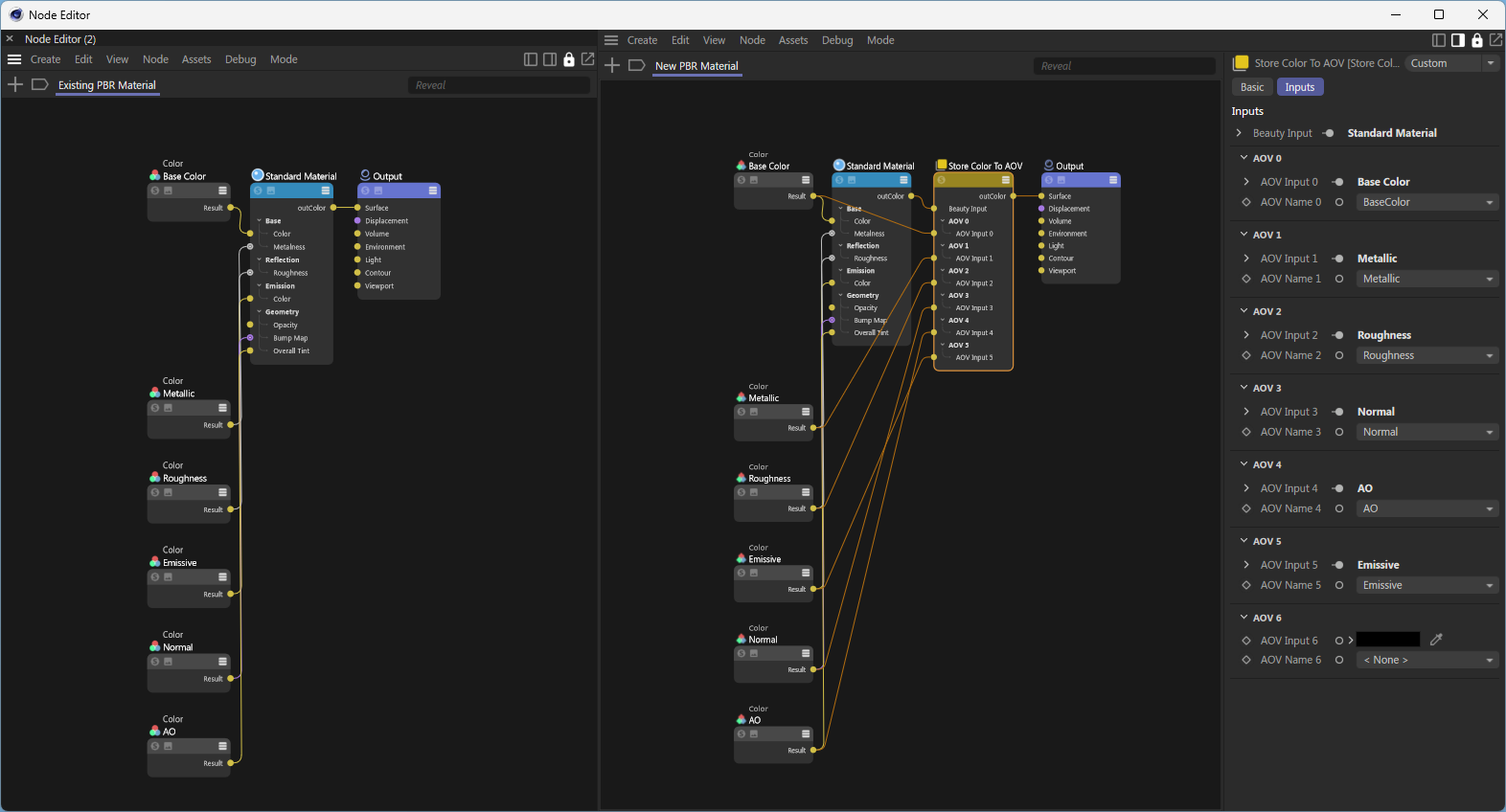
      0af0590b-05bd-4301-8ae2-083a544636ed-image.png
      Cheers,
      Anthony

      posted in Cinema 4D SDK windows python 2025
      I
      itstanthony
    • RE: Link StoreColorToAOV to Existing AOV (Python)

      Thank you very much for pointing this out.
      I knew that Cinema 4D’s UI includes a “Linear Numeric Values” button to switch between color spaces, but I wasn’t aware of how to properly handle this conversion in code until you showed me.

      Your reference to the open_color_io_2025_2.py example is really helpful for better understanding how to manage color spaces in scripts.

      Thanks again for the great insight!

      posted in Cinema 4D SDK
      I
      itstanthony
    • RE: Link StoreColorToAOV to Existing AOV (Python)

      Hey @ferdinand

      Thanks a lot for the clear explanation, it really helped. Your tip about partial descriptions completely fixed the issue.

      Also, the clarification on that confusing error message makes a lot more sense now. It’s great that it’ll be improved in a future Cinema 4D update. I really appreciate your transparency and all the work you’re doing to make this easier.

      Thanks again for your help and for taking the time to explain everything so clearly!

      Cheers,
      Anthony

      posted in Cinema 4D SDK
      I
      itstanthony
    • RE: Link StoreColorToAOV to Existing AOV (Python)

      Thanks @Dunhou for the pointers to redshift_id.py; it really helped me identify the ports properly.
      Also, thanks to @ferdinand for the earlier script and support—that was extremely helpful.

      I can connect standard PBR ports to storeColorToAOV without issues, but EmissionColor and OverallTint don’t connect in my test.

      However, connecting these textures directly to the material works fine.
      Could the order of connections affect their recognition? Or do these ports need to be exposed (made visible/available) before they can be connected via storeColorToAOV?

      Thanks again for your help!

      Here is a minimal example reproducing the issue:

      import c4d
      import maxon
      
      REDSHIFT_NODE_SPACE_ID = "com.redshift3d.redshift4c4d.class.nodespace"
      
      def main() -> None:
          graph: maxon.NodesGraphModelRef = maxon.GraphDescription.GetGraph(
              name="Simple PBR Material", nodeSpaceId=maxon.NodeSpaceIdentifiers.RedshiftMaterial)
      
          maxon.GraphDescription.ApplyDescription(graph,
              {
                  "$type": "Output",
                  "Surface": {
                      "$type": "Store Color To AOV",
      
                      "AOV Input 0": {
                          "$type": "Color",
                          "Inputs/Color": maxon.Vector(1, 1, 1),
                          "$id": "BaseColorNode"
                      },
                      "AOV Name 0": "BaseColor",
      
                      "AOV Input 1": {
                          "$type": "Color",
                          "Inputs/Color": maxon.Vector(0.0, 0.0, 0.0),
                          "$id": "MetallicNode"
                      },
                      "AOV Name 1": "Metallic",
      
                      "AOV Input 2": {
                          "$type": "Color",
                          "Inputs/Color": maxon.Vector(0.5, 0.5, 0.5),
                          "$id": "RoughnessNode"
                      },
                      "AOV Name 2": "Roughness",
      
                      "AOV Input 3": {
                          "$type": "Color",
                          "Inputs/Color": maxon.Vector(0.5, 0.5, 1),
                          "$id": "NormalMapNode"
                      },
                      "AOV Name 3": "Normal",
      
                      "AOV Input 4": {
                          "$type": "Color",
                          "Inputs/Color": maxon.Vector(1, 1, 1),
                          "$id": "AOColorNode"
                      },
                      "AOV Name 4": "AO",
      
                      "AOV Input 5": {
                          "$type": "Color",
                          "Inputs/Color": maxon.Vector(0, 0, 0),
                          "$id": "EmissiveColorNode"
                      },
                      "AOV Name 5": "Emissive",
      
                      "Beauty Input":  {
                          "$type": "Standard Material",
      
                          "Base/Color": "#BaseColorNode",
                          "Base/Metalness": "#MetallicNode",
                          "Reflection/Roughness": "#RoughnessNode",
                          "Geometry/Bump Map": "#NormalMapNode",
                          "Geometry/Overall Tint": "#AOColorNode",
                          "Emission/Color": "#EmissiveColorNode",
                      }
                  }
              }
          )
      
      if __name__ == '__main__':
          main()
      

      The error message:

      Traceback (most recent call last):
        File "D:\C4D Setup\scripts\PBRtoAOV\PBRtoAOV_Final.py", line 73, in <module>
          print("Matériau PBR avec AOV créé avec succès!")
          ^^^^^^
        File "D:\C4D Setup\scripts\PBRtoAOV\PBRtoAOV_Final.py", line 10, in main
          maxon.GraphDescription.ApplyDescription(graph,
        File "C:\Program Files\Maxon Cinema 4D 2025\resource\modules\python\libs\python311\maxon\frameworks\nodes.py", line 548, in ApplyDescription
          res: DataDictionary = GraphDescription._ApplyDescription(
                                ^^^^^^^^^^^^^^^^^^^^^^^^^^^^^^^^^^^
        File "C:\Program Files\Maxon Cinema 4D 2025\resource\modules\python\libs\python311\maxon\decorators.py", line 495, in Auto
          ExecStaticMethod(*args)
      Exception: The input port reference 'Geometry/Overall Tint' has a value which resolves to more than one node. In:
      { <- Error in this scope ->
         $type: Standard Material
         Base/Color: #BaseColorNode
         Base/Metalness: #MetallicNode
         Reflection/Roughness: #RoughnessNode
         Geometry/Bump Map: #NormalMapNode
         Geometry/Overall Tint: #AOColorNode
         Emission/Color: #EmissiveColorNode
      }
      
      # Result with these lines commented:   
      # Geometry/Overall Tint: #AOColorNode
      # Emission/Color: #EmissiveColorNode
      

      83a21098-e6f5-4893-8c34-3ca4ced84c87-image.png

      posted in Cinema 4D SDK
      I
      itstanthony
    • RE: Link StoreColorToAOV to Existing AOV (Python)

      Hi @ferdinand,

      Thanks a lot for the clarification and fair enough about the snippet I posted earlier, I get that it might’ve caused some confusion.

      I really appreciate you taking the time to share both code examples. That gives me a much clearer starting point, and I’ll take the time to go through them and explore the API more carefully.

      Thanks again for your help!

      Cheers,
      Anthony

      posted in Cinema 4D SDK
      I
      itstanthony
    • RE: Link StoreColorToAOV to Existing AOV (Python)

      Hi @DunHou,

      Thanks again for your insights and for sharing your experience with the Redshift module!

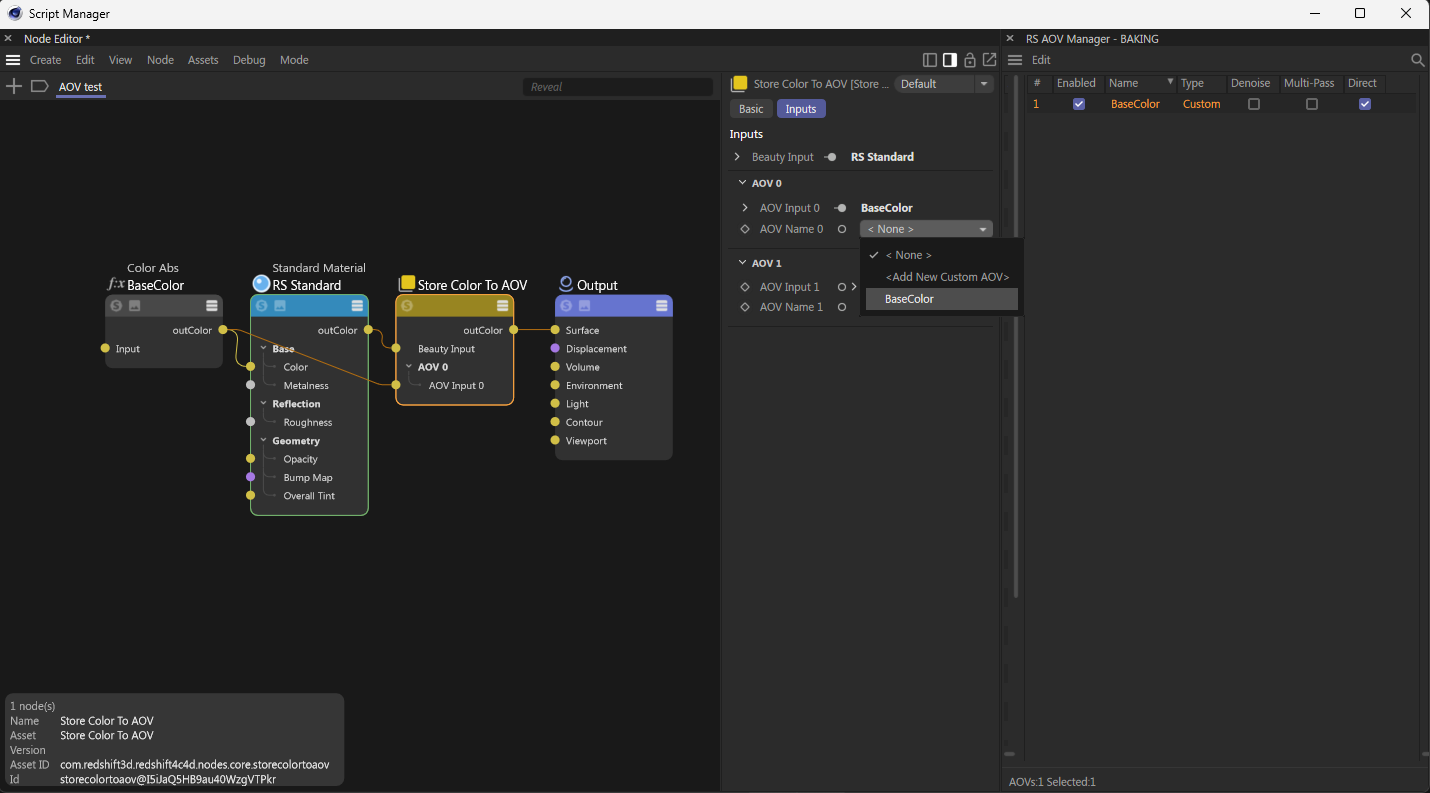
      Just to clarify, I’m trying to understand how to retrieve the list of available AOVs already preconfigured in the AOV Manager, find one named “BaseColor” for example, and set it as the value for the “AOV Name 0” parameter in a Store Color To AOV node.

      I know full script solutions aren’t expected here, but if you could point me to relevant Maxon IDs or documentation to manipulate these parameters, it would be greatly appreciated.

      Thanks again for your help!
      Cheers,
      Anthony

      2025-05-21 08_02_39-Script Manager.png

      posted in Cinema 4D SDK
      I
      itstanthony