• Writing scene nodes

    17
    0 Votes
    17 Posts
    3k Views
    S
    Hi @ferdinand, Firstly, thank you very much for this, which is incredibly helpful. I didn't know you had to turn on the ID switch in the editor prefs but more than that, was how to get the resource editor running as you showed in earlier screen shots. The resource editor manual says that you can right-click in the node editor window and open the resource editor by clicking 'Edit Resource...'. This either does not work at all (if in material mode) or in scene nodes mode opens the resource editor for what looks like the node editor window itself, which isn't very useful. Anyway, there is no menu entry for the resource editor anywhere in the Cinema menu system as far as I can see, or in the node editor menus, so your method of using the commander to open it is the only way to get to it. That is what was confusing me! Now I can open the resource editor and get most of what the screencast shows, although I didn't get the 'Mode' menu so couldn't switch to developer mode. However, adding the 'g_descriptionEditorDeveloperMode=true' flag does work and I can finally see what you show in the screencast - all the menus and switches (Data/UI/String switches) - so that flag is in fact essential ATM with this build of Cinema. Now I can actually get to the resource editor I can look at the manual for it and see where it goes. I am sorry if I've been so dense in getting this working. It would be nice though if the dev team could look at the issues of how to open the resource editor because it doesn't match the documentation and might well confuse others as well as me. So for the moment I can now try adding a simple core node of my own based on the example. If I can, I'll try to write some kind of tutorial for this because it's a tricky process as things stand to even get started. Thanks once again for being so helpful, it is greatly appreciated. Cheers, Steve
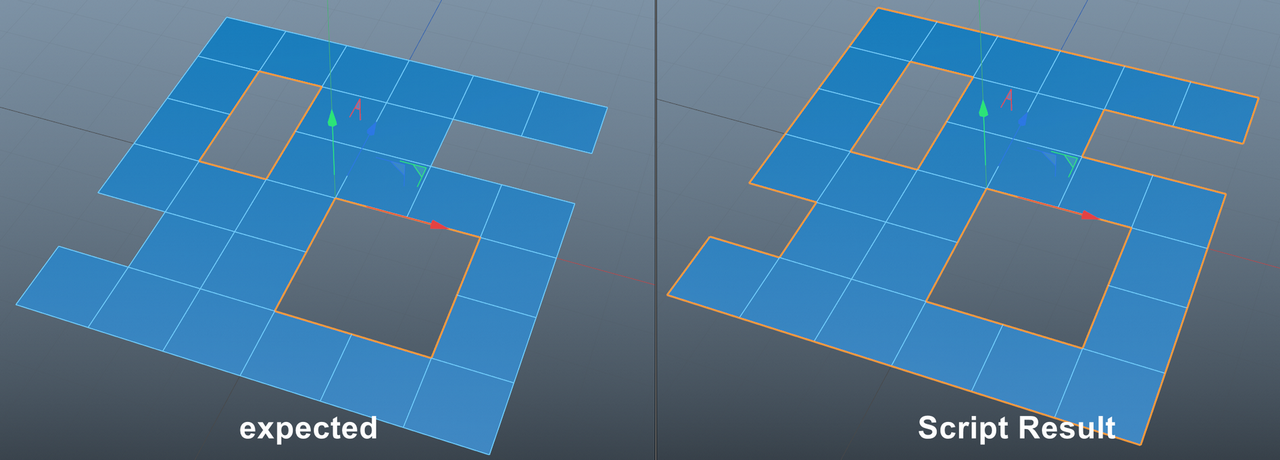
  • Can I select only the edge of an inner hole?

    Moved 2023
    5
    1
    0 Votes
    5 Posts
    1k Views
    ymoonY
    @ferdinand Yes I understood.
  • Tetrahelix modeling and generative rule based automation ?

    2
    0 Votes
    2 Posts
    610 Views
    ferdinandF
    Hello @user, Welcome to the Plugin Café forum and the Cinema 4D development community, it is great to have you with us! Getting Started Before creating your next postings, we would recommend making yourself accustomed with our Forum and Support Guidelines, as they line out details about the Maxon SDK Group support procedures. Of special importance are: Support Procedures: Scope of Support: Lines out the things we will do and what we will not do. Support Procedures: Confidential Data: Most questions should be accompanied by code but code cannot always be shared publicly. This section explains how to share code confidentially with Maxon. Forum Structure and Features: Lines out how the forum works. Structure of a Question: Lines out how to ask a good technical question. It is not mandatory to follow this exactly, but you should follow the idea of keeping things short and mentioning your primary question in a clear manner. About your First Question You posted in the right forum here, as this mostly is an off-topic question. It is also out of scope of support in this extremely broad form. I am also unsure if you actually are looking for a Python/C++ API based solution. Something like this could also be done with Xpresso/Scene Nodes; or in the case of Xpresso an Xpresso/Python combination. But I personally would not really bother with doing that though. If you want to define a formal language, your shape grammar, I would use one of the common grammar definition and parsing tools, e.g. PLY is a popular library to lex custom grammars. You could of course also go big and use something like ANTLR, or go small and just use the standard library. I would however not recommend the last option. When you then implemented parsing an expression in your formal grammar into an AST, actually constructing the geometry for that with Python should be fairly easy. I would invite you to then come back and ask a new question for how to do that (given that you did choose to take this path). The complexities of that last step of course depend also on how complex your grammar is, "tetrahelix" can mean a lot. Cheers, Ferdinand
  • Viewport render always causing c4d stop running

    s22 s26
    6
    0 Votes
    6 Posts
    2k Views
    chuanzhenC
    The problem has been resolved, reinstall the graphics driver and perform a custom clean installation!
  • What happened to AEC export / AE compositing file?

    3
    0 Votes
    3 Posts
    1k Views
    i_mazlovI
    Hi @jochemdk, Thanks for reaching out to us. The described issue likely originates from the confirmed bug report. You can check it yourself in the Bugslife: ITEM#431430 [rsCam] RS Camera doesn't work with Cineware and Compositing Project File The following list includes all illegal characters that are being replaced: /:*?"<>|!$%&()=`{}[]+-,;.#'~ Let me know, if you have any further questions! Cheers, Ilia
  • Creating custom dynamic 'hot corners'?

    4
    0 Votes
    4 Posts
    1k Views
    ferdinandF
    Hey @Hexbob6, I assume because the original Redshift Shader Graph editor uses an xpresso-like editor, that could be the reason for me being unable to toggle it in a similar way to the other managers? Strange that the Redshift IPR allows me to toggle, however, although it isn't xpresso-like so perhaps that's the reason? Yes, the legacy Redshift material graph is using GraphView, a.k.a., Xpresso. And which dialogs support this folding feature and which not is primarily guided by feasibility and efficiency reasons. There never was an Open/Close Xpresso command in Cinema 4D as that would have been an ambiguous command since there can be dozens of Xpresso graphs in a scene. It is not an unsolvable problem, the new Node Editor has the same problem and it does solve it. But solving something like this would be more costly than throwing the four or five lines of code in there which realize the folding behavior in other dialogs. The Thinking Particles dialog in the Xpresso window on the other hand, does not have any such restrictions, at least I see none, and simply has not been adapted for efficiency reasons, as there are A LOT of dialogs in Cinema 4D. In any case, if you think that a feature X is missing in of our products, I would invite you to Submit Feedback in the Share your Ideas section of our end user support. So, to confirm, you're saying there isn't a work around for such editors if they haven't been retrofitted, either via python or otherwise? Yes, a dialog shipped with Cinema 4D which is wrapped by a command which does not implement this behavior cannot be retrofitted by third parties. The reason for this is that the dialogs that realize things such as Node Editor, Object Manager, Xpresso Manager, etc. are not exposed in the public API. We only expose their associated commands. This is an intentional decision. As a bonus question, do you know of a way to toggle tabbed groups of managers with an icon (and not via the folding behaviour accessed by ctrl+clicking the hamburger menu). For example, pressing the red icon could close/hide the whole of the purple area despite it consisting of 2 tabbed groups? Hm, I do not think so. There is AFAIK not a built-in feature like that, but the appropriate place to ask this would be end user support. Wrapping two commands into one (with either a full blown plugin or just a script) is not a problem. But dialog folding is undefined for tabbed dialogs as you show it in your screenshot. You could also file a feature request here in our support center. What you can however do, is put multiple dialogs into a layout, and write yourself either a script or plugin which cycles through them, fold/unfolding them one by one. Not exactly the same, but similar For an example, see the end of my posting. Cheers, Ferdinand Result: [image: 1683974899734-toggle_blah.gif] Code: """Cycles the folding state of dialogs associated with multiple commands. Must be run as a Script Manager script. Could also be realized as a CommandData plugin for a fancier solution. """ from typing import Optional import c4d # ID definitions for the timeline and node editor commands. Technically not necessary, we could also # use the the integers directly, but makes things nicer to read. c4d.CID_TIMELINE_MANAGER: int = 465001541 c4d.CID_NODEEDITOR_MANAGER: int = 465002211 # Define the folding group we want to create, i.e., the script will cycle through these command IDs, # folding and unfolding dialogs associated with the command, each time it is pressed. PID_FOLDING_GROUP: tuple[int] = (c4d.CID_TIMELINE_MANAGER, c4d.CID_NODEEDITOR_MANAGER) # If #True, a state will be added at the end of the cycle, showing all dialogs. SHOW_ALL_AT_END: bool = False # If #True, a state will be added at the end of the cycle, hiding all dialogs. HIDE_ALL_AT_END: bool = True def GetNextCommandId() -> int | bool: """Determines the command ID of the next item in #PID_TOGGLE_GROUP. """ # Get the check state of all commands in PID_TOGGLE_GROUP. states: list[bool] = [c4d.IsCommandChecked(pid) for pid in PID_FOLDING_GROUP] if not any(states): return PID_FOLDING_GROUP[0] i: int = states.index(True) # Everything is open if all(states): return False if HIDE_ALL_AT_END else 0 # The cycle has reached the end elif i == len(PID_FOLDING_GROUP) - 1: if SHOW_ALL_AT_END: return True elif HIDE_ALL_AT_END: return False else: return PID_FOLDING_GROUP[0] # Pick the next item return PID_FOLDING_GROUP[i+1] def main() -> None: """Switches the group #PID_TOGGLE_GROUP to the next state. """ cid: int | bool = GetNextCommandId() for item in PID_FOLDING_GROUP: # Show the item when it is hidden and the to be shown item or all items should be shown. if not c4d.IsCommandChecked(item) and (cid == item or cid is True): c4d.CallCommand(item) # Hide the item when it is shown and not the to be shown item or all items should be hidden. elif c4d.IsCommandChecked(item) and (cid != item or cid is False): c4d.CallCommand(item) if __name__ == '__main__': main()

  • Command line Rendering Takes

    Moved python
    2
    0 Votes
    2 Posts
    585 Views
    ferdinandF
    Hello @emlcpfx, Welcome to the Plugin Café forum and the Cinema 4D development community, it is great to have you with us! Getting Started Before creating your next postings, we would recommend making yourself accustomed with our Forum and Support Guidelines, as they line out details about the Maxon SDK Group support procedures. Of special importance are: Support Procedures: Scope of Support: Lines out the things we will do and what we will not do. Support Procedures: Confidential Data: Most questions should be accompanied by code but code cannot always be shared publicly. This section explains how to share code confidentially with Maxon. Forum Structure and Features: Lines out how the forum works. Structure of a Question: Lines out how to ask a good technical question. It is not mandatory to follow this exactly, but you follow the idea of keeping things short and mentioning your primary question in a clear manner. About your First Question Since your question is not related to any of the Cinema 4D APIs, it is unfortunately out of scope of support for Plugin Café. I therefore have moved your question to our off-topic forum. The SDK group of Maxon which runs this forum cannot provide an answer in this case, although you might receive a community answer. To receive an answer from Maxon, you should reach out to our support team via a Support Request. When you want to solve the problem programmatically, you are welcome to open a new topic here. This would then however not happen via the commandline app but either the c4dpy or Cinema 4D app. Note that there is no direct solution in our APIs either, likely because Cinema 4D itself does not offer that feature out of the the box. But it should be solvable with ~300 lines of code script. One approach could be to save (temporary) variants of a file for each take in it and launch them then with the render queue as sperate renders. Please also note that we cannot write your script(s) for you, but we are more than happy to help you along the way. So Cheers, Ferdinand
  • Senior Maya Developer job opportunity at Maxon

    jobs
    1
    1 Votes
    1 Posts
    616 Views
    No one has replied
  • USDA support for Redshift Materials?

    3
    0 Votes
    3 Posts
    874 Views
    jenandesignJ
    Thanks for the response @i_mazlov ! That's what I figured, based on what the RS team told me. I am definitely wondering about RS native materials
  • updated forum search

    5
    0 Votes
    5 Posts
    859 Views
    ferdinandF
    Hey @datamilch, @datamilch said in updated forum search: Actually I was not able to respond in the Announcement forum. I just looked again and there is no reply button for me. Good that you point that out, that was not intentional. The recent forum update might have changed the privileges. I have again given registered users the ability to reply to topics in this forum. Creating new topics in this forum is still restricted to moderators. Regarding the search mode, I fully understand the different behaviors. Just had the urge to give this feedback, so i can move on. I really appreciate your 'hacky' solution with the dark-mode, thank you! Yeah, I understand and truly appreciate that. I was just trying to explain that what might seem as 'absolutely correct' from one user's perspective, might be the opposite from another. just a thought for consistency: since the condensed feature seems to be skin related, couldn't there be 4 skins - light condensed and uncondensed and dark condensed and uncondensed ... but since i don't know, how you did it, maybe this might become to cluttered in your backend. NodeBB has skins and themes (two different things). The theme our forum is based on, which is effectively a NodeBB plugin, has its own setting which is also called skin (because everything else would be too easy, right ). That skin has nothing to do with the NodeBB notion of a skin and its elements cannot be extended (without messing with the source) as far as I know. That custom skin is what users see as default and dark skin. The easiest solution would be to inject some custom JS which listens for search result page events and then injects one or multiple toggle buttons and their associated logic into that page. The result will be then that one can toggle the folded state of all results on a page with one click (more or less what is currently already possible in the search options). But one would have to do this single click on each result page. Anything which is more persistent than that is too much work. Cheers, Ferdinand
  • 5 Votes
    3 Posts
    1k Views
    DunhouD
    @JACK0319 Great work ! I have been using ualib for some plugins and worked very well for whatever a beginner or experienced programmer , It's definitely worth trying it [image: 1682952587810-0cf6ade8-8bae-4cd8-96f0-ff3f143c1306-image.png]
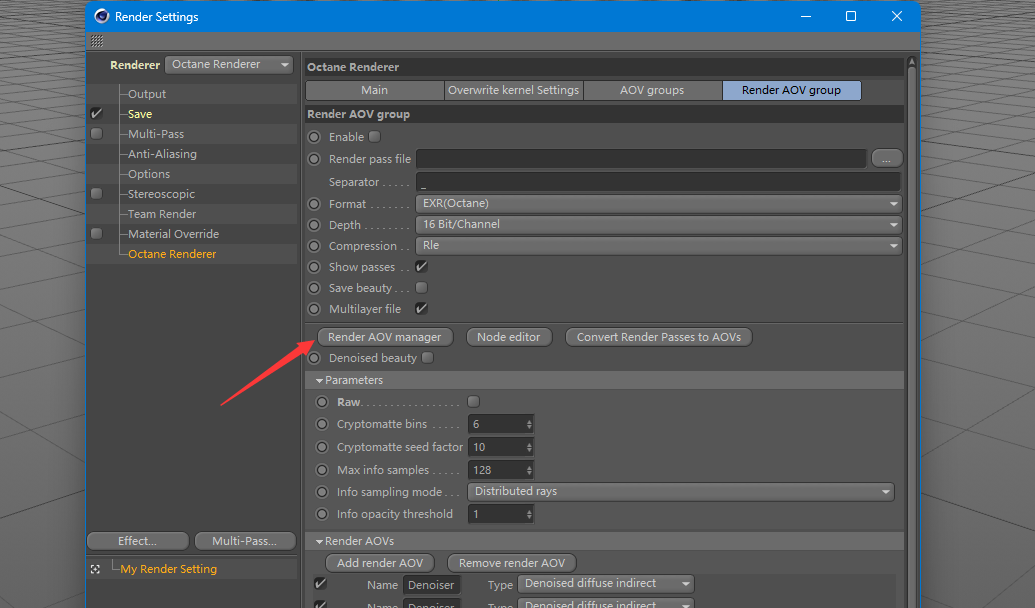
  • How to get octane aov manager in python

    Moved python sdk
    7
    2
    0 Votes
    7 Posts
    2k Views
    ferdinandF
    Hello @render_exe, Thank you for reaching out to us. Unfortunately, as already pointed out by @Dunhou, questions about third party APIs are out of scope of support: Forum Guidelines: Scope of Support We cannot provide support on learning either C++, Python or one of its popular third party libraries. Thank you @Dunhou for providing such a nice community answer. Since this topic is not about the Cinema 4D SDK, I have moved it to General Talk. Cheers, Ferdinand
  • 0 Votes
    3 Posts
    878 Views
    G
    Entschuldigung. Vielen Dank.
  • Generate Item List of Objects used in the Object manager.

    Moved sdk c++ python
    1
    0 Votes
    1 Posts
    432 Views
    No one has replied
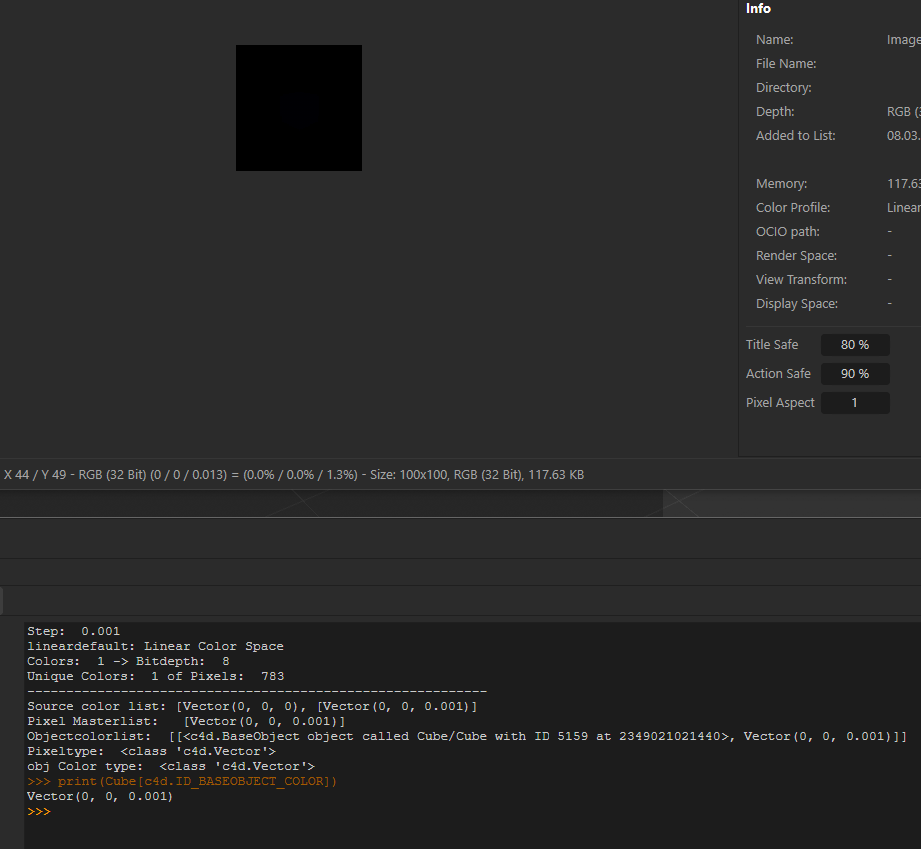
  • Color accuracy 32 bit - how to archive - things to look out for ...

    7
    1
    0 Votes
    7 Posts
    1k Views
    M
    Thanks, @ferdinand Yes seems intended but could be troublesome if you use mograph / redshift object color to drive something ? C4D Version : 2023.1.2 A solution to guide the user could be to disable the object color when set to "Render Instance" , but from a UX standpoint I am not a fan of taking away control from the user. thanks for taking it to CS kind regards mogh
  • Can we add a folding option for the code block when searching

    5
    0 Votes
    5 Posts
    956 Views
    M
    Hi I can confirm that from nodebb side there is still no way to do it. Rest assured that we are also annoyed by that so as soon as this is available we will enable it Cheers, Maxime.
  • Job opportunity for Cinema 4D developer at Conductor

    python jobs
    1
    1 Votes
    1 Posts
    532 Views
    No one has replied
  • 0 Votes
    2 Posts
    723 Views
    ferdinandF
    Hello @conductor, thank you for reaching out to us. You can certainly post a job posting here, but it should happen in the General Talk forum. It can contain everything which is not directly related to one of our APIs but loosely related to CGI or development. The same applies to this thread of yours, I have moved it to 'General Talk' . Cheers, Ferdinand
  • This topic is deleted!

    1
    1
    0 Votes
    1 Posts
    9 Views
    No one has replied
  • Subprocess can't detect system installed utilities

    r23 python
    3
    0 Votes
    3 Posts
    824 Views
    mikeudinM
    Thank you @ferdinand !