@chuanzhen
Well, could it perhaps stem from rounding errors involving floating-point values?
 Offline
Posts
-
RE: Using SetWeightMap() multiple times can lead to inexplicable changes in weight values
-
RE: Custom node-locked licensing: Bypassing checks for Team Renderer, Clients, Server safely?
@ferdinand

Yes, thanks, that indirect answer is enough for me. I was mainly wondering whether a check performed on both the client and the server is robust enough, or if it could be bypassed using Python, for instance. I’m well aware that it can be cracked somehow. I’m also already usingExportLicenses()for my node-locking system in combination.Thanks a lot for your help.
-
RE: Programmatically created Redshift Lights in an Object Plugin converts lights into Null-Objekts without an function after making Objekt-Plugin editable
@ferdinand
crazy, this helps me a lot Ferdinand. Thank you so much . I didn`t now that.
Thanks for this function example.Edit:
It works....
How is a dumb plugin developer like me supposed to know that you have to clear those two bits right there of all places...
But that's great, thanks. It helps me a huge amount for the future.Sincerely T.B.
-
Custom node-locked licensing: Bypassing checks for Team Renderer, Clients, Server safely?
Hi,
I am using a custom node-locked licensing system (2 Nodes) for my Cinema 4D plugin. Since Team Render clients running on other machines shouldn't consume a license activation, I want to bypass the license check on startup for them.
My plan is to check
c4d.isClient()or rather,c4d.GeGetVersionType()right before the licensing routine and skip it if it returns true.Example:
client = c4d.GeGetVersionType()
if client == c4d.VERSIONTYPE_TEAMRENDER_CLIENT or client == c4d.VERSIONTYPE_TEAMRENDER_SERVER:
        print("yes free rendering for all")
        return True
My question: Is
c4d.isClient()orc4d.GeGeVersionType()reliable and secure against spoofing, meaning a user couldn't just fake this flag on a normal Cinema 4D master instance to bypass the node-lock? Or is there a better way to handle this for Team Renderer, Clients and Server?Thanks!
-
RE: Programmatically created Redshift Lights in an Object Plugin converts lights into Null-Objekts without an function after making Objekt-Plugin editable
@ferdinand
I think we were talking at cross-purposes there. The problem was actually the light conversion using "Make Editable" on the plugin itself, not the Light Importer, which was the workaround I had already implemented. The problem where the lights are converted into null objects when making the plugin editable still persists.
But you did mention the diff tool in an earlier reply and managed to get it working once using a TempDoc. So, I won't be able to avoid giving it another thorough test, but the release is coming up first.More on that in the
. -
RE: Programmatically created Redshift Lights in an Object Plugin converts lights into Null-Objekts without an function after making Objekt-Plugin editable
@ferdinand
Ok , I will give it another try tomorrow.
I will print this out again using this diff tool and compare it.
I understand your point of view and your perseverance.
. But quite honestly, Ferdinand. That workaround might have to be removed again with Maxon's next fix, which in turn might necessitate a further update to my plugin, and so on. The plugin's strength lies in its extensibility. Therefore, my focus regarding the plugin is on extensions, rather than on removing workarounds or adding new features.Given the highly complex document structure and the various types of lights involved, a particularly complex method has to be written for this. Furthermore, as I mentioned earlier, some lights have other lights as child objects, and those in turn have their own, with the specific setup varying from building to building. And every light of the same type might even have slightly different settings as well. This isn't really how I wanted to handle it.
But I will give it a try. I know, complaining doesn't help. So I'll test it again with two lights, just like you did. One light from the document and the other generated programmatically. Then I'll compare the two again.
However, this will be the last feature before the release, as it simply needs to be ready for delivery.
The lighting feature is a bit of a thorn in my side anyway, since it’s very resource-intensive—but you know what users are like (myself included!). They want the all-singing, all-dancing, do-it-all solution.All things considered, the plugin has turned out quite well and is on the verge of release. My actual implemented workaround for importing the lights into the scene works, too, and requires just a single click from the user. Since the lights for each level are contained within a null object, this light importer represents the most pragmatic approach for me, involving the least amount of effort.
So, if I don't manage to fix the "bug" according to your requirements now, I’m going to release it anyway. Unfortunately, I can't live on thin air.

Respectfully,
T.B.Person: I love AI, I want to do everything with AI...
Developer: So you want to replace your brain with a language model? bye Bye! There's the door
-
RE: Programmatically created Redshift Lights in an Object Plugin converts lights into Null-Objekts without an function after making Objekt-Plugin editable
Okay, great that you really dug into this. That could well have something to do with it.
However, if you look at my latest test plugin—the C4D scene—the "Illumination" checkbox on the Redshift light is enabled, yet when you select "Make Editable," the light still turns into just a Null Object. So, regardless of whether the illumination is on or not..
But as I mentioned earlier this only happens if the light originates from a temporary document in the code. Or rather, when the scene with the light is loaded into a temp_doc.
- e.g.
LoadDocument()orMergeDocument()
That is why simply checking the "Illumination" box does not work.
Cheers
- e.g.
-
RE: Programmatically created Redshift Lights in an Object Plugin converts lights into Null-Objekts without an function after making Objekt-Plugin editable
Yeah, thanks—there’s no rush; I have until the end of July before the plugin is released.
But as I mentioned, manually swapping the lights doesn't work; the problem persists even if the scene is created in Cinema 4D 2026.3.1. The only way it would work is programmatically as you mentioned above—via code in the plugin that iterates through all the lights in the loaded scene and swaps the data. I’ll give it a try; if load times and performance suffer, or if the effort isn't worth it, I’ll stick with the "Lights Import" button method for now.
Summary of the Core Issue
So, when scenes are imported via
LoadDocumentorMergeDocumentin the code and parts returned within the GVO, they are correctly converted into polygon objects (after "Make Editable")—but Redshift lights are not converted into Redshift lights; instead, they are converted into Null objects. Numerous tests have confirmed this, regardless of whether the scene was created in the latest version of C4D or an older one, such as 2023.
 ️A programmatic replacement of the lights is necessary after the virtual document has loaded.
Best Regards
T.B
Edit:
I’ve implemented a light replacer in the example plugin again.
It searchesself.temp_docfor all Redshift lights, iterates through the list, creates a completely new light programmatically, sets the key values to match the old light, applies theGetDataInstanceto the light in the temp doc, and sets the global matrix.
️As discussed, this approach doesn't work either; the lights are still being converted into Null objects.
That means I would have to replace the lights entirely with programmatically generated ones, which would require replicating the entire light and temp_doc hierarchy—including cases where lights contain other lights or objects. The effort involved simply isn't worth the benefit. Sorry.In this case, it would be better to look for the cause of the problem.
-
RE: Programmatically created Redshift Lights in an Object Plugin converts lights into Null-Objekts without an function after making Objekt-Plugin editable
@ferdinand
thank you for your time Ferdinand. We all really appreciate your work. Without you, there would be only half as many plugins for Cinema 4D.Oh man, I'm sorry about the corrupted scene.
Did you programmatically modify this scene? Because your plugin only seems to load it.
The Road to a Corrupted File
- Since I prefer modeling in R23, I did my modeling work there and saved the scene in R23.
- Then I opened it in the latest version, 2026.3.1.
- It notified me that it needed to modify the Cinema 4D scene and that it might no longer work with older versions of Cinema 4D.
- Then, I just saved over it normally using 2026.3.1. That version runs on the MRD license.
- I just wanted to make sure it was saved using the latest version.
️Apparently, it didn't correctly convert the scene to the new Redshift core. I'll compare the two versions later using mxutils. For now, everything looks normal in the new scene.
I didn't modify the scene via code.
Otherwise, the only other explanation I can think of for the corrupted file structure is the ZIP compression or a temporary license problem, between R23 and the MRD License. R23 runs on a Commercial License, Redshift runs on MRD.New scene:
However, I’ve now created and saved a completely new scene—exclusively in 2026.3.1—and uploaded it as a new plugin. The file cannot be corrupt at this stage. Using the mxutils methods reveals no issues.Result:
However, the result is the same. Something seems to struggle with the conversion process during the "Make Editable" when those lights originate from a loaded virtual document.
So, if I create the area light directly via code as you did and then press "C", then it works, it appears in the scene as a standard Redshift Area Light. But you simply can't generate everything via code, so I need the ability to take things from pre-made scenes.Important:
I’ve gone a step further and implemented a button that simply extracts the light from the virtual document—or rather, the container—and inserts it into the scene. Oddly enough, the light is inserted correctly into the active document this way.
The user could bring the lights into the scene before pressing "C"—that would be a workaround.
However, the problem with "Make Editable" still persists.I wish you a relaxing weekend. As a Maxon SDK specialist, your head must be spinning quite often.
Cheers -
RE: Programmatically created Redshift Lights in an Object Plugin converts lights into Null-Objekts without an function after making Objekt-Plugin editable
Okay, thank you Ferdinand for your reply.
Okay, that's strange—it works in your video.I don't think the issue lies with my code; it simply loads a Cinema 4D scene in which the objects are already prepared.
But here is the unprotected plugin.
As previously mentioned, this is just a simple, simplified plugin to demonstrate that the problem behaves exactly as described above when using "Make Editable."
Download unprotected pluginand the code if this helps out:
from typing import Optional import c4d from c4d import plugins, bitmaps, BaseObject import os PLUGIN_ID = 1000200 def load_house(): house_path = os.path.join(path, "res", "models", "build_1.c4d") doc = None if os.path.exists(house_path): doc = c4d.documents.LoadDocument(house_path, c4d.SCENEFILTER_OBJECTS | c4d.SCENEFILTER_MATERIALS) return doc class RedshiftLightsTest(plugins.ObjectData): def __init__(self): self.SetOptimizeCache(True) self._temp_doc = load_house() def Init(self, op, isCloneInit): return True def GetVirtualObjects(self, op: BaseObject, hh: object) -> Optional[BaseObject]: cdirty = False for child in op.GetChildren(): cdirty = child.CheckCache(hh) or child.IsDirty(c4d.DIRTYFLAGS_DATA) if cdirty: break dirty = op.CheckCache(hh) or op.IsDirty(c4d.DIRTYFLAGS_DATA | c4d.DIRTYFLAGS_ALL) or cdirty if not dirty: return op.GetCache(hh) if self._temp_doc: container = c4d.BaseObject(c4d.Onull) base: c4d.BaseObject = self._temp_doc.GetFirstObject().GetDown().GetClone() base.InsertUnder(container) return container else: return None def GetDDescription(self, op, description, flags): if not description.LoadDescription(op.GetType()): return False single_id = description.GetSingleDescID() return False, (flags | c4d.DESCFLAGS_DESC_LOADED) def GetDEnabling(self, op, did, t_data, flags, itemdesc): return True if __name__ == "__main__": path, file = os.path.split(__file__) file = "icon.tif" new_path = os.path.join(path, "res", file) bitmap = bitmaps.BaseBitmap() bitmap.InitWith(new_path) plugins.RegisterObjectPlugin(id=PLUGIN_ID, str="redshift_lights_test", g=RedshiftLightsTest, description="redshift_lights_test", icon=bitmap, info=c4d.OBJECT_GENERATOR) -
Programmatically created Redshift Lights in an Object Plugin converts lights into Null-Objekts without an function after making Objekt-Plugin editable
Sorry first, I am not sure if this is the right place to post this. The Redshift forum was apparently not the right place.

I don't know if this behavior is intentional or unavoidable, but there is a problem with Redshift lights in my opinion.
Situation:
When you create a Redshift light and press 'C', it converts it into a standard Cinema 4D light—or, if generated programmatically, into a useless Null object.
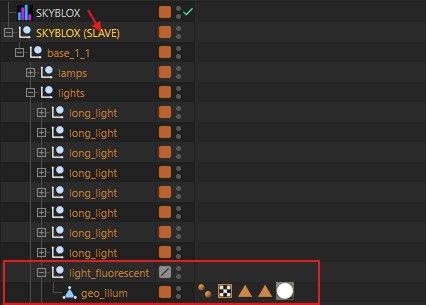
It is programmatically impossible to generate a light (e.g., within an object plugin). When the object plugin is made "Editable"—for instance, to get the geometry—all Redshift lights are converted into Null objects and lose their functionality. Unlike the standard behavior, they aren't even converted into Cinema 4D lights.Steps:
- The plugin loads a virtual scene containing prepared scene elements and lights.
- It returns in a container all the needed elements
- When the plugin is made "Editable" to recieve the geometry, all Redshift lights are converted into Null objects.
️ result: Light functionality is lost.
Visual Examples:
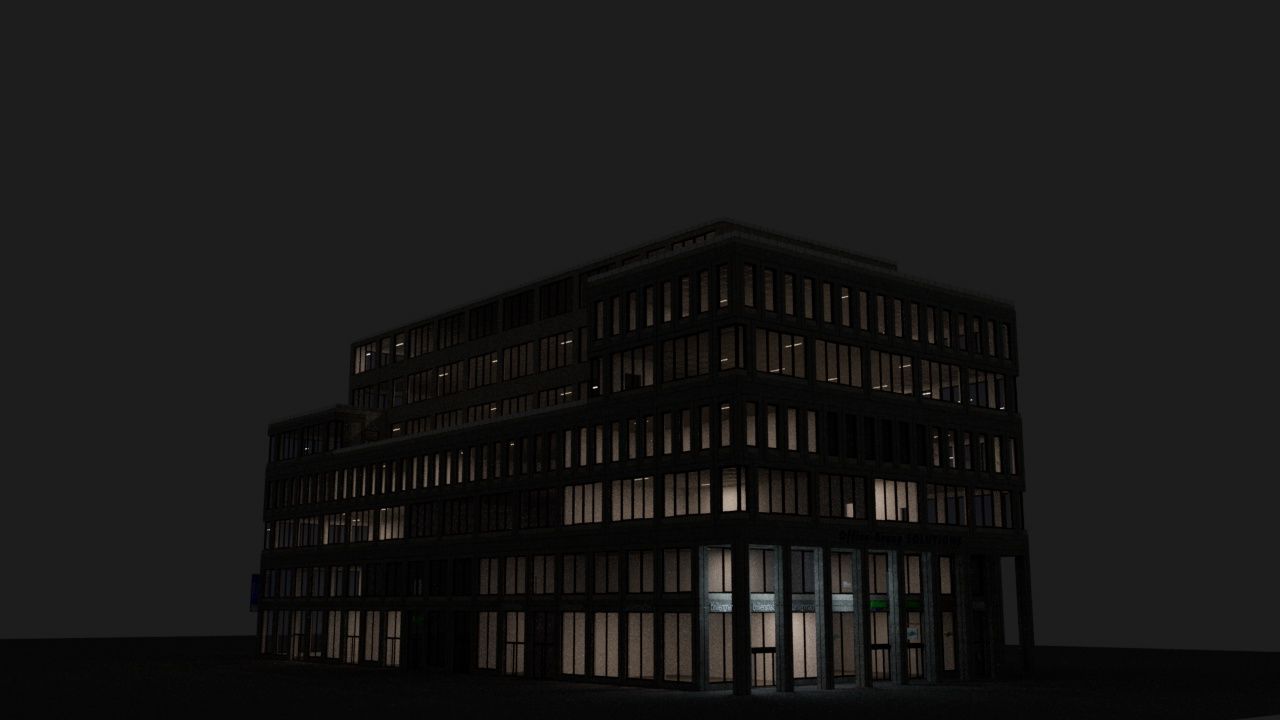
Plugin creates a building for night view:-
as long as the plugin is running lights are working
-
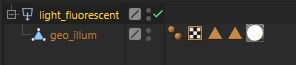
a light in code looks like this in a virtual temp_doc:
-
after converting the plugin into geometry (c to make it editable) it converts the lights into this:
Plugin Example:
Here is a trivial plugin example which basically loads a scene and returns an element with a light.
The scene structure of the document looks like that. The plugin returns the base element
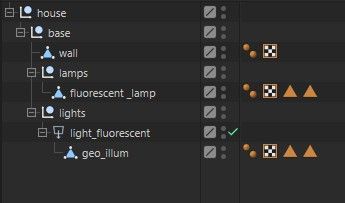
After making the plugin editabel the light_flurescent is converted into a null object, and not even a Cinema 4D light remains.
Ideally, of course, the Redshift light would be fully preserved. That makes sense if you want to render with Redshift.It uses a temporary Plugin ID
Download PluginI don't need to explain the code in detail here; an element is simply returned in the GetVirtualObjects method:
    def GetVirtualObjects(self, op: BaseObject, hh: object) -> Optional[BaseObject]:

        cdirty = False
        for child in op.GetChildren():

            cdirty = child.CheckCache(hh) or child.IsDirty(c4d.DIRTYFLAGS_DATA)
            if cdirty:

                break

        dirty = op.CheckCache(hh) or op.IsDirty(c4d.DIRTYFLAGS_DATA | c4d.DIRTYFLAGS_ALL) or cdirty
        if not dirty:
            return op.GetCache(hh)


        if self._temp_doc:
            container = c4d.BaseObject(c4d.Onull)

            base: c4d.BaseObject = self._temp_doc.GetFirstObject().GetDown().GetClone()
            base.InsertUnder(container)

            return container
        else:
            return None
Cheers
T.B. -
RE: Thread safety when handling CTrack in TagData.Message() on button click
@ferdinand
Hi Ferdinand,there is a misunderstanding regarding the workflow: You created the internal issue ITEM#650353 for me, but I have no access to that ticket as MRD. I can only see and edit/reply to my own Bug Reports in the 'Bugs Live' tool (like my original report #650297).
Since you requested the plugin files, how do you want me to provide them to you? Since I cannot access your internal ticket #650353, please let me know where exactly I should upload the files so you can actually retrieve them. I want to make sure the data is delivered correctly.
-
RE: Thread safety when handling CTrack in TagData.Message() on button click
@ferdinand
ok Ferdinand, I did some stress-tests with my plugin, loaded the sounds, created the patterns, freezed the sounds, all during timeline was running, but I was unable to reproduce the crash.
Maybe it was the small difference between c4d.threading.GeIsMainThread() and c4d.threading.GeIsMainThreadAndNoDrawThread() and some small fixes. Even so, working with audio in Cinema 4D still doesn't feel entirely comfortable .
.That’s why I submitted a bug report regarding the old crash. However, I didn't do it via BugsLife this time, but rather through the standard Help/Report A Bug option. I hope that’s the right way to do it. I described the crash and attached the bug report ZIP file.
-
RE: Thread safety when handling CTrack in TagData.Message() on button click
@ferdinand
Hi Ferdinand,thanks for the technical clarification.
I am performing a stress test now. If it crashes again, I will submit the official report as requested or would the old one work too?
Regarding the "Reproduction" steps in your guide: If I submit the report without the plugin, I obviously cannot provide steps that you can execute in your environment. To keep the report actionable for you while excluding the plugin files, should I describe the steps purely based on the sequence of internal C4D API operations that trigger the crash?
In short: How should the "Reproduction" section be formulated to be useful for your debugging process if the plugin itself is not included?
Cheers,
T.B -
RE: Thread safety when handling CTrack in TagData.Message() on button click
Ok I try to force a crash with the simplified plugin, when I have time

There is a lot to do here in the plugin stack right now.
I'll try to look into it tomorrow or the day after.And back to the other topic...
I let AI look into the crash log (because this is beyound my knowledge) again and it found the root cause. The crash was indeed happening during a very heavy scene setup with high MoGraph load and active Redshift Live Viewer rendering.While my UI synchronization from the GeDialog to the Attribute Manager parameters and vice versa runs perfectly safe on the main thread (hope so
:-)) , the crash was triggered inside MSG_DESCRIPTION_COMMAND when clicking the "Convert" button. In that moment, my code overwrites the temporary audio file, temporarily flushes the track path with an empty string "" to force C4D to clear its memory buffer, and reloads the track.Without protection it somehow collided with Redshift or MoGraph trying to read the document's audio properties during a redraw cycle, resulting in the access violation inside the audio driver callback (wdmaud.drv).
edit (Ferdinand).
My Solution:
I now wrap the conversion trigger using c4d.SpecialEventAdd() in the GeDialog (Step Sequencer) from the dialog to cleanly pass it into the main event pipeline.And Inside the message handler, I safely guard the execution with c4d.threading.GeIsMainThreadAndNoDraw().
Additionally, the convert buttons are now disabled while the animation is actively running.
With these safeguards in place, the collision is hopfully entirely bypassed, and Cinema 4D hopfully remains stable.I might reconsider sending the plugin to sdk..... I’m just a bit afraid of the scathing criticism I’d get :-).
But for now, I’ll keep testing it a bit longer— If I run into another crash, I’ll get back to you.Thanks a lot
T.B -
RE: Thread safety when handling CTrack in TagData.Message() on button click
@ferdinand
First of all, thank you very much for your efforts; where you get such perseverance from is truly remarkable.- Windows 11 Pro 26200.8524
- Cinema 4D 2026.2
- Hardware
- CPU: AMD Ryzen 9 5950X 16-Core
- RAM: 64 GB
- GPU: RTX 3060 (Studio Driver)
I think you misunderstood me. I’m not trying to report a bug here, since the issue isn't with Cinema 4D itself. Rather, I wanted to know if I’m handling the threading correctly here within the Main Thread, because I’ve been experiencing some freezing when I clicked the "Convert" button during playback.
 ️By the way in the simple plugin example, you can click the Convert Button multiple times. It just toggles back and forth between the two sounds.
 I experienced these freezes with the paid plugin that is already on the market. In principle, the convert function is the same, though it’s a bit more complex—calculating and loading audio.
I have the bug report, too, in case that’s of interest. Though I don't think I checked forc4d.threading.GeIsMainThreadAndNoDrawin that instance. The AI has already analyzed the bug report and specifically pointed out the threading issue, so I’m asking here for the best way to handle the threading or whether I’m doing something wrong.I’d rather not share the large plugin here, as it’s a commercial product.
The plugin is way more complex of course. I try not to build puny plugins
 . Currently it consists of that tag and a
 GeDialog—the step sequencer—that can be launched from the tag.
The step sequencer also has a "Convert" button that triggers the same function within the plugin'sNodeData. It works fine.
In the commercial version, I disabled both Convert Buttons the one in the StepSequencer and the one in the tag while the animation is running, just to be on the safe side.
Since you don't see any major issues with the example plugin's
Convertmethod, I don't think the problem lies with the tag's Convert button, but rather with the Step Sequencer's Convert button.
Can I trigger the
Convertmethod from within theGeDialogas well?
In other words:- when a click occurs in the
GeDialog - I send a
c4d.SpecialEventAdd() - catch it in the
GeDialog'sCoreMessage(), - and trigger the tag's convert function.
That should put me in the Main Thread, right?
- Or can I fire it directly from the GeDialog's Command() method?
You can see it in the figure down below.
Theoretically, could I use any of the three methods, or is one better? Or am I not allowed to do that at all?
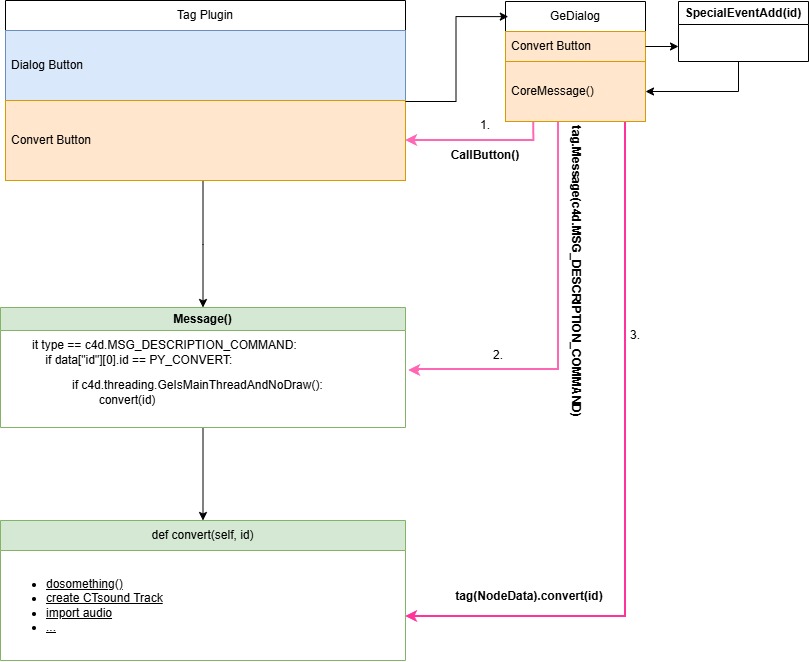
 Anyone who works makes mistakes.
Cheers
T.B -
RE: Thread safety when handling CTrack in TagData.Message() on button click
@ferdinand
WTF is wrong with me? It should work now. -
RE: Thread safety when handling CTrack in TagData.Message() on button click
Oh sorry, I missed that.
Is Google Drive ok?(which I assume is what you mean with 'running (an) animation').
By "running during animation," I meant clicking the button while the animation is playing.
-
Thread safety when handling CTrack in TagData.Message() on button click
Hi,
I have a small plugin example of a Tag Plugin and I want to know if I handle the threading correctly, because in my production version , I encountered some freezes, espacially during a running animation or when Redhift Render View was running.Download Plugin:
test_tag_plugin.zipQuick explanation:
- tag plugin with a button and a link field
- button click has to load a sound
- When the button is clicked, I want to alternate between loading a sound into the track specified in the link field (In the official release, I calculate a sound, save it to the hard drive, and load it into the track.)
- If no track exists, one must be created.
- I handle this within the
MessageMethod as usual - and check using
c4d.threading.GeIsMainThread().
Is this the right approach, or are there other factors to consider?
Should I perform the check inside theadd_soundmethod instead,
or would it be better to check usingc4d.GeIsMainThreadAndNoDrawThread?Please bear in mind that I threw this together quickly; you shouldn't expect perfection in the code—such as error handling—as my only concern right now is thread safety.
Code:
"""
Simple CTrack Sound Loader
"""

import c4d
import os
from c4d import bitmaps, plugins

# be sure to use a unique ID obtained from www.plugincafe.com
PLUGIN_ID = 123456789

PY_ADD_AUDIO = 1000
PY_TRACK = 1001

class TestTagPlugin(plugins.TagData):
    def __init__(self):

        self.current_sound: str | None = None

    def Init(self, node, isCloneInit):

        if not isCloneInit:
            self.InitAttr(node, c4d.BaseList2D, c4d.DescID(PY_TRACK))


            node[PY_TRACK] = None
        return True

    def Execute(self, tag, doc, op, bt, priority, flags):
        return c4d.EXECUTIONRESULT_OK

    @staticmethod
    def check_track(node, sound_path):
        """
        Checks if there is a track in the audiotrack slot, if not it creates one and puts the sound into this track
        Has to be called from the MainThread
        :param node: the tag instance
        :param sound_path: str - The path to the sound file
        """
        track = node[PY_TRACK]

        if not track or not track.GetType() == c4d.CTsound:

            # create special Audio Track
            obj: c4d.BaseObject = node.GetObject()

            track = c4d.CTrack(obj, c4d.DescID(c4d.DescLevel(c4d.CTsound, c4d.CTsound, 0)))

            obj.InsertTrackSorted(track)

            node[PY_TRACK] = track
            track.SetName("Audio_Track")

        node[PY_TRACK][c4d.CID_SOUND_NAME] = ""

        node[PY_TRACK][c4d.CID_SOUND_NAME] = sound_path


    def msg_add_audio(self, node) -> bool:
        """
        Loads the audio into the track
        :param node: the tag instance
        :return: bool
        """
        was_animation_running = False
        if c4d.CheckIsRunning(c4d.CHECKISRUNNING_ANIMATIONRUNNING):
            # save animation state and stop animation

            was_animation_running = True
            c4d.CallCommand(12412)

        if self.current_sound == "base_1.wav":
            self.current_sound = "base_2.wav"
        else:
            self.current_sound = "base_1.wav"

        path = os.path.join(sample_path, self.current_sound)

        if not os.path.exists(path):
            return False

        self.check_track(node, path)

        if was_animation_running:
            # restart stopped Animation

            c4d.CallCommand(12412)

        return True

    def Message(self, node: c4d.GeListNode, type: int, data: object) -> bool:

        if type == c4d.MSG_DESCRIPTION_COMMAND:

            if data["id"][0].id == PY_ADD_AUDIO:
                if c4d.threading.GeIsMainThread():
                    self.msg_add_audio(node)

                return True

        return True

# main
if __name__ == "__main__":

    bmp = bitmaps.BaseBitmap()
    p_dir, file = os.path.split(__file__)

    fn = os.path.join(p_dir, "res", "icon.tif")
    bmp.InitWith(fn)

    sample_path = os.path.join(p_dir, "res", "samples")

    c4d.plugins.RegisterTagPlugin(id=PLUGIN_ID,
                                  str="test_tag_plugin",
                                  info=c4d.TAG_EXPRESSION | c4d.TAG_VISIBLE,
                                  description="test_tag_plugin",
                                  g=TestTagPlugin, icon=bmp)
An additional question regarding the tag:
I’m also curious about a scenario where I launch aGeDialogfrom the tag via a button and pass the tag to it and toggle the sound from within the dialog as well. Would usingc4d.SpecialEventAdd()keep me on the safe side—for instance. So if the dialog runs asynchronously, stores the tag as a member variable,
retrieves the class instance viaGetNodeData, and then calls theadd_soundfunction?
Is that a viable approach? It works in the official plugin.Thanks in advance.
T.B. -
RE: Best way to hide a child and get best perfomance
@Tpaxep
besides that I have a code which works for your scenario.def GetVirtualObjects(self, op, hh): profile_orig = op.GetDown() if profile_orig is None: return None path_orig = profile_orig.GetNext() if path_orig is None: return None # you need to make clones of the children, don't use the orig # first make clones and then use the GACHC Methode below profile = profile_orig.GetClone() path = path_orig.GetClone() dirty = op.CheckCache(hh) or op.IsDirty(c4d.DIRTYFLAGS_ALL) child_dirty = op.GetAndCheckHierarchyClone(hh, profile_orig, c4d.HIERARCHYCLONEFLAGS_ASSPLINE, True) if not any([dirty, child_dirty["dirty"]]): return child_dirty["clone"] print("GVO Executed") # calculation of your geometry sweep = c4d.BaseObject(c4d.Osweep) tag = c4d.BaseTag(c4d.Tphong) tag[c4d.PHONGTAG_PHONG_USEEDGES] = False sweep.InsertTag(tag) path.InsertUnder(sweep) profile.InsertUnder(sweep) return sweepyou can also track dirty manually:
def GetVirtualObjects(self, op, hh):

        profile_orig = op.GetDown()
        if profile_orig is None:
            return None

        path_orig = profile_orig.GetNext()
        if path_orig is None:
            return None

        profile = profile_orig.GetClone()
        path = path_orig.GetClone()

        dirty = op.CheckCache(hh) or op.IsDirty(c4d.DIRTYFLAGS_ALL)

        #Manually track dirty of the childs (Example)
        child_dirty = False
        for child in op.GetChildren():
            child_dirty = child.IsDirty(c4d.DIRTYFLAGS_DATA | c4d.DIRTYFLAGS_MATRIX)
            if child_dirty:
                break

        # After Dirty Touch the childs
        profile_orig.Touch()
        path_orig.Touch()

        if not any([dirty, child_dirty]):
            return op.GetCache(hh)

        print("GVO Executed")
        # calculation of your geometry
        sweep = c4d.BaseObject(c4d.Osweep)
        tag = c4d.BaseTag(c4d.Tphong)
        tag[c4d.PHONGTAG_PHONG_USEEDGES] = False
        sweep.InsertTag(tag)
        path.InsertUnder(sweep)
        profile.InsertUnder(sweep)

        return sweep