Maxon Developers Maxon Developers
    • Documentation
      • Cinema 4D Python API
      • Cinema 4D C++ API
      • Cineware API
      • ZBrush Python API
      • ZBrush GoZ API
      • Code Examples on Github
    • Forum
    • Downloads
    • Support
      • Support Procedures
      • Registered Developer Program
      • Plugin IDs
      • Contact Us
    • Categories
      • Overview
      • News & Information
      • Cinema 4D SDK Support
      • Cineware SDK Support
      • ZBrush 4D SDK Support
      • Bugs
      • General Talk
    • Recent
    • Tags
    • Users
    • Register
    • Login
    1. Maxon Developers Forum
    2. mogh
    3. Topics
    M
    Offline
    • Profile
    • Following 0
    • Followers 0
    • Topics 38
    • Posts 167
    • Groups 0

    Topics

    • M

      Performance / Viewport refresh Problems in 2026 - 2027.0.0

      Watching Ignoring Scheduled Pinned Locked Moved Cinema 4D SDK 2026
      3
      0 Votes
      3 Posts
      112 Views
      ferdinandF
      Hello @mogh, please excuse the delay. Without your plugin this is not easy to answer. Your GetState looks okayish to me, the GetActiveObjects and c4d_progressbar (I assume this is a helper for our status bar methods) calls are not great as GetState can be called quite often, but I would not expect this to be a huge bottleneck unless the scene is really large (GetActiveObjects implies traversing the scene). The Message function however is not great. You free there without any safe guard (except for the document mode condition) your tool. Not only would the tool freeing then happen under a random message context, freeing a tool is also something that you can only do on the main thread (see the all new Scene Execution manual), as something could still work under the assumption that this tool is active. So, you would at least also have to add a main thread check there. But even then I would consider this not great code, as this is a bit awkward place to free a tool. Both methods do not look essential to the operation of a plugin. Did you try to remove code or methods to see what exactly makes it slow? Your second code listing looks much less rogue. As a tip I would still add an GeIsMainThreadAndNoDrawThread to your MSG_DOCUMENT_MODE_CHANGED condition. It is very likely that this message is only sent on the MT, but there can always be rogue plugins (or bad Maxon code) which violate such assumptions. Cheers, Ferdinand
    • M

      File import and doc merge -> InsertAfter or c4d.PREF_INTERFACE_I_BOTTOM

      Watching Ignoring Scheduled Pinned Locked Moved Cinema 4D SDK python 2026
      5
      0 Votes
      5 Posts
      335 Views
      M
      Thank you all for your answers. Will test this.
    • M

      Change render Space (Color Profile) - how?

      Watching Ignoring Scheduled Pinned Locked Moved Cinema 4D SDK 2025 2026 python
      10
      2
      0 Votes
      10 Posts
      789 Views
      ferdinandF
      You likely have to call UpdateOcioColorSpaces, just follow the example. There is btw no guarantee at all that DOCUMENT_COLOR_MANAGEMENT entails a render space of ACEScg. That is just the default, the user could have changed that. I am also not sure what all that RDATA_IMAGECOLORPROFILE code is meant to do. It depends a bit on what your plugin does and what self.IsForceLinear is meant to express. Only so much: An OCIO document does not necessarily entail a bitmap with a non-linear color profile, and OCIO also does not mean that the bitmap has to be 32bit. You are however missing UNDOTYPE_PRIVATE_DOCUMENTDATA undo management for setting the color management.
    • M

      How to measure Viewport performance? -> Troubleshooting and optimization.

      Watching Ignoring Scheduled Pinned Locked Moved General Talk programming off-topic-question
      8
      0 Votes
      8 Posts
      3k Views
      ferdinandF
      Hey @mogh, I forgot this thread a bit, sorry. That sounds all very mysterious. When I summarize your issue, I would describe it as follows. I assume that is the gist of it? I have a workstation and experience there micro- and macro-stutters in the viewport performance. This happens primarily in low performing scenes with a heavy payload. The odd thing is though, that these performance dips only happen on one machine. On other comparable machines I have an an order of magnitude better performance. This is very hard to debug, but I would say there are two main cases of what could be going wrong. Your GPU is damaged or you use corrupted drivers. Outdated drivers alone cannot explain the numbers you report. It could also be the mainboard, although somewhat unlikely. You have another VRAM intensive app running on this machine. Cinema 4D and this app then play the VRAM memory battle, causing data to be constantly cycled in and out of VRAM, causing the performance dips. But this is somewhat unlikely as you probably would be aware of this. What I would do: Update all your drivers. Go into Preferences/Viewport Hardware and start dialing knobs to see if you can make a difference. Cinema 4D has unfortunately not a software viewport renderer anymore with which you could do a baseline test. Use a GPU monitoring tool (like MSI Afterburner) to see if your GPU is running at full load, or if there are spikes in VRAM usage. There are also more fancy tools with which you can monitor memory allocations over time. Run GPU tests such as FurMark or 3DMark to see if your GPU behaves stable there. Install a different GPU (not fun to do, but the best way to rule out hardware issues). There could also be a bug in Cinema 4D but with numbers as shown below that strikes me as a very unlikely cause. This sounds more like damaged hardware or a really nasty driver issue. laptop with ~60 FPS (Quadro 2000) on my workstation with ~8 FPS (RTX 3090) Cheers, Ferdinand
    • M

      Usage of SplineHelp.InitSplineWith() regarding flags -> returned data

      Watching Ignoring Scheduled Pinned Locked Moved Cinema 4D SDK python
      5
      0 Votes
      5 Posts
      1k Views
      M
      Hey ferdinand, I mixed different questions - I'll keep to the theoretical part to keep the Post relevant to the original question. I appreciate the informative post as always. Parametric concept of a spline is clear to me -> that's why i asked about "C4D can not get more precise than a 0° degree line object ?" which was formulated to lose as 0° is mathematical problematic? and I know 0.1 would be better. sorry about that. The tip about spline 'Adaptive' setting was a good hint, I never use it in work so I forgot about it. So to summarize regarding my question. The Line object always samples what the user has set in the spline settings and not by a unknown internal setting (for example to give good viewport performance, or nice equal sections) And its a better fit for my application, hence there is no "linear transport" shenanigans going on. And if I want to display a high resolution of my calculation, I make an internal copy of that spline and edit the spline settings, instead of sampling a low division spline with spline helper. Normalization / Jagged lines: I use Menger-Krümmung. -> will open a new topic. Your code might come in handy when I'll extend the plugin to polygon meshes. ... ... ... Remark as humans cannot see that level of detail. I have to disagree on this topic. As a tell tale we import CAD data here into C4D to evaluate the work of the engineers. Not long ago I said to our surface engineer. "take a look at the end of that surface something feels off, it looks like the surface is lifting" -> The engineer reportet back "you just spoted a 0.001mm surface deviation of an unconstrained spline ending I did not set." We could argue that the seen result was in fact not 0.001mm but perhaps to surface setup more than 1mm, (or by some rounding error C4D normal tag shading where continuous and then stagnant for 1 pixel) but my point is settings in precision are important and carry through till the final product. Even though a setting of 0.1° for a spline might might be unsuitable in most cases (rendering, performance, ...) it is not for evaluation. So even C4D and all that rounding / conversion / floating point precision might look like unrealiable, unecessary or even esotheric it caries through to a certain degree and its more reliable than you think. (Yes we evaluate in the original CAD Program, but the tale is that I saw something even after importing it into C4D) As reference to why I need this: Blender Plugin: Surface Diagnostics - Josef Ludvík Böhm Thank You
    • M

      How to receive the high definition / Interpolation version of a spline?

      Watching Ignoring Scheduled Pinned Locked Moved Cinema 4D SDK python
      7
      0 Votes
      7 Posts
      2k Views
      M
      Ok Understood, Ok I guess that explains my "nice" comb from the cache and my jagged flip/flop . sometimes zero comb from the "full" matrix normal ... I also have different tangents from manually "calculating" them then v3, v2. But I will make a "sanity" check this weekend (feed manual matrixes into my code instead of spline "point" matrixes), before I post about this. Thanks Ferdinand I'll divide and conquer away.
    • M

      TagData Plugin with Gui not using *.res

      Watching Ignoring Scheduled Pinned Locked Moved Cinema 4D SDK python
      3
      0 Votes
      3 Posts
      1k Views
      M
      Understood Thanks.
    • M

      General Question: Which Plugin Type? -> Curvature Comb / Plot

      Watching Ignoring Scheduled Pinned Locked Moved Cinema 4D SDK python
      6
      0 Votes
      6 Posts
      1k Views
      M
      [image: 1739867168603-curvature_comb.png] not bad for 5 hours of dabbling --- thanks to you @ferdinand Gotcha's: The Curvature was 90dgree rotated - LLM to the rescue ... # c4d.plugins.RegisterTagPlugin( .... # That one nearly got me ;-) # c4d.TAG_IMPLEMENTS_DRAW_FUNCTION # R22 cheers
    • M

      res file, formatting, line ending, or encoding ?

      Watching Ignoring Scheduled Pinned Locked Moved Cinema 4D SDK windows c++ python
      11
      1
      0 Votes
      11 Posts
      3k Views
      ferdinandF
      Thanks for helping out @spedler!
    • M

      Programing a Tabulated BRDF Node / Shader - possible ?

      Watching Ignoring Scheduled Pinned Locked Moved Cinema 4D SDK 2024
      6
      1
      0 Votes
      6 Posts
      2k Views
      ferdinandF
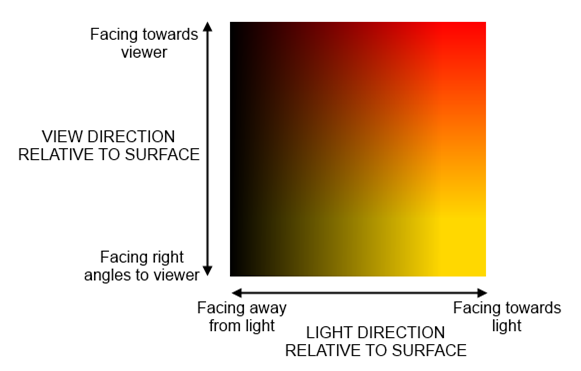
      Hey, Out of curiosity, I did some poking in Redshift, and what I forgot, is that you are in principle unable to escape the current shading context of a sample in Redshift. I.e., you cannot just say, "screw the current UV coordinate, please sample my texture 'there'" due to the closure thing which Redshift has going. With the Standard Renderer, you can do the following, which is pretty close. I compute the v (i.e., view angle coordinate) as described above. Standard also does not give you directly light ray angles, but you can get the light contribution where I use the diffuse component of the light(s) as a faksimile: High diffuse = high angle of incident/light contribution. [image: 1730128355045-82ee51e1-15a9-487b-8cb0-91eec633352e-image-resized.png] Fig. I: A crude iridescence setup in Standard. test.png is your texture from above, I forgot to take the inverse of values as 1 - x. view_angle.zip In Redshift you cannot do the same light contribution hack, and I currently do not see how you could set the sampling coordinate of the texture in the first place. Maybe the Redshift pro's know more. Cheers, Ferdinand
    • M

      How to add "scripts" to a menu?

      Watching Ignoring Scheduled Pinned Locked Moved Cinema 4D SDK 2024 python
      4
      0 Votes
      4 Posts
      2k Views
      ferdinandF
      Hey @mogh, I know that you did not meant any harm and the word hijack was a bit strong - which is why reworded that before you answered. But topics should remain focused on a singular thing, the specific question of the original poster, rather than being a collection of questions from multiple people which roughly align with whatever broader topic they see embodied in a thread. Cheers, Ferdinand
    • M

      GUI created Redshift Camera is registered as baseobject not as OCamera ?

      Watching Ignoring Scheduled Pinned Locked Moved Cinema 4D SDK python 2024
      3
      1
      0 Votes
      3 Posts
      1k Views
      M
      Thanks you answered my question, if it solves my problem we will see.
    • M

      Python version suddenly reported as 3.1 in 2023.2

      Watching Ignoring Scheduled Pinned Locked Moved Cinema 4D SDK sdk python 2023
      3
      1
      0 Votes
      3 Posts
      989 Views
      M
      Ok, thanks Ferdinand your clarification shed some light on my problem. I convert the version to a float which is the culprit ... import sys if sys.version_info < (3, 2): print("This Plugin requires at least Python 3.2") thank you
    • M

      Quicktab SDK Example

      Watching Ignoring Scheduled Pinned Locked Moved Cinema 4D SDK r20 2023 python sdk
      9
      1
      0 Votes
      9 Posts
      3k Views
      M
      While rethinking about it last night, it may not be that slow if on user interaction you just flush the main group and re-attach already existing dialog. So you need to modify your `def _DrawQuickTabGroup(self)`` method like so to only display visible dialog: def _DrawQuickTabGroup(self, onlyVisible=True): """ Creates and draws all the SubDialog for each tab, take care it does not hide these according to a selection state. Returns: True if success otherwise False. """ # Checks if the quicktab is defined if self._quickTab is None: return False activeIds, activeNames = self.GetActiveTabs() # Flush the content of the group that holds all ours SubDialogs self.LayoutFlushGroup(ID_MAINGROUP) #self.GroupBorderSpace(left=5, top=5, right=5, bottom=5) # Iterates over the number of tab to create and attach the correct SubDialog for tabId, (tabName, tabGui) in enumerate(self._tabList.items()): toDisplay = tabId in activeIds if not toDisplay: continue self.AddSubDialog(ID_QUICKTAB_BASE_GROUP + tabId, c4d.BFH_SCALEFIT | c4d.BFV_SCALEFIT, 0, 0) self.AttachSubDialog(tabGui, ID_QUICKTAB_BASE_GROUP + tabId) self.LayoutChanged(ID_MAINGROUP) return True Then in the Command message instead of calling DisplayCorrectGroup you should call _DrawQuickTabGroup like so: def Command(self, id, msg): if id == ID_QUICKTAB_BAR and self._quickTab: self._DrawQuickTabGroup() return True Regarding your question and classic Tab, find an example in Remove a GeDialog Tab Group but as you can see this is also not possible to remove a tab without redrawing everything . Cheers, Maxime.

    • M

      Color accuracy 32 bit - how to archive - things to look out for ...

      Watching Ignoring Scheduled Pinned Locked Moved General Talk
      7
      1
      0 Votes
      7 Posts
      2k Views
      M
      Thanks, @ferdinand Yes seems intended but could be troublesome if you use mograph / redshift object color to drive something ? C4D Version : 2023.1.2 A solution to guide the user could be to disable the object color when set to "Render Instance" , but from a UX standpoint I am not a fan of taking away control from the user. thanks for taking it to CS kind regards mogh
    • M

      SDK typo/discrepancy ? bitmap.Init() regarding bitdepth

      Watching Ignoring Scheduled Pinned Locked Moved Bugs python sdk
      7
      0 Votes
      7 Posts
      3k Views
      M
      Thank you Ferdinand for your time, and also providing a high / low level solution. As far as I can tell it works all as intended - my code now results in clean colors "measured". (in lowlvl R20 and highlvl 2023) I found a small discrepancy with render instances but that's another topic. Cheers, mogh
    • M

      Catch - 'c4d.BaseDraw' is not alive

      Watching Ignoring Scheduled Pinned Locked Moved Cinema 4D SDK
      2
      0 Votes
      2 Posts
      794 Views
      ferdinandF
      Hey @mogh, Thank you for reaching out to us. The idea of a node, a c4d.C4DAtom not being alive means that the Python layer cannot find the C++ C4DAtom which the Python layer c4d.C4DAtom was referencing, usually because something has been reallocated in the background while someone was long-term storing a c4d.C4DAtom instance. We talked about it here in more detail. Sometimes you then must write elaborate interfaces which recapture the same thing over their UUID, e.g., get hold of the same shader once its Python reference has gone bad. But that does not seem necessary here since you are interested only in the active viewport of the active document. It is in this case also not only the case that the viewport could have been reallocated, but also what is the active viewport could have changed (although that will likely cause viewports to be reallocated). So, when you want to modify the active base draw, in fact any node, make sure to get a fresh reference when possible. doc: c4d.document.BaseDocument = c4d.documents.GetActiveDocument() bd: c4d.BaseDraw = doc.GetActiveBaseDraw() self.AddCheckbox(ID_SAVEFRAME, flags=c4d.BFH_LEFT, initw=270, inith=0, name="Show Save Frame") self.SetBool(ID_SAVEFRAME, bd[c4d.BASEDRAW_DATA_SHOWSAFEFRAME]) If you need access to the active viewport of the active document very often, you could make it a property with some mild caching. import c4d import typing class Foo: """Provides cached access to the active document and active viewport. """ def __init__(self) -> None: self._activeDocument: typing.Optional[c4d.documents.BaseDocument] = None self._activeViewport: typing.Optional[c4d.BaseDraw] = None @property def ActiveDocument(self) -> c4d.documents.BaseDocument: """Returns the active document. """ if self._activeDocument is None or not self._activeDocument.IsAlive(): self._activeDocument = c4d.documents.GetActiveDocument() return self._activeDocument @property def ActiveBaseDraw(self) -> c4d.BaseDraw: """Returns the active viewport in the active document. """ if self._activeViewport is None or not self._activeViewport.IsAlive(): self._activeViewport = self.ActiveDocument.GetActiveBaseDraw() return self._activeViewport def Bar(self) -> None: """Makes use of the #ActiveBaseDraw property. """ self.ActiveBaseDraw[c4d.BASEDRAW_DATA_TEXTURES] = True Although this also suffers from the problem that what is the active viewport could have changed. Caching anything that is "active" is a bad idea as what is active can change. Active entities should always be retrieved when required unless one can guarantee that they cannot change (by being in a modal dialog for example). Cheers, Ferdinand
    • M

      Button Hover -> Helptext - searching for example

      Watching Ignoring Scheduled Pinned Locked Moved Cinema 4D SDK
      5
      0 Votes
      5 Posts
      1k Views
      M
      I use CreateLayout ... no description file ... but as I wrote probably a little bit to cryptic I am fine for now. Thanks for the reply Manuel. Cheers mogh
    • M

      MCOMMAND_MAKEEDITABLE why does this comand need an object in scene oposed to passing it in Ram?

      Watching Ignoring Scheduled Pinned Locked Moved Cinema 4D SDK python sdk
      4
      0 Votes
      4 Posts
      1k Views
      ferdinandF
      Hey @mogh, just to clarify: I found that bit of the documentation before you pointed it out, but in my mind I could not link "needs a document" to "the object has to be present" ... Well, the documentation clearly states it: doc (Optional[c4d.documents.BaseDocument]) – The document for the operation. Should be set if possible. Must be set for MCOMMAND_JOIN, MCOMMAND_MAKEEDITABLE, MCOMMAND_CURRENTSTATETOOBJECT and MCOMMAND_SPLINE_PROJECT. If you set the document, the objects which you pass to this function have to be in the same document. So pay attention that you use one send_modeling_command per document for objects. But that could be more visible. I'll see if I can rework the function documentation a bit to make that important information more prominent. Cheers, Ferdinand
    • M

      Wish / request: c4d.CallComand()

      Watching Ignoring Scheduled Pinned Locked Moved General Talk
      7
      0 Votes
      7 Posts
      2k Views
      a_blockA
      Sorry, my bad, different forum, different rules... I had forgotten, we do not have PMs in here. Send me an email to "job AT andreasblock dot de".