@ferdinand
Alright, thank you for your reply.
R
Offline
Posts
-
RE: V-Ray Materials Not Detected by Project Asset Inspector
-
RE: V-Ray Materials Not Detected by Project Asset Inspector
@ferdinand
Thank you for your help.
I am using Cinema 4D 2025, and this issue exists in Cinema 4D versions 2023 through 2026. -
RE: V-Ray Materials Not Detected by Project Asset Inspector
@ferdinand
Hi, thanks for your reply.c4d.MSG_UPDATE does not seem to work.
If I manually link the textures, they are correctly detected and displayed in the Project Asset Inspector. However, when importing them via Python, they are not detected.
Redshift and Arnold do not have this issue.
I hope you can help me figure out what might be wrong. Here is my code:import c4d import maxon doc: c4d.documents.BaseDocument def main() -> None: c4d.CallCommand(1058751) # V-Ray Node Material mat = doc.GetFirstMaterial() urlTexRust = r"D:\RustPaint0291_M.jpg" # image path idTextureNode: maxon.Id = maxon.Id("com.chaos.vray_node.texbitmap") brdfMaterial: maxon.Id = maxon.Id("com.chaos.vray_node.brdfvraymtl") nodespaceId = c4d.GetActiveNodeSpaceId() nimbusRef = mat.GetNimbusRef(nodespaceId) if not nimbusRef: return graph = nimbusRef.GetGraph() if not graph: raise RuntimeError("Could not add graph to material.") return result: list[maxon.GraphNode] = [] maxon.GraphModelHelper.FindNodesByAssetId(graph, brdfMaterial, True, result) if len(result) < 1: raise RuntimeError("Could not find Mat node in material.") matNode: maxon.GraphNode = result[0] with graph.BeginTransaction() as transaction: rustTexNode: maxon.GraphNode = graph.AddChild(maxon.Id(), idTextureNode) pathRustPort: maxon.GraphNode = rustTexNode.GetInputs().FindChild( "com.chaos.vray_node.texbitmap.file") pathRustPort.SetPortValue(urlTexRust) rustTexColorOutPort: maxon.GraphNode = rustTexNode.GetOutputs().FindChild( "com.chaos.vray_node.texbitmap.output.default") brdfBaseColorInPort: maxon.GraphNode = matNode.GetInputs().FindChild( "com.chaos.vray_node.brdfvraymtl.diffuse") rustTexColorOutPort.Connect(brdfBaseColorInPort, modes=maxon.WIRE_MODE.NORMAL, reverse=False) transaction.Commit() c4d.EventAdd() if __name__ == "__main__": main() -
V-Ray Materials Not Detected by Project Asset Inspector
Hi,
I found an issue when creating renderer materials via Python in Cinema 4D.
Redshift materials created by Python can correctly display texture assets in the Project Asset Inspector.
However, V-Ray material textures are not detected by the Project Asset Inspector, even though the textures render correctly.
Is there any extra step required for V-Ray materials to register texture assets properly?Thanks!

-
How to Modify Button Parameters?
I’m working on a Cinema 4D + Octane Render project and need help modifying the "Import Type" button parameters of an ImageTexture node. Specifically, I want to automate or script the selection of different import types , but I can’t figure out how to access or modify this button’s settings through the Python.
I understand that Octane-related topics may not be suitable for this forum, but I've been struggling with this issue for a long time and really need help.
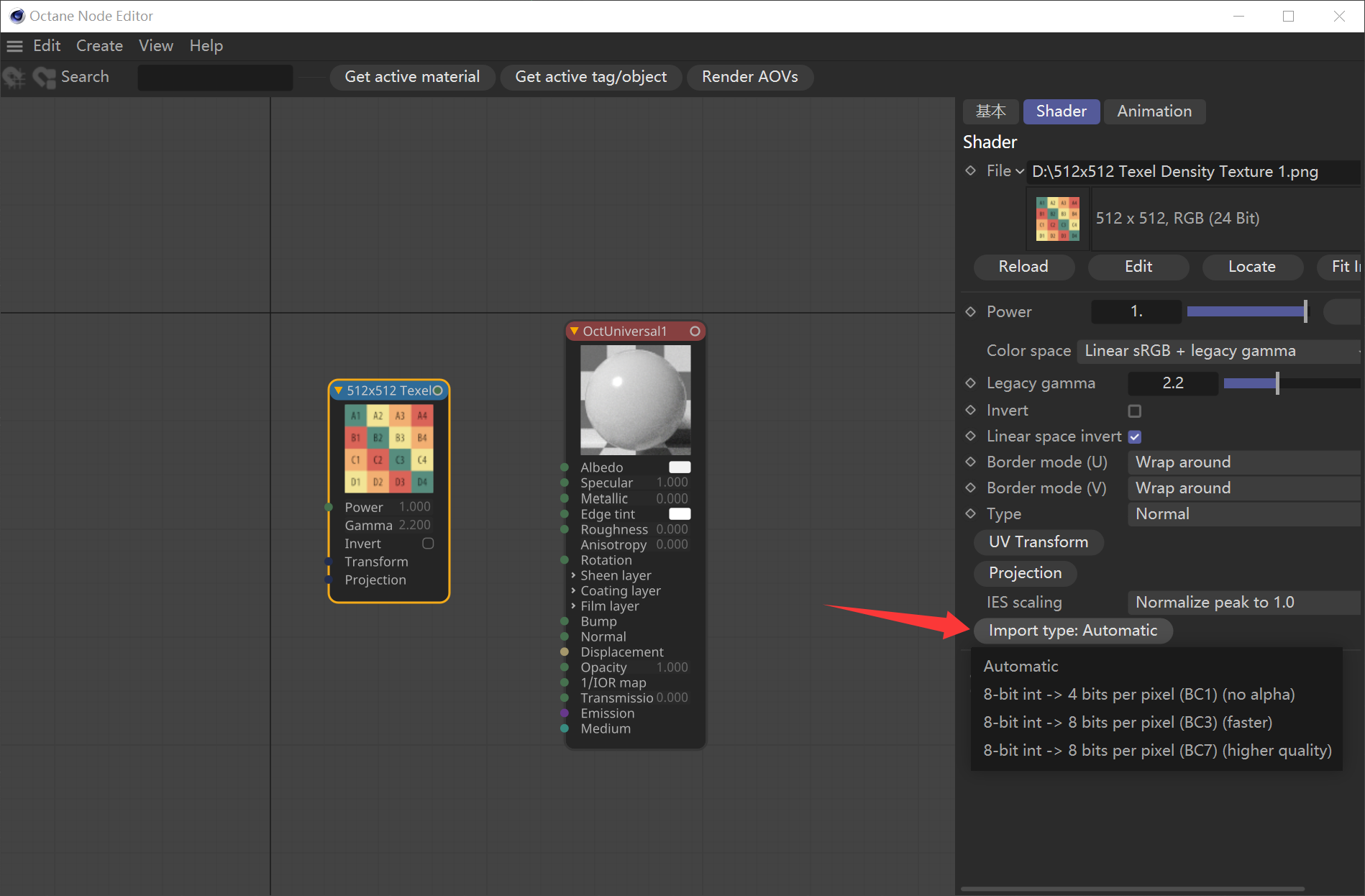
This is my code, but it's not working as expected.
import c4d def main(): mat = doc.GetActiveMaterial() shader = mat.GetFirstShader() ImportType = c4d.DescID(c4d.DescLevel(1139, c4d.DTYPE_BUTTON, 0)) importValue = shader.GetParameter(ImportType, c4d.DESCFLAGS_GET_0) shader.SetParameter(ImportType, 2, c4d.DESCFLAGS_SET_0) c4d.EventAdd() if __name__ == '__main__': main() -
RE: About Texture Paths in MergeDocument
@i_mazlov I get it, thanks for your reply.
-
About Texture Paths in MergeDocument
Hi everyone!
After using MergeDocument to import a file, I need to manually specify the texture paths in the Project Asset Inspector. Am I importing the files incorrectly, or is there an additional setting I need to configure?import c4d def main() -> None: doc = c4d.documents.GetActiveDocument() target_flie = r"D:\01\test.c4d" c4d.documents.MergeDocument(doc, target_flie, c4d.SCENEFILTER_OBJECTS | c4d.SCENEFILTER_MATERIALS | c4d.SCENEFILTER_MERGESCENE) if __name__ == '__main__': main()