V-Ray Materials Not Detected by Project Asset Inspector
-
Hi,
I found an issue when creating renderer materials via Python in Cinema 4D.
Redshift materials created by Python can correctly display texture assets in the Project Asset Inspector.
However, V-Ray material textures are not detected by the Project Asset Inspector, even though the textures render correctly.
Is there any extra step required for V-Ray materials to register texture assets properly?Thanks!

-
Hey @Ross,
Thank you for reaching out to us. Assets in the sense of the Asset Inspector are realized via MSG_GETALLASSETS in general. For material nodes you have to set IMAGENODEASSETID and
IMAGENODEPORTSon the node space, or directly implementMATERIALMESSAGEHANDLERFUNC(all attributes are in the same namespace). Under the hood, all these Nodes API systems pipe back intoMSG_GETALLASSETSand it is the implementer who must realize them, i.e., Chaos in this case. You as a user cannot do anything about, the asset data is either there or not.I am currently on my Mac where I do not have VRay installed. The main question would be: Does VRay show its assets when you wire up the same materials manually? I think it does, right? You can try sending a
MSG_UPDATEto the material holding the graph(s) but that should not be necessary by default(myMaterial.Message(c4d.MSG_UPDATE)). It could be that VRay is doing some black magic with its assets andMATERIALMESSAGEHANDLERFUNCwhich is not correctly setup when you programmatically create graphs. But that (a) strikes me as a bit unlikely and (b) only Chaos can help you with that.VRay is as a third party plugin generally out of scope of support, so their support is your best shot. But when you share your code and a scene, I can have an informal look as what is going wrong there (but it might take a week or so before I get to it).
Cheers,
Ferdinand -
@ferdinand
Hi, thanks for your reply.c4d.MSG_UPDATE does not seem to work.
If I manually link the textures, they are correctly detected and displayed in the Project Asset Inspector. However, when importing them via Python, they are not detected.
Redshift and Arnold do not have this issue.
I hope you can help me figure out what might be wrong. Here is my code:import c4d import maxon doc: c4d.documents.BaseDocument def main() -> None: c4d.CallCommand(1058751) # V-Ray Node Material mat = doc.GetFirstMaterial() urlTexRust = r"D:\RustPaint0291_M.jpg" # image path idTextureNode: maxon.Id = maxon.Id("com.chaos.vray_node.texbitmap") brdfMaterial: maxon.Id = maxon.Id("com.chaos.vray_node.brdfvraymtl") nodespaceId = c4d.GetActiveNodeSpaceId() nimbusRef = mat.GetNimbusRef(nodespaceId) if not nimbusRef: return graph = nimbusRef.GetGraph() if not graph: raise RuntimeError("Could not add graph to material.") return result: list[maxon.GraphNode] = [] maxon.GraphModelHelper.FindNodesByAssetId(graph, brdfMaterial, True, result) if len(result) < 1: raise RuntimeError("Could not find Mat node in material.") matNode: maxon.GraphNode = result[0] with graph.BeginTransaction() as transaction: rustTexNode: maxon.GraphNode = graph.AddChild(maxon.Id(), idTextureNode) pathRustPort: maxon.GraphNode = rustTexNode.GetInputs().FindChild( "com.chaos.vray_node.texbitmap.file") pathRustPort.SetPortValue(urlTexRust) rustTexColorOutPort: maxon.GraphNode = rustTexNode.GetOutputs().FindChild( "com.chaos.vray_node.texbitmap.output.default") brdfBaseColorInPort: maxon.GraphNode = matNode.GetInputs().FindChild( "com.chaos.vray_node.brdfvraymtl.diffuse") rustTexColorOutPort.Connect(brdfBaseColorInPort, modes=maxon.WIRE_MODE.NORMAL, reverse=False) transaction.Commit() c4d.EventAdd() if __name__ == "__main__": main() -
Please also share which version of Cinema 4D you are using, I'll try to have a look this or next week.
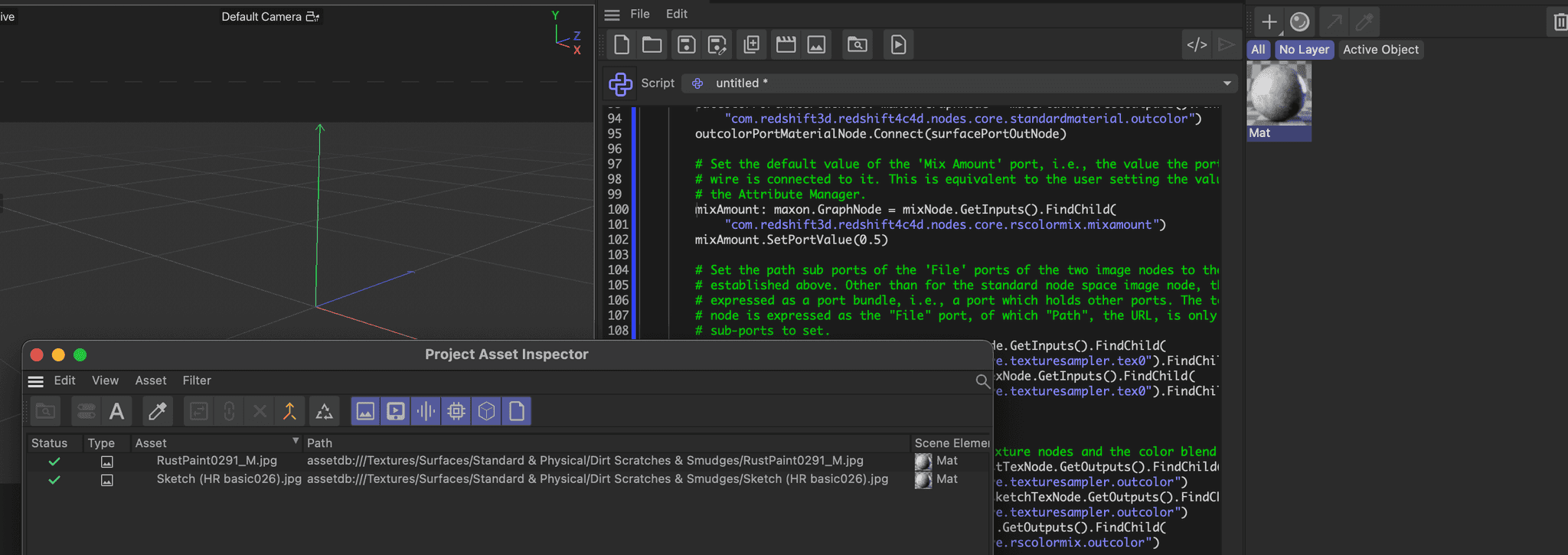
edit: I briefly checked with scripts/05_modules/node/create_redshift_nodematerial_2024.py and there, with Redshift, it works and the assets show up in the inspector right away. Which hints at this being an exlusive VRay issue which only can be solved by Chaos.
-
@ferdinand
Thank you for your help.
I am using Cinema 4D 2025, and this issue exists in Cinema 4D versions 2023 through 2026. -
Hey,
I had a quick look, and I can confirm that your script does not generate asset inspector output. But at least in 2026.2, VRay does produces any asset inspector output in general. Below is a manually wired up material which should report the asset database texture - but it does not.
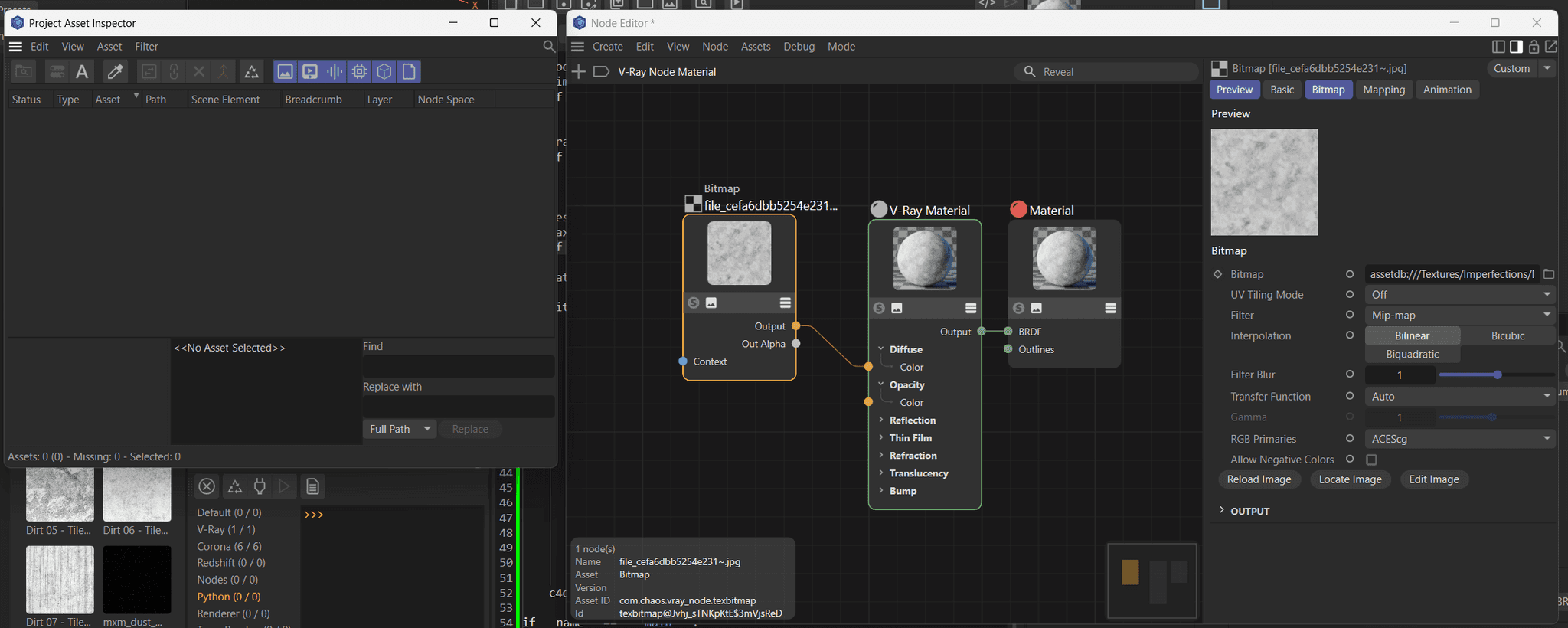
Please contact Chaos about this, they either never implemented what I described above, or there is somewhere a bug in their code or our API. In any case, this can only solved by Chaos Group with possible help from Maxon. You as a user cannot do anything about it.
Cheers,
Ferdinand -
@ferdinand
Alright, thank you for your reply.
