Programmatically created Redshift Lights in an Object Plugin converts lights into Null-Objekts without an function after making Objekt-Plugin editable

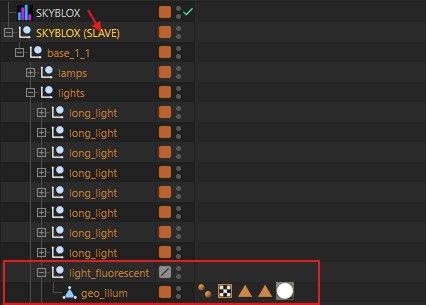
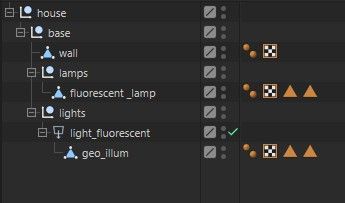
-
Thanks, I will have a look. This all is starting to make sense now. We rewrote the RS Light and Camera objects a while ago. And at least the RS Camera object is not absolutely non-trivial to operate. This either sounds like that you have to jump through specific hoops or there is a bug in the importer code, that transforms pre 2024 Light and Camera objects (I think this was when we revamped them).
It might take me a week or so to figure this out. When this is very urgent for you, I would recommend fixing the scene(s) by manually recreating the lights. You could probably also automate this by just selectively copying data (which is likely going to be the solution I am going to provide, unless I come to the conclusion that this must be fixed on our side, as for example the importer being faulty).
Cheers,
FerdinandMAXON SDK Specialist
developers.maxon.net -
Yeah, thanks—there’s no rush; I have until the end of July before the plugin is released.
But as I mentioned, manually swapping the lights doesn't work; the problem persists even if the scene is created in Cinema 4D 2026.3.1. The only way it would work is programmatically as you mentioned above—via code in the plugin that iterates through all the lights in the loaded scene and swaps the data. I’ll give it a try; if load times and performance suffer, or if the effort isn't worth it, I’ll stick with the "Lights Import" button method for now.
Summary of the Core Issue
So, when scenes are imported via
LoadDocumentorMergeDocumentin the code and parts returned within the GVO, they are correctly converted into polygon objects (after "Make Editable")—but Redshift lights are not converted into Redshift lights; instead, they are converted into Null objects. Numerous tests have confirmed this, regardless of whether the scene was created in the latest version of C4D or an older one, such as 2023.
 ️A programmatic replacement of the lights is necessary after the virtual document has loaded.
Best Regards
T.B
Edit:
I’ve implemented a light replacer in the example plugin again.
It searchesself.temp_docfor all Redshift lights, iterates through the list, creates a completely new light programmatically, sets the key values to match the old light, applies theGetDataInstanceto the light in the temp doc, and sets the global matrix.
️As discussed, this approach doesn't work either; the lights are still being converted into Null objects.
That means I would have to replace the lights entirely with programmatically generated ones, which would require replicating the entire light and temp_doc hierarchy—including cases where lights contain other lights or objects. The effort involved simply isn't worth the benefit. Sorry.In this case, it would be better to look for the cause of the problem.
-
Hey @ThomasB,
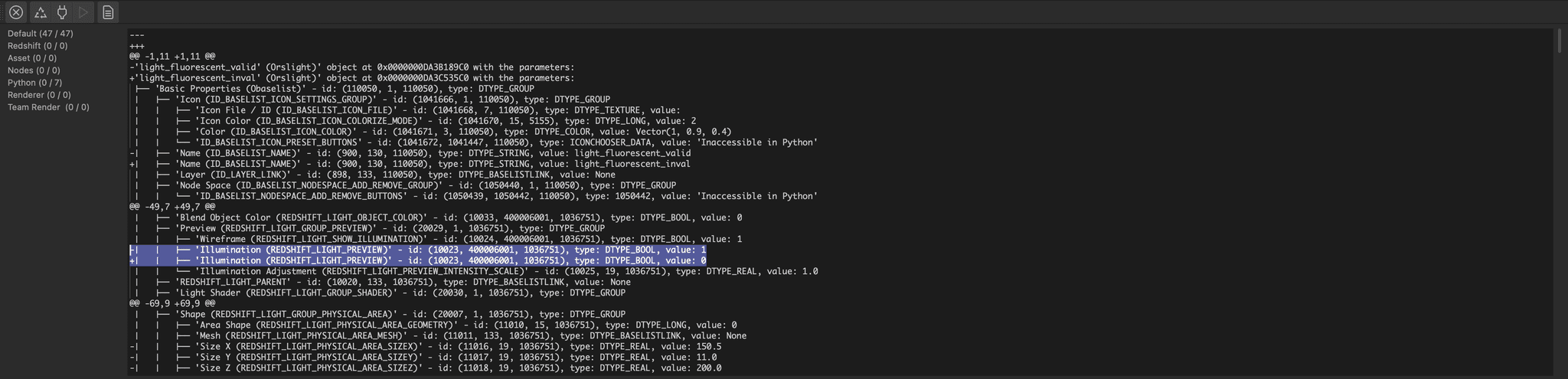
so, I had a look and figured it out. When you diff the two objects from my file, there are quite few differences (as I was not 100% faithful in copying all values), but the culprit is this:
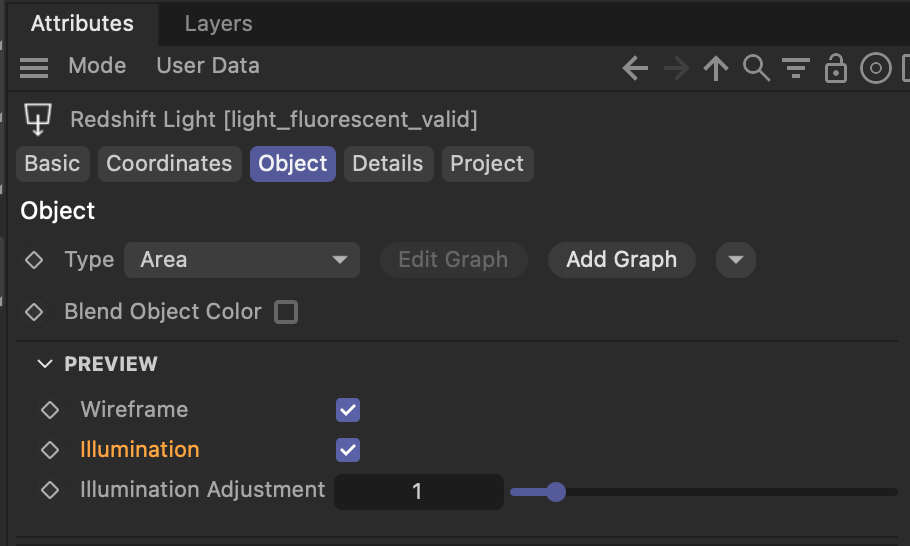
The RS Light uses a standard light to accomplish its VP representation. When you disable the 'Illumination' checkmark, the RS Light
GetVirtualObjectswill simply return a null object, i.e., the behavior you experienced. I filed a ticket for this (ITEM#651586 Inconsistent Redshift Light 'Make Editable' behavior), as I would consider this so unintuitive that it borders on a bug. But this is outside of the SDK/Cinema 4D domain, so I cannot just fix it myself.In Python, there is currently no way to fix this on your side. The message
MSG_CURRENTSTATE_ENDis not wrapped for Python (with it you can manipulate the output of a "Make Editable" action before it is inserted). The other route, the build flags on HierarchyHelp are also not possible in Python either, becauseHierarchyHelpis also not wrapped for Python.But I just changed the latter route, and in the next major update you will be able to react to build flags. There will also be a new code example named
py-objectdata_buildflags_2027which showcases this feature. You can then react to your object being made editable, built for rendering, built for export, etc. and react by changing its output.In your case you would then probably not disable the illumination when your object is being made editable. So, for now, you either have to live with the behavior, or turn on "preview > illumination".
Cheers,
FerdinandResult
The output, i.e., diff, with the offending line highlighted.
Code
This assumes my scene from above with everything deleted but the two objects.
import c4d
import mxutils
import difflib

doc: c4d.documents.BaseDocument  # The currently active document.
op: c4d.BaseObject | None  # The primary selected object in `doc`. Can be `None`.

def main() -> None:
    """Called by Cinema 4D when the script is being executed.
    """
    data: list[str] = [
        mxutils.GetParameterTreeString(node)
        for node in mxutils.IterateTree(doc.GetFirstObject(), True)
    ]

    # Diff the first two strings in the list and print the result to the console.
    if len(data) < 2:
        return c4d.gui.MessageDialog("Not enough data to perform diff.")

    a: str = data[0]
    b: str = data[1]

    diff: list[str] = list(difflib.unified_diff(a.splitlines(), b.splitlines(), lineterm=''))
    if not diff:
        print("No differences found.")

    print("\n".join(diff))
    print("\n\n" + "=" * 80 + "\n\n")
    print(a)
    print("\n" + "-" * 80 + "\n")
    print(b)

    c4d.EventAdd()


if __name__ == '__main__':
    main()
MAXON SDK Specialist
developers.maxon.net -
Okay, great that you really dug into this. That could well have something to do with it.
However, if you look at my latest test plugin—the C4D scene—the "Illumination" checkbox on the Redshift light is enabled, yet when you select "Make Editable," the light still turns into just a Null Object. So, regardless of whether the illumination is on or not..
But as I mentioned earlier this only happens if the light originates from a temporary document in the code. Or rather, when the scene with the light is loaded into a temp_doc.
- e.g.
LoadDocument()orMergeDocument()
That is why simply checking the "Illumination" box does not work.
Cheers
- e.g.
-
Hey,
sorry for the delay, I did read your reply. When I set the parameter in your scene the issue disappears. I did not check the
LoadDocument/MergeDocumentaspect yet. But I am 99.99% sure that there is no bug inOrslightin the conventional sense, it is just that theOrslight::GetVirtualObjectsmethod is a bit of a fever dream.The issue is
Orslight::GetVirtualObjectsreturns a null object in some cases and a null with a light attached in other cases.LoadDocument/MergeDocumenthaving a significant enough impact on the scene graph that causesOrslight::GetVirtualObjectsto change its cache building behaviour from "null + light" to "null" sounds a bit unlikely but is not impossible (that would mean the scene importer is buggy).I will try to have another look tomorrow or next week. When you want to help yourself, you could just do what I did: Diff the light from the loaded scene with a light your have already in the document which you know that works.
Cheers,
Ferdinand -
@ferdinand
Ok , I will give it another try tomorrow.
I will print this out again using this diff tool and compare it.
I understand your point of view and your perseverance.
 . But quite honestly, Ferdinand. That workaround might have to be removed again with Maxon's next fix, which in turn might necessitate a further update to my plugin, and so on. The plugin's strength lies in its extensibility. Therefore, my focus regarding the plugin is on extensions, rather than on removing workarounds or adding new features.
Given the highly complex document structure and the various types of lights involved, a particularly complex method has to be written for this. Furthermore, as I mentioned earlier, some lights have other lights as child objects, and those in turn have their own, with the specific setup varying from building to building. And every light of the same type might even have slightly different settings as well. This isn't really how I wanted to handle it.
But I will give it a try. I know, complaining doesn't help. So I'll test it again with two lights, just like you did. One light from the document and the other generated programmatically. Then I'll compare the two again.
However, this will be the last feature before the release, as it simply needs to be ready for delivery.
The lighting feature is a bit of a thorn in my side anyway, since it’s very resource-intensive—but you know what users are like (myself included!). They want the all-singing, all-dancing, do-it-all solution.All things considered, the plugin has turned out quite well and is on the verge of release. My actual implemented workaround for importing the lights into the scene works, too, and requires just a single click from the user. Since the lights for each level are contained within a null object, this light importer represents the most pragmatic approach for me, involving the least amount of effort.
So, if I don't manage to fix the "bug" according to your requirements now, I’m going to release it anyway. Unfortunately, I can't live on thin air.

Respectfully,
T.B.Person: I love AI, I want to do everything with AI...
Developer: So you want to replace your brain with a language model? bye Bye! There's the door
-
Hey @ThomasB,
so I did a clean writing of your plugin demo code in preparation to debug the output and I cannot reproduce the issue you report. For me the light works. There were some issues with your code, but none of them should cause the light to malfunction as your reported on
LoadDocument. What you did there withself.containerwas a bit dicey and could have caused the issue but it seems somewhat unlikely.I am today on my Mac, it seems quite unlikely that this is an OS related issue.
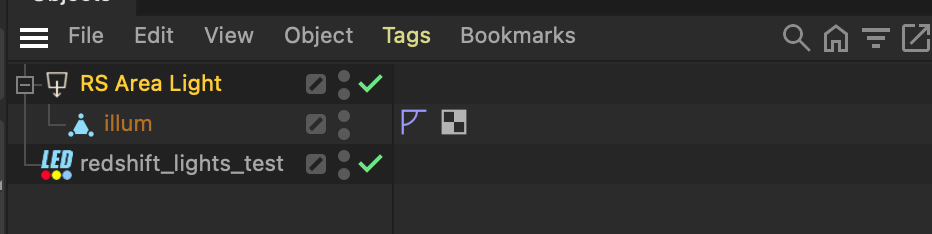
The object after pressing the button in your plugin:
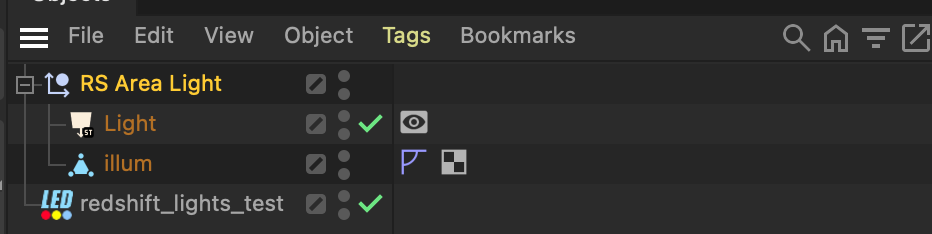
And the object after collapsing it:
Cheers,
Ferdinandfrom c4d import plugins, bitmaps, BaseObject, GeListNode import c4d import mxutils import os PLUGIN_ID: int = 1000200 PY_ADD_LIGHTS: int = 10000 class RedshiftLightsTest(plugins.ObjectData): """ """ HOUSE_PATH: str = os.path.join(os.path.dirname(__file__), "res", "models", "build_1.c4d") def __init__(self) -> None: """ """ self.SetOptimizeCache(True) self._asset_doc: c4d.documents.BaseDocument | None = None # No, never store a reference to what you return as your cache in GVO! # self.container = None def Init(self, op, isCloneInit: bool = False) -> bool: """ """ if not os.path.exists(self.HOUSE_PATH): raise FileNotFoundError(f"House model not found at {self.HOUSE_PATH}") # For cloning it would be better to copy over the document to avoid reloading it, but since # we do not implement NodeData.CopyTo() we will just reload it for now. self._asset_doc = mxutils.CheckType( c4d.documents.LoadDocument(self.HOUSE_PATH, c4d.SCENEFILTER_OBJECTS | c4d.SCENEFILTER_MATERIALS)) return True def GetAssetPayload(self) -> c4d.BaseObject | None: """Returns a copy of the asset payload for the plugin. """ if not isinstance(self._asset_doc, c4d.documents.BaseDocument): raise RuntimeError("Asset not loaded correctly.") # Should not happen, but just in case. root: c4d.BaseObject = self._asset_doc.GetFirstObject() if not root: raise RuntimeError("Asset document has no root object.") payload: c4d.BaseObject = root.GetDown() if not payload: raise RuntimeError("Asset document has no payload object.") return payload.GetClone() def GetVirtualObjects(self, op: BaseObject, hh: object) -> BaseObject | None: """ """ # Return the cached object if it is not dirty, otherwise rebuild it. dirty: bool = op.CheckCache(hh) or op.IsDirty(c4d.DIRTYFLAGS_DATA | c4d.DIRTYFLAGS_ALL) if not dirty: return op.GetCache(hh) # Returning None in an ObjectData.GetVirtualObjects() call will tell Cinema that a memory error # occurred, and with that cause Cinema to stop calling/building the object. This is almost never # what we want, return a Null object instead. null: c4d.BaseObject | None = c4d.BaseObject(c4d.Onull) if not null: return c4d.BaseObject(c4d.Onull) payload: c4d.BaseObject | None = self.GetAssetPayload() if payload: payload.InsertUnder(null) return null def Message(self, node: GeListNode, type: int, data: object) -> bool: """ """ if type == c4d.MSG_DESCRIPTION_COMMAND: if data["id"][0].id == PY_ADD_LIGHTS: self.ImportLights(node) return True return True def ImportLights(self, node: GeListNode) -> bool: """ """ if not isinstance(node, c4d.BaseObject) or not c4d.threading.GeIsMainThreadAndNoDrawThread(): return False # This is a bit tedious but each of these calls can fail, and you cannot, or better, should # not just do chain calls such as GetDown().GetDown().GetNext().GetNext(). One could abstract # this away with a function such as Traverse(node, "DDNN") where D = Down, N = Next, but for # this example I just did it manually. doc: c4d.documents.BaseDocument = node.GetDocument() if not doc: return False payload: c4d.BaseObject | None = self.GetAssetPayload() if not payload: return False down: c4d.BaseObject | None = payload.GetDown() if not down: return False item: c4d.BaseObject | None = down.GetNext() if not item: return False light: c4d.BaseObject | None = item.GetNext() if not light: return False clone: c4d.BaseObject | None = light.GetClone() if not clone: return False doc.InsertObject(clone) c4d.EventAdd() return True if __name__ == "__main__": path, file = os.path.split(__file__) file = "icon.tif" new_path = os.path.join(path, "res", file) bitmap = bitmaps.BaseBitmap() bitmap.InitWith(new_path) plugins.RegisterObjectPlugin(id=PLUGIN_ID, str="redshift_lights_test", g=RedshiftLightsTest, description="redshift_lights_test", icon=bitmap, info=c4d.OBJECT_GENERATOR)MAXON SDK Specialist
developers.maxon.net -
@ferdinand
I think we were talking at cross-purposes there. The problem was actually the light conversion using "Make Editable" on the plugin itself, not the Light Importer, which was the workaround I had already implemented. The problem where the lights are converted into null objects when making the plugin editable still persists.
But you did mention the diff tool in an earlier reply and managed to get it working once using a TempDoc. So, I won't be able to avoid giving it another thorough test, but the release is coming up first.More on that in the
. -
Hey @ThomasB,
my bad, I did miss that. The reason why you are still having problems is that in the scene data you load from your asset file, has generator and scene building flags set on its nodes that are visible in the object manager. When you then put them into the cache of your object, this leads to buggy/unintended behavior, as these flags should not appear in caches.
Cheers,
FerdinandResult
The initial state:

Collapsing your generator, it now correctly preserves the nested generators:

Collapsing once more the RS Light:

Code
This builds on the cleaned up code example I posted above. But effectively you only need
ResetFlagsand call it on your cache before you return it. But you should also remove the reference (self.container) to your own cache in your code example from your code, as this could cause some serious issues.def ResetFlags(self, node: c4d.BaseObject) -> None: """Resets selected flags in the local hierarchy of the given node. """ def ResetFlags(node: c4d.BaseObject) -> None: node.DelBit(c4d.BIT_CONTROLOBJECT) node.DelBit(c4d.BIT_EDITOBJECT) ResetFlags(node) for child in mxutils.IterateTree(node, True): ResetFlags(child) return node def GetVirtualObjects(self, op: BaseObject, hh: object) -> BaseObject | None: """ """ # Return the cached object if it is not dirty, otherwise rebuild it. dirty: bool = op.CheckCache(hh) or op.IsDirty(c4d.DIRTYFLAGS_DATA | c4d.DIRTYFLAGS_ALL) if not dirty: return op.GetCache(hh) # Returning None in an ObjectData.GetVirtualObjects() call will tell Cinema that a memory error # occurred, and with that cause Cinema to stop calling/building the object. This is almost never # what we want, return a Null object instead. null: c4d.BaseObject | None = c4d.BaseObject(c4d.Onull) if not null: raise c4d.BaseObject(c4d.Onull) payload: c4d.BaseObject | None = self.GetAssetPayload() if payload: payload.InsertUnder(null) # --- DEBUG --- # Some debug code I wrote to figure out what is going on here. I then quickly figured out # that the parameters were okay, but that this light always malfunctioned. And that returning # a fresh light worked fine. So, the culprit must be outside of the data container of the # light but still inside the light object. I.e., BIT or NBIT flags, which then directly # made me think of the BIT_CONTROLOBJECT and BIT_EDITOBJECT flags. # # WARNING: The code below is highly illegal code, as we insert objects into the active # document from a non-main thread. This is just for debugging purposes, as I did not mind # Cinema potentially crashing, and should never be done in production code. # # for child in mxutils.IterateTree(null, True): # if child.GetType() == c4d.Orslight: # print("-" * 100) # print(mxutils.GetParameterTreeString(child)) # doc: c4d.documents.BaseDocument | None = c4d.documents.GetActiveDocument() # if doc: # doc.InsertObject(clone) # c4d.EventAdd() # --- FIX --- # Now we reset the build flags of all objects in the hierarchy. Not doing this caused 'Make # Editable' to incorrectly collapse the cache of this object, going much deeper than it # should. When you have this setup, i.e., a generator within the cache of another generator: # # SomeGenerator (Obase) # └── Cache # └── Null (Onull) # └── CubeGenerator (Obase) // Generator that is inside the cache of SomeGenerator # └── Cache # └── Null (Onull) # └── PolygonObject (Opolygon) # # then the collapsed cache of SomeGenerator should be (important is the type in parentheses, # not the name in front) as follows: # # SomeGenerator (Onull) # └── CubeGenerator (Obase) // the uncollapsed CubeGenerator generator which was # // before inside the cache of SomeGenerator # # And not this. # # SomeGenerator (Onull) # └── CubeGenerator (Onull) # └── PolygonObject (Opolygon) # # But the former is exactly what happened when we do not reset the build flags of all objects # in the hierarchy. On top of that comes some bug / side effect of when you do this nested # collapsing that it seems to 'forget' half of the cache, 'PolygonObject (Opolygon)' in the # example above, or the converted standard light from the RS light in your case. self.ResetFlags(null) return nullMAXON SDK Specialist
developers.maxon.net -
@ferdinand
crazy, this helps me a lot Ferdinand. Thank you so much . I didn`t now that.
Thanks for this function example.Edit:
It works....
How is a dumb plugin developer like me supposed to know that you have to clear those two bits right there of all places...
But that's great, thanks. It helps me a huge amount for the future.Sincerely T.B.
-
This is not common knowledge, otherwise I would have spotted that earlier.
So, you are not really expected to know this as a third party dev. You can look at the
geometry_caches_s26.pyexample and there at this line, under [2] I mention that the cache of that object is muted. But that is of course only very indirect information and not enough to deduce this. I think we also talked about it a couple of times on the forum.The flag
BIT_CONTROLOBJECTis set on input objects of generators, e.g., the to be extruded spline of an Extrude object, the profile and rail spine of a Loft object, the to be cloned cube and sphere objects of a MoGraph cloner, etc. As shown in the caching example, Cinema will mute the caches of input objects. To be very formal, they are actually built but then again deleted.BIT_CONTROLOBJECTmarks such input objects.Your light in that scene should not have that flag, as it is not the input for some generator. But it somehow got it anyway, there is probably somewhere a bug. For normal scene evaluation that bug is also not really a problem (because as you saw from your own test, the light still converted correctly when you inserted it on its own outside of caches). The problems start when that irregularly as
BIT_CONTROLOBJECTmarked object is part of a cache. 'Make Editable' then incorrectly collapses the cache. Not only does it not stop at nested generators which are incorrectly marked like this, it also seems to apply the cache muting logic for input objects (resulting in the empty null object instead of the content of the cache of the collapsed generator).I already told the relevant devs that I consider this borderline buggy but they do not seem very inclined to do anything about this. What is effectively missing somewhere in cache resolvement is the evaluation if the flag
BIT_CONTROLOBJECT'makes sense on an object'. That is of not so easy to do, as generator - input object relations can be quite complex in Cinema. Which is probably also why the modelling team does not want to touch this.Cheers,
Ferdinand