Redshift Renderer

Demonstrates basic operations with the Redshift renderer in Cinema 4D.

About

With S26 the Redshift render engine has been integrated with Cinema 4D. While the render engine has already previously been available to Cinema 4D users, it was then a plugin and therefor not part of the public Cinema 4D SDK. With the integration come also architectural changes as for example the unification of camera and light types and a unified nodes model.

Current Limitations

In the current form of Redshift integration there are no Redshift specific frameworks yet exposed. But the core features of Redshift can be accessed through the Cinema API and Nodes API. Currently missing from the public API are also the Redshift render engine ID and the Redshift node space ID for node materials. They must be provided manually in third party code at the moment as demonstrated by the examples here.

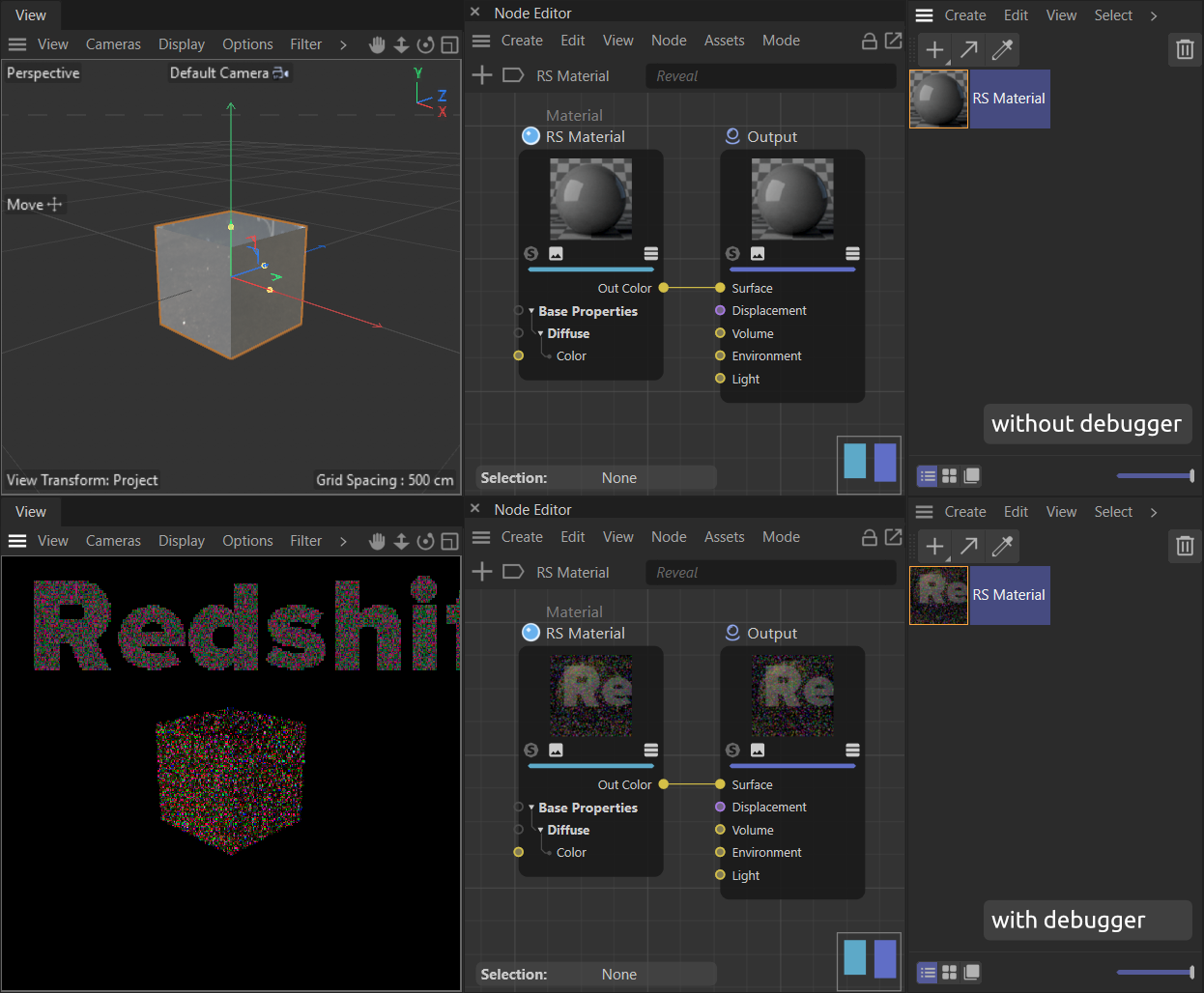
Redshift has also an anti-tampering mechanism which ensures Redshift is being run with a valid license. This mechanism triggers when a debugger, as for example provided by Visual Studio and Xcode, is attached to Cinema 4D. The anti-tampering mechanism then obfuscates the rendering output of Redshift as shown in Figure I. Plugins making use of Redshift can still be debugged as any other plugin, but to see the final output of a plugin which generates for example a Redshift node material setup, the plugin must be compiled and loaded by a normal instance of the Cinema 4D application without a debugger attached.

Fig I: At the top - a Redshift Material graph of a Redshift material in a Cinema 4D instance without a debugger attached. At the bottom - the same scene loaded into a Cinema 4D instance to which a debugger has been attached, in this case provided by Visual Studio. The anti-tampering mechanism detects the debugger and obfuscates all Redshift output, as shown by the rendering of the viewport and the material preview thumbnails.

Examples

Set Render Engine to Redshift

Sets the render engine of the active render data of a document to Redshift.

Also assures that the required Redshift video post node is present in the render data. This example requires defining the Redshift renderer plugin ID as shown here, as the ID is currently not exposed in the SDK.

maxon::Result<void> SetRenderEngineToRedshift(BaseDocument* doc)
{
// Attempt to open an undo stack item. The undo handling can be omitted when not required.
if (!doc->StartUndo())
return maxon::UnexpectedError(MAXON_SOURCE_LOCATION, "Failed to open undo item."_s);
// Get the active render data of the passed document.
RenderData* rdata = doc->GetActiveRenderData();
if (rdata == nullptr)
return maxon::UnexpectedError(
MAXON_SOURCE_LOCATION, "Could not access render data of the passed document."_s);
// Set the render engine to Redshift.
if (!doc->AddUndo(UNDOTYPE::CHANGE, rdata))
return maxon::UnexpectedError(MAXON_SOURCE_LOCATION, "Failed to insert undo data."_s);
BaseContainer* bc = rdata->GetDataInstance();
// A lambda to search the video post nodes of a RenderData instance for a node with a specific ID.
auto FindVideoPost = [](RenderData* rdata, Int32 videoPostType) -> BaseVideoPost*
{
if (rdata == nullptr)
return nullptr;
// Get the first video post node in the render data.
BaseVideoPost* videoPost = rdata->GetFirstVideoPost();
// Iterate over all nodes until a node with #videoPostType has been found and return it or
// return #nullptr when no such node can be found.
while (videoPost)
{
if (videoPost->IsInstanceOf(videoPostType))
return videoPost;
videoPost = videoPost->GetNext();
}
return nullptr;
};
// When there is no Redshift video post node present, then insert one.
if (FindVideoPost(rdata, VPrsrenderer) == nullptr)
{
// Allocate the Redshift video post plugin.
BaseVideoPost* redshiftVideoPost = BaseVideoPost::Alloc(VPrsrenderer);
if (!redshiftVideoPost)
return maxon::OutOfMemoryError(
MAXON_SOURCE_LOCATION, "Could not allocate redshift video post plugin."_s);
// Insert the Redshift video post plugin.
rdata->InsertVideoPost(redshiftVideoPost);
if (!doc->AddUndo(UNDOTYPE::NEWOBJ, redshiftVideoPost))
return maxon::UnexpectedError(MAXON_SOURCE_LOCATION, "Failed to insert undo data."_s);
}
// Close the undo item.
if (!doc->EndUndo())
return maxon::UnexpectedError(MAXON_SOURCE_LOCATION, "Failed to close undo item."_s);
return maxon::OK;
}
@ RDATA_RENDERENGINE
Definition: drendersettings.h:39
CHANGE
Any change to an object, including hierarchy modifications, modification in positioning,...
Definition: ge_prepass.h:2
NEWOBJ
A new object, material, tag, or other Cinema API node instance has been inserted into the document....
Definition: ge_prepass.h:7
return OK
Definition: apibase.h:2783
#define MAXON_SOURCE_LOCATION
Definition: memoryallocationbase.h:69
#define VPrsrenderer
Videopost plugin 'Redshift'. @PublicExposure.
Definition: c4d_videopostdata.h:250
class CINEWARE_SINGLEINHERITANCE BaseContainer
Definition: lib_noise.h:75
maxon::Int32 Int32
Definition: ge_sys_math.h:51
class CINEWARE_SINGLEINHERITANCE BaseDocument
Definition: customgui_inexclude.h:18
#define iferr_scope
Definition: resultbase.h:1482

Simple Rendering of a Document

Demonstrates how to render a document in OCIO mode using convenience functions which streamline the process. This is the recommended way to render OCIO documents, as it ensures that all OCIO color spaces and transforms are correctly applied to the rendering.

maxon::Result<void> SimpleRenderDocument(cinema::BaseDocument* doc)
{
iferr_scope; // The error handler for this function.
if (MAXON_UNLIKELY(!doc))
return maxon::NullptrError(MAXON_SOURCE_LOCATION, "Invalid document pointer"_s);
// Allocate two bitmaps to render into and also ensure they are freed once the function returns.
MultipassBitmap* bmp1 = AllocateRenderBitmap(&settings);
MultipassBitmap* bmp2 = AllocateRenderBitmap(&settings);
finally
{
MultipassBitmap::Free(bmp1);
MultipassBitmap::Free(bmp2);
};
if (MAXON_UNLIKELY(!bmp1 || !bmp2))
return maxon::OutOfMemoryError(
MAXON_SOURCE_LOCATION, "Failed to allocate one or more render bitmaps."_s);
// Render the document into #bmp1 with AUTO_SETUP flags, which is an alias for OCIO_RAW_RENDERING
// | EXTERNAL. This call is equivalent to the path taken in the complex example which
// puts the bitmap into the picture viewer.
doc, settings, nullptr, nullptr, bmp1, RENDERFLAGS::AUTO_SETUP, nullptr) != RENDERRESULT::OK)
return maxon::UnexpectedError(MAXON_SOURCE_LOCATION, "Rendering failed."_s);
ShowBitmap(bmp1, "AUTO_SETUP Rendered Image");
// AUTO_SETUP render the document into #bmp2 and also bake OCIO data when necessary, so that we
// can directly save the image to disk without further processing.
if (RenderDocument(doc, settings, nullptr, nullptr, bmp2, flags, nullptr) != RENDERRESULT::OK)
return maxon::UnexpectedError(MAXON_SOURCE_LOCATION, "Rendering failed."_s);
// We can also display baked images in the picture viewer and they will display correctly, but
// they will not have any OCIO color profiles associated with them anymore, i.e., we view baked
// down data (usually sRGB 2.2).
ShowBitmap(bmp2, "AUTO_SETUP | OCIO_BAKE_RENDERING Rendered Image");
// Save the baked image to disk. The conversion from RDATA_FORMATDEPTH to SAVEBIT is
// unfortunately something we must manually do.
const Int32 format = settings.GetInt32(RDATA_FORMATDEPTH);
const Filename filePath = GeGetC4DPath(C4D_PATH_DESKTOP) + "SDK_SIMPLE_RENDERING.psd";
if (bmp2->Save(filePath, FILTER_PSD, nullptr, savebit) != IMAGERESULT::OK)
return maxon::UnexpectedError(MAXON_SOURCE_LOCATION, "Failed to save rendered image to disk."_s);
return maxon::OK;
}
NONE
Definition: asset_browser.h:1
Definition: c4d_basedocument.h:553
RenderData * GetActiveRenderData()
Returns the data for the active render settings in the document.
const BaseContainer & GetDataInstanceRef() const
Definition: c4d_baselist.h:2625
OK
User has selected a font.
Definition: customgui_fontchooser.h:0
@ RDATA_FORMATDEPTH_16
Definition: drendersettings.h:74
@ RDATA_FORMATDEPTH_32
Definition: drendersettings.h:75
@ RDATA_FORMATDEPTH
Definition: drendersettings.h:72
USE16BITCHANNELS
Use 16-bit channels.
Definition: ge_prepass.h:4
AUTO_SETUP
Alias for EXTERNAL | OCIO_RAW_RENDERING. This is the recommended flags combination to use as a base f...
Definition: ge_prepass.h:18
OCIO_BAKE_RENDERING
Shorthand for calling cinema::BakeOcioViewToBitmap on the render result bitmap, baking down all OCIO ...
Definition: ge_prepass.h:16
USE32BITCHANNELS
Use 32-bit channels.
Definition: ge_prepass.h:8
#define C4D_PATH_DESKTOP
OS desktop directory.
Definition: c4d_file.h:1984
#define FILTER_PSD
PSD.
Definition: ge_prepass.h:183
RENDERFLAGS
Definition: ge_prepass.h:4854
SAVEBIT
Definition: ge_prepass.h:267
#define MAXON_UNLIKELY(...)
Definition: compilerdetection.h:401
const Filename GeGetC4DPath(Int32 whichpath)
Bool ShowBitmap(const Filename &fn)
RENDERRESULT RenderDocument(BaseDocument *doc, const BaseContainer &rdata, ProgressHook *prog, void *private_data, BaseBitmap *bmp, RENDERFLAGS renderflags, BaseThread *th, WriteProgressHook *wprog=nullptr, void *data=nullptr)
MultipassBitmap * AllocateRenderBitmap(const BaseContainer *renderData)
Allocates a bitmap for rendering a document according to the passed render data container.

Complex Rendering of a Document

Demonstrates how to manually setup and OCIO document for rendering, giving you more control over the rendering process.

maxon::Result<void> ComplexRenderDocument(cinema::BaseDocument* doc)
{
iferr_scope; // The error handler for this function.
if (MAXON_UNLIKELY(!doc))
return maxon::NullptrError(MAXON_SOURCE_LOCATION, "Invalid document pointer"_s);
// This function must be called from the main thread because it attempts to update the
// GUI and open the Picture Viewer. RenderDocument itself is not inherently main thread
// bound.
return maxon::UnexpectedError(
MAXON_SOURCE_LOCATION, "This function must be called from the main thread."_s);
// Declare the bitmaps to render and bake into and also ensure that they are freed
// when the function terminates regardless of the exit path.
MultipassBitmap* bmp = nullptr;
BaseBitmap* bakedBmp = nullptr;
finally
{
if (bmp)
MultipassBitmap::Free(bmp);
if (bakedBmp)
BaseBitmap::Free(bakedBmp);
};
// Before we start manually rendering a document, we must understand the purpose of two toggles
// in the render settings of a document.
//
// RDATA_BAKE_OCIO_VIEW_TRANSFORM_RENDER: Determines if the view transform should be baked into
// the image in memory. This should be disabled for OCIO documents as data in memory should be
// raw linear data in render space.
//
// RDATA_BAKE_OCIO_VIEW_TRANSFORM: Determines if the view transform should be baked into an image
// when saved to disk. This is a setting which can be set by users as "Bake View Transform" in
// the render settings (which only is available when the render format is 32b bit). When Cinema
// 4D is rendering, it will always use 32 bit bitmaps. So, when the user has set the rendering
// depth to anything than 32 bit, data must always be baked down. Which also means that OCIO
// transforms are baked into the data when saved to disk (i.e., the output is not linear). When
// this flag is set, also renderings with a 32 bit output format will have their OCIO transforms
// baked down to the color profile of the image.
// Check if the document is an OCIO document (default for 2026+ documents) and disable the
// RDATA_BAKE_OCIO_VIEW_TRANSFORM_RENDER flag accordingly. Also draw a copy of the render
// settings so that we can modify them without changing the actual settings of the document.
const Bool isOcioDocument = (doc->GetDataInstanceRef().GetInt32(DOCUMENT_COLOR_MANAGEMENT) ==
if (isOcioDocument)
renderSettings.SetBool(RDATA_BAKE_OCIO_VIEW_TRANSFORM_RENDER, false);
// Allocate the render bitmap always as a 32 bit float bitmap, no matter what the user has set
// in the render settings. Also add an alpha channel to the bitmap.
const maxon::Int32 xRes = renderSettings.GetInt32(RDATA_XRES);
const maxon::Int32 yRes = renderSettings.GetInt32(RDATA_YRES);
bmp = MultipassBitmap::Alloc(xRes, yRes, COLORMODE::RGBf);
if (!bmp)
return maxon::OutOfMemoryError(MAXON_SOURCE_LOCATION, "Failed to allocate render bitmap."_s);
if (!bmp->AddChannel(true, true))
return maxon::OutOfMemoryError(MAXON_SOURCE_LOCATION, "Failed to add alpha channel."_s);
// Setup a progress hook to receive progress updates during rendering, we just print inside the
// DURINGRENDERING phase the progress to the console (there are also other phases).
auto progressHook = [](Float p, RENDERPROGRESSTYPE type, void* context) -> void
{
ApplicationOutput("Render progress: @", p);
};
// Render the image. This call is blocking, but the actual rendering happens in a dedicated
// render thread.
StatusSetText("Rendering document..."_s);
doc, renderSettings, progressHook, nullptr, bmp, RENDERFLAGS::EXTERNAL, nullptr);
if (res != RENDERRESULT::OK)
return maxon::UnexpectedError(
MAXON_SOURCE_LOCATION, FormatString("Rendering failed with error code: @", Int32(res)));
// #bmp is a 32 bit image at this point, i.e., data in the render space of the document when
// #doc is an OCIO document. We can just send this image as is to the Picture Viewer to display
// it. It will correctly have setup a render, view transform, and display color profile which
// is then used by the picture viewer.
ShowBitmap(bmp, "SDK Rendered Image");
// Here we could start manipulating the image data in #bmp in render space.
// ...
// But when we want to save the image to disk, and want to emulate what Cinema usually does
// when saving an image to disk, we must bake OCIO data. The only scenario where no baking is
// required, is when this rendering was a native OCIO rendering and the user did not select
// "Bake View Transform" in the render settings.
// We must convert the RDATA_FORMATDEPTH in the render settings to the corresponding save bit
// flag (there is no dedicated 8 bit save bit flag, None is 8 bit).
const Int32 format = renderSettings.GetInt32(RDATA_FORMATDEPTH);
// Now we can call #BakeOcioViewToBitmap with our bitmap, render settings, and save flags to
// bake down our image if necessary.The function will return nullptr when no baking was necessary.
bakedBmp = BakeOcioViewToBitmap(bmp, renderSettings, savebit) iferr_return;
// Now we save the file to the desktop as "SDK_RENDERING.psd".
const Filename filePath = GeGetC4DPath(C4D_PATH_DESKTOP) + "SDK_RENDERING.psd";
if ((bakedBmp ? bakedBmp : bmp)->Save(filePath, FILTER_PSD, nullptr, savebit) != IMAGERESULT::OK)
return maxon::UnexpectedError(MAXON_SOURCE_LOCATION, "Failed to save rendered image to disk."_s);
return maxon::OK;
}
EXTERNAL
Some external state (for example document settings) will be accessed. This flag may only be used for ...
Definition: c4d_accessedobjects.h:67
Int32 GetInt32(Int32 id, Int32 preset=0) const
Definition: c4d_basecontainer.h:346
@ DOCUMENT_COLOR_MANAGEMENT
Definition: ddoc.h:155
@ DOCUMENT_COLOR_MANAGEMENT_OCIO
Definition: ddoc.h:157
@ RDATA_BAKE_OCIO_VIEW_TRANSFORM_RENDER
Definition: drendersettings.h:89
@ RDATA_XRES
Definition: drendersettings.h:154
@ RDATA_YRES
Definition: drendersettings.h:155
DURINGRENDERING
During rendering.
Definition: ge_prepass.h:1
RGBf
32-bit floating point RGB channels.
Definition: ge_prepass.h:30
int32_t Int32
32 bit signed integer datatype.
Definition: apibase.h:184
RENDERPROGRESSTYPE
Definition: ge_prepass.h:4777
RENDERRESULT
Definition: ge_prepass.h:425
#define ApplicationOutput(formatString,...)
Definition: debugdiagnostics.h:204
#define FormatString(...)
Definition: string.h:2280
class CINEWARE_SINGLEINHERITANCE BaseBitmap
Definition: c4d_graphview.h:30
maxon::Result< BaseBitmap * > BakeOcioViewToBitmap(BaseBitmap *bmp, const BaseContainer &renderData, SAVEBIT flags)
Bakes the OCIO transforms associated with bmp into the image.
maxon::Bool Bool
Definition: ge_sys_math.h:46
void StatusClear()
Clears the status bar text.
maxon::Float Float
Definition: ge_sys_math.h:57
Bool GeIsMainThread()
void StatusSetText(const maxon::String &str)
void StatusSetSpin()
#define iferr_return
Definition: resultbase.h:1617

Create a Redshift Camera

Instantiates a Redshift camera and inserts it into a document.

Also modifies the projection mode, the near clipping plane and the transform of the new camera to demonstrate setting up a camera in more detail.

maxon::Result<void> CreateRedshiftCamera(BaseDocument* doc)
{
// The Redshift camera is a Cinema API object as any other and can be instantiated with its
// plugin id Orscamera.
BaseObject* redshiftCamera = BaseObject::Alloc(Orscamera);
if (redshiftCamera == nullptr)
return maxon::OutOfMemoryError(MAXON_SOURCE_LOCATION, "Could not allocate camera object."_s);
// Get the data container pointer for the camera.
BaseContainer* bc = redshiftCamera->GetDataInstance();
// Set the camera projection from the default value of "Perspective" to "Orthographic".
// Enable the "near-clip-plane" and sets its value to 100 units.
bc->SetFloat(RSCAMERAOBJECT_NEAR_CLIPPING, 100.0);
// Construct a transform translating the camera to the point (500, 500, 0) and rotating it first
// by 45° on the y-axis and then by -25° on the x-axis.
Matrix transform = (
MatrixMove(Vector(500.0, 500.0, -250.0)) *
// Set the new global matrix of the camera and insert it into the document.
redshiftCamera->SetMg(transform);
doc->InsertObject(redshiftCamera, nullptr, nullptr);
// Set the camera as the active render camera of the document.
BaseDraw* renderBaseDraw = doc->GetRenderBaseDraw();
if (!renderBaseDraw)
return maxon::UnexpectedError(MAXON_SOURCE_LOCATION, "Could not access render BaseDraw."_s);
renderBaseDraw->SetSceneCamera(redshiftCamera);
// Converting between Orscamera and Ocamera sensor size values:
// Under the parameter RSCAMERAOBJECT_APERTURE, an Orscamera object is exposing a sensor size
// equivalent for the standard Ocamera object parameter CAMERAOBJECT_APERTURE, the value which is
// named "Sensor Size (Film Gate)" in the Attribute Manager. While the horizontal sensor size of
// an Orscamera object exposed with RSCAMERAOBJECT_SENSOR_SIZE is equal to the conversion value
// RSCAMERAOBJECT_APERTURE in some configurations, this does not hold true for all camera
// configurations.
const Float sensorSizeStdCamera = bc->GetFloat(RSCAMERAOBJECT_APERTURE);
BaseObject* convertStdCamera = BaseObject::Alloc(Ocamera);
if (!convertStdCamera)
return maxon::OutOfMemoryError(MAXON_SOURCE_LOCATION, "Could not allocate camera object."_s);
convertStdCamera->SetParameter(
ConstDescID(DescLevel(CAMERAOBJECT_APERTURE)), GeData(sensorSizeStdCamera), DESCFLAGS_SET::NONE);
// To convert from an Ocamera instance to a new Orscamera, the operation can be simply reversed.
// The new Orscamera will then automatically be set to horizontal fitting mode for its sensor.
const Float stdCameraApperatureValue = 50.0;
BaseObject* convertRsCamera = BaseObject::Alloc(Orscamera);
if (!convertRsCamera)
return maxon::OutOfMemoryError(
MAXON_SOURCE_LOCATION, "Could not allocate Redshift camera object."_s);
convertRsCamera->SetParameter(
ConstDescID(DescLevel(RSCAMERAOBJECT_APERTURE)), GeData(stdCameraApperatureValue), DESCFLAGS_SET::NONE);
convertStdCamera->SetName("Conversion Redshift->Standard"_s);
convertRsCamera->SetName("Conversion Standard->Redshift"_s);
doc->InsertObject(convertRsCamera, nullptr, nullptr);
doc->InsertObject(convertStdCamera, nullptr, nullptr);
return maxon::OK;
}
constexpr MAXON_ATTRIBUTE_FORCE_INLINE Float32 DegToRad(Float32 r)
Converts float value from degrees to radians.
Definition: apibasemath.h:469
#define Orscamera
New Camera Object (Redshift)
Definition: ge_prepass.h:1053
#define Ocamera
Camera - CameraObject.
Definition: ge_prepass.h:1052
Matrix MatrixRotX(Float w)
Definition: c4d_tools.h:299
Matrix MatrixMove(const Vector &t)
Definition: c4d_tools.h:272
Matrix MatrixRotY(Float w)
Definition: c4d_tools.h:317
#define ConstDescID(...)
Definition: lib_description.h:611
maxon::Mat3< maxon::Vector64 > Matrix
Definition: ge_math.h:141
maxon::Vec3< maxon::Float64, 1 > Vector
Definition: ge_math.h:122
@ CAMERAOBJECT_APERTURE
Definition: ocamera.h:42
@ RSCAMERAOBJECT_PROJECTION_ORTHOGRAPHIC
Definition: orscamera.h:233
@ RSCAMERAOBJECT_NEAR_CLIPPING_ENABLE
Definition: orscamera.h:18
@ RSCAMERAOBJECT_APERTURE
Definition: orscamera.h:46
@ RSCAMERAOBJECT_PROJECTION
Definition: orscamera.h:10
@ RSCAMERAOBJECT_NEAR_CLIPPING
Definition: orscamera.h:17

Create a Redshift Light Object

Instantiates a Redshift light object and inserts it into a document.

Also modifies the light type and shape, the color and intensity and the transform of the new light object to demonstrate setting up a light object in more detail. Finally, adds a target tag to the light object to orient towards a dummy geometry created alongside with this example.

maxon::Result<void> CreateRedshiftLight(BaseDocument* doc)
{
// A Redshift light is a Cinema API object as any other and can be instantiated with its
// plugin id Orslight.
BaseObject* redshiftLight = BaseObject::Alloc(Orslight);
if (redshiftLight == nullptr)
return maxon::OutOfMemoryError(MAXON_SOURCE_LOCATION, "Could not allocate light object."_s);
// Get the data container pointer for the light.
BaseContainer* bc = redshiftLight->GetDataInstance();
// As for the standard renderer, different light types are all represented by the same light
// object and are only differentiated by the light type parameter of a light object instance.
// Set the type of the light to "Area" and its shape to "Disc".
// Set the light color to HSL(40°, 25%, 100%) and the light intensity to 150%. As for the standard
// lights, color values must be set in the RGB color space. There is also a HSL/RGB conversion
// function in the Maxon API in addition to the Cinema API function HSLtoRGB() used here.
bc->SetVector(REDSHIFT_LIGHT_PHYSICAL_COLOR, HSLtoRGB(Vector(40.0, 0.25, 1.0)));
// Construct a transform translating the light to the point (-100, 500, -100).
Matrix transform = MatrixMove(Vector(-100.0, 500.0, -100.0));
// Set the new global matrix of the light and insert it into the document.
redshiftLight->SetMg(transform);
doc->InsertObject(redshiftLight, nullptr, nullptr);
// Add a cube object to the document.
BaseObject* cubeObject = BaseObject::Alloc(Ocube);
if (cubeObject == nullptr)
return maxon::OutOfMemoryError(MAXON_SOURCE_LOCATION, "Could not allocate cube object."_s);
doc->InsertObject(cubeObject, nullptr, nullptr);
// Create a target tag on the light object and set the cube object as the target, orienting the
// the light object towards the cube.
BaseTag* targetTag = redshiftLight->MakeTag(Ttargetexpression);
if (targetTag == nullptr)
return maxon::OutOfMemoryError(MAXON_SOURCE_LOCATION, "Could not allocate target tag."_s);
bc = targetTag->GetDataInstance();
bc->SetLink(TARGETEXPRESSIONTAG_LINK, cubeObject);
// When creating or changing expressions (tags) that modify a scene state, as for example this
// target tag, the passes on the document must be executed. Otherwise the expression will not
// be executed until Cinema 4D does execute the passes on the given document on its own (for
// example when the user starts interacting with the document).
doc->ExecutePasses(nullptr, false, true, false, BUILDFLAGS::NONE);
return maxon::OK;
}
#define Orslight
Redshift light.
Definition: ge_prepass.h:1051
#define Ocube
Cube.
Definition: ge_prepass.h:1128
#define Ttargetexpression
Target expression.
Definition: ge_prepass.h:1451
Vector HSLtoRGB(const Vector &col)
@ REDSHIFT_LIGHT_AREA_GEOMETRY_DISC
Definition: orslight.h:216
@ REDSHIFT_LIGHT_PHYSICAL_COLOR
Definition: orslight.h:54
@ REDSHIFT_LIGHT_TYPE
Definition: orslight.h:9
@ REDSHIFT_LIGHT_TYPE_PHYSICAL_AREA
Definition: orslight.h:205
@ REDSHIFT_LIGHT_PHYSICAL_INTENSITY
Definition: orslight.h:58
@ REDSHIFT_LIGHT_PHYSICAL_AREA_GEOMETRY
Definition: orslight.h:64
@ TARGETEXPRESSIONTAG_LINK
Definition: ttargetexpression.h:6

Create a Redshift Material

Creates a Redshift node material, modifies its node graph and inserts the material into a document.

The example adds two Texture nodes, a Color Mix node, and a Maxon Noise node to the node graph of the material and creates connections between these nodes. The two texture nodes are setup to reference texture assets delivered with Cinema 4D. See Asset API for more information on the asset system of Cinema 4D which is used here.

maxon::Result<void> CreateRedshiftMaterial(BaseDocument* doc)
{
// --- Error handling ----------------------------------------------------------------------------
// We must declare our node material here, so that the error handler below can access it.
NodeMaterial* material;
Bool didInsertMaterial = false;
// This is the error handler for the scope of this function. It is necessary and the exit
// point for code which returns errors like for example `iferr_return` or a return statement.
// What is not necessary, is how explict we are about this. We could replace the whole handler
// with an `iferr_scope;`, but would then give up the special handling we do below.
//
// We use the error handler here to gracefully unwind the document state when an error
// occurred while we tried to build the material graph. The primary thing we do, is remove
// the material #material from the passed document #doc. This error handler is also special
// in that it demonstrates how to raise new errors while handling errors.
iferr_scope_handler -> maxon::Error
{
// We declare a few errors in advance to make our code a bit cleaner (and a tiny bit
// less performant). We need these when errors occur while handling the error #err
// which is passed to this error scope.
maxon::IllegalStateError undoError { MAXON_SOURCE_LOCATION,
"Could not unroll or finalize undo stack upon error handling."_s };
maxon::UnexpectedError critError { MAXON_SOURCE_LOCATION,
"Critical error while aggregating errors."_s };
// There is a valid document and material and we inserted the material. We try to
// unwind the document state before returning the error.
if (doc && material && didInsertMaterial)
{
// We try to add an undo item for removing the material, on success, we try
// to remove the material and close the undo.
Bool isUndoError = !doc->AddUndo(UNDOTYPE::DELETEOBJ, material);
if (!isUndoError)
{
material->Remove();
isUndoError = !doc->EndUndo();
}
// An error occurred while handing the undo, we attempt to use an AggregatedError, a
// container which can hold multiple errors, to return both the original error #err which
// has been passed into this scope, as well as #undoError to indicate that while handling
// #err another error occurred.
if (isUndoError)
{
// AggregatedError::AddError is itself of type Result<>, i.e., can fail. We use here
// iferr (Result<T>) to return #critError in such cases.
iferr (aggError.AddError(maxon::Error(err)))
return critError;
iferr (aggError.AddError(undoError))
return critError;
// Building the aggregated error succeeded we return it instead of #err.
return aggError;
}
}
// We return the original error as there was either no document handling to do, or there was
// no error in doing so. The special thing is here that we must wrap the #err in an Error
// because #err is an error pointer and our precise error handling with error aggregation
// requires us to return a error reference instead (as indicated by the return type of this
// handler).
return maxon::Error(err);
};
// --- Logic starts here -------------------------------------------------------------------------
// This main thread check is not strictly necessary in all cases, but when #doc is a loaded
// document, e.g., the active document, then we are bound by threading restrictions and must not
// modify such document off-main-thread.
return maxon::IllegalStateError(MAXON_SOURCE_LOCATION, "Must run on main thread."_s);
if (!doc)
return maxon::NullptrError(MAXON_SOURCE_LOCATION, "Invalid document pointer."_s);
// We start an undo item. This example is written with the goal to wrap the whole operation
// into a singular undo operation. All the manual undo-handling in the function can be omitted but
// depending on the context, we might then end up with more than one undo step to revert to
// the previous document state.
if (!doc->StartUndo())
return maxon::IllegalStateError(
MAXON_SOURCE_LOCATION, "Could not start undo item for document."_s);
// The asset URL of the "rust" and "sketch" texture assets delivered with Cinema 4D. See the
// Asset API Handbook in the Cinema 4D C++ documentation for more information on the Asset AP.
const maxon::Url rustTextureUrl { "asset:///file_edb3eb584c0d905c"_s };
const maxon::Url sketchTextureUrl { "asset:///file_3b194acc5a745a2c"_s };
// Create a NodeMaterial by instantiating a Mmaterial BaseMaterial and casting it to a
// NodeMaterial. This could also be done in two steps (first allocating the Mmaterial and
// then casting it) or by casting an already existing Mmaterial into a NodeMaterial.
material = static_cast<NodeMaterial*>(BaseMaterial::Alloc(Mmaterial));
if (!material)
return maxon::OutOfMemoryError(MAXON_SOURCE_LOCATION, "Could not allocate node material."_s);
// Define the ID of the Redshift node space and add an empty graph.
const maxon::LiteralId redshiftId("com.redshift3d.redshift4c4d.class.nodespace");
material->CreateEmptyGraph(redshiftId) iferr_return;
const maxon::nodes::NodesGraphModelRef& graph = material->GetGraph(redshiftId) iferr_return;
// Insert the material into the passed document. When we do not do this before the transaction,
// textures will not be properly reflected in the viewport unless we do a dummy commit at the
// end. It is also quite important that we do this after we called CreateEmptyGraph or
// CreateDefaultGraph as these will otherwise add an undo item (without us being able to
// consolidate this into our undo).
doc->InsertMaterial(material);
didInsertMaterial = true;
if (!doc->AddUndo(UNDOTYPE::NEWOBJ, material))
return maxon::IllegalStateError(
MAXON_SOURCE_LOCATION, "Could not add undo for adding material to document."_s);
// The ids of the nodes which are required to build the graph. These ids can be discovered in the
// Asset Browser with the #-button in the "Info Area" of the Asset Browser.
const maxon::Id outputNodeTypeId("com.redshift3d.redshift4c4d.node.output");
const maxon::Id materialNodeTypeId("com.redshift3d.redshift4c4d.nodes.core.standardmaterial");
const maxon::Id colormixNodeTypeId("com.redshift3d.redshift4c4d.nodes.core.rscolormix");
const maxon::Id noiseNodeTypeId("com.redshift3d.redshift4c4d.nodes.core.maxonnoise");
const maxon::Id textureNodeTypeId("com.redshift3d.redshift4c4d.nodes.core.texturesampler");
// Define a settings dictionary for the transaction we start below. Doing this is not necessary,
// as the userData argument to BeginTransaction is optional. The here used attribute and enum
// requires the nodespace.framework and `node_undo.h` to be included with the module. We
// instruct the graph to not open a new undo operation for this transaction and instead add items
// to the ongoing undo operation of the document.
maxon::DataDictionary userData;
userData.Set(maxon::nodes::UndoMode, maxon::nodes::UNDO_MODE::ADD) iferr_return;
// Start modifying the graph by starting a graph transaction. Transactions in the Nodes API work
// similar to transactions in databases and implement an all-or-nothing model. When an error occurs
// within a transaction, all already carried out operations will not be applied to the graph. The
// modifications to a graph are only applied when the transaction is committed. The scope
// delimiters { and } used here between BeginTransaction() and transaction.Commit() are not
// technically required, but they make a transaction more readable.
maxon::GraphTransaction transaction = graph.BeginTransaction(userData) iferr_return;
{
// Add the new nodes to the graph which are required for the setup. Passing the empty ID as
// the first argument will let Cinema 4D choose the node IDs, which is often the best option
// when newly created nodes must not be referenced by their ID later.
maxon::GraphNode outNode = graph.AddChild(maxon::Id(), outputNodeTypeId) iferr_return;
maxon::GraphNode materialNode = graph.AddChild(maxon::Id(), materialNodeTypeId) iferr_return;
maxon::GraphNode colormixNode = graph.AddChild(maxon::Id(), colormixNodeTypeId) iferr_return;
maxon::GraphNode noiseNode = graph.AddChild(maxon::Id(), noiseNodeTypeId) iferr_return;
maxon::GraphNode rustTexNode = graph.AddChild(maxon::Id(), textureNodeTypeId) iferr_return;
maxon::GraphNode sketchTexNode = graph.AddChild(maxon::Id(), textureNodeTypeId) iferr_return;
// The port IDs which are used here can be discovered with the "IDs" option "Preferences/Node
// Editor" option enabled. The selection info overlay in the bottom left corner of the Node
// Editor will now show both the IDs of the selected node or port.
// Get the "Out Color" out-port of the "Standard Material" node and the "Surface" in-port of
// from the "Output" node in this graph.
maxon::GraphNode outcolorPortMaterialNode = materialNode.GetOutputs().FindChild(
maxon::Id("com.redshift3d.redshift4c4d.nodes.core.standardmaterial.outcolor")) iferr_return;
maxon::GraphNode surfacePortOutNode = outNode.GetInputs().FindChild(
maxon::Id("com.redshift3d.redshift4c4d.node.output.surface")) iferr_return;
// Connect the "Out Color" port to the "Surface" port. The connection order of an out-port
// connecting to an in-port is mandatory.
outcolorPortMaterialNode.Connect(surfacePortOutNode) iferr_return;
// Connect the "outColor" out-port of the the "Texture" node for the rust texture to the
// "Input 1" in-port of the "Color Mix" node.
maxon::GraphNode outcolorPortRustTexNode = rustTexNode.GetOutputs().FindChild(
maxon::Id("com.redshift3d.redshift4c4d.nodes.core.texturesampler.outcolor")) iferr_return;
maxon::GraphNode input1PortColormixNode = colormixNode.GetInputs().FindChild(
maxon::Id("com.redshift3d.redshift4c4d.nodes.core.rscolormix.input1")) iferr_return;
outcolorPortRustTexNode.Connect(input1PortColormixNode) iferr_return;
// Connect the output port of the sketch "Texture" node to the "Input 2" in-port of the
// "Color Mix" node.
maxon::GraphNode outcolorPortSketchTexNode = sketchTexNode.GetOutputs().FindChild(
maxon::Id("com.redshift3d.redshift4c4d.nodes.core.texturesampler.outcolor")) iferr_return;
maxon::GraphNode input2PortColormixNode = colormixNode.GetInputs().FindChild(
maxon::Id("com.redshift3d.redshift4c4d.nodes.core.rscolormix.input2")) iferr_return;
outcolorPortSketchTexNode.Connect(input2PortColormixNode) iferr_return;
// Connect the output port of the "Color Mix" node to the "Base > Color" in-port of the "Standard
// Material" node.
maxon::GraphNode outcolorPortColormixNode = colormixNode.GetOutputs().FindChild(
maxon::Id("com.redshift3d.redshift4c4d.nodes.core.rscolormix.outcolor")) iferr_return;
maxon::GraphNode basecolorPortMaterialNode = materialNode.GetInputs().FindChild(
maxon::Id("com.redshift3d.redshift4c4d.nodes.core.standardmaterial.base_color")) iferr_return;
outcolorPortColormixNode.Connect(basecolorPortMaterialNode) iferr_return;
// Connect the output port of the "Maxon Noise" node both to the "Mix Amount" in-port of
// the "Color Mix" node and the in-port "Reflection > Roughness" of the "Standard Material" node.
maxon::GraphNode outcolorPortNoiseNode = noiseNode.GetOutputs().FindChild(
maxon::Id("com.redshift3d.redshift4c4d.nodes.core.maxonnoise.outcolor")) iferr_return;
maxon::GraphNode amountPortColormixNode = colormixNode.GetInputs().FindChild(
maxon::Id("com.redshift3d.redshift4c4d.nodes.core.rscolormix.mixamount")) iferr_return;
maxon::GraphNode roughnessPortMaterialNode = materialNode.GetInputs().FindChild(
maxon::Id("com.redshift3d.redshift4c4d.nodes.core.standardmaterial.refl_roughness")) iferr_return;
outcolorPortNoiseNode.Connect(amountPortColormixNode) iferr_return;
outcolorPortNoiseNode.Connect(roughnessPortMaterialNode) iferr_return;
// Set the noise type of the "Maxon Noise" node to "Wavy Turbulence"
// Setting a value of a port without a connection is done by setting the default value of a
// port. What is done here is the equivalent to a user changing the value of a noise type of
// the noise node to "Wavy Turbulence" in the Attribute Manager of Cinema 4D.
maxon::GraphNode noisetypePortNoiseNode = noiseNode.GetInputs().FindChild(
maxon::Id("com.redshift3d.redshift4c4d.nodes.core.maxonnoise.noise_type")) iferr_return;
noisetypePortNoiseNode.SetPortValue(NOISE_WAVY_TURB) iferr_return;
// Set the texture paths of both texture nodes to the texture asset URLs defined above.
// Here we encounter something new, a port which has ports itself is a "port-bundle" in terms
// of the Nodes API. The "Filename" port of a texture node is a port bundle which consists out
// of two sub-ports, the "path" and the "layer" port of the texture. The texture URL must be
// written into the "path" sub-port.
maxon::GraphNode pathPortRustTexNode = rustTexNode.GetInputs().FindChild(
maxon::Id("com.redshift3d.redshift4c4d.nodes.core.texturesampler.tex0")).FindChild(
pathPortRustTexNode.SetPortValue(rustTextureUrl) iferr_return;
maxon::GraphNode pathPortSketchTexNode = sketchTexNode.GetInputs().FindChild(
maxon::Id("com.redshift3d.redshift4c4d.nodes.core.texturesampler.tex0")).FindChild(
pathPortSketchTexNode.SetPortValue(sketchTextureUrl) iferr_return;
} transaction.Commit() iferr_return;
// Finalize our undo item.
if (!doc->EndUndo())
return maxon::IllegalArgumentError(MAXON_SOURCE_LOCATION, "Failed to finalize undo item."_s);
return maxon::OK;
}
Definition: errorbase.h:126
Result< typename SFINAEHelper< GraphNode, BASE >::type > GetOutputs() const
Definition: graph.h:1214
Result< typename SFINAEHelper< GraphNode, BASE >::type > GetInputs() const
Definition: graph.h:1203
Result< void > Connect(const GraphNode &target, Wires modes=WIRE_MODE::CONNECT_DEFAULT, Bool reverse=false) const
Definition: graph.h:1512
Result< Bool > SetPortValue(T &&value) const
Definition: graph.h:1810
Definition: graph.h:1992
Definition: graph.h:989
Result< void > Commit(const DataDictionary &userData=GetPtrSizedZeroRef< DataDictionary >(), Bool validate=true)
Definition: apibaseid.h:243
Definition: apibaseid.h:28
Definition: url.h:943
DELETEOBJ
An object, node, tag, or other Cinema API node instance is about to be deleted. Must to be called bef...
Definition: ge_prepass.h:8
#define Mmaterial
Standard material.
Definition: ge_prepass.h:1014
@ NOISE_WAVY_TURB
Wavy turbulence.
Definition: lib_noise.h:59
#define iferr(...)
Definition: errorbase.h:388
Bool GeIsMainThreadAndNoDrawThread()
@ ADD
Add an undo entry, but don't start a new undo.
#define iferr_scope_handler
Definition: resultbase.h:1500