• Python Generator and texte

    Cinema 4D SDK python r25
    3
    2
    0 Votes
    3 Posts
    557 Views
    B
    Hello, Thanks a lot for your help !
  • Xpreso plugin development

    General Talk python
    2
    0 Votes
    2 Posts
    538 Views
    ferdinandF
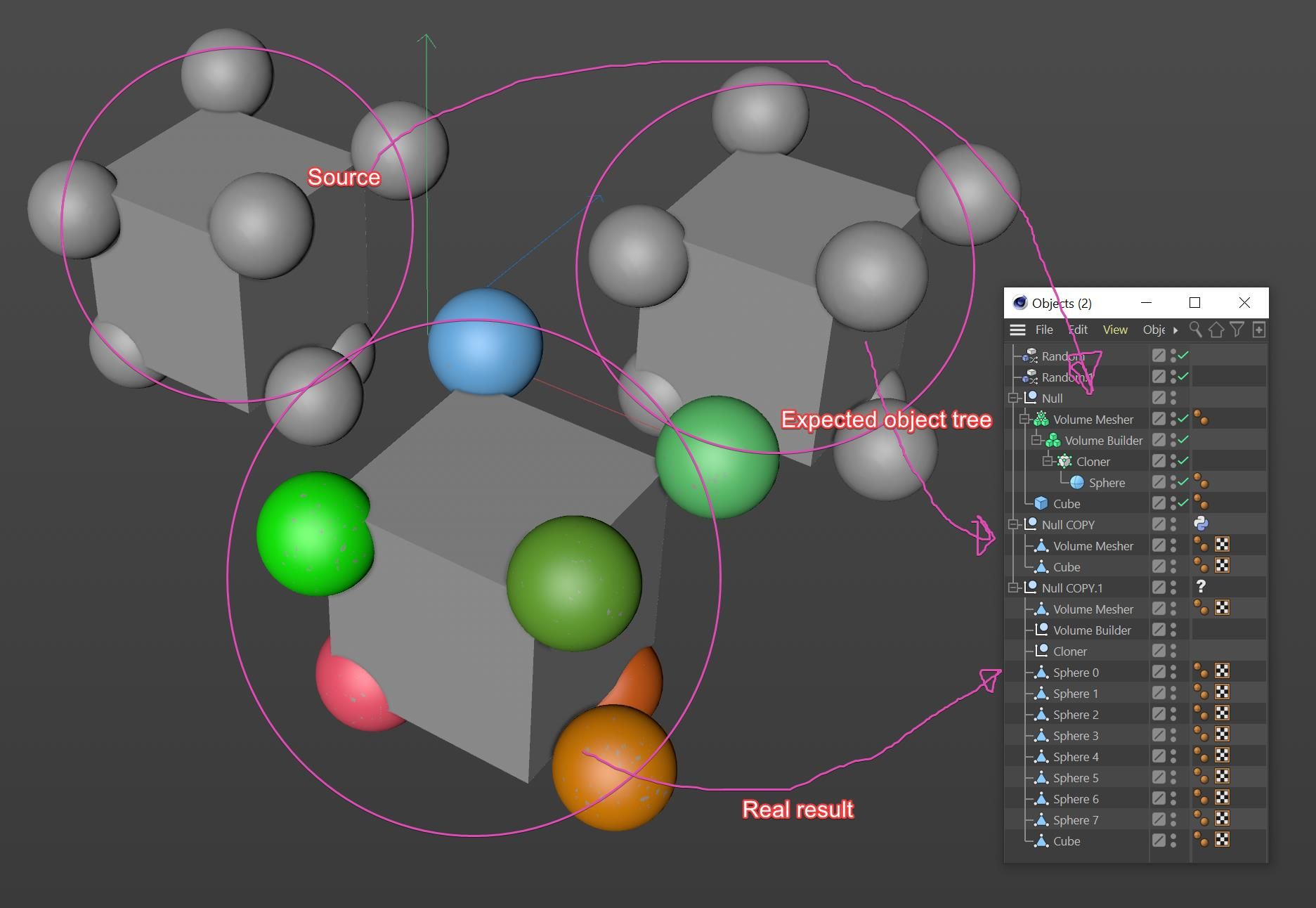
    Hello @rastan_cgi, Thank you for reaching out to us. This forum is targeted at software development with the Cinema 4D & Cineware SDK. Xpresso or Scene Nodes are not part of the scope of the forum and the support Maxon does deliver here. However, you already did post in the correct forum for asking an off-topic question, the General Talk forum. The community is welcome to discuss here topics that are adjacent to the Cinema 4D & Cineware SDKs, as for example Xpresso. But the SDK-Team cannot offer any support for these questions. If you seek an official answer from Maxon, you should contact user support. With that being said: Xpresso setups cannot automatically be converted into a Python or C++ plugin. You can provide a scene with a null object and your setup, but these workflows are not within the scope of the SDK-Team. When you seek help with reimplementing your Xpresso setup as a plugin, for example as a Python plugin, then we will need more information on what the Xpresso setup does. We can then tell you where you can find learning resources related to your goals, but you will have to write the code yourself. Cheers, Ferdinand
  • Access renderer specific settings with python

    Cinema 4D SDK sdk python
    6
    0 Votes
    6 Posts
    2k Views
    ferdinandF
    Hey @wen, Thanks for sharing the example scene! Got a new question though, what do you mean with: "In R25 Redshift does not have a "Raw" color profile anymore" I looked at the wrong parameter; I thought your second script was still for REDSHIFT_RENDERER_COLOR_MANAGEMENT_OCIO_RENDERING_COLORSPACE as the previous example, but it is for REDSHIFT_RENDERER_COLOR_MANAGEMENT_OCIO_VIEW. So, you are right, "Raw" is still there Cheers, Ferdinand
  • How to Center the Axis of Objects

    Cinema 4D SDK python r21
    4
    0 Votes
    4 Posts
    3k Views
    ferdinandF
    Hello @roman, I have forked this topic since this a new question. Please refer to the Forum Guidelines for details on forum procedures. The error message AttributeError: 'NoneType' object has no attribute 'GetAllPoints'. likely stems from you having no object selected when trying to run the script you posted. This is because the script simply assumes that op is populated, i.e., some kind of BaseObject, and even further it assumes that it is not only a BaseObject but also a PointObject. Both assumptions can prove false, as the user can have no selection, then op is None, or a selection which is not a PointObject, e.g., some parametric object. Your code will also not work for what you wanted to do regarding the last thread, as this new code only applies to a singular object. Your code is also a bit complicated for my taste, it could be done more cleanly like this: # Get the origin of the bounding box of the object, i.e., where # the axis should be. origin = node.GetMp() # The global matrix of the object. mg = node.GetMg() # The delta between where the axis is and where it should be delta = c4d.Matrix(off=origin) # Move all points by the inverse of that delta. node.SetAllPoints([(p * ~delta) for p in node.GetAllPoints()]) # Set the new node position node.SetMg(mg * delta) I have provided an example solution in the context of your last topic. The major insight here is that you have to do things then in two steps. First you go over all selcted objects to set their layers and try to move their axis. And after that you can calaculate the position of the null. Please also note that: Moving the axis of an object can be quite the can of worms when you start touching orientation or scale, as you then also have to update tangent tags, normal tags and other data. The provided code is an example and might still contain bugs you must fix yourself. We cannot provide full solutions. Cheers, Ferdinand The result: [image: 1640948064379-origin.gif] The test scene: test_scene.c4d The code: import c4d def main(): """ """ # Start an undo stack item. doc.StartUndo() # Add a new top-level layer newLayer = c4d.documents.LayerObject() layerRoot = doc.GetLayerObjectRoot() newLayer.InsertUnder(layerRoot) doc.AddUndo(c4d.UNDOTYPE_NEWOBJ, newLayer) # Let the user name the new layer newName = c4d.gui.RenameDialog(newLayer.GetName()) newLayer[c4d.ID_BASELIST_NAME] = newName # Get the selected objects. selectedObjects = doc.GetActiveObjects(c4d.GETACTIVEOBJECTFLAGS_NONE) # Iterate over the selected objects to change their layer and the layer # of the attached materials and optionally center their axis. for node in selectedObjects: # Attempt to center the axis for editable objects. if isinstance(node, c4d.PointObject): # Get the origin of the bounding box of the object, i.e., where # the axis should be. origin = node.GetMp() # The global matrix of the object. mg = node.GetMg() # The delta between where the axis is and where it should be delta = c4d.Matrix(off=origin) # Move all points by the inverse that delta. doc.AddUndo(c4d.UNDOTYPE_CHANGE, node) node.SetAllPoints([(p * ~delta) for p in node.GetAllPoints()]) # Move the object by that delta. node.SetMg(mg * delta) # Set the layer of the current node. doc.AddUndo(c4d.UNDOTYPE_CHANGE, node) node[c4d.ID_LAYER_LINK] = newLayer # Get all materials attached with material tags to the node. isTex = lambda node: node.IsInstanceOf(c4d.Ttexture) for material in [t.GetMaterial() for t in node.GetTags() if isTex(t)]: doc.AddUndo(c4d.UNDOTYPE_CHANGE, material) material[c4d.ID_LAYER_LINK] = newLayer # Compute the mean global offset for all objects in the selection. meanOffset = (sum((n.GetMg().off for n in selectedObjects)) * (1. / len(selectedObjects))) # Create a null object at that offset to parent the selected objects to. newLayerNull = c4d.BaseObject(c4d.Onull) newLayerNull[c4d.ID_LAYER_LINK] = newLayer newLayerNull[c4d.ID_BASELIST_NAME] = newName newLayerNull.SetMg(c4d.Matrix(off=meanOffset)) doc.InsertObject(newLayerNull) doc.AddUndo(c4d.UNDOTYPE_NEWOBJ, newLayerNull) # Loop again over all selected objects to parent them to the new null # object. for node in selectedObjects: # Get the global matrix of the node and then remove it from the scene. mg = node.GetMg() doc.AddUndo(c4d.UNDOTYPE_CHANGE, node) node.Remove() # Attach the node to its new parent and set its global matrix to the # stored value. node.InsertUnder(newLayerNull) node.SetMg(mg) # Close the undo item and push an update event to Cinema 4D. doc.EndUndo() c4d.EventAdd() if __name__ == '__main__': main()
  • 0 Votes
    10 Posts
    2k Views
    ferdinandF
    Hello @del, without any further questions or postings, we will consider this thread as solved by Friday the 4th, February 2022. Thank you for your understanding, Ferdinand
  • How to fix the bug of objects position in script

    Cinema 4D SDK python r21
    2
    0 Votes
    2 Posts
    886 Views
    ferdinandF
    Hello @roman, Thank you for reaching out to us. R21 has left the SDK support cycle, which primarily means we will not debug again such versions anymore and also do not fix bugs for it anymore. I have provided below a solution for your problem which has been tested with R25 because of that, but it should run fine in R21. Your problem primarily is rooted in you simply reparenting the objects. Objects store their transformation - their position, scale and orientation - as a matrix relative to their parent. So, when you have the objects a, b, c with the local positions (0, 100, 0), (0, 50, 0), (0, 0, 0) and b being parented to a, then the effective global position of b is (0, 100, 0) + (0, 50, 0) = (0, 150, 0). When you then parent b to c, its position will change from (0, 150, 0) to (0, 50, 0) since c only contributes the null vector to the position of its children. The same principle applies to the scale and orientation stored in the local transform matrix of an object. You were also missing some undo-steps, at least I assumed you did not skip them intentionally. The topic is also covered in the Python API Matrix Manual. Cheers, Ferdinand The result: [image: 1640700023739-reparent.gif] The script: """Moves the selected objects to a new layer and parent object. Your problem primarily is rooted in you simply reparenting the objects. Objects store their transformation - their position, scale and orientation - as a matrix relative to their parent. So, when you have the objects `a, b, c` with the local positions `(0, 100, 0), (0, 50, 0), (0, 0, 0)` and `b` being parented to `a`, then the effective global position of `b` is `(0, 100, 0) + (0, 50, 0) = (0, 150, 0)`. When you then parent `b` to `c`, its position will change from `(0, 150, 0)` to `(0, 50, 0)` since `c` only contributes the null vector to the position of its children. The same principle applies to the scale and orientation stored in the local transform matrix of an object. You were also missing some undo-steps, at least I assumed you did not skip them intentionally. """ import c4d def main(): """Entry point. """ # Start an undo stack item. doc.StartUndo() # Add a new top-level layer newLayer = c4d.documents.LayerObject() layerRoot = doc.GetLayerObjectRoot() newLayer.InsertUnder(layerRoot) doc.AddUndo(c4d.UNDOTYPE_NEWOBJ, newLayer) # Let the user name the new layer newName = c4d.gui.RenameDialog(newLayer.GetName()) newLayer [c4d.ID_BASELIST_NAME] = newName # Create a null object to parent the objects moved to the new layer to. newLayerNull = c4d.BaseObject(c4d.Onull) newLayerNull [c4d.ID_LAYER_LINK] = newLayer newLayerNull [c4d.ID_BASELIST_NAME] = newName doc.InsertObject(newLayerNull) doc.AddUndo(c4d.UNDOTYPE_NEWOBJ, newLayerNull) # Iterate over the selected objects and attach them both to the new layer # and layer null-object. for item in doc.GetActiveObjects(c4d.GETACTIVEOBJECTFLAGS_NONE): # Set the layer of the current item, detach it from its previous # parent and store its global matrix. doc.AddUndo(c4d.UNDOTYPE_CHANGE, item) item [c4d.ID_LAYER_LINK] = newLayer itemMg = item.GetMg() item.Remove() # Attach the object to the null and set its global matrix to the old # value. item.SetMg(itemMg) item.InsertUnder(newLayerNull) # Get all materials attached with material tags to the item. isTex = lambda item: item.IsInstanceOf(c4d.Ttexture) for material in [t.GetMaterial() for t in item.GetTags() if isTex(t)]: doc.AddUndo(c4d.UNDOTYPE_CHANGE, material) material[c4d.ID_LAYER_LINK] = newLayer # Close the undo item and push an update event to Cinema 4D. doc.EndUndo() c4d.EventAdd() if __name__ == '__main__': main()

  • Detect tool button pressed - outside tool plugin

    Cinema 4D SDK r20 python c++
    5
    0 Votes
    5 Posts
    970 Views
    C4DSC
    As I won't be spending more time on this project there is no need for delving further into the subject. As such I am setting the status of the topic to "solved".
  • UserData

    Moved Cinema 4D SDK python r25 windows
    4
    1
    0 Votes
    4 Posts
    1k Views
    ferdinandF
    Hello @bokibo, without any further questions or postings, we will consider this thread as solved by Friday the 4th, February 2022. Thank you for your understanding, Ferdinand
  • 0 Votes
    5 Posts
    869 Views
    bacaB
    @m_magalhaes Thanks Manuel, I appreciate your wise support every time. Merry Xmas and Happy New Year!
  • 0 Votes
    5 Posts
    2k Views
    H
    Many thanks for your help and thorough explanations, Ferdinand! Much appreciated! I'll go create a temp document and clones, and don't expect much more resistance from this particular issue. Thanks again, and have a happy holiday season!
  • How to pass a value from GeDialog to another class

    Cinema 4D SDK
    5
    0 Votes
    5 Posts
    1k Views
    D
    @ferdinand Thank you for your awesome explanation! I will keep this post as a reference for my studies as your approach seems a bit complicated for my understanding at the moment. I'm learning a lot with your contribution in this forum, and in this case here it's not gonna be different. Cheers
  • 0 Votes
    3 Posts
    768 Views
    ferdinandF
    Hello @RenoBozo, without any further questions or postings, we will consider this thread as solved by Friday the 4th, February 2022. Thank you for your understanding, Ferdinand
  • Exporting data from Takes to a file

    Cinema 4D SDK sdk r23 python
    8
    0 Votes
    8 Posts
    2k Views
    F
    Hi Manual, This is exactly what I needed. Thank you very much. Best regards, Tomasz
  • 0 Votes
    4 Posts
    1k Views
    ferdinandF
    Hello @wuzelwazel, without any further questions or postings, we will consider this thread as solved by Friday the 4th, February 2022. Thank you for your understanding, Ferdinand
  • Unique Material per Object Plugin instance?

    Cinema 4D SDK r20 python macos
    4
    0 Votes
    4 Posts
    1k Views
    H
    Hi Guys, as I'm pretty sure I found a way to achieve what I'm after I thought I update this thread. Maybe this will help others as well. After taking some time to make NodeData.CopyTo() work, I ended up not getting it to work at all. So I thought about how I could achieve what I'm after a different way. Long story short, I ended up implementing a MessageData plugin as some kind of watchdog for a document. Since its CoreMessage runs on the main thread I can happily insert and delete materials as much as I wish to. (At least I'm hoping so ) Tl; dr The idea behind this goes as follows. I have a timer running and in addition to that I listen for c4d.EVMSG_CHANGE and do some checking to see if the scene needs to update. In my case it's comparing the amount of a specific object against the amount of "specific" materials. If there's a difference I use that difference to delete or insert materials until there's no difference. Once there's no difference I can assign the materials to the objects and let each object control its own material. To distinguish between materials responsible for my plugin and the ones that aren't I make sure to put a unique plugin id inside the base container of the material I can then check for. Here's a code snippet of that MessageData: class Watchdog(c4d.plugins.MessageData): PLUGIN_ID = "Use your own unique one" PLUGIN_NAME = "A MessageData plugin." PLUGIN_INFO = 0 def __init__(self): self._time = 1000 def GetTimer(self): return self._time def SetTimer(self, time): self._time = time @property def should_execute(self): is_mainthread = c4d.threading.GeIsMainThread() check_running = ( bool(c4d.CheckIsRunning(c4d.CHECKISRUNNING_EDITORRENDERING)), bool(c4d.CheckIsRunning(c4d.CHECKISRUNNING_EXTERNALRENDERING)), bool(c4d.CheckIsRunning(c4d.CHECKISRUNNING_INTERACTIVERENDERING)), bool(c4d.CheckIsRunning(c4d.CHECKISRUNNING_ANIMATIONRUNNING)), bool(c4d.CheckIsRunning(c4d.CHECKISRUNNING_VIEWDRAWING)) ) is_running = any(item is True for item in check_running) return is_mainthread and not is_running def CoreMessage(self, mid, mdata): if not self.should_execute: return False doc = c4d.documents.GetActiveDocument() # SceneHandler is a custom class I delegate the whole creation and comparing stuff to. objs, mats = ..., ... scene = SceneHandler(objs, mats) # Check for a change and start the timer again. But only if the scene should update. Otherwise the timer would run all the time. if mid == c4d.EVMSG_CHANGE: if scene.should_update: self.SetTimer(1000) # If we get a timer event we update the scene as long as it shouldn't update anymore. We can then stop the timer. if mid == c4d.MSG_TIMER: if not scene.should_update: self.SetTimer(0) scene.update(doc) return True Maybe this will help others. Since I found a solution for my problem this thread can be marked solved. Cheers, Sebastian
  • RS Reference Node in Python

    Cinema 4D SDK s24 python windows
    3
    0 Votes
    3 Posts
    574 Views
    ferdinandF
    Hello @kverhaar, without any further questions or postings, we will consider this thread as solved by Friday the 4th, February 2022. Thank you for your understanding, Ferdinand
  • 0 Votes
    7 Posts
    2k Views
    F
    That's exactly what I was looking for. Thank you, Ferdinand
  • Detect new project in Python plugin

    Cinema 4D SDK python
    4
    0 Votes
    4 Posts
    710 Views
    ferdinandF
    Hello @mheberlein, without any further questions or postings, we will consider this thread as solved by Friday the 4th, February 2022. Thank you for your understanding, Ferdinand
  • Get object by active tag in Python

    Cinema 4D SDK python
    5
    0 Votes
    5 Posts
    1k Views
    ferdinandF
    Hello @stanDM, without any further questions or postings, we will consider this thread as solved by Friday the 4th, February 2022. Thank you for your understanding, Ferdinand
  • Number of Init() calls in ObjectData

    Moved Bugs python r25
    3
    0 Votes
    3 Posts
    1k Views
    a_blockA
    Hi Ferdinand, thanks for the quick and detailed answer, even trying to find workarounds. I had hoped, I could spare you this extra effort by saying, that it's no functional issue on my end. I am already satisfied with the confirmation. Often it is enough to be able to stop worrying about my own mental integrity. And while this new behavior certainly will not improve performance, I can happily ignore performance issues beyond my own responsibility. Regarding the GeDialog stuff: No worries, either. As mentioned back then, no future fix/solution can help me there and I went down a different route to get the project done with support for R19 to present. Yet, I'm thankful for your tenacity and that the issue is still being researched. Some meals simply need time to develop their flavours. Thanks and cheers, Andreas