• Change Bodypaint Active Channel Color

    python
    3
    1
    0 Votes
    3 Posts
    560 Views
    A
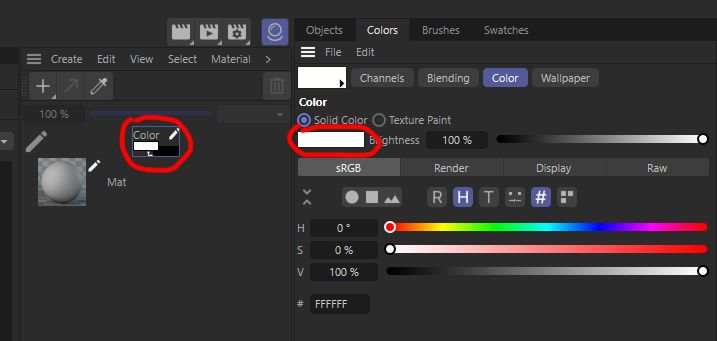
    Hi @m_adam. Thanks for the information! I needed this feature to generate UV texture, where polygon selection tags colorizes the texture with different colors. And since "Fill Layer, Fill Polygons and Outline Polygons" commands uses color from current "Channel Color" I needed option to change the color with a script. [image: 1675761996302-g89cotievo.png] c4d.CallCommand(170150) # Fill Layer c4d.CallCommand(170151) # Fill Polygons c4d.CallCommand(170152) # Outline Polygons But if this is not possible, one workaround that come to mind is to use "UV to Mesh" Scene Nodes Deformer/Capsule and render actual mesh with aligned camera. Cheers, Arttu
  • Snap to grid while MouseDrag()

    2023 python
    2
    0 Votes
    2 Posts
    463 Views
    ferdinandF
    Hello @pim, Thank you for reaching out to us. It depends a bit on what you expect to happen here. There is the snapping module of Cinema 4D but you cannot actually get values out of it, i.e., you cannot compute the snapped value of x with it, you can only define the snap settings with it. But when I understand your correctly, you just want to quantize some mouse inputs for a plugin and for that you must indeed compute the values yourself. It is best to also draw a snapping location onto the screen, so that user can see where the actual input is in relation to the mouse. How the snapping works in detail depends on what you want to do exactly when quantizing your plane drawing. The snapping module might become relevant here, because with it you can retrieve the working planes, which might be useful when placing planes. Cheers, Ferdinand
  • Plugin opens on Mac not correctly

    2023 python macos
    13
    1
    0 Votes
    13 Posts
    2k Views
    ferdinandF
    Hello @pim, In addition to my answer via mail, I will also answer here, as this might be interesting for the rest of the community. Cheers, Ferdinand So, the question was here "Why does my tree view not open with the right size?". The easy answer to this is that: You did neither set a minimum size for the dialog in GeDialog.Open(). Nor one for the tree view itself via GeDialog.AddCustomGui(). Both in conjunction did result in your dialog collapsing down to zero height. What can I do? Not much, the TreeViewCustomGui is not designed to scale to the size of its content. The underlying question is what you expect to happen here. a. Just have the tree view have some fixed minimum size, regardless of its content. b. Have the tree view initialize automatically to size, i.e., when the view has 10 items upon opening, it should have exactly 10 items height. When it is (a.) what you want, then this is easily doable with the minimum size passed to GeDialog.AddCustomGui(). When it is (b.), then you are more or less out of luck, as a tree view cannot scale automatically to the size of its content. You can adjust the minimum size dynamically based on the content which is going to be placed in the tree view, but when the content changes, you will have to flush your layout in order to be able to set a new minimum size. On a practical level it is also not so desirable to have a tree view scale like this, as this minimum height is not well defined. Should it be all items, or just all top level items, i.e., fully collapsed or fully expanded (which is implied by your example as all nodes start out as expanded). Let's say we choose fully collapsed. What happens when you have so many root nodes that the tree view will not fit on screen when making space for all root nodes. Example Result The dialog is set to have a minimum height which matches the total number of nodes in it. [image: 1675704054022-58d6b1aa-de83-484f-9d48-d6a0d327a98f-image.png] Code I had to cut here a bit, but the relevant parts are: class TreeNode: # ... def __len__(self): """(f_hoppe): Counts all descendants of this node, including the node itself. Implemented fully recursively. Should be implemented iteratively for production due to stack overflows and Python's recursion limit preventing them. Or the data should be acquired when textures are collected. """ count: int = 1 for child in self.children: count += len(child) class ListView(c4d.gui.TreeViewFunctions): COLUMN_COUNT: int = 1 MIN_LINE_HEIGHT: int = 24 MIN_WIDTH: int = 500 def __init__(self): # The root nodes of the tree view. self._rootNodes: list[TreeNode] = [] def __len__(self): """(f_hoppe): Returns the number of tree nodes in the instance. """ return sum([len(node) for node in self._rootNodes]) def GetMinSize(self) -> tuple[int, int]: """(f_hoppe): Returns the minimum GUI size for the data of this ListView instance. """ # But all these classic API pixel values are quite wonky anyways and the tree view does # many custom things. So we must do some ugly magic number pushing. Subtracting nine units # from the actual height of each row gave me sort of the best results, but the tree view # GUI does not scale linearly in height with the number of rows. Meaning that what looks # good for 5 items might not look good for 50 items. return (ListView.MIN_WIDTH, (ListView.MIN_LINE_HEIGHT - 9) * len(self)) def GetColumnWidth(self, root: TreeNode, userdata: None, obj: TreeNode, col: int, area: c4d.gui.GeUserArea): """(f_hoppe): This cannot be a constant value, as we will otherwise clip data. """ return area.DrawGetTextWidth(obj.textureName) + 24 def GetLineHeight(self, root, userdata, obj, col, area): """(f_hoppe): Used constant value. """ return ListView.MIN_LINE_HEIGHT # ... class SimpleDialog (c4d.gui.GeDialog): ID_TRV_TEXTURES: int = 1000 def __init__(self) -> None: self._treeView: c4d.gui.TreeViewCustomGui = None # This builds the tree node data so that self._listView._rootNodes holds the top level # node(s) for the tree managed by this ListView instance. self._listView: ListView = self.GetTree() super().__init__() def CreateLayout(self) -> bool: """(f_hoppe): I substantially rewrote this. """ # Because we already initialized the ListView data, we can use it to compute the minimum # size of the gadget. w, h = self._listView.GetMinSize() print(f"{self._listView.GetMinSize() = }, {len(self._listView) = }") # Use these values to define a default size so that it shows all columns. What you want to # be done here is sort of not intended by the TreView GUI, although admittedly desirable. # The closest thing we can do is set the minimum size for the gadget, so that all lines # will fit into it. This will then ofc also have the side effect that the GUI cannot be # scaled down beyond this point. You might want to implement ListView.GetMinSize() in a # different manner, so that it does not take into account all nodes and instead just the # top level nodes. self._treeView = self.AddCustomGui( id=SimpleDialog.ID_TRV_TEXTURES, pluginid=c4d.CUSTOMGUI_TREEVIEW, name="", flags=c4d.BFH_SCALEFIT | c4d.BFV_SCALEFIT, minw=w, minh=h, customdata=SimpleDialog.SETTINGS_TREEVIEW) if not isinstance(self._treeView, c4d.gui.TreeViewCustomGui): raise MemoryError(f"Could not allocate tree view.") # If you want to do this at runtime, i.e., load a new texture path, you would have to # call GeDialog.LayoutChanged() on the layout group which contains the tree view, add # the tree view again (with new min size values), and then call GeDialog.LayoutChanged() # on the group. It might be easier to just live with a fixed minimum size just as # (300, 300) return True # ...
  • How do you collapse complex dependies in order?

    2023 python
    2
    0 Votes
    2 Posts
    609 Views
    ferdinandF
    Hello @fss, Thank you for reaching out to us. The Cinema 4D classic API has no dependency graph for its scene elements. If you want such information, you must gather it yourself. This is however a non-trivial task. You also have been asking this same question multiple times both here on the forum and via mail, with both Manuel and I giving you multiple times the same answer. To "collapse" things, you must use 'Current State to Object (CSTO)' and then join the results, as first reducing things to their current cache state (CSTO) will remove the dependencies between things. You can/could also do this manually, just as the joining operation, but it is then up to you to develop that. Please understand that we will not answer the same question over and over again. We enjoy and encourage discussions with users, but as stated in our forum guidelines: We cannot provide support for [...] code design that is in direct violation of Cinema's technical requirements [...] Find below an example. Cheers, Ferdinand Result for the fairly complex Mograph asset Example Scenes\Disciplines\Motion Graphics\01 Scenes\Funny Face.c4d: [image: 1675690420936-connect_and_delete.gif] Code '''Example for mimicking the "Connect & Delete" command in Python. Must be run from the Script Manager with the root objects selected whose local hierarchies should be collapsed. ''' import c4d import typing def Collapse(objects: list[c4d.BaseObject]) -> None: """Collapses all items in #objects as individual root nodes into singular objects. This function mimics the behaviour of the builtin (but unexposed) "Connect & Delete" command by first running the "CSTO" and then "JOIN" command. With setups complex enough, this can still fail due to the non-existent dependency graph of the classic API (when one does CSTO things in the wrong order). In 99.9% of the cases this will not be the case, but one should get the inputs with #GETACTIVEOBJECTFLAGS_SELECTIONORDER as I did below to give the user more control. (or alternatively do not batch operate). """ if len(objects) < 1: raise RuntimeError() doc: c4d.documents.BaseDocument = objects[0].GetDocument() doc.StartUndo() # CSTO all local hierarchies in #objects and replace these root nodes with their collapsed # counter parts. result = c4d.utils.SendModelingCommand(c4d.MCOMMAND_CURRENTSTATETOOBJECT, objects, c4d.MODELINGCOMMANDMODE_ALL, c4d.BaseContainer(), doc, c4d.MODELINGCOMMANDFLAGS_NONE) if not result or len(result) != len(objects): raise RuntimeError() for old, new in zip(objects, result): parent, pred = old.GetUp(), old.GetPred() doc.AddUndo(c4d.UNDOTYPE_DELETEOBJ, old) old.Remove() doc.InsertObject(new, parent, pred) doc.AddUndo(c4d.UNDOTYPE_NEWOBJ, new) # Join the CSTO results root by root object, and then replace the CSTO results with the final # collapsed result. JOIN is a bit weird when it comes to transforms, so we must store the # transform of the to be joined object, then zero it out, and finally apply it to the joined # result again. for obj in result: mg: c4d.Matrix = obj.GetMg() obj.SetMg(c4d.Matrix()) joined = c4d.utils.SendModelingCommand(c4d.MCOMMAND_JOIN, [obj], c4d.MODELINGCOMMANDMODE_ALL, c4d.BaseContainer(), doc, c4d.MODELINGCOMMANDFLAGS_NONE) if not joined: raise RuntimeError() parent, pred = obj.GetUp(), obj.GetPred() doc.AddUndo(c4d.UNDOTYPE_DELETEOBJ, obj) obj.Remove() new: c4d.BaseObject = joined[0] new.SetMg(mg) doc.InsertObject(new, parent, pred) doc.AddUndo(c4d.UNDOTYPE_NEWOBJ, new) doc.EndUndo() c4d.EventAdd() doc: c4d.documents.BaseDocument # The active document op: typing.Optional[c4d.BaseObject] # The active object, can be None. def main() -> None: """Runs the #Collapse() function on all currently selected objects as root nodes. """ selection: list[c4d.BaseObject] = doc.GetActiveObjects(c4d.GETACTIVEOBJECTFLAGS_SELECTIONORDER) if len(selection) < 1: print("Please select at least one root object.") else: Collapse(selection) if __name__ == "__main__": main()
  • Keyframing the source file on an ImageTexture shader

    r25
    3
    0 Votes
    3 Posts
    701 Views
    mocolocoM
    Hi, A simple addition on CTrack and DescId as I was also faced to this a time ago. You can consult the @ferdinand's explanations and exemples on CTrack to the following post : https://developers.maxon.net/forum/topic/14315/solved-how-to-setup-a-ctrack-on-tag-plugin-ui-slider-with-extended-details/8 Cheers, Christophe
  • Struggling on SetParameter for OLight

    python s26
    4
    0 Votes
    4 Posts
    1k Views
    mocolocoM
    Hi @m_adam, Thanks a lot for the flags, it does work as expected now. Are c4d.DESCFLAGS_GET_NONE and c4d.DESCFLAGS_GET_0 similars? Cheers, Christophe.
  • Get material / texture resolution.

    2023 python
    3
    1
    0 Votes
    3 Posts
    620 Views
    P
    Thanks for the good explanation and the example. Regards, Pim
  • Back on "message after tag delete" post

    python s26 sdk
    5
    0 Votes
    5 Posts
    1k Views
    mocolocoM
    Hi @ferdinand, Thanks a lot one more time for all the detailed examples and informations. I finally opt to a data container of the node, mostly due to the fact that the hooks are volatile and need to be set all the time. I also ran some tests with globals without having encounter issues, but indeed you need to be careful when handling this approach. Cheers, Christophe
  • How to make Icon buttons and Shortcut in python plugin

    python
    2
    0 Votes
    2 Posts
    556 Views
    ManuelM
    Hi, Welcome to the forum, you do not need to be sorry, we all ask basic question. There are differences between creating a script and plugins. Script is something you create inside the Script Manager. You can save them in a file and this file extension is .py. Plugins are something you must create in an external editor and save the file with the extension .pyp or .pypv (for encrypted files) with a certain plugin structure There are differents way to create an icon and a shortcut. icon for script: as state here, you can just use the command in the Script Manager to load a file that will be used as the icon for that script. If you save the script or already saved it, the picture will be saved in the same directory with the same name as the script. save the picture you want to use for a script in the same directory than your script with the same filename. icon for plugins: Plugins are registered using register commands like RegisterCommandPlugin, most of those commands allow you to pass as an argument the bitmap that will be used as the icon for that plugin. Shortcuts: To create shortcuts you must use the function AddShortcut you can check this thread where Maxime answer the question in the second part of his thread. Finally, you might want to create a palette to store your different icons and add the possibility to load the palette. Ferdinand answer this question in this thread. Cheers, Manuel
  • Building menus with C4DPL_BUILDMENU in S26+

    s26 python
    4
    0 Votes
    4 Posts
    2k Views
    ferdinandF
    Hello @alexandre-dj, I know all menus in C4D have their own id, so this should be an easy check. That is only true on a relatively abstract level. There are string symbols, e.g., IDS_EDITOR_PLUGINS for menu resources, but there is no strict namespace management or anything else on might associate with statements such as 'all menus in C4D have their own id'. Also note that all menu entries in a menu container are stored under the integer IDs MENURESOURCE_COMMAND and MENURESOURCE_SUBMENU as shown in my example above. So, when you have a menu with ten commands and four sub-menus, all fourteen items are stored under these two IDs. This works because BaseContainer is actually not a hash map as one might think, and can store more than one value under a key. Long story short - traversing and modifying menus is not ultra complicated but I would also not label it as 'easy' ; which is why I did provide the example in my previous posting. When firing c4d.gui.GetMenuResource("M_EDITOR") to Get the whole menu of Cinema 4D (as you mention in your code here) I get a different address every time: >>> c4d.gui.GetMenuResource("M_EDITOR") <c4d.BaseContainer object at 0x000001B406C86580> >>> c4d.gui.GetMenuResource("M_EDITOR") <c4d.BaseContainer object at 0x000001B406CA6A40> >>> c4d.gui.GetMenuResource("M_EDITOR") <c4d.BaseContainer object at 0x000001B406C88C80> You are calling here the Python layer for returning a Python object representation of the C++ object that represents the menu. Cinema 4D is still a C++ application and the menu exists in your memory with the layout defined by the C++ type BaseContainer. That type has memory-wise nothing to do with its Python counter part c4d.BaseContainer. So, the Python layer must create that Python data on the fly, as otherwise the memory-footprint of Cinema 4D would double (actually more, because Python data is not exactly sparse data) and synchronizing both data layers would bring Cinema 4D to a crawl. TLDR; you retrieve the same data expressed as a different memory object because 'that is how Python works'. So when I use c4d.gui.SearchMenuResource(main_menu_ressource, my_custom_menu) to check if my custom menu is part of the main menu, this always return False, as the address of the main_menu object changes. Why your call fails here, depends a bit on what you are passing. The first argument should be the string symbol inside a sub menu, and the second item is the sub menu. When you store a reference to a sub-menu from a previous call to GetMenuResource, this might not work when SearchPluginMenuResource searches by identity instead of equality, i.e., it expects that container to be at a certain memory location (have not tried though). There is also c4d.gui.SearchPluginMenuResource(identifier='IDS_EDITOR_PLUGINS'), which should be sufficient to find anything that does not produce a name collision. I personally would just write my own stuff as demonstrated above, since I can then search however I want to. Cheers, Ferdinand
  • Rendering into Multipassbitmap a "Depth Matte" Layer

    c++
    5
    0 Votes
    5 Posts
    944 Views
    ferdinandF
    Hey @wickedp, thank your for your reply. First of all, I don't expect you to do everything in case my answer gave the impression that I am unwilling to add such an example - that is not the case. I just must play a bit the gatekeeper for not letting our code examples become too convoluted and fringe. So, this was less a "ugh, we do not have time for this" than a "what demonstrates the general relevance of such example/information for most users?" thing. First of all, thank you for sharing what you would like to have documented as an example and your code. I personally would still say that this is an extremely specific example of a use case most users probably will never encounter. Which makes it a not so good example case. But we also have many fringe examples in our code base, and in the case one needs such example, it is quite helpful, as the parameter handling of bitmaps is a bit cryptic. I have added a task to our task pool to add such an example. I will add it in one of the next releases. Cheers, Ferdinand
  • Adding Layers to a MultipassBitmap

    c++
    2
    0 Votes
    2 Posts
    475 Views
    ManuelM
    Hi, If you want the layer and folder to be displayed in the picture viewer you need to define the parameter MPBTYPE_SAVE to True. MPBTYPE_SHOW is defined by default to true when you add a layer. This parameter will just disable the layer as seen below. (the red eye) [image: 1674808233490-7375d915-1e62-4b6b-b174-3a16d05a5e20-image.png] This example will create a folder with a layer in it and another layer below the folder. If it is working with pyhton, it should work with c++, you can share a bit of your code so we can reproduce it. from typing import Optional import c4d doc: c4d.documents.BaseDocument # The active document op: Optional[c4d.BaseObject] # The active object, None if unselected def main() -> None: mpb = c4d.bitmaps.MultipassBitmap(640, 480, c4d.COLORMODE_ARGB) folder1 = mpb.AddFolder(None) folder1.SetParameter(c4d.MPBTYPE_NAME, "folder") folder1.SetParameter(c4d.MPBTYPE_SAVE, True) layer1 = folder1.AddLayer(None, c4d.COLORMODE_ARGB) layer1.SetParameter(c4d.MPBTYPE_NAME, "layer1") layer1.SetParameter(c4d.MPBTYPE_SAVE, True) layer2 = mpb.AddLayer(folder1, c4d.COLORMODE_ARGB) layer2.SetParameter(c4d.MPBTYPE_NAME, "layer2") layer2.SetParameter(c4d.MPBTYPE_SAVE, True) c4d.bitmaps.ShowBitmap(mpb) if __name__ == '__main__': main() Cheers, Manuel
  • Create RS Standard Material instead of RS Material

    2023 python
    6
    2
    0 Votes
    6 Posts
    1k Views
    P
    Ok, thank you.
  • Render settings Multi-Pass flag

    c++ sdk
    4
    1
    0 Votes
    4 Posts
    709 Views
    ferdinandF
    Hello @wickedp, I have forked your questions as they both did constitute new topics, find them here: Rendering into Multipassbitmap Depth Pass Adding Layers to a MultipassBitmap Cheers, Ferdinand
  • Inheritance created by Python script not getting saved

    python
    8
    0 Votes
    8 Posts
    1k Views
    J
    @ferdinand Thank you so much. Adding: inheritance1.Message(c4d.MSG_MEUPREPARE, doc) Solved the issue.
  • Changing DataType of a Value Node

    2023 python
    3
    1
    0 Votes
    3 Posts
    584 Views
    ManuelM
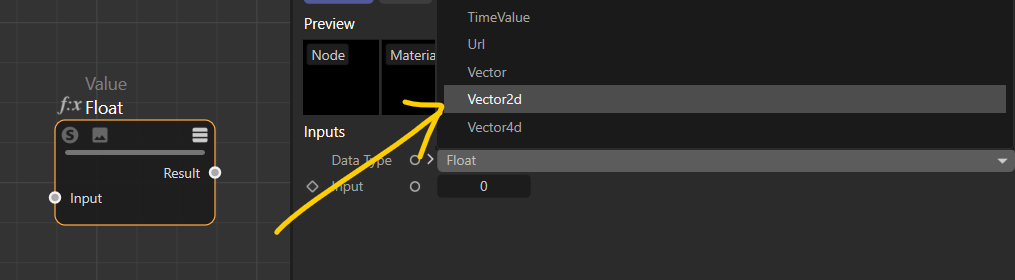
    Hi @bentraje, Nodes and ports are GraphNode. A GraphNode can store any kind of maxon Data. Using SetValue or SetDefaultValue on the "True Node" level will not change the value of a port. That is why you still need to find the port you want to change the value. SetDefaultValue internally encapsulate the value in a maxon.Data and use the SetValue function to define the value for the ID DESCRIPTION::DATA::BASE::DEFAULTVALUE. I do not see any advantage using SetValue instead of SetDefaultValue. While the GraphNode can receive any kind of Maxon Data, you can still define the DataType it should use. You must use the function SetValue to define the ID "fixedtype". In c++ you would do something like this: port.SetValue(nodes::FixedPortType, GetDataType<neutron::OBJECT_FLAGS>()) iferr_return;. Unfortunately, you cannot do it with python because you cannot define the datatype. If the Datatype is not defined, it will be deducted from the incoming or outgoing connection. In the case of the "Type" node, you are defining the port's value with this ID "net.maxon.parametrictype.vec<2,float>". This ID will allow the system to call the right CoreNode to manage this kind of DataType. The Datatype of this port is maxon::Id. I hope it is a bit clearer. I will try to add that to one of our manuals or in the documentation itself. Cheers, Manuel
  • Possible typo in documentation

    python
    3
    0 Votes
    3 Posts
    619 Views
    .
    Thanks for the info and adding the tag. I totally forgot that the Cafe' merged. I'm so used to approaching from my view. I actually answered somebodies question yesterday and at the very end saw the C++ tag and hit delete Thanks for tips on the GUI. I was able to implement what I needed.
  • How to get weights from a Vertex Map tag on an uneditable object

    2023 python
    5
    0 Votes
    5 Posts
    939 Views
    ManuelM
    @kng_ito said in How to get weights from a Vertex Map tag on an uneditable object: Sorry for asking a question that has already been resolved in another thread. Don't worry, we are glad to help. Cheers, Manuel
  • API for Adding a Port on a Group Node?

    2023 python
    5
    1
    0 Votes
    5 Posts
    841 Views
    B
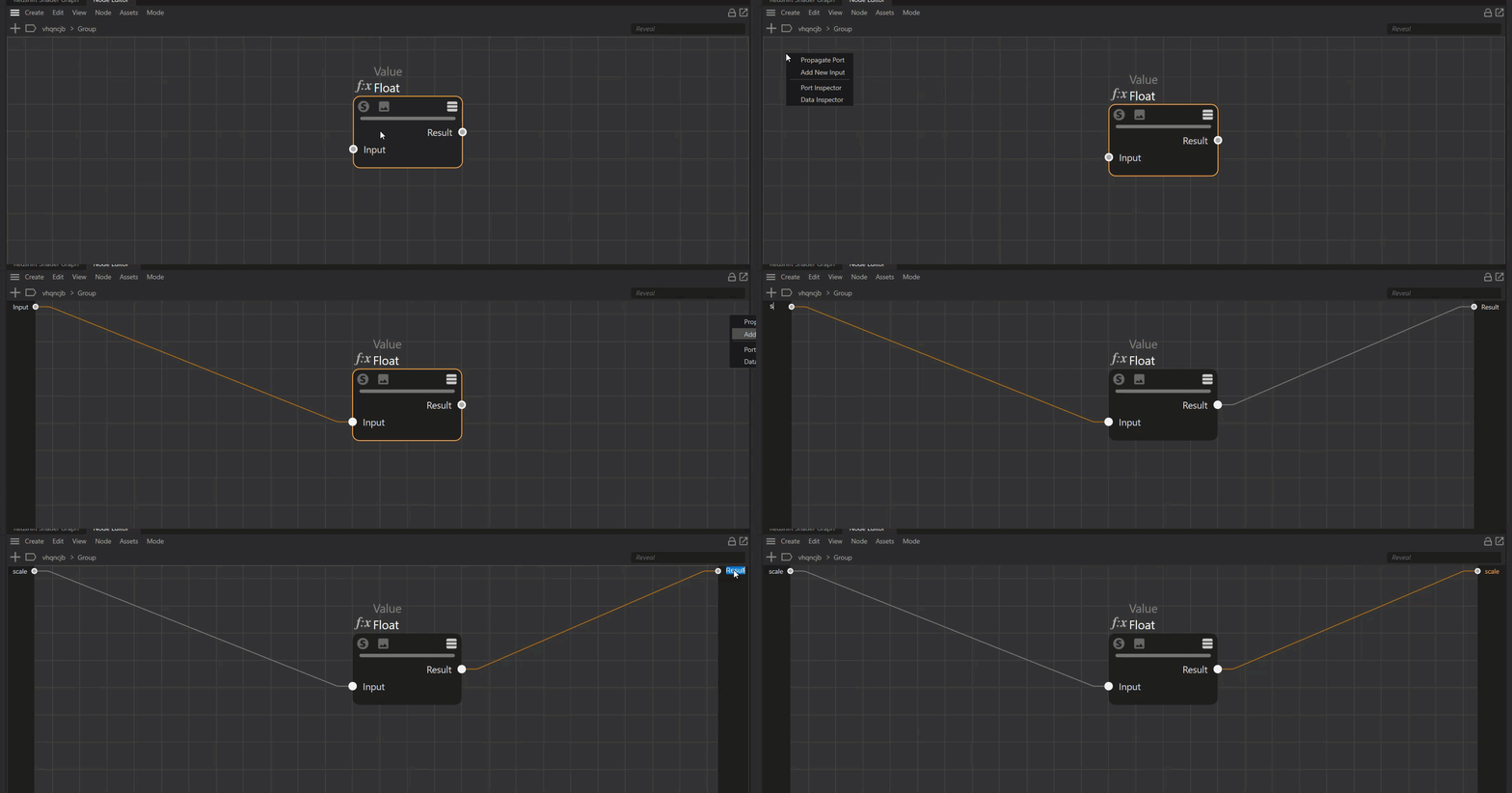
    @manuel Thanks for the illustration. Works as expected. When you have this statement: maxon.GraphModelHelper.FindNodesByAssetId(graph,"net.maxon.node.type", True, value) valueNode = value[0] inputNode = valueNode.GetInputs().FindChild("in") I'm guessing this part of my previous code is no longer working and so we need to reestablish the variable again. value = selectedNodes[0] Anyhow, thanks again. Closing this thread now
  • Set the Preview of an Asset using an Image file.

    2023 python
    8
    0 Votes
    8 Posts
    2k Views
    ferdinandF
    Hello @tdapper, I still do not fully understand what you want to do, but in general, my answer does not change much. I do not want to be rude here, but in C++ you have everything you need. And what you want to do here, is fundamentally interfere with how the Asset API works. Such low-level access is traditionally the domain of the C++ API and not the Python API. Bottom line is that it's cool that the asset browser automatically creates thumbnails [...] That was less me showing off the features of the asset API and more pointing out its general approach. Therefore we are basically trying to replicate the functionality you get when you right-click on the thumbnail in the Asset Browser and Click "Update Thumbnail from File...". 'Update Thumbnail from File...' will not prevent thumbnails from being overwritten either. So the only way to do so, would be to make the metadata entry read-only as pointed out in my first posting. Perhaps there is a way to just immediately kill the job that creates the thumbnail from being generated in the background or prevent that job from starting in the first place. If that is not possible, maybe there is a message we could intercept to know the thumbnail has been updated so we can run our workaround right after the thumbnail creation job is finished instead of waiting a hardcoded amount of time. Maybe there is another option that we're not clearly seeing right now? Neither your first nor second option are possible. The preview thumbnail job queue is non-public and there is no such thing as messages in the maxon API. There are Observables which realize the idea of events, but they are not exposed in Python nor are you able to stop a preview rendering with them. Again, I do not want to be rude here, but as pointed out in my first posting, what you want to do is not intended. You could get hacky from the Python API, but that is more or less up to you. [image: 1674145517216-982bbbbf-ca43-4f16-a85c-b9b5cb836a6f-image.png] Fig. 1: The physical location of thumbnails for local assets is always the same, net.maxon.asset.previewimageurl.meta.png. With that knowledge one can infer the future pyhsical location of a thumbnail for a local asset. # Create a new object asset. asset: maxon.AssetDescription = maxon.AssetCreationInterface.CreateObjectAsset( obj, doc, storeAssetStruct, assetId, assetName, assetVersion, assetMetadata, True) # Get the physical location of the asset #asset, normally one should not touch # AssetDescriptionInterface.GetUrl(). Then get the directory of that path and infer the # preview thumbnail location from it. assetUrl: maxon.Url = asset.GetUrl() assetPath: maxon.Url = maxon.Url(assetUrl.GetSystemPath()) previewFile: maxon.Url = assetPath + maxon.Url("net.maxon.asset.previewimageurl.meta.png") # Print out the paths, #previewFile won't yet exist at this point, because the thumbnailing is # parallelized. print (f"{assetUrl = }") print (f"{assetPath = }") print (f"{previewFile = }") print (f"{os.path.exists(previewFile.GetUrl()) = }") Example output: assetUrl = file:///C:/Users/f_hoppe/AppData/Roaming/Maxon/2023.1.3_97ABE84B/userrepository/object_a2c9ff14d748481fb9a8ae03d7bfa9b7/1/asset.c4d assetPath = file:///C:/Users/f_hoppe/AppData/Roaming/Maxon/2023.1.3_97ABE84B/userrepository/object_a2c9ff14d748481fb9a8ae03d7bfa9b7/1/ previewFile = file:///C:/Users/f_hoppe/AppData/Roaming/Maxon/2023.1.3_97ABE84B/userrepository/object_a2c9ff14d748481fb9a8ae03d7bfa9b7/1/net.maxon.asset.previewimageurl.meta.png os.path.exists(previewFile.GetUrl()) = False With that knowledge you could start messing with that file. But that is obviously out of scope of support and a hack. Otherwise you will have to use the C++ API or file a bug report for your thumbnails being black in the first place. Cheers, Ferdinand