Maxon Developers Maxon Developers
    • Documentation
      • Cinema 4D Python API
      • Cinema 4D C++ API
      • Cineware API
      • ZBrush Python API
      • ZBrush GoZ API
      • Code Examples on Github
    • Forum
    • Downloads
    • Support
      • Support Procedures
      • Registered Developer Program
      • Plugin IDs
      • Contact Us
    • Categories
      • Overview
      • News & Information
      • Cinema 4D SDK Support
      • Cineware SDK Support
      • ZBrush 4D SDK Support
      • Bugs
      • General Talk
    • Recent
    • Tags
    • Users
    • Register
    • Login
    1. Maxon Developers Forum
    2. Anlv
    3. Best
    Offline
    • Profile
    • Following 0
    • Followers 0
    • Topics 4
    • Posts 19
    • Groups 0

    Posts

    Recent Best Controversial
    • RE: How to start a new line in plugin help with localization?

      Another small tip: you can simply use a single <br> for line breaks — there’s no need to use <b> or </b>.

      Also, just like in the script example, scripts can support localized language strings as well:

      """
      Name-US:Example
      Name-CN:示例
      Description-US:Example line 1.<br>Example line 2.<br>Example line 3.
      Description-CN:示例第 1 行。<br>示例第 2 行。<br>示例第 3 行。
      """
      
      posted in Cinema 4D SDK
      AnlvA
      Anlv
    • [Free Plugin]Plugin Debug Manager v1.3.0— Python Plugin Reloading for Cinema 4D

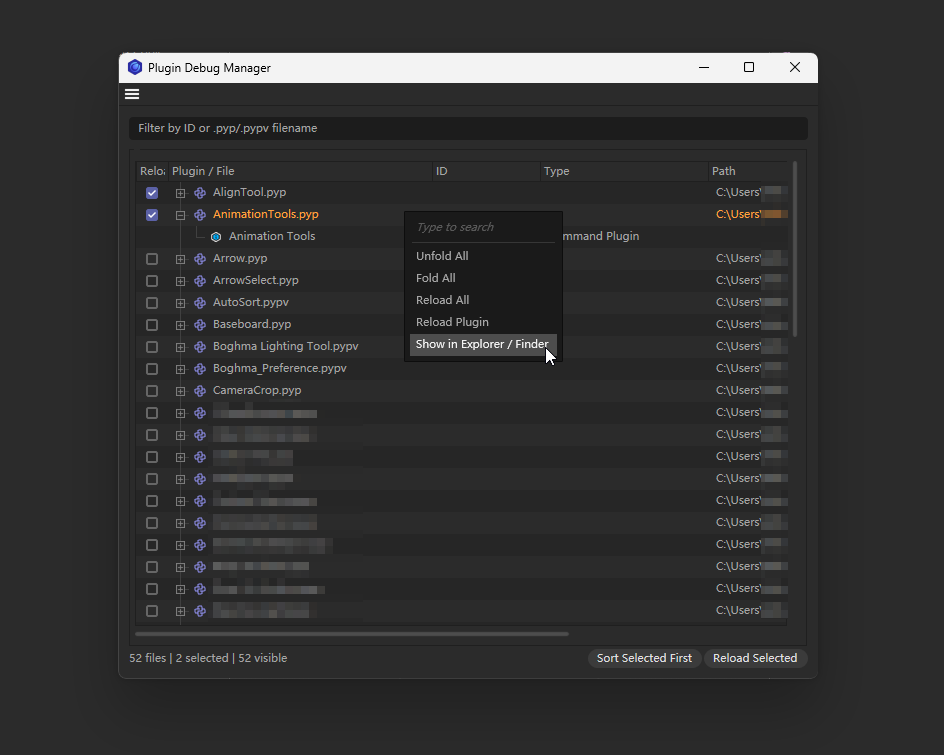
      Hi everyone, I’m releasing Plugin Debug Manager, a debugging utility for Cinema 4D Python plugin development.

      When working on a .pyp plugin, changing a single entry file can otherwise require reloading every Python plugin—or restarting Cinema 4D. Plugin Debug Manager reads the currently registered Python plugins and lets developers reload only the entries they are testing.

      Main features:

      • Reads registered .pyp and .pypv plugins from Cinema 4D
      • Groups multiple registrations by their actual entry-file path
      • Displays plugin names, icons, decimal IDs, registration types, and full paths
      • Filters entries by filename or plugin ID
      • Reloads one plugin, selected plugins, or all reloadable plugins
      • Supports click-and-drag checkbox painting for batch selection
      • Persists checked entries and can move them to the top on demand
      • Provides Reload Plugin, Reload All, Fold All, and Unfold All context commands
      • Locates plugin files in Explorer or Finder through c4d.storage.ShowInFinder()
      • Continues processing when an individual plugin fails to reload

      Implementation details:

      • Registry entries are collected with c4d.plugins.FilterPluginList(c4d.PLUGINTYPE_ANY, True)
      • Entry files and registration metadata are obtained through BasePlugin.GetFilename(), GetID(), and GetType()
      • Selective reloads are performed with c4d.plugins.ReloadPythonPlugin()
      • ReloadDocumentAfterReload(True) is called only once after the reload batch

      Before reloading, the manager copies and normalizes the target file paths instead of retaining BasePlugin objects that may become invalid during the reload process. The manager itself remains visible in the list but cannot be selected or reloaded.

      Compatibility:

      • Current target: Cinema 4D 2026.3.3
      • Selective reloading depends on c4d.plugins.ReloadPythonPlugin, available in this version
      • Other Cinema 4D versions have not yet been verified
        2d3c073d-21ea-4e6f-8bba-4a84aee4c964-Anlv_2026-07-27_14-40-53.png

      Version: 1.3.0
      Plugin ID: 1069486
      Author: Anlv
      Download: Plugin Debug Manager v1.3.0.zip

      By the way, this is open source, and you can edit and modify it yourself to make it better suit your work habits.

      Best regards,
      Anlv

      posted in General Talk plugin-information download programming
      AnlvA
      Anlv
    • RE: Mesh Emitter CallCommand works in Script Manager, no-op from plugin

      Hi, @atg Simply remove the invalid child IDs after the commands recorded in the script log, for example:

      c4d.CallCommand(1062577, 1067510) → c4d.CallCommand(1062577)
      

      I remember encountering the same issue before, but I can’t quite recall the details. I need to look it up.

      import c4d
      
      doc: c4d.documents.BaseDocument  # The currently active document.
      op: c4d.BaseObject | None  # The primary selected object in `doc`. Can be `None`.
      
      def main() -> None:
          """Called by Cinema 4D when the script is being executed.
          """
          c4d.CallCommand(1062577)  # Mesh Emitter
      
      if __name__ == '__main__':
          main()
      

      How do I retrieve a command call from it's index number ?

      Cheers,
      Anlv

      posted in Cinema 4D SDK
      AnlvA
      Anlv
    • RE: Disable all animation in document

      @ceen Hi, The Summary row mey only a UI aggregate; it is not a single CTrack that can be switched directly.
      To reproduce its Animation switch, collect the real CTrack objects and set their c4d.ID_CTRACK_ANIMOFF value:

      # True = animation enabled, False = animation disabled
      track[c4d.ID_CTRACK_ANIMOFF] = False
      

      This does not delete keyframes and does not hide Timeline rows. Do not use NBIT_TLx_HIDE for this, because those flags only hide rows in the Timeline.
      A complete document-wide solution must also traverse Motion Sources in doc.GetNLARoot() . Add Motion Source moves/copies animation into that separate NLA hierarchy, so iterating only normal scene objects and tags will miss tracks such as Time and 2D Tracks.

      It should be noted that doc.GetNLARoot() is marked as Private in the SDK, and I'm not sure whether it should be used.

      """Toggle the Summary Animation switch for all collected CTracks."""
      
      import c4d
      
      
      def iter_nodes(node):
          while node:
              yield node
              yield from iter_nodes(node.GetDown())
              node = node.GetNext()
      
      
      def main():
          doc = c4d.documents.GetActiveDocument()
          tracks, seen = [], set()
      
          def add_tracks(owner):
              for track in (owner.GetCTracks() or []) if owner else []:
                  if id(track) not in seen:
                      seen.add(id(track))
                      tracks.append(track)
      
          def add_tree(root, include_tags=False):
              for node in iter_nodes(root):
                  add_tracks(node)
                  if include_tags:
                      for tag in node.GetTags() or []:
                          add_tracks(tag)
      
          add_tracks(doc)
          add_tree(doc.GetFirstObject(), include_tags=True)
      
          material = doc.GetFirstMaterial()
          while material:
              add_tracks(material)
              add_tree(material.GetFirstShader())
              material = material.GetNext()
      
          render_data = doc.GetFirstRenderData()
          while render_data:
              add_tracks(render_data)
              video_post = render_data.GetFirstVideoPost()
              while video_post:
                  add_tracks(video_post)
                  video_post = video_post.GetNext()
              render_data = render_data.GetNext()
      
          layer_root = doc.GetLayerObjectRoot()
          add_tree(layer_root.GetDown() if layer_root else None)
      
          # Private API, but required for Add Motion Source tracks in C4D 2026.
          add_tree(doc.GetNLARoot().GetDown(), include_tags=True)
      
          enabled = any(track[c4d.ID_CTRACK_ANIMOFF] for track in tracks)
          for track in tracks:
              track[c4d.ID_CTRACK_ANIMOFF] = not enabled
          c4d.EventAdd()
      
      
      if __name__ == "__main__":
          main()
      

      Cheers,
      Anlv

      posted in Cinema 4D SDK
      AnlvA
      Anlv