• How to create a child from the script manager?

    General Talk r20 python
    8
    0 Votes
    8 Posts
    1k Views
    ferdinandF
    Hello @JH23, first, I would like to point out that we ask the community here to post separate questions into separate postings, so that other users can find more easily answers when searching the forum. You can read more about the procedures of SDK support in our Forum Guidelines. It is okay in this case, but for future cases we have to ask you to open new topics for follow-up questions that are not directly related to the initial question of the topic (thread). About your question - you have two options when you want to make an object editable: In case you already have the object in question already inserted into the active document and are in the main thread, you can still use CallCommand. For CallCommand you have to keep in mind that it usually relies on an object selection. When running it in a script, you have then make sure that actually the objects you want to be affected are selected when you do run the CallCommand. I have provided an extension of my prior example at the end of this posting. In all other cases, i.e., when the object is either in no document or not in the active one, or you are not on the main thread, then you must use c4d.utils.SendModelingCommand Link. In this case for example for the command MCOMMAND_MAKEEDITABLE. You can find more information about that in our SDK documentation and in the code examples on GitHub. Cheers, Ferdinand Example code: import c4d def main(): # Assuming you want to use a CallCommand, you can do this. In practice # instantiating a cube object is better done in the way shown by Cairyn # in the forums. # The CallCommand for creating a cube object which will also insert and # select the cube. c4d.CallCommand(5159) # Get the currently active object; which is the new cube object due to the # prior CallCommand. The function object() created by the script log, and # used in your code, does effectively something similar. But it has the # overhead of retrieving the active object each time it is being called, # which is not necessary here. # In a script environment there are also the predefined attributes op and # doc, "variables" in non-Python terms. op is the currently active object # when the script is being run and doc the currently active document. # We cannot use op here, since the CallCommand just did change that, but # we can use doc, which we could retrieve also manually if we had to via # c4d.documents.GetActiveDocument(). cube = doc.GetActiveObject() # Set some of the parameters of that cube object. cube[c4d.ID_BASELIST_NAME] = "Cube" cube[c4d.PRIM_CUBE_LEN, c4d.VECTOR_X] = 32 cube[c4d.PRIM_CUBE_LEN, c4d.VECTOR_Y] = 32 cube[c4d.PRIM_CUBE_LEN, c4d.VECTOR_Z] = 32 cube[c4d.PRIM_CUBE_SUBX] = 11 cube[c4d.PRIM_CUBE_SUBY] = 11 cube[c4d.PRIM_CUBE_SUBZ] = 11 # Instantiate manually a cone object and insert it under that cube, i.e., # do it like Cairyn has shown it. cone = c4d.BaseObject(c4d.Ocone) # We can also set the name of a node like this, which is a bit easier to # remember than the ID. cone.SetName("Cone") # Set some parameters of the cone. You can find out parameter ids via # drag and drop and the console, read more about it here: # developers.maxon.net/docs/Cinema4DPythonSDK/html/misc/descriptions.html cone[c4d.PRIM_CONE_HEIGHT] = 32 cone[c4d.PRIM_CONE_BRAD] = 16 cone[c4d.ID_BASEOBJECT_REL_POSITION, c4d.VECTOR_Y] = 32 # Create a phong tag for the cone, so that the cone is being shaded nicely. phongTag = cone.MakeTag(c4d.Tphong) # Enable the angle limit of the phong tag. phongTag[c4d.PHONGTAG_PHONG_ANGLELIMIT] = True # Insert the cone under the cube. cone.InsertUnder(cube) # When we are doing things "manually", i.e., do not use CallCommand, we # have to push an update to Cinema 4D after we have modified the scene # graph. c4d.EventAdd() # Make the cube object the new active selection. doc.SetActiveObject(cube, c4d.SELECTION_NEW) # And run the " Make Editable" CallCommand on that c4d.CallCommand(12236) # Make Editable if __name__ == '__main__': main()

  • Posemorph tag, pose selection/highlighting

    Cinema 4D SDK python
    3
    0 Votes
    3 Posts
    556 Views
    a_blockA
    Hi Maxime, thanks for the answer and verifying what I had thought. Indeed I would need it in Animation mode and especially for the case where user highlighted multiple poses at once. I had seen that thread, but it did not contain a definitive confirmation from Maxon. Maybe the thread I was thinking of was in a different forum. Anyway, good to have your confirmation, now. And not possible only means I can stop wasting time looking around and instead need to implement another workflow for the user. Maybe not as slick as with the selection info, but no show stopper either. Cheers, Andreas
  • RenderDocument flags and return values?

    Moved Bugs python r23
    11
    0 Votes
    11 Posts
    3k Views
    César VoncC
    Just for the info, calling the command to open the PictureViewer and RenderDocument with both c4d.RENDERFLAGS_CREATE_PICTUREVIEWER and c4d.RENDERFLAGS_OPEN_PICTUREVIEWER works just fine for me : c4d.CallCommand(430000700) # Picture Viewer c4d.documents.RenderDocument(doc, rdData, bmp, c4d.RENDERFLAGS_EXTERNAL | c4d.RENDERFLAGS_CREATE_PICTUREVIEWER | c4d.RENDERFLAGS_OPEN_PICTUREVIEWER)
  • 0 Votes
    9 Posts
    1k Views
    ferdinandF
    Hello @john_do, the Asset Browser is an important feature for Maxon and we plan to build upon it. Despite that, we are not at liberty to currently disclose when we are going to provide Python bindings for the Asset Brower or if this will happen at all. I understand that this is a unsatisfying answer, but it is unfortunately the best we can currently give. Thank you for your understanding, Ferdinand
  • 0 Votes
    3 Posts
    809 Views
    ferdinandF
    Hello @pyr, without any further questions or replies, we will consider this topic as solved by Monday and flag it accordingly. Thank you for your understanding, Ferdinand
  • 2 Votes
    8 Posts
    2k Views
    ferdinandF
    Dear community, this bug has been fixed and will be integrated with an upcoming release of Cinema 4D S24 (hopefully the next one). Cheers, Ferdinand
  • Get the String of the Font Data?

    Cinema 4D SDK r21 python
    4
    0 Votes
    4 Posts
    538 Views
    B
    @Cairyn @ferdinand Thanks for the response. Printing the base container with their indexes worked in my use case
  • Write a python code into a Python Effector

    Cinema 4D SDK python
    10
    0 Votes
    10 Posts
    2k Views
    H
    @Cairyn Thank you for your help ! That's it. I confused it all with the wrong word. Sory... Your answers help me very nicely @ferdinand I apologize about going out of the guidelines. I understand this and will create new topic for that point
  • LINK EFFECTORS TO CLONERS

    Cinema 4D SDK python
    4
    0 Votes
    4 Posts
    1k Views
    H
    Thank you @bentraje and @ferdinand ! You make the deal of the EffectorList function much clearer ! It works well now
  • 0 Votes
    4 Posts
    905 Views
    mfersaouiM
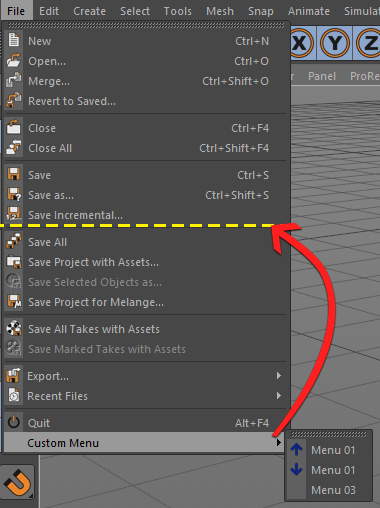
    @mfersaoui Hi, I found the following solution: FileMenu = c4d.BaseContainer() resource = c4d.plugins.GeResource() resource.InitAsGlobal() FileMenu.InsData(c4d.MENURESOURCE_SUBTITLE, resource.LoadString(12587))
  • 0 Votes
    4 Posts
    1k Views
    B
    @Cairyn @ferdinand Thanks for the response. The python generator works as expected. I did try to retrieve the cache earlier for mograph but with a python tag rather than a python generator, but it has some priority delays. Your solution is much more stable. Now, I don't have to jump to houdini for such simple scenes. Have a great day ahead!
  • 0 Votes
    3 Posts
    546 Views
    orestiskonO
    Thanks Manuel, yes that's how I ended up doing it in the end. I thought it would've been simpler to extract a variable from the main function, since it had already calculated. All I would need is to save the variable somewhere where the button function can read it, so this is where I tried the global variables but it didn't work.
  • How to set Roughness texture to material?

    Moved Cinema 4D SDK
    3
    0 Votes
    3 Posts
    595 Views
    C
    Hello Maxime, Thanks for fixing the category for my post. I am new to Cinema4D. I found the correct IDs by opening the UI for the material and drag and drop the settings into the Python console. Kind Regards, Chris
  • Fields and Adding an Effector

    Cinema 4D SDK c++ python r20 sdk
    3
    0 Votes
    3 Posts
    833 Views
    D
    @m_magalhaes Thank you! Works perfectly. Dan
  • Blank appearing dropdown cycle

    Cinema 4D SDK python macos
    5
    0 Votes
    5 Posts
    1k Views
    H
    @m_adam alrighty got it working. Thanks again. You can close this thread if you like. Cheers, Sebastian
  • Create a Take

    Cinema 4D SDK r23 python
    5
    1
    0 Votes
    5 Posts
    820 Views
    ferdinandF
    Hello @pim, without any further feedback or questions, we will consider this topic as solved by Wednesday and flag it accordingly. Thank you for your understanding, Ferdinand
  • startup script in R23 not working anymore

    Cinema 4D SDK r23 python
    3
    0 Votes
    3 Posts
    552 Views
    M
    hi @ferdinand thank you very much for your response! the python_init.py does the job perfectly great support, thanks a lot! best, marc.
  • 0 Votes
    4 Posts
    809 Views
    ferdinandF
    Hello @JH23, without any further feedback or questions, we will consider this topic as solved by Wednesday and flag it accordingly. Thank you for your understanding, Ferdinand
  • Create Geometry from Python Generator

    Moved Cinema 4D SDK python
    7
    1
    0 Votes
    7 Posts
    2k Views
    J
    @johntravolski I figured it out, I needed to add node.Message(c4d.MSG_UPDATE) after the for double loop where I set the polygons.