• Quicktab SDK Example

    r20 2023 python sdk
    9
    1
    0 Votes
    9 Posts
    2k Views
    M
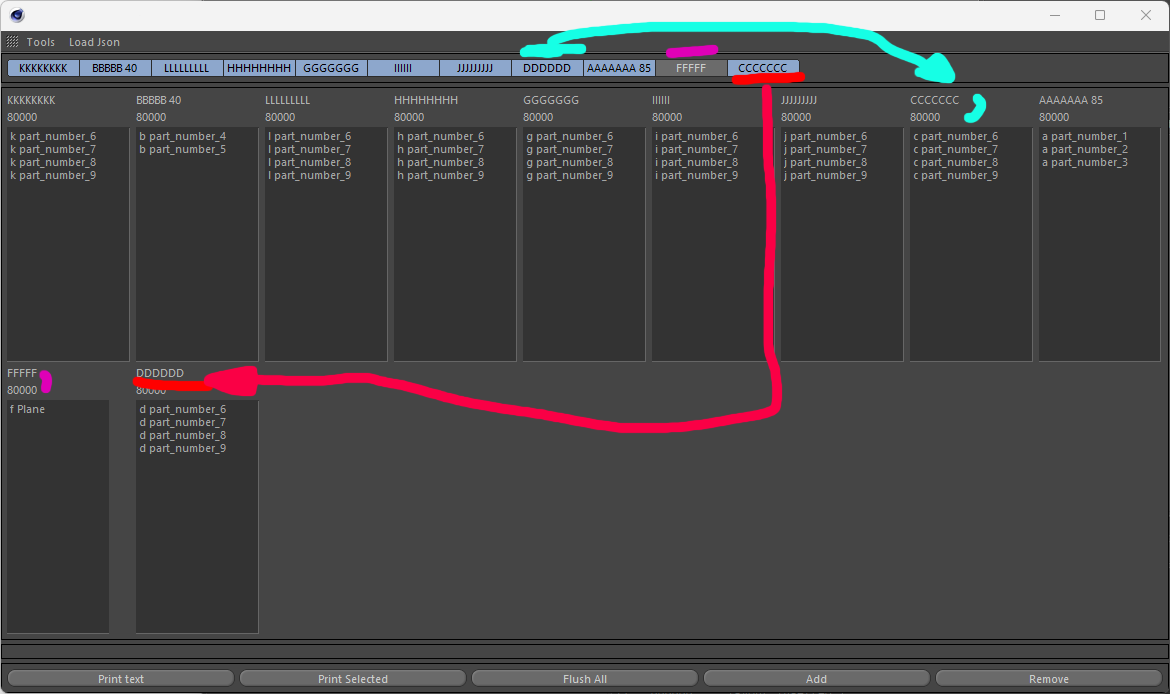
    While rethinking about it last night, it may not be that slow if on user interaction you just flush the main group and re-attach already existing dialog. So you need to modify your `def _DrawQuickTabGroup(self)`` method like so to only display visible dialog: def _DrawQuickTabGroup(self, onlyVisible=True): """ Creates and draws all the SubDialog for each tab, take care it does not hide these according to a selection state. Returns: True if success otherwise False. """ # Checks if the quicktab is defined if self._quickTab is None: return False activeIds, activeNames = self.GetActiveTabs() # Flush the content of the group that holds all ours SubDialogs self.LayoutFlushGroup(ID_MAINGROUP) #self.GroupBorderSpace(left=5, top=5, right=5, bottom=5) # Iterates over the number of tab to create and attach the correct SubDialog for tabId, (tabName, tabGui) in enumerate(self._tabList.items()): toDisplay = tabId in activeIds if not toDisplay: continue self.AddSubDialog(ID_QUICKTAB_BASE_GROUP + tabId, c4d.BFH_SCALEFIT | c4d.BFV_SCALEFIT, 0, 0) self.AttachSubDialog(tabGui, ID_QUICKTAB_BASE_GROUP + tabId) self.LayoutChanged(ID_MAINGROUP) return True Then in the Command message instead of calling DisplayCorrectGroup you should call _DrawQuickTabGroup like so: def Command(self, id, msg): if id == ID_QUICKTAB_BAR and self._quickTab: self._DrawQuickTabGroup() return True Regarding your question and classic Tab, find an example in Remove a GeDialog Tab Group but as you can see this is also not possible to remove a tab without redrawing everything . Cheers, Maxime.
  • Python Tag how to hide a mogragh object

    python windows 2023
    7
    0 Votes
    7 Posts
    1k Views
    DunhouD
    @Manuel Oh, what a pitty! I know that I can dot it with a effector, but it is not a "all in one" solution for my convenient,but that's it , I will not spend times in it. Thanks for your research, and @HerrMay thanks for your enthusiastic answers ! Cheers~ DunHou
  • 0 Votes
    3 Posts
    775 Views
    B
    Hi Manuel, Thank you very much. Your script works perfectly in my environment. Only one modification I made was if "color" in portPath: to if "color" in str(portPath): Thank you.
  • Checking for ALT GetInputState() issue

    python 2023
    6
    1
    0 Votes
    6 Posts
    1k Views
    P
    Great, thank you Glad I can help to improve this great program.
  • How to find out if document is rendering from a python tag

    s26 python sdk windows
    3
    0 Votes
    3 Posts
    709 Views
    H
    Hi @m_adam, thanks for the explanation and your example code. That will absolutely suffice my needs. Good to know though that additional information may be available in the future. Cheers, Sebastian
  • 0 Votes
    3 Posts
    475 Views
    H
    Hi @m_adam, alrighty, good to know that this will be looked into and eventually get fixed. Yes, I remember I returned True in the past. In the python tag as well as in the TagData equivalent. As returning super didn't work. Thanks for the information anyway. Cheers, Sebastian
  • FieldList Enable Clamping

    r20 sdk c++
    5
    0 Votes
    5 Posts
    1k Views
    J
    Thanks, that was exactly what I was looking for. John Terenece
  • Crash when apply a Tag plugin.

    2023 python windows
    7
    0 Votes
    7 Posts
    1k Views
    DunhouD
    Hey @ferdinand ,Thanks for your detailed explains forever. Now it is clear to read the res files , and you show me the Agent Ransack last year, I use this software for learn something , and the C++ document is also good for the res file, but some of the data is distribute anywhere , like BITMAPMUTTON , I remember that I search for no fading option for a long time, but in python document it has a user friendly position in sdk. Maybe a document improvement or more Github examples are both welcomed( seems lots of works ) Thanks for your patience! Cheers~ DunHou
  • Object Generator as Particles

    python
    2
    0 Votes
    2 Posts
    464 Views
    ManuelM
    Hi, sorry, the display of this tab is hardcoded an only available for a couple of builtin objects. What you can do is have a Matrix object in object mode that point to your generator, the rs tag being applied to the matrix object. You can also create that setup inside your generator. Below, i am using a cube but that could be your PointObject instead. Keep in mind that python is slow, using it for point cloud or anything related to particles might be super slow. from typing import Optional import c4d doc: c4d.documents.BaseDocument # The document evaluating this python generator op: c4d.BaseObject # The python generator hh: Optional["PyCapsule"] # A HierarchyHelp object, only defined when main is executed def main() -> c4d.BaseObject: . cube = c4d.BaseObject(c4d.Ocube) parent = c4d.BaseObject(c4d.Onull) cube.InsertUnder(parent) matrix = c4d.BaseObject(c4d.Omgmatrix) matrix.InsertUnder(parent) matrix[c4d.ID_MG_MOTIONGENERATOR_MODE] = c4d.ID_MG_MOTIONGENERATOR_MODE_OBJECT matrix[c4d.MG_OBJECT_LINK] = cube matrix[c4d.MG_POLY_MODE_] = c4d.MG_POLY_MODE_VERTEX rsTag = matrix.MakeTag(1036222) rsTag[c4d.REDSHIFT_OBJECT_PARTICLE_MODE] = 2 return parent Cheers, Manuel
  • How to be sure if an object is a generator/modifier?

    s26 r20 python sdk
    3
    0 Votes
    3 Posts
    1k Views
    H
    Hello @ferdinand, alright I see. I already thought that you would teach me once again that the naive thought I put up here would'nt hold up to the real world. Thanks for the explanation and the example you provided. I guess that will do just fine. As always much appreciated! Cheers, Sebastian
  • How to draw on spline points from spline returned by Object Data

    4
    0 Votes
    4 Posts
    793 Views
    ferdinandF
    Hello @HerrMay, Funny enough DrawPoints seems to internally use the "same points" to draw, one gets to see when one edits the points of a polygon object. In S26 the points are round (thats probably why I was thinking of circles) while in R20 they are squares. No question here, just an observation. As you can see, in the script I retrieve the cache of the object we are going to draw. # Get the cache of the object representing the plugin in the object manager, i.e., more or # less what we returned in GetContour, Cinema 4D has however exhausted the cache for us, and # the cache is not a SplineObject but a LineObject (i.e, the cache of a SplineObject). cache: c4d.LineObject = op.GetDeformCache() or op.GetCache() if not isinstance(cache, c4d.LineObject): return c4d.DRAWRESULT_O This not only enables us to deal with splines affected by a deformer correctly, but also and more importantly with spline generators as for example the Circle spline generator. Such generators do not have any control points one could retrieve, their cache will always contain LineObject instances and not SplineObject instances (when they have been implemented correctly). This is also what I was referring to in my comment, because OffsetYSpline returns a SplineObject as its cache in GetContour, but Cinema 4D will 'exhaust' that cache for us by returning the cache of the cache, the LineObject. A LineObject represents a SplineObject over its current interpolation settings. What is actually weird though is that the color gradient you used here to color the points doesn't work in R20. The points are simply drawn black there. Possibly a Python 2/3 issue caused by integer/float division differences? Yes, this is Python 3 code. In Python 2 integers divide by default as integers. Simply wrap one of the numbers into a float, e.g., f: float = float(i)/float(count). Allow one follow up question. How can I draw only the control points of the spline? In your example you use a circle primitive which has - when made editable - exactly four points making up the shape via tangents. Where as the drawn points using the intermediate points of the circle as well. You can use BaseObject.GetRealSpline to get the underlying editable spline object for a spline. So, when you would replace the section quoted above with this: cache: c4d.SplineObject = op.GetRealSpline() if not isinstance(cache, c4d.SplineObject): return c4d.DRAWRESULT_OK You would now draw the control points of the SplineObject representing the spline generator rather than the vertices of its underlying LineObject. The problem in this case is that the plugin you have chosen is calling 'Current State to Object' (CSTO) on the input object which it is cloning and returning offset-ed (see line 130 in your code listing). CSTO is of course just replacing an object with its cache state. So, when you put a circle spline below the offset spline, it will still be drawn as in the LineObject cache version because the cache and the BaseObject.GetRealSpline representation are in this case identical. Cheers, Ferdinand
  • Place multiple objects on spline and align

    python 2023
    5
    1
    0 Votes
    5 Posts
    2k Views
    P
    And once again, thank you!
  • 0 Votes
    3 Posts
    955 Views
    Y
    Oh my gosh, so comprehensive answer! I'm so impressed that you put so much effort in it. You a great, thank you a lot!
  • How to get the status of video post in python

    sdk python
    4
    1
    0 Votes
    4 Posts
    823 Views
    R
    @ferdinand Thank you, the code runs well. └(^o^)┘
  • GeDialog Timer Always Printing to Console?

    s26 2023 python
    2
    2
    0 Votes
    2 Posts
    347 Views
    K
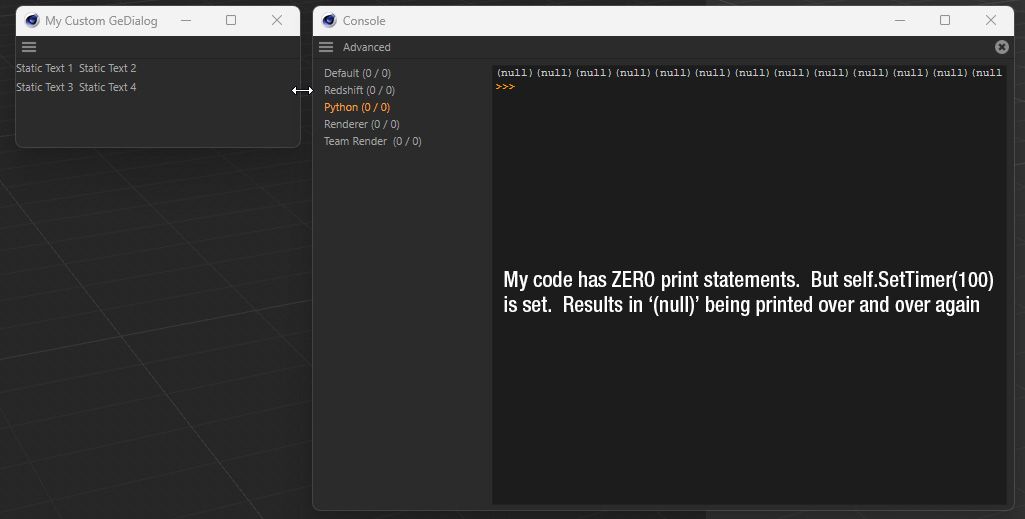
    Well, that was a fast solution... couldn't it have emerged BEFORE I hit submit?!? Haha, the solution was easy... I was returning True on the Timer function. Took a look at the python memory viewer example and noticed they don't return a value on it. Removed the return from my Timer() function and all is working as expected. def Timer(self, msg): print("Timer") That's it:)
  • How can I change the order of Reflection layers

    r21 classic api python
    6
    0 Votes
    6 Posts
    852 Views
    M
    Oh my, this is horrible ... cheers mogh
  • PointObject.CalcVertexMap(self, modifier)

    python r25
    5
    0 Votes
    5 Posts
    1k Views
    A
    @m_adam hi Maxime, thank you for your availability. Bacca's answer immediately cleared my mind on the subject, just as I was reading the other thread. I usually use the traditional method of calculating vertexmaps in the presence of obstacles. I thought CalcVertexMap did just that (the restriction tag is not mentioned in the SDK, so I couldn't figure out how to use it) but my curiosity is just didactic. Ciao Gianluca
  • select edge points with python

    Moved
    5
    0 Votes
    5 Posts
    2k Views
    D
    wohaa, thank you so much for your time an effort! i will have a good look at it. alos great insight into what the GetNgonEdgesCompact numbers mean. this was a bit mysterious in the sdk, or at least hard to decipher what the description meant.
  • List all Redshift node types that can be added in Node Editor?

    python 2023
    3
    0 Votes
    3 Posts
    957 Views
    V
    Great, this is exactly what I needed. Thanks @ferdinand !
  • 0 Votes
    6 Posts
    682 Views
    ferdinandF
    Hello @dunhou, ah that was the critical bit of information for me, that is you plugin at work there Well, as always without code it is hard to say what is going wrong there. the main code about this function is like : SetBit() doc.InsertMaterial() c4d.CallCommand(12252) # Render Materials doc.GetActiveMaterial() textag.SetMaterial() and some undo and call the Node Editor for certain renderer or rules for the function ... Out of this selection, I would put my money on CallCommand and undo handling. Setting bits and calling the mentioned methods are far less likely candidates. But that is pure guess work. actually, I checked the c4d.IsCommandChecked(id) The first thing I would do, is search for the command ID of the Material Manager (12159) in your code and add a print statement to each place where either this command ID is invoked with CallCommand or places where an ID determined at runtime is invoked (silly example : CallCommand(random.randint(1000, 1000000))) Then run your plugin again. When you see 12159 being printed when the undesired behaviour happens, you know it must be your plugin which misfiring. When not, it might be a bug in Cinama 4D or one of its APIs. Cheers, Ferdinand