The Maxon SDK Team is currently short staffed due to the winter holidays. No forum support is being provided between 15/12/2025 and 5/1/2026. For details see Maxon SDK 2025 Winter Holidays.
  • Python Xpresso Node

    windows python 2023
    5
    0 Votes
    5 Posts
    1k Views
    M
    Hi @Brakusha, welcome in plugin cafe ! c4d.ID_OPERATOR_COFFEE is working in all versions, please open a new topic with a code that demonstrate the issue and with a short explanation about what you want to achieve. I would also highly recommend you to read our Support Guideline to know how to get the best support from us. Cheers, Maxime.
  • Message on "Quit and Free License"

    c++
    2
    0 Votes
    2 Posts
    594 Views
    ferdinandF
    Hey @kbar, Thank you for reaching out to us. In the public API there is only what you can find in Plugin Licensing Manual. The natural solution for this would be an observable to which you can attach, but there is none in the public API. What you could do is try workarounds: Register a MessageData plugin and check periodically yourself. This might work okay for certain license change events, but when the license change induces a shutdown of Cinema 4D (a user released a license for example), you might get event starved. So, this is not great. Hook into the shutdown of Cinema 4D itself. When we want to specifically target the event that a license is being released, we can build upon the fact that Cinema 4D will then shut down. MAXON_INITIALIZATION: This is a bad choice in this case, because when the shutdown delegate of MAXON_INITIALIZATION is running, most registries already have been shut down. So, I would not be surprised, if all the license stuff is not working anymore at this point (I have not checked though). The advantage is here that MAXON_INITIALIZATION often makes for nicer looking code than PluginMessage. PluginMessage: Hook into the shutdown sequence of Cinema 4D, and check the license state there. C4DPL_ENDACTIVITY is the best event to start with. The problem is here that I do not know how licenses behave when a user releases a license. The idea would be to check for example on shutdown, if there is still a commercial license bound to this instance: // Create the ID for a commercial Cinema 4D license. maxon::InternedId feature; feature.Init("net.maxon.license.app.cinema4d-release~commercial"_s) iferr_return; // Check if the given #feature is active in the current license of this instance. if (!CheckLicenseFeature(feature)) ReleasePluginLicense(userId); But it could very well be that it takes some time before a released license 'kicks in' in a shutdown process and that you must go further into no-mans-land than C4DPL_ENDACTIVITY (where more and more services will be shut down). Internally, we have a licensing API which has observables which communicate such events. I will bring up the subject internally if we can make the framework fully or partially public. Cheers, Ferdinand
  • Converting image bit depth

    c++
    4
    0 Votes
    4 Posts
    758 Views
    ferdinandF
    Hey @WickedP, Good to hear that you solved your problem. And I know that the color management and pixel format stuff can be a royal pain in the ***, you have my sympathies. Things tend to also get REALLY lovely when you also must deal with OCIO. Please do not hesitate to reach out again when you run in further troubles. Cheers, ferdinand
  • Force polygon object to generate it's cache

    python 2024
    7
    0 Votes
    7 Posts
    1k Views
    bacaB
    Thanks @ferdinand, Thats gone too far, we can close this subj now. I think I have a solution already. I just wasn't clear enough in the beginning, I just wanted to know if PolygonObject can be forced to produce it's cache object by a command. I made an experiment where I spawn flat geometries between other flat geometries. Like planes in-between of deformed soft body planes. Here's working example: Setup: [image: 1699565133962-417b1a04-77c9-4163-bc6f-36c2800323f5-image.png] And simulation: [image: 1699565001814-cloth_multiply__03_.gif] Once you clone original geometry — it's flat, and there would be intersections and simulation will be broken. So you need to blend newborn geo point positions in-between of existing geometry points. Once you blend it — there are no intersections, it nicely continue with soft body simulation. But softbody dynamics build constraints for every new object. And if geometry first appears as deformed — wrong constraints are initialized, and each new object becomes crumpled real quick. Also there's "Mix Animation" -> "Follow Shape" checkbox, which rebuild constraints (or adjusts them - who knows?) — and it reads original point positions, as I understood. So I had to have both — original geo, and cache. Where cache used to simulate geometry in 3D, and original object (CacheParent?) will be used for constraints.
  • How to draw a primitive object in BaseDraw

    python 2023 2024 s26
    3
    0 Votes
    3 Posts
    664 Views
    gheyretG
    Hi @ferdinand Thank you for your reply and guidance. I'll get around to it. Cheers Gheyret
  • 0 Votes
    3 Posts
    657 Views
    S
    @i_mazlov sorry I thought I deleted this post as I solved the issue. Anyway to anyone who stumbles upon this question here's how I solved it: for i,pt in enumerate(points_list[::-1]): off = c4d.Vector(distance * i,0,0 ) mg = pt.GetMg() mg.off = off print(rotation.x) rm = c4d.utils.HPBToMatrix(rotation) pt.SetMg(mg * rm) So basically if the objects are inserted in the hierarchy and you start from the last one with the transformations this will work just like in the OM.
  • Why won't my python generator update? R2024

    python s26 windows
    5
    0 Votes
    5 Posts
    1k Views
    S
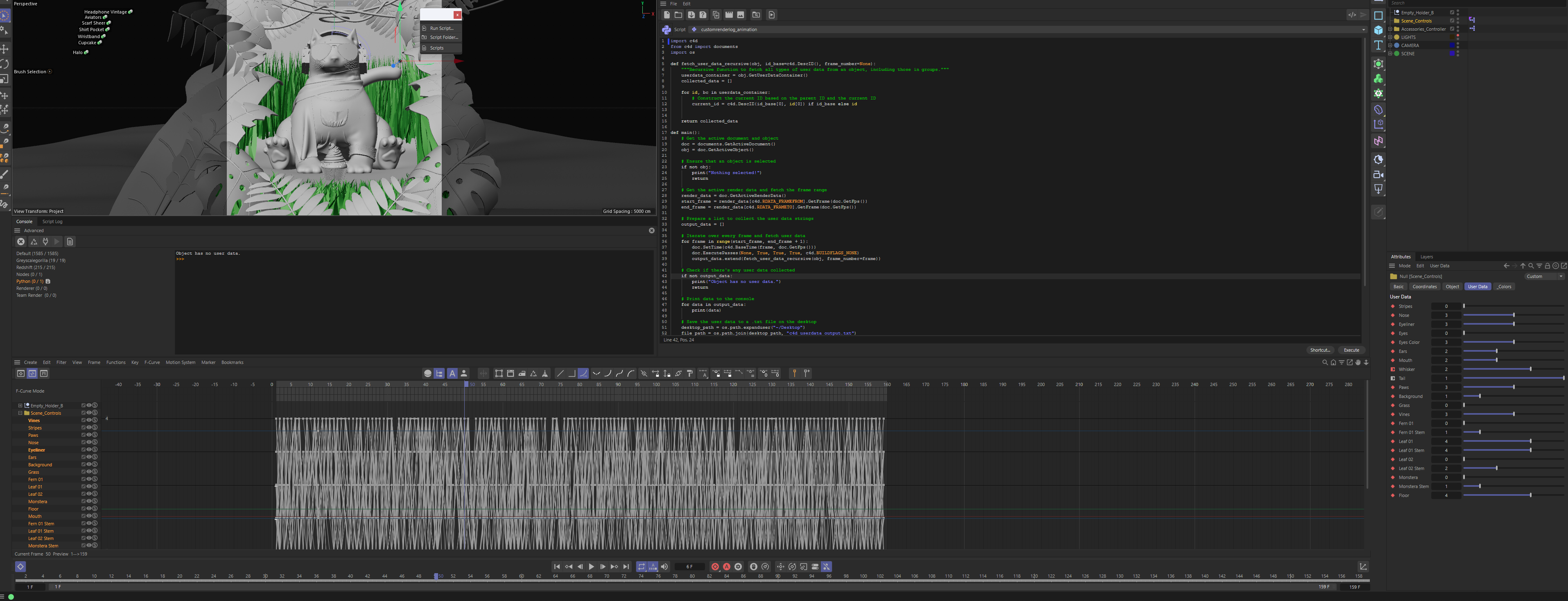
    @baca @ferdinand Thank you both. It was the fact that the user data was not collected in the main function. Silly I didn't catch that. It's working fine now.
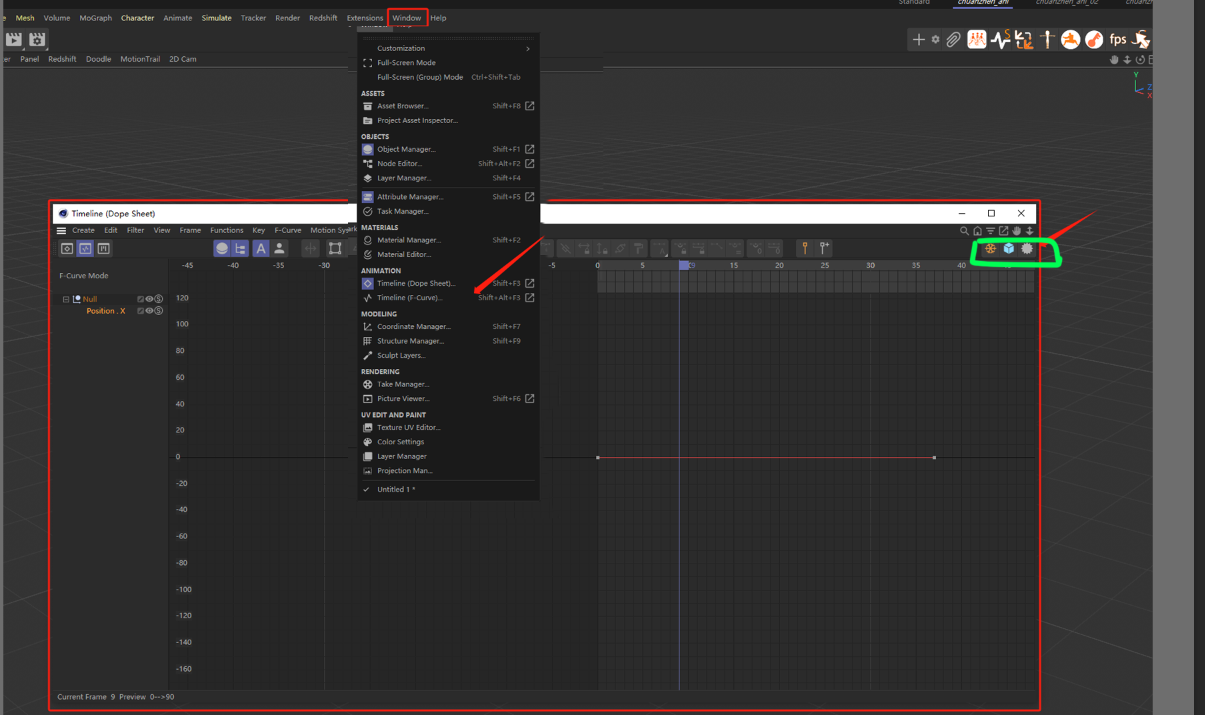
  • TimeLine Window Custom open

    2024 python
    7
    2
    0 Votes
    7 Posts
    1k Views
    chuanzhenC
    @kangddan @Dunhou
  • 2024 NodeData Init isCloneInit argument for older version

    2024 python
    4
    0 Votes
    4 Posts
    925 Views
    mikeudinM
    @baca Thank you! Works like a charm!
  • 0 Votes
    3 Posts
    724 Views
    H
    Hi @ferdinand, ah okay I see. Some part of me already suspected it could be a bug. Thanks for taking the time to look into it. Regarding the scope of question. You are absolutely right. And while I understand that it can make answering branching questions hard, it is sometimes not that easy to split things up. But all good, no offense taken. One last thing, I know you guys are not here to develop solutions or come up with algorithms. Still, I was wondering if a possible solution could be to move the selected points to a custom vector position and afterwards simply send an "Optimize" modeling command? Cheers, Sebastian
  • Icons reuse

    windows 2024 python
    3
    0 Votes
    3 Posts
    641 Views
    DunhouD
    Hi @ferdinand , Thanks for your explain, I would convert the svg files to png then regist them for a temp solution, and wait the attribute valid in python. Thanks always for your awesome works. Cheers~ DunHou
  • Check the state of record modes with python?

    2024 python
    2
    0 Votes
    2 Posts
    493 Views
    B
    ah ok I figured it out. its possible to check those with the c4d.IsCommandChecked() function.
  • How to control a posemorph tag

    python
    4
    1
    0 Votes
    4 Posts
    940 Views
    M
    thanks a lot, your post is working for me.
  • some icon index not find

    python
    3
    1
    0 Votes
    3 Posts
    475 Views
    chuanzhenC
    @ferdinand Thanks
  • Colorchooser in 2024

    2024 python
    2
    0 Votes
    2 Posts
    438 Views
    M
    Hi @mikeudin thanks a lot for the report, this is a regression due to a last minute optimization within the internal Python API parsing done for which bring around 20% performance boost of the Python Effector in 2024.0. So any other classic API (c4d module) previously accepting a maxon.Vector or maxon.Color/A as an argument will be impacted (only ColorSwatchGroup.SetColor and ColorSwatchGroup.AddColor are affected by these changes) With that's said I was never a big fan of mixed datatype from classic API and maxon API, so even if this is a regression I think I prefer the new behavior. I will discuss that internally and see what is the outcome. I will keep you posted. Cheers, Maxime.
  • How to press the "Apply" button in the DescriptionToolData?

    c++ python
    2
    1
    0 Votes
    2 Posts
    465 Views
    ferdinandF
    Hello @LingZA, Thank you for reaching out to us. Thank you for posting your solution, much appreciated! I have provided below a variant of your example which without having the C++ Example Pick Object Tool installed. In case someone is wondering how to find out such a thing, you would have to look into the description of a tool, e.g. the extrude tool ... toolextrude.res: CONTAINER xbeveltool { NAME xbeveltool; GROUP MDATA_BEVEL_GROUP_OPTION { DEFAULT 1; LONG MDATA_BEVEL_MASTER_MODE // ... } INCLUDE ToolBase; // Includes the gadgets that are common to all description tools. } to find out that they all include all ToolBase which then looks like this: toolbase.res: CONTAINER ToolBase { NAME ToolBase; GROUP MDATA_MAINGROUP { DEFAULT 1; } GROUP MDATA_COMMANDGROUP { DEFAULT 1; GROUP { // SEPARATOR { LINE; } BOOL MDATA_INTERACTIVE { } SEPARATOR { } GROUP { COLUMNS 2; DEFAULT 1; BUTTON MDATA_APPLY { FIT_H; } BUTTON MDATA_NEWTRANSFORM { FIT_H; } } } } SUBCONTAINER ID_SNAPSETTINGS { } } Cheers, Ferdinand Code: """Actives and runs the extrude tool. """ import c4d ID_EXTRUDE_TOOL: int = 1011183 def main() -> None: c4d.CallCommand(ID_EXTRUDE_TOOL) tool = c4d.plugins.FindPlugin(ID_EXTRUDE_TOOL, c4d.PLUGINTYPE_TOOL) tool[c4d.MDATA_INTERACTIVE] = True c4d.EventAdd() if tool is not None: c4d.CallButton(tool, c4d.MDATA_APPLY) c4d.CallButton(tool, c4d.MDATA_NEWTRANSFORM) c4d.EventAdd() if __name__ == '__main__': main()

  • How to weld two points to the last selected point?

    windows s26 2023 python
    5
    0 Votes
    5 Posts
    1k Views
    i_mazlovI
    Yes, you found the thread about point selection just right!
  • GetActiveToolData() doesn't work for Mirror Tool

    windows s26 python 2023
    5
    0 Votes
    5 Posts
    929 Views
    G
    I want to mirror a polygon selection along specified modeling axis, but i'm kinda stuck since i can't apply the dedicated Mirror Tool, the basic Scale Tool also doesn't allow to set the tool settings...
  • 0 Votes
    5 Posts
    1k Views
    i_mazlovI
    Hi @LingZA , Sorry for the delayed answer. Could you please explain the result that you're trying to achieve? It looks now that you would like to implement a modeling tool similar to Bevel, when you would like to firstly select points/edges/polys and secondly apply some changes to them. If that's the case, then you need to implement the part of your tool that selects objects. Please have a look at BaseSelect. You can also explore Flatten Polygons example. You can find a sample code snippet below that simply selects all of the edges of the polygon. You need to be in "Edges" mode for that. Additionally you can emulate the polygon highlighting yourself. Regarding the flags: PLUGINFLAG_TOOL_EDITSTATES - designates that the tool supports deformed editing PLUGINFLAG_TOOL_SWITCHACTION - allows to adjust the active tool. This works in tandem with the MSG_TOOL_SWITCHACTION message type. Namely, when the modifier (aka qualifier) key is pressed, the plugin receives this message such that it can react on this key press. PLUGINFLAG_TOOL_NO_TOPOLOGY_EDIT - flag that informs cinema that the tool doesn't perform any topology modifications (i.e. doesn't add/remove/reassign of the polygons) PLUGINFLAG_TOOL_TWEAK - if you click on the element that isn't currently selected, it will select it for you (so your tool can work with this selection), and will deselect it once your tool finishes PLUGINFLAG_TOOL_TWEAK_NO_HIGHLIGHT - same as above but without highlighting the temporarily selected element PLUGINFLAG_TOOL_DRAW_MULTIPLANE - some legacy flag that is (or at least should be) deprecated Cheers, Ilia [image: 1698935992814-cinema_4d_ezzrkgku0y.gif] import c4d PLUGIN_ID = 1234321 # Be sure to use a unique ID obtained from www.plugincafe.com class MyTool(c4d.plugins.ToolData): def __init__(self): self.selectionRadius = 10 self.highlightedPolygon: int = -1 def GetState(self, doc): if doc.GetMode() != c4d.Medges: return False return c4d.CMD_ENABLED def MouseInput(self, doc, data, bd, win, msg): # Only handle left click if msg[c4d.BFM_INPUT_CHANNEL] != c4d.BFM_INPUT_MOUSELEFT: return True # Get active object op = doc.GetActiveObject() if not op: return True if self.highlightedPolygon < 0: return True # Initialize helping Neighbor struct nbr = c4d.utils.Neighbor() nbr.Init(op) polyInfo = nbr.GetPolyInfo(self.highlightedPolygon) # get polygon information bs = c4d.BaseSelect() opPolygon: c4d.CPolygon = op.GetPolygon(self.highlightedPolygon) # Iterate over sides for side in range(4): # Skip last edge if polygon is a triangle if side == 2 and opPolygon.c == opPolygon.d: continue # Select edge edgeIdx = polyInfo['edge'][side] bs.Select(edgeIdx) # Apply selection op.SetSelectedEdges(nbr, bs, c4d.EDGESELECTIONTYPE_SELECTION) c4d.EventAdd() return True def Draw(self, doc, data, bd, bh, bt, flags): selectionColor = c4d.GetViewColor(c4d.VIEWCOLOR_SELECTION_PREVIEW) if flags & c4d.TOOLDRAWFLAGS_HIGHLIGHT: # if the DrawPass is the Highlight one if self.highlightedPolygon >= 0: # Get active object op = doc.GetActiveObject() if not op: return True bd.SetMatrix_Matrix(op, op.GetMg()) # draw in global coordinates # Get points and polygon from the object opPoints: list[c4d.Vector] = op.GetAllPoints() opPolygon: c4d.CPolygon = op.GetPolygon(self.highlightedPolygon) points = [opPoints[idx] for idx in (opPolygon.a, opPolygon.b, opPolygon.c, opPolygon.d)] colors = [selectionColor for _ in points] if len(points) == 3 or len(points) == 4: bd.DrawPolygon(points, colors) # draw the polygon highlight # Draw the outline bd.SetPen(c4d.Vector(0, 1, 0)) for point1Idx in range(-1, len(points) - 1): point1, point2 = points[point1Idx], points[point1Idx + 1] bd.DrawLine(point1, point2, c4d.NOCLIP_D) return c4d.TOOLDRAW_HIGHLIGHTS def GetCursorInfo(self, doc, data, bd, x, y, bc): self.highlightedPolygon = -1 # If the cursor has left a user area, simply return True if bc.GetId() == c4d.BFM_CURSORINFO_REMOVE or doc.GetMode() != c4d.Medges: return True # Get active object op = doc.GetActiveObject() if not op: return True # Calculates the width and height of the screen bd: c4d.BaseDraw = doc.GetActiveBaseDraw() frame = bd.GetFrame() l, r, t, b = frame["cl"], frame["cr"], frame["ct"], frame["cb"] width, height = r - l + 1, b - t + 1 # Initialize viewport select vpSelect = c4d.utils.ViewportSelect() vpSelect.Init(width, height, bd, [op], c4d.Medges, True, c4d.VIEWPORTSELECTFLAGS_IGNORE_HIDDEN_SEL) c4d.SpecialEventAdd(c4d.EVMSG_UPDATEHIGHLIGHT) # pushing highlighting event to cinema # Looking for the nearest polygon and saving it's index in self.highlightedPolygon polyInfo = vpSelect.GetNearestPolygon(op, int(x), int(y), self.selectionRadius) if not polyInfo or 'i' not in polyInfo: return True polygonIdx = polyInfo['i'] if (polygonIdx < 0 or polygonIdx >= op.GetPolygonCount()): return True self.highlightedPolygon = polygonIdx return True if __name__ == "__main__": c4d.plugins.RegisterToolPlugin(id=PLUGIN_ID, str="MyTool", info=0, icon=None, help="", dat=MyTool())
  • c4d.MCOMMAND_EXPLODESEGMENTS makes target object dead

    macos python 2024
    6
    0 Votes
    6 Posts
    1k Views
    bacaB
    @ferdinand said in c4d.MCOMMAND_EXPLODESEGMENTS makes target object dead: Select 0th polygon in a mesh. SMC: MCOMMAND_SELECTCONNECTED SMC: MCOMMAND_SPLIT Delete the selected polygons. When no polygons are left, exit, otherwise goto 1. Oh, great idea. Not that elegant, but seems legit. Thanks again.