Solved.
I need to change this part:
track = obj.FindCTrack(desc_id_keyframes)
if track is None:
   track = c4d.CTrack(obj, desc_id_keyframes)
   obj.InsertTrackSorted(track)
Solved.
I need to change this part:
track = obj.FindCTrack(desc_id_keyframes)
if track is None:
track = c4d.CTrack(obj, desc_id_keyframes)
obj.InsertTrackSorted(track)
To whom it may concern,
I have an object that has two user data fields.
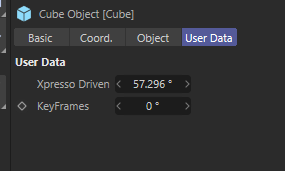
I know that an Xpresso-driven user data field can not be animatable using keyframes, which is why I have the user data field keyframes. If I manually put the keyframes in the user data field keyframes with the same data as the Xpresso Driven user data field, everything works. However, I want it to make it work with a Python script, so I do not need to do the keyframes manually. I tried with this script:
import c4d
from c4d import gui

def main():
    doc = c4d.documents.GetActiveDocument()
    obj = doc.SearchObject('Cube')
    desc_id_keyframes = None
    value = None
    user_data_container = obj.GetUserDataContainer()
    for desc_id, bc in user_data_container:
        if bc[c4d.DESC_NAME] == "Xpresso Driven":
            value = obj[desc_id]
        elif bc[c4d.DESC_NAME] == "KeyFrames":
            desc_id_keyframes = desc_id

    print(value)
    print(desc_id_keyframes)

    track = c4d.CTrack(obj, desc_id_keyframes)

    if not obj.FindCTrack(desc_id_keyframes):
        obj.InsertTrackSorted(track)

    curve = track.GetCurve()
    time = c4d.BaseTime(0, doc.GetFps())
    result = curve.AddKey(time)
    key = result["key"]
    key.SetValue(curve, value)
    c4d.EventAdd()

if __name__=='__main__':
    main()
However, the keyframe does not get inserted:
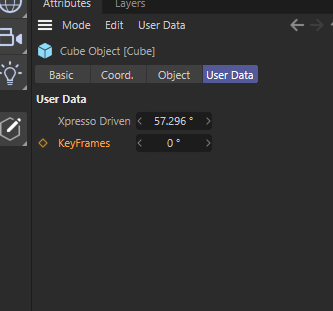
What am I doing wrong?
Thanks in advance for the help.
Regards,
Joel Johera
To whom it may concern,
I am trying to connect the outputs of an Object Index Node to other nodes. I know it can be done as via the GUI I can do it but I can not do it with Python.
This is the code I have:
import c4d

def main():
    doc = c4d.documents.GetActiveDocument()
    null = doc.SearchObject("Null")
    sphere = null.GetDown()
    xtag = c4d.BaseTag(c4d.Texpresso)
    null.InsertTag(xtag)
    gv = xtag.GetNodeMaster()

    # Object Index Node
    object_index_node = gv.CreateNode(gv.GetRoot(), c4d.ID_OPERATOR_DETAILS)
    object_index_node_in_instance = object_index_node.GetInPorts()[0]
    object_index_node_out_index = object_index_node.GetOutPorts()[0]
    object_index_node_out_instance = object_index_node.GetOutPorts()[1]

    # Sphere Node
    sphere_node = gv.CreateNode(gv.GetRoot(), c4d.ID_OPERATOR_OBJECT)
    sphere_node[c4d.GV_OBJECT_OBJECT_ID] = sphere
    sphere_node_in_object = sphere_node.AddPort(c4d.GV_PORT_INPUT, c4d.GV_OBJECT_OPERATOR_OBJECT_IN)

    # Motion Data Node
    motion_data_node = gv.CreateNode(gv.GetRoot(), 1019010)
    motion_data_node_in_index = motion_data_node.GetInPorts()[0]
    motion_data_node_in_object = motion_data_node.GetInPorts()[1]

    # Connections
    object_index_node_out_instance.Connect(sphere_node_in_object)
    print(object_index_node_out_instance)
    object_index_node_out_index.Connect(motion_data_node_in_index)
    print(object_index_node_out_index)

    c4d.EventAdd()


if __name__=='__main__':
    main()
In the console, I get:
False
False
I get this:
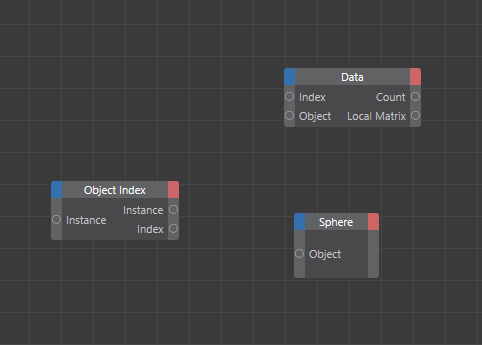
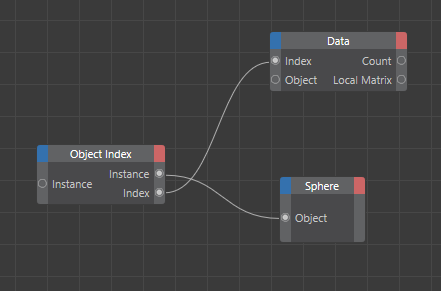
And I am looking for this:
Also I am using c4d.ID_OPERATOR_DETAILS to generate the node as in __init__.py matched the 400001152 number that the node has if it is created via the GUI.
Thank you for your time.
Joel Johera
To whom it may concern,
I am trying to create an Xpresso Motion Graphics Data node and add two ports, a Global Matrix and a Color, with a Python script.
I have this code:
import c4d

def main():
    doc = c4d.documents.GetActiveDocument()
    null= doc.SearchObject("Null")
    xtag = c4d.BaseTag(c4d.Texpresso)
    null.InsertTag(xtag)
    gv = xtag.GetNodeMaster()

    motion_data_node = gv.CreateNode(gv.GetRoot(), 1019010)
    motion_data_node_in_index = motion_data_node.GetInPorts()[0]
    motion_data_node_in_object = motion_data_node.GetInPorts()[1]
    motion_data_node_out_global_matrix = motion_data_node.AddPort(c4d.GV_PORT_OUTPUT, c4d.GV_OBJECT_OPERATOR_GLOBAL_OUT)
    print(motion_data_node_out_global_matrix)
    motion_data_node_out_color = motion_data_node.AddPort(c4d.GV_PORT_OUTPUT, c4d.ID_BASEOBJECT_COLOR)
    print(motion_data_node_out_color)

    c4d.EventAdd()

if __name__=='__main__':
    main()
In the console I get:
None
None
And the node:
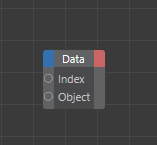
Also, I am using number 1019010 to create the node as I failed to find the name of the motion graphics data node type in Graph View Node Types.
Thank you for your time.
Joel Johera
Thank you so much for the resources. I asked because now I am trying to create a Python node, and I tried to specify the input port as c4d.DTYPE_VECTOR, but it does not work.
Thank you for the information.
Also where I can find all the GV_ options and ID_ options for creating nodes, and ports ?
To whom it may concern,
I am trying to create an Xpresso tag and nodes programmatically with python.
I can create a Sphere with custom user data, like a link where I will drag another object. I can create the sphere object with output ports for its global position and the link.
For my application, I need to obtain the global position of the object that will be linked in the link.
I can create an object node; however, I can not programmatically add the Object Input Port to the object node.
How is the correct way to add this Input Port Object ? Is there any other way to extract the global position of the link?
Also, is there a way to set a node name programmatically?
doc = c4d.documents.GetActiveDocument()
sphere = c4d.BaseObject(c4d.Osphere)
doc.InsertObject(sphere)

ud_target = c4d.GetCustomDataTypeDefault(c4d.DTYPE_BASELISTLINK)
ud_target[c4d.DESC_NAME] = "Target"
ud_target[c4d.DESC_ANIMATE] = c4d.DESC_ANIMATE_ON
sphere.AddUserData(ud_target)

xtag = c4d.BaseTag(c4d.Texpresso)
sphere.InsertTag(xtag)
gv = xtag.GetNodeMaster()

sphere_node = gv.CreateNode(gv.GetRoot(),c4d.ID_OPERATOR_OBJECT)
sphere_node[c4d.GV_OBJECT_OBJECT_ID] = sphere
global_pos_port = sphere_node.AddPort(c4d.GV_PORT_OUTPUT, c4d.ID_BASEOBJECT_GLOBAL_POSITION)
user_data_container = sphere.GetUserDataContainer()
target_desc_id = None
target_port = None
for desc_id, bc in user_data_container:
   if bc[c4d.DESC_NAME] == "Target":
      target_desc_id = desc_id
      target_port = sphere_node.AddPort(c4d.GV_PORT_OUTPUT, desc_id)

target_node = gv.CreateNode(gv.GetRoot(), c4d.ID_OPERATOR_OBJECT)
target_object_input = target_node.AddPort(c4d.GV_PORT_INPUT, c4d.GV_OBJECT_OBJECT_ID)
What I get with the above code:
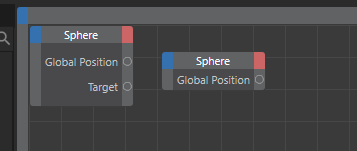
What I need it to do:
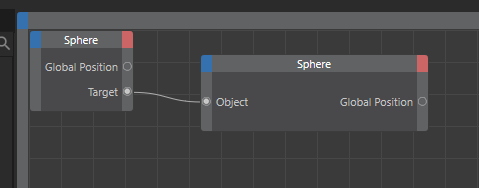
To later link the target with the object.
Thank you for your time.
Joel Johera