Maxon Developers Maxon Developers
    • Documentation
      • Cinema 4D Python API
      • Cinema 4D C++ API
      • Cineware API
      • ZBrush Python API
      • ZBrush GoZ API
      • Code Examples on Github
    • Forum
    • Downloads
    • Support
      • Support Procedures
      • Registered Developer Program
      • Plugin IDs
      • Contact Us
    • Categories
      • Overview
      • News & Information
      • Cinema 4D SDK Support
      • Cineware SDK Support
      • ZBrush 4D SDK Support
      • Bugs
      • General Talk
    • Recent
    • Tags
    • Users
    • Login

    KeyFrame User Data from Xpresso driven User Data

    Scheduled Pinned Locked Moved Cinema 4D SDK
    python
    3 Posts 2 Posters 5 Views 1 Watching
    Loading More Posts
    • Oldest to Newest
    • Newest to Oldest
    • Most Votes
    Reply
    • Reply as topic
    Log in to reply
    This topic has been deleted. Only users with topic management privileges can see it.
    • J Offline
      JoelJohera
      last edited by

      To whom it may concern,

      I have an object that has two user data fields.
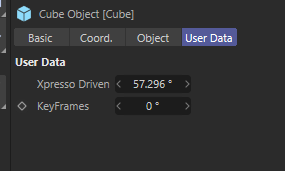
      393270d5-85c7-43e3-b57a-0b899df5733a-image.png
      I know that an Xpresso-driven user data field can not be animatable using keyframes, which is why I have the user data field keyframes. If I manually put the keyframes in the user data field keyframes with the same data as the Xpresso Driven user data field, everything works. However, I want it to make it work with a Python script, so I do not need to do the keyframes manually. I tried with this script:

      import c4d
      from c4d import gui
      
      def main():
          doc = c4d.documents.GetActiveDocument()
          obj = doc.SearchObject('Cube')
          desc_id_keyframes = None
          value = None
          user_data_container = obj.GetUserDataContainer()
          for desc_id, bc in user_data_container:
              if bc[c4d.DESC_NAME] == "Xpresso Driven":
                  value = obj[desc_id]
              elif bc[c4d.DESC_NAME] == "KeyFrames":
                  desc_id_keyframes = desc_id
          
          print(value)
          print(desc_id_keyframes)
          
          track = c4d.CTrack(obj, desc_id_keyframes)
          
          if not obj.FindCTrack(desc_id_keyframes):
              obj.InsertTrackSorted(track)
          
          curve = track.GetCurve()
          time = c4d.BaseTime(0, doc.GetFps())
          result = curve.AddKey(time)
          key = result["key"]
          key.SetValue(curve, value)
          c4d.EventAdd()
          
      if __name__=='__main__':
          main()
      

      However, the keyframe does not get inserted:
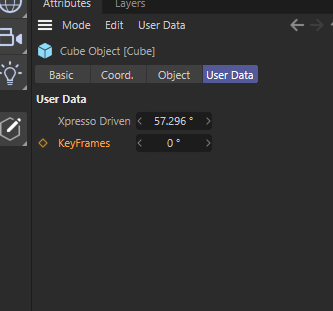
      b8737051-578a-4c44-95d0-c895e7c1ab95-image.png

      What am I doing wrong?

      Thanks in advance for the help.
      Regards,
      Joel Johera

      1 Reply Last reply Reply Quote 0
      • J Offline
        JoelJohera
        last edited by

        Solved.

        I need to change this part:

        track = obj.FindCTrack(desc_id_keyframes)
        if track is None:
           track = c4d.CTrack(obj, desc_id_keyframes)
           obj.InsertTrackSorted(track)
        
        
        1 Reply Last reply Reply Quote 0
        • ferdinandF Offline
          ferdinand
          last edited by ferdinand

          Hey @JoelJohera,

          it is kind of hard to follow your question and solution, as the former lacks a scene for context and for the latter I am not quite sure what you fixed. But when it works for you I am happy 😉

          Cheers,
          Ferdinand

          MAXON SDK Specialist
          developers.maxon.net

          1 Reply Last reply Reply Quote 0
          • First post
            Last post
