Maxon Developers Maxon Developers
    • Documentation
      • Cinema 4D Python API
      • Cinema 4D C++ API
      • Cineware API
      • ZBrush Python API
      • ZBrush GoZ API
      • Code Examples on Github
    • Forum
    • Downloads
    • Support
      • Support Procedures
      • Registered Developer Program
      • Plugin IDs
      • Contact Us
    • Categories
      • Overview
      • News & Information
      • Cinema 4D SDK Support
      • Cineware SDK Support
      • ZBrush 4D SDK Support
      • Bugs
      • General Talk
    • Recent
    • Tags
    • Users
    • Login
    1. Maxon Developers Forum
    2. BretBays
    B
    Offline
    • Profile
    • Following 0
    • Followers 0
    • Topics 13
    • Posts 33
    • Groups 0

    BretBays

    @BretBays

    0
    Reputation
    32
    Profile views
    33
    Posts
    0
    Followers
    0
    Following
    Joined
    Last Online

    BretBays Unfollow Follow

    Latest posts made by BretBays

    • RE: How to get edge 'island' selection

      Hey Ferdinand, thanks for the detailed response.

      Allow me to expand even further and try to explain some of the issues I have run into. My plugin/tool basically works at the moment via a start point and an end point that sit on the same loop. LIke this image:
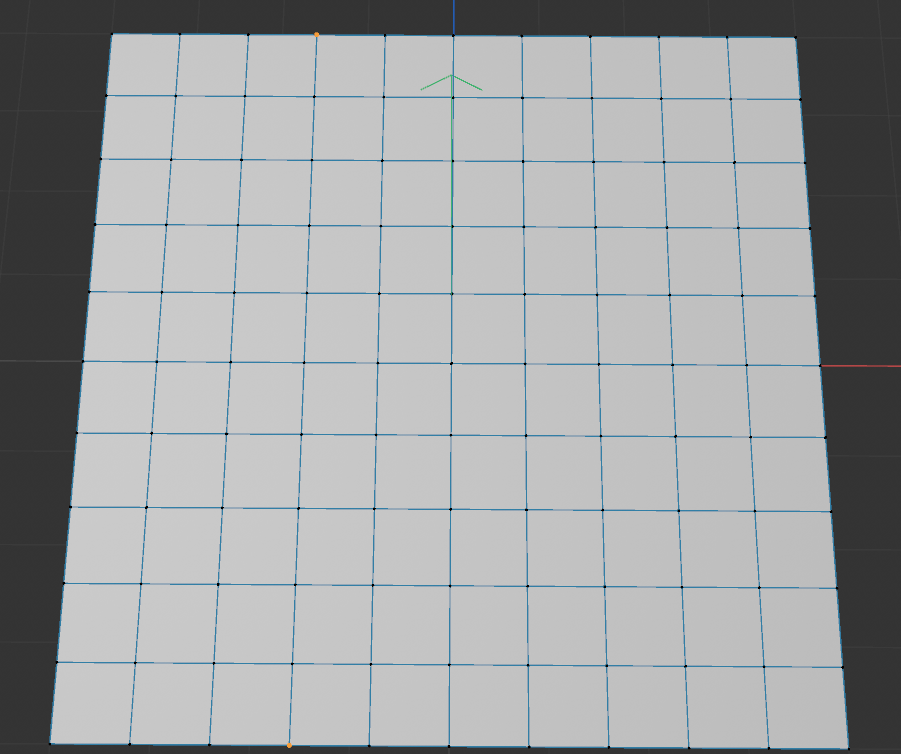
      image.png

      What the plugin does is it looks at the joint weights for one point(designated as the start point) and the weights for the other point(designated as the end point). Then, it gets all the other in between points on the loop path and in order.
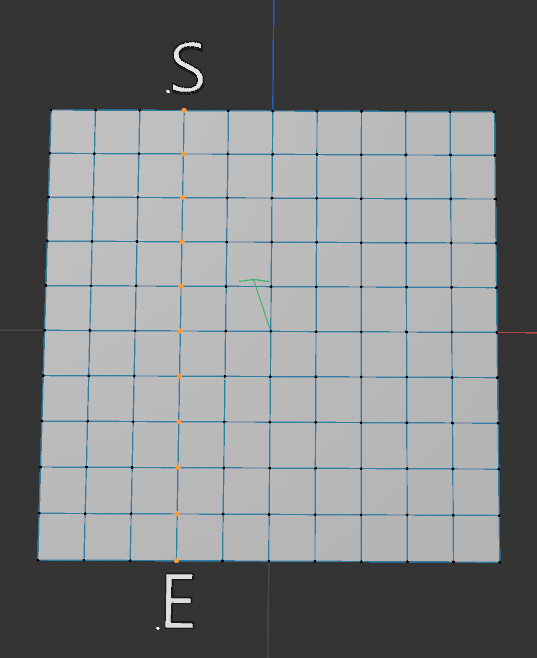
      image.png

      Then the plugin does an interpolation of the joint weights from the start to end, and interpolates all those in between point's joint weights. That all works fine and I have a function to get those points based off that joint selection, so no issues there.

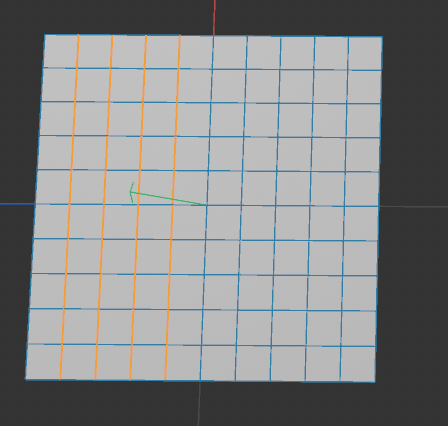
      From a workflow standpoint, this is fine, but it's slow because I have to go loop by loop manually selecting my start and end points, and go loop by loop. So my idea(based off a maya tool used at work) is to be able to select those loops myself with edges, and have it run the interpolation on all the loops at once(well, at once as far as clicking apply once and it does each loop for you).

      The issues I am running into is that it seems like working with edge selections is very cumbersome in Cinema. There is op.GetEdgeS() which will return me a BaseSelect, but I cannot properly query whether or not an edge is selected. Edges dont seem to have their own unique id to where I could do something and say like, "Go select Edge 23 and do something with it". The edge seems to be derived from a polygon's info to be either 0-3 for a given polygon.

      I don't know I just am having a hard time wrapping my head around these concepts in Cinema. Is it possible to pass in an edge ID and work with edge ID's or do you have to go through the polygon info and all of that to get them? Like if I could store a list of selected edge ID's(in theory op.GetEdgeS() should do this for me, right?) I could in theory just start with one, then walk through the mesh via growing the selection and appending only edges found in the original selection, then deselecting all the rest. This should in theory allow me to grow along the path and organize them by loop and then I could do things like you said convert them to loops later
      posted in Cinema 4D SDK
      B
      BretBays
    • RE: How to get edge 'island' selection

      Hey Ferdinand,

      I didn't give a good enough example, my apologies. And no worries, I certainly don't expect the script to be done for me, it's just hard to know if something is possible or not and if I knew the answer, I'd likely have the script myself :). Let me try to explain it better.

      Check out this video: https://www.dropbox.com/scl/fi/ce9d71lg0tnv3j9qz1s9v/WeightBlend.mp4?rlkey=4s3qj0s2trhniwezgo7yf4cy3&e=1&dl=0 it shows the workflow for a plugin I am developing that this request was even for. If you watch, I am working with 2 points along an edge loop before click apply. What would be preferred is to instead define all the edge loops to then click apply and it will do the blending along each loop.

      So the question is if there are any means or ways to determine unique edge loops from an edge selection that I could then go through each edge loop, convert to verts under the hood and then do what I normally do for the weight blending.

      posted in Cinema 4D SDK
      B
      BretBays
    • How to get edge 'island' selection

      Hello there,

      I do not have code for this, I was mostly curious if an idea was at all possible and how to approach it in Cinema's SDK.

      Steps to reproduce:

      1. Create Plane.
      2. Make it editable
      3. Switch to Edge mode
      4. Use Path Selection tool set to Simple Edge loop to select a few loops like this:

      26d93d43-5a7b-4258-a418-f7d10c94822f-image.png

      Is there a way to get each of these loops in python? Like, a Base Select would just give me whether or not an edge is selected, but I basically want to get the continuous edges of each loop. So to know that the first loop is made up of edges 1-10, the second loop is 2-20, etc. The end goal would be to take those loops, and do some stuff with each set of verts for each loop. But I am not sure if this is even possible or not. I had looked at the Neighbor class, but I don't know if that would enable me to do it.

      There must be some sort of internal method because if you do some loops and use the edge to joint command, it can differentiate the different loop selections to create joints.

      posted in Cinema 4D SDK python 2026
      B
      BretBays
    • RE: Gear Settings Icon Workflow

      Nevermind. I am an idiot. I did manage to find some of what I was looking for.

      For future reference in case anyone is as blind as I am, when you are doing a commandData plugin, when registering your plugin, you need to set c4d.PLUGINFLAG_COMMAND_OPTION_DIALOG in the info flag, and that will make it have the icon. Then I can go do some searching to sort the rest of it out.

      posted in Cinema 4D SDK
      B
      BretBays
    • Gear Settings Icon Workflow

      I have a question that conceptually I don't know the best practices for doing and I was having trouble locating anything in the SDK about it.

      Cinema has the concept of the gear icon which let's you open a little dialog for commands to change something that you maybe would only do occassionally. This is visible in a variety of areas such as the Mesh>Add>Subdivide for instance.

      link

      Is there any information about best practices for doing something like this? I am sorry this is a bit vague. Is it just a matter of having the script/command plugin, and then a second script/command plugin for the the settings dialog that maybe writes something that the first script references when running? Or is there some proper way to write a command with the setting icon option? I feel like there has to be some way, because if I were to do it as two separate scripts/plugins, they'd have two different entries, in the Extensions menu, right? Which is not what is desired.

      posted in Cinema 4D SDK python
      B
      BretBays
    • RE: ToolData Linkbox does not retain object when one is dragged in.

      Blah! Bummer. Seemed like a bug to me. I guess I will just convert this to a CommandData plugin and use GeDialog.

      posted in Bugs
      B
      BretBays
    • RE: How to Undo Switching Between Modes?

      @ferdinand said in How to Undo Switching Between Modes?:

      Well, just move the code which switches the mode to the end of your code when it is only cosmetic anyways. As I said above, a sensible way to use SetMode is when you want to leave the user in a state where he or she can continue working right away. But you can then just run all your code, check if everything went fine and then set your code. Otherwise you never set the mode, and therefore also have nothing to revert.

      It's a matter of workflow. It's not simply for checking the code that it's working properly. It's about a workflow. The workflow in the example is Select some mesh components, run the command. It generates something for you and switches the mode for you. If you selected the wrong components, you'd undo and try it again. But the undo won't put you back in the component mode. The issue is that that part of the command is not undoable so it's does hinder the workflow just a bit. I'm not necessarily advocating that it should be undoable or anything like that, just explaining the reasoning in this example and the value if it were undoable.

      posted in Cinema 4D SDK
      B
      BretBays
    • RE: ToolData Linkbox does not retain object when one is dragged in.

      I would do that, except the process for creating a plugin is not trivial and in no way intuitive anymore. There's no resEdit to generate all the necessary resource information and UI elements, so now I have to do that manually. That means to provide a meaningful and functional example, I need to now go through the several hoops of creating a plugin just for this test, despite giving reasonably clear indications of what is being done function and plugin-wise. And despite going through the process of getting a new plugin ID, and creating a new folder, .pyp file, res, strings_us, renaming my classes, using the correct, new, throwaway plugin ID, my plugin wont even initialize. Even though it's the same code as my actual plugin, just with renamed classes and file, and stripped down, the plugin would not initialize. So here's the code that had to hijack an existing toolData plugin SDK example to demonstrate the issue.

      """
      Copyright: MAXON Computer GmbH
      Author: XXX, Maxime Adam
      
      Description:
          - Tool, Creates a liquid Painter Tool.
          - Consists of Metaball and Sphere.
      
      Class/method highlighted:
          - c4d.plugins.ToolData
          - ToolData.GetState()
          - ToolData.MouseInput()
          - ToolData.Draw()
          - ToolData.GetCursorInfo()
          - ToolData.AllocSubDialog()
      """
      import c4d
      import os
      
      # Be sure to use a unique ID obtained from www.plugincafe.com
      PLUGIN_ID = 1025247
      
      # Values must match with the header file, usd by c4d.plugins.GeLoadString
      IDS_PRIMITIVETOOL = 50000
      
      
      class SettingsDialog(c4d.gui.SubDialog):
          """Creates a Dialog to show the ToolData options.
      
          This dialog will be displayed in the Attribute Manager so this means the ToolDemoDialog
          will be instantiate each time the tool is activate and destruct when the AM change its mode.
          """
          def __init__(self, sharedDict):
              super(SettingsDialog, self).__init__()
      
          def CreateLayout(self):
              self.SetTitle("BB-Distribute Points")
              self.GroupBegin(id=100010, flags=c4d.BFH_SCALEFIT, cols=1, rows=5, title="BB-Distribute Points")
      
              self.GroupBegin(id=200010, flags=c4d.BFH_SCALEFIT, cols=2, rows=1)
              #bc=c4d.BaseContainer()
              self.AddCheckbox(id=8888,  flags = c4d.BFH_LEFT,  initw=10, inith= 10, name="")
              self.linkGadget = self.AddCustomGui(9898, c4d.CUSTOMGUI_LINKBOX, "Custom", c4d.BFH_SCALEFIT, minw=100, minh=10)
              self.GroupEnd()
              
              self.GroupEnd()
      
              return True
          
          def Command(self, commandID, msg):
              """This Method is called automatically when the user clicks on a gadget and/or changes its value this function will be called.
      
              It is also called when a string menu item is selected.
      
              Args:
                  commandID (int): The ID of the gadget that triggered the event.
                  msg (c4d.BaseContainer): The original message container
      
              Returns:
                  bool: False if there was an error, otherwise True.
              """
              if commandID == 9898:
                  print(self.linkGadget.GetLink())
      
      
      class LiquidTool(c4d.plugins.ToolData):
          """Inherit from ToolData to create your own tool"""
      
          def __init__(self):
              self.data = {'sphere_size':15}
      
          def AllocSubDialog(self, bc):
              """Called by Cinema 4D To allocate the Tool Dialog Option.
      
              Args:
                  bc (c4d.BaseContainer): Currently not used.
      
              Returns:
                  The allocated sub dialog.
              """
              return SettingsDialog(getattr(self, "data", {'sphere_size': 15}))
      
      
      if __name__ == "__main__":
          # Retrieves the icon path
          directory, _ = os.path.split(__file__)
          fn = os.path.join(directory, "res", "liquid.tif")
      
          # Creates a BaseBitmap
          bmp = c4d.bitmaps.BaseBitmap()
          if bmp is None:
              raise MemoryError("Failed to create a BaseBitmap.")
      
          # Init the BaseBitmap with the icon
          if bmp.InitWith(fn)[0] != c4d.IMAGERESULT_OK:
              raise MemoryError("Failed to initialize the BaseBitmap.")
      
          # Registers the tool plugin
          c4d.plugins.RegisterToolPlugin(id=PLUGIN_ID,
                                         str="Py-Liquid PainterBB",
                                         info=0, icon=bmp,
                                         help="This string is shown in the statusbar",
                                         dat=LiquidTool())


      This is a copy of an SDK example of a toolData plugin, it does the same thing I am doing in my plugin which is using and was as I described in my first post def AllocSubDialog(self, bc) in the toolData pluginto call a c4d.gui.SubDialog class that is calling CreateLayout(self) which inside there is using self.linkGadget = self.AddCustomGui(9898, c4d.CUSTOMGUI_LINKBOX, "Custom", c4d.BFH_SCALEFIT, minw=100, minh=10). I also added the Command bit from your example, and it will print the object, but the object does not get retained.

      Open Cinema. Select Py-Liquid PainterBB. Drag any object into the link field of the AM and it should disappear immediately.

      posted in Bugs
      B
      BretBays
    • RE: How to Undo Switching Between Modes?

      I think the idea is that when working with this and testing it, it becomes a thing that the user has to manage themselves.

      Imagine you have a script that takes point selections, then creates a null, and then switches to object mode with the null selected so you can immediate move the null.

      You hit undo, null is gone. Back to your point object selected, but you are still in model mode. So to run it again youd need to manually switch back to point mode, THEN run the script again.

      Thats what I think the idea for the use case is.

      posted in Cinema 4D SDK
      B
      BretBays
    • RE: ToolData Linkbox does not retain object when one is dragged in.

      Does it still work if you instead put it into a SubDialog and call that subDialog from a tooldata plugin? Because thats the only thing I can see from my code. As ive mentioned, I have used linkboxes successfully before, but it was always in CommandData plugins with GeDialog not ToolData plugins with SubDialog so it shows up in the Attribute Manager vs a pop up window. I wasn't sure if there is some sort of difference I need to account for there.

      posted in Bugs
      B
      BretBays