-
Hello @ThomasB,
could you share your plugin via something like dropbox or google drive with us? You upload above seems to have failed.
Your code looks fine, you do everything correctly at first glance. You only try to modify the scene in the context of
MSG_DESCRIPTION_COMMAND(which should only be invoked from the main thread) and shield yourself against rogue actors by also checkingc4d.threading.GeIsMainThread()(slightly better would beGeIsMainThreadAndNoDrawThreadbut that is just semantics). Your node does also not do anything wildly expensive in itsInit/__init__.But I am sure you are not just imagining your performance issues. Generally speaking, your code should only run when the user clicks the button with the ID
PY_ADD_AUDIOin the description of your tag. So, this should not be able to accidently run when you render or while scene playback (which I assume is what you mean with 'running (an) animation').PY_TRACKseems to be a parameter of typeDTYPE_BASELINKwhere you just link the newly created track. I cannot really see anything going wrong with this, as this is very harmless. I also checked if there is any 'special sauce' in creating sound tracks, as they are one of the special tracks, but as far as I can see, we are doing this internally exactly like you do it. So, this also does not seem to be a case of an incorrectly allocated node, which then constantly causes internal errors.Cheers,
FerdinandMAXON SDK Specialist
developers.maxon.net -
Oh sorry, I missed that.
Is Google Drive ok?(which I assume is what you mean with 'running (an) animation').
By "running during animation," I meant clicking the button while the animation is playing.
-
Absolutely, but you have to either grant me access or make the whole folder public.
MAXON SDK Specialist
developers.maxon.net -
@ferdinand
WTF is wrong with me? It should work now. -
It did, thanks, I will have a look.
MAXON SDK Specialist
developers.maxon.net -
Hey,
Can you provide a bit more context? I tried your plugin on Cinema 4D 2025.2.1 and macOS 26.5.1. I added your tag to a scene, clicked the "Add Audio" button, and started playback.
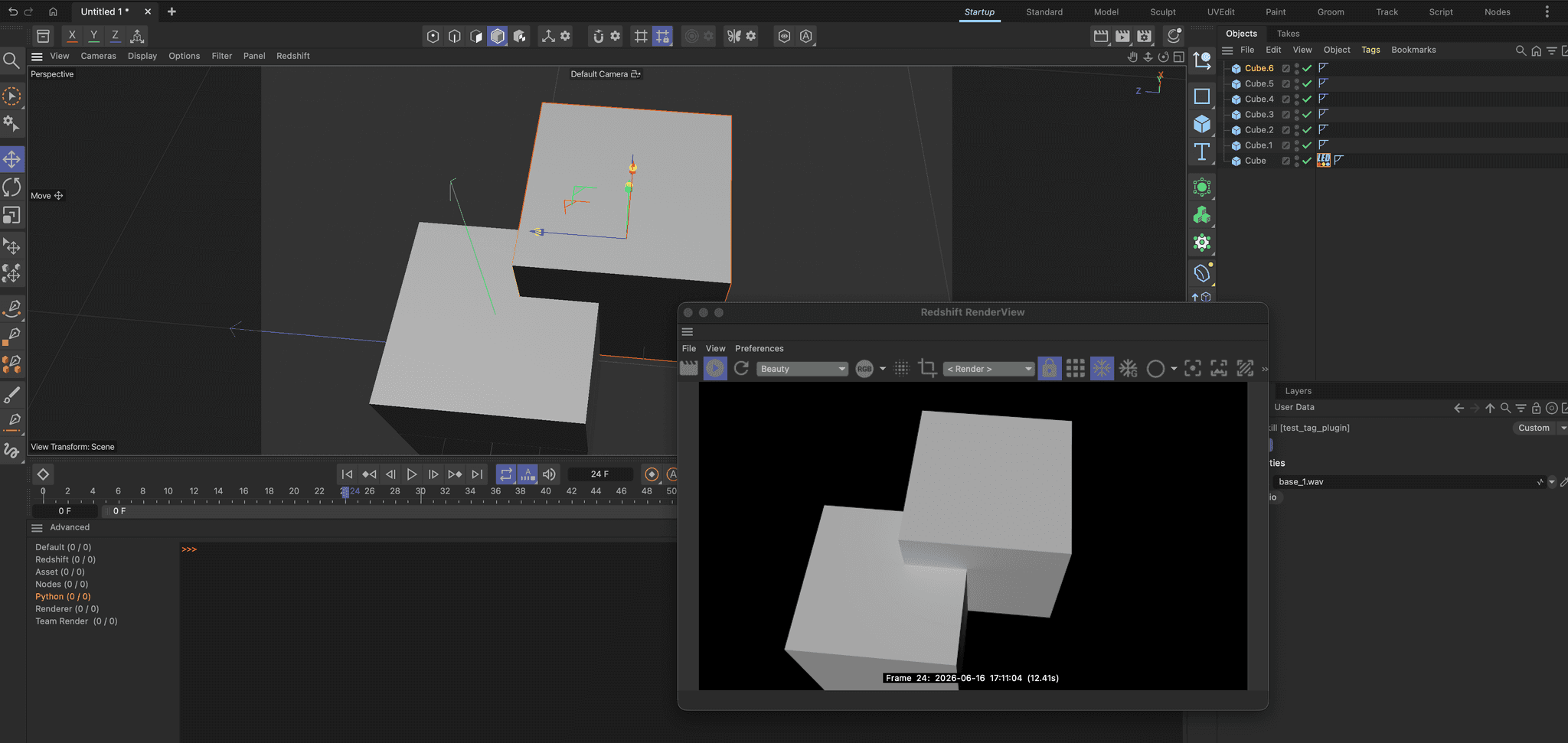
- I experience no slowdowns when I run the scene playback (
F8) or the RS render view. - I hear the
base_1.wavsound playing your plugin adds.
Can you please:
- Provide the type and version of operating system you use.
- Provide the version of Cinema 4D you use.
- Describe the hardware you use.
- Provide an example scene.
- Check if you experience the same slowdowns when your plugin is being removed from the scene (but the sound track it has added is being left in.
- If necessary, provide a step-by-step instruction to describe your bug. See here for how to formally make a bug report.
My hunch right now is that your plugin has probably little to do with the slowdowns, but that sound track playback is the culprit which might lead to 'resource fighting' on some systems.
Cheers,
FerdinandMAXON SDK Specialist
developers.maxon.net - I experience no slowdowns when I run the scene playback (
-
@ferdinand
First of all, thank you very much for your efforts; where you get such perseverance from is truly remarkable.- Windows 11 Pro 26200.8524
- Cinema 4D 2026.2
- Hardware
- CPU: AMD Ryzen 9 5950X 16-Core
- RAM: 64 GB
- GPU: RTX 3060 (Studio Driver)
I think you misunderstood me. I’m not trying to report a bug here, since the issue isn't with Cinema 4D itself. Rather, I wanted to know if I’m handling the threading correctly here within the Main Thread, because I’ve been experiencing some freezing when I clicked the "Convert" button during playback.
 ️By the way in the simple plugin example, you can click the Convert Button multiple times. It just toggles back and forth between the two sounds.
 I experienced these freezes with the paid plugin that is already on the market. In principle, the convert function is the same, though it’s a bit more complex—calculating and loading audio.
I have the bug report, too, in case that’s of interest. Though I don't think I checked forc4d.threading.GeIsMainThreadAndNoDrawin that instance. The AI has already analyzed the bug report and specifically pointed out the threading issue, so I’m asking here for the best way to handle the threading or whether I’m doing something wrong.I’d rather not share the large plugin here, as it’s a commercial product.
The plugin is way more complex of course. I try not to build puny plugins
 . Currently it consists of that tag and a
 GeDialog—the step sequencer—that can be launched from the tag.
The step sequencer also has a "Convert" button that triggers the same function within the plugin'sNodeData. It works fine.
In the commercial version, I disabled both Convert Buttons the one in the StepSequencer and the one in the tag while the animation is running, just to be on the safe side.
Since you don't see any major issues with the example plugin's
Convertmethod, I don't think the problem lies with the tag's Convert button, but rather with the Step Sequencer's Convert button.
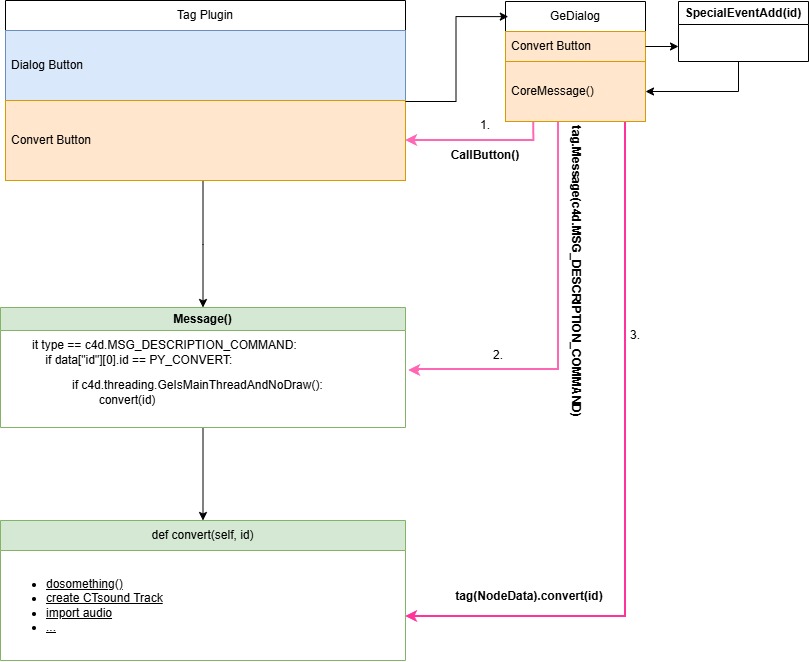
Can I trigger the
Convertmethod from within theGeDialogas well?
In other words:- when a click occurs in the
GeDialog - I send a
c4d.SpecialEventAdd() - catch it in the
GeDialog'sCoreMessage(), - and trigger the tag's convert function.
That should put me in the Main Thread, right?
- Or can I fire it directly from the GeDialog's Command() method?
You can see it in the figure down below.
Theoretically, could I use any of the three methods, or is one better? Or am I not allowed to do that at all?
 Anyone who works makes mistakes.
Cheers
T.B -
@ThomasB said in Thread safety when handling CTrack in TagData.Message() on button click:
I think you misunderstood me. I’m not trying to report a bug here, since the issue isn't with Cinema 4D itself.
No, I did not misunderstood your situation (at least I think so
 ). We sometimes ask people to report a formal bug report so that we can reproduce an issue. This is not necessarily bound to the bug being in Cinema 4D. Although we often do this when we suspect that the bug is on the Cinema side or at least in a grey area where the plugin does something that is not so great but Cinema also drops the ball in some shape or form.
Your code, at least the one you shared with us, does not do anything wrong. And even though I know you have put a lot of work in your reply here, a lot of text and diagrams do not help in concretely fixing the issue. To answer a few questions anyway:
NodeData::Messageusually runs on the main thread (and you additionally check), so we are fine.- Dialog code also usually runs on the main thread. The only exception can be drawing code (something like
GeUseraArea::DrawMsg), although drawing code usually also runs in a special section of the main thread. Hence my hint to useGeIsMainThreadAndNoDrawThreadinstead ofGeIsMainThreadin my first posting. - Generally there is no guarantee that any code runs on the MT. As an example,
NodeData::Messagecalls are usually on the MT, especially the messageMSG_DESCRIPTION_COMMAND. I.e., when a user clicked a button in your node this should run on the MT as you often want to do GUI things or modify the scene. And Cinema will (should) honor this. But nothing prevents me, Evil Bob the developer, from grabbing your tag, creating a new thread then callingyourTag.Message(MSG_DESCRIPTION_COMMAND, BaseContainer())from this new thread and with that violate the assumption that description commands alwary run on the MT. - Core messages are also usually sent from the MT, both in a dialog and in a
MessageData; soCoreMessagefunctions should usually run on the MT. Core message (i.e., event) evaluation is also decoupled. When you set a (core) event from a non-MT thread (viaSpecialEventAdd), Cinema should properly synchronize and execute the event on the MT. But there could be of course bugs in our code. You should therefore always shield your code withGeIsMainThreadAndNoDrawThreadorGeIsMainThreadif your code could also run in a drawing context.
It is good that you have an eye on the threading safety in Cinema as this is something that often trips developers. But I do not think that threading is here the issue. Threading violations usually lead to crashes, corrupted data, or inexplicable behavior. Slowdowns usually mean that either code runs way more often that you think, e.g. some feedback loop between your tag and dialog, or that there is some resource fighting going on. Playing audio means that hardware resources must be allocated. When they are constantly dropped and reallocated, because something else wants to access them too, this can lead to slowdowns. This is still just a guess into the blue of mine, but it would fit the symptoms you are describing.
Could you please:
- Confirm that the issue also happens for your with the simplified plugin.
- Provide a step by step bug report to reproducing the issue as described here.
- Check that the issue does not happen when you delete your tag (but leave the sound track in the scene). I really want to rule out that Cinema does not have a problem with audio playback on some hardware in general.
When push comes to shove, you can also share your full plugin in private with us via sdk_support(at)maxon(dot)com. When you can reproduce the issue with the simplified plugin, this is of course sufficient for us to investigate the issue. But if you cannot reproduce the issue with the simplified plugin, then we would need to see the full plugin to understand what is going on.
Cheers,
Ferdinandedit: I now also tried on my Win 11 machine (Intel chipset, a bit beefier GPU). And I cannot detect any slowdowns in normal scene playback or when using the RS render view. However, when I use the Calculate Fps tool (just press
SHIFT + Cand type'FPS'), I experience distorted audio and the view port becomes sightly laggy. This happens with and without your tag, an audio track alone seem to be enough.MAXON SDK Specialist
developers.maxon.net -
Ok I try to force a crash with the simplified plugin, when I have time

There is a lot to do here in the plugin stack right now.
I'll try to look into it tomorrow or the day after.And back to the other topic...
I let AI look into the crash log (because this is beyound my knowledge) again and it found the root cause. The crash was indeed happening during a very heavy scene setup with high MoGraph load and active Redshift Live Viewer rendering.While my UI synchronization from the GeDialog to the Attribute Manager parameters and vice versa runs perfectly safe on the main thread (hope so
 :-)) , the crash was triggered inside MSG_DESCRIPTION_COMMAND when clicking the "Convert" button. In that moment, my code overwrites the temporary audio file, temporarily flushes the track path with an empty string "" to force C4D to clear its memory buffer, and reloads the track.
Without protection it somehow collided with Redshift or MoGraph trying to read the document's audio properties during a redraw cycle, resulting in the access violation inside the audio driver callback (wdmaud.drv).
edit (Ferdinand).
My Solution:
I now wrap the conversion trigger using c4d.SpecialEventAdd() in the GeDialog (Step Sequencer) from the dialog to cleanly pass it into the main event pipeline.And Inside the message handler, I safely guard the execution with c4d.threading.GeIsMainThreadAndNoDraw().
Additionally, the convert buttons are now disabled while the animation is actively running.
With these safeguards in place, the collision is hopfully entirely bypassed, and Cinema 4D hopfully remains stable.I might reconsider sending the plugin to sdk..... I’m just a bit afraid of the scathing criticism I’d get :-).
But for now, I’ll keep testing it a bit longer— If I run into another crash, I’ll get back to you.Thanks a lot
T.B -
While my UI synchronization from the GeDialog to the Attribute Manager parameters and vice versa runs perfectly safe on the main thread (hope so
:-)) , the crash was triggered inside MSG_DESCRIPTION_COMMAND when clicking the "Convert" button. In that moment, my code overwrites the temporary audio file, temporarily flushes the track path with an empty string "" to force C4D to clear its memory buffer, and reloads the track. Without protection it somehow collided with Redshift or MoGraph trying to read the document's audio properties during a redraw cycle, resulting in the access violation inside the audio driver callback (wdmaud.drv).First of all: I am happy that you found your fix.
But this should not happen, and would imply a severe bug on our side. You should be able to write data as you desire on the MT. I am also not sure if the AI did not misinform you a bit. The stack trace which is found in a bug report contains raw function pointer offsets. Apart from some guesswork based on the DLL names, the offsets are meaningless for a human, even an AI cannot read this. To become meaningful, these stack traces must be resolved by our bug ticket system which then turns the function offset pointers into function and method names and their file and line numbers (it then looks more or less the same as the Python stack traces you know). You can only resolve this when you have access to the debug database /source code of Cinema 4D, which is for obvious reasons not shipped with Cinema 4D.
Did you submit your crash when Cinema 4D asked you to do so? Because I do not see it in our bug tracker when I search for that stack trace. The strack trace in your crash report must be read bottom to top, i.e., the highest item is the stack frame where it crashed.
CINEMA_4D_Crash_Report_WINDOWS
{
	Call_Stacks
	{
		Call_Stack_Thread_57060
		{
			VCRUNTIME140.dll:	_NLG_Return2 + 0x6c0 (SP: 0x0000006CAA3FED68, PC: 0x00007FFEB8DB0CF0) // Here is goes 'poof'
			c4d_base.xdl64:	0x00007FFD9CDB07E6 (SP: 0x0000006CAA3FED70, PC: 0x00007FFD9CDB07E6)
			c4d_base.xdl64:	0x00007FFD9CDAC864 (SP: 0x0000006CAA3FEDE0, PC: 0x00007FFD9CDAC864)
			c4d_base.xdl64:	0x00007FFD9CDAC503 (SP: 0x0000006CAA3FEE80, PC: 0x00007FFD9CDAC503)
			c4d_base.xdl64:	0x00007FFD9CDB480F (SP: 0x0000006CAA3FEF60, PC: 0x00007FFD9CDB480F)
			c4d_base.xdl64:	0x00007FFD9CDB5914 (SP: 0x0000006CAA3FF500, PC: 0x00007FFD9CDB5914)
			c4d_base.xdl64:	0x00007FFD9CDB755C (SP: 0x0000006CAA3FF550, PC: 0x00007FFD9CDB755C)
			c4d_base.xdl64:	0x00007FFD9DA833B4 (SP: 0x0000006CAA3FF590, PC: 0x00007FFD9DA833B4)
			c4d_base.xdl64:	0x00007FFD9DA82F45 (SP: 0x0000006CAA3FF5F0, PC: 0x00007FFD9DA82F45)
			winmmbase.dll:	DriverCallback + 0x5a (SP: 0x0000006CAA3FF630, PC: 0x00007FFEB126D38A)
			wdmaud.drv:	0x00007FFE1D202A35 (SP: 0x0000006CAA3FF670, PC: 0x00007FFE1D202A35)
			wdmaud.drv:	0x00007FFE1D2020F4 (SP: 0x0000006CAA3FF6E0, PC: 0x00007FFE1D2020F4)
			wdmaud.drv:	0x00007FFE1D201E45 (SP: 0x0000006CAA3FF970, PC: 0x00007FFE1D201E45)
			KERNEL32.DLL:	BaseThreadInitThunk + 0x17 (SP: 0x0000006CAA3FF9A0, PC: 0x00007FFED3BAE957)
			ntdll.dll:	RtlUserThreadStart + 0x2c (SP: 0x0000006CAA3FF9D0, PC: 0x00007FFED52A7C1C)
			Registers
			{
...
I.e., it crashed in
VCRUNTIME140.dll, a Visual C++ Runtime component that is responsible for executing basic C++ code. This hints at low level operations such as memory allocation or hardware drivers. And you are right,wdmaud.drvis the Windows Media audio driver.c4d_base.xdl64is then the base library of the Cinema API, there are a lot of things to be found in there and without resolving the report we cannot know where the problem lies (the stack frame in the Cinema API which then invokes something inVCRUNTIME140.dll). So, this basically goes "Audio Driver -> Cinema Core -> MSVC lib -> poof".Python plugin execution modules do not show up at all (which means that this happens quite a bit after any Python code ran). And Mograph and Redshift modules do not show up in the crashing thread (MG shows up one thread before but that does not mean much).
It would be great if you could submit the bug report, so that our crash handler can resolve it. I can also technically add your crash dump manually, but that is always a bit of a hassle. This is pretty much guaranteed to be a severe bug somewhere in the audio memory management.
Cheers,
Ferdinandedit: I edited out the crash report download link in your posting, as it contains some minor sensitive details about your system we do not want to publish to the world when we do not have to
PS: And we will of course never shame users for their code, as that would be very counterproductive to what we are trying to do: help developers.
MAXON SDK Specialist
developers.maxon.net -
@ferdinand
Hi Ferdinand,thanks for the technical clarification.
I am performing a stress test now. If it crashes again, I will submit the official report as requested or would the old one work too?
Regarding the "Reproduction" steps in your guide: If I submit the report without the plugin, I obviously cannot provide steps that you can execute in your environment. To keep the report actionable for you while excluding the plugin files, should I describe the steps purely based on the sequence of internal C4D API operations that trigger the crash?
In short: How should the "Reproduction" section be formulated to be useful for your debugging process if the plugin itself is not included?
Cheers,
T.B -
Reproduction steps just refers to what you do in the GUI as an end user (switch to modeling layout, press play, ...). Do not include any API information, imagine you are someone who knows nothing about our APIs. And if we have or have not your plugin is irrelevant for the report, just state what you do.
MAXON SDK Specialist
developers.maxon.net -
@ferdinand
ok Ferdinand, I did some stress-tests with my plugin, loaded the sounds, created the patterns, freezed the sounds, all during timeline was running, but I was unable to reproduce the crash.
Maybe it was the small difference between c4d.threading.GeIsMainThread() and c4d.threading.GeIsMainThreadAndNoDrawThread() and some small fixes. Even so, working with audio in Cinema 4D still doesn't feel entirely comfortable .
.That’s why I submitted a bug report regarding the old crash. However, I didn't do it via BugsLife this time, but rather through the standard Help/Report A Bug option. I hope that’s the right way to do it. I described the crash and attached the bug report ZIP file.
-
Hello @ThomasB,
thank you for putting the work into this. I manually injected your bug report since you could not reproduce anymore. Its issue ID is ITEM#650353 BugReport_3deoskill_Audioworkstation.
This also gave me the resolved crash report. I cannot post it here in full, but these are the last stack frames (we also discussed above). So, this crashes while trying to apply filtering to the audio.
I will also give end user support a poke so that they can connect the dots. We would also be still very much interested in the state of the plugin which did cause the crash (and I saw that you cannot reproduce it anymore, I am asking for the old state of your plugin which caused the crash in case you use version control therefore also have a non-working version).
Call_Stack_Thread_57060
    VCRUNTIME140.dll = _NLG_Return2+ 0x6c0
    c4d_base.xdl64 = cinema::TSCompoundAudioCurve::processFiltering
    ...
    winmmbase.dll = DriverCallback+ 0x5a
    wdmaud.drv = 0x00007ffe1d202a35
    wdmaud.drv = 0x00007ffe1d2020f4
    wdmaud.drv = 0x00007ffe1d201e45
    KERNEL32.DLL = BaseThreadInitThunk+ 0x17
    ntdll.dll = RtlUserThreadStart+ 0x2c
Cheers,
FerdinandMAXON SDK Specialist
developers.maxon.net -
 F ferdinand moved this topic from Cinema 4D SDK on
-
@ferdinand
Hi Ferdinand,there is a misunderstanding regarding the workflow: You created the internal issue ITEM#650353 for me, but I have no access to that ticket as MRD. I can only see and edit/reply to my own Bug Reports in the 'Bugs Live' tool (like my original report #650297).
Since you requested the plugin files, how do you want me to provide them to you? Since I cannot access your internal ticket #650353, please let me know where exactly I should upload the files so you can actually retrieve them. I want to make sure the data is delivered correctly.
-
That is not a misunderstanding. I am aware that MRDs can only see their own tickets. But we still needed that crash reported, so I did it. I would have done the same if you would not have been an MRD. I usually mention ticket IDs here so that I can come back and close bugs. As you might have noticed, I have moved this into the Bugs forum.
You do not have to do anything regarding that ticket, it it inaccessible for non-Maxonians. But we are still very much interested in a version of your plugin or a workflow which caused the crash. Otherwise we will not be able to reproduce and fix the issue. When you cannot provide it, this is also not a biggie (please do not waste time on this), then we have at least documented that there is somewhere a problem with audio tracks and how they handle memory while post-processing audio; in case we run into the same issue in the future in another context.
Cheers,
FerdinandTo share plugins with us, you can either use a chat on backstage or send us a mail to sdk_support(at)maxon(dot)net. There is a good chance that when you use a binary data attachment in a mail, that our mail system will filter out that attachment. When you use backstage (and upload the plugin there in a chat) that data would be permanently in the assets of that forum. When you just give us a link, we will delete your data once we do not need them anymore for debugging.