how to detect obj selected in InExcludeData()?
-
Hi,
i use this script code to detect obj selected in InExcludeData(),always return "None"import c4d doc: c4d.documents.BaseDocument # The currently active document. op: c4d.BaseObject | None # The primary selected object in `doc`. Can be `None`. def main() -> None: ie = op[c4d.ID_USERDATA,1] for i in range(ie.GetObjectCount()): print(ie.GetData(i)[c4d.IN_EXCLUDE_DATA_SELECTION]) if __name__ == '__main__': main()i found a example code in this post,but it also not work.
Thanks for any help!
-
Hey @chuanzhen,
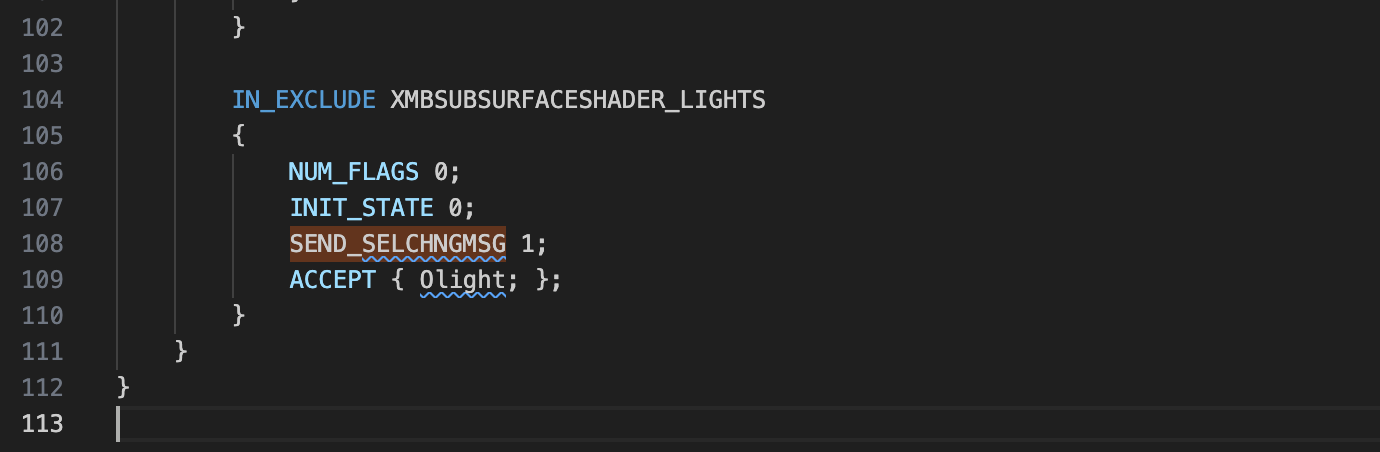
Thank you for reaching out to us. For me this works fine, but I also struggled for a second with this. The crucial information is probably that you have to set
SEND_SELCHNGMSGin theInExcludeCustomGuifor which this shall work. Since this information is rather obscure, I have updated the docs ofInExcludeData::GetDatato better reflect this.Cheers,
FerdinandMAXON SDK Specialist
developers.maxon.net -
@ferdinand Thanks,it works!
-
Supplement an example of generating UserData using code:
import c4d def main() -> None: bc = c4d.GetCustomDataTypeDefault(c4d.CUSTOMDATATYPE_INEXCLUDE_LIST) bc[c4d.DESC_NAME] = "Test" bc[c4d.IN_EXCLUDE_FLAG_SEND_SELCHANGE_MSG] = True did = op.AddUserData(bc) c4d.EventAdd() if __name__ == '__main__': main() -
Hi @ferdinand , in .res file, how to set InExcludeData IN_EXCLUDE_FLAG_SEND_SELCHANGE_MSG is True? in c++ API doc,there no this flags for IN_EXCLUDE_FLAG_SEND_SELCHANGE_MSG
-
MAXON SDK Specialist
developers.maxon.net -
@ferdinand Thank you. hope this can be updated in the document