[Cinema 4D/Redshift] Nested Redshift Proxy Files Not Detected by Project Asset Inspector
-
Dear community,
I'm facing an issue with nested Redshift proxy files not being detected by Cinema 4D's Project Asset Inspector. When a Redshift proxy file references another Redshift proxy file (proxy-of-proxy), only the first-level proxy is detected, causing incomplete asset collection when saving projects.
Environment:
- Cinema 4D Version: 2025, 2026
- Renderer: Redshift
- Operating System: Windows, Linux
- Python Version: 3.11 (Cinema 4D native)
Issue Description:
When ProxyA.rs references ProxyB.rs, the Project Asset Inspector only detects ProxyA but fails to discover ProxyB. This results in incomplete project asset collection when using "Save Project with Assets" or when programmatically querying scene dependencies.Steps to Reproduce:
- Create objects in Cinema 4D and export to Redshift proxy (ProxyB.rs)
- Create new scene, add Redshift proxy object referencing ProxyB.rs
- Export this setup to another Redshift proxy (ProxyA.rs)
- Create new scene with Redshift proxy object referencing ProxyA.rs
- Open Project Asset Inspector (Window > Content Browser > Project Asset Inspector)
- Observe that only ProxyA.rs is listed, ProxyB.rs is missing
Expected Behavior:
The Project Asset Inspector should recursively scan Redshift proxy files to detect nested proxy references and list all dependencies.Actual Behavior:
Only first-level proxy files are detected. Nested proxies are not discovered, resulting in incomplete asset collection when moving projects between workstations.SDK Investigation:
I've been exploring the Cinema 4D SDK to programmatically detect these nested dependencies. Using the SDK, I can access proxy materials and textures:def main() -> None: doc = c4d.documents.GetActiveDocument() objs = doc.GetObjects() for obj in objs: print(obj[c4d.REDSHIFT_PROXY_MATERIAL_LIST]) print(obj[c4d.REDSHIFT_PROXY_MATERIAL_TEXTURES])This successfully retrieves the proxy material and texture lists, showing references like:
ProxyOfProxyOfProxyTest.c4d:__RSC4D Default Material
RedshiftProxyTest.c4d:__RSC4D Default Material
Questions:
- Is there a built-in way to make the Project Asset Inspector recursively detect nested Redshift proxy dependencies?
- Can c4d.documents.GetAllAssetsNew() be used to discover these nested proxy files?
- Is there an SDK approach to programmatically traverse the proxy dependency chain and ensure all nested assets are collected?
Workaround:
Currently manually copying nested proxy files alongside projects, but this requires knowing which nested dependencies exist beforehand.Has anyone implemented a solution for detecting and bundling nested Redshift proxy dependencies? Any guidance would be greatly appreciated.
Thank you for your assistance.
-
Hello @vaishhg,
Welcome to the Maxon developers forum and its community, it is great to have you with us!
Getting Started
Before creating your next postings, we would recommend making yourself accustomed with our forum and support procedures. You did not do anything wrong, we point all new users to these rules.
- Forum Overview: Provides a broad overview of the fundamental structure and rules of this forum, such as the purpose of the different sub-forums or the fact that we will ban users who engage in hate speech or harassment.
- Support Procedures: Provides a more in detail overview of how we provide technical support for APIs here. This topic will tell you how to ask good questions and limits of our technical support.
- Forum Features: Provides an overview of the technical features of this forum, such as Markdown markup or file uploads.
It is strongly recommended to read the first two topics carefully, especially the section Support Procedures: How to Ask Questions.
About your First Question
I assume this is about Deadline? I am also not sure that I understand the question correctly. Let me recap, so that we are sure we talk about the same thing.
You have a scene
Original.c4dand you export it to the Redshift Scene formatOriginalProxy.rs. Then you create a Cinema 4D sceneComposition.c4dand there create one or multiple Redshift Proxy objects referencingOriginalProxy.rs. Then you export that scene as a Redshift scene asCompositionProxy.rs. You now want to access information aboutOriginal.c4dorOriginalProxy.rswhen loadingCompositionProxy.rswith a RS Proxy object into a Cinema 4D scene (or by extension see that information in the Asset Inspector).That is not possible.
rsis the Redshift scene format which works across the full landscape of DCCs supported by Redshift. The Redshift format has no such concept as a generator and just discretizes all smooth/procedural geometry data.When you export a Cinema 4D scene to the Redshift
rsformat, it will among other things just walk your scene and collect all the geometry caches and save them discretely in the RS format. For Redshift it does not make any difference if it collects the cache of a Cube generator object or the cache of a Redshift Proxy generator object. In the eyes of Redshift these are both just two procedural geometry generators which must be discretized/baked for export (not entirely true, because Redshift Proxy objects are cached in the Redshift Core itself and not in Cinema 4D, but close enough).As soon as you save a scene in the
RSformat, all information is lost that something once was a generator and the parameters it held. The Redshift Core also does not know a concept such as asset data or the Asset Inspector, as that is a Cinema 4D specific concept. So, such data is not stored in thersformat either.So, to answer your questions: You cannot reach into the past like that. Neither directly via the Asset Inspector and its API, nor indirectly by for example traversing the scene graph of a scene. In fact, RS Proxy objects do not even have caches in the Cinema 4D world, unless you set Preview to Mesh. The actual data resides discretely in the in the Redshift Core.
As an example, when we have this scene which holds two proxies and we run this script on it to, print the scene graph string of each object in the scene, we can see both proxies only hold discrete polygonal data:
import c4d
import mxutils

doc: c4d.documents.BaseDocument  # The currently active document.

def main() -> None:
    """Called by Cinema 4D when the script is being executed.
    """
    for obj in mxutils.IterateTree(doc.GetFirstObject(), True):
        print(mxutils.GetSceneGraphString(obj))


if __name__ == '__main__':
    main()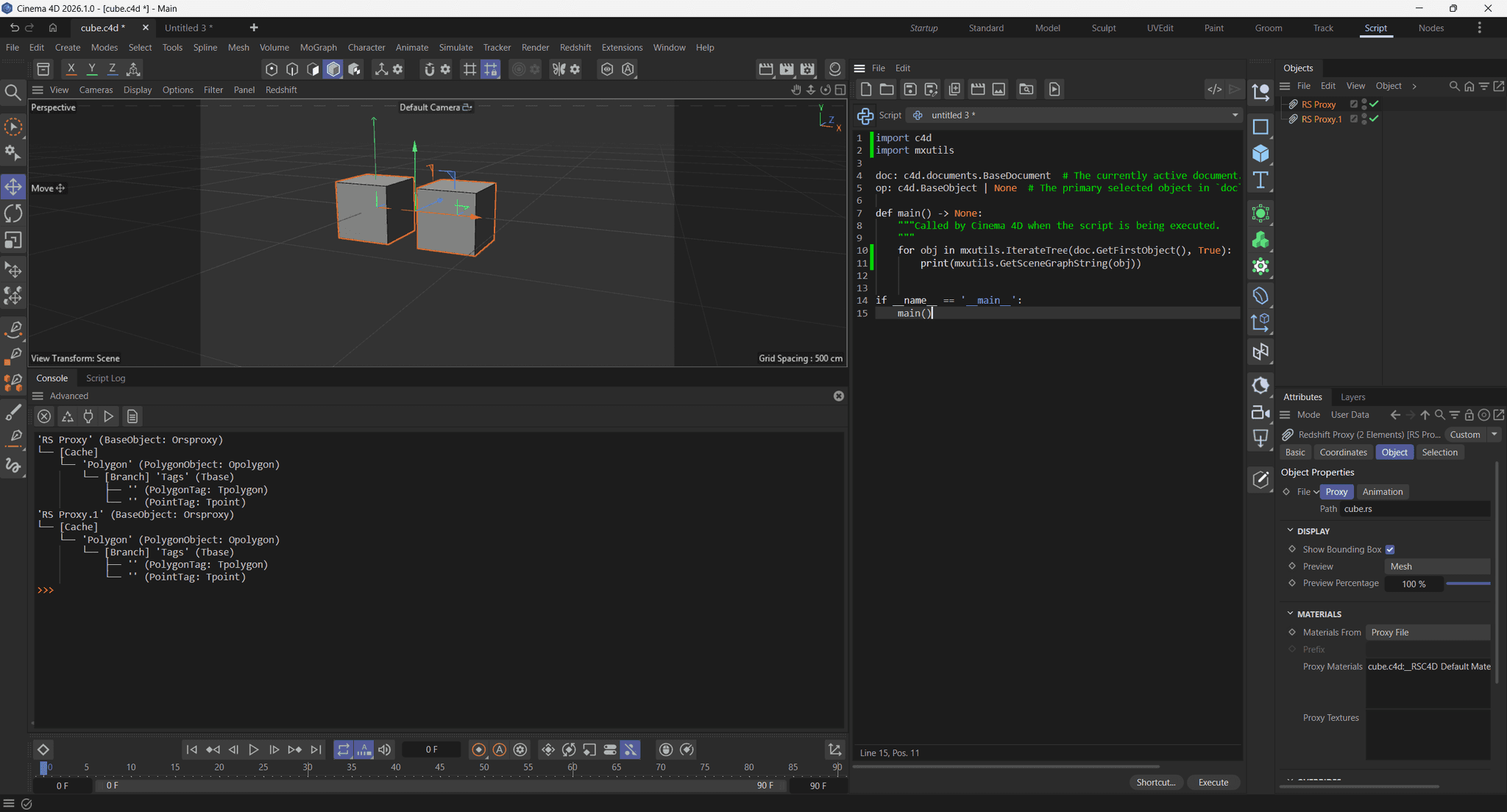
When we now save that scene as an RS scene file and load that in an RS Proxy object in another scene, we will see that it only contains one blob of discrete geometry.
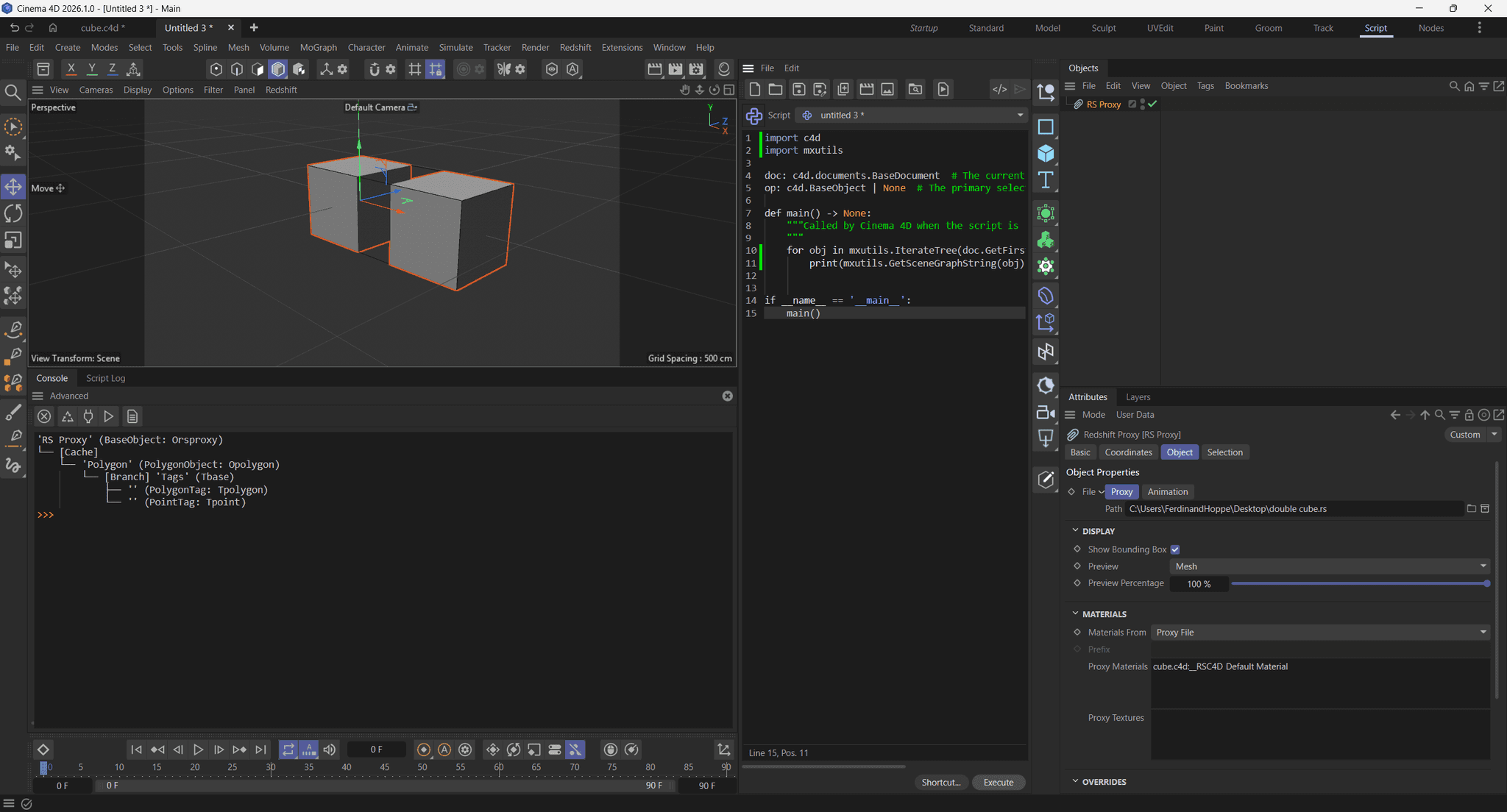
Cheers,
Ferdinand -
Hello,
Thank you for the detailed explanation. This helps clarify the limitation.
One follow-up question: We've observed that nested Redshift proxies render correctly at runtime — the renderer successfully resolves and renders the full proxy chain. Given this, is the limitation specifically that the Asset Inspector/SDK cannot detect nested proxy dependencies for asset collection purposes, even though the renderer can resolve them?
If so, it would be helpful to understand how the renderer discovers these nested dependencies internally, and whether there's any way to access that same resolution logic via the SDK for asset management workflows.
Thanks again for your support.
-
Hey @vaishhg,
As I tried to explain there are no nested dependencies.
*.rsis a full blown scene file format which can express geometry, curves, simulation data, materials and more. When you save a Cinema 4D scene as*.rsal data in it is exported to that format, including the "nested" case where a*.c4dscene is referencing a*.c4dscene.So when you start out with this
*.c4dscene:Scene.c4d +-- Objects +-- Cloner ( creates 5 instances) +-- Cube Generator +-- Cache +-- Polygon Object +-- Tags +-- Material Tag (references 'Red Material') +-- Materials +-- Red MaterialAnd then export it to
Scene.rs, you get this (this is not an actual depiction of the file format, just a visualization of what happens,rsis not an open format).Scene.rs +-- Objects +-- Cube.0 [Red Material] +-- Cube.1 [Red Material] +-- Cube.2 [Red Material] +-- Cube.3 [Red Material] +-- Cube.4 [Red Material] +-- Materials +-- Red Material (contains Red Material definition)If you load that file back into Cinema 4D you get this. All data - that these are 5 separate cubes with a red material each - resides in the Redshift core only, we only see a proxy in Cinema 4D, hence the name "RS Proxy Object". It is the Redshift Core which will resolve the data in the RS file at render time.
ReferencingScene.c4d
    +-- Objects
        +-- RS Proxy Object.0 (loads Scene.rs)
            +-- Cache (will be empty by default, there is literally no data in the c4d core,
                       only when we set 'Preview' to 'Mesh' there will be a cache so that the
                       viewport can display something)
                +-- Polygon Object (one blob representing all 5 cubes and no material information)
        +-- RS Proxy Object.1 (loads Scene.rs)
            +-- Cache
                +-- Polygon Object
When we now export
ReferencingScene.c4dtoReferencingScene.rswe get this. Because when the exporter runs, it will encounter the two RS Proxy Objects when flattening the c4d scene and do what you cannot do, grab the rs scene data from the referencedScene.rsfiles and inline that into the newReferencingScene.rsfile. So we end up with 10 cubes in total, each with the red material assigned.ReferencingScene.rs +-- Objects +-- Cube.0 [Red Material] (from RS Proxy Object.0) +-- Cube.1 [Red Material] ... +-- Cube.2 [Red Material] ... +-- Cube.3 [Red Material] ... +-- Cube.4 [Red Material] ... +-- Cube.0 [Red Material] (from RS Proxy Object.1) +-- Cube.1 [Red Material] ... +-- Cube.2 [Red Material] ... +-- Cube.3 [Red Material] ... +-- Cube.4 [Red Material] ... +-- Materials +-- Red Material (contains Red Material definition)And when we load that back into Cinema 4D we get this:
SecondGeneration.c4d
    +-- Objects
        +-- RS Proxy Object.0 (loads ReferencingScene.rs)
            +-- Cache
                +-- Polygon Object (one blob representing all 10 cubes and no material information)
The TLDR is that the Redshift Core can read
*.rsfiles and the Cinema API cannot, it can only write them or load them via an RS Proxy Object. And there is no 'resolving [...] the full proxy chain' as you put it. An*.rsscene file is just a discrete scene representation that contains does not know concepts such as generators or assets known to the Cinema API/Core. When export a*.c4dscene that references*.rsfiles all data is just flattened into a single*.rsfile (again, what I showed under the*.rsformats above was just a visualization, not the actual file format).There is currently no way to do what you want to do, even if you would request access to the Redshift Core C++ SDK. Because the RS file format is a GPU scene file format and very deeply integrated into the core. Even the RS Core SDK does not expose functionalities to read RS files to CPU memory structures.
Cheers,
Ferdinand
