Can a plugin use the native Node Editor for its own graph?
-
Is there a public Cinema 4D SDK API for displaying a plugin-defined graph in the native Node Editor, with custom nodes, ports, and connections, independently of the built-in material and Scene Nodes graphs?
I found NodeSpaceInterface, NodeSystemClassInterface, NodesGraphModelRef, and NimbusBaseInterface, but I’m unclear which API provides the graph host and Node Editor context for an independent plugin graph. Is this supported in Cinema 4D 2026, and is there an SDK example of the required registration and host setup? -
Hello @sohrabroshanaee,
Welcome to the Maxon developers forum and its community, it is great to have you with us!
Getting Started
Before creating your next postings, we would recommend making yourself accustomed with our forum and support procedures. You did not do anything wrong, we point all new users to these rules.
- Forum Overview: Provides a broad overview of the fundamental structure and rules of this forum, such as the purpose of the different sub-forums or the fact that we will ban users who engage in hate speech or harassment.
- Support Procedures: Provides a more in detail overview of how we provide technical support for APIs here. This topic will tell you how to ask good questions and limits of our technical support.
- Forum Features: Provides an overview of the technical features of this forum, such as Markdown markup or file uploads.
It is strongly recommended to read the first two topics carefully, especially the section Support Procedures: How to Ask Questions.
About your First Question
Please excuse the delay, we can chat about your question in detail next week. You can implement your own material node systems, we also have examples for that. For arbitrary node systems I would have to check myself if that is possible in the public API, but probably not.
Cheers,
FerdinandMAXON SDK Specialist
developers.maxon.net -
Hey,
sorry for the delay. I checked and it is not possible to have arbitrary node systems, i.e., node systems that are neither scene nor material nodes. In the backed of things, you actually have almost all you need, so you could implement a node system that outputs sound files for example. One of the major hurdles is that this menu is hard-coded at the moment:
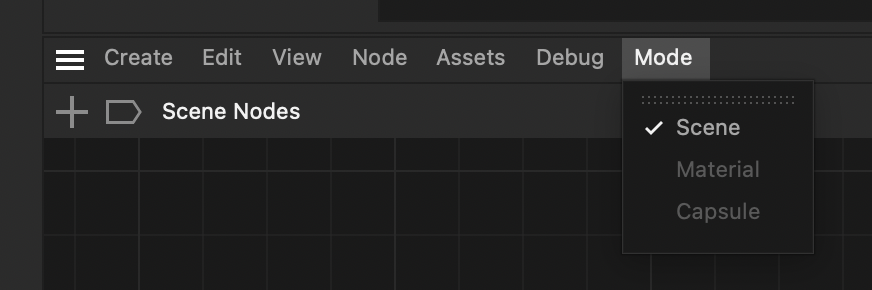
So, there is no way to display your node system of a custom node space purpose type.
Cheers,
FerdinandMAXON SDK Specialist
developers.maxon.net -
Hey Ferdinand.
thanks for replying.
i actually digged into the documents and tried different AI to find a solution for this but in the end i ended up using HTML for the node canvas and tried to keep the visuals as close as possible to cinema itself in order to keep it familiar for user.here is a screenshot of what it is right now!
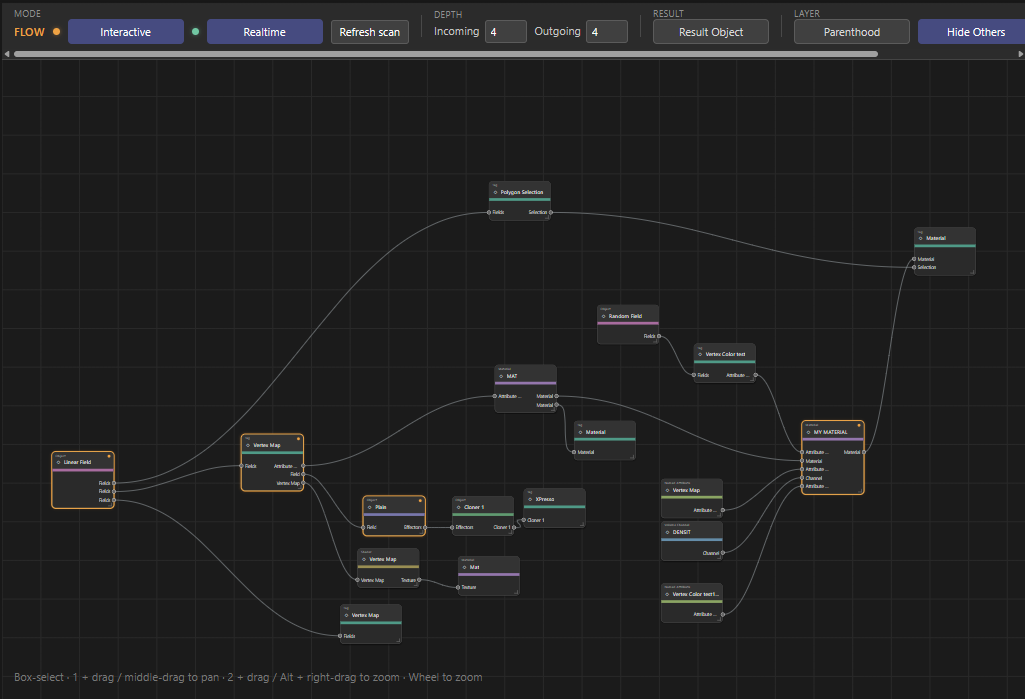
and here is the quick intro to what im doing.
as a long time user of cinema i realized there is something missing at least for my own pipeline and that is the dependency graph. sometimes i either recieve a file or i open an old file that i dont remember what i did exactly and even naming is not that clear to me to figure what is connected to what so i made this dependecy scanner/viewer. basically you select object/s and it shows how and in what object its been used or used by!
-
@ferdinand said in Can a plugin use the native Node Editor for its own graph?:
Hey,
sorry for the delay. I checked and it is not possible to have arbitrary node systems, i.e., node systems that are neither scene nor material nodes. In the backed of things, you actually have almost all you need, so you could implement a node system that outputs sound files for example. One of the major hurdles is that this menu is hard-coded at the moment:
So, there is no way to display your node system of a custom node space purpose type.
Cheers,
FerdinandI did manage to add a space to the dropdowns but couldnt connect the viewer to that. although it was only accessible from the top shelf menu Render/node space.
-
Hey,
that menu is a different menu. I assume you are talking about this menu?
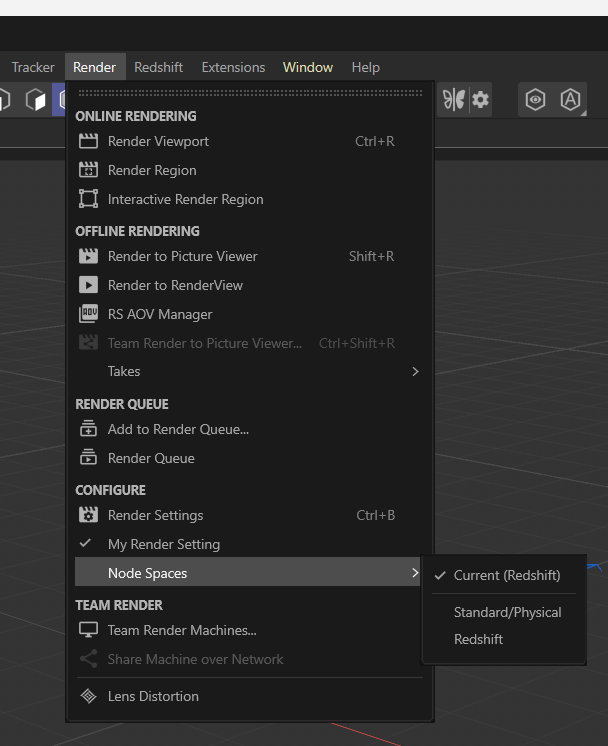 .
These are the node spaces and it is intended that you can add stuff there, the SDK shows you how to. The other menu is something different, there does not even exist a defined term for that. I would call it Node space groups, i.e. enclosing entities for a collection of node spaces of similar purpose. All render engine node spaces (Redshift, VRay, Arnold, etc.) are for example all material node nodespaces. The Nodes API currently defines two larger groups of node spaces. Scene nodes and material nodes; capsules are sort of an extension of scene nodes. And they come with certain conventions for the node editor. Which are hardcoded in the menu I showed you.
You could technically setup shop in a material nodes space and just let your nodes do there what you want to be done, and implement a hacky end node. But that would be very hacky. Currently there is no way to implement such concept of a node space group as third party.
-
yes, but as i said its only regarding the material node spaces.
anyway I appreciate you take the time to answer and i think the HTML is working fine as a meduim for what im trying to do.
soon im gonna release a beta version for testing.

-
You can implement your own material node spaces, all of example.nodes in the C++ SDK is about this. Just compile the SDK and you will find a custom material node space in Cinema once you load the SDK. It also shows you how to implement nodes.
Another alternative could be the old Xpresso system. You can also use HTML if you want but I would advise against reinventing the wheel and either pick Xpresso or the node editor.
I thought you wanted to use the node editor to implement your own node subject, think of a node particle system, or a node system to create sound.
Cheers,
Ferdinand -
Hey Ferdinand,
Thanks for replying back.
I initially wanted to use the Xpresso system, but I couldn’t find a way to implement some of the interactions I want, such as double-clicking a node to select its corresponding object in the Object Manager or material in the Material Manager.
Then I tried example.nodes from the SDK package. I managed to represent the relationships using nodes and connections, but the graph is still hosted by a material and accessed through the material node context.
FLOW scans existing scene dependencies and displays them as a graph. Each node represents an existing object, tag, material, or named data reference. The viewer needs to follow the scene selection and let users navigate back to those scene elements.
What I’m trying to achieve is an independent FLOW editor that can display this graph directly, without requiring a material to own it. That’s the independence I currently have with the HTML canvas.
From your explanation, I understand that the public SDK doesn’t currently expose the native Node Editor for that use case. Have I understood that limitation correctly, or is there a supported hosting approach I’ve overlooked?
here is the result of node editor (MATERIAL)
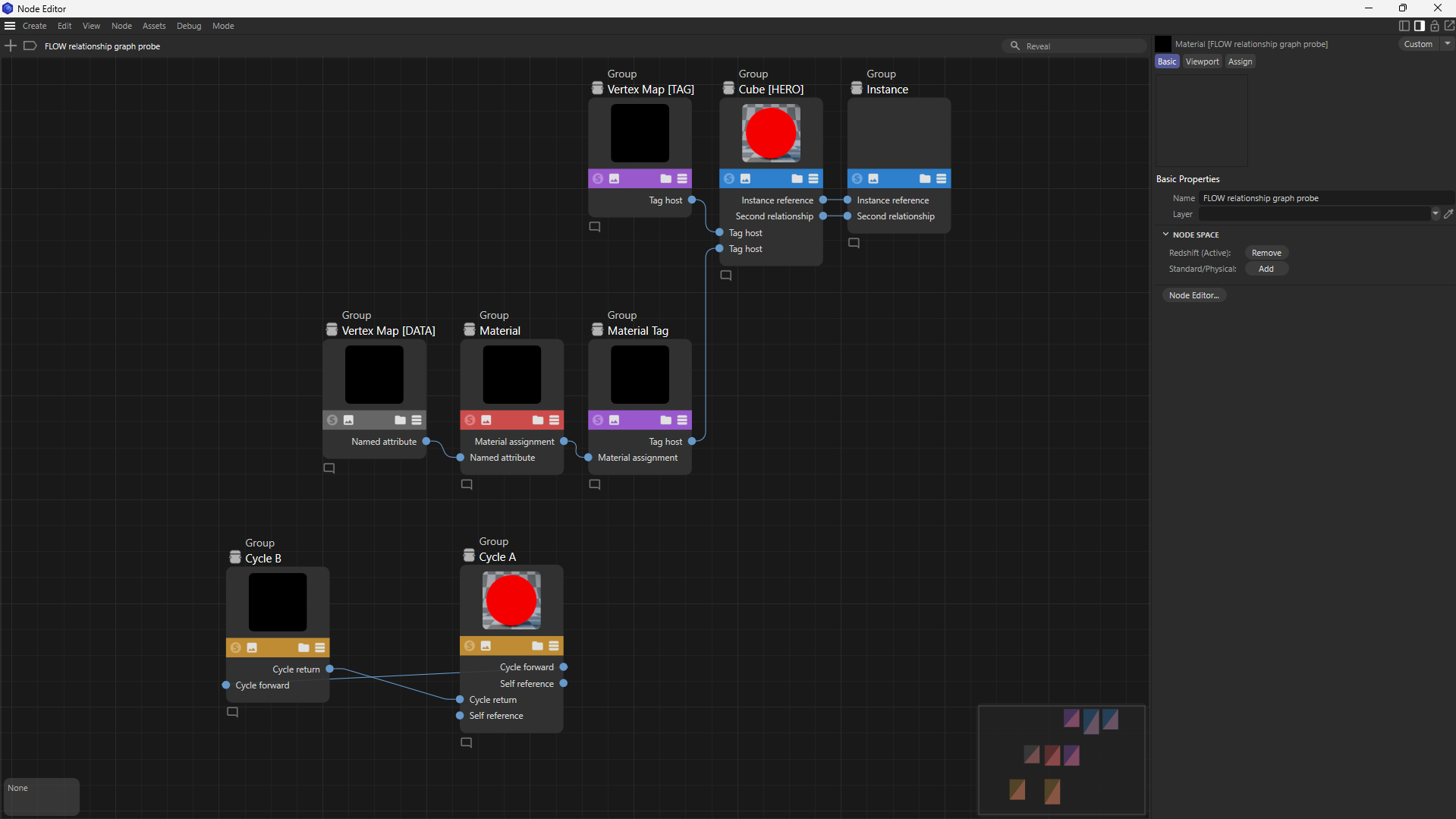
here is my HTML
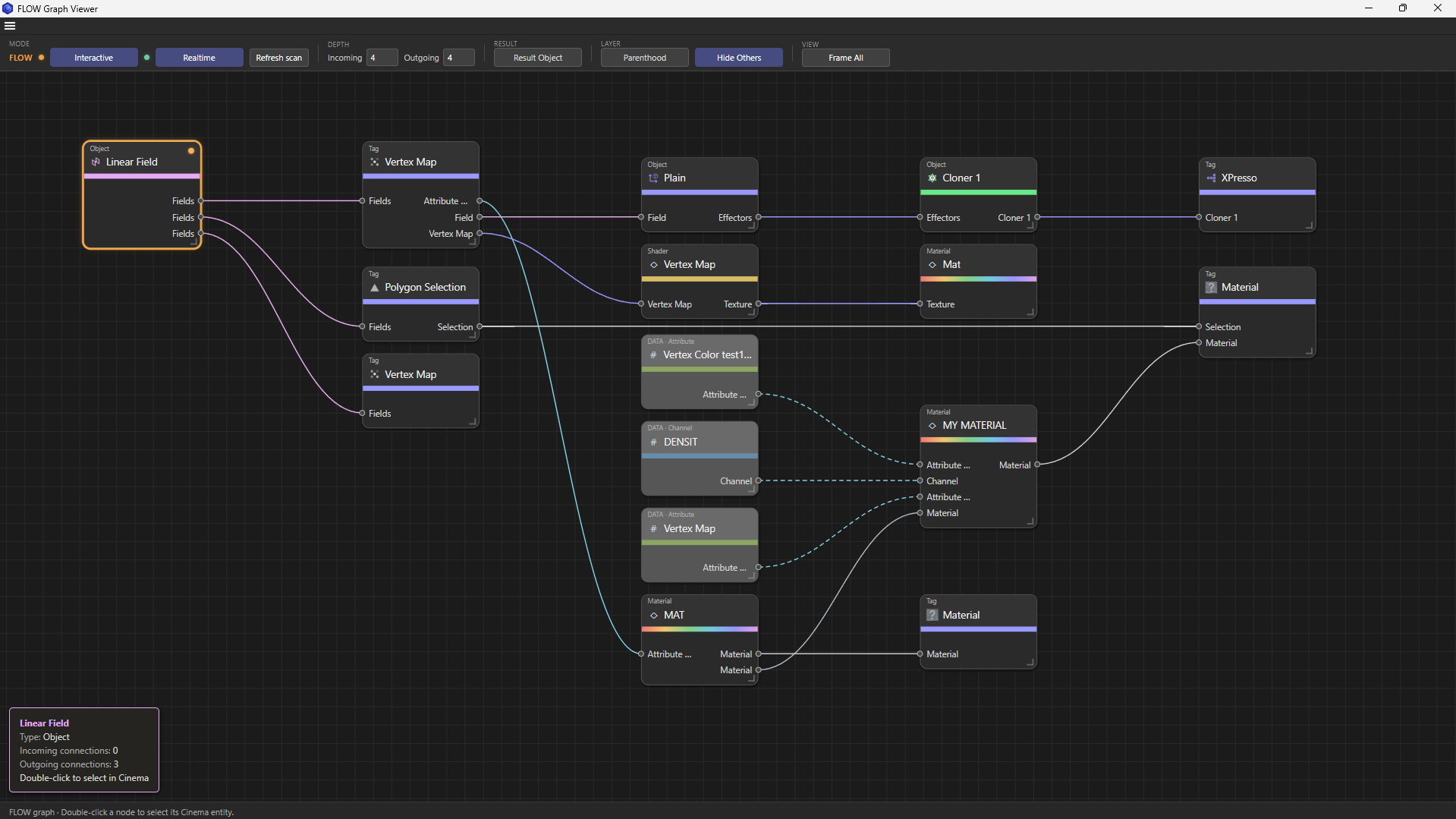
-
Hey,
when you are happy with your HTML solution I am happy. I just meant writing your own node editor can be quite a bit of work, even with AI. Your material system seems to be quite unique, given how many object manager nodes it uses. Material nodes other than scene nodes have object manager drag and drop disabled by default; but you could implement a node which just links an object manager node manually. I think there is also a drag and drop override hook in the node space, but I would have to ask the node team if this is possible for public API users.
The old GraphView (i.e. Xpresso) API editor will already display the selected node for you in the attribute manager. So, when you want for example a field node, you would have to let the relevant field settings of the field object shine through on that node (dynamically copy part of its description).
You could technically also do some "select instead logic", but that will likely result in race conditions. It would go like this: Implement some kind of plugin that has access to the core message stream, e.g., a GeDialog or MessageData plugin. There hook into EVMSG_CHANGE and traverse the whole scene graph or the parts you are interested in such as an Xpresso graph to record the selection state of nodes. The diff to a previously recorded state will then tell you which nodes just have been selected with the current EVMSG_CHANGE. You can then overwrite the the attribute manager selection.
A bit more brutish version would be to check with each EVMSG_CHANGE which nodes are active in the attribute manager via cinema::ActiveObjectManager_GetObjects (this is indeed the attribute manager and not the object manager), and then overwrite the selection to your needs. But as I said, this is very hacky, and I would not recommend doing this. There is no way to naturally overwrite the event of a node X being selected and therefore shown in the AM as to translate to the node Y actually being shown in the AM. This would violate core UX principles in Cinema 4D. If you want a node to have the parameters of other nodes "shine through", the way to go is incorporating parts of the other nodes description. The cheapest way to do this is a
Baselinkas you have nothing to do then other than adding this parameter to your node.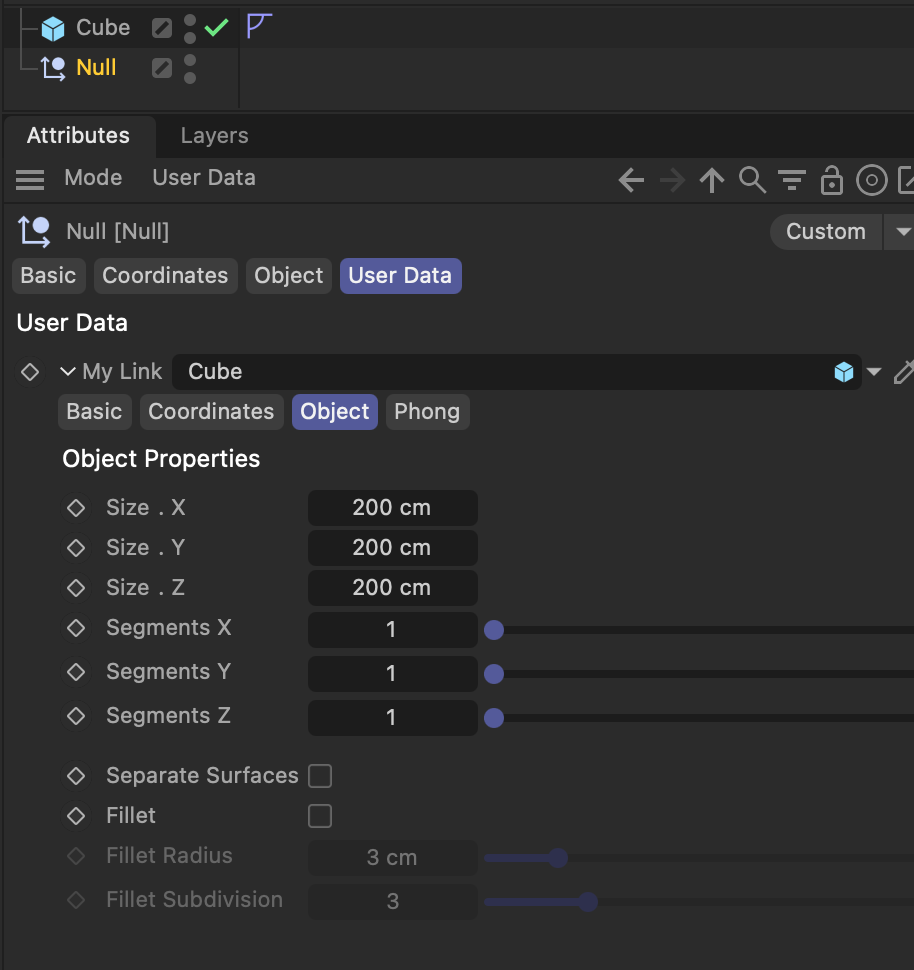
Cheers,
Ferdinand -
Hi Ferdinand,
Thank you very much for taking the time to explain this and for sharing your advice. I appreciate it.
I’ve finished the HTML solution, and it’s nearly ready for beta testing. It’s working well for what I need, so I’m looking forward to sharing it soon.
Thanks again for your help!
Best,
Sohrab