Adding an Icon to a GeDialog Menu Group
-
Hello MAXON SDK Specialist
 ! Congrats again.
I had tried your suggestion already: creating a dedicated CommandData for my command, but I couldn't get a submenu working with it. Do you know if it's possible to have a submenu for a dedicated CommandData plugin?
Thank you!
-
Hi,
I hadn't any problems regarding your problem. At least in my understanding of it. Below you will find an example for two
CommandDataplugins, where one does reference the other in the dialog it displays. Feel free to ask further questions if anything remains unclear
PS: I ran this on R23 and R21 Win. I know from your screenshots that you are on Win (if I am not mixing something up here), but please add OS tags and version tags in the future, as they can be important.
Cheers,
Ferdinand"""Demonstrates the usage of icons in a dialog menu. """ import c4d # Please use unique plugin IDs obtained from PluginCafe.com. ID_CMD_ICON = 1053528 ID_CMD_MENU = 1053529 class IconMenueDialog(c4d.gui.GeDialog): """The dialog opend by MenuCommandData. References IconCommandData in its menu. """ def CreateLayout(self): """Creates the menu of the dialog. """ self.MenuFlushAll() self.MenuSubBegin("Stuff") # You can also pass in some of the node types. Thhis here will # act like clicking on the cube object in the menus of Cinema. self.MenuAddCommand(c4d.Ocube) # Our little CommandData plugin. self.MenuAddCommand(ID_CMD_ICON) self.MenuSubEnd() self.MenuFinished() self.AddStaticText(2000, c4d.BFH_CENTER, name="Blah") return True def InitValues(self): """ """ return True def Command(self, id, msg): """ """ return True class IconCommandData(c4d.plugins.CommandData): """Just a plugin that acts as command to be executed. """ def Execute(self, doc): """Just prints something to the console. """ print("IconCommandData is being executed.") return True class MenuCommandData(c4d.plugins.CommandData): """The plugin that opens the menu. """ def __init__(self): """ """ self._dialog = None def Execute(self, doc): """Just opens IconMenueDialog. """ if self._dialog is None: self._dialog = IconMenueDialog() self._dialog.Open(dlgtype=c4d.DLG_TYPE_ASYNC, pluginid=ID_CMD_MENU, xpos=- 1, ypos=- 1) return True def RestoreLayout(self, sec_ref): """Retores the dialog on layout changes. """ if self._dialog is None: self._dialog = IconMenueDialog() # Restores the layout return self._dialog.Restore(pluginid=ID_CMD_MENU, secret=sec_ref) def register(): """Regissters the plugins. """ # A makeshift icon. icon = c4d.bitmaps.BaseBitmap() icon.Init(32, 32) # Registration. # The plugin with a icon. c4d.plugins.RegisterCommandPlugin(id=ID_CMD_ICON, str="IconCommand", info=0, icon=icon, help="The command to call.", dat=IconCommandData()) # The menu command that does not have an icon. c4d.plugins.RegisterCommandPlugin(id=ID_CMD_MENU, str="MenuCommand", info=0, icon=None, help="Opens the dialog with a menu.", dat=MenuCommandData()) if __name__ == "__main__": register() -
@zipit Hi!
Thank you for the example. This is not what I am seeking unfortunately.
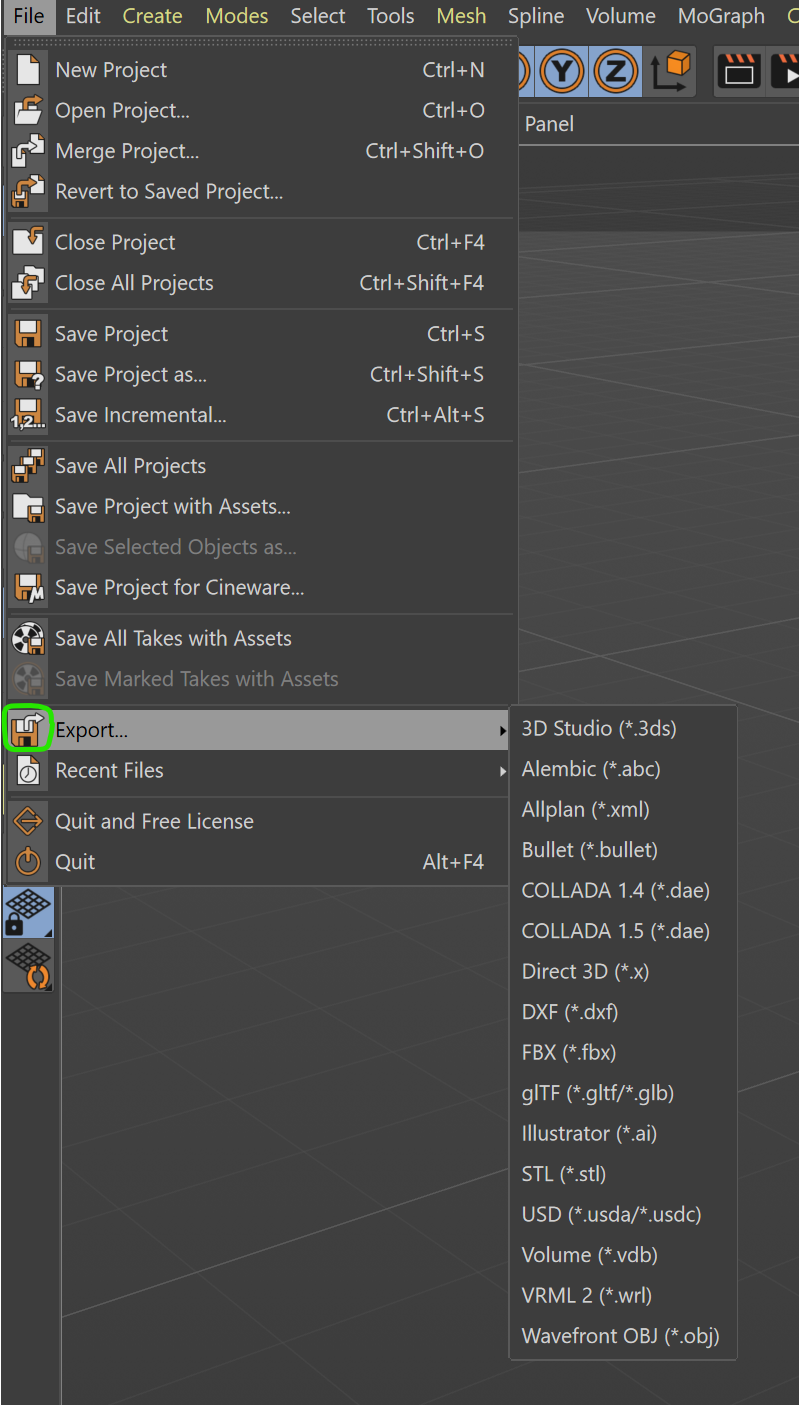
As in the initial post's screenshot, I'm looking to add an icon next to the menu group (where the green star is in this screenshot):

Is it possible?
Thanks!
-
Hi,
execute
MenuCommand, it will do what you want.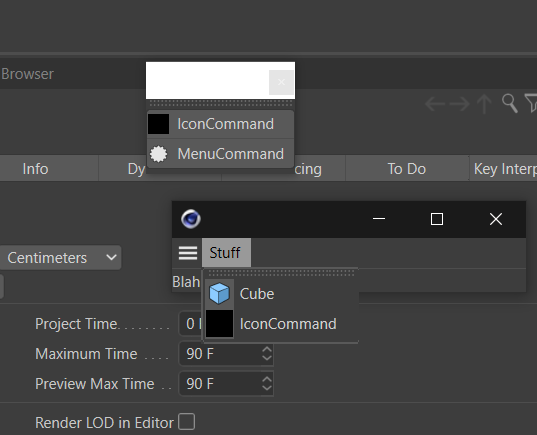
Cheers,
Ferdinand -
@zipit I think we're not understanding each other. I want to put an icon to the left of a menu command that has a sub menu. Your GeDialog example's menu commands with icons do not have sub menus. If you go to File > Export and look at the disk icon next to Export (which has a sub menu), THAT is what I want to create in a GeDialog. I hope it's clearer.
Thank you!
-
Hi @blastframe,
sorry for taking so long to answer. I do understand your problem now. You want to display the icon on the sub menu header. I have been working on your problem, but my initial solution did not work. I now had a look on how Cinema does it internally, and will try to do this on Monday in Python (with unfortunately no guarantee that this will be possible) .
Sorry again for the delay, but I had mostly to settle in here at Maxon this week. Have a nice weekend.
Cheers
Ferdinand -
Hi @blastframe,
I am sorry to inform you, that this is currently not possible. Because the procedures used by Cinema internally cannot be reflected to Python at the moment. We will continue to track this topic internally and inform you here if there are going to be changes and/or we did find an alternative route.
Cheers
Ferdinand -
@zipit Thank you, Ferdinand, for looking into it!
-
Any updates on this ?
if yes would be nice to incorporate this into your nice "menue example":
https://developers.maxon.net/forum/topic/14276/building-menus-with-c4dpl_buildmenu-in-s26/3?_=1785138165926 -
Hey @mogh,
It depends a bit on what you mean with 'this'. Loading menu resources still does not seem to work in Python. I just tried, and while loading for example the main menu resource in your plugin just works fine, I cannot make it work with a locally defined plugin resource. Below you can see me loading
M_EDITOR, i.e., the main menu resource, into the py-cmd_gui_resources_2024 example.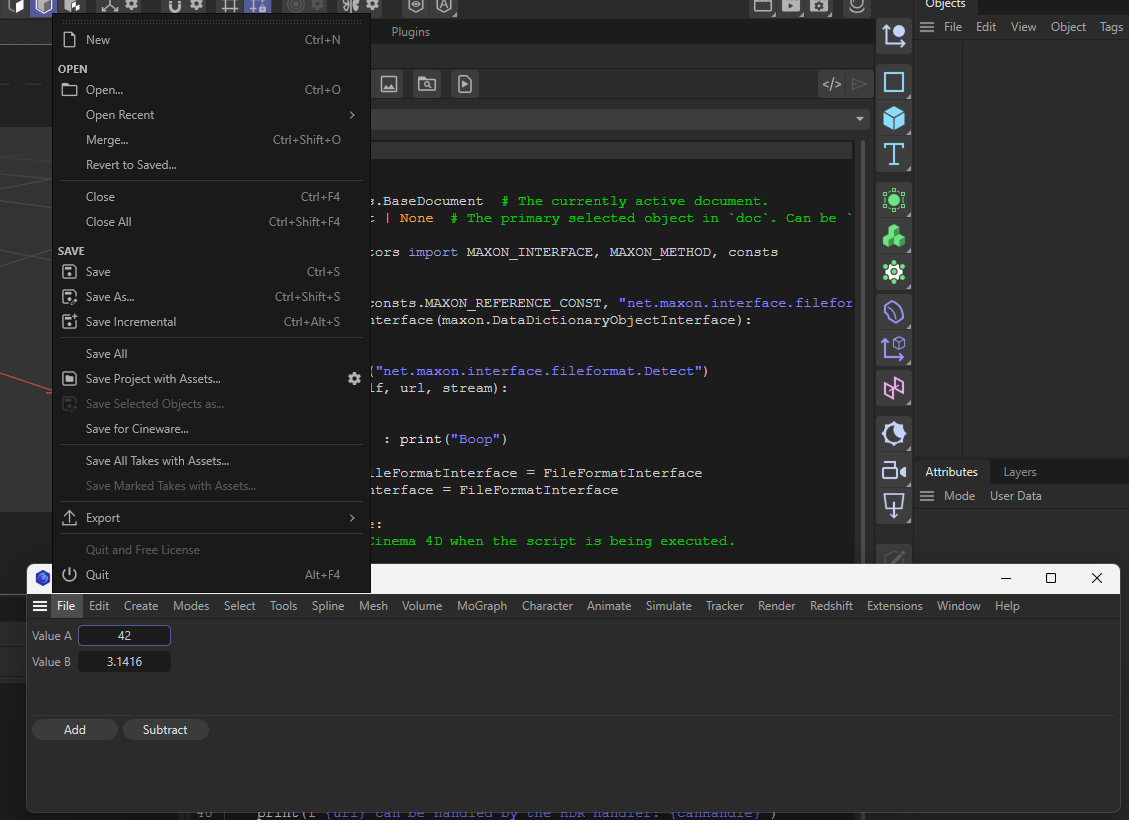
That is probably what I was referring to a bit fuzzily with 'I am sorry to inform you, that this is currently not possible. Because the procedures used by Cinema internally cannot be reflected to Python at the moment.' six years ago. I would have to sit down and debug this piece by piece to see what is going wrong with loading locally defined menu resources (or if I just made a mistake in the resource files). Resources in Cinema 4D are a bit different from plugin resources, and menu resources have never been publicly documented or demonstrated, neither in C++ nor in Python. So, this being broken is not impossible.
What you can do right now, is define a string menu item with an icon. But you will not be able to use this to create submenus with an icon as the original question was about. You can only create a string menu item with an icon, but not a submenu with an icon.
Cheers,
Ferdinand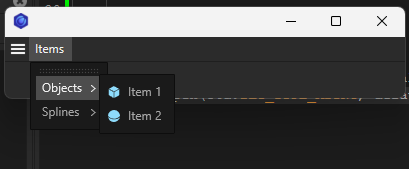
import c4d class IconMenuDialog(c4d.gui.GeDialog): """ """ def CreateLayout(self) -> bool: """Called by Cinema 4D when the GUI of the dialog is being built. """ self.GroupBorderSpace(5, 5, 5, 5) # Add a menu called "Items". self.MenuSubBegin("Items") # And a submenu called "Objects". self.MenuSubBegin("Objects") # Here we use string menu items with the &i icon embed code. This only works for items and # not for submenus, therefore resources are currently the only way to define icons for submenus. self.MenuAddString(1000, f"Item 1&i{c4d.Ocube}&") self.MenuAddString(1001, f"Item 2&i{c4d.Osphere}&") self.MenuSubEnd() # Same thing, but here we use commands instead of string menu items. This will automatically # add the icon and label of the command to the menu item. When invoked, this will execute also # the command without us having to implement this ourself. self.MenuSubBegin("Splines") self.MenuAddCommand(c4d.Osplinecircle) self.MenuAddCommand(c4d.Osplinerectangle) self.MenuSubEnd() self.MenuSubEnd() return True if __name__ == "__main__": dialog: IconMenuDialog = IconMenuDialog() dialog.Open(c4d.DLG_TYPE_ASYNC, defaultw=200, defaulth=100) -
Yes I wanted submenu with Icon, thanks for Up to Date clarification.
