Reverse direction of multi-segment splines
-
Hi forum! When creating a spline with multiple segments (mostly text), the directions of some of the spline segments are inverted. I'd like to know if there's a simple and reliable way to fix this.I've tried several options, but they don't work correctly with deformed splines. Any advice would be greatly appreciated.spline_dir_problem.mp4
-
Hello @Tpaxep,
Your link does not work as your file upload seems to have failed. But there are in general two ways to achieve this.
- Manually reverse the spline. For a simple non-bezier spline this is trivial, you just reverse both the points and the segments. When you want to also support bezier splines, i.e., tangents, this becomes a bit more work.
- Just use the modeling command MCOMMAND_SPLINE_REVERSE. Modeling commands can be undesirable in some contexts, see the extrude example in Modeling Commands for details.
Cheers,
Ferdinand"""Reverses the selected editable spline object. """ import c4d doc: c4d.documents.BaseDocument # The currently active document. op: c4d.BaseObject | None # The primary selected object in `doc`. Can be `None`. def main() -> None: """Called by Cinema 4D when the script is being executed. """ if not isinstance(op, c4d.SplineObject): return c4d.gui.MessageDialog("Please select a spline object.") doc.StartUndo() if not c4d.utils.SendModelingCommand(command=c4d.MCOMMAND_SPLINE_REVERSE, list=[op], mode=c4d.MODELINGCOMMANDMODE_ALL, doc=doc): c4d.gui.MessageDialog("Failed to reverse the spline.") doc.EndUndo() if __name__ == '__main__': main() -
Hi @ferdinand! I'm having trouble loading the site, so I'll leave the links. The reverse isn't the problem. I can't figure out how to automatically detect segments with "incorrect" direction, given their deformation, etc.
-
Hey @Tpaxep,
please have a look at How to Ask Questions. Your question is very ambigous, and it is impossible to help you like this. I assume the issue for you is that the "holes" in your font spline have another winding direction than the outline?
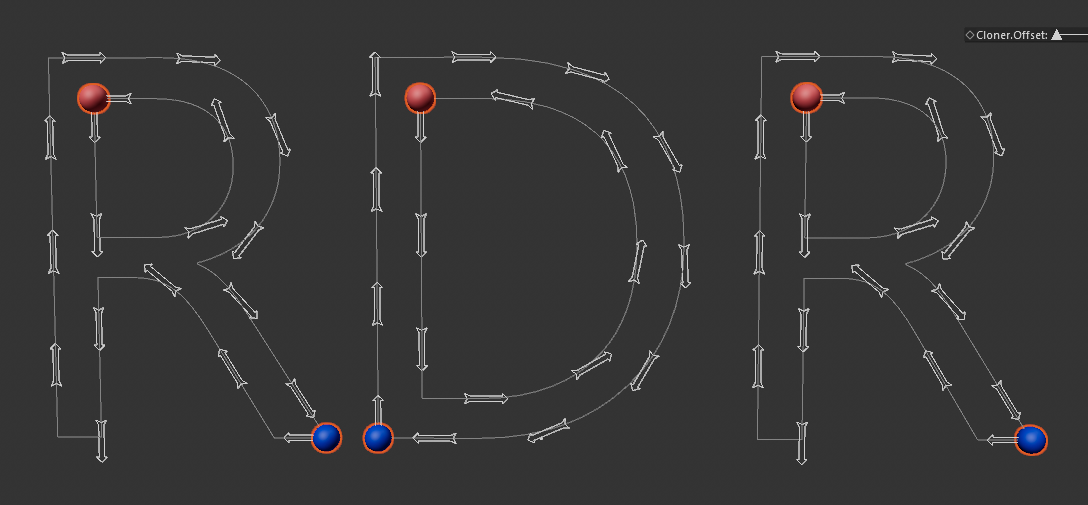
I.e., the 'hole' in the R is winding counter-clockwise/negatively, while the outline is winding clockwise/positively. This is a non-trivial problem from geometry processing, and our API does not offer any ready made tools for this niche problem. One of the many approaches can be to compute the signed area of the segment (or a bit more advanced: the shoelace formula), but this can fail for self-intersecting splines and will not work for 3D splines. You can also try to compute the winding direction of the spline by looking at the cross product of the tangents, but this will also fail for self-intersecting splines and 3D splines. For 3D splines, you can work with the vector area of the spline, but this will also fail for self-intersecting splines.
There are generic solutions to this problem, but they are not trivial and discussing such problems is out of scope of support, unless the user approaches us with a specific question for an already implemented solution.
Cheers,
Ferdinand -
@ferdinand Yes, you really understood the problem correctly, and I also knew the solution was unlikely to be simple. I was more interested in the possible options. Thank you for your analysis and recommendations.
-
Okay,
I think I was a bit overly cautious in my answer here. You gave my a very broad question, or to be precise, you gave me a video and a scene file, and did not really ask a precise question. I understand that asking good questions can be hard, especially with a language barrier. But when I have nothing to go by, I of course assume the worst case possible.
The scene you have there is a trivial case, even the best case possible. You have there spline segments which lie in a perfect plane and which have no self intersections. You can treat them just like polygons (in the CG sense, not in the mathematical sense) and simply compute their normal over the first three vertices of each segment. Due to the fundamental property of a polygon - reversing the order of the vertices reverses the normal - you can then easily determine if two segments have opposite or equal winding.
But all this starts to fall apart, as soon as you cannot make these assumptions. And I cannot help you to write the code for this, as this is then more than just a few lines. Hope this helps, and that I my answer was now less 'overly cautious'.
Cheers,
FerdinandResult
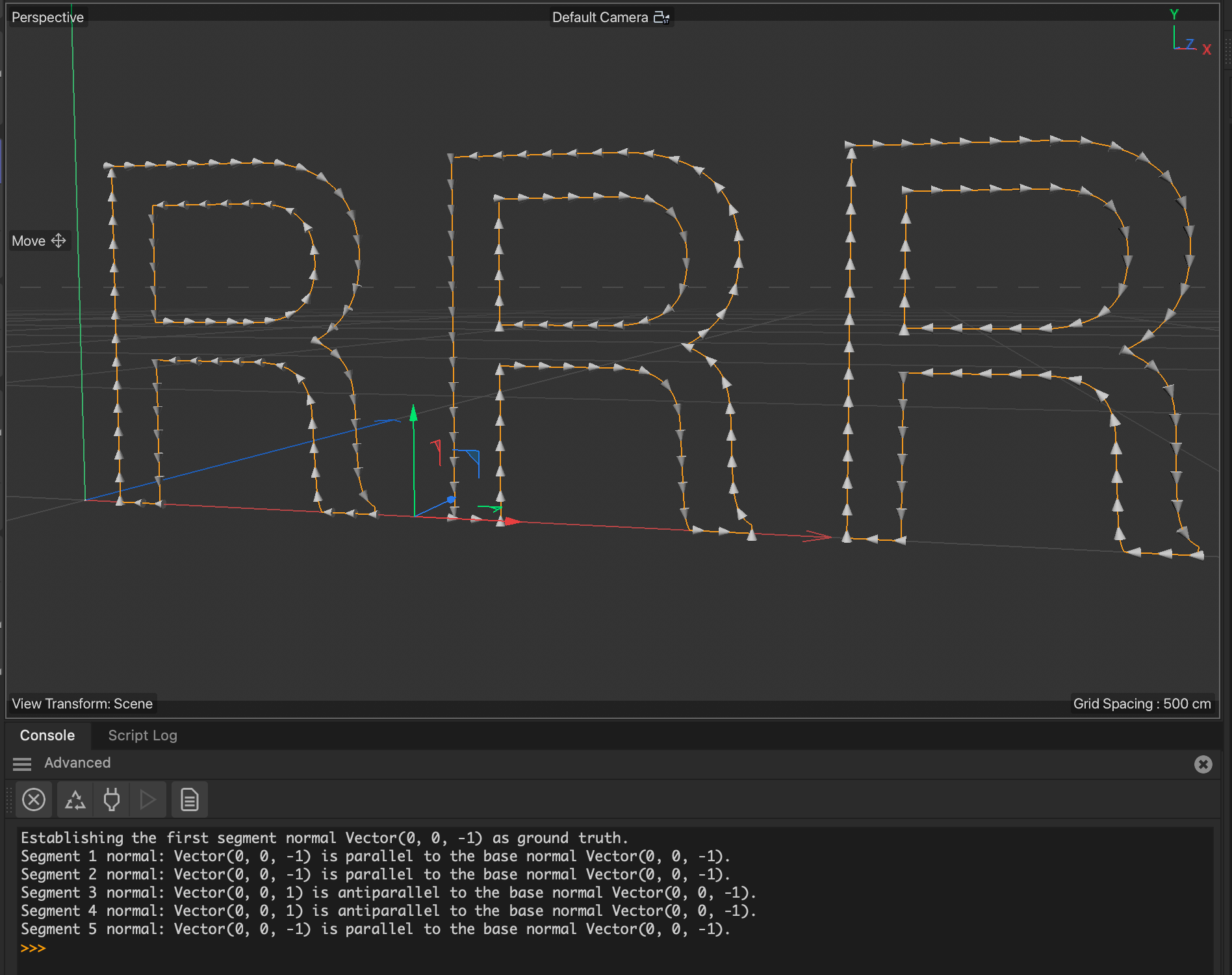
The code correctly identifies that in this six segment spline are four segments of one winding direction (clockwise in this case) and two of the other winding direction.Code
"""Treats spline segments as polygons and compares their plane normals to find
segments with reversed winding order.
"""

import c4d

op: c4d.SplineObject # The currently active object in the scene.

def main() -> None:
    """Called by Cinema 4D when the script is being executed.
    """
    if not isinstance(op, c4d.SplineObject):
        return c4d.gui.MessageDialog("Please select a spline object.")

    # Get all points in the spline and organize them into their segments.
    points: list[c4d.Vector] = op.GetAllPoints()
    segments: list[list[c4d.Vector]] = []

    j: int = 0
    for i in [op.GetSegment(i)["cnt"] for i in range(op.GetSegmentCount())]:
        segments.append(points[j:j+i])
        j += i

    if len(segments) < 2:
        return c4d.gui.MessageDialog("Please select a spline object with at least 2 segments.")

    # Now build normal data for the spline segments. This assumes:
    #
    #   - A spline where all points lie in a single plane, a '2D' spline in 3D space.
    #   - No self intersections in the spline.
    #   - A piecewise linear spline, i.e., what Cinema 4D calls a 'Linear' spline. When we have a
    #     'Cubic' or 'Bezier' spline, we would have make it linear with 'Current State to Object'
    #     first.
    #
    # We build the normal for each segment over its three first vertices. The reason why we are doing
    # this is because of the fundamental identity of a polygon (in a computer graphics sense),
    # reversing the order of the vertices of a polygon will reverse the normal. So if we have a
    # spline with two segments with reversed winding order, they will have antiparallel normals (normals
    # pointing in opposite directions).
    segmentNormals: list[c4d.Vector] = []
    for segment in segments:
        if len(segment) < 3:
            print("Segment has less than 3 points, skipping normal calculation.")
            continue

        a, b, c = segment[0], segment[1], segment[2]
        edge1: c4d.Vector = b - a
        edge2: c4d.Vector = c - b
        normal: c4d.Vector = edge1.Cross(edge2).GetNormalized()
        segmentNormals.append(normal)

    # Now we just declare one segment as 'ground truth' and check if the other segments have normals
    # that are parallel or antiparallel to it. When we found a segment with an antiparallel normal, we
    # know we found a segment with reversed winding order. To check if two normals are parallel or
    # antiparallel, we just compute their dot product (i.e., spanned angle). When the dot product is
    # negative, the normals are antiparallel.
    print(f"Establishing the first segment normal {segmentNormals[0]} as ground truth.")
    baseNormal: c4d.Vector = segmentNormals[0]
    for i, normal in enumerate(segmentNormals[1:], start=1):
        isAntiparallel: bool = baseNormal.Dot(normal) < 0
        print(f"Segment {i} normal: {normal} is {'antiparallel' if isAntiparallel else 'parallel'} "
              f"to the base normal {baseNormal}.")

if __name__ == '__main__':
    main()
