Using the Bridge Tool
-
Hello, I'm trying to use the Bridge Tool with the SendModelingCommand but I'm having trouble as there are attributes I don't know how to use. Could someone explain to me what these are for ?
MDATA_BRIDGE_ELEMENT1 = 1100, //LONG
MDATA_BRIDGE_ELEMENT2 = 1101, //LONG
MDATA_BRIDGE_ELEMENT3 = 1102, //LONG
MDATA_BRIDGE_ELEMENT4 = 1103, //LONG
MDATA_BRIDGE_OBJINDEX1 = 1104, //LINK
MDATA_BRIDGE_OBJINDEX2 = 1105, //LINK
MDATA_BRIDGE_OBJINDEX3 = 1106, //LINK
MDATA_BRIDGE_OBJINDEX4 = 1107, //LINK
MDATA_BRIDGE_DELETE = 1108, //BOOL
MDATA_BRIDGE_ISO = 1109, //BOOLAlso, given the type of elements I'm bridging and subsequently the modeling mode in which I will be using the Tool should I look out for specific things like the sequence of edges or points between the two parts to be connected ? Should I be treating Edge Selections like a sequence of point IDs or can I use them with their own IDs ?
Thank you for your time.
-
Hey @Dimitris_Derm. ,
Thank you for reaching out to us. The bridge tool in Cinema supports (in point mode) up to four objects as inputs.
MDATA_BRIDGE_OBJINDEX1toMDATA_BRIDGE_OBJINDEX4areBaseLinkparameters where you must link thePolygonObjectinstances you want to bridge. When you want the common case of bridging within one object, you set the same object for all four slots.MDATA_BRIDGE_ELEMENT1toMDATA_BRIDGE_ELEMENT4are then the element (e.g. point) indices to bridge (which can be scattered over multiple objects). They will be evaluated in relation to what you have set for the object indices.MDATA_BRIDGE_DELETEis "Delete Original Polygons" when you are bridging polygons in polygon mode.MDATA_BRIDGE_ISOseems to be related to SDS isoparms in the viewport, you can probably ignore it.// Only use case of MDATA_BRIDGE_ISO in our code base, very likely a dormant parameter. Bool BridgeTool::MouseInput(...) { // ... if (bd->GetEditState()& DISPLAYEDITSTATE::SDS) data.SetBool(MDATA_BRIDGE_ISO, true); else data.SetBool(MDATA_BRIDGE_ISO, false); // ...When bridging in edge mode, you likely will have to operate with half-edge indices, as for example described under GetEdgeS. I would personally either go for point or polygon mode bridging, as edges are a virtual construct which can be a pain in the *** to deal with in code.
Cheers,
Ferdinand -
Oh ! we can bridge independent objects ? That simplifies things as I thought I would have to Connect+Delete first and then bridge...
Thank you for the explanation of the attribute calls. -
@ferdinand I'm still having trouble with this.
I'm trying to bridge polygon selections on a single merged object, but it keeps returning False.
My setup:
- Single polygon object (2 cylinders under a Connect, then Connect+Delete)
- Two polygon selection tags with different names on the merged object
- Polygon mode (MODELINGCOMMANDMODE_POLYGONSELECTION)
All settings:
python  settings[MDATA_BRIDGE_RESTRICT] = True
settings[MDATA_BRIDGE_OBJINDEX1] = merged_obj
settings[MDATA_BRIDGE_OBJINDEX2] = merged_obj
settings[MDATA_BRIDGE_OBJINDEX3] = merged_obj
settings[MDATA_BRIDGE_OBJINDEX4] = merged_obj
settings[MDATA_BRIDGE_ELEMENT1] = 48  # First polygon of source selection
settings[MDATA_BRIDGE_ELEMENT2] = 56  # Last polygon of source selection
settings[MDATA_BRIDGE_ELEMENT3] = 19  # First polygon of target selection
settings[MDATA_BRIDGE_ELEMENT4] = 30  # Last polygon of target selection
//+ subdivision, tension, mode, etc.
The bridge tool returns False. The selections are verified to exist on the object (9 polygons at indices 48-56, and 12 polygons at indices 19-30).
Questions:
- Do all MDATA_BRIDGE_OBJINDEX# need to be filled when bridging in polygon mode ?
- Do I need to apply the selections to the active BaseSelect, or should they only be in tags?
- Are there other required parameters for polygon mode ?
- Does RESTRICT=True have any meaning when using the tool programmatically ?
- If MDATA_BRIDGE_DELETE is "Keep Original Polygons" when bridging polygons then what is the MDATA_BRIDGE_KEEP_POLYGONS ?
Thanks!
-
Hey @Dimitris_Derm. ,
please share complete code and a scene of what you are doing, otherwise I am guessing what you are trying to do. I assume you are trying to bridge to polygon islands, i.e., instead of distinct mesh elements in the destination and target, you have a group of polygons selected in both and then want to bridge by specifying a point index in the destination and target (which are an element of said polygon selections)?
Cheers,
Ferdinand -
At this point I have no idea what the difference between "Polygon Islands" and "Polygon Selections" is ....
But yes, I have tried this with both two different objects and a single unified mesh of the two objects and didn't work. Exactly the same way I would do it manually as a user but this time I set polygon selections on the object and link them on the plugin generator to handle them.""" Minimal example of trying to use ID_MODELING_BRIDGE_TOOL programmatically to bridge two polygon selections on a single merged object. SETUP: - Two cylinder objects with polygon selection tags - Each tag selects polygons on one end cap - We merge them with Connect, then try to bridge the selections PROBLEM: - With OBJINDEX1 only: C4D crashes - With OBJINDEX1 and OBJINDEX3: C4D crashes - With all four OBJINDEX: Returns False (no crash, but doesn't work) """ import c4d from c4d import utils def BridgePolygonSelections(doc): """ Attempt to bridge two polygon selections on a merged object """ # Get two source objects with polygon selection tags obj1 = doc.SearchObject("Cylinder") # Has tag "Polygon Selection" with 9 polys selected obj2 = doc.SearchObject("Cylinder 2") # Has tag "Polygon Selection" with 12 polys selected if not obj1 or not obj2: print("Objects not found") return # Clone the objects clone1 = obj1.GetClone() clone2 = obj2.GetClone() # Get the polygon selection tags tag1 = clone1.GetTag(c4d.Tpolygonselection) tag2 = clone2.GetTag(c4d.Tpolygonselection) if not tag1 or not tag2: print("Selection tags not found") return # CRITICAL: Rename tags so Connect doesn't merge them into one tag1.SetName("bridge_source") tag2.SetName("bridge_target") # Extract polygon indices from original tags source_indices = [] target_indices = [] bs1 = tag1.GetBaseSelect() bs2 = tag2.GetBaseSelect() for i in range(clone1.GetPolygonCount()): if bs1.IsSelected(i): source_indices.append(i) for i in range(clone2.GetPolygonCount()): if bs2.IsSelected(i): target_indices.append(i) print(f"Source: {len(source_indices)} polygons") print(f"Target: {len(target_indices)} polygons") # Create temp document temp_doc = c4d.documents.BaseDocument() # Create Connect object and insert clones under it connect = c4d.BaseObject(1011010) temp_doc.InsertObject(connect) clone1.InsertUnder(connect) clone2.InsertUnder(connect) # Execute passes to build Connect cache temp_doc.ExecutePasses(None, True, True, True, c4d.BUILDFLAGS_NONE) # Make Connect editable to get merged polygon object result = utils.SendModelingCommand( command=c4d.MCOMMAND_CURRENTSTATETOOBJECT, list=[connect], mode=c4d.MODELINGCOMMANDMODE_ALL, doc=temp_doc ) if not result: print("Failed to make Connect editable") return merged_obj = result[0] print(f"Merged object: {merged_obj.GetPolygonCount()} polygons") # Find the two selection tags on merged object source_tag = None target_tag = None tag = merged_obj.GetFirstTag() while tag: if tag.GetName() == "bridge_source": source_tag = tag elif tag.GetName() == "bridge_target": target_tag = tag tag = tag.GetNext() if not source_tag or not target_tag: print("Tags not found on merged object") return # Extract actual polygon indices from merged object's tags merged_source = [] merged_target = [] bs_src = source_tag.GetBaseSelect() bs_tgt = target_tag.GetBaseSelect() for i in range(merged_obj.GetPolygonCount()): if bs_src.IsSelected(i): merged_source.append(i) if bs_tgt.IsSelected(i): merged_target.append(i) print(f"Merged source indices: {merged_source}") print(f"Merged target indices: {merged_target}") # Build bridge settings settings = c4d.BaseContainer() settings[c4d.MDATA_BRIDGE_RESTRICT] = True # QUESTION: How to set OBJINDEX for polygon mode? # Option 1: Only OBJINDEX1 (CRASHES C4D) # settings[c4d.MDATA_BRIDGE_OBJINDEX1] = merged_obj # Option 2: OBJINDEX1 and OBJINDEX3 (CRASHES C4D) settings[c4d.MDATA_BRIDGE_OBJINDEX1] = merged_obj settings[c4d.MDATA_BRIDGE_OBJINDEX3] = merged_obj # Option 3: All four OBJINDEX (Returns False, doesn't crash) # settings[c4d.MDATA_BRIDGE_OBJINDEX1] = merged_obj # settings[c4d.MDATA_BRIDGE_OBJINDEX2] = merged_obj # settings[c4d.MDATA_BRIDGE_OBJINDEX3] = merged_obj # settings[c4d.MDATA_BRIDGE_OBJINDEX4] = merged_obj # ELEMENT parameters - first and last polygon of each selection settings[c4d.MDATA_BRIDGE_ELEMENT1] = merged_source[0] # 48 settings[c4d.MDATA_BRIDGE_ELEMENT2] = merged_source[-1] # 56 settings[c4d.MDATA_BRIDGE_ELEMENT3] = merged_target[0] # 19 settings[c4d.MDATA_BRIDGE_ELEMENT4] = merged_target[-1] # 30 # Other settings settings[c4d.MDATA_BRIDGE_SUBDIVISION] = 0 settings[c4d.MDATA_BRIDGE_TENSION] = 0.0 settings[c4d.MDATA_BRIDGE_BOTH_MODE] = 0 print(f"Executing bridge...") # Execute bridge bridge_result = utils.SendModelingCommand( command=c4d.ID_MODELING_BRIDGE_TOOL, list=[merged_obj], mode=c4d.MODELINGCOMMANDMODE_POLYGONSELECTION, bc=settings, doc=temp_doc ) print(f"Bridge result: {bridge_result}") if bridge_result: print("SUCCESS!") else: print("Bridge returned False") # Run it if __name__ == '__main__': doc = c4d.documents.GetActiveDocument() BridgePolygonSelections(doc)I would post the full zip but I get a server error again... something must have broken on this forum with uploaded files as I had the same issue when trying to upload a screenshot
-
Hey @Dimitris_Derm. ,
you should be able to upload things, it is at least working for me and other users. But we have a file size limit of 32 megabytes and only allow the file types:
png jpg bmp c4d gif txt py pyp vdb zip mp4 webm cpp h pdf mov.NodeBB sometimes also rejects GIFs and JPEGs when it thinks they contain a malicious payload but that should not happen for images sourced from an OS or reputable apps such as Photoshop, Gimp, InfraView, XnView, etc.
Your code contains some mistakes, and the question what you want to bridge (islands or elements) is still not clear to me, as you yourself do not seem to be quite sure. Since the case of bridging islands is not entirely trivial, and because SMC in general tends to be a hurdle for users, I decided to add a dedicated bridge tool SMC example to the SDK.
You can find the example here, it should cover you use case, since I go over both bridging distinct elements and bridging selection islands.
Cheers,
Ferdinand -
Thank you very much for the hands-on example @ferdinand !
About "Islands" and "selections" terms.
As far as I know "Islands" are groups of polygons that are isolated from the rest of the object's geometry, similarly to the "Fill Bucket" of MS Painter in 2D if we choose a polygon of the mesh and apply the Grow Selection to it infinitely many times it will never reach the "Island" polygons.
Selections, well, they are selections we all know what those are but when you asked me if I was bridging Islands or Selections I didn't (and still don't) why it should matter. Doesn't the Bridge behave the same when connecting polygons be it Islands or Selections ? After all Selections are like islands in the sense that we isolate them from the rest of the mesh to apply modifications to them.
EDIT:
Ah ! thesettings.SetBool(c4d.MDATA_BRIDGE_FIRST_SELECT_ONLY, True) settings.SetBool(c4d.MDATA_BRIDGE_SECOND_SELECT_ONLY, True)They were at the bottom of the toolbridge.h with the rest of the UI-related Attributes that I didn't pay attention at all.... there's even a comment line.. how blind am I ?
About the Server Error
The zip containing my project I was trying to upload was 11,6 KB so I don't know what's wrong with that... tried again and failed. Tried a C4D file also and still failed.
The exact message:
Something went wrong while parsing server responseI am dropping the files in this text field to upload, should I be using a different method ? I don't want to externally link to them (like Dropbox or something else)
EDIT #2
Ah ! By islands you meant two different objects !EDIT #3
I'm having constant crashes when trying to bridge polygon selections from the same object ...
Are there specific attributes that need to be left empty when bridging the same object with itself ?
For now I'll try to disconnect the target polygon selection and treat it as a different object in order to bridge it... -
Hello @Dimitris_Derm.
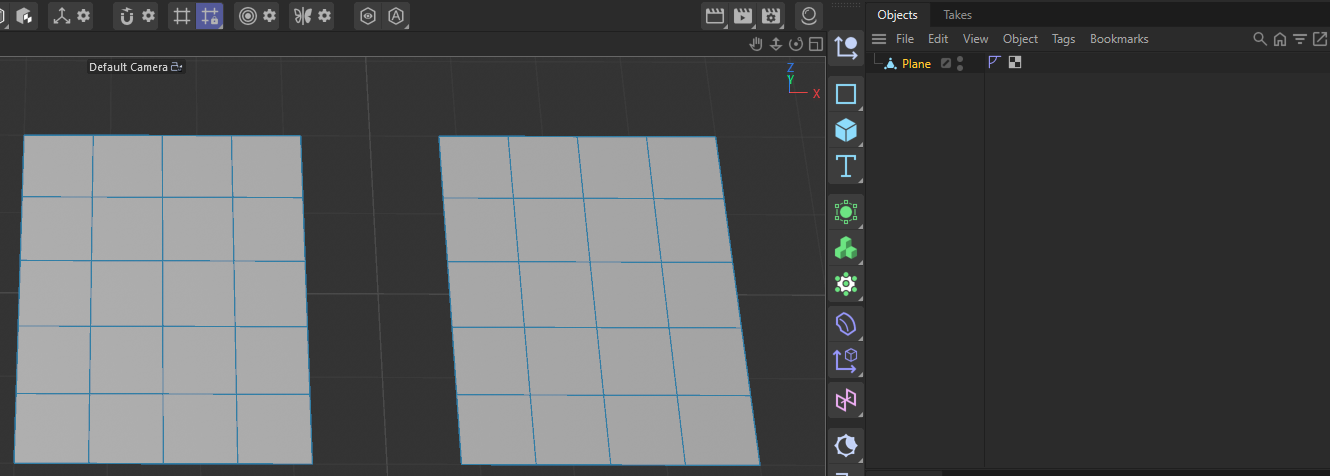
No, with islands I do not mean different objects. With islands are polygon (selection) islands meant. And that is just the term that is used for these things. The "Plane" object below has two polygon islands, the left and right rectangle shown in the viewport, each composed out of 4 * 5 polygons. They are islands because they are topological disjunct from each other - you cannot 'get' from one island to another without jumping over a gap.
The same can be applied to selections, as shown below. Now the left polygon island in the mesh has two polygonal selection islands. You cannot get from one selection island to another without jumping over a gap (they are topologically disjunct).
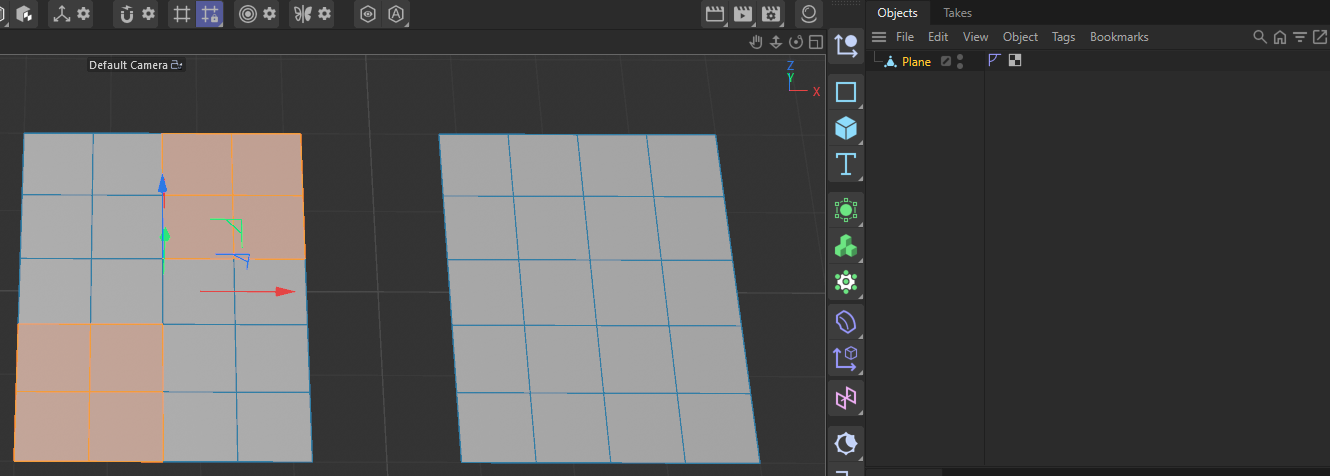
This is a requirement because as my code example demonstrates, when bridging in island mode, you just specify a polygon and a point (and set the flags), and the tool then 'grows out' the to be bridged patch from the given polygon, based on the active polygon selection. And this growing will stop at topological boundaries. So, when you would bridge from the selection in the lower left corner of the left rectangle (to some unspecified target in another mesh), it would only grow into these four polygons. The selection in the top right corner would never be part of the operation.
Cheers,
Ferdinand
