Can I have access to the Loop and Ring Selection algorithm ?
-
Hi community,
I wonder if there's a direct call for accessing Loop and Ring Selection results (element data) by providing an edge.
I tried the indirect method of actually using the interactive user tool on a temporary project but I constantly run in walls either by crashing C4D or just not getting any results back.Is there a direct method that utilizes the native C4D Ring/Loop Selection geometry traversing algorithms with a direct input of 2 points or an edge ID ?
If not, is there a direct method from the C++ API ?
If explaining the concept of how to use the interactive tool programmatically in an algorithm is too complicated and there's not a similar example for it, can I at least know if the native C4D algorithm is UV-traversing or Geometry-traversing in order to implement one myself ?I want to create a parametric generator similar to the SceneNodes Loop/Ring Selection Modifier that is more intuitive in use because the current implementation uses as inputs two point IDs. This isn't practical at all as the two points provided most of the time will not be related (belong to the same edge) at all returning nothing back. My implementation will be using an Edge ID counter to cycle the geometry and have just an Index user attribute using a pre-constructed table of all unique possible selections so the user can cycle all unique Ring and Loop selections. (Useful for effects, multiple selections, Field-driven selections etc)
-
Hello @Dimitris_Derm.,
Welcome to the Maxon developers forum and its community, it is great to have you with us!
Getting Started
Before creating your next postings, we would recommend making yourself accustomed with our forum and support procedures. You did not do anything wrong, we point all new users to these rules.
- Forum Overview: Provides a broad overview of the fundamental structure and rules of this forum, such as the purpose of the different sub-forums or the fact that we will ban users who engage in hate speech or harassment.
- Support Procedures: Provides a more in detail overview of how we provide technical support for APIs here. This topic will tell you how to ask good questions and limits of our technical support.
- Forum Features: Provides an overview of the technical features of this forum, such as Markdown markup or file uploads.
It is strongly recommended to read the first two topics carefully, especially the section Support Procedures: How to Ask Questions.
About your First Question
I am not quite sure how your question is meant, but the loop and ring selection tools are accessible in the API. When you are literally asking for the algorithm, we cannot share that, as declared in our Support Procedures:
We will not reveal non-public functionalities of our APIs.
When you just want to use the tools programmatically, SendModelingCommand is the way to go. We also have a dedicated section in our examples for them.
Cheers,
FerdinandResult
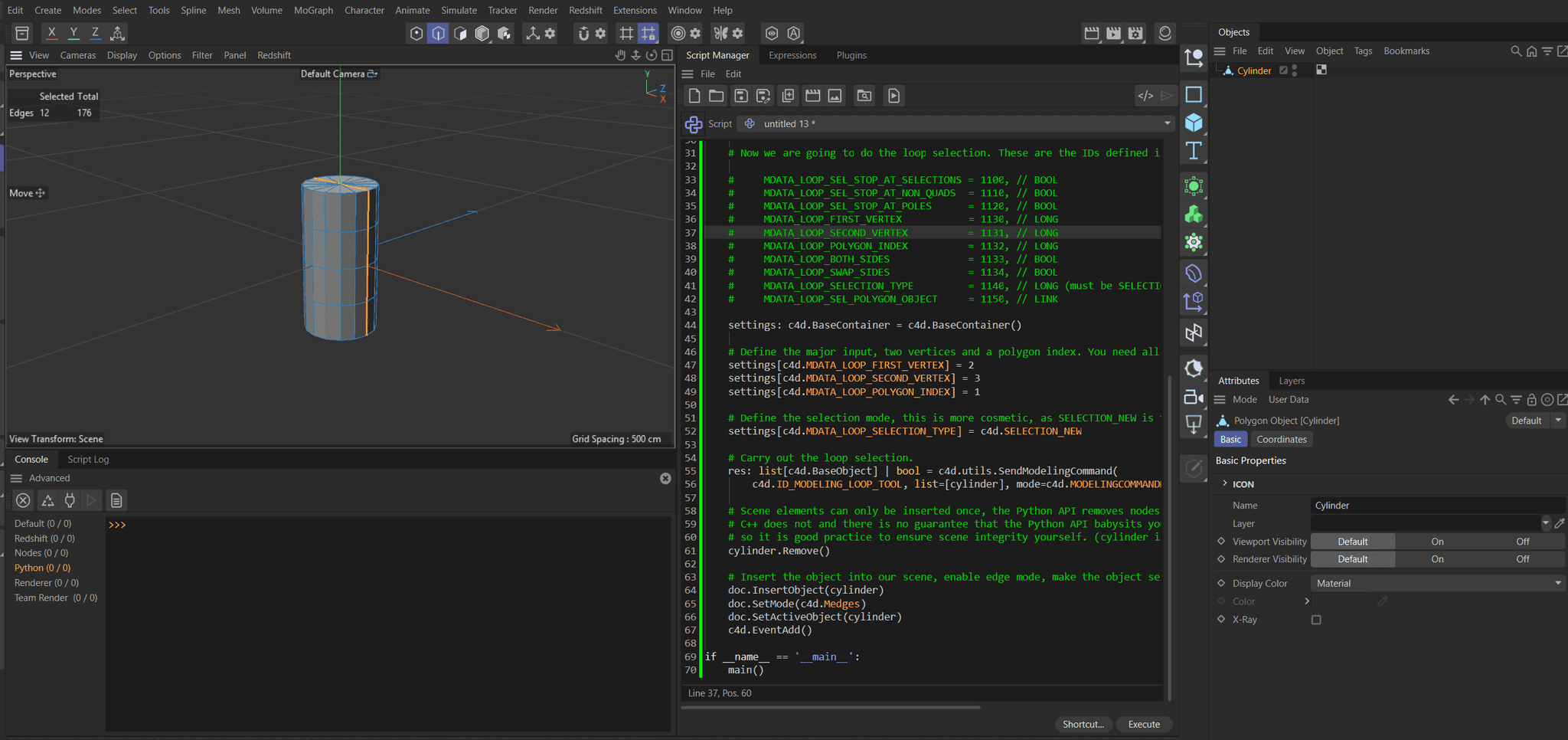
Code
"""Demonstrates how to use the loop selection command in the Python API. The script creates a cylinder, makes it editable, and then performs a loop selection based on two vertices and a polygon index. Finally, it inserts the modified object into the active document and updates the scene. """ import c4d import mxutils doc: c4d.documents.BaseDocument # The currently active document. op: c4d.BaseObject | None # The primary selected object in `doc`. Can be `None`. def main() -> None: """Called by Cinema 4D when the script is being executed. """ # Instantiate a cylinder and insert it into a temporary working document. cylinder: c4d.BaseObject = mxutils.CheckType(c4d.BaseObject(c4d.Ocylinder)) temp: c4d.documents.BaseDocument = mxutils.CheckType(c4d.documents.BaseDocument()) temp.InsertObject(cylinder) # Make the object editable. We could also build the caches and get the cache, but since the # subject is here SMC, we can also use SendModelingCommand and MODELINGCOMMAND_MAKEEDITABLE. res: list[c4d.BaseObject] | bool = c4d.utils.SendModelingCommand( c4d.MCOMMAND_MAKEEDITABLE, list=[cylinder], mode=c4d.MODELINGCOMMANDMODE_ALL, doc=temp) if not res: raise RuntimeError("Failed to make object editable.") # The cylinder is now editable. cylinder: c4d.PolygonObject = res[0] # Now we are going to do the loop selection. These are the IDs defined in toolloopselection.h: # MDATA_LOOP_SEL_STOP_AT_SELECTIONS = 1100, // BOOL # MDATA_LOOP_SEL_STOP_AT_NON_QUADS = 1110, // BOOL # MDATA_LOOP_SEL_STOP_AT_POLES = 1120, // BOOL # MDATA_LOOP_FIRST_VERTEX = 1130, // LONG # MDATA_LOOP_SECOND_VERTEX = 1131, // LONG # MDATA_LOOP_POLYGON_INDEX = 1132, // LONG # MDATA_LOOP_BOTH_SIDES = 1133, // BOOL # MDATA_LOOP_SWAP_SIDES = 1134, // BOOL # MDATA_LOOP_SELECTION_TYPE = 1140, // LONG (must be SELECTION_NEW, SELECTION_ADD or SELECTION_SUB) # MDATA_LOOP_SEL_POLYGON_OBJECT = 1150, // LINK settings: c4d.BaseContainer = c4d.BaseContainer() # Define the major input, two vertices and a polygon index. You need all three, regardless of the output mode # you choose in SMC. settings[c4d.MDATA_LOOP_FIRST_VERTEX] = 2 settings[c4d.MDATA_LOOP_SECOND_VERTEX] = 3 settings[c4d.MDATA_LOOP_POLYGON_INDEX] = 1 # Define the selection mode, this is more cosmetic, as SELECTION_NEW is the default. settings[c4d.MDATA_LOOP_SELECTION_TYPE] = c4d.SELECTION_NEW # Carry out the loop selection, targeting edge mode. res: list[c4d.BaseObject] | bool = c4d.utils.SendModelingCommand( c4d.ID_MODELING_LOOP_TOOL, list=[cylinder], mode=c4d.MODELINGCOMMANDMODE_EDGESELECTION, bc=settings, doc=temp) if not res: raise RuntimeError("Failed to perform loop selection.") # Scene elements can only be inserted once, the Python API removes nodes automatically when you call InsertObject, but # C++ does not and there is no guarantee that the Python API babysits you in all cases where you can insert something, # so it is good practice to ensure scene integrity yourself. (#cylinder is currently part of #temp). cylinder.Remove() # Insert the object into our scene, enable edge mode, make the object selected, and push an update event. doc.InsertObject(cylinder) doc.SetMode(c4d.Medges) doc.SetActiveObject(cylinder) c4d.EventAdd() if __name__ == '__main__': main() -
Thank you, this make more sense.
I was passing vertices not polygon indexes and was calling MDATA_LOOP_SELECTION_TYPE instead of MDATA_LOOP_SELECTION. -
These attributes :
#     MDATA_LOOP_FIRST_VERTEX           = 1130, // LONG
#     MDATA_LOOP_SECOND_VERTEX          = 1131, // LONG
#     MDATA_LOOP_POLYGON_INDEX          = 1132, // LONG
and many more aren't documented here https://developers.maxon.net/docs/py/2026_1_0/cinema_resource/tool/toolloopselection.html
Is this an intended omission or a neglect ? should I be visiting the C++ SDK more often ?
And how do I see the data type and call ID for each of them in the documentation ? I don't see them here https://developers.maxon.net/docs/cpp/2026_1_0/toolloopselection_8h.html
(I would upload a screenshot but I get a server error about not being able to parse the file) -
Hey,
well, "intended" would be the wrong word, but I am aware. The whole resource parsing situation is a bit of a mess at the moment, both in C++ and the Python API.
Why is it like this?
A description is defined by a
resfile (more or less its GUI declaration) and anhfile which declares symbols for parameter IDs. The resource for the loop tool looks like this:CONTAINER ToolLoopSelection { NAME ToolLoopSelection; INCLUDE ToolBase; GROUP MDATA_MAINGROUP { BOOL MDATA_LOOP_SEL_STOP_AT_SELECTIONS { } BOOL MDATA_LOOP_SEL_STOP_AT_NON_QUADS { } BOOL MDATA_LOOP_SEL_STOP_AT_POLES { } } HIDE MDATA_COMMANDGROUP; }I.e., it indeed only defines three parameters. But the header file looks like this:
#ifndef TOOLLOOPSELECTION_H__
#define TOOLLOOPSELECTION_H__

enum
{
	MDATA_LOOP_SEL_STOP_AT_SELECTIONS	= 1100, // BOOL
	MDATA_LOOP_SEL_STOP_AT_NON_QUADS	= 1110, // BOOL
	MDATA_LOOP_SEL_STOP_AT_POLES			= 1120, // BOOL
	MDATA_LOOP_FIRST_VERTEX						= 1130, // LONG
	MDATA_LOOP_SECOND_VERTEX					= 1131, // LONG
	MDATA_LOOP_POLYGON_INDEX					= 1132, // LONG
	MDATA_LOOP_BOTH_SIDES							= 1133, // BOOL
	MDATA_LOOP_SWAP_SIDES							= 1134, // BOOL
	MDATA_LOOP_SELECTION_TYPE					= 1140, // LONG (must be SELECTION_NEW, SELECTION_ADD or SELECTION_SUB)
	MDATA_LOOP_SEL_POLYGON_OBJECT			= 1150, // LINK
};

#endif // TOOLLOOPSELECTION_H__
I.e., it not only defines these three parameters, but also all the others. Because there are all these "hidden" parameters which are written into the data container of the tool, but never show up in the GUI. What collides here is (a) the a bit irregular (but not illegal) behavior of a resource to define more parameters in its header file than are used in the resource and (b) the questionable decision of our resource parser to ignore hidden parameters.
Our resource parsing is automated, i.e., I cannot just go into a file and just add these parameters for a docs build. I could touch the resource parsers for Python and C++, but I do not have the time for that right now as they has been written in a very opaque manner.
My advice is simply what the docs suggest: Search in the header files directly. Go to your Cinema folder, make sure that the
resource.zipis either unpacked to the local folder (the folder existing does not mean necessarily that it has been fully unpacked) or an external folder of your choice. And then simply search in that folder with an editor of your choice.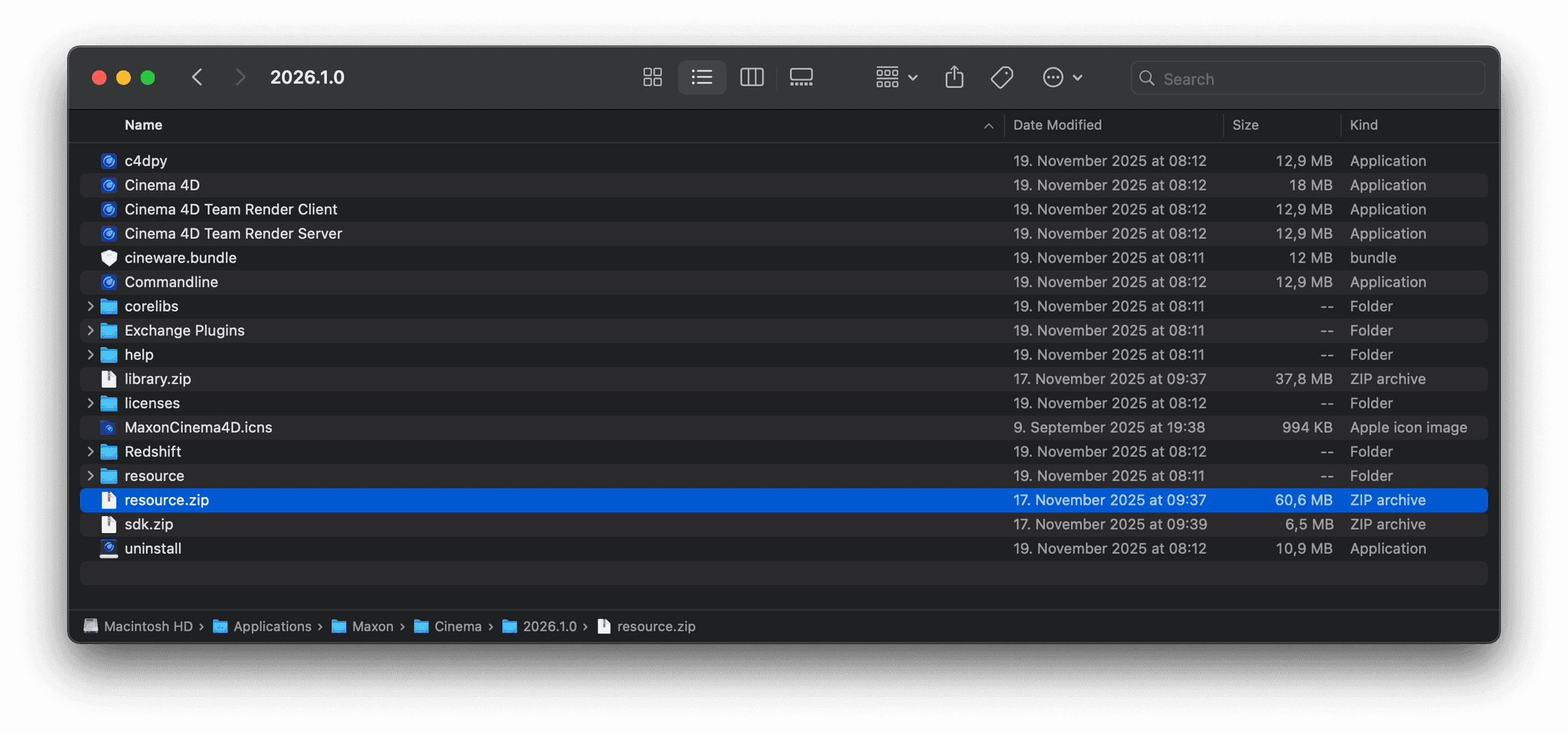
At some point I will replace the resource and symbols parsing for Python and C++, because we made there quite a mess in the past with questionable parsers and manually curated lists. But for now this cannot be changed and using the files directly is the way to go when you want to look at descriptions.
Cheers,
FerdinandPS: The C++ docs are NOT inherently better in that regard. The parser shares there the same flaws. The reason why you find some symbols there is because developers have duplicated them from the resources into the frameworks.
