-
Hi Ferdinand,
OK, I'll try that again. Trying upload: Diamond.zip
And the output (hope this is what you wanted!):
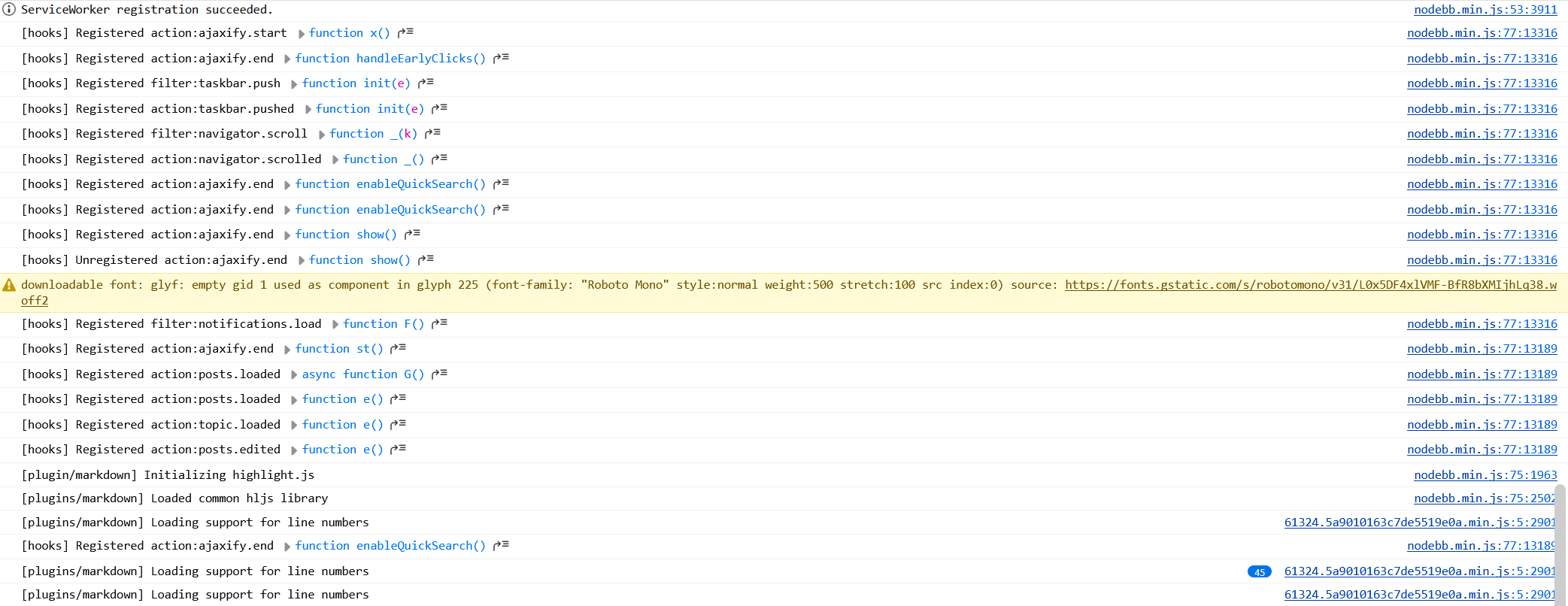
I can't even upload an image, this is a link to my site.
Steve
-
@ferdinand Hi Ferdinand,
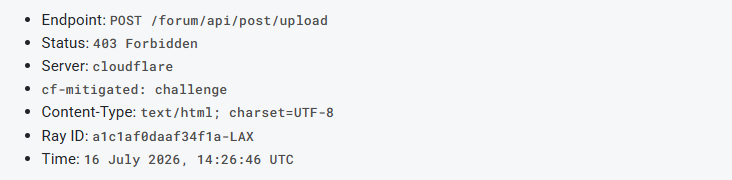
I reproduced the upload failure and found that it is caused by a Cloudflare Challenge, rather than NodeBB itself.
The upload request completes, but the response is:
- Endpoint:
POST /forum/api/post/upload - Status:
403 Forbidden - Server:
cloudflare cf-mitigated: challenge- Content-Type:
text/html; charset=UTF-8 - Ray ID:
a1c1af0daaf34f1a-LAX - Time:
16 July 2026, 14:26:46 UTC
Cloudflare returns an HTML Challenge Page to the XHR upload request. NodeBB expects a JSON upload response, so its parser subsequently reports: “Something went wrong while parsing server response.” The 100% progress only indicates that the browser finished sending the request body.
Could you please look up this Ray ID in Cloudflare Security Events to identify which WAF/Bot Management rule issued the challenge? A narrowly scoped exception for
POST /forum/api/post/uploadmay resolve it, since an interactive Challenge Page cannot be completed inside this AJAX upload request.I tested with a small PNG file in Chrome on Windows. I can provide additional non-sensitive request details if needed.
Cheers,
Anlv - Endpoint:
-
POST https://developers.maxon.net/forum/api/post/upload 403 (Forbidden)
That is the culprit. That is the data upload endpoint and something is not letting you even talk with it. Could be NodeBB misbehaving or some shenanigans by Cloudflare. I will see if I can find out more.
edit: now I see it too, this is some cloudflare misfire
Thanks for the info @Anlv
MAXON SDK Specialist
developers.maxon.net -
@ferdinand A small update:
My first attempt to open the upload endpoint directly only returned
Forbiddenand did not display a visible Cloudflare verification page.I then used a small userscript to submit a real multipart file upload as a top-level browser navigation instead of an XHR request. That request succeeded and returned the normal NodeBB JSON response:
{"status":{"code":"ok","message":"OK"}}More importantly, after this top-level request, the forum’s normal attachment uploader also started working successfully.
This suggests that the top-level request allowed Cloudflare to complete or refresh its verification/clearance state, while the original XHR upload could not handle the HTML Challenge response. It appears to be a Cloudflare Challenge/clearance issue rather than a damaged file or a failure in NodeBB’s upload handler.
-
Hey, could you please try again

MAXON SDK Specialist
developers.maxon.net -
@ferdinand Hi, I think the issue has been fixed. I just tried uploading an attachment (before uploading, I cleared the cache and changed the network environment), and it no longer prompts "Error: Something went wrong while parsing server response."
Thanks for your help,
Anlv -
-
 F ferdinand moved this topic from Cinema 4D SDK on
-
Hey @spedler,
I did give this a shot. I cannot reproduce this after even quite a few attempts, but one of my colleagues (Fritz) could. There is probably some undo code missing in the color chip dialog. I assume that was what you did, Steve, right? You set the color via the popup color chip dialog and not with the inline control? Fritz could reproduce this without your plugin. So, my hunch was right, your plugin is not the culprit.
Since I cannot fix what I cannot reproduce on my machine, I have created a bug ticket for this and sent it off to the owners of the
COLORcontrol. The ticket isITEM#652737 Parameters of type COLOR do not always correctly invoke UNDOs in descriptions.Out of curiosity: Can you also reproduce this on your machine with a a builtin object, e.g., the Cube object? Fritz and I were both on macOS while testing. But this being OS-specific seems a bit unlikely.
Cheers,
FerdinandI have moved this topic into "bugs".
edit: As always with these things now I can reproduce it too

-
Hi Ferdinand,
Sorry to take a while to get back to you. Yes, that's what I did - changed the colour with the colour chip, the dialog appears, change the colour in that, close the dialog then hit Undo, which reverts any previous change before the colour change as well.
I tried with a Cube where the only way to change colour is to use the display colour in the basic tab. At first sight this doesn't cause the problem, but in fact it does. To change the display colour you first have to change the 'Display Color' menu from Material (the default) to Automatic or Custom. If you then change the colour, then hit Undo, what happens is that the colour is reverted and the display colour menu is reverted back to 'Material'. So yes, you can reproduce the same bug with a simple cube (I missed that when I started looking at this, could have saved the time writing a test plugin!).
Cheers,
Steve -
I tried with a Cube where the only way to change colour is to use the display colour in the basic tab. At first sight this doesn't cause the problem, but in fact it does.
Yes, that was what I meant. Thanks for confirming. The issue likely already has vanished in the current alpha, because there I could not reproduce it. But in 2026.3.2 I can. What is a bit odd is that no one seems to have touched the relevant code in the last months. But that is something for the GUI team to figure out.