How to add tabs to tool plugins.
-
I want to use groups UI in ToolData plugins is resource file( or in codes maybe ), but I didn't figure out witch us the right flag.
Still, I can not upload images, but please see selection tool, it has
option/axis/soft selectiongroups.How can I do this?
Cheers~
DunHou -
Hey @Dunhou,
Thank you for reaching out to us. There are two tool plugin types in the Cinema API, ToolData and DescriptionToolData. The former uses dialogs to create the tool UI, the latter uses descriptions and therefore shares the description logic of top level groups being turned into tabs. Almost all native tools inside Cinema 4D are these days
DescriptionToolDatahooks, including the selection tool. So, they are not the same thing as your plugin.When you want tabs in a dialog, you have to create them yourself with either GeDialog.TabGroupBegin (which is not the same kind of tabs as used by descriptions) or CUSTOMGUI_QUICKTAB (which is the tab type used by descriptions).
DescriptionToolDatadoes not exist in the Python API. One of my colleagues always says that you can use SculptBrushToolData which is indeed wrapped for the Python API and a subtype ofDescriptionToolDatabut I am personally not a big fan of implementing sculpting tools in such hacky manner as non-sculpting tools, just to get the benefits ofDescriptionToolData.Cheers,
FerdinandMAXON SDK Specialist
developers.maxon.net -
Thanks for your detailed answer @ferdinand
I do know quicktab, but I didn't find its symbol in res file, seems I can only make it works in python codes.I also agree it is bit strange to use sculpt plugins.
Cheers~
DunHou -
@Dunhou, there are multiple cases of quick tab dialog resource file definitions. For example the UV manager.
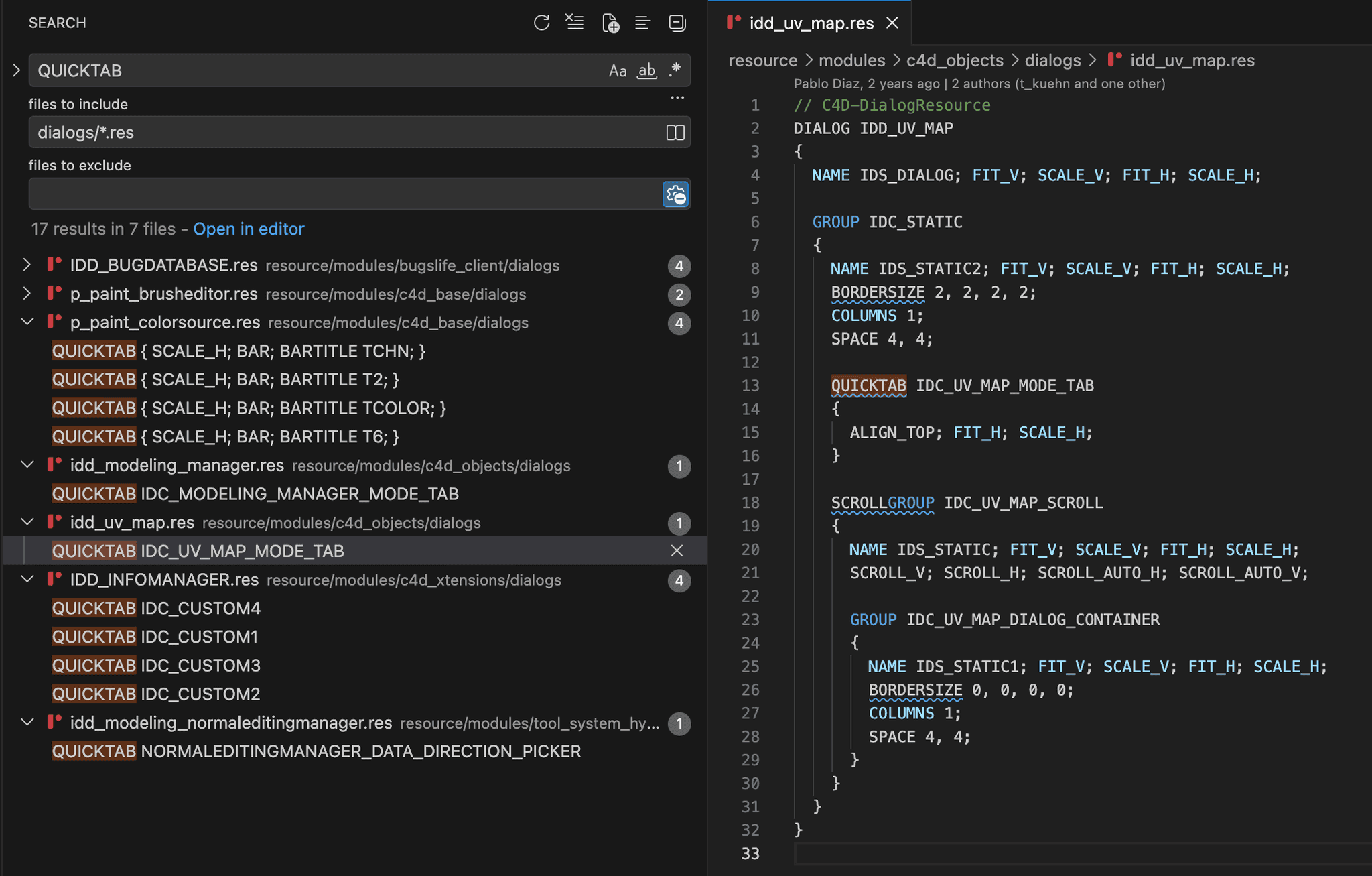
Unlike for node description resources, custom GUIs are not indicated as
SOME_DATA_TYPE { CUSTOMGUI SOME_CUSTOM_GUI; ... }in dialog resources but always as their own data type (don't ask me why).edit: And in case this is unclear - the quick tab GUI gives you really only a quick tab GUI. You have to create multiple groups and hide/show them on your own using GeDialog.HideElement - based on the selection state of the quick tab. The native dialog tab groups automate this for you, but are unfortunately not the commonly used tab GUI anymore. So, when you want the 'modern' look, you have to do the little bit of extra work of managing the visibility of groups yourself.
MAXON SDK Specialist
developers.maxon.net -
It works! Thanks!
@ferdinand said in How to add tabs to tool plugins.:
Unlike for node description resources, custom GUIs are not indicated as SOME_DATA_TYPE { CUSTOMGUI SOME_CUSTOM_GUI; ... } in dialog resources but always as their own data type (don't ask me why).
Hahaha, this is really strange. The first thing I tried was CUTOMGUI SOME_CUSTOM_GUI. This is what I got with Agent Ransack...
One more thing, I couldn't find the
idd_uv_map.resfile in the image in the local resources. Is it already embedded without displaying the source code.Cheers~
DunHou -
You very likely have not unpacked your resources. The resource folder found in an installation only contains a part of the application resources (we are doing this since release 2023 if I remember correctly). A good portion of the resources sits inside
resource.zipfor performance reasons and is unpacked on demand. You can just unpack theresource.zipinto you resource folder without an performance or stability issues.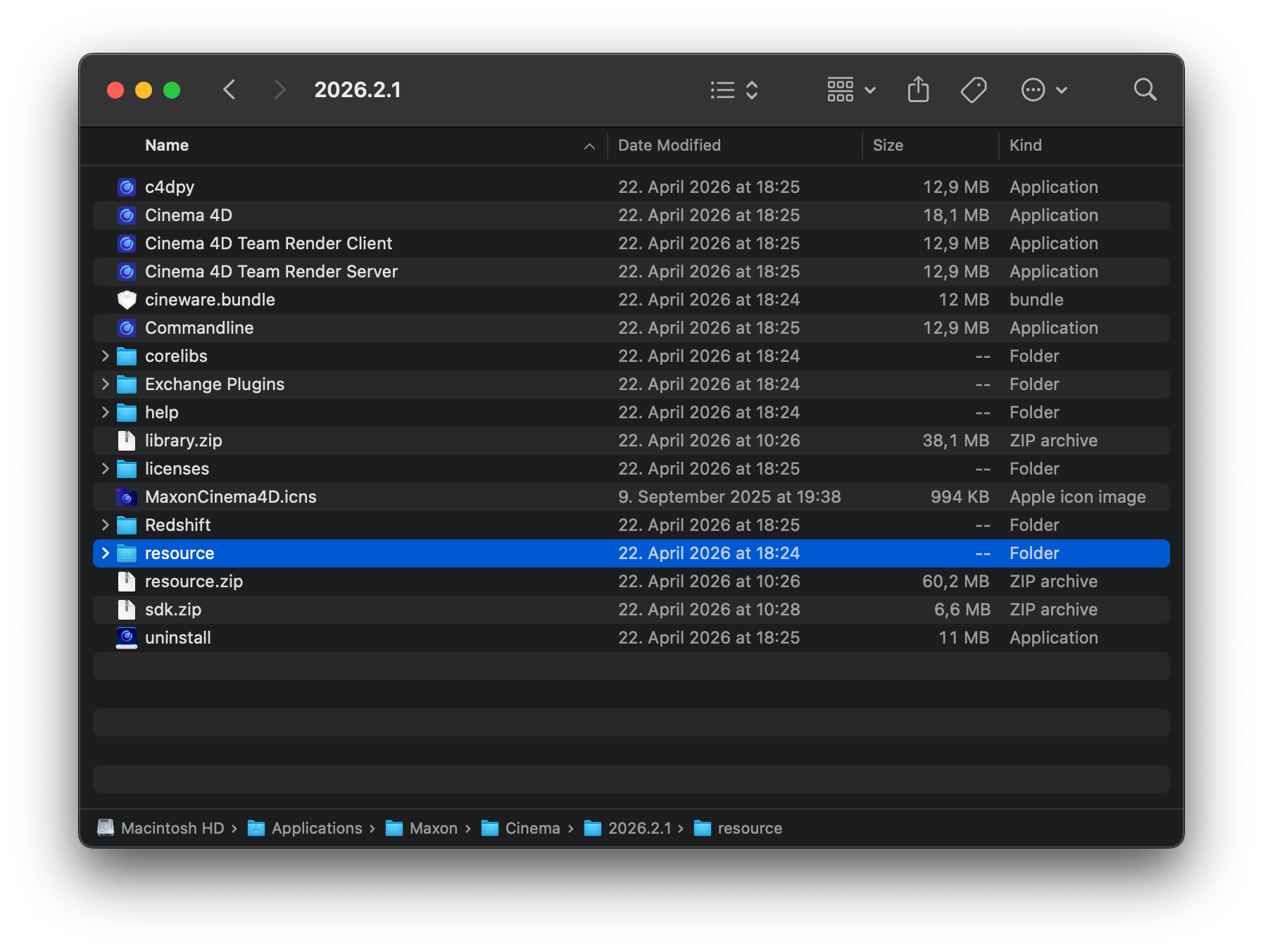
You as an MRD can also look at the Bugslife client, as it is probably the better example, as it uses more features of the quick tab GUI. But my answer above was targeted at a general audience who can see the resources for Bugslife but not Bugslife itself, and it therefore is not a good example for them. Just grep the resource folder as I did in my screen for files that match the path
dialogs/*.res(i.e., are res files for dialogs) and contain the wordQUICKTAB.Cheers,
Ferdinand

