Cache Proxy Tag
-
Hello,
I have a question when it comes to the Selection tags such as "Tcacheproxytagpointselection". In the SDK they are listed as private for generators and not referenced again.
Is there a method available to utilize them or an equivalent method. Specifically I'm trying to achieve the behavior shown in this clip, where the Text object is able to be changed by the Plain effector without being made editable due to its selection tag, while the Rectangle spline has to be made editable to be changed.
-
Hey @JohnThomas,
Thank you for reaching out to us. We just talked about your question in our morning meeting, and none of us does truly understand it. So, let me state a few facts about the literal question you asked:
Specifically I'm trying to achieve the behavior shown in this clip, where the Text object is able to be changed by the Plain effector without being made editable due to its selection tag, while the Rectangle spline has to be made editable to be changed.
 Plugin authors should treat caches as read-only although they technically are not. Internally, we pull a lot of caching tricks, as this is certainly possible and desirable in some cases. But you can also quite easily crash Cinema 4D when you do not know what you are doing. Especially allocations or deallocations are absolutely off limits, as something could have already established a pointer to some internal data. E.g., you cannot add or remove points to/from a
 PointObjectwhen poking around irregularly in caches.- Editing things without making them editable just means modifying their cache. So, for your Rectangle spline, you could call
myRect->GetCache()and then find there aLineObjectwhich you could edit. See geometry_caches_s26.py for an explanation of the cache model of Cinema 4D, as navigating caches can become quite complex. - The natural model to modify caches are deformers, i.e.,
ObjectData::ModifyObject, as for example done by the Bend deformer. That is also what MoGraph is doing with its effectors once you enable one of the deformer modes. Tags in general or specificallyTcacheproxytagpointselectionare only tangentially relevant. - Another (although not recommended) way to modify the caches of things can be
TagData::ExecuteorObjectData::Execute, i.e., a tag or an object acting like a tag. You simply reach there into the cache and do stuff, but other than forModifyObjectyou are not as well shielded for access violations/update anomalies there. The reason why one would do this, is to put a possible deformation step somewhere else in the excution pipeline (as you can specify when in the scene evaluation theExecutemethods are called). - Modifying the cache of an object is volatile, i.e., will just be discarded on the next scene update. So, unless you do it in regularly called places such as
ModifyObjectorExecute, this will not work. And when you do this outside of the context of these two methods, you are pretty much guranteed to crash Cinema 4D sooner or later.
When I read here a bit between the lines, the implicit question does not seem to be actually about deforming the output of other generators but how selections work in the context of generators.
As a rule of thumb we can say that selections do not work with generators. It is only for generators which yield a simple (i.e., one object deep cache) and some hard coded extra cases where you can put a point/edge/polygon selection tag on that generator and Cinema 4D then being able to interpret that selection tag correctly. Because a selection tag is effectively just a list of selection states such as
[True, False, False, True], where this list would mean that the elements with the indices 0 and 3 are selected while the elements with the indices 1 and 2 are not selected. When you now have a scene structure like this:myGenerator (BaseObject) ├── Tags │ └── myPointSelection (SelectionTag): {True, False, False, False} └── Cache └── myNull (BaseObject) ├── poly.0 (PolygonObject) └── poly.1 (PolygonObject)The selection tag
myPointSelectionis ambiguous as it is not clear which of thePolygonObjectinstances in the cache ofmyGeneratorit is referring to. So, Cinema 4D will just ignore it. Only when it is clear to whichPoint/Line/PolygonObjecta selection tag is referring to, it will be used. There are some hardcoded exceptions in the case of MoGraph, but you must implement them manually in the 'user' of such selection, i.e., the thing that takes such selection as an input. So, long story short, this is why this works for the text spline but not the text object, one has a simple cache structure and the other has not.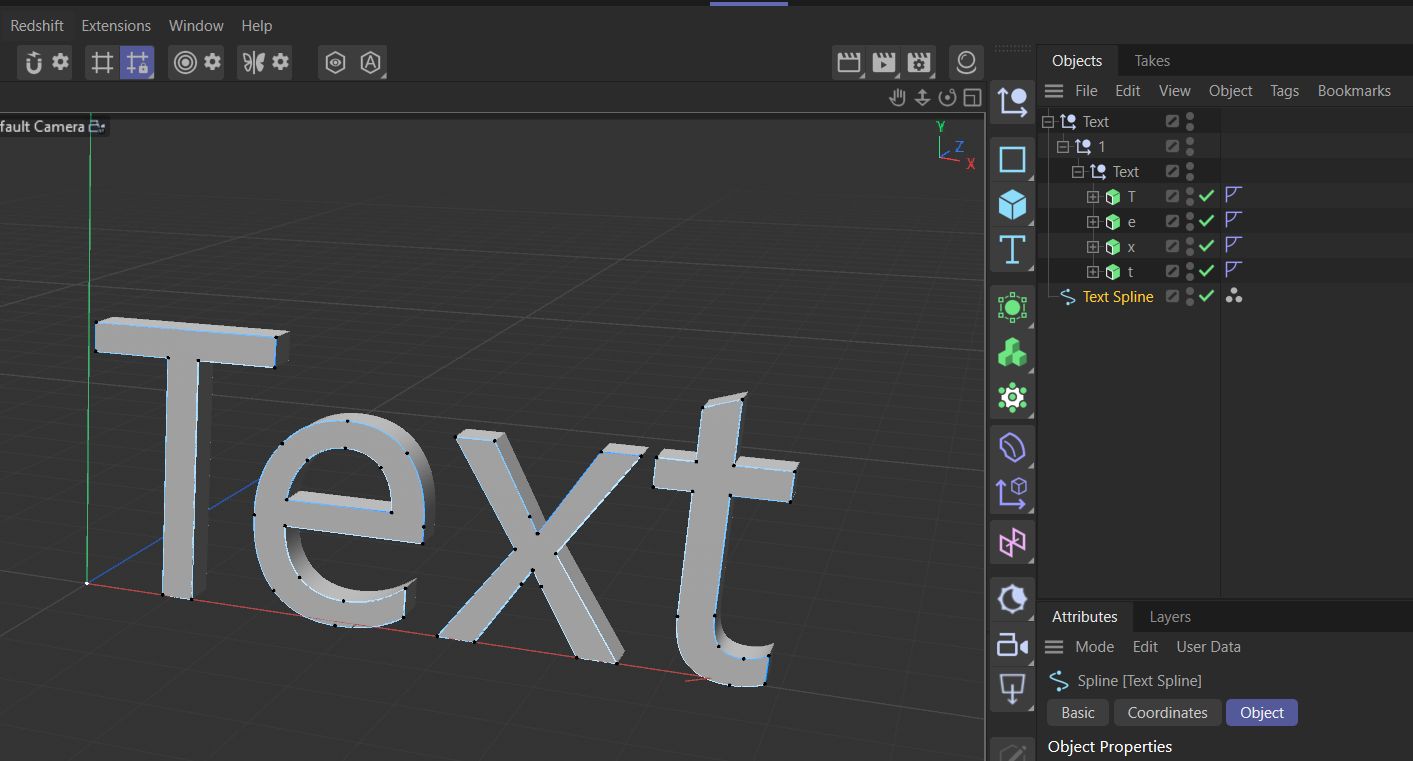
Cheers,
Ferdinand - Editing things without making them editable just means modifying their cache. So, for your Rectangle spline, you could call
-
Thanks for the response.
For clarification what I am trying to do is have my modifer inside of ModifyObject change the points of the modified object. For simplicity sake it takes in the four points and moves them inwards so the Rectangle spline is smaller. The idea with the selection tag is to mimic the behavior of the things like the Selections in the Text object, so I could create a selection tag that would have some amount of the points from the Rectange spline selected, these points would be set in the Selection tag inside of ModifyObject. The selection tag would ideally be able to now be dragged into something like the Plain effector where it can effect the selected points, without the parent Spline object being made editable.
When it comes to Selection tags is it possible, via code, to create the Tcacheproxytagpointselection style selection tags or is that purely limited to things like the Selections in a Text object?
John Thomas
-
Hello @JohnThomas,
Thank you for your clarifications, but unfortunately they do not bring much clarity for me. It is still unclear to me what you want to achieve.
Tcacheproxytagpointselectionand its edge, polygon, vertex color, and vertex map counter parts are a MoGraph mechanism to link from a generator, i.e., the tags visible in the Object Manager to tags in the cache of something, i.e., the invisible part of a scene graph. So that the user can interact with tags buried in the cache of something. They are one of the MoGraph workarounds for the very problem I described above. The generator using them has of course to support them/create them, because you need a selection/vertex tag on some point object in the cache in the first place, to which the proxy can link. I.e., you cannot just create proxy tags on anything.- You can create a proxy tag yourself. Since it is just a variable tag, you can just the generic
VariableTaginterface for that. But the concrete interface is private, so you would have to reverse engineer how they work, but they are effectively a hollow shell which just carry a base link to their linked entity in their data container (and some other meta data). The real challenge would be to keep that meta up to date, i.e., mimic how MoGraph operates these tags. - You also talk about fields implicitly all the time, specifically a variable tag field, i.e., a field which can sample things like selection tags and their proxies. Variable tag fields of course only support variable tags and nothing you would write yourself.
Cheers,
FerdinandMAXON SDK Specialist
developers.maxon.net -
@ferdinand
Thanks for the detailed response, unfortunately what I'm trying to do doesn't seem viable.John Thomas
-
@ferdinand said in Cache Proxy Tag:
Tcacheproxytagpointselection and its edge, polygon, vertex color, and vertex map counter parts are a MoGraph mechanism to link from a generator, i.e., the tags visible in the Object Manager to tags in the cache of something, i.e., the invisible part of a scene graph. So that the user can interact with tags buried in the cache of something. They are one of the MoGraph workarounds for the very problem I described above. The generator using them has of course to support them/create them, because you need a selection/vertex tag on some point object in the cache in the first place, to which the proxy can link. I.e., you cannot just create proxy tags on anything.
Sorry, I still confused about proxy tags, do you mean that third-party users cannot create proxy tags, even if the generated model contains an ‘internal selection’, such as when the generator creates a cube and we set a selection to consistently select the top face? Can we not create a proxy tag and assign a material to it, in the same way as with ‘Extrude’?
Cheers~
DunHou -
Hey @Dunhou,
No, you cannot create such tags from the public C++ or Python API. You can resolve existing tags via
MSG_GETREALTAGDATAto their real underlying tag, but you cannot create new ones. At least we do not expose the internal interfaces we use for this.You can print the data container of a proxy tag, and will find something like this:
Root (None , id = -1):
├── 2003 (DTYPE_REAL): 0.5
├── 2002 (DTYPE_LONG): 0
├── 2001 (CUSTOMDATATYPE_FIELDLIST): <c4d.FieldList object at 0x000002B6CF99C8C0>
├── 1011 (DTYPE_LONG): 0
├── 1000 (DTYPE_LONG): 5673
├── 1050449 (DTYPE_SUBCONTAINER , id = -1):
│   ├── 1 (DTYPE_LONG): 4001
│   └── 3 (DTYPE_LONG): 4101
└── 1041671 (DTYPE_VECTOR): Vector(1, 0.9, 0.4)
Where
1050449is the ID forTcacheproxytagand this sub-container then contains two fields which represent these two IDs:
We seem to have removed the old
BaseLinkapproach we used before. And the code for resolving the 'name' (which as you can see is actuallyDTYPE_LONG) is not super trivial. If I would pull out this information for you and others, I would also have to maintain it, which you can see by the deprecation of the base-link, would be ongoing work. When you can make it work with the hinted at information, go for it. But this is a private interface for now, and I cannot reveal its details.Cheers,
FerdinandMAXON SDK Specialist
developers.maxon.net -
Thanks for your info @ferdinand, but I would like to raise a few ‘off-topic’ questions on this matter.
When working with object generators, what would you recommend regarding materials and tags? Should you create material labels directly to reference the ‘hidden selection name’, or use BaseLink in the Parameters panel? The user experience is always somewhat suboptimal when there are no proxy tags.
Cheers~
DunHou -
I am afraid there is not really good way to do this. You could expose the tags as
BaseLink's in the parameters of your object, so that users can drag them, but that is also clunky and a also a bit 'yikes' to expose the cache internals like that.Unless the object and selections are very complex, I would simply go by creating the selections in the cache, and then either documenting them in the docs, using short names such as
C1andC2for cap one and cap two, or alternatively display a little static text at bottom of your node in the attribute manager which lists these names. This also worked a long time for Cinema itself like this, before we got seven years ago or so the proxy concept. -
This is how I’ve implemented it at the moment, although users can’t drag and drop selection tags in the same way as with C4D’s built-in generator. Hope there are plans to expose the proxy tags.
Thanks for tour time!