How to select multiple files using "c4d.storage.LoadDialog()"?
-
Hi everyone,
I found that through the “Open...” or “Merge...” options in the File menu, I can open “Load File(s)”, which allows handling multiple files.
However, with c4d.storage.LoadDialog(), I can only select a single folder or file.
In the latest SDK documentation, I couldn’t find a method to load multiple files. Is this an internal API?
My current workaround is using AddMultiLineEditText, but it’s not very user-friendly.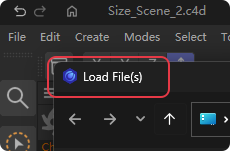
import c4d def main(): path = c4d.storage.LoadDialog( title="Select File", type=c4d.FILESELECTTYPE_ANYTHING, flags=c4d.FILESELECT_LOAD, ) print(path) if __name__ == '__main__': main() -
Hello @Anlv,
Welcome to the Maxon developers forum and its community, it is great to have you with us!
Getting Started
Before creating your next postings, we would recommend making yourself accustomed with our forum and support procedures. You did not do anything wrong, we point all new users to these rules.
- Forum Overview: Provides a broad overview of the fundamental structure and rules of this forum, such as the purpose of the different sub-forums or the fact that we will ban users who engage in hate speech or harassment.
- Support Procedures: Provides a more in detail overview of how we provide technical support for APIs here. This topic will tell you how to ask good questions and limits of our technical support.
- Forum Features: Provides an overview of the technical features of this forum, such as Markdown markup or file uploads.
It is strongly recommended to read the first two topics carefully, especially the section Support Procedures: How to Ask Questions.
About your First Question
What you are asking for is not possible in this form at the moment. The Cinema (C++) API has two functions for opening the native OS file and folder dialogs: FileSelect and FileSelectMultiple. The Python API makes this more complicated that it has to be with
c4d.storage.LoadDialogandc4d.storage.SaveDialogbut both just wrapFileSelect.With
FileSelectMultipleyou can do what you want, select multiple files in one go, but the Python API currently does not wrap this function. You must either open multiple dialogs or use a third party GUI API which can open such native OS dialog for you.Cheers,
Ferdinand -
Hello @ferdinand,
Thank you very much for your detailed guidance and for pointing out the necessary forum procedures.
Following your suggestion, I managed to implement the multi-file selection feature by utilizing a third-party GUI API, and I successfully outputted the selected file paths to the console.
Please note that this solution has only been tested on the Windows so far. I am sharing my example script below in the hope that it might help other developers facing the same requirement:
import ctypes
from ctypes import wintypes


# Flags used by the Windows file dialog.
OFN_EXPLORER = 0x00080000          # Use the Explorer-style dialog.
OFN_ALLOWMULTISELECT = 0x00000200  # Allow selecting multiple files.
OFN_FILEMUSTEXIST = 0x00001000     # Require selected files to exist.
OFN_PATHMUSTEXIST = 0x00000800     # Require the selected path to exist.
MAX_BUFFER = 65536                 # Buffer size used to receive the result.


# OPENFILENAMEW structure used by the Windows API.
class OPENFILENAMEW(ctypes.Structure):
    _fields_ = [
        ("lStructSize", wintypes.DWORD),
        ("hwndOwner", wintypes.HWND),
        ("hInstance", wintypes.HINSTANCE),
        ("lpstrFilter", wintypes.LPCWSTR),
        ("lpstrCustomFilter", ctypes.c_wchar_p),
        ("nMaxCustFilter", wintypes.DWORD),
        ("nFilterIndex", wintypes.DWORD),
        ("lpstrFile", ctypes.c_wchar_p),
        ("nMaxFile", wintypes.DWORD),
        ("lpstrFileTitle", ctypes.c_wchar_p),
        ("nMaxFileTitle", wintypes.DWORD),
        ("lpstrInitialDir", wintypes.LPCWSTR),
        ("lpstrTitle", wintypes.LPCWSTR),
        ("Flags", wintypes.DWORD),
        ("nFileOffset", wintypes.WORD),
        ("nFileExtension", wintypes.WORD),
        ("lpstrDefExt", wintypes.LPCWSTR),
        ("lCustData", wintypes.LPARAM),
        ("lpfnHook", wintypes.LPVOID),
        ("lpTemplateName", wintypes.LPCWSTR),
        ("pvReserved", wintypes.LPVOID),
        ("dwReserved", wintypes.DWORD),
        ("FlagsEx", wintypes.DWORD),
    ]


def open_multiple_files():
    # Create a writable Unicode buffer to receive the file path data from Windows.
    buffer = ctypes.create_unicode_buffer(MAX_BUFFER)

    # Configure the parameters for the file-open dialog.
    ofn = OPENFILENAMEW()
    ofn.lStructSize = ctypes.sizeof(OPENFILENAMEW)
    ofn.hwndOwner = None
    ofn.lpstrFilter = "All Files\0*.*\0Text Files\0*.txt\0\0"
    ofn.lpstrFile = ctypes.cast(buffer, ctypes.c_wchar_p)
    ofn.nMaxFile = MAX_BUFFER
    ofn.lpstrTitle = "Select Files"
    ofn.Flags = (
        OFN_EXPLORER
        | OFN_ALLOWMULTISELECT
        | OFN_FILEMUSTEXIST
        | OFN_PATHMUSTEXIST
    )

    # Call the native Windows file selection dialog.
    comdlg32 = ctypes.windll.comdlg32
    result = comdlg32.GetOpenFileNameW(ctypes.byref(ofn))

    # The user canceled the dialog, or the call failed.
    if not result:
        err = comdlg32.CommDlgExtendedError()
        if err:
            print("GetOpenFileNameW failed, error code:", err)
        return []

    # Read the returned content from the buffer.
    # Single selection: returns a full file path.
    # Multiple selection: returns [directory, file1, file2, ...].
    raw = ctypes.wstring_at(ctypes.addressof(buffer), MAX_BUFFER)
    parts = [p for p in raw.split("\0") if p]

    if not parts:
        return []

    # If only one file was selected, return the full path directly.
    if len(parts) == 1:
        return [parts[0]]

    # If multiple files were selected, combine the directory with each filename.
    directory = parts[0]
    filenames = parts[1:]
    return [directory + "\\" + name for name in filenames]


def main():
    paths = open_multiple_files()

    if not paths:
        print("No file selected.")
        return

    print("Selected files:")
    for path in paths:
        print(path)


if __name__ == "__main__":
    main()
Best regards,
Anlv -
Yes, that is a very low level way to do it, I assume you had help from an AI in writing it?
I personally meant more to use a GUI kit such as tkinter or QT. We deliberately do not ship our Python with tkinter (the builtin GUI lib of Python), but you could just install it yourself. The advantage of tkinter or a similar lib is that things like
filedialog.askopenfilenameswill work on multiple OS's and versions of it, the disadvantge is that you have to install the dependency. Doing it manually yourself means that you have to support each OS yourself and also have to track versions of the API. But at least GetOpenFileNameW is probably so stable that you never have to care about the latter on WIndows.Cheers,
FerdinandMAXON SDK Specialist
developers.maxon.net -
Hi @ferdinand,
Yes, this example was written with the help of AI, and I performed a basic review;
I wanted to avoid installing dependencies, so I used the currently supported
ctypes, but I indeed did not fully consider the issue of supporting every operating system. Thank you for the reminder.Best regards,
Anlv -
Your approach is not necessarily worse, one could even argue that it is better. I personally would always avoid manually binding to an OS DLL via ctypes, but that is more a personal preference.