Create Motion Clip Source with Python API
-
Hi everyone,
I am trying to fully automate the creation of a Motion Clip via Python, completely bypassing the UI popup from the "Add Motion Clip" command. I need to be able to set parameters through code.
I understand from previous threads that the NLA system might not be fully exposed in the Python API. I was successfully able to use branch traversal to find the NLA Base and allocate the MT_LAYER and MT_CLIP using c4d.BaseList2D().
This post was a good source of info:
http://developers.maxon.net/forum//post/55975However, my roadblock is creating the actual Motion Source to link to the clip. When I try to allocate it, I get an allocation error.
Here is the exact line:
import c4d
MT_SOURCE = 465003004 # ID for Motion Source

def main():
    # Attempting to create the Motion Source container
    motion_source = c4d.BaseList2D(MT_SOURCE)

if __name__=='__main__':
    main()

BaseException: the plugin 'c4d.BaseList2D' (ID 465003004) is missing. Could not allocate instance.
I have two questions:
-
Is there an undocumented helper function, message, or workaround to allocate a Motion Source (MT_SOURCE) in Python so I can manually insert CTrack data into it?
-
Alternatively, since "Add Motion Clip" is a CommandData plugin, is there any hidden way to pass a settings container to it via Python (similar to MSG_RETRIEVEPRIVATEDATA with SceneSavers) so it executes silently without the UI popup?
Any guidance or confirmation if this is strictly locked to the internal C++ core would be hugely appreciated!
Thank you,
Jaroslav -
-
Hello @jaroslavnovotny,
Welcome to the Maxon developers forum and its community, it is great to have you with us!
Getting Started
Before creating your next postings, we would recommend making yourself accustomed with our forum and support procedures. You did not do anything wrong, we point all new users to these rules.
- Forum Overview: Provides a broad overview of the fundamental structure and rules of this forum, such as the purpose of the different sub-forums or the fact that we will ban users who engage in hate speech or harassment.
- Support Procedures: Provides a more in detail overview of how we provide technical support for APIs here. This topic will tell you how to ask good questions and limits of our technical support.
- Forum Features: Provides an overview of the technical features of this forum, such as Markdown markup or file uploads.
It is strongly recommended to read the first two topics carefully, especially the section Support Procedures: How to Ask Questions.
About your First Question
BaseException: the plugin 'c4d.BaseList2D' (ID 465003004) is missing. Could not allocate instance.Just means that Cinema 4D cannot instantiate a node with such ID as it does find its implementation. In some VERY rare cases nodes are sealed and cannot be instantiated manually from the outside but that is very rare and not a difference between Python or C++ thing. If it fails in one API, it does so in the other.
The other issue is you hard coded the ID. Where did you get this 465003004 for "motion source" from? Maxime did unfortunately the same in his old thread. You should never hardcode IDs when you can avoid it, i.e., when there is a symbol. With modern tools it also easier than ever to discover the correct symbols. Here I look with
mxutils.GetSceneGraphStringat the partial scene graph that is attached to my cube in the scene (op because my cube is selected).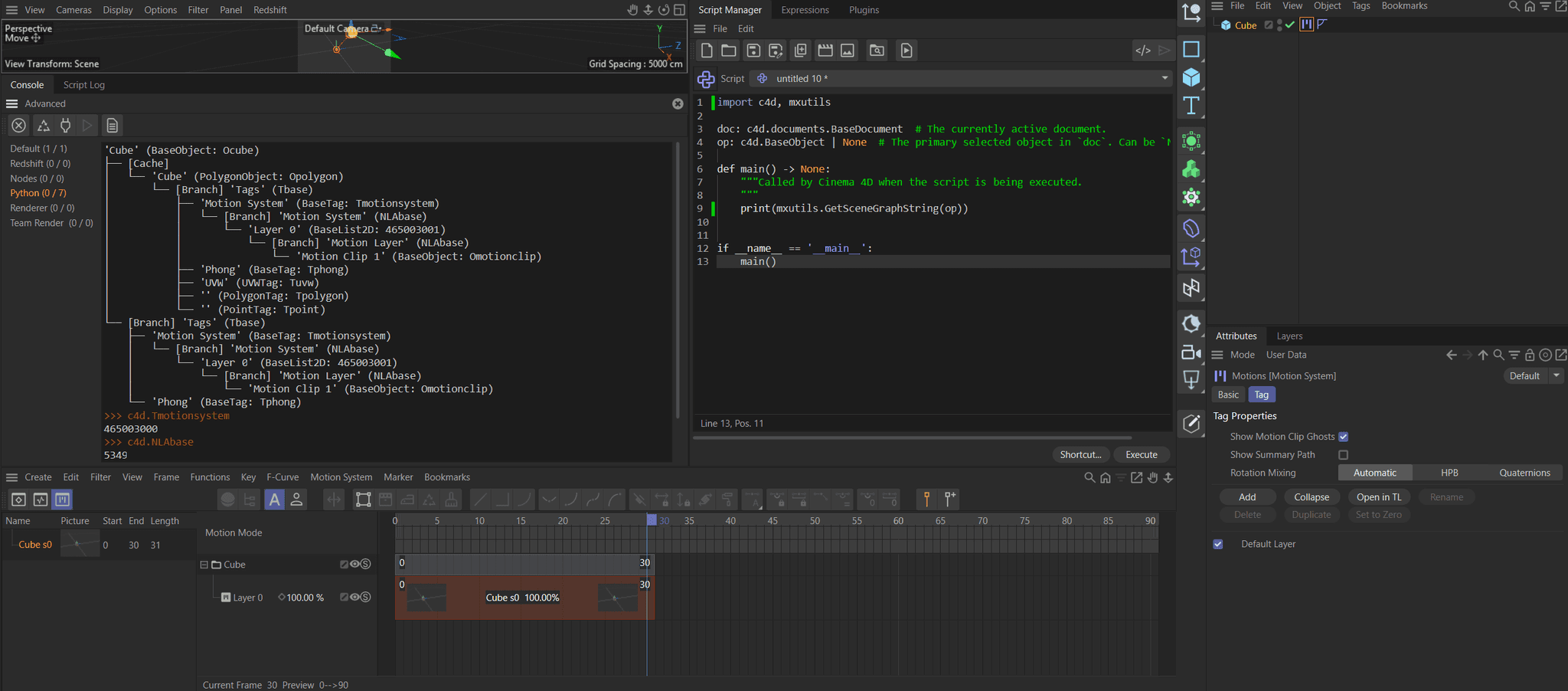
If you dig a little deeper (by passing the document, instead of just the cube) you can find out that there is also data in the motion branch of the document:
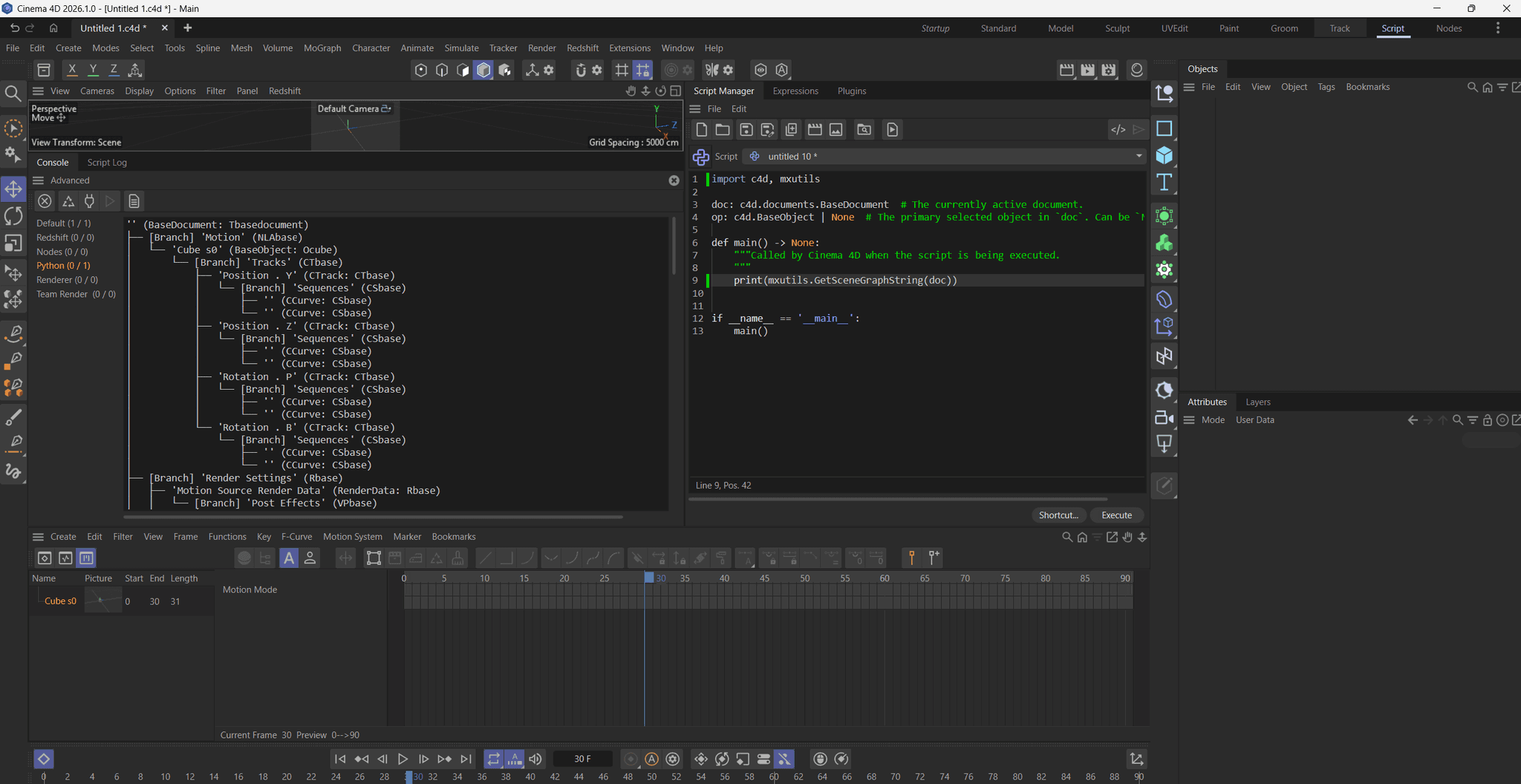
Which is why we keep seeing the motion source in my screen even though I deleted the cube. I do not know where you have digged out that ID
MT_SOURCE = 465003004, because I could not find it when reverse searching for it. But assuming it is correct, it is probably just the ID for a sealed node to be instantiated by the timeline to realize its little display thingy of motion sources to the left.When you want to create an NLA animation on an object, you must create the motion system on it. And when you want to create one of the motion system 'templates' stored in the document, you just dump some entity (in my case the cube) into the motion branch of the document.
The higher level problem is that I have no idea what you are tyring to achieve. You want to create motion system 'templates' (aka motion sources) inside a document without actually adding content to the document?
Cheers,
Ferdinandedit:
Here is a little proof of concept, although I am not quite sure what one is supposed to do with such dangling motion sources?import c4d import mxutils doc: c4d.documents.BaseDocument # The currently active document. op: c4d.BaseObject | None # The primary selected object in `doc`. Can be `None`. def main() -> None: """Called by Cinema 4D when the script is being executed. """ # Create a cube and add a little 3 second animation to its X position (I was lazy here and just # assumed the document would have 30 FPS instead of doing it more formally). cube: c4d.BaseObject = mxutils.CheckType(c4d.BaseList2D(c4d.Ocube)) did: c4d.DescID = c4d.DescID(c4d.DescLevel(c4d.ID_BASEOBJECT_REL_POSITION, c4d.DTYPE_VECTOR, 0), c4d.DescLevel(c4d.VECTOR_X, c4d.DTYPE_REAL, 0)) track: c4d.CTrack = c4d.CTrack(cube, did) cube.InsertTrackSorted(track) curve: c4d.CCurve = track.GetCurve() curve.AddKey(c4d.BaseTime(0, 30)) curve.AddKey(c4d.BaseTime(90, 30)) curve.GetKey(0).SetValue(curve, 0.0) curve.GetKey(1).SetValue(curve, 1000.0) # Now insert the cube into the motion branch of the document. For that we have to first find # the motion branch (what we discovered before with mxutils.GetSceneGraphString). info: dict | None = next((b for b in doc.GetBranchInfo(c4d.GETBRANCHINFO_NONE) if b['id'] == c4d.NLAbase), None) if not info or not info['head']: raise RuntimeError('Could not find valid motion branch in document') head: c4d.GeListHead = info['head'] cnt: int = len(head.GetChildren()) cube.SetName(f'Cube Motion Source {cnt}') cube.InsertUnderLast(head) c4d.EventAdd() if __name__ == '__main__': main() -
Hi @ferdinand, and thank you!
Your proof-of-concept and pointing me towardmxutils.GetSceneGraphString()was exactly what I needed to solve this.By using the scene graph dumper on a native UI-generated Motion Source from a rigged character, I realized it's just a standard Ojoint hierarchy with normal
CTrackobjects.
I usedGetClone(c4d.COPYFLAGS_NO_HIERARCHY)to perfectly replicate theOjointskeleton and injected the time variables into the container, and it maps and plays back perfectly. Thanks again.
