Example mod_subtool_array
Demonstrates how to construct an array of sub tools within a tool.
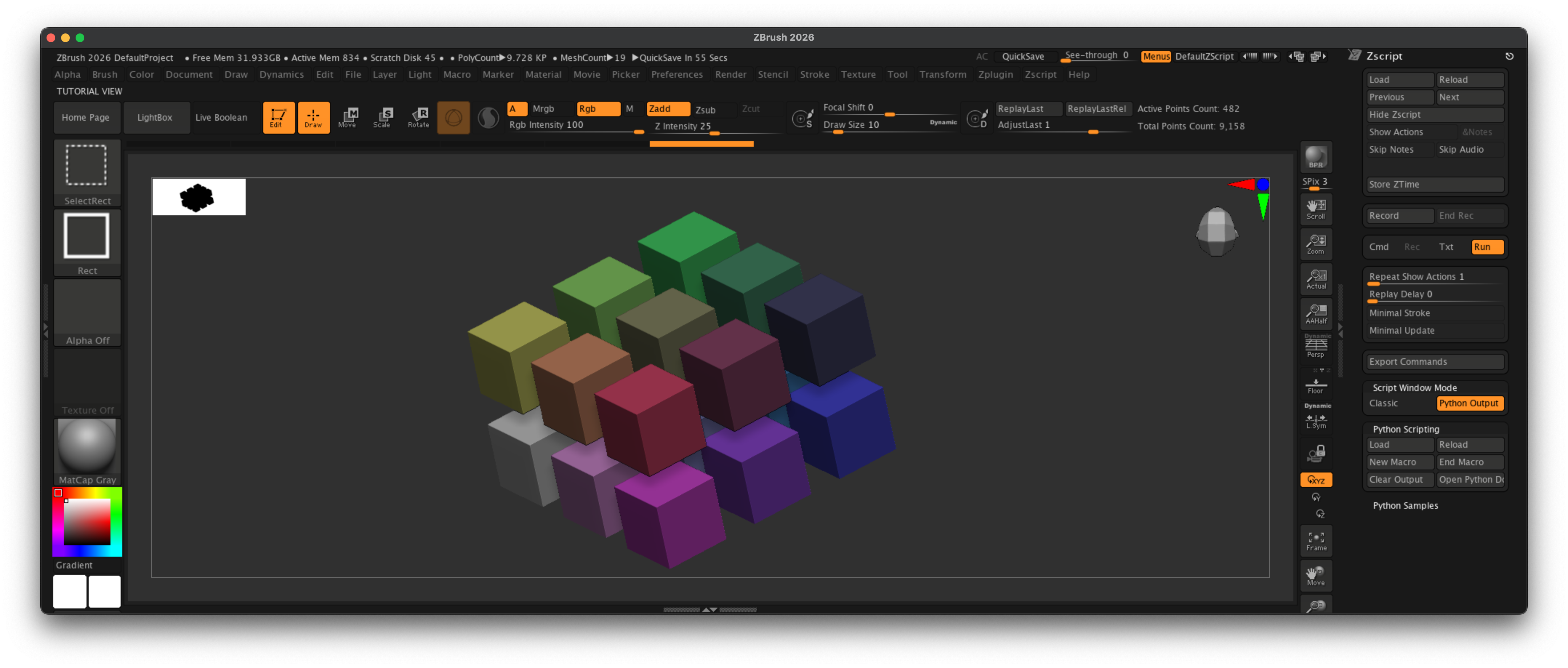
Fig. I: A possible outcome of the example.
Code
"""Demonstrates how to construct an array of sub tools within a tool.

Primarily highlights how to select a tool by name and automate getting its PolyMesh3D derivate. Also
discusses (but does not show) some alternative routes. The script will create a 3x3x2 array of
colorized Cube3D sub tools. You can change the generated sub-tool with the module attribute
#TOOL_NAME.

You must draw into the canvas after the script ran to see its tool result.
"""
__author__ = "Ferdinand Hoppe, Jan Wesbuer"
__date__ = "22/08/2025"
__copyright__ = "Maxon Computer"

import itertools
import re

TOOL_NAME: str = "Cube3D" # The name of the tool to create an array of.

import zbrush.commands as zbc

def make_poly_mesh_from_tool(tool_name: str) -> None:
    """Creates an an editable PolyMesh3D from the specified tool #tool_name.
    """
    # One of the main "tricks" when working with tools and brushes is to ignore most of the
    # specialized API functions such as #get_tool_count or #get_tool_path and instead work with item
    # paths. Every loaded tool will have an item path such as "Tool:Cube3D" or "Tool:Sphere3D". So,
    # we can simply check if such item exists and then click it.

    # Check if there is already an existing PolyMesh3D tool with the given name, and if so,
    # select it.
    tool_path: str = f"Tool:{tool_name}"
    poly_tool_path: str = f"Tools:PM3D_{tool_name}"
    if zbc.exists(poly_tool_path):
        zbc.press(poly_tool_path)
        return

    if zbc.exists(tool_path):
        zbc.press(tool_path)
        zbc.press("Tool:Make PolyMesh3D")
    else:
        raise RuntimeError(f"There is no tool named '{tool_name}' in the current ZBrush session.")

def create_tool_array(tool_name: str, shape: tuple[int], offsets: tuple[float],
                      colorize: bool) -> None:
    """Clones the tool with the given #tool_name in an array with the given #shape and #offsets.

    Args:
        tool_name (str): The tool name of the tool to clone.
        shape (tuple[int]): The shape of the array (x, y, z).
        offsets (tuple[float]): The offsets for each axis (x, y, z).
        colorize (bool): Whether to colorize the duplicated tools.
    """
    # Enable Mrgb draw mode when we should colorize the clones and then activate the given tool.
    if colorize:
        zbc.press("Draw:Mrgb")

    # Create a PolyMesh 3D for the given #tool_name.
    make_poly_mesh_from_tool(tool_name)

    # Now iterate over the shape of the array. itertools.product yields the cartesian product for
    # its inputs, i.e., their combinations. It is the same as three nested loops.
    for ix, iy, iz in itertools.product(range(shape[0]), range(shape[1]), range(shape[2])):

        # Compute the position and color for this clone. The position is just the product of the
        # current index (ix, iy, iz) and the offsets. The color is just a makeshift gradient based
        # on the current index.
        x: float = offsets[0] * ix
        y: float = offsets[1] * iy
        z: float = offsets[2] * iz
        r: int = int(((ix + 1) / (shape[0])) * 255)
        g: int = int(((iy + 1) / (shape[1])) * 255)
        b: int = int(((iz + 1) / (shape[2])) * 255)

        # Create a new sub tool for the tool, and then set its position and color.
        zbc.press("Tool:SubTool:Duplicate")
        zbc.set("Tool:Geometry:X Position", x)
        zbc.set("Tool:Geometry:Y Position", y)
        zbc.set("Tool:Geometry:Z Position", z)
        zbc.set_color(r, g, b)
        zbc.press("Color:FillObject")

def main() -> None:
    """Executed when ZBrush runs this script.
    """
    # Create a 3x3x2 array of #TOOL_NAME tools with a spacing of 3 units on each axis between
    # each sub tool.
    create_tool_array(tool_name=TOOL_NAME,
                      shape=(3, 3, 2),
                      offsets=(3.0, 3.0, 3.0),
                      colorize=True)

if __name__ == "__main__":
    main()