Example gui_notes
Demonstrates how to build and run a modal dialog (a note).
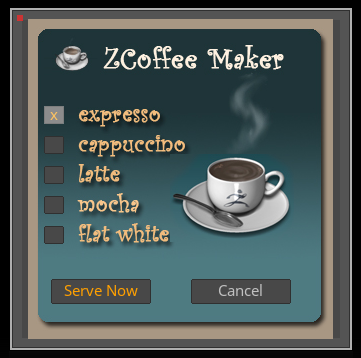
Fig. I: A possible outcome of the example.
Code
"""Demonstrates how to build and run a modal dialog (a note).

This directory contains three examples for notes interfaces. All three implement the same
coffee maker interface, where the user can select a coffee type and then serve it. The examples are:

- ex_gui_notes.py            : A modern Pythonic implementation of a notes interface.
- ex_gui_zscript_port.py     : A literal port of a ZScript notes interface to Python.
- ex_gui_zscript_orginal.txt : The original ZScript notes example for reference.
"""
__author__ = "Ferdinand Hoppe"
__date__ = "21/08/2025"
__copyright__ = "Maxon Computer"

import os
import platform

from zbrush import commands as zbc


class CoffeeSelectionDialog:
    """Implements a coffee selection dialog using ZBrush notes.
    """
    # The IDs of the various buttons in the dialog, they are defined by the order in which we add
    # buttons to the note.
    ID_BTN_BG: int = 1
    ID_BTN_1: int = 2
    ID_BTN_2: int = 3
    ID_BTN_3: int = 4
    ID_BTN_4: int = 5
    ID_BTN_5: int = 6
    ID_BTN_CUP: int = 7
    ID_BTN_CANCEL: int = 8
    ID_BTN_SERVE: int = 9

    def __init__(self) -> None:
        """Initializes the dialog state.
        """
        self.h_size: int = 20  # The horizontal size of a coffee button.
        self.v_size: int = 18  # The vertical size of a coffee button.
        self.v_pos: int = 87  # The vertical offset of a coffee button.
        self.h_pos: int = 23  # The horizontal position of a coffee button.
        self.space: int = 12  # The horizontal space between the coffee buttons.

        # The paths of the images used to display the coffee choices.
        image_dir: str = os.path.join(os.path.dirname(__file__), "images")
        self.images: list[str] = [os.path.join(image_dir, "expresso.jpg"),
                                  os.path.join(image_dir, "cappuccino.jpg"),
                                  os.path.join(image_dir, "latte.jpg"),
                                  os.path.join(image_dir, "mocha.jpg"),
                                  os.path.join(image_dir, "flat white.jpg")]
        self.background_image: str = os.path.join(image_dir, "ZCoffeeBack.jpg")

        # On macOS, we must prefix absolute paths with '!:' to make ZBrush load them correctly.
        if platform.system() == "Darwin":
            self.images = [f"!:{path}" for path in self.images]
            self.background_image = f"!:{self.background_image}"

        # The currently selected coffee as an index out of the five buttons.
        self.selected_coffee: int = 0

        # The message to return when the user made a choice.
        self.message: str = ""

    def run(self) -> None:
        """Runs the note and returns the result as #self.message.
        """
        while True:
            # Add a button filling the full canvas which we disable and give an icon. So, we repurpose
            # a button to just display the background image.
            zbc.add_note_button(name="", icon_path=self.background_image, initially_pressed=False,
                                initially_disabled=True, h_rel_position=1, v_rel_position=305,
                                width=320.0)

            # Add the five buttons to select a coffee, we use the #selected_coffee to decide if the
            # button should have an "x" as the label and if it is in a pressed stated.
            for i in range(5):
                label: str = "x" if i == self.selected_coffee else ""
                is_pressed: bool = i == self.selected_coffee
                zbc.add_note_button(name=label, icon_path="", initially_pressed=is_pressed,
                    initially_disabled=False, h_rel_position=self.h_pos,
                    v_rel_position=self.v_pos + ((self.v_size + self.space) * i),
                    width=self.h_size, height=self.v_size, bg_color=-1, text_color=0xffa000,
                )

            zbc.add_note_button("", self.images[self.selected_coffee], False, True, 149, 135)
            zbc.add_note_button("Cancel", "", False, False, 170, 260, 100, 25)
            zbc.add_note_button("Serve Now", "", False, False, 30, 260, 100, 25, -1, 0xffa000)

            # The trick is now to dummy open the note dialog to poll its interface state. #action
            # will hold the value of the last interaction.
            action: int = zbc.show_note("")

            # The user clicked the cancel button, we set the message.
            if action == self.ID_BTN_CANCEL:
                self.message = "\Cffa000\n  What, no coffee?!\n"
                return
            # The user clicked the serve button, we mangle the selected coffee image name to return a
            # message with the name of the selected coffee. E.g., ".../expresso.jpg" -> "expresso"
            elif action == self.ID_BTN_SERVE:
                coffee: str = os.path.basename(self.images[self.selected_coffee]).rsplit(".", 1)[0]
                self.message = f"\Cc0c0c0Enjoy your \Cffa000 {coffee} \Cc0c0c0 !\n"
                return

            # The user clicked one of the coffees, we update the selection. #action must be offset
            # by the first button ID so that we end up with a selection in the range [0, 4].
            if action in (self.ID_BTN_1, self.ID_BTN_2, self.ID_BTN_3, self.ID_BTN_4, self.ID_BTN_5):
                self.selected_coffee = action - self.ID_BTN_1

def main() -> None:
    """Executed when ZBrush runs this script.
    """
    # Freeze the UI while the note interface is running and then display the returned message.
    dlg: CoffeeSelectionDialog = CoffeeSelectionDialog()
    zbc.freeze(dlg.run)
    zbc.show_note(text=dlg.message, item_path="", display_duration=2.0,
                  bg_color=zbc.rgb(125, 125, 125))


if __name__ == "__main__":
    main()