• 0 Votes
    8 Posts
    805 Views
    A
    @ferdinand said in BaseBitmap.Init("somefile.exr") crashes with multiple std::thread: omp #parallel Sorry for late reply, I am not advocating for std::threads, I understand your design explanation. The omp #parallel thing is OpenMP directive to launch parallel threads. It's an old but simple method. Actually I have made a solution by exploiting Cinema way of launching threads and it works fine. However, I hope it would be good to make BaseBitmap->Init a thread safe and independent call from other C4D threads and resources. I will collect an example for you with exr images soon. Cheers, Aaron
  • 0 Votes
    2 Posts
    525 Views
    ferdinandF
    Hey @Amazing_iKe, Thank you for reaching out to us. That RenderDocument does not support animations is only partially true. Effectively it does not for users, but that is more a regression than the lack of an actual feature. When you look into its documentation, you will see that many symbols and arguments are animation related. And when you send it a document which holds an animation, you are paying the price for rendering the full animation. The regressed state is however that you effectively only have access to the bitmap of the last frame of that animation. There is also the issue that the OCIO workflow with RenderDocument is a bit clunky at the moment. We have these issues in our backlog by I unfortunately cannot make any guarantees as to when we will fix them. You have two options: Render the document frame by frame yourself with RenderDocument and then assemble the animation yourself. Use the BatchRender, i.e., what is shown to the user as the render queue. You can use this in a fully programmatic manner, but you are restricted to rendering documents that have been saved to disk, and the output will also be put to disk. I.e., you do not have the 'memory only'-aspect of RenderDocument. There are many topics about this subject on this forum, for example here where I showed how you abstract some of the disc-only limitations aways. Maxime also recently added some features to the batch render like switching cameras and takes, which makes it less likely that you have to modify the file. I cannot write examples for all possible routes here. You have to decide yourself which route you want to go, and when you are then stuck there, I will help you. What to pick depends on your goals. When you expect the renderings to be quick, doing it manually with RenderDocument could be a solution. For more complex animations, the batch renderer is probably the better route. Cheers, Ferdinand
  • 0 Votes
    3 Posts
    576 Views
    ferdinandF
    Hey @Amazing_iKe, Thank you for reaching out to us. You do the same thing you did incorrectly in your other thread. You create an async dialog and you do not keep it alive. We would prefer it to keep things G-rated here. I.e., no nudity, no violence, and no weapons. I removed the image in your posting. With that being said, and when I try out your script (with the dlg thing fixed). I end up with this: [image: 1752854682502-fc83d223-abc0-4568-98fc-deb82596b059-image.png] I.e., it just works. But you docked your dialog (and so did I imitating what you did). I now cannot reproduce this anymore, but when I did something in my layout, I think I dragged a palette, I got a similar result as yours. That is not too surprising though as you implement here an async dialog in a hacky manner. You have no CommandData.RestoreLayout which would handle layout events for your dialog. Something getting out of whack with scroll areas is not out of question for such irregular cases. Please follow the patterns shown in our GUI examples I would recommend to follow py-cmd_gui_simple_2024, it also contains code for handling layout events. I.e., this: def RestoreLayout(self, secret: any) -> bool: """Restores the dialog on layout changes. Implementing this is absolutely necessary, as otherwise the dialog will not be restored when the user changes the layout of Cinema 4D. """ return self.Dialog.Restore(self.ID_PLUGIN, secret) And to be clear, it is absolutely fine to share plugins with us here. It does not have to be a script manager script. Things should just not get too long. Feel free to anonymize your plugin IDs when you feel skittish about sharing them in public. Cheers, Ferdinand edit: Okay, there it is again. Not exactly the same as yours but close. But I would still have to ask you to provide an example where this happens inside a valid async dialog implementation (with a command or a similar owner). It is not out of question that there is a bug but we still need a non-hacky example. [image: 1752856082257-df89038f-124d-434f-8cde-3442bd9aebba-image.png]
  • 0 Votes
    3 Posts
    491 Views
    ferdinandF
    And just to be clear, using a modal dialog, e.g., DLG_TYPE_MODAL, is absolutely fine in a script manager script. Because then the GeDialog.Open call will only return when the dialog is closed (and you therefore do not have to keep the dialog alive). The hack I showed above is only needed when you need one of the async dialog types in a script manager script for testing purposes.
  • 0 Votes
    3 Posts
    617 Views
    Amazing_iKeA
    @ferdinand Thank you very much for your response and suggestions. I’ll make sure to follow best practices and provide a minimal, testable code sample when posting questions in the future. I’ll also give embedding a group a try. Thanks again for your support!
  • 0 Votes
    2 Posts
    445 Views
    ferdinandF
    Hey @Viktor-Velicko, Thank you for reaching out to us. Generally, our codebase supports Unicode, but in C++ source code and in *.str resource files, we only support Unicode escape sequences, not Unicode symbols directly. In Python, we do support Unicode symbols directly. In the 2025.3 SDK, I just added a code example for how to use Python to create a Unicode escaping pipeline around *.str files. So, the Unicode string const String slopeLabel = "Slope 90º"_s; would be written as const String slopeLabel = "Slope 90\\u00b0"_s; in C++. A bit more verbose variant would be const String slopeLabel ="Slope 90"_s + String("\\u00b0", STRINGENCODING::BIT7HEX));. In Python, you can use the string directly as slopeLabel: str = "Slope 90°". Cheers, Ferdinand
  • 0 Votes
    3 Posts
    590 Views
    ferdinandF
    Hey @lionlion44, Thank you for reaching out to us. We cannot provide support on third party libraries (Octane). But, yes, in general you are on the right track. We have this C++ example, which I loosely translated to Python. The thing to do which you are missing, is to check if such VP already exists, as you otherwise can land in a world of hurt. For everything else, you would have to talk with the Octane devs (of which some are here on this forum), if there are any special further steps to be taken for Octane. Cheers, Ferdinand """Provides an example for generically setting a render engine in Cinema 4D. Note that there is no guarantee that every render engine has a video post node, and when it has one, that it uses the same ID as the render engine. But it is highly conventional to implement a render engine like this. Derived from the C++ Example "Set Render Engine to Redshift": https://developers.maxon.net/docs/cpp/2023_2/page_manual_redshift_rendrer.html """ import c4d import mxutils doc: c4d.documents.BaseDocument # The active Cinema 4D document. def SetRenderEngine(doc: c4d.documents.BaseDocument, newEngineId: int, createsVideoPostNode: bool) -> bool: """Sets the render engine of the given document to the specified ID. """ # Make sure we are on the main thread, as we plan to modify the document and ensure that our # inputs are what we think they are. if not c4d.threading.GeIsMainThread(): raise RuntimeError("SetRenderEngine must be called from the main thread.") mxutils.CheckType(doc, c4d.documents.BaseDocument) mxutils.CheckType(newEngineId, int) mxutils.CheckType(createsVideoPostNode, bool) # Get the currently active render engine ID and get out if it matches the new one. renderData: c4d.documents.RenderData = doc.GetActiveRenderData() currentEngineId: int = renderData[c4d.RDATA_RENDERENGINE] if currentEngineId == newEngineId: print(f"Render engine {newEngineId} is already set, no changes made.") return True # Try to find a video post with the render engine ID. There is no absolute guarantee that every # render engine either has a video post node or that is gives it the same ID as the render # engine (but it is strongly conventional). if createsVideoPostNode: # Try to find an already existing video post node with the render engine ID. node: c4d.documents.BaseVideoPost | None = renderData.GetFirstVideoPost() while node: if node.GetType() == newEngineId: break node = node.GetNext() # There is no video post for the render engine, so we try to a new create one. if not node: try: node: c4d.documents.BaseVideoPost = c4d.documents.BaseVideoPost(newEngineId) renderData.InsertVideoPost(node) except Exception as e: raise RuntimeError(f"Failed to create video post node for render engine {newEngineId} ({e}).") # Finally, we set the render engine ID in the render data. renderData[c4d.RDATA_RENDERENGINE] = newEngineId return True def main() -> None: """Called by Cinema 4D to run the script. """ # Setting the standard render engine, here we do not have to create a video post node, since # the standard renderer is one of the rare cases that does not have a dedicated video post. SetRenderEngine(doc, newEngineId=c4d.RDATA_RENDERENGINE_STANDARD, createsVideoPostNode=False) # Set Redshift as the render engine, which does have a video post node. SetRenderEngine(doc, newEngineId=c4d.VPrsrenderer, createsVideoPostNode=True) # Push an update event. c4d.EventAdd() if __name__ == "__main__": main()
  • 0 Votes
    2 Posts
    538 Views
    ferdinandF
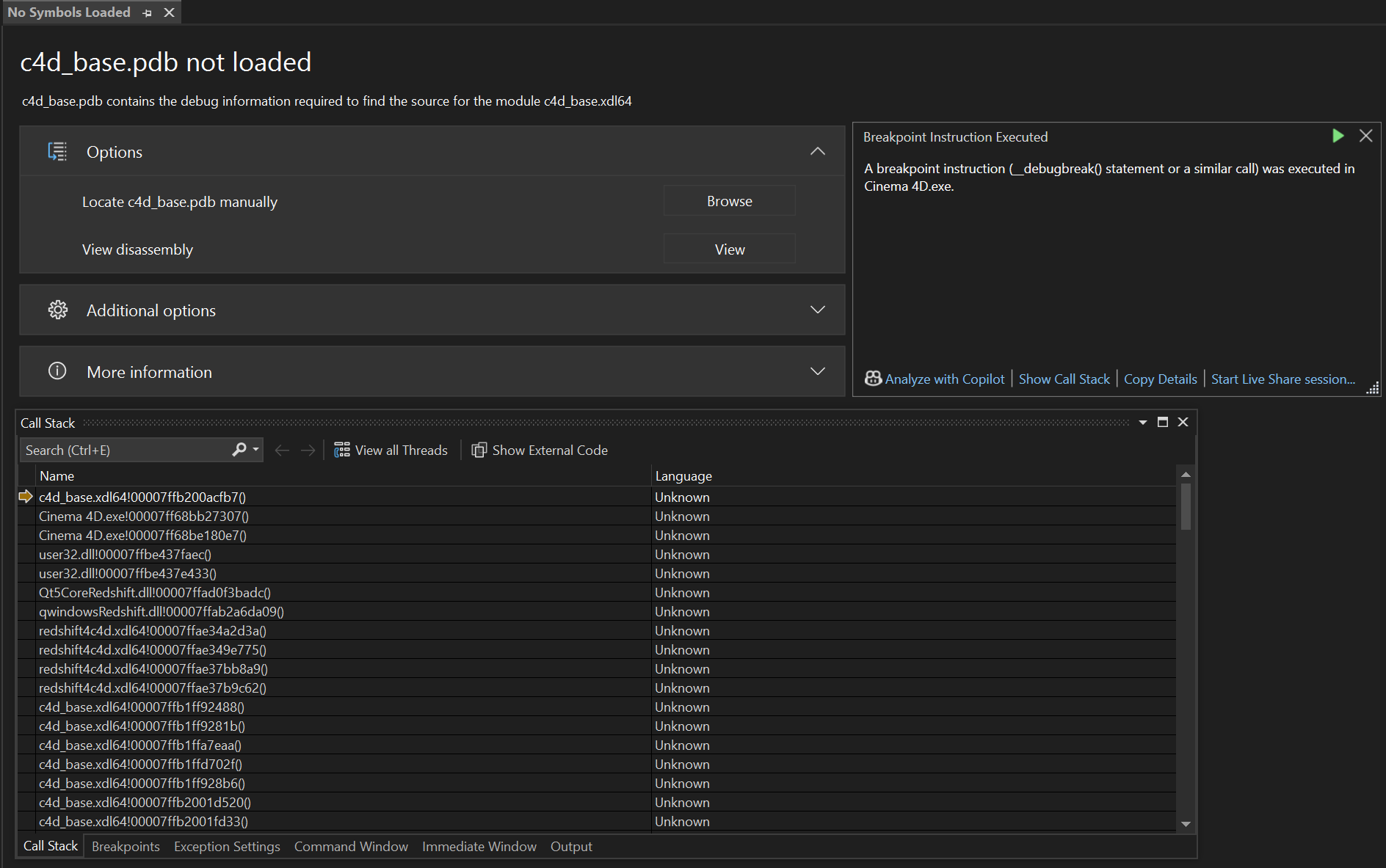
    Hey @shir, Thank you for reaching out to us. A Program Database (PDB) is a debug information format from Microsoft. It is comparable to the DWARF debug information format often used under Linux and macOS. However, unlike DWARF under Linux, where debug information is directly compiled into the binary, Microsoft chooses to store debug information in separate files, the pdb files. When you attach a debugger to a binary without any debug information, it will by default only see the machine code of the binary. So when you have an issue and the debugger puts out a stack trace, it will only show you the offsets in a library, e.g., something like this: #1 0x0000000000767576 in myBinary.dll #2 0x0000000000767df4 in otherBinary.dll #3 0x0000000000773aca in myBinary.dll #4 0x00000000004b893e in myBinary.dll You can see this happen in the call stack window in your screenshot. VS only provides information in the format someBinary.ext!someAddress(), e.g., c4d_base.xdl64!00007ffb200acfb7(), as it has no further information. With bin!address() VS means a function at that address is being called. In my opinion, VS has one of the most cryptic stack trace formats out there and can be a bit confusing for beginners. To see meaningful output, you need the debug information for that binary, which among other things contains the mapping of addresses to source code. If you have the pdb file for the binary, you can load it into your debugger, and it will then show you something like this instead: #1 0x0000000000767576 in MyClass::MyMethod() at myClass.cpp:42 #2 0x0000000000767df4 in OtherClass::OtherMethod() at otherClass.cpp:15 #3 0x0000000000773aca in MyClass::AnotherMethod() at myClass.cpp:78 #4 0x00000000004b893e in main() at main.cpp:10 When you compile the Cinema 4D SDK and your source code, it will automatically generate the pdb files for these binaries for you, so that you can debug them in a meaningful manner. But what we see here is Visual Studio asking you for the pdb for c4d_base.xdl64, one of the core library binaries located in the corelibs folder of the Cinema 4D application you are debugging with. You did not compile that binary, so you do not have the pdb file for it. And we do not ship our binaries with debug information, as that would not only be a very large download, but also would expose our source code to the public. You are hitting a debug stop there (VS tells you that in the info box by stating this is a __debugbreak). This is the less critical case of a debug event, which is covered by the very tutorial you are following (the other one being a critical stop). You can simply hit continue in your debugger and ignore this. The event seems to be raised from Redshift, judging by the stack trace we can see in the screenshot you provided. There is probably some minor hardware issue or so, and Redshift is trying to handle it gracefully by raising this debug event. It is, however, not normal when this happens permanently and usually it hints at a corrupted installation of Cinema 4D or a hardware issue when you are always greeted by debug events on startup (or even when just running and interacting with Cinema 4D). Sometimes debug stops can happen as a one-time thing when you are debugging for the first time against some Cinema 4D instance (and it has not yet built all its prefs, caches, and other things Cinema 4D builds in the background). When this persists and you are annoyed by having to press continue, I would recommend trying to either remove Redshift from your Cinema 4D installation or reinstall Cinema 4D altogether. You could also check inside of Cinema 4D if you can see any errors in the 'Redshift Feedback Display' window. For you as a third party, it is however not possible to find out what that issue in c4d_base.xdl64 at the offset 7ffb200acfb7 is. Cheers, Ferdinand PS: There is also g_enableDebugBreak=true|false which you can pass to your Cinema 4D instance as a commandline argument. With that you can permanently mute debug stops. But that is more of an expert feature and you probably do not want to enable that as a beginner.

  • 0 Votes
    5 Posts
    900 Views
    chuanzhenC
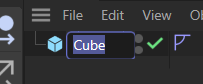
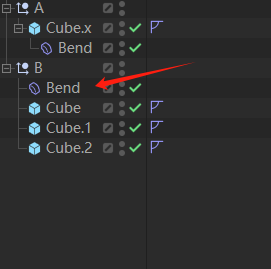
    @ferdinand Thanks for detailed explanation. Let me introduce the goals that the custom deformer plugin wants to achieve. (As can be seen from the cube, cube. 1, cube. 2... in the image, each object has a weight tag.) The custom deformer plugin needs to preprocess and store some data before the ModifyObjects () function works. (By clicking a button) Access the weight tag of each object to be deformed in Message (), preprocess and store some data, and then use the preprocessed data to execute the ModifyObjects () function to correctly process the deformation calculation. [image: 1751680146980-9c418a15-9d3c-4466-83c2-0481e7b67c69-image.png] In C4D, it seems that the Surface deformer has achieved a similar function [image: 1751680414378-5ef7303f-0ea2-4d3b-bed4-c342a755350c-image.png] (there are certain benefits to restricting the custom deformer plugin only to the parent level, as there is no need to spend effort on correctly linking the corresponding preprocessed data when the ModifyObjects () function works.But it did break the general logic operation of the deformer) The only way you could do that is by checking each deformed object being passed into , to be the parent of the also passed in (i.e., the deformer also simply accessible via ). Only for an which is the parent of would you then carry out the modification.
  • save/keep cache of generator plugin

    Cinema 4D SDK 2025 python windows
    5
    1 Votes
    5 Posts
    965 Views
    P
    Could you provide an snipped where you show how to cache it in a plugin?
  • Edge ring selection

    Cinema 4D SDK 2024 python windows
    2
    0 Votes
    2 Posts
    682 Views
    M
    Hi @Tpaxep, Welcome to the Maxon developers forum and its community, it is great to have you with us! Getting Started Before creating your next postings, we would recommend making yourself accustomed with our forum and support procedures. You did not do anything wrong, we point all new users to these rules. Forum Overview: Provides a broad overview of the fundamental structure and rules of this forum, such as the purpose of the different sub-forums or the fact that we will ban users who engage in hate speech or harassment. Support Procedures: Provides a more in detail overview of how we provide technical support for APIs here. This topic will tell you how to ask good questions and limits of our technical support. Forum Features: Provides an overview of the technical features of this forum, such as Markdown markup or file uploads. It is strongly recommended to read the first two topics carefully, especially the section Support Procedures: How to Ask Questions. About your First Question The tool has indeed been updated, but the docs were not. Here is how to call it. Note that you have to pass a polygon index, this is mandatory and it needs to be adjacent to one of the vertex to indicate a direction of the ring selection. Here is your script adapted, to be run on a sphere that was made editable. import c4d from c4d import utils def select_ring_edge(obj, v1Id, v2Id, polyId): bc = c4d.BaseContainer() bc.SetData(c4d.MDATA_RING_SEL_STOP_AT_SELECTIONS, False) bc.SetData(c4d.MDATA_RING_SEL_STOP_AT_NON_QUADS, False) bc.SetData(c4d.MDATA_RING_SEL_STOP_AT_POLES, True) bc.SetData(c4d.MDATA_RING_BOTH_SIDES, False) bc.SetData(c4d.MDATA_RING_SWAP_SIDES, False) bc.SetData(c4d.MDATA_RING_FIRST_VERTEX, v1Id) bc.SetData(c4d.MDATA_RING_SECOND_VERTEX, v2Id) bc.SetData(c4d.MDATA_RING_POLYGON_INDEX, polyId) bc.SetData(c4d.MDATA_RING_SELECTION, c4d.SELECTION_NEW) result = c4d.utils.SendModelingCommand( command=c4d.ID_MODELING_RING_TOOL, list=[obj], mode=c4d.MODELINGCOMMANDMODE_EDGESELECTION, bc=bc, doc=c4d.documents.GetActiveDocument(), flags=c4d.MODELINGCOMMANDFLAGS_NONE ) c4d.EventAdd() return result def main(): doc = c4d.documents.GetActiveDocument() obj = doc.GetActiveObject() if obj is None: c4d.gui.MessageDialog("select obj.") return firstVertex = 346 secondVertex = 347 polygonIndex = 312 result = select_ring_edge(obj, firstVertex, secondVertex, polygonIndex) if result: print("DONE") else: print("ERROR") if __name__ == '__main__': main() Note that the same settings also apply for the ID_MODELING_LOOP_TOOL, just modify RING by LOOP in the constant so MDATA_RING_SEL_STOP_AT_SELECTIONS become MDATA_LOOP_SEL_STOP_AT_SELECTIONS. Cheers, Maxime.
  • Debug Scene / Generators (Scene heat map)

    Cinema 4D SDK windows macos
    2
    0 Votes
    2 Posts
    453 Views
    ferdinandF
    Hey @indexofrefraction, Thank you for reaching out to us. The Object Profiler should do what you want to do. [image: 1750425151882-7f8ba2c2-8af1-448e-a0d4-f120e3b91e0b-image.png] It is part of Cinema 4D since 2025.0.0. Cheers, Ferdinand
  • Sweep Modifier

    Cinema 4D SDK 2025 c++ windows
    4
    0 Votes
    4 Posts
    919 Views
    ferdinandF
    Hey, Please note that both options, a modifier that changes the number of points of its host, and a spline generator that has another spline as an input, are not great. We have internally two cases that do exactly these two things: The bevel deformer and the spline mask spline generator. But third parties do not easily replicate both because they require detailed knowledge of our API and in some cases access to non-public things. For deformers, Ilia already gave a great explanation. In short, if you are not careful, you can crash Cinema 4D. For the other case, a spline generator which takes another spline as an input, you will run into the issue that splines are not intended to have as objects as inputs. This means you are not getting passed a HierarchyHelp in ObjectData::GetContour with which you could ensure that your child object dependencies are up to date (because by default they are being built after you). There are patterns to solve this, and you run here at worst into the problem of a laggy/malfunctioning plugin and no crashes. But I would still advise going down that rabbit hole when avoidable. When you really must do this and now want to go down the spline generator road, I would recommend opening a new topic on that before you start. Cheers, Ferdinand
  • Crash when using C4D shader in Redshift

    Moved Bugs 2024 c++ windows
    7
    0 Votes
    7 Posts
    2k Views
    S
    Tried to send the crash report on 6/6/25 at 22:08 but I got a message saying there was a problem sending it. The message also says to send it by email so I've sent it to sdk_support(at)maxon(dot)net. Steve
  • Marquee Selection of Items in GeUserArea

    Cinema 4D SDK windows python 2025
    5
    1
    0 Votes
    5 Posts
    3k Views
    N
    @ferdinand Got it. Thanks you for the tips. Much appreciated
  • 0 Votes
    2 Posts
    681 Views
    ferdinandF
    Hello @popandchop, Welcome to the Maxon developers forum and its community, it is great to have you with us! Getting Started Before creating your next postings, we would recommend making yourself accustomed with our forum and support procedures. You did not do anything wrong, we point all new users to these rules. Forum Overview: Provides a broad overview of the fundamental structure and rules of this forum, such as the purpose of the different sub-forums or the fact that we will ban users who engage in hate speech or harassment. Support Procedures: Provides a more in detail overview of how we provide technical support for APIs here. This topic will tell you how to ask good questions and limits of our technical support. Forum Features: Provides an overview of the technical features of this forum, such as Markdown markup or file uploads. It is strongly recommended to read the first two topics carefully, especially the section Support Procedures: How to Ask Questions. About your First Question The question is impossible to answer in this form, we would need something concrete (a plugin and a scene which crashes for you) or a time stamp of a submitted crash report. What you do there is this code snippet looks a bit unusual. I assume from the screen shot that you are inside a GeDialog, the code looks a bit like this could be GeDialog.Command or Message. Please read the Threading Manual, invoking an event, e.g., a command, is forbidden off-main thread. But in a dialog you are usually on the main thread (but you should still check with c4d,.threading.GeIsMainThread()). What is also rather odd, is what you call there: if id == BTN_SceneRenderPictureViewer: self.Close() # This will shut down the dialog, think of it as a return statement. c4d.StopAllThreads() # This is generally the biggest nuke you can drop on Cinema 4D and should # be avoided. But in this context (a dialog that has been closed) this # seems extra dangerous. Why are you doing this? time.sleep(0.1) # This makes things even worse, as it increases the chance that the dialog # has been destroyed before the last line of this function has been # executed. If I had to guess, this is probably crashing here. c4d.CallCommand(12099) I assume you hve a modal dialog and that you run into issues with opening the picture viewer due to that? Either make your dialog non-modal (in GeDialog.Open) and then first send the command and then close the dialog or keep using a modal dialog and detach the code from the instance of the dialog. import c4d class MyModalDialog (c4d.gui.GeDialog): BTN_SceneRenderPictureViewer: int = 1000 # ... def Command(self, cid: int, msg: c4d.BaseContainer) -> bool: if cid == MyModalDialog.BTN_SceneRenderPictureViewer: MyModalDialog.CloseAndAction(self, 12099) return True @staticmethod def CloseAndAction(dlg: "MyModalDialog", cid: int) -> None: """Closes the passed dialog and executes a command. Args: dlg (MyModalDialog): The dialog instance to close. cid (int): The command ID to execute after closing the dialog. """ if not dlg or not c4d.threading.GeIsMainThread(): return dlg.Close() c4d.CallCommand(cid) if __name__ == '__main__': dlg = MyModalDialog() dlg.Open(c4d.DLG_TYPE_MODAL, defaultw=400, defaulth=300, title="My Modal Dialog") Cheers, Ferdinand
  • 0 Votes
    3 Posts
    888 Views
    ferdinandF
    Hello @Amazing_iKe, Welcome to the Maxon developers forum and its community, it is great to have you with us! Getting Started Before creating your next postings, we would recommend making yourself accustomed with our forum and support procedures. You did not do anything wrong, we point all new users to these rules. Forum Overview: Provides a broad overview of the fundamental structure and rules of this forum, such as the purpose of the different sub-forums or the fact that we will ban users who engage in hate speech or harassment. Support Procedures: Provides a more in detail overview of how we provide technical support for APIs here. This topic will tell you how to ask good questions and limits of our technical support. Forum Features: Provides an overview of the technical features of this forum, such as Markdown markup or file uploads. It is strongly recommended to read the first two topics carefully, especially the section Support Procedures: How to Ask Questions. About your First Question @Dunhou is right, this, querying for values is not possible with graph descriptions at the moment (querying for nodes is possible to some extent) . What you could do, is use a graph query to select some node over its properties, and then just write its ID. ApplyDescription returns the true nodes of a graph sorted over their IDs. Then you could grab that node you are interested in, get the port you want, and write the value based on the existing value. Or you could let graph descriptions be graph descriptions and just use the low level API directly. You can have a look at the Nodes API examples for some inspiration how this lower level API works. On of the things I am working on at the moment, is extending the query ability of graph descriptions. What I have implemented so far, is nested queries (you can select nodes over them being connected in a specific way), more query operators (<, >, !=, regex, etc.), and something I dubbed query compositions that allows you to query one node property for more than one value, so that can do stuff like checking if something is smaller than 1, AND bigger than 0, AND not exactly 0.5, or that something matches the regex "$foo." OR "$bar.". What has been also added so far, is a new function called EvaluateQuery which allows you to run queries without having to apply a description. But this function also operates on the level that it will return nodes, and not ports or even values. I of course also have thought about this, querying for values directly, but I have not implemented it for now, as you can do it somewhat easily yourself with EvaluateQuery (and to some extent even with ApplyDescription) by just getting the port and then its value. But I understand the alure, maybe when I have time, I will fit in a EvaluateValueQuery. The update was planned for one of later 2025.X releases, but at the moment it looks more like that it will be 2026.0.0. When you need help with the lower level Nodes API, just open a posting here on the forum with what you got. Cheers, Ferdinand
  • 0 Votes
    3 Posts
    1k Views
    O
    @ferdinand Got it, thanks for the heads-up!
  • 0 Votes
    6 Posts
    1k Views
    ferdinandF
    FYI: This has been fixed and will be shipped in a future version of Cinema 4D.
  • 0 Votes
    6 Posts
    1k Views
    ferdinandF
    Hey @itstanthony, sorry for the delay. So, here is how you could do this. It is not the pretiest solution, but the only that works at the moment for graph descriptions. You could of course also use the full Nodes API to do this. I hope this helps and cheers, Ferdinand import c4d import maxon import mxutils doc: c4d.documents.BaseDocument # The active Cinema 4D document. def CreateMaterials(count: int) -> None: """Creates #count materials with relevant "Store Color To AOV" setup. """ mxutils.CheckType(count, int) for i in range(count): graph: maxon.NodesGraphModelRef = maxon.GraphDescription.GetGraph( name=f"AovSetup.{i}", nodeSpaceId=maxon.NodeSpaceIdentifiers.RedshiftMaterial) maxon.GraphDescription.ApplyDescription(graph, [ { "$type": "Color", "Basic/Name": "Base Color", "Inputs/Color": maxon.Vector(1, 1, 1), "$id": "base_color" }, { "$type": "Color", "Basic/Name": "Metallic", "Inputs/Color": maxon.Vector(0.0, 0.0, 0.0), "$id": "metallic_color" }, { "$type": "Color", "Basic/Name": "Roughness", "Inputs/Color": maxon.Vector(0.5, 0.5, 0.5), "$id": "roughness_color" }, { "$type": "Color", "Basic/Name": "Normal", "Inputs/Color": maxon.Vector(0.5, 0.5, 1), "$id": "normal_color" }, { "$type": "Color", "Basic/Name": "AO", "Inputs/Color": maxon.Vector(1, 1, 1), "$id": "ao_color" }, { "$type": "Color", "Basic/Name": "Emissive", "Inputs/Color": maxon.Vector(0, 0, 0), "$id": "emissive_color" }, { "$type": "Output", "Surface": { "$type": "Store Color To AOV", "AOV Input 0": "#base_color", "AOV Name 0": "BaseColor", "AOV Input 1": "#metallic_color", "AOV Name 1": "Metallic", "AOV Input 2": "#roughness_color", "AOV Name 2": "Roughness", "AOV Input 3": "#normal_color", "AOV Name 3": "Normal", "AOV Input 4": "#ao_color", "AOV Name 4": "AO", "AOV Input 5": "#emissive_color", "AOV Name 5": "Emissive", "Beauty Input": { "$type": "Standard Material", "Base/Color": "#base_color", "Base/Metalness": "#metallic_color", "Reflection/Roughness": "#roughness_color", "Geometry/Bump Map": "#normal_color", "Geometry/Overall Tint": "#ao_color", "Emission/Color": "#emissive_color", } } } ] ) def ModifyMaterials() -> None: """Modifies all materials in the scene, with the goal of removing the "Store Color To AOV" node in material setups as created above. """ for graph in maxon.GraphDescription.GetMaterialGraphs(doc, maxon.NodeSpaceIdentifiers.RedshiftMaterial): try: # Remove a "Store Color To AOV" node from the graph that matches the given AOV names. nodes: dict[maxon.Id, maxon.GraphNode] = maxon.GraphDescription.ApplyDescription(graph, { "$query": { # Match the fist node of type "Store Color To AOV" ... "$qmode": maxon.GraphDescription.QUERY_FLAGS.MATCH_FIRST, "$type": "Store Color To AOV", # ... that has the following AOV names. Graph queries currently do not yet # support nested queries, i.e., query to which nodes a node is connected to. # This will come with the next major version of Cinema 4D/the SDK. "AOV Name 0": "BaseColor", "AOV Name 1": "Metallic", "AOV Name 2": "Roughness", "AOV Name 3": "Normal", "AOV Name 4": "AO", "AOV Name 5": "Emissive", }, "$commands": "$cmd_remove" } ) # At this point we have to cheat a little bit, as the query abilities of graph # descriptions are not yet up to the task of what we would have to do here, as we # would have to query for a node by its type and at the same time set its ID, which is # not possible yet (I will also add this in a future version, but I am not yet sure when). # So what we do, is exploit the fact that #GraphDescription.ApplyDescription() will turn # dictionary/map of id:node relations and we can predict how a Redshift Output and # Standard Material will start (with "output@" and "standardmaterial@"). outputNodeId: str | None = next( str(key) for key in nodes if str(key).startswith("output@")) standardMaterialNodeId: str | None = next( str(key) for key in nodes if str(key).startswith("standardmaterial@")) if not outputNodeId or not standardMaterialNodeId: raise ValueError("Could not find Output or Standard Material node in the graph.") # Now that we have this information, we could either use the traditional Nodes API to # wire these two nodes together, or we can use the GraphDescription API to do this. # Connect the existing Output node to the existing Standard Material node. maxon.GraphDescription.ApplyDescription(graph, { "$query": { "$qmode": maxon.GraphDescription.QUERY_FLAGS.MATCH_FIRST, "$id": outputNodeId, }, "Surface": f"#{standardMaterialNodeId}" } ) except Exception as e: print(e) continue # Some concluding thoughts: This task, although it might look trivial, has actually some # complexities. The main issue is that while we have the quasi-guarantee that there will # only be one Output (i.e., 'end node') in a Redshift material graph, we cannot # guarantee that there will only be one Standard Material node in the graph. # # To truly solve all this, we would need the 2026.0.0 graph query capabilities, so that we # can more precisely select which nodes we mean. # # What occurred to me while writing this, is that it would also be very nice to have a # command like "$cmd_remove_smart" which attempts to remove a node while maintaining the # connection flow, in your case wire the Standard Material node to the Output node. # # In general, this an unsolvable riddle, but many node relations in a material graph are # trivial, i.e., there is only one ingoing and one outgoing connection, so that it would # be easy to try to connect these two nodes together. In your case, deleting the # "Store Color To AOV" node, this would however never be possible as we have here seven # color inputs and one color output. From an abstract API perspective, it is impossible to # determine which one of the seven inputs should be connected to the output, as we do not # have the higher human insight to determine that the Standard Material node is the relevant # node to connect to the Output node. if __name__ == '__main__': CreateMaterials(5) # Create five materials with the "Store Color To AOV" setup. ModifyMaterials() # Remove the "Store Color To AOV" node from all materials. c4d.EventAdd() # Refresh Cinema 4D to show changes