Hi @LingZA ,
Sorry for the delayed answer.
Could you please explain the result that you're trying to achieve?
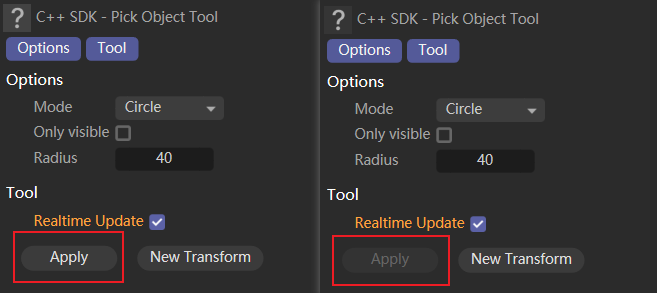
It looks now that you would like to implement a modeling tool similar to Bevel, when you would like to firstly select points/edges/polys and secondly apply some changes to them. If that's the case, then you need to implement the part of your tool that selects objects. Please have a look at BaseSelect. You can also explore Flatten Polygons example.
You can find a sample code snippet below that simply selects all of the edges of the polygon. You need to be in "Edges" mode for that. Additionally you can emulate the polygon highlighting yourself.
Regarding the flags:
PLUGINFLAG_TOOL_EDITSTATES - designates that the tool supports deformed editing
PLUGINFLAG_TOOL_SWITCHACTION - allows to adjust the active tool. This works in tandem with the MSG_TOOL_SWITCHACTION message type. Namely, when the modifier (aka qualifier) key is pressed, the plugin receives this message such that it can react on this key press.
PLUGINFLAG_TOOL_NO_TOPOLOGY_EDIT - flag that informs cinema that the tool doesn't perform any topology modifications (i.e. doesn't add/remove/reassign of the polygons)
PLUGINFLAG_TOOL_TWEAK - if you click on the element that isn't currently selected, it will select it for you (so your tool can work with this selection), and will deselect it once your tool finishes
PLUGINFLAG_TOOL_TWEAK_NO_HIGHLIGHT - same as above but without highlighting the temporarily selected element
PLUGINFLAG_TOOL_DRAW_MULTIPLANE - some legacy flag that is (or at least should be) deprecated
Cheers,
Ilia
[image: 1698935992814-cinema_4d_ezzrkgku0y.gif]
import c4d
PLUGIN_ID = 1234321 # Be sure to use a unique ID obtained from www.plugincafe.com
class MyTool(c4d.plugins.ToolData):
def __init__(self):
self.selectionRadius = 10
self.highlightedPolygon: int = -1
def GetState(self, doc):
if doc.GetMode() != c4d.Medges:
return False
return c4d.CMD_ENABLED
def MouseInput(self, doc, data, bd, win, msg):
# Only handle left click
if msg[c4d.BFM_INPUT_CHANNEL] != c4d.BFM_INPUT_MOUSELEFT:
return True
# Get active object
op = doc.GetActiveObject()
if not op: return True
if self.highlightedPolygon < 0:
return True
# Initialize helping Neighbor struct
nbr = c4d.utils.Neighbor()
nbr.Init(op)
polyInfo = nbr.GetPolyInfo(self.highlightedPolygon) # get polygon information
bs = c4d.BaseSelect()
opPolygon: c4d.CPolygon = op.GetPolygon(self.highlightedPolygon)
# Iterate over sides
for side in range(4):
# Skip last edge if polygon is a triangle
if side == 2 and opPolygon.c == opPolygon.d:
continue
# Select edge
edgeIdx = polyInfo['edge'][side]
bs.Select(edgeIdx)
# Apply selection
op.SetSelectedEdges(nbr, bs, c4d.EDGESELECTIONTYPE_SELECTION)
c4d.EventAdd()
return True
def Draw(self, doc, data, bd, bh, bt, flags):
selectionColor = c4d.GetViewColor(c4d.VIEWCOLOR_SELECTION_PREVIEW)
if flags & c4d.TOOLDRAWFLAGS_HIGHLIGHT: # if the DrawPass is the Highlight one
if self.highlightedPolygon >= 0:
# Get active object
op = doc.GetActiveObject()
if not op: return True
bd.SetMatrix_Matrix(op, op.GetMg()) # draw in global coordinates
# Get points and polygon from the object
opPoints: list[c4d.Vector] = op.GetAllPoints()
opPolygon: c4d.CPolygon = op.GetPolygon(self.highlightedPolygon)
points = [opPoints[idx] for idx in (opPolygon.a, opPolygon.b, opPolygon.c, opPolygon.d)]
colors = [selectionColor for _ in points]
if len(points) == 3 or len(points) == 4:
bd.DrawPolygon(points, colors) # draw the polygon highlight
# Draw the outline
bd.SetPen(c4d.Vector(0, 1, 0))
for point1Idx in range(-1, len(points) - 1):
point1, point2 = points[point1Idx], points[point1Idx + 1]
bd.DrawLine(point1, point2, c4d.NOCLIP_D)
return c4d.TOOLDRAW_HIGHLIGHTS
def GetCursorInfo(self, doc, data, bd, x, y, bc):
self.highlightedPolygon = -1
# If the cursor has left a user area, simply return True
if bc.GetId() == c4d.BFM_CURSORINFO_REMOVE or doc.GetMode() != c4d.Medges:
return True
# Get active object
op = doc.GetActiveObject()
if not op: return True
# Calculates the width and height of the screen
bd: c4d.BaseDraw = doc.GetActiveBaseDraw()
frame = bd.GetFrame()
l, r, t, b = frame["cl"], frame["cr"], frame["ct"], frame["cb"]
width, height = r - l + 1, b - t + 1
# Initialize viewport select
vpSelect = c4d.utils.ViewportSelect()
vpSelect.Init(width, height, bd, [op], c4d.Medges, True, c4d.VIEWPORTSELECTFLAGS_IGNORE_HIDDEN_SEL)
c4d.SpecialEventAdd(c4d.EVMSG_UPDATEHIGHLIGHT) # pushing highlighting event to cinema
# Looking for the nearest polygon and saving it's index in self.highlightedPolygon
polyInfo = vpSelect.GetNearestPolygon(op, int(x), int(y), self.selectionRadius)
if not polyInfo or 'i' not in polyInfo:
return True
polygonIdx = polyInfo['i']
if (polygonIdx < 0 or polygonIdx >= op.GetPolygonCount()):
return True
self.highlightedPolygon = polygonIdx
return True
if __name__ == "__main__":
c4d.plugins.RegisterToolPlugin(id=PLUGIN_ID, str="MyTool", info=0, icon=None, help="", dat=MyTool())