The Maxon SDK Team is currently short staffed due to the winter holidays. No forum support is being provided between 15/12/2025 and 5/1/2026. For details see Maxon SDK 2025 Winter Holidays.
  • 0 Votes
    3 Posts
    662 Views
    i_mazlovI
    Hi @datamilch, you can use the EVMSG_CHANGE message as a trigger to check your objects for changes. The timer approach might seem imprecise from the first glance, but can actually be used, I don't think there're any significant reasons against it. Additionally, the recent change was made to make BaseList2D being hashable. This effectively means you can operate with your objects in a dict. The python tag approach is the least efficient, although would still work, yes. You're saying your GeDialog plugin uses "mostly the ideantical userdata". If it was "identical", you could potentially use c4d.gui.DescriptionCustomGui with the SetObject function to make it point to your object. This way you can avoid hassling around all the data sync, because it is all handled as a built-in functionality of this class. This is how the attribute manager effectively works, or the Active Object Dialog as well. For your further postings please follow our guidelines on How to Ask Questions, namely: Please consolidate your questions into a singular posting by editing your last posting Cheers, Ilia
  • 0 Votes
    4 Posts
    884 Views
    H
    @i_mazlov Thanks much for explanation.
  • 0 Votes
    3 Posts
    844 Views
    ferdinandF
    Hello, Thank you for reaching out to us. @Dunhou is right, the Picture Viewer is sealed, which means that you can put images into it (with c4d.bitmaps.ShowBitmap or c4d.documents.LoadFile) but you cannot get images or information out of it. This generally applies to all UIs, we do not expose UIs, but the data structures behind them. So, there is for example no Object or Material Manager API interface, their functionalities are exposed via the scene graph. For the Picture Viewer there is no data structure exposed. Cheers, Ferdinand
  • 0 Votes
    3 Posts
    665 Views
    B
    @ferdinand Gotcha. Thanks for the response. c4d.CallButton(op, c4d.ID_BASEOBJECT_FROZEN_RESET) works as expected.
  • 0 Votes
    2 Posts
    1k Views
    ferdinandF
    Hey @moghurt, Thank you for reaching out to us. I tried using the pyp plugin to execute Python scripts when starting the software to modify the project file, but when I use the '-render' parameter, the Python code in the pyp plugin is executed after the rendering is complete. I can only speculate as to what exactly you have been doing here, as you do not provide any details or code. Please have a look at Support Procedures: Asking Questions for how to ask good technical questions. The general workflow for what you want to do here (given that one really wants to follow the plugin route) would be to implement PluginMessage for your plugin, and then try to run your code from there at a fitting point of time in the startup sequence of Cinema 4D. And while I would not rule out that -render has an impact on the startup sequence of Cinema 4D, the general claim that your Python code only runs after the rendering seems a bit far fetched. Because for events such as C4DPL_INIT_SYS and C4DPL_INIT modules and plugins have not been loaded yet, i.e., rendering is literally impossible at these points. The plugin approach also assumes that you can inject without problems alien command line arguments into a Cinema 4D app call, e.g., \CINEMA 4D.exe"-nogui -render "render.c4d" -script "myscript.py" with -script being the alien argument. I am not quite sure that this would work, I would have to try myself. What also is problematic, is that you are likely not able to get hold of the render document on this route. The active document will be the empty document, not the render document, i.e., you cannot get hold of the BaseDocument for render.c4d. And you cannot just open and modify the document yourself, as Cinema might have already a lock on that file or is even already loading it. All this makes using c4dpy instead much more attractive as you won't have these problems there. It is also the intended solution for what you want to do here: Modify one or many documents without a GUI in a fire and forget manner. A while ago we had the topic Extending the Command Line with Python where I showed a workflow for how to treat c4dpy as a Script Manager environment. The thread is four years old, written in Python 2 syntax (you will have to convert to Python 3 syntax), and I was then not yet a Maxon employee but a student. So, you might run into some issues. But the principle is definitively reproduceable and I also do not see anything in my old code which seems like a really bad idea. Your workflow could then look like this for doing the pre and post rendering events (as a bat, ps1, sh, or command file and assuming that you do not want to overwrite files): c4dpy script_manager_environment.py -script my_script.py -in my_doc.c4d -out my_doc_pre.c4d CommandLine -my_doc_pre.c4d ... c4dpy script_manager_environment.py -script my_script.py -in my_doc_pre.c4d -out my_doc_post.c4d Cheers, Ferdinand
  • How to Set Void Type Attributes in GraphNode?

    Cinema 4D SDK python 2023 2024
    6
    0 Votes
    6 Posts
    1k Views
    E
    @m_adam Thank you for providing an alternative method to set parameters.
  • 0 Votes
    3 Posts
    957 Views
    ThomasBT
    @ferdinand Thanks a lot Ferdinand for your time and effort. It is always admirable how carefully and thoroughly you answer many questions. At first it was often difficult to understand and follow your code examples...now it is a little easier. Thanks for that. I found out that the following method also does the job: c4d.SendCoreMessage(c4d.COREMSG_CINEMA, c4d.BaseContainer(c4d.COREMSG_CINEMA_FORCE_AM_UPDATE), 0) Sorry for the second question about why this buttonDesc[c4d.DESC_FITH] = True buttonDesc[c4d.DESC_SCALEH] = True in the GetDDescription method are not working. I thought this is a follow-up question. I will open another topic for that.
  • Download Cinema 4D 2023.2.0 link doesn't work

    Cinema 4D SDK 2023 macos
    4
    0 Votes
    4 Posts
    760 Views
    ferdinandF
    Hey @BruceC, you are not expected to. In fact you cannot delete any topic as a user here once it is older than 60 minutes (no replies or not). Postings, a reply in a topic, can be deleted without restrictions. But deleting is not really deleting in NodeBB anyway, true deletion, NodeBB calls its purging, is not available for users at all. Long story short: We do not want users to delete topics as they tend to delete valuable information for others with that, even when they consider the topic failed or obsolete. Cheers, Ferdinand
  • Best guess at active user selection

    Cinema 4D SDK c++ 2023
    4
    0 Votes
    4 Posts
    656 Views
    i_mazlovI
    Hi Andy, Welcome to the Maxon developers forum and its community, it is great to have you with us! Getting Started Before creating your next postings, we would recommend making yourself accustomed with our forum and support procedures. You did not do anything wrong, we point all new users to these rules. Forum Overview: Provides a broad overview of the fundamental structure and rules of this forum, such as the purpose of the different sub-forums or the fact that we will ban users who engage in hate speech or harassment. Support Procedures: Provides a more in detail overview of how we provide technical support for APIs here. This topic will tell you how to ask good questions and limits of our technical support. Forum Features: Provides an overview of the technical features of this forum, such as Markdown markup or file uploads. It is strongly recommended to read the first two topics carefully, especially the section Support Procedures: Asking Questions. About your First Question Yes, unfortunately it's not possible to catch the "hover" event as there's no such event. So yes, you're right, you can somehow emulate the desired behavior. The suggestion for that would be to work with Core Messages, namely do your stuff (i.e. change the mode) as a reaction on catching the EVMSG_CHANGE message. For checking the selections part, you can refer to the DunHou's pointer to the Ferdinand's script. Cheers, Ilia
  • 0 Votes
    3 Posts
    648 Views
    D
    Thanks @ferdinand, you answered my question brilliantly, as you always do. Cheers
  • 0 Votes
    4 Posts
    846 Views
    ferdinandF
    Hey @John_Do, you can add as many EventAdd as you want, it does not really hurt. All that will happen is that Cinema 4D will see that there is already an event and then do nothing. Technically speaking, it can make sense to have multiple EventAdd calls in a row - when you set the flags in c4d.EventAdd(flags=EVENT_NONE) as your call might then add a flag to the next upcoming event. It is a bit odd that you need an EventAdd at the end of your CommandData:Execute, but your screen grab clearly shows that it is necessary, so just keep it there. Maybe I also just misremembered something there. But I am a bit confused to what is now concretely not working. Cheers, Ferdinand
  • 0 Votes
    2 Posts
    693 Views
    ferdinandF
    Hey @ThomasB, Thank you for reaching out to us. Without your code we cannot really help you, we are not the oracle of Delphi There are many things which could go wrong in your plugin. But in general what you are doing is correct; add a dummy point object with your snap points to your cache, when you want to introduce special snapping points for your custom generator object. Snapping onto the points of the returned geometry should work out of the box (but snapping sometimes struggles a bit with deep caches). There is however only limited support for adding special snapping points, as it is not really intended to add you own snap logic in that manner. The snapping module both in Python and C++ does not allow you to implement your own snapping logic, you can just read some data. You should also keep in mind that the snapping is an older part of Cinema 4D which has its flaws. You should check if your problem also does occur when you try to snap onto the converted cache of your object (current state to object). If that is the case, you know it is not something your plugin does, but simply the fact that the snapping struggles with that specific geometry/scenario. Cheers, Ferdinand
  • GvNodeMaster::Execute() returns error

    Cinema 4D SDK c++ 2023
    5
    0 Votes
    5 Posts
    884 Views
    F
    @ferdinand said in GvNodeMaster::Execute() returns error: Since you do your own stuff, this could for example fail in the DL_TERMINAL node you implemented in addition to some of the init stuff going wrong. I have confirmed that the error seems to come from my own GvOperatorData()-plugins (shader nodes). When I delete all my own nodes in the graph and only use the build in c4d xpresso nodes, then GvNodeMaster updates correctly. I will look into this, but now I know where to look! We can mark this as solved for now. "I can of course also just have a look at it, but I will not be able to run your project to see and tell you why it fails exactly" At this stage, I was just looking for general feedback on how and when the Execute() function was supposed to work correctly, i.e., if it needed to be called in a special context or similar. This is also why I did not post detailed code initially. I don´t fully agree that detailed code is always needed to discuss an issue, even if it of course sometimes helps in clarifying things! Anyway, thanks a lot for the good support, it is really helpful and I appreciate the availability of this forum - it really helps! Best regards /Filip
  • Copying/Pasting GvNodes?

    Cinema 4D SDK c++ 2023
    3
    0 Votes
    3 Posts
    600 Views
    F
    "PS: There are also the copy buffer methods on GvNodeMaster if you want to preserve connections, copy multiple nodes at once etc.:" -That looks like it might be exactly what I need! Thanks a lot!
  • 0 Votes
    4 Posts
    1k Views
    ferdinandF
    Good to hear!
  • fieldlayer with variable tag

    Cinema 4D SDK windows python 2023
    2
    1
    0 Votes
    2 Posts
    471 Views
    D
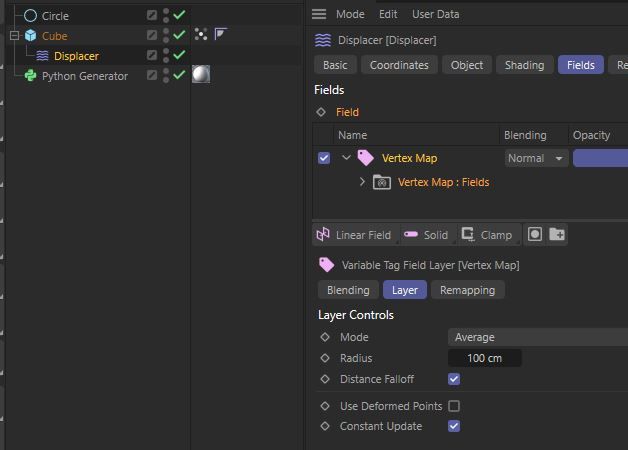
    found the solution ... the corresponding type is called: FLweight
  • Create folder in Volume Builder

    Cinema 4D SDK windows python 2023
    3
    0 Votes
    3 Posts
    623 Views
    D
    hi @i_mazlov, thanks for the answer. good to know about this status / limitation. for my current case I found a solution without folders..
  • Get information about renderer plugin via Python

    Moved General Talk 2024 python 2023
    6
    0 Votes
    6 Posts
    1k Views
    ferdinandF
    Hello @hSchoenberger, Sorry, but this is a C4D SDK question! It is NOT about the Octane SDK. "How can I list all installed renderer plugins in C4D with their version?" Although you have put your sentence into quotes, that was not what you asked, your questions were: Is there any way to get some information about renderer plugins? I want to get the version of the Octane plugin. So how I can loop through all plugins loaded and get some information from the plugins like the version? And I answered that: There is no public interface with which you could get the version of a plugin. And when plugins provide version information on their own, you must ask their vendors about that. You can access the flags a plugin has been registered with BasePlugin.GetInfo, the disk-level is in-accessible for you. You can detect installed render engines by looping over all video post data plugins and check if they have PLUGINFLAG_VIDEOPOST_ISRENDERER set (this assumes that the to be detected render engine sets this flag on registration - which is usually unavoidable as you otherwise cannot hook in the render system of Cinema 4D, but there might be 'rogue' render engines out there which side step things). import c4d doc: c4d.documents.BaseDocument # The currently active document. op: c4d.BaseObject | None # The primary selected object in `doc`. Can be `None`. def main() -> None: """Called by Cinema 4D when the script is being executed. """ plugin: c4d.plugins.BasePlugin for plugin in c4d.plugins.FilterPluginList(c4d.PLUGINTYPE_VIDEOPOST, True): if (plugin.GetInfo() & c4d.PLUGINFLAG_VIDEOPOST_ISRENDERER): print (plugin.GetName()) if __name__ == '__main__': main() # Example output for a vanilla installation. Physical Redshift Viewport Renderer Cheers, Ferdinand
  • 0 Votes
    3 Posts
    580 Views
    ferdinandF
    Hey @datamilch, Thank you for reaching out to us and answering your own question. In general we prefer it when topics do not get deleted, so that other users can benefit from a topic. You should also not be able to delete this topic anymore since more than three hours have passed since you posted and because your topic has replies. Cheers, Ferdinand
  • 0 Votes
    5 Posts
    1k Views
    gheyretG
    @czt_306 It looks realy cool!