• The slider tool returns False.

    r21 python
    2
    0 Votes
    2 Posts
    638 Views
    M
    Hi @x_nerve the ID used is not the correct one you should use: 431000021 for edge mode and 431000030 for point mode, unfortunately, there are no symbols for these tools. Cheers, Maxime.
  • Some attempts at nondestructive modeling

    Moved r21 python
    5
    1
    0 Votes
    5 Posts
    1k Views
    X
    Hi: After a trial run, the script was tested successfully. By setting the name suffix of Python Tag, the problem of repeated running of Tag can be solved. Taking c4d.DIRTYFLAGS_SELECT as an example, if the point, line, and surface selections change, it will execute, otherwise it won't. The Python script code is as follows: import c4d #e-mail: [email protected] def main(): Name = op.GetName() Objects = op.GetObject() Changed = Objects.GetDirty(c4d.DIRTYFLAGS_SELECT) Text = ["xit" + str(Changed)[-1]] if str(Name).count(Text[0][:-1]) != 0 : if str(Name).find(Text[0][:-1]) != str(Name).rfind(Text[0][:-1]) : if str(Name)[str(Name).rfind(Text[0][:-1]):] == Text[0] : if str(Name).find(Text[0][:-1]) <= 0: #Do not execute, exit the program. print ("Does not perform.") op.SetName(str(Text[0])) return else: #Do not execute, exit the program. op.SetName(str(Name)[:str(Name).find(Text[0][:-1])] + str(Text[0])) print ("Does not perform.") return else: if str(Name).find(Text[0][:-1]) <= 0: op.SetName(str(Text[0])) print ("Perform.") else: op.SetName(str(Name)[:str(Name).find(Text[0][:-1])] + str(Text[0])) print ("Perform.") else: if str(Name)[str(Name).rfind(Text[0][:-1]):] == Text[0] : #Do not execute, exit the program. print ("Does not perform.") return else: op.SetName(str(Name)[:str(Name).find(Text[0][:-1])] + str(Text[0])) print ("Perform.") else: print ("Perform.") op.SetName(str(Name) + str(Text[0])) print ("pass") #The next thing to execute.
  • c4dpy.exe asking for credentials?

    r21 python
    3
    0 Votes
    3 Posts
    504 Views
    M
    Hi @bentraje as you already figured out in the documentation for R21+ this is necessary because each version (c4dpy, CommandLine, TRS, TRC) now have their own preference folder and doesn't share anymore the one from c4d. Cheers, Maxime.
  • c4dtools alive?

    Moved
    3
    0 Votes
    3 Posts
    650 Views
    indexofrefractionI
    ok tx... It seems the old c4dtools were integrated into c4ddev sadly c4ddev is nothing for the occasional c4d python hacker .-) the "beginners guides" are on "todo" for years, now and probably wont get completed anymore. it does not look like Niklas is still engaged in the c4d world.
  • Maximize/Resize "Add Motion Clip" Window

    3
    0 Votes
    3 Posts
    761 Views
    Leo_SaramagoL
    @zipit Thanks!
  • Get Point Positions of Selected N-Gon or Polygon

    11
    0 Votes
    11 Posts
    3k Views
    X
    Hi: This is a bit of a hassle, but can still be scripted, who CARES about an extra polygon. import c4d def main(): polygons = op.GetAllPolygons() points = op.GetAllPoints() point = [c4d.Vector(10000, 10000, 10000),c4d.Vector(9999, 10000,10000), c4d.Vector(9999, 10000, 10001),c4d.Vector(10000, 10000, 10001)] point_indexe = [[len(points) + i ,point[i]] for i in range(len(point))] op.ResizeObject(len(points) + len(point),len(polygons) + 1) set_point = [op.SetPoint(k[0], k[1]) for k in point_indexe] op.Message(c4d.MSG_UPDATE) c4d.EventAdd() if __name__=='__main__': main()
  • Our plugin is not showing up on the menu in just a few cases.

    4
    0 Votes
    4 Posts
    858 Views
    r_giganteR
    Hi Fernando, feel free to have the developer writing directly to our sdk support email box. Best, R
  • Script : Harden edges of all UV borders (break Phong shading)

    6
    3 Votes
    6 Posts
    2k Views
    M
    Wow, very nice! There's a huge progress, it now works pretty fast. Thanks for adding the wishlist items.
  • Plugin OnFloor Final 1.2.4RC1

    14
    4 Votes
    14 Posts
    6k Views
    J
    Grand merci pour ce Plugin tellement simple et facile d'utilisation. Grand merci... Many thanks for this Plugin so simple and easy to use. Big thanks
  • Mobile layout: Header takes too much space

    Moved
    5
    0 Votes
    5 Posts
    1k Views
    M
    The issue is fixed by the way.
  • This topic is deleted!

    2
    0 Votes
    2 Posts
    8 Views
  • Cannot Connect Xpresso Nodes in Python

    3
    0 Votes
    3 Posts
    938 Views
    M
    Hi, here in Cinema 4D S22 defining the type of the cloner I don't have anymore an issue import c4d from c4d import gui import math def main(): # Build Parent Cloner cloner = c4d.BaseObject(1018544) cloner[c4d.ID_MG_MOTIONGENERATOR_MODE] = c4d.ID_MG_MOTIONGENERATOR_MODE_LINEAR doc.InsertObject(cloner) # Build Null newnull = c4d.BaseObject(c4d.Onull) newnull.InsertUnder(cloner) # Build Children Cloner internal_cloner = c4d.BaseObject(1018544) internal_cloner[c4d.ID_MG_MOTIONGENERATOR_MODE] = c4d.ID_MG_MOTIONGENERATOR_MODE_GRIDARRAY internal_cloner.InsertUnder(newnull) internal_cloner.Message(c4d.MSG_MENUPREPARE, doc) # Cube cube = c4d.BaseObject(c4d.Ocube) internal_cloner.Message(c4d.MSG_MENUPREPARE, doc) cube.InsertUnder(internal_cloner) # Xpresso Tag xtag = c4d.BaseTag(c4d.Texpresso) cloner.InsertTag(xtag) # Setup Parent Cloner cloner[c4d.MG_LINEAR_OBJECT_POSITION, c4d.VECTOR_Y] = 0.0 cloner[c4d.MG_LINEAR_OBJECT_POSITION, c4d.VECTOR_Z] = 500.0 cloner[c4d.MG_LINEAR_COUNT] = 10 cloner[c4d.MGCLONER_VOLUMEINSTANCES_MODE] = c4d.MGCLONER_VOLUMEINSTANCES_MODE_RENDERINSTANCE # Setup Children Cloner internal_cloner[c4d.MG_GRID_SIZE] = c4d.Vector(300, 200, 100) # Setup Cube cube[c4d.PRIM_CUBE_LEN] = c4d.Vector(20, 10, 100) # Setup Xpresso # http://mograph.net/board/index.php?/topic/26338-creating-xpresso-nodes-with-python-script/ nodemaster = xtag.GetNodeMaster() node1 = nodemaster.CreateNode(nodemaster.GetRoot(), c4d.ID_OPERATOR_OBJECT, None, 100, 100) node1[c4d.GV_OBJECT_OBJECT_ID] = internal_cloner gridResParam = c4d.DescID(c4d.DescLevel(c4d.MG_GRID_RESOLUTION, c4d.DTYPE_VECTOR,0), c4d.DescLevel(c4d.VECTOR_Z, c4d.DTYPE_REAL,0)) node1out = node1.AddPort(c4d.GV_PORT_OUTPUT, gridResParam) node2 = nodemaster.CreateNode(nodemaster.GetRoot(), c4d.ID_OPERATOR_OBJECT, None, 300, 100) node2[c4d.GV_OBJECT_OBJECT_ID] = cloner posParam = c4d.DescID(c4d.DescLevel(c4d.MG_LINEAR_OBJECT_POSITION, c4d.DTYPE_VECTOR,0), c4d.DescLevel(c4d.VECTOR_Z, c4d.DTYPE_REAL,0)) node2in = node2.AddPort(c4d.GV_PORT_INPUT, posParam) # Connect if node1out is not None and node2in is not None: node1out.Connect(node2in) c4d.EventAdd() # refreshed viewport to see changes automatically if __name__=='__main__': main() And as pointed by @PluginStudent the problem was because the AddPort fails. And I guess it failed because at the time you ask for the port creation since no explicit mode was defined in the Cloner the XPresso description was not properly fed so this GvPort didn't exist. Cheers, Maxime.

  • How to Add Multiple Redshift Pazzle Matte AOVs

    python
    2
    1
    0 Votes
    2 Posts
    1k Views
    ManuelM
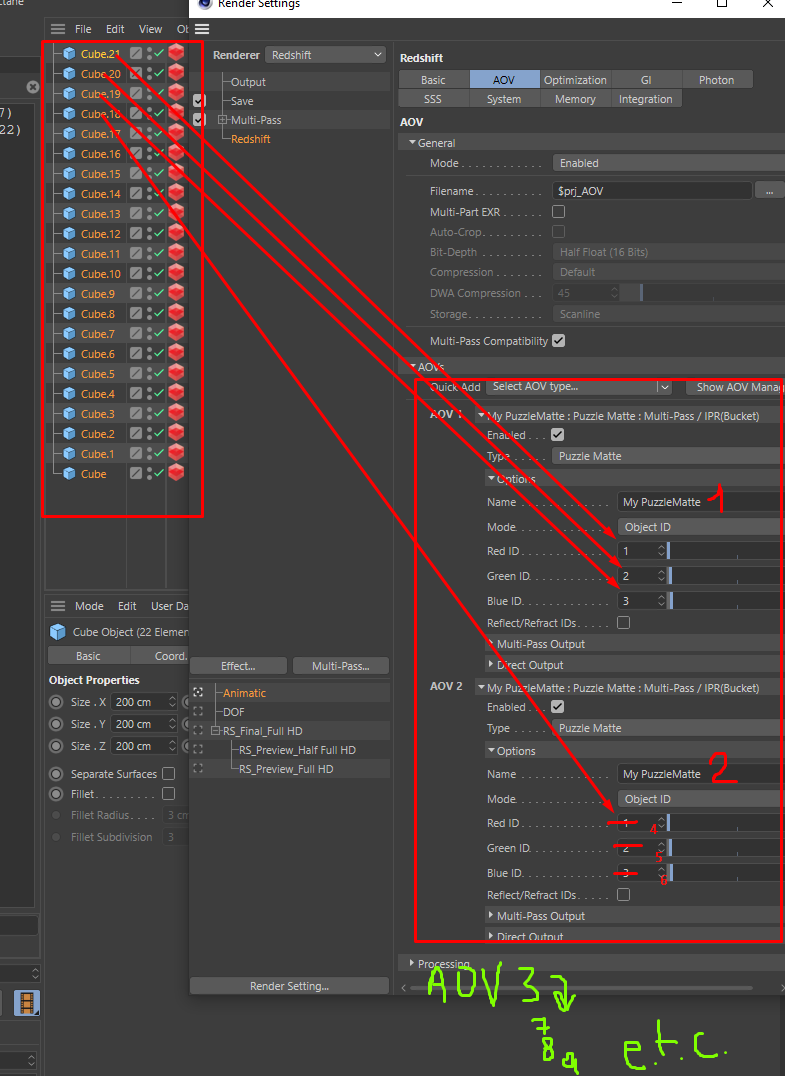
    hi, if you wants to know how many AOVs you need for 10 objects you should use Ceil. After that, some math to have your ID raising by 1. numberOfAOVs = math.ceil(10 / 3.0) # will give you 4 for i in xrange(int(numberOfAOVs)): print ("create aov number {}".format(i)) for j in xrange (3): print ("value of field will be : {}".format(j + i * 3 ) ) I'm not a big fan of retrieving all the objects on each function. But first, make things works, than optimize. (at least at the beginning) Cheers, Manuel
  • Create a Redshift Camera with Python

    python r21
    3
    0 Votes
    3 Posts
    786 Views
    C
    Thanks! For whatever reason I couldn't get that particular code to work, but I eventually figured out a different method. I think my script is finished for now.
  • "Axis Center " Script button reuse problem

    r21 python
    3
    0 Votes
    3 Posts
    799 Views
    X
    Thank you very much for your help to solve the previous doubts. I will continue to work hard.
  • How to move splines in Python Generator?

    3
    1
    0 Votes
    3 Posts
    755 Views
    S
    Thanks for the answer. I will check it.
  • Left-Hand Local Coordinates to Right-Hand Local Coordinates?

    python
    4
    0 Votes
    4 Posts
    1k Views
    dskeithbuckD
    Thank you @zipit and @m_magalhaes for your replies! @zipit your response put me on the right track. The issue was that I was trying to do all of the conversions using C4D's left-handed coordinate matrices, and it was auto-fixing my "malformed" matrices. I ended up porting the Three.js Matrix4 and Euler classes from JS to python and using them in my script. So, the final code (leaving out the ported methods) looked something like: mg = self.op.GetMg() parent_mg = self.op.GetUpMg() c4d_to_three = c4d.Matrix( off=c4d.Vector(0), v1=c4d.Vector(1, 0, 0), v2=c4d.Vector(0, 1, 0), v3=c4d.Vector(0, 0, -1) ) # Convert to new coordinate space # http://www.techart3d.com/2016/02/convert-left-handed-to-right-handed-coordinates/ mg_three_coords = c4d_to_three * mg * c4d_to_three parent_mg_three_coords = c4d_to_three * parent_mg * c4d_to_three mg_mat4 = Matrix4(mg_three_coords) parent_mg_mat4 = Matrix4(parent_mg_three_coords) inv_parent_mg_mat4 = parent_mg_mat4.Clone() inv_parent_mg_mat4 = inv_parent_mg_mat4.Inverse() node_local = inv_parent_mg_mat4.Clone() node_local = node_local.MultiplyMatrices(inv_parent_mg_mat4, mg_mat4) position, scale, rotation = node_local.Decompose() if position != c4d.Vector(0): self.props["position"] = position if scale != c4d.Vector(1): self.props["scale"] = scale if rotation != c4d.Vector(0): self.props["rotation"] = rotation
  • Stuck with loop through tags

    python
    4
    0 Votes
    4 Posts
    1k Views
    ManuelM
    hi @SuperHomiak welcome to the forum. Thanks @zipit for the answer For your next threads, please help us keeping things organised and clean. I know it's not your priority but it really simplify our work here. Q&A New Functionality. How to Post Questions especially the tagging part. I've set the thread to a question and marked zipit answer as the right answer Cheers, Manuel
  • This topic is deleted!

    1
    0 Votes
    1 Posts
    14 Views
    No one has replied
  • Question about IDs for Python Dialog

    python
    3
    0 Votes
    3 Posts
    652 Views
    ManuelM
    hi, I'll set this thread as solved without feedback from your side. Cheers, Manuel