• Render depth map using python

    Cinema 4D SDK python
    3
    0 Votes
    3 Posts
    982 Views
    G
    Thank you for the quick answer. Unfortunately this approach was quite destructive for my workflow, so i found a workaround using materials and 3d gradients. For anyone who want to render z-depth in python from c4d scene, this may be the approach. There may be some tweaks considering color space. It would be nice to get access to this kind of data inside cinema 4d's python without crazy workarounds. import c4d from c4d import gui, plugins, storage import os PLUGIN_ID = 1234567 # Replace this ID with your unique plugin ID from Maxon def GetFilterTypeFromFilename(filename): ext = os.path.splitext(filename)[1].lower() if ext == '.bmp': return c4d.FILTER_BMP elif ext == '.jpg' or ext == '.jpeg': return c4d.FILTER_JPG elif ext == '.png': return c4d.FILTER_PNG elif ext == '.tif' or ext == '.tiff': return c4d.FILTER_TIF elif ext == '.exr': return c4d.FILTER_EXR else: return c4d.FILTER_PNG # Default to PNG if extension is unrecognized class RenderDialog(gui.GeDialog): DESTINATION_FILE = 1001 BROWSE_BUTTON = 1002 RENDER_BUTTON = 2000 def CreateLayout(self): self.SetTitle("External Render Plugin") # Add Destination File Field self.GroupBegin(id=0, flags=c4d.BFH_SCALEFIT, cols=2) self.AddStaticText(id=0, flags=c4d.BFH_LEFT, name="Destination File:") self.AddEditText(id=self.DESTINATION_FILE, flags=c4d.BFH_SCALEFIT) self.GroupEnd() # Add Browse Button self.AddButton(id=self.BROWSE_BUTTON, flags=c4d.BFH_LEFT, name="Browse") # Add Render Button self.AddButton(id=self.RENDER_BUTTON, flags=c4d.BFH_CENTER, name="Render") return True def Command(self, id, msg): if id == self.BROWSE_BUTTON: path = storage.SaveDialog(title="Select Destination File") if path: self.SetString(self.DESTINATION_FILE, path) return True elif id == self.RENDER_BUTTON: path = self.GetString(self.DESTINATION_FILE) if not path: gui.MessageDialog("Please specify a destination file.") return True # Get the active document doc = c4d.documents.GetActiveDocument() # Create a large sphere object sphere = c4d.BaseObject(c4d.Osphere) sphere[c4d.PRIM_SPHERE_RAD] = 10000000 # Set radius to 10,000,000 m doc.InsertObject(sphere) c4d.EventAdd() # Check if a material named "LuminanceMaterial" already exists material = doc.SearchMaterial("LuminanceMaterial") if not material: # Create new material and set its parameters material = c4d.BaseMaterial(c4d.Mmaterial) material.SetName("LuminanceMaterial") material[c4d.MATERIAL_USE_COLOR] = False material[c4d.MATERIAL_USE_REFLECTION] = False material[c4d.MATERIAL_USE_LUMINANCE] = True # Create gradient shader and set it as luminance gradient_shader = c4d.BaseShader(c4d.Xgradient) if gradient_shader: gradient_shader[c4d.SLA_GRADIENT_TYPE] = c4d.SLA_GRADIENT_TYPE_3D_LINEAR # 3D Linear Gradient gradient_shader[c4d.SLA_GRADIENT_SPACE] = c4d.SLA_GRADIENT_SPACE_WORLD # World space gradient_shader[c4d.SLA_GRADIENT_CYCLE] = False material[c4d.MATERIAL_LUMINANCE_SHADER] = gradient_shader material.InsertShader(gradient_shader) # Insert material into the document doc.InsertMaterial(material) # Update gradient start and end points for the current camera gradient_shader = material[c4d.MATERIAL_LUMINANCE_SHADER] if gradient_shader: camera = doc.GetActiveObject() if not camera or camera.GetType() != c4d.Ocamera: camera = doc.GetRenderBaseDraw().GetSceneCamera(doc) if not camera: camera = doc.GetRenderBaseDraw().GetEditorCamera() if camera: start_position = camera.GetMg().off focus_distance = camera[c4d.CAMERAOBJECT_TARGETDISTANCE] end_position = start_position + (camera.GetMg().v3 * focus_distance) # Use v3 for z-axis direction gradient_shader[c4d.SLA_GRADIENT_START] = start_position gradient_shader[c4d.SLA_GRADIENT_END] = end_position # Enable material override in render settings rd = doc.GetActiveRenderData() rd[c4d.RDATA_MATERIAL_OVERRIDE] = True rd[c4d.RDATA_MATERIAL_OVERRIDE_LINK] = material # Set render settings rdata = rd.GetDataInstance().GetClone(c4d.COPYFLAGS_NONE) rdata[c4d.RDATA_PATH] = path rdata[c4d.RDATA_RENDERENGINE] = c4d.RDATA_RENDERENGINE_STANDARD # Create a bitmap to render into width = int(rdata[c4d.RDATA_XRES]) height = int(rdata[c4d.RDATA_YRES]) bmp = c4d.bitmaps.BaseBitmap() result = bmp.Init(width, height) if result != c4d.IMAGERESULT_OK: gui.MessageDialog("Failed to initialize bitmap.") return True # Trigger render render_result = c4d.documents.RenderDocument( doc, # Document to render rdata, # Render settings bmp, # Bitmap to render into c4d.RENDERFLAGS_EXTERNAL | c4d.RENDERFLAGS_DONTANIMATE # Flags ) if render_result != c4d.RENDERRESULT_OK: gui.MessageDialog("Render failed.") else: # Determine the appropriate file format filter filter_type = GetFilterTypeFromFilename(path) # Save the rendered image save_result = bmp.Save(path, filter_type, c4d.BaseContainer()) if save_result != c4d.IMAGERESULT_OK: gui.MessageDialog("Failed to save image.") else: gui.MessageDialog("Render completed and saved.") # Turn off material override after rendering rd[c4d.RDATA_MATERIAL_OVERRIDE] = False rd[c4d.RDATA_MATERIAL_OVERRIDE_LINK] = None # Delete the large sphere after rendering sphere.Remove() c4d.EventAdd() # Delete the material after rendering if material: material.Remove() c4d.EventAdd() # Refresh the document c4d.EventAdd() return True return False class ExternalRenderPlugin(plugins.CommandData): def __init__(self): self.dlg = None def Execute(self, doc): if not self.dlg: self.dlg = RenderDialog() self.dlg.Open(c4d.DLG_TYPE_ASYNC, defaultw=400, defaulth=100) return True if __name__ == "__main__": plugins.RegisterCommandPlugin( id=PLUGIN_ID, str="External Render Plugin", info=0, icon=None, help="Render current frame to a specified file", dat=ExternalRenderPlugin() )

  • GeUserArea.GetDragObject() for xpresso node

    Cinema 4D SDK python
    4
    0 Votes
    4 Posts
    1k Views
    ferdinandF
    Hey everyone, Just as an FYI: cinema::GvCopyBuffer is not a public type. Just saying this so that future C++ users do not run against a wall here. One might be able to wiggle through with a forward/dummy deceleration of GvCopyBuffer, but officially this is not supported in the public C++ API either. And we therefore cannot provide forum support for this in C++ either. Cheers, Ferdinand
  • 0 Votes
    4 Posts
    1k Views
    L
    Hello, Ferdinand! Thank you for your attention to my question, your time, and your academic explanations.
  • 0 Votes
    4 Posts
    2k Views
    O
    And that's good to know about using GetMl() over Get Mg(), mainly for the performance reasons if I understood correctly.
  • SetPortValue for Texture node ColorSpace

    Cinema 4D SDK python 2024 windows
    3
    0 Votes
    3 Posts
    1k Views
    M
    Thank you so much, this was very helpful to learn. All the best.
  • 0 Votes
    5 Posts
    2k Views
    ferdinandF
    Hey @lednevandrey, without wanting to be rude, I really struggle with understanding what you want to convey. Material[c4d.TEXTURETAG_PROJECTION] = c4d.TEXTURETAG_PROJECTION_UVW does not work because Python is case sensitive and you gave your BaseMaterial instance the symbol material. So, Python is complaining about that. But as said before, a material, i.e., BaseMaterial is not the right place to set the projection. It is the counter part to the thing you see in the Material Manager of Cinema 4D and has no projection. The projection is set in the Material Tag, which slightly confusingly is called TextureTag in the API. Cheers, Ferdinand """Assigns the first material in the document to the selected object and sets its projection to UVW. """ import c4d import mxutils doc: c4d.documents.BaseDocument # The currently active document. op: c4d.BaseObject | None # The primary selected object in `doc`. Can be `None`. def main() -> None: """Called by Cinema 4D when the script is being executed. """ if not op: raise ValueError("Please select an object.") # Get the first material in the document. material: c4d.BaseMaterial = doc.GetFirstMaterial() if not material: raise ValueError("No materials found in the document.") # Get the first existing texture tag on #op or create a new one when none exists. tag: c4d.BaseTag = op.GetTag(c4d.Ttexture) or op.MakeTag(c4d.Ttexture) if not tag: raise ValueError("Failed to get or create a texture tag.") # Set the material and projection. tag[c4d.TEXTURETAG_MATERIAL] = material tag[c4d.TEXTURETAG_PROJECTION] = c4d.TEXTURETAG_PROJECTION_UVW # Update the Cinema 4D UI. c4d.EventAdd() if __name__ == '__main__': main()
  • 0 Votes
    6 Posts
    2k Views
    i_mazlovI
    Hi @tx3008, Welcome to the Maxon developers forum and its community, it is great to have you with us! Getting Started Before creating your next postings, we would recommend making yourself accustomed with our forum and support procedures. You did not do anything wrong, we point all new users to these rules. Forum Overview: Provides a broad overview of the fundamental structure and rules of this forum, such as the purpose of the different sub-forums or the fact that we will ban users who engage in hate speech or harassment. Support Procedures: Provides a more in detail overview of how we provide technical support for APIs here. This topic will tell you how to ask good questions and limits of our technical support. Forum Features: Provides an overview of the technical features of this forum, such as Markdown markup or file uploads. It is strongly recommended to read the first two topics carefully, especially the section Support Procedures: Asking Questions. About your First Question Third party software is out of scope of our Support Procedures, namely: We cannot provide support for third party libraries. Hence I've moved your thread to the "General Talk" forum. Many thanks to @Dunhou for taking an active role of our community! Much appreciated! Cheers, Ilia
  • Query Morph Order Based on the UI Order?

    Cinema 4D SDK 2024 python
    3
    1
    0 Votes
    3 Posts
    1k Views
    B
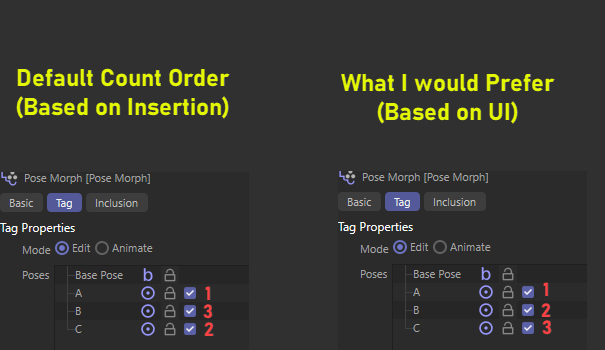
    Hi @ferdinand Thanks for the response. Found a workaround it. Basically, just name the poses properly in a sorting order. Query the GetName() method and perform my own sorting. Regards, Ben
  • 0 Votes
    6 Posts
    2k Views
    ferdinandF
    Great to hear that you found your solution! Do not hesitate to ask more questions when you run into problems while exploring our Python API. But just as a heads up, we prefer users opening new topics for new questions. For details see the Support Procedures linked above. Cheers, Ferdinand
  • Set UVWs for Ngons?

    Cinema 4D SDK s26 python
    4
    1
    0 Votes
    4 Posts
    1k Views
    E
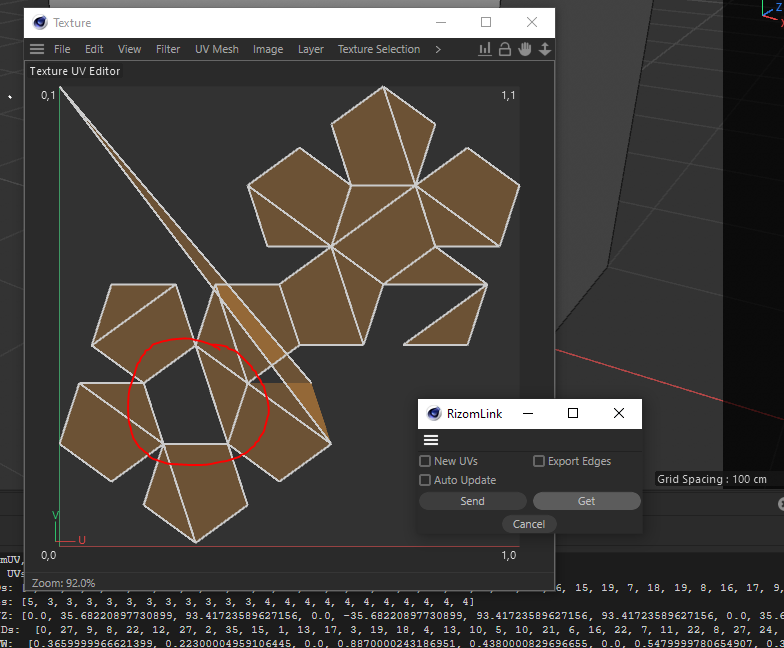
    @ferdinand I figured this issue out so you can mark this as solved/closed. Thank you.
  • Not able to post?

    Cinema 4D SDK s26 python
    2
    0 Votes
    2 Posts
    1k Views
    ferdinandF
    Hey @ELJeffery, Thank you for pointing this out. We are generally aware of this issue. If anyone else is experiencing similar issues, please point them out. While we are aware that the issue exists and we can see the incident reports in the back end, it is not 100% clear to us how frequent this does happen to human users (and how urgent this is issue is). So, when you run into the issue too, please drop us here the Cloudflare Ray ID of your error page. As an FYI, the issue usually rectifies itself after a few minutes. Cheers, Ferdinand
  • C4DAtom.SetParameter/GetParameter help

    Cinema 4D SDK 2024 python
    3
    0 Votes
    3 Posts
    842 Views
    i_mazlovI
    Hi @ops, Thanks for reaching out to us and thanks for sharing your solution with the community, this is highly appreciated! You're right, the most common way of accessing object's attributes is by using subscript operator. Cheers, Ilia
  • 0 Votes
    8 Posts
    2k Views
    DunhouD
    Wow @m_adam , thanks for that, I'll check this after work!
  • 0 Votes
    2 Posts
    789 Views
    i_mazlovI
    Hi @BigRoy, For the alembic camera, you can use c4d.MSG_GETREALCAMERADATA, for example: def main(): data = dict() op.Message(c4d.MSG_GETREALCAMERADATA, data) print(data['res']) Another option (which would work for other object types as well) would be to check type of the object's cache using GetCache(). Cheers, Ilia
  • 0 Votes
    2 Posts
    1k Views
    M
    Hey BigRoy, sadly it's still impossible, I will start the discussion again, thanks for the reminder. Cheers, Maxime.
  • 0 Votes
    5 Posts
    2k Views
    R
    I was just looking for the exact same thing and would second the need for these 3 hooks without the need for a Python Generator object. It would make the pipeline integration of C4D much more straightforward. @m_adam
  • Import and managing 'merged' Alembic

    Cinema 4D SDK python 2023
    4
    1
    0 Votes
    4 Posts
    2k Views
    i_mazlovI
    Hi @BigRoy, in python the lifetime of the objects is handled automatically so you're right, there's no need to do anything special to destruct the object. Good job on your project! Thanks for sharing it with the community! Cheers, Ilia
  • 0 Votes
    3 Posts
    892 Views
    i_mazlovI
    Hi @datamilch, you can use the EVMSG_CHANGE message as a trigger to check your objects for changes. The timer approach might seem imprecise from the first glance, but can actually be used, I don't think there're any significant reasons against it. Additionally, the recent change was made to make BaseList2D being hashable. This effectively means you can operate with your objects in a dict. The python tag approach is the least efficient, although would still work, yes. You're saying your GeDialog plugin uses "mostly the ideantical userdata". If it was "identical", you could potentially use c4d.gui.DescriptionCustomGui with the SetObject function to make it point to your object. This way you can avoid hassling around all the data sync, because it is all handled as a built-in functionality of this class. This is how the attribute manager effectively works, or the Active Object Dialog as well. For your further postings please follow our guidelines on How to Ask Questions, namely: Please consolidate your questions into a singular posting by editing your last posting Cheers, Ilia
  • CopyBitmapToClipboard gamma issue

    Cinema 4D SDK python 2024 windows
    2
    1
    0 Votes
    2 Posts
    677 Views
    i_mazlovI
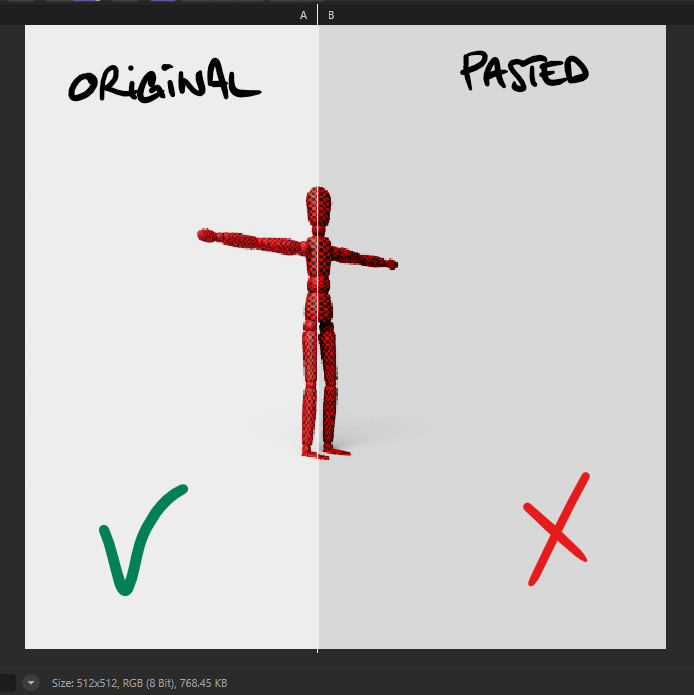
    Hi @John_Do, Please note that this forum is for the public APIs of Maxon products related topics. We unfortunately cannot help with the end user issues. Please ask your end user questions in our Support Center. This and also other important considerations are mentioned in the Scope of Support part of our Support Procedures. With that's said, your question gives a fuzzy impression on what exactly you're asking about. Namely, you're talking (presumably) about the CopyToClipboard() function, but then also claim the issue is not there, rather when you paste this bitmap in the PV. Could you please share some code snippet, which highlights the issue, especially the pasting part, which seem to not work as expected. Please also make sure you've setup the Picture Viewer's View Transform to meet your needs. In our internal bug tracking system I'm also seeing 2 issues that we already keep track of: A-B comparison issue that was just recently fixed and is not yet released Picture Viewer issue with OCIO enabled when using EXR files However, none of these seem to be specifically related to your case. If you're still having this issue and it is not related to our SDK, I would kindly ask you to reach out to our Support Center. Cheers, Ilia
  • 0 Votes
    4 Posts
    1k Views
    H
    @i_mazlov Thanks much for explanation.