• 0 Votes
    2 Posts
    603 Views
    ferdinandF
    Hey @Viktor-Velicko, Thank you for reaching out to us. Generally, our codebase supports Unicode, but in C++ source code and in *.str resource files, we only support Unicode escape sequences, not Unicode symbols directly. In Python, we do support Unicode symbols directly. In the 2025.3 SDK, I just added a code example for how to use Python to create a Unicode escaping pipeline around *.str files. So, the Unicode string const String slopeLabel = "Slope 90º"_s; would be written as const String slopeLabel = "Slope 90\\u00b0"_s; in C++. A bit more verbose variant would be const String slopeLabel ="Slope 90"_s + String("\\u00b0", STRINGENCODING::BIT7HEX));. In Python, you can use the string directly as slopeLabel: str = "Slope 90°". Cheers, Ferdinand
  • Unable to Sign In to Old Forum to Generate Plugin ID

    Cinema 4D SDK python
    3
    0 Votes
    3 Posts
    665 Views
    d_keithD
    Thanks Ferdinand - Up and running again!
  • 0 Votes
    2 Posts
    2k Views
    ferdinandF
    Hey, I now know how our API will look like in this regard in 2026.0.0. Its compile/runtime behaviour will be as for 2025.2.1 and before. And we will introduce a new flag NOHANDLEFOCUS which must be set when attaching the area when one explicitly wants to ignore focus events. So, you will not have to change your code when you were happy with your user area behaviour as it is has been. Cheers, Ferdinand
  • 0 Votes
    3 Posts
    827 Views
    ferdinandF
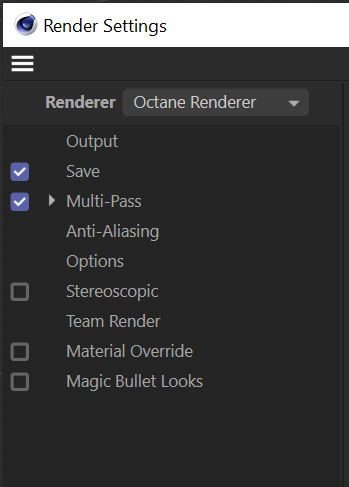
    Hey @lionlion44, Thank you for reaching out to us. We cannot provide support on third party libraries (Octane). But, yes, in general you are on the right track. We have this C++ example, which I loosely translated to Python. The thing to do which you are missing, is to check if such VP already exists, as you otherwise can land in a world of hurt. For everything else, you would have to talk with the Octane devs (of which some are here on this forum), if there are any special further steps to be taken for Octane. Cheers, Ferdinand """Provides an example for generically setting a render engine in Cinema 4D. Note that there is no guarantee that every render engine has a video post node, and when it has one, that it uses the same ID as the render engine. But it is highly conventional to implement a render engine like this. Derived from the C++ Example "Set Render Engine to Redshift": https://developers.maxon.net/docs/cpp/2023_2/page_manual_redshift_rendrer.html """ import c4d import mxutils doc: c4d.documents.BaseDocument # The active Cinema 4D document. def SetRenderEngine(doc: c4d.documents.BaseDocument, newEngineId: int, createsVideoPostNode: bool) -> bool: """Sets the render engine of the given document to the specified ID. """ # Make sure we are on the main thread, as we plan to modify the document and ensure that our # inputs are what we think they are. if not c4d.threading.GeIsMainThread(): raise RuntimeError("SetRenderEngine must be called from the main thread.") mxutils.CheckType(doc, c4d.documents.BaseDocument) mxutils.CheckType(newEngineId, int) mxutils.CheckType(createsVideoPostNode, bool) # Get the currently active render engine ID and get out if it matches the new one. renderData: c4d.documents.RenderData = doc.GetActiveRenderData() currentEngineId: int = renderData[c4d.RDATA_RENDERENGINE] if currentEngineId == newEngineId: print(f"Render engine {newEngineId} is already set, no changes made.") return True # Try to find a video post with the render engine ID. There is no absolute guarantee that every # render engine either has a video post node or that is gives it the same ID as the render # engine (but it is strongly conventional). if createsVideoPostNode: # Try to find an already existing video post node with the render engine ID. node: c4d.documents.BaseVideoPost | None = renderData.GetFirstVideoPost() while node: if node.GetType() == newEngineId: break node = node.GetNext() # There is no video post for the render engine, so we try to a new create one. if not node: try: node: c4d.documents.BaseVideoPost = c4d.documents.BaseVideoPost(newEngineId) renderData.InsertVideoPost(node) except Exception as e: raise RuntimeError(f"Failed to create video post node for render engine {newEngineId} ({e}).") # Finally, we set the render engine ID in the render data. renderData[c4d.RDATA_RENDERENGINE] = newEngineId return True def main() -> None: """Called by Cinema 4D to run the script. """ # Setting the standard render engine, here we do not have to create a video post node, since # the standard renderer is one of the rare cases that does not have a dedicated video post. SetRenderEngine(doc, newEngineId=c4d.RDATA_RENDERENGINE_STANDARD, createsVideoPostNode=False) # Set Redshift as the render engine, which does have a video post node. SetRenderEngine(doc, newEngineId=c4d.VPrsrenderer, createsVideoPostNode=True) # Push an update event. c4d.EventAdd() if __name__ == "__main__": main()
  • 0 Votes
    2 Posts
    781 Views
    ferdinandF
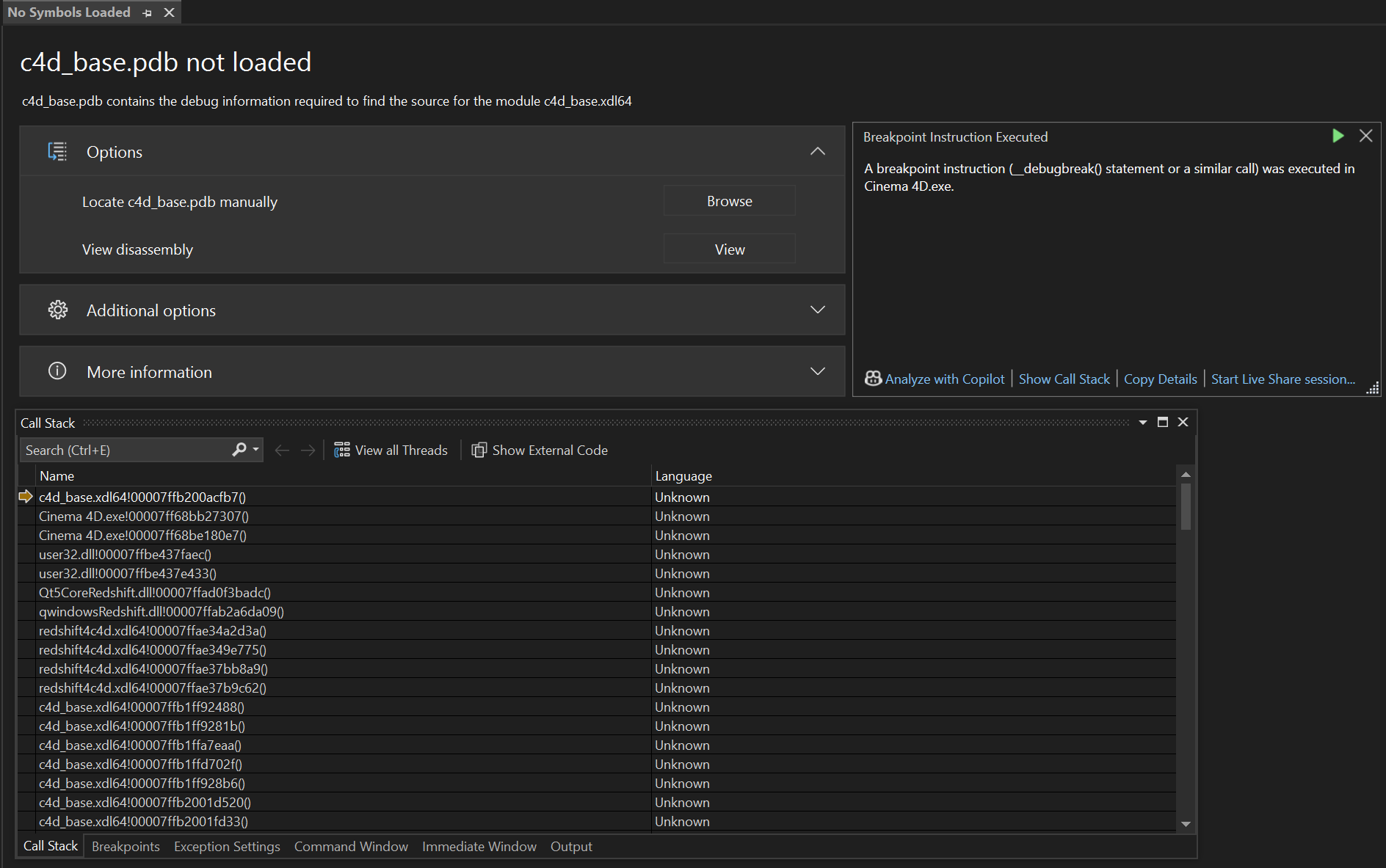
    Hey @shir, Thank you for reaching out to us. A Program Database (PDB) is a debug information format from Microsoft. It is comparable to the DWARF debug information format often used under Linux and macOS. However, unlike DWARF under Linux, where debug information is directly compiled into the binary, Microsoft chooses to store debug information in separate files, the pdb files. When you attach a debugger to a binary without any debug information, it will by default only see the machine code of the binary. So when you have an issue and the debugger puts out a stack trace, it will only show you the offsets in a library, e.g., something like this: #1 0x0000000000767576 in myBinary.dll #2 0x0000000000767df4 in otherBinary.dll #3 0x0000000000773aca in myBinary.dll #4 0x00000000004b893e in myBinary.dll You can see this happen in the call stack window in your screenshot. VS only provides information in the format someBinary.ext!someAddress(), e.g., c4d_base.xdl64!00007ffb200acfb7(), as it has no further information. With bin!address() VS means a function at that address is being called. In my opinion, VS has one of the most cryptic stack trace formats out there and can be a bit confusing for beginners. To see meaningful output, you need the debug information for that binary, which among other things contains the mapping of addresses to source code. If you have the pdb file for the binary, you can load it into your debugger, and it will then show you something like this instead: #1 0x0000000000767576 in MyClass::MyMethod() at myClass.cpp:42 #2 0x0000000000767df4 in OtherClass::OtherMethod() at otherClass.cpp:15 #3 0x0000000000773aca in MyClass::AnotherMethod() at myClass.cpp:78 #4 0x00000000004b893e in main() at main.cpp:10 When you compile the Cinema 4D SDK and your source code, it will automatically generate the pdb files for these binaries for you, so that you can debug them in a meaningful manner. But what we see here is Visual Studio asking you for the pdb for c4d_base.xdl64, one of the core library binaries located in the corelibs folder of the Cinema 4D application you are debugging with. You did not compile that binary, so you do not have the pdb file for it. And we do not ship our binaries with debug information, as that would not only be a very large download, but also would expose our source code to the public. You are hitting a debug stop there (VS tells you that in the info box by stating this is a __debugbreak). This is the less critical case of a debug event, which is covered by the very tutorial you are following (the other one being a critical stop). You can simply hit continue in your debugger and ignore this. The event seems to be raised from Redshift, judging by the stack trace we can see in the screenshot you provided. There is probably some minor hardware issue or so, and Redshift is trying to handle it gracefully by raising this debug event. It is, however, not normal when this happens permanently and usually it hints at a corrupted installation of Cinema 4D or a hardware issue when you are always greeted by debug events on startup (or even when just running and interacting with Cinema 4D). Sometimes debug stops can happen as a one-time thing when you are debugging for the first time against some Cinema 4D instance (and it has not yet built all its prefs, caches, and other things Cinema 4D builds in the background). When this persists and you are annoyed by having to press continue, I would recommend trying to either remove Redshift from your Cinema 4D installation or reinstall Cinema 4D altogether. You could also check inside of Cinema 4D if you can see any errors in the 'Redshift Feedback Display' window. For you as a third party, it is however not possible to find out what that issue in c4d_base.xdl64 at the offset 7ffb200acfb7 is. Cheers, Ferdinand PS: There is also g_enableDebugBreak=true|false which you can pass to your Cinema 4D instance as a commandline argument. With that you can permanently mute debug stops. But that is more of an expert feature and you probably do not want to enable that as a beginner.
  • How do I create a Plugin Identifier?

    Cinema 4D SDK windows python 2024
    14
    0 Votes
    14 Posts
    3k Views
    ferdinandF
    Hey @shir, good to hear that you solved the issue. Maybe NodeBB has an issue with the specific (top level) domain your mail handle was under? I just checked the logs and this is the event for the second registration mail that has been sent out (I edited your mail handle for privacy reasons). I.e., this is the one I manually invoked. There is another event for your actual registration. As far as NodeBB is concerned, it seems to be convinced that it successfully sent these mails. { "confirm_code": "dbcc0d6c-8646-4191-9975-badc1c7035f2", "email": "[email protected]", "subject": "Welcome to PluginCafé", "template": "welcome", "timestamp": 1751883962965 } NodeBB can be a bit buggy from time to time but that it fails to send a mail and then creates an event for successfully sending it, would be a bit odd. I will have an eye on this. Cheers, Ferdinand
  • 0 Votes
    6 Posts
    1k Views
    ferdinandF
    Hey @ECHekman, I sense there is some frustration, but I am not sure telling us how bad our API is will get us anywhere. Yes, the Nodes API ist not trivial, but you are only on the using part (which is not that hard to understand) not the implementation part (which is the trickly one). There are multiple render engine vendors who took that hurdle. I already answered your questions, and as always you will not see source code from us, unless you give us executable code in the first place upon which we can build, or we deem a subject new. I often bend these rules a bit where it makes sense to meet our customers and third parties halfway. But you cannot just throw a snippet at us and then expect us to invent everything around it and then fix that for you. Executable code makes a difference as lined out in our support procedures. My hunch would be that your getConnectedNode does not work because you do not check if your nodes are valid. You can get the value of a port with GetPortValue or GetEffectivePortValue. What you are doing with GetValue and EffectivePortValue is the old way but will still work. // Redshift expresses a lot of its enums as strings and not as ints (did not check if that is here the case). const String value = myPort.GetEffectivePortValue<String>().GetOrDefault() iferr_return; And as lined out before, what your function is trying to do, can likely be done via GraphModelHelper too, e.g., with GraphModelHelper::GetDirectPredecessors. An alternative and more manual approach would be using GraphNode.GetInnerNodes and GraphNode.GetConnections. And as always, I am not really looking for a discussion about what you or I would consider a good API. I am telling you that you will be in a world of hurt when you terminate your errors everywhere as you did in your code. Your code will then just silently fail without you knowing why. So, I gave you an example on how to use our error handling. Cheers, Ferdinand
  • save/keep cache of generator plugin

    Cinema 4D SDK 2025 python windows
    5
    1 Votes
    5 Posts
    1k Views
    P
    Could you provide an snipped where you show how to cache it in a plugin?
  • 0 Votes
    5 Posts
    1k Views
    chuanzhenC
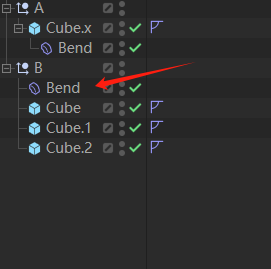
    @ferdinand Thanks for detailed explanation. Let me introduce the goals that the custom deformer plugin wants to achieve. (As can be seen from the cube, cube. 1, cube. 2... in the image, each object has a weight tag.) The custom deformer plugin needs to preprocess and store some data before the ModifyObjects () function works. (By clicking a button) Access the weight tag of each object to be deformed in Message (), preprocess and store some data, and then use the preprocessed data to execute the ModifyObjects () function to correctly process the deformation calculation. [image: 1751680146980-9c418a15-9d3c-4466-83c2-0481e7b67c69-image.png] In C4D, it seems that the Surface deformer has achieved a similar function [image: 1751680414378-5ef7303f-0ea2-4d3b-bed4-c342a755350c-image.png] (there are certain benefits to restricting the custom deformer plugin only to the parent level, as there is no need to spend effort on correctly linking the corresponding preprocessed data when the ModifyObjects () function works.But it did break the general logic operation of the deformer) The only way you could do that is by checking each deformed object being passed into , to be the parent of the also passed in (i.e., the deformer also simply accessible via ). Only for an which is the parent of would you then carry out the modification.
  • How to create a Track on a Vector Userdata?

    Cinema 4D SDK python
    3
    0 Votes
    3 Posts
    695 Views
    P
    Works! Thank you!
  • 0 Votes
    13 Posts
    7k Views
    KantroninK
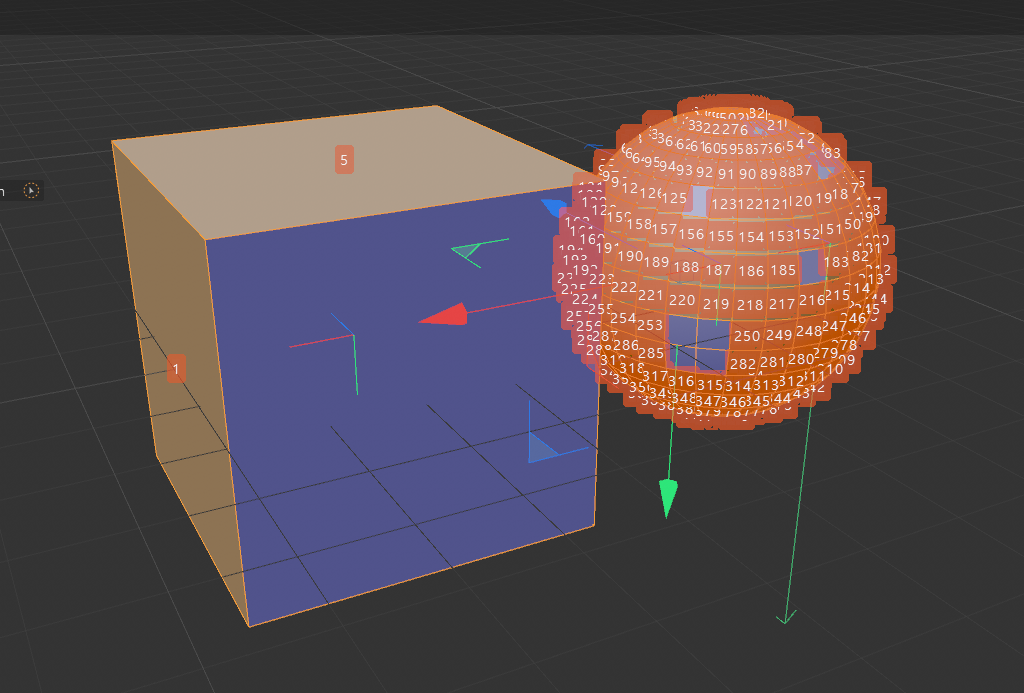
    @ferdinand I'm showing an example with a curved surface composed of 8 zones. Each zone is the union of several polygons with normals oriented in the same direction (represented by an arrow). I think C4D should be able to identify this type of tiling and colorize these areas to highlight them. Depending on the case, this tiling could be important, but most often, creators assemble the faces logically. A window could then offer the option to select each tiling, in order to invert the normals with a single click. A plugin could also do this kind of work, which would save creators time. [image: 1751317789481-surface.jpg]
  • Joining Polygon Objects (MCOMMAND_JOIN)

    Moved Cinema 4D SDK python
    2
    0 Votes
    2 Posts
    792 Views
    ferdinandF
    Hello @Kantronin, Thank you for reaching out to us. Your script does not work because it does not follow the conditions of MCOMMAND_JOIN. Joins the objects that are parented to the passed null object. Passing multiple objects into SMC will not join them. edit: Moved this into the correct forum and added a small example. Cheers, Ferdinand Here is how I would write that in modern Cinema 4D. I have seen that your screenshot is from an older version such as S26, or even older, but I cannot write code examples for such old versions. There are multiple things that wont work in such old version such as type hinting and the mxutils lib, but you will be able to copy the general approach - move everything under a null while preserving the transforms. Code """Demonstrates how to join all objects in a document. """ import c4d import mxutils doc: c4d.documents.BaseDocument # The currently active document. op: c4d.BaseObject | None # The primary selected object in `doc`. Can be `None`. def main() -> None: """Called by Cinema 4D when the script is being executed. """ # There is no super good way to do this in the manner you implied, joining everything in a # document. I clone here the whole document, which is not the cheapest operation (but also # not as expensive as it may sound like). When we do not have to join everything, it is better # just to clone the things you want to join. En even better way could be to not clone anything # and instead use undos to revert the transform and hierarchy changes we have to make. temp: c4d.documents.BaseDocument = doc.GetClone(c4d.COPYFLAGS_NONE) firstObject: c4d.BaseObject | None = temp.GetFirstObject() if firstObject is None: c4d.gui.MessageDialog("No object selected.") return # Get all objects in the document, and move them under a null object. We must record and # restore their global matrices, when we deconstruct the scene and move it all under one null # object. allObjects: list[c4d.BaseObject] = list(mxutils.IterateTree(firstObject, True)) null: c4d.BaseObject = mxutils.CheckType(c4d.BaseObject(c4d.Onull)) for obj in allObjects: mg: c4d.Matrix = obj.GetMg() # save the transform of the object obj.Remove() # Technically not necessary in the Python API, as it will do it for you when # you call things like InsertUnderLast. But C++ will not do that and a node # cannot be inserted more than once in a document, otherwise the fireworks # will start. obj.InsertUnderLast(null) obj.SetMg(mg) # restore the transform of the object under the null # Insert the null object into the temporary document and then join all objects under it. temp.InsertObject(null) result: list[c4d.BaseObject] = c4d.utils.SendModelingCommand( command=c4d.MCOMMAND_JOIN, list=[null], doc=temp, mode=c4d.MODELINGCOMMANDMODE_ALL, ) if not result: c4d.gui.MessageDialog("Failed to join objects.") return # Now insert the joined object into the original document. joinedObject: c4d.BaseObject = result[0] joinedObject.SetName("Joined Object") joinedObject.Remove() doc.InsertObject(joinedObject) c4d.EventAdd() if __name__ == '__main__': main()
  • Userarea keyboard focus issues in 2025.3

    Moved Bugs 2025 c++
    5
    0 Votes
    5 Posts
    2k Views
    ferdinandF
    Hey @ECHekman, you can find our general answer here. This is unfortunately an unintended regression caused by an intentional bugfix, not taking API stability into account. The flag USERAREAFLAGS::HANDLEFOCUS is meant to signal if a user area is focusable or not. But before user areas were always focusable, as this flag was erroneously being ignored. We then 'fixed' this, causing the chain of events. The in detail logic is then that some types of events are not possible for non-focusable gadgets, as for example keyboard events. I will touch up the docs a bit in that area, as things are indeed a bit thin there. But the doc changes will probably not make it into the next release, given how close it is, unless I patch them in there manually. So, long story short, compiling with USERAREAFLAGS::HANDLEFOCUS against the 2025.0.0 SDK will result in a binary that will be compatible with all versions of 2025, you did the right thing. Cheers, Ferdinand
  • CAMERA_ZOOM and Pparallel

    Cinema 4D SDK c++
    4
    1
    0 Votes
    4 Posts
    1k Views
    ferdinandF
    Hey @WickedP, It did not come across as abrupt or rude, but it was clear that you were a bit frustrated, and I was just trying to make clear that they had to choose some magic number, as that is the nature of rendering an orthographic projection. As to why we chose this number, I have no idea, as this happened 20 years or an even longer time back, long before I was at Maxon. It could either be because programmers simply love powers of two, or something more concrete such as that a power of two leads to less floating precision losses when multiplying other numbers with them, or simply that they did chose 1024x576 as the norm render size then. And you can set the camera width and height, but you just do this in the render settings with the render resolution, which was pretty standard for 3D software I would say. The new Redshift camera then uses a more complex model with an actual sensor and fitting the sensor to the render resolution (which I ignored here since you showed us using a Standard camera). Cheers, Ferdinand
  • 2025.3.0 SDK Release

    News & Information news cinema 4d c++ python sdk information
    4
    3 Votes
    4 Posts
    25k Views
    E
    Ok? will do
  • 2025.3.1 SDK Release

    News & Information cinema 4d news c++ python sdk information
    1
    0 Votes
    1 Posts
    25k Views
    No one has replied
  • Edge ring selection

    Cinema 4D SDK 2024 python windows
    2
    0 Votes
    2 Posts
    1k Views
    M
    Hi @Tpaxep, Welcome to the Maxon developers forum and its community, it is great to have you with us! Getting Started Before creating your next postings, we would recommend making yourself accustomed with our forum and support procedures. You did not do anything wrong, we point all new users to these rules. Forum Overview: Provides a broad overview of the fundamental structure and rules of this forum, such as the purpose of the different sub-forums or the fact that we will ban users who engage in hate speech or harassment. Support Procedures: Provides a more in detail overview of how we provide technical support for APIs here. This topic will tell you how to ask good questions and limits of our technical support. Forum Features: Provides an overview of the technical features of this forum, such as Markdown markup or file uploads. It is strongly recommended to read the first two topics carefully, especially the section Support Procedures: How to Ask Questions. About your First Question The tool has indeed been updated, but the docs were not. Here is how to call it. Note that you have to pass a polygon index, this is mandatory and it needs to be adjacent to one of the vertex to indicate a direction of the ring selection. Here is your script adapted, to be run on a sphere that was made editable. import c4d from c4d import utils def select_ring_edge(obj, v1Id, v2Id, polyId): bc = c4d.BaseContainer() bc.SetData(c4d.MDATA_RING_SEL_STOP_AT_SELECTIONS, False) bc.SetData(c4d.MDATA_RING_SEL_STOP_AT_NON_QUADS, False) bc.SetData(c4d.MDATA_RING_SEL_STOP_AT_POLES, True) bc.SetData(c4d.MDATA_RING_BOTH_SIDES, False) bc.SetData(c4d.MDATA_RING_SWAP_SIDES, False) bc.SetData(c4d.MDATA_RING_FIRST_VERTEX, v1Id) bc.SetData(c4d.MDATA_RING_SECOND_VERTEX, v2Id) bc.SetData(c4d.MDATA_RING_POLYGON_INDEX, polyId) bc.SetData(c4d.MDATA_RING_SELECTION, c4d.SELECTION_NEW) result = c4d.utils.SendModelingCommand( command=c4d.ID_MODELING_RING_TOOL, list=[obj], mode=c4d.MODELINGCOMMANDMODE_EDGESELECTION, bc=bc, doc=c4d.documents.GetActiveDocument(), flags=c4d.MODELINGCOMMANDFLAGS_NONE ) c4d.EventAdd() return result def main(): doc = c4d.documents.GetActiveDocument() obj = doc.GetActiveObject() if obj is None: c4d.gui.MessageDialog("select obj.") return firstVertex = 346 secondVertex = 347 polygonIndex = 312 result = select_ring_edge(obj, firstVertex, secondVertex, polygonIndex) if result: print("DONE") else: print("ERROR") if __name__ == '__main__': main() Note that the same settings also apply for the ID_MODELING_LOOP_TOOL, just modify RING by LOOP in the constant so MDATA_RING_SEL_STOP_AT_SELECTIONS become MDATA_LOOP_SEL_STOP_AT_SELECTIONS. Cheers, Maxime.
  • Dynamic desription issue

    Cinema 4D SDK c++
    4
    0 Votes
    4 Posts
    951 Views
    ferdinandF
    You do not have to do that; I only recommended this for the case when you happen to have to override a dynamic parameter of the same ID with a new GUI/datatype, then you should also set a new default value. But as I said and as you can see here at the Python dynamic description example (in C++ we have a similar one), Cinema 4D will do the bookkeeping for you. Here we read the value of Dynamic REAL 6 at 1106. [image: 1750479817421-4361ae57-21f3-47d2-87e4-84709bf6f809-image.png] Once we have modified the description, in this case removed Dynamic REAL 6, Cinema 4D will update the data container for us and remove the data at 1106. [image: 1750479903921-2712461d-c0c7-4280-96f5-ca9be93dfd8b-image.png] Cheers, Ferdinand
  • 5 Votes
    10 Posts
    3k Views
    ferdinandF
    Hey @Dunhou, I am still not 100% clear about what you are trying to do. But I guess what you want to do is distinguish a single-drag -click, i.e., the user is dragging something, from a single click. The issue with that is that we are in your code inside a while loop which just polls the input state as fast as it can and not in message stream, where we only get events for state changes. So, this means unless there is Speedy Gonzales at the mouse, even the quickest of single clicks will produce more than one iteration in the loop. What is still unclear to me why you are doing all this, as knowing that the mouse is outside of the UA does not mean that we know if the user dropped the payload on an object. But this is how I would solve distinguishing a 'light click' (a single click) from a drag event. A cleaner solution might be to let the convenance function InputEvent be a convenance function and move to the source Message. There you should be issue start and stop events for drag operations. But since you want to start it yourself, we are sort of in a pickle. I would have to play around a bit with the code to see if there is a better way with Message, Cheers, Ferdinand def InputEvent(self, msg: c4d.BaseContainer) -> bool: """Called by Cinema 4D when the user area receives input events. Here we implement creating drag events when the user drags from this user area. The type of drag event which is initiated is determined by the drag type selected in the combo box of the dialog. """ # When this is not a left mouse button event on this user area, we just get out without # consuming the event (by returning False). if msg[c4d.BFM_INPUT_DEVICE] != c4d.BFM_INPUT_MOUSE and msg[c4d.BFM_INPUT_CHANNEL] != c4d.BFM_INPUT_MOUSELEFT: return False dragType: int = self._host.GetInt32(self._host.ID_DRAG_TYPE) mx = int(msg[c4d.BFM_INPUT_X]) my = int(msg[c4d.BFM_INPUT_Y]) mx -= self.Local2Global()["x"] my -= self.Local2Global()["y"] state = c4d.BaseContainer() self.MouseDragStart(c4d.BFM_INPUT_MOUSELEFT,mx,my,c4d.MOUSEDRAGFLAGS_DONTHIDEMOUSE|c4d.MOUSEDRAGFLAGS_NOMOVE) lastPos: tuple[float, float] | None = None while True: res, dx, dy, channels = self.MouseDrag() if res != c4d.MOUSEDRAGRESULT_CONTINUE: break self.GetInputState(c4d.BFM_INPUT_MOUSE, c4d.BFM_INPUT_MOUSELEFT, state) # This is how I debugged this, GetContainerTreeString (in the beta it might be already # contained) is a feature of a future version of the SDK. # print(f"{mxutils.GetContainerTreeString(state, 'BFM_')}") # State: Root (None , id = -1): # ├── BFM_INPUT_QUALIFIER (DTYPE_LONG): 0 # ├── BFM_INPUT_MODIFIERS (DTYPE_LONG): 0 # ├── BFM_INPUT_DEVICE (DTYPE_LONG): 1836021107 # ├── BFM_INPUT_CHANNEL (DTYPE_LONG): 1 # ├── BFM_INPUT_VALUE (DTYPE_LONG): 1 # ├── BFM_INPUT_VALUE_REAL (DTYPE_REAL): 0.0001 # ├── BFM_INPUT_X (DTYPE_REAL): 203.13671875 # ├── BFM_INPUT_Y (DTYPE_REAL): 88.0390625 # ├── BFM_INPUT_Z (DTYPE_REAL): 0.0 # ├── BFM_INPUT_ORIENTATION (DTYPE_REAL): 0.0 # ├── 1768977011 (DTYPE_REAL): 1.0 # ├── BFM_INPUT_TILT (DTYPE_REAL): 0.0 # ├── BFM_INPUT_FINGERWHEEL (DTYPE_REAL): 0.0 # ├── BFM_INPUT_P_ROTATION (DTYPE_REAL): 0.0 # └── BFM_INPUT_DOUBLECLICK (DTYPE_LONG): 0 # I.e., we are unfortunately neither being issued a BFM_DRAGSTART nor an # c4d.BFM_INTERACTSTART, I assume both or only emitted in the direct Message() loop. # But we can write code like this. # if state[c4d.BFM_INPUT_DOUBLECLICK]: # print(f"Double click detected at {mx}, {my}") # break # elif state[c4d.BFM_INPUT_VALUE] != 1: # print(f"Mouse button not pressed anymore at {mx}, {my}") # break # else: # print(f"Non double click at {mx}, {my}") # The issue with this is that we are here just in a loop polling the current left button # state, not inside a message function where we get a state stream. So, for a single # click, we end up with somewhat like this, and here I made sure to click really fast # Non double click at 96.8515625, 58.37109375 # Non double click at 96.8515625, 58.37109375 # Non double click at 96.8515625, 58.37109375 # Non double click at 96.8515625, 58.37109375 # Mouse button not pressed anymore at 96.8515625, 58.37109375 # And this is a short drag event. # Non double click at 84.875, 56.5859375 # Non double click at 84.875, 56.5859375 # Non double click at 84.875, 56.5859375 # Non double click at 84.875, 56.5859375 # Non double click at 84.59765625, 56.5859375 # Non double click at 83.49609375, 56.94921875 # Non double click at 83.49609375, 56.94921875 # Non double click at 82.39453125, 57.3125 # Non double click at 82.39453125, 57.3125 # Non double click at 80.74609375, 58.1328125 # Non double click at 80.74609375, 58.1328125 # Non double click at 77.7265625, 58.6328125 # ... # Non double click at -8.35546875, 80.16796875 # Non double click at -8.35546875, 80.16796875 # Non double click at -8.35546875, 80.16796875 # Mouse button not pressed anymore at -8.35546875, 80.16796875 # So they are very similar, and we cannot go by the pure logic "when the coordinates # do not change, we are in a drag event" because this is not an event stream, i.e., we # might poll the same input state multiple times, depending on how fast our #while loop # runs. # But what we could do, is postpone all actions until we see a change. In extreme cases, # where the user is swiping very fast with the mouse and then clicks on a tile, this might # fail. mx -= dx my -= dy currentPos: tuple[float, float] = (mx, my) if lastPos is None and currentPos != lastPos: lastPos = currentPos # The mouse is not being pressed anymore. if not state[c4d.BFM_INPUT_VALUE]: if currentPos != lastPos: print("Drag event") else: print("Click event") break return True Click event Drag event Click event Click event Click event Drag event

  • Debug Scene / Generators (Scene heat map)

    Cinema 4D SDK windows macos
    2
    0 Votes
    2 Posts
    757 Views
    ferdinandF
    Hey @indexofrefraction, Thank you for reaching out to us. The Object Profiler should do what you want to do. [image: 1750425151882-7f8ba2c2-8af1-448e-a0d4-f120e3b91e0b-image.png] It is part of Cinema 4D since 2025.0.0. Cheers, Ferdinand