• 3D -> 2D and back with perspective

    programming
    4
    4
    0 Votes
    4 Posts
    2k Views
    CJtheTigerC
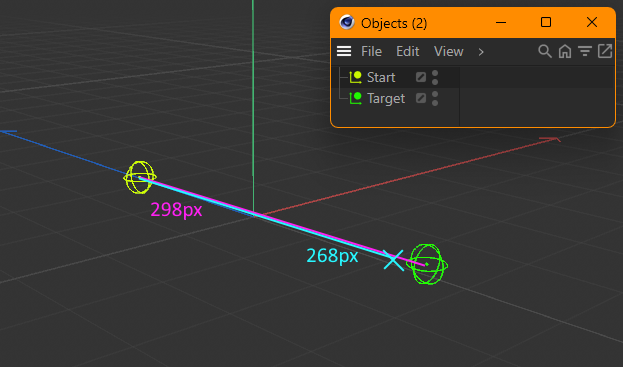
    Good morning Ilia, Thanks for your detailed response even though this is out of support scope! Let me explain what I meant by this: involve more computations than I'd like it to Using ProjectPointOnLine() the calculations by the script are as follows: Transform 3D points to 2D screen space using WS(). Calculate my desired new point in screen space. Transform the new point to 3D world space by projecting the new point onto the 3D line using ProjectPointOnLine(). Transform the new point back from 3D world space to 2D screen space using WS(). Do more things using these correct 2D coordinates of the new point. The issue of this topic is addressed by step 3 but to further work properly with the point in 2D space I also need step 4. I in fact do not only need the 2D coordinates but the z component as well. I feel like there must be a mathematical formula to get the correct Z value without transforming all three vector components back and forth in steps 3 and 4. So the issue I have with the "hacky" solution is purely to reduce the amount of performed calculations to a bare minimum which to be completely honest is just a means to satisfy this itch of mine to optimize as much as possible. It's part of what makes programming fun to me. Also it would really be interesting to grasp the mathematical concept behind this. As someone who taught himself 3D programming by reading a bunch of game dev tutorials 15 years ago this is super interesting. But enough rambling. Regarding your question: Why can't you first do your computations in screen space and only then use the ProjectPointOnLine() function? In my example the script I'm currently working on takes the new point as a base and creates some more points around that which are not on the line so I can't use ProjectPointOnLine() for those. For that the new point must have the correct coordinates already so I can derive the other new points correctly, otherwise their position in the world will be skewed as well. The frustum concept is something I'll have to take some time to fully understand how I can utilize that. Thanks for the hint. Have a nice weekend, Daniel
  • how can I draw volumetric clouds in R25 ?

    programming
    2
    0 Votes
    2 Posts
    1k Views
    i_mazlovI
    Hi Klaus, Please excuse the delayed answer. Are you asking from the developer's point of view or from the user's perspective? The Physical Sky object is still there in R25, so is the "Cloud Tool". It was probably removed from the top menu, but you can still access it using Commander (Tools -> Commander or Shift+C): Cheers, Ilia [image: 1704903921815-9121f34b-5996-49fd-b502-8f4342f7879e-image.png]
  • This topic is deleted!

    1
    1
    0 Votes
    1 Posts
    26 Views
    No one has replied
  • Python Linting in VSCode?

    programming
    3
    2
    0 Votes
    3 Posts
    2k Views
    CJtheTigerC
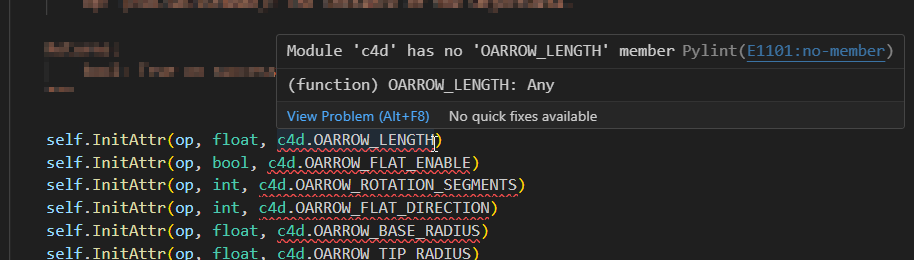
    Hi @m_adam, I coincidentally followed the steps on there when I installed the VS Code extension way back. It's pretty straight forward. PyLint in VS Code immediately ramped up my CPU usage so I got rid of that extension. But maybe there's a trick that someone else knows about that could help me out. I'm always open for suggestions and alternatives. What IDE are you using if I may ask? Did you setup anything special to make life easier? Best regards, Daniel
  • 0 Votes
    3 Posts
    1k Views
    aghiad322A
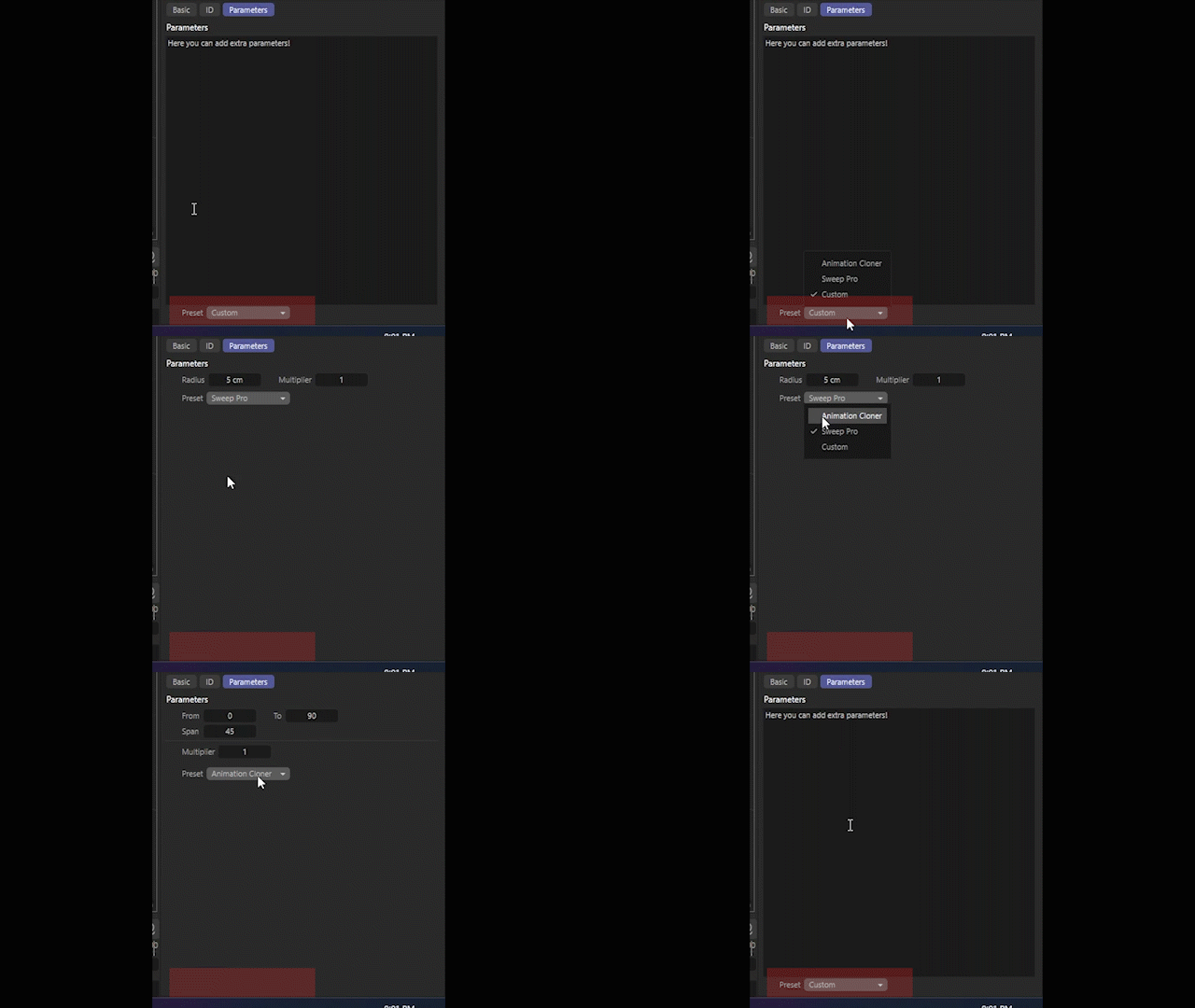
    Thanks a lot @i_mazlov that's exactly what i needed. however on one of the options for the dropdown i have a single Text input that spans across the whole attribute manager, now after i added the "STATICTEXT { SCALE_V; }" it eats up half the space in the image below [image: 1703269667505-screenshot-2023-12-22-211432.png] i tried to give it a Description id and treat it as any other parameter and hiding it using "c4d.DESC_HIDE", below is the layout of the whole tab GROUP ADVANCED_TAB { SCALE_V; STRING CUSTOM_TXT_PARAMETER{ ANIM OFF; CUSTOMGUI MULTISTRING; SCALE_V; WORDWRAP; }; GROUP{ COLUMNS 2; LONG ANIMATION_CLONER_FROM { MIN 0; ANIM OFF; }; LONG ANIMATION_CLONER_TO { MIN 0; ANIM OFF; }; LONG ANIMATION_CLONER_SPAN { MIN 1; ANIM OFF; }; GROUP{ COLUMNS 1; SEPARATOR ANIMATION_CLONER_SEPARATOR{ LINE; }; REAL ANIMATION_CLONER_MULTIPLIER { MIN 0.1 ; STEP 0.1 ; ANIM OFF; }; } } GROUP{ COLUMNS 2; REAL SWEEP_PRO_RADIUS { UNIT METER ; STEP 0.1 ; MIN 0.1; ANIM OFF; }; REAL SWEEP_PRO_MULTIPLIER { MIN 0.1; ANIM OFF; }; } STATICTEXT UI_FILLER{SCALE_V;} GROUP{ COLUMNS 2; LONG PRESET { ANIM OFF; CYCLE { ANIMATION_CLONER; SWEEP_PRO; CUSTOM_INPUT; } } } } but when i try to hide it from the "GetDDescription()" the description "description.GetParameterI(paramId)" is empty ! ,in the "GetDDescription()" in my source code i have the hiding for the other parameters implemented as well but didn't copy them to keep the snippet at minimum lines def GetDDescription(self, node: c4d.GeListNode, description: c4d.Description, flags: int) -> typing.Union[bool, tuple[bool, int]]: if not description.LoadDescription(node.GetType()): return False, flags paramId: c4d.DescID = c4d.DescID(c4d.DescLevel(c4d.UI_FILLER, c4d.DTYPE_STRING, 0)) evalId: c4d.DescID = description.GetSingleDescID() if (evalId and not paramId.IsPartOf(evalId)): return True, flags paramData: c4d.BaseContainer = description.GetParameterI(paramId) #paramData for the "c4d.UI_FILLER" is empty if paramData is None: return True, flags # parameter ID_HIDE_CONDITION. paramData[c4d.DESC_HIDE] = True if node[c4d.PRESET] == c4d.CUSTOM_INPUT else False return True, flags | c4d.DESCFLAGS_DESC_LOADED
  • Multiple unique render files from same file?

    programming download
    5
    0 Votes
    5 Posts
    2k Views
    G
    Ok, I ran into the issue of polling the BatchRender.IsRendering. I don't have the python skills to do multi-threading to check when a render is complete. I was able to hack in a time.sleep function but it is very problematic for longer renders and crashes a lot. Instead I went the route of Takes though Take are a bit cumbersome to setup but it is working nicely. I'll post the code here for anyone looking to do something similiar. I can just RenderAllTakes command and get each object rendered with its name using a $Take render token. def main(): doc = c4d.documents.GetActiveDocument() inEx = op[c4d.ID_USERDATA,4] # In/Exclude User Data for i in range(0 , op[c4d.ID_USERDATA,4].GetObjectCount()): #Iterate through each shot based on our shot slider in user data activeObj = inEx.ObjectFromIndex(doc, i) #deterimine which object is active if op[c4d.ID_USERDATA,1] == i: activeObj[c4d.ID_BASEOBJECT_VISIBILITY_EDITOR] = False #turn visibility On activeObj[c4d.ID_BASEOBJECT_VISIBILITY_RENDER] = False render_filename = inEx.ObjectFromIndex(doc, i).GetName() #Gets the name of the currently active object op[c4d.ID_USERDATA,5] = render_filename else: activeObj[c4d.ID_BASEOBJECT_VISIBILITY_EDITOR] = True #turn visibility Off activeObj[c4d.ID_BASEOBJECT_VISIBILITY_RENDER] = True c4d.EventAdd() ################ SEND ALL def BuildTakes(): #Sequencer() takedata = doc.GetTakeData() obj = doc.GetActiveObject() #print( Description.GetParameterI(op[c4d.ID_USERDATA,1], ar=None)) inEx = op[c4d.ID_USERDATA,4] # In/Exclude User Data for i in range(0,op[c4d.ID_USERDATA,4].GetObjectCount()): #Sequencer() take = takedata.AddTake(inEx.ObjectFromIndex(doc, i).GetName(), None, None) take.FindOrAddOverrideParam(takedata, obj , c4d.DescID(c4d.DescLevel(c4d.ID_USERDATA, c4d.DTYPE_SUBCONTAINER, 1),c4d.DescLevel(1)), i , backupValue=None, deleteAnim=False) take.FindOrAddOverrideParam(takedata, inEx.ObjectFromIndex(doc, i), c4d.ID_BASEOBJECT_VISIBILITY_EDITOR, False, backupValue=None, deleteAnim=False) take.FindOrAddOverrideParam(takedata, inEx.ObjectFromIndex(doc, i), c4d.ID_BASEOBJECT_VISIBILITY_RENDER, False, backupValue=None, deleteAnim=False) #op[c4d.ID_USERDATA,1] = 0 #Sequencer() #c4d.MSG_DESCRIPTION_CHECKUPDATE #Sequencer() #c4d.EventAdd() def ClearTakes(): tk = doc.GetTakeData() tk.ResetSystem()

  • Free Python Plugin: Quad Disc

    plugin-information download
    8
    1
    4 Votes
    8 Posts
    4k Views
    DunhouD
    I had PM you about that but I wonder if you see it @CJtheTiger, or you can get my e-mail address on my Github. Cheers~ DunHou
  • Spline Round Tool behave issue

    Moved python 2024
    6
    1
    0 Votes
    6 Posts
    2k Views
    ferdinandF
    Hey @baca, Just as an FYI, this bug has been fixed and it will be included in one of the upcoming releases of Cinema 4D, quite likely the next release. Cheers, Ferdinand
  • Hiring C++ Developer

    1
    0 Votes
    1 Posts
    760 Views
    No one has replied
  • Script that converts Redshift materials back to C4D standard ones

    21
    0 Votes
    21 Posts
    32k Views
    K
    Ah, ok. Thanks for the response. I get what you are saying and will try to further my own understanding of how to implement this script and scripting in general, and I appreciate you taking the time to clarify things. I am surprised that there isn't more of a demand for a more refined tool to revert RS materials. Do you know of any other approaches to achieving this? I realize this outside the realm of this forum an appreciate any input you might be able to provide.
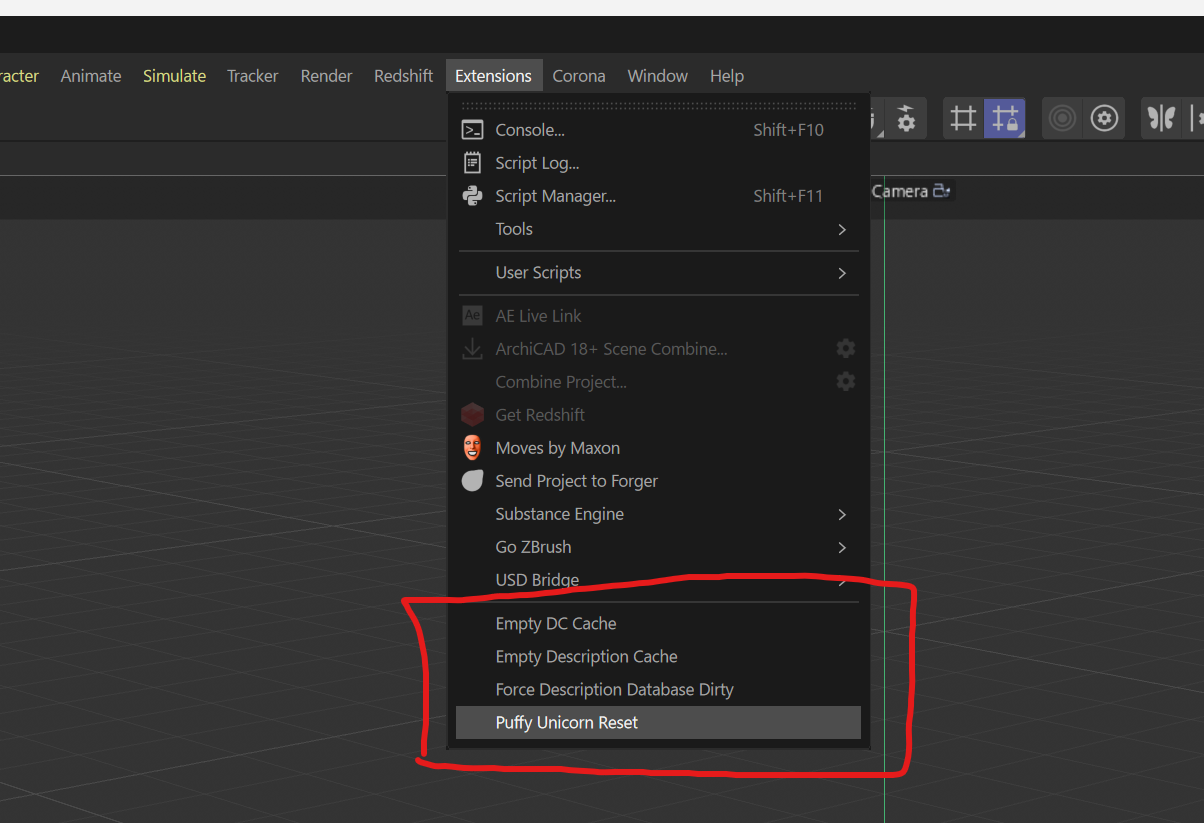
  • What does "Puffy Unicorn Reset" command do in 2024.1.0?

    2
    1
    0 Votes
    2 Posts
    1k Views
    M
    Hi @kng_ito this is some internal development commands that slipped through the release candidate. They remove some very specific cache files so nothing armful, but nothing really useful for you as it's more some internal debugging tools. Thanks for letting us know. Cheers, Maxime.
  • How many C++ and Python devs do we have here?

    5
    7 Votes
    5 Posts
    2k Views
    Leo_SaramagoL
    I'm looking for a C++ developer. I wrote a prototype in Python that needs some love... It's meant to become a real plug-in. Yes, there's a budget. Hey, @a_block , how can I reach you? Anybody else interested? Please, reply to this, let's talk. Thanks for your time.
  • 0 Votes
    9 Posts
    4k Views
    S
    Hi Bjorn, I have a working version of this now which you can download from my site at https://microbion.co.uk/files/rounditr2024.zip It's PC-only at the moment and requires C4D R2024. Try this and see if it does what you need. There's some basic documentation included which I'll tidy up for the final version. There doesn't seem to be a DM facility here so we'd better take any further discussion to email. You can get hold of through the contact page on my site (link is in the PDF in the zip file). Do let me know what you think. Cheers, Steve
  • SplineIK Rotation jitter problem

    7
    2
    0 Votes
    7 Posts
    3k Views
    chuanzhenC
    @ferdinand Thanks
  • Notarizing a plugin for macOS

    2
    1 Votes
    2 Posts
    1k Views
    M
    Thanks for the detailed guide, and also a good reminder that the altool is going to be deprecated. We are going to update our documentation accordingly. Cheers, Maxime.
  • Old Coffee "vnorm" term to python

    3
    0 Votes
    3 Posts
    2k Views
    C
    @ferdinand Thank you! you can find it in the old coffee help "using matrices" tutorial section: [image: 1694524159445-88c1a768-9234-4fe1-b6eb-c93e4d2ebf6a-grafik.png] My own code is ridicoulusly simple: main() { ang = ( vnorm(vector1) * vnorm(vector2)) ; } Just looking for a python "vnorm"
  • Plugin ID page is down?

    4
    0 Votes
    4 Posts
    1k Views
    J
    Hi @ferdinand, Thank you for you quick response! It is working nicely right now. All my previous ID are untouched and I am able to generate a new one. Thank you so much for your dedication! Best, JX
  • Are there any official personnel from Megascans here ?

    2
    2
    1 Votes
    2 Posts
    909 Views
    M
    Hi @Dunhou, we can't disclose any information about our partner and I'm doubtful that Megascan developer are reading this forum but who know. Cheers, Maxime.
  • using c4d.threading with (python) thinking particles

    python
    7
    0 Votes
    7 Posts
    3k Views
    ferdinandF
    Hello @jenandesign, Thank you for reaching out to us, I appreciate sharing your customer journey with us. I cannot make any further statements on the ongoing development of Cinema 4D, but we are of course happy to hear that you see value and potential in Cinema 4D. I will make sure that your input does reach the simulation Team. Cheers, Ferdinand
  • Free plugin : Octane Light Manager

    6
    1
    3 Votes
    6 Posts
    3k Views
    DunhouD
    Redshift Manager Here, and Octane also had a huge update, please use my plugin manager version to check new furtures. [image: 1693752232080-49845e69-c2ef-4d79-a429-4c1433f5a773-image.png]