• Test "Lock Overrides" in Python

    python
    4
    0 Votes
    4 Posts
    874 Views
    ferdinandF
    Hello @danielsian, without any further activity before Wednesday, the 16.03.2022, we will consider this topic as solved and remove the "unsolved" state from this topic. Thank you for your understanding, Ferdinand
  • Strip Texture Path using Python

    python
    5
    0 Votes
    5 Posts
    1k Views
    ferdinandF
    Hello @djoneeeee, without any further activity before Wednesday, the 16.03.2022, we will consider this topic as solved and remove the "unsolved" state from this topic. Thank you for your understanding, Ferdinand
  • The second "call command" cannot be executed

    python s24
    6
    0 Votes
    6 Posts
    1k Views
    ferdinandF
    Hello @mari, without any further activity before Wednesday, the 16.03.2022, we will consider this topic as solved and remove the "unsolved" state from this topic. Thank you for your understanding, Ferdinand
  • Normal tangents to world

    7
    0 Votes
    7 Posts
    1k Views
    ferdinandF
    Hello @wickedp, without any further activity before Wednesday, the 16.03.2022, we will consider this topic as solved and remove the "unsolved" state from this topic. Thank you for your understanding, Ferdinand
  • Calling an existing user data preset onto a python tag.

    python r25
    7
    0 Votes
    7 Posts
    2k Views
    ferdinandF
    Hello @z-prich, without any further activity before Wednesday, the 16.03.2022, we will consider this topic as solved and remove the "unsolved" state of this topic. Thank you for your understanding, Ferdinand
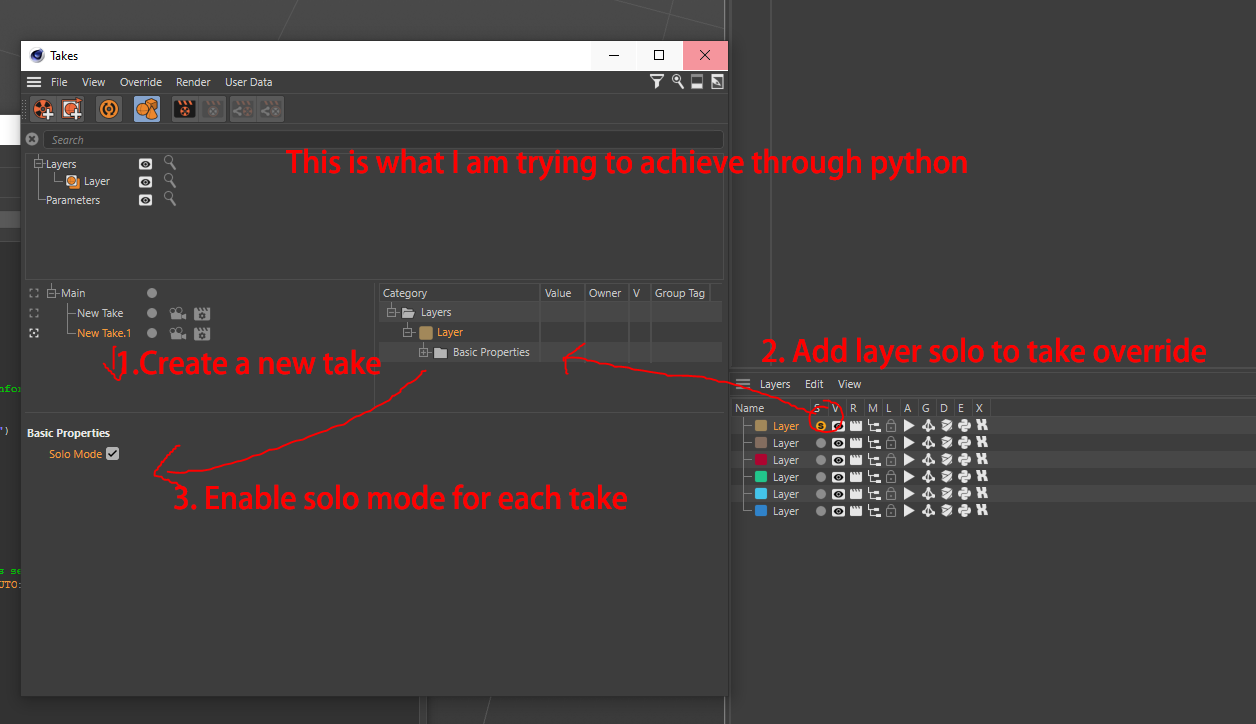
  • Is it possible to add layer solo to a new take through script?

    python
    4
    1
    0 Votes
    4 Posts
    850 Views
    ferdinandF
    Hello @sean1832 , without any further activity before Wednesday, the 16.03.2022, we will consider this topic as solved and remove the "unsolved" state of this topic. Thank you for your understanding, Ferdinand
  • What are the AES specifications for the AES encryption in C4D SDK ?

    c++
    7
    0 Votes
    7 Posts
    1k Views
    ferdinandF
    Hello @c5d, without any further activity before Wednesday, the 16.03.2022, we will consider this topic as solved and remove the "unsolved" state of this topic. Thank you for your understanding, Ferdinand
  • Python Source Protector: Can it be called via CLI?

    python
    18
    0 Votes
    18 Posts
    6k Views
    a_blockA
    Thanks, Ferdinand! Much appreciated. I always forget about c4dpy and that it can still be run in parallel to a running C4D instance. Thanks.
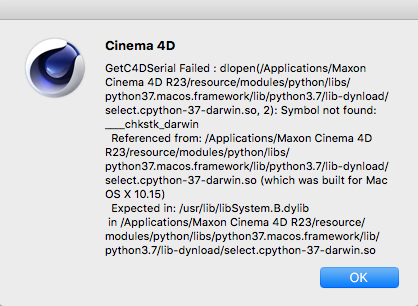
  • Symbol not found: ___chkstk_darwin

    r23 python c++
    2
    1
    0 Votes
    2 Posts
    800 Views
    M
    Cinema 4D R23 require at least mac os 10.14 and the most optimal is 10.15. In your case you need to update to 10.15. See Cinema 4D R23 Requierements. Cheers, Maxime.
  • Layers checker

    python s24 sdk
    4
    0 Votes
    4 Posts
    2k Views
    ROMANR
    @mogh I didn't know about this function @ferdinand Thank you a lot for your detailed response. I will chek posts which you recommended
  • OpenGL in Cinema 4D

    python r25
    6
    0 Votes
    6 Posts
    2k Views
    gheyretG
    @fwilleke80 Yes, it's a solution. But it's can not to orbiting the scene or transforming the model. I think i need to make a desktop application, and make sure the window always on top. However, this will lead to more work for me. And thanks to your reply! cheers
  • Particles from python SDK

    5
    0 Votes
    5 Posts
    2k Views
    Z
    @ferdinand That is great! I did not imagine that working so simply, that's a wonderful feature. Regarding the 'broken' part, I did 'something' and spheres stopped appearing in the viewport, just the 'tracers'. I cannot reproduce that, I must have screwed up. All is right with the world now. In case it helps others, the demo code below now does everything I currently need. Programmatically changes position of the emitter, and following this discussion (https://forums.cgsociety.org/t/c4d-animation-via-python/1546556) I also change the color over the course of each 10-frame segment. Thanks so much for your help, I am really sold on 4D. import c4d import math import random mat = c4d.BaseMaterial(c4d.Mmaterial) mat.SetName('emitter sphere') mat[c4d.MATERIAL_COLOR_COLOR] = c4d.Vector(0.8, 0.0, 0.0) ## Get RGB tracks for continuous color update redtrack = c4d.CTrack(mat, c4d.DescID(c4d.DescLevel(c4d.MATERIAL_COLOR_COLOR, c4d.DTYPE_COLOR, 0, ), c4d.DescLevel(c4d.VECTOR_X, c4d.DTYPE_REAL, 0))) mat.InsertTrackSorted(redtrack) greentrack = c4d.CTrack(mat, c4d.DescID(c4d.DescLevel(c4d.MATERIAL_COLOR_COLOR, c4d.DTYPE_COLOR, 0, ), c4d.DescLevel(c4d.VECTOR_Y, c4d.DTYPE_REAL, 0))) mat.InsertTrackSorted(greentrack) bluetrack = c4d.CTrack(mat, c4d.DescID(c4d.DescLevel(c4d.MATERIAL_COLOR_COLOR, c4d.DTYPE_COLOR, 0, ), c4d.DescLevel(c4d.VECTOR_Z, c4d.DTYPE_REAL, 0))) mat.InsertTrackSorted(bluetrack) doc.InsertMaterial(mat) sph = c4d.BaseObject(5160) rad = sph.GetRad() particleRad = 2.0 scale = particleRad/rad[0] sph.SetAbsScale((scale,scale,scale)) ttag = c4d.TextureTag() ttag.SetMaterial(mat) sph.InsertTag(ttag) sph.SetBit(c4d.BIT_ACTIVE) emitter = c4d.BaseObject(5109) emitter.SetBit(c4d.BIT_ACTIVE) doc.InsertObject(emitter) sph.InsertUnder(emitter) # emit particles at rate 500 emitter[c4d.PARTICLEOBJECT_BIRTHEDITOR] = 500 emitter[c4d.PARTICLEOBJECT_BIRTHRAYTRACER ] = 500 emitter[c4d.PARTICLEOBJECT_RENDERINSTANCES] = 500 emitter[c4d.PARTICLEOBJECT_SIZEX] = 0.2 emitter[c4d.PARTICLEOBJECT_SIZEY] = 0.2 emitter[c4d.PARTICLEOBJECT_TYPE] = c4d.PARTICLEOBJECT_TYPE_PYRAMID emitter[c4d.PARTICLEOBJECT_ANGLEH] = 2 * math.pi emitter[c4d.PARTICLEOBJECT_ANGLEV] = math.pi emitter[c4d.PARTICLEOBJECT_SHOWOBJECTS] = True fps = 24 emitter[c4d.PARTICLEOBJECT_START] = c4d.BaseTime(0, fps) emitter[c4d.PARTICLEOBJECT_STOP] = c4d.BaseTime(500, fps) emitter[c4d.PARTICLEOBJECT_LIFETIME] = c4d.BaseTime(5, fps) ## Animate 500 frames, new position every ten frames, ## transition to next color (cycle red->green->blue) ## First set key frames for color change nextRGB = [1.,0.,0.] redcurve = redtrack.GetCurve() greencurve = greentrack.GetCurve() bluecurve = bluetrack.GetCurve() for segment in range(50) : frame = 50*segment redkey = redcurve.AddKey(c4d.BaseTime(frame, fps))['key'] redkey.SetValue(redcurve, nextRGB[0]) greenkey = greencurve.AddKey(c4d.BaseTime(frame, fps))['key'] greenkey.SetValue(greencurve, nextRGB[1]) bluekey = bluecurve.AddKey(c4d.BaseTime(frame, fps))['key'] bluekey.SetValue(bluecurve, nextRGB[2]) # # rotate RGB values nextRGB.append(nextRGB.pop(0)) ## run animation frame = 0 pos = c4d.Vector(0,0,0) emitter.SetAbsPos(pos) doc.SetTime(c4d.BaseTime(frame, fps)) c4d.CallCommand(12410) for segment in range(50) : frame = 10 * segment mat.Update(True, True) sph.Message(c4d.MSG_UPDATE) for k in range(3) : pos[k] = -30 + 60*random.random() emitter.SetAbsPos(pos) doc.SetTime(c4d.BaseTime(frame, fps)) c4d.CallCommand(12410) # record
  • module 'c4d' has no attribute 'ASSETDATA_FLAG_MISSING'

    r23 r25 python
    3
    0 Votes
    3 Posts
    715 Views
    mikeudinM
    @cairyn Thank you!
  • Thinking Particles in ParallelFor

    r20 c++ windows sdk
    5
    0 Votes
    5 Posts
    1k Views
    N
    Hello @ferdinand, thank you again for this very detailed and helpful reply! I tried both methods, allocating beforehand and like the previous setup, just have it after the ParallelFor altogether. Both worked, although allocating beforehand introduced some weird flickering in the particles and was (at least it feels that way) more unstable. Which is why I opted to go for the second solution as with some exstensive testing it didn't seem to cause any issues. For anyone maybe reading this in the future and having the same issues: Do not allocate the particle group inside the plugin but use a link field and have the user handle the particle group creation inside c4d, that solved a lot of weird behaviours and seemed to work better/more stable. (at least in my not so intended usecase) I will mark this thread as solved, as it works now and I can fix the main-thread issue as well without too much trouble. So thank you very much for your quick and very detailed replies! Best Regards, Florian
  • Treeview Column adjust

    python r20 r25
    8
    2
    0 Votes
    8 Posts
    2k Views
    ferdinandF
    Hey @mogh, Thank you for the kind words and I am happy that this solved your problem. While I sometimes channel here my inner librarian and press for a formal order for new topics, so that the SDK Team can answer them effectively, I want to make clear that all Cinema 4D programming questions are welcome on Plugin Café. Just remember to open a new topic for new questions and to place them in the General Talk forum when they are general programming questions not directly related to our APIs. We will treat them then with a lower priority and rigor, but we usually also answer there. Cheers, Ferdinand
  • Resolving Save Path in Render Settings

    python
    3
    0 Votes
    3 Posts
    637 Views
    a_blockA
    Hi Ferdinand, thanks for your thorough and detailed reply. The problem is, I need to put the correct name of the rendered output into a text file. This needs to match, when rendered later on. So, just guessing something similar is also not an option. I already anticipated, there would be no easy solution. By the way, even if I had the time to test render 1x1 images, it would still not be ok, there are resolution tokens... I will most likely reduce the amount of freedom the user has here, in order to end with something deterministic. Thanks for your help and ideas. You can consider this topic closed from my side. Cheers to the entire SDK Team, Andreas
  • MSG_MENUPREPARE not sent to BaseShaders

    c++ r25
    6
    0 Votes
    6 Posts
    1k Views
    fwilleke80F
    I've changed this back to "Normal topic". It was a question, and it was answered, but since there's no solution, I didn't want to mark it as "solved.
  • Access renderer specific settings with python

    sdk python
    6
    0 Votes
    6 Posts
    2k Views
    ferdinandF
    Hey @wen, Thanks for sharing the example scene! Got a new question though, what do you mean with: "In R25 Redshift does not have a "Raw" color profile anymore" I looked at the wrong parameter; I thought your second script was still for REDSHIFT_RENDERER_COLOR_MANAGEMENT_OCIO_RENDERING_COLORSPACE as the previous example, but it is for REDSHIFT_RENDERER_COLOR_MANAGEMENT_OCIO_VIEW. So, you are right, "Raw" is still there Cheers, Ferdinand
  • Node description database versions

    3
    0 Votes
    3 Posts
    789 Views
    D
    Hi @m_magalhaes , thanks very much for the provided information. We are not modifying the database manually from an editor, but rather generate it on our own. That's why I was searching for an explicit documentation, because the process of adding nodes from the Resource Editor in C4D just to check an attribute may be tedious. Thanks we will consider doing that for version changes. Thanks again - I will take a look into this interface and ask again if I have questions for its proper usage. Cheers, Deyan
  • Get height and width (cm) of a camera focus area

    python sdk r21
    5
    1
    0 Votes
    5 Posts
    2k Views
    pyxelriggerP
    Hmm thank you!! It's not as difficult as I imagined I just had to make a change in the formula for some case, I used: x = focaldistance*math.tan(h/2)*1 [image: 1644929034240-96f1960e87e92c0bd8b3f677b453172d.gif]