The Maxon SDK Team is currently short staffed due to the winter holidays. No forum support is being provided between 15/12/2025 and 5/1/2026. For details see Maxon SDK 2025 Winter Holidays.
  • 0 Votes
    2 Posts
    44 Views
    ferdinandF
    Hey @lasselauch, Thank you for reaching out to us. The issue is likely that you do not respect OCIO color management in your document. You have marked this posting as S26, but my hunch would be that you are using a newer version of Cinema 4D and an OCIO enabled document. The first implementation of OCIO showed up with S26 in Cinema 4D, although it was just some internal systems then such as the flag DOCUMENT_COLOR_MANAGEMENT_OCIO and user facing systems arrived with 2024 the earliest I think. In Python, you can only truly deal with this in 2025.0.0 and higher, as that is when we added the OCIO API to Python. When you indeed are testing this on an S26 or lower instance of Cinema 4D, the major question would be if DOCUMENT_LINEARWORKFLOW is enabled or not. Because you cannot just blindly convert colors. Is this the intended behavior? Should we always convert LINEAR→sRGB when drawing colors from ColorField/ColorDialog in a GeUserArea? The question would be what you consider here this ;). But if the question is if it is intended behavior for a scene with DOCUMENT_COLOR_MANAGEMENT_BASIC and DOCUMENT_LINEARWORKFLOW enabled, to have all its scene element and parameter colors expressed as sRGB 1.0, then yes, that is the major gist of the old linear workflow. It is also intended that drawing happens in sRGB 2.2 up this day. Issue 2: Eyedropper Roundtrip Doesn't Preserve Saturated Colors Generally, multi question topics tend to become a mess (which is why we do not allow them). But in short: While roundtrips in the form of sRGB 1.0 -> sRGB 2.2 -> sRGB 1.0 are not absolutely lossless (you are always subject to floating point precision errors), there is no giant loss by default. I am not sure what math TransformColor is using explicitly. A simple pow(color, 2.2) and pow(color, 1/2.2) are the naive way to do this and the loss would be rather small. TransformColor might be respecting tristimulus weights which is a bit more lossy but still in a small range. OCIO roundtrips on the other hand are generally quite lossy, because ACEScg is a very wide gamut color space and converting from ACEScg to sRGB 2.2 and back can lead to significant losses in saturated colors. Some conversion paths in OCIO are even irreversible in a certain sense (depending on what color spaces you have assigned to which transform). OCIO is rather complicated to put it mildly. Is there a known issue with the ColorDialog eyedropper and color space conversion for saturated colors? Not that I am aware of. But you likely just ignored OCIO. And while the default OCIO Render Space of Cinema 4D (ACEScg) is in a certain sense similar to sRGB 1.0 for low saturated colors, it diverges significantly for highly saturated colors. So, your loss of saturation is likely stemming from treating an OCIO document with an ACEScg render space as sRGB 1.0. See also: Python OCIO Example: open_color_io_2025_2.py Python OCIO Example: py-ocio_node_2025.pyp C++ Manual: Color Management C++ Manual: OCIO Last but not least, I attached an example of what you are trying to achieve, get a color from a color gadget in a dialog and draw with it faithfully in your own user area. Cheers, Ferdinand """Demonstrates how to correctly draw with OCIO colors in a dialog. This examples assumes that you are using Cinema 4D 2025+ with an OCIO enabled document. It will also work in other versions and color management modes, but the point of this example is to demonstrate OCIO color conversion for drawing in dialogs (more or less the same what is already shown in other OCIO examples in the SDK). """ import c4d from c4d import gui class ColorArea(gui.GeUserArea): """Draws a color square in a custom UI element for a dialog. """ def __init__(self): self._color: c4d.Vector = c4d.Vector(1, 0, 0) # The color to draw, this is in sRGB 2.2 def GetMinSize(self): return 75, 20 def DrawMsg(self, x1: int, y1: int, x2: int, y2: int, msg: c4d.BaseContainer) -> None: """Draw the color of the area. """ self.OffScreenOn() # Draw the color. self.DrawSetPen(self._color) self.DrawRectangle(x1, y1, x2, y2) class ColorDialog(gui.GeDialog): """Implements a dialog that hosts a color field and chooser as well as our custom color area. The colors in the color field and chooser are in render space, so we have to convert them to sRGB for correct display in our user area. All three color widgets are kept in sync, i.e., changing one updates the others. """ ID_DUMMY_ELEMENT: int = 1000 ID_COLOR_CHOOSER: int = 1001 ID_COLOR_FIELD: int = 1002 ID_COLOR_AREA: int = 1003 SPACING_BORDER: int = (5, 5, 5, 5) SPACING_ELEMENTS: int = (5, 5) DEFAULT_FLAGS: int = c4d.BFH_SCALEFIT | c4d.BFV_SCALEFIT def __init__(self) -> None: """Initializes the dialog. """ # Reinitializing the color area each time CreateLayout is called, could cause loosing its # state when this is an async dialog docked in the UI and part of a layout, as CreateLayout # can be called more than once when a dialog must be reinitialized on layout changes. So, # doing it in __init__ or guarding it with a check if it is already created in CreateLayout # is better. self._color_area: ColorArea = ColorArea() def CreateLayout(self) -> None: """Called by Cinema 4D to populate the dialog with elements. """ self.SetTitle("Dialog Color OCIO Demo") # Using the same ID for dummy elements multiple times is fine, using IDs < 1000 is often # not a good idea, as Cinema 4D usually operates in that range, and therefore an ID such # as 0 can lead to issues (0 is AFIAK not actually used but better safe than sorry). if self.GroupBegin(self.ID_DUMMY_ELEMENT, self.DEFAULT_FLAGS, cols=1): self.GroupBorderSpace(*self.SPACING_BORDER) self.GroupSpace(*self.SPACING_ELEMENTS) # Add a color chooser and a color field. self.AddColorChooser(self.ID_COLOR_CHOOSER, c4d.BFH_LEFT) self.AddColorField(self.ID_COLOR_FIELD, c4d.BFH_LEFT) # Add our user area to display the color. self.AddUserArea(self.ID_COLOR_AREA, c4d.BFH_LEFT) self.AttachUserArea(self._color_area, self.ID_COLOR_AREA) self.GroupEnd() return True def InitValues(self) -> bool: """Called by Cinema 4D to initialize the dialog values. """ self.SetColors(c4d.Vector(1, 0, 0)) return True def SetColors(self, color: c4d.Vector, doc: c4d.documents.BaseDocument | None = None) -> None: """Sets the colors of all color widgets to the given render space #color. """ # Just set the two color widgets first, as they expect render space colors. self.SetColorField(self.ID_COLOR_CHOOSER, color, 1.0, 1.0, c4d.DR_COLORFIELD_NO_BRIGHTNESS) self.SetColorField(self.ID_COLOR_FIELD, color, 1.0, 1.0, c4d.DR_COLORFIELD_NO_BRIGHTNESS) # When the call did not provide a document, use the active document. if not isinstance(doc, c4d.documents.BaseDocument): doc = c4d.documents.GetActiveDocument() # Check in which color mode the document is. Explicit OCIO color management exists in this # form since S26 but it really only took off with 2025. isOCIO: bool = False if (c4d.GetC4DVersion() >= 2025000 and doc[c4d.DOCUMENT_COLOR_MANAGEMENT] == c4d.DOCUMENT_COLOR_MANAGEMENT_OCIO): # All colors in a document are render space colors (including the color fields in # dialogs). GUI drawing however still happens in sRGB space, so we need to convert # the render space color to sRGB for correct display. For that we need a document # because it contains the OCIO config and the converted which is derived from it. converter: c4d.modules.render.OcioConverter = doc.GetColorConverter() # Transform a render space color to sRGB space (there are other conversion paths # too, check the docs/examples on OCIO). color: c4d.Vector = converter.TransformColor( color, c4d.COLORSPACETRANSFORMATION_OCIO_RENDERING_TO_SRGB) isOCIO = True elif not isOCIO and doc[c4d.DOCUMENT_LINEARWORKFLOW]: # For non-OCIO documents (older than S26 or DOCUMENT_COLOR_MANAGEMENT_BASIC), the scene # element color space ('render space' in OCIO terms) can either be sRGB 2.2 or sRGB 1.0 # (linear sRGB), depending on whether DOCUMENT_LINEARWORKFLOW is set or not. In that # case, we would have to convert from gamma 1.0 to 2.2. In a modern OCIO document, we # could also use #converter for this, but for legacy reasons I am using here the old # c4d.utils function. It might be better to use the converter when this is a 2025+ # instance of Cinema 4D. #DOCUMENT_LINEARWORKFLOW is really old, it exists at least # since #R21 (I did not check earlier versions), so I am not doing another version check. color = c4d.utils.TransformColor(color, c4d.COLORSPACETRANSFORMATION_LINEAR_TO_SRGB) # Last but not least, in practice you would probably encapsulate this logic in your user # area, similarly to how native color elements operate just in Render Space but draw in # sRGB space. For dialogs (compared to description parameters), this is a bit complicated # by the fact that one cannot unambiguously associate a dialog with a document from which # to take the color management settings. A custom GUI of a description parameter can # always get the node it is hosted by and its document. For dialog GUIs that is not possible. # So, we have to do the active document approach I showed here. # In a super production scenario, you would overwrite CoreMessage() of the user area or # dialog, to catch the active document changing, to then update the color conversion, as # with the document change, also the OCIO config could changed and with that its render # space transform. # # All in all probably a bit overkill, and I would ignore this under the banner of "who # cares, just reopen the dialog and you are fine". Because users will also rarely change # the default render space transform of ACEScg to something else. self._color_area._color = color self._color_area.Redraw() def Command(self, id: int, msg: c4d.BaseContainer) -> bool: """Called by Cinema 4D when the user interacts with a dialog element. """ if id == self.ID_COLOR_CHOOSER: color: c4d.Vector = self.GetColorField(self.ID_COLOR_CHOOSER)["color"] self.SetColors(color) elif id == self.ID_COLOR_FIELD: color: c4d.Vector = self.GetColorField(self.ID_COLOR_FIELD)["color"] self.SetColors(color) return True # Please do not do this hack in production code. ASYNC dialogs should never be opened in a Script # Manager script like this, because this will entail a dangling dialog instance. Use modal dialogs # in Script Manager scripts or implement a plugin such as a command to use async dialogs. dlg: ColorDialog = ColorDialog() if __name__ == '__main__': dlg.Open(c4d.DLG_TYPE_ASYNC, defaultw=480, defaulth=400)
  • How to change the Node spaces

    Cinema 4D SDK python 2025 windows
    2
    0 Votes
    2 Posts
    22 Views
    ferdinandF
    Hello @gelobui, Welcome to the Maxon developers forum and its community, it is great to have you with us! Getting Started Before creating your next postings, we would recommend making yourself accustomed with our forum and support procedures. You did not do anything wrong, we point all new users to these rules. Forum Overview: Provides a broad overview of the fundamental structure and rules of this forum, such as the purpose of the different sub-forums or the fact that we will ban users who engage in hate speech or harassment. Support Procedures: Provides a more in detail overview of how we provide technical support for APIs here. This topic will tell you how to ask good questions and limits of our technical support. Forum Features: Provides an overview of the technical features of this forum, such as Markdown markup or file uploads. It is strongly recommended to read the first two topics carefully, especially the section Support Procedures: How to Ask Questions. About your First Question It depends a bit on how you mean your question. There is GetActiveNodeSpaceId which allows you to get the ID of the current node space. But there is no setting equivalent of that function. So, you cannot set a node space by its ID. What you can do, is call the command which switches node spaces. These are however dynamically assigned and can have a different meaning, depending on how many render engines are installed. You can just check the script log after changing the space. On this installation I have for example no extra render engines or node spaces installed, therefore Redshift is there 72000, 4. [image: 1765458881919-a0da1ed7-7add-456e-a8cc-63d8bd1ced2a-image.png] But on this machine I have the C++ SDK installed and therefore the Example nodes space, so Redshift is now 72000, 5: [image: 1765459007165-49b0838b-49d5-4f14-b638-811d8d26ada4-image.png] When you really want to do this in a fail safe manner, you would have to parse the menu of Cinema 4D to know with which sub-id to call CallCommand. Cheers, Ferdinand
  • ObjectData handles - Unexpected position jitter

    Moved Bugs python 2026
    8
    1 Votes
    8 Posts
    99 Views
    ferdinandF
    Good to hear!
  • 0 Votes
    1 Posts
    767 Views
    No one has replied
  • KeyFrame User Data from Xpresso driven User Data

    Cinema 4D SDK python
    3
    2
    0 Votes
    3 Posts
    30 Views
    ferdinandF
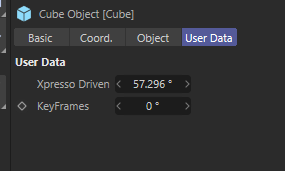
    Hey @JoelJohera, it is kind of hard to follow your question and solution, as the former lacks a scene for context and for the latter I am not quite sure what you fixed. But when it works for you I am happy Cheers, Ferdinand
  • How to get edge 'island' selection

    Cinema 4D SDK python 2026
    6
    1
    0 Votes
    6 Posts
    100 Views
    ferdinandF
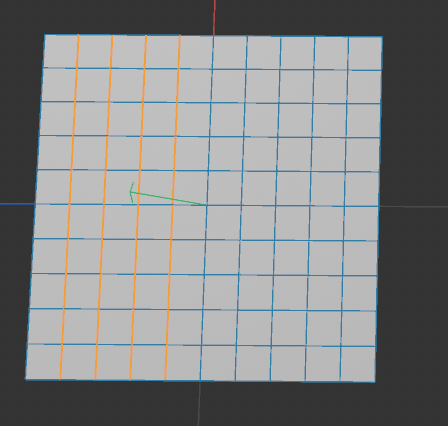
    Hey @BretBays, Let me answer a few things, I although I still have the feeling we are not at the bottom of things yet. So my idea(based off a maya tool used at work) is to be able to select those loops myself with edges, and have it run the interpolation on all the loops at once(well, at once as far as clicking apply once and it does each loop for you). You can of course implement a point, edge, or polygon loop or ring selection yourself. But my advice would be to use the builtin tool programmatically unless you really have to implement your own tool. Because while a simple loop selection is relatively trivial, a production level loop tool is then quite a bit of work, due to all the edge cases you have to handle. The issues I am running into is that it seems like working with edge selections is very cumbersome in Cinema. [...] I don't know I just am having a hard time wrapping my head around these concepts in Cinema. Is it possible to pass in an edge ID and work with edge ID's or do you have to go through the polygon info and all of that to get them? Cinema 4D does not store edges explicitly, as this would unnecessarily increase the size of a scene. One can sufficiently describe polygonal geometry as a set of points for the vertices, and a set of ordered quadruples of point indices for each polygon. This is common practice in 3D applications and called 'indexed face set'. You always have to go through the polygons and points to work with edges. Edges are effectively just a smoke and mirrors convenience feature for end users. One could argue how much front-end wrappers for edges an API requires to be easy to use, but I would say Cinema 4D is there at least okay. You can find helper functions for edges on PolygonObject and SendModelingCommand supports edge selections directly. In short, for each perceived user edge E_p, exist n 'real' or 'raw' edges for the indexed face set, where n is either 1 or 2 when the is mesh manifold (or larger when non-manifold). If n=1, then E_p is a boundary edge, otherwise it is an internal edge shared by two polygons. This is due to these two polygons having two have opposite winding orders for that shared edge when the polygons are meant to face into the same direction. The following diagram illustrates this (arrows indicate the winding order of the polygons): a- → -b b- → -e | | | | ↑ P ↓ ↑ Q ↓ | | | | d- ← -c c- ← -f Fig. 1: Two polygons P and Q sharing the user perceived edge E_p defined by the points b and c. The lower case labels denote unique point identifiers in the indexed face set, not a point order within the polygon. The polygon P is defined as (a, b, c, d) and the polygon Q as (b, e, f, c), i.e., a and b are the first vertex of each polygon respectively. The arrows describe the winding order of the polygons. The global raw edge index is defined as rawEdgeIndex = polygonIndex * 4 + localEdgeIndex. E.g., when P would have the polygon index 2 and Q the polygon index 6, then the user perceived edge E_p would correspond to the two raw edges indices p_bc = 2 * 4 + 1 = 8 (edge bc in P which is the second edge, i.e. local index 1) and q_cb = 6 * 4 + 3 = 27 (edge cb in Q which is the fourth edge, i.e. local index 3). Here are some code examples and forum posts about working with edges in Cinema 4D's Python API: geometry_polgyon_edges_2024: This is the official example script showing how to work with polygon edges in Cinema 4D 2024. It explains how to access and identify edges in a polygon object. Select Edges by Length: An example that shows how to select edges based on their length. Select Polygons Facing into the Same Direction: Not directly related to edges, but I talk here about the fundamental concept of a winding order, which is important when working with polygon edges. Cheers, Ferdinand

  • 0 Votes
    2 Posts
    59 Views
    ferdinandF
    Hey @Simon-Lucas, Welcome to the Maxon developers forum and its community, it is great to have you with us! Getting Started Before creating your next postings, we would recommend making yourself accustomed with our forum and support procedures. You did not do anything wrong, we point all new users to these rules. Forum Overview: Provides a broad overview of the fundamental structure and rules of this forum, such as the purpose of the different sub-forums or the fact that we will ban users who engage in hate speech or harassment. Support Procedures: Provides a more in detail overview of how we provide technical support for APIs here. This topic will tell you how to ask good questions and limits of our technical support. Forum Features: Provides an overview of the technical features of this forum, such as Markdown markup or file uploads. It is strongly recommended to read the first two topics carefully, especially the section Support Procedures: How to Ask Questions. About your First Question Do you really mean you are on R25? Or do you mean you are on 2025? Anyway, please share an example scene and the code you have so far. Otherwise we won't be able to help you. Cheers, Ferdinand
  • 0 Votes
    3 Posts
    75 Views
    ymoonY
    @ferdinand Thank you. It works well. --> tag.Message(c4d.MSG_EDIT)
  • 0 Votes
    5 Posts
    112 Views
    chuanzhenC
    @ferdinand Thanks for reply Other channels(BOX,X-Ray....) also seem to be unfeasible, and currently it seems only can accept this limitation (affected by depth of field) Due to the current not to transfer to C++, some plugin ideas are indeed somewhat unusual only using some simple C4D drawings to generate Bitmaps, so I did not pay attention to the handling of Ocio. I will carefully read the manual on this aspect in the document.
  • 0 Votes
    3 Posts
    80 Views
    ferdinandF
    Hey @lionlion44, yes, that is the correct answer. The subject comes up from time to time, here is an answer of mine which is about the very case of yours - discovering substance channels. Cheers, Ferdinand
  • Educational Licenses

    Cinema 4D SDK python windows 2025
    9
    1
    0 Votes
    9 Posts
    261 Views
    DunhouD
    @ferdinand Thanks for your great examples! Very helpful!
  • set GvNode value via python

    Cinema 4D SDK windows python 2026
    4
    1
    0 Votes
    4 Posts
    146 Views
    DunhouD
    Thanks for @ferdinand awesome answer! I found DescLevel and DescId always confused to me, but them do can access more than simple set item, time to dive deeper to the DescLevel part Cheers~ DunHou
  • 0 Votes
    5 Posts
    169 Views
    M
    Hey ferdinand, I mixed different questions - I'll keep to the theoretical part to keep the Post relevant to the original question. I appreciate the informative post as always. Parametric concept of a spline is clear to me -> that's why i asked about "C4D can not get more precise than a 0° degree line object ?" which was formulated to lose as 0° is mathematical problematic? and I know 0.1 would be better. sorry about that. The tip about spline 'Adaptive' setting was a good hint, I never use it in work so I forgot about it. So to summarize regarding my question. The Line object always samples what the user has set in the spline settings and not by a unknown internal setting (for example to give good viewport performance, or nice equal sections) And its a better fit for my application, hence there is no "linear transport" shenanigans going on. And if I want to display a high resolution of my calculation, I make an internal copy of that spline and edit the spline settings, instead of sampling a low division spline with spline helper. Normalization / Jagged lines: I use Menger-Krümmung. -> will open a new topic. Your code might come in handy when I'll extend the plugin to polygon meshes. ... ... ... Remark as humans cannot see that level of detail. I have to disagree on this topic. As a tell tale we import CAD data here into C4D to evaluate the work of the engineers. Not long ago I said to our surface engineer. "take a look at the end of that surface something feels off, it looks like the surface is lifting" -> The engineer reportet back "you just spoted a 0.001mm surface deviation of an unconstrained spline ending I did not set." We could argue that the seen result was in fact not 0.001mm but perhaps to surface setup more than 1mm, (or by some rounding error C4D normal tag shading where continuous and then stagnant for 1 pixel) but my point is settings in precision are important and carry through till the final product. Even though a setting of 0.1° for a spline might might be unsuitable in most cases (rendering, performance, ...) it is not for evaluation. So even C4D and all that rounding / conversion / floating point precision might look like unrealiable, unecessary or even esotheric it caries through to a certain degree and its more reliable than you think. (Yes we evaluate in the original CAD Program, but the tale is that I saw something even after importing it into C4D) As reference to why I need this: Blender Plugin: Surface Diagnostics - Josef Ludvík Böhm Thank You
  • 0 Votes
    7 Posts
    237 Views
    ferdinandF
    Hey, almost forgot: We have fixed this, an upcoming release will contain the fix . We, however, went with a fix removing the offending call instead of fixing the incorrect progress handler method (which was the issue). So, in other words: The workaround I showed here won't work in future versions, as the number of progress calls will be halved. Before one got two calls per update when rendering with the preview renderer: One for the correctly working image progress update and one for the buggy generic progress update. We have removed the latter. Halving the number of calls is more technically correct, since it made no sense to call the progress hook twice per update but will break any plugins that relied on that incorrect behaviour. Cheers, Ferdinand
  • 0 Votes
    14 Posts
    565 Views
    ferdinandF
    FYI, there has been a verified fix for the Booleans crash, it will be included in an upcoming release of Cinema 4D.
  • Several Asset Browser Issues

    Cinema 4D SDK 2026 2025 python
    7
    0 Votes
    7 Posts
    380 Views
    B
    Hi @ferdinand Thank you for the reply and I totally understand your point. I think I will try to find another solution and will adjust my rigs to maybe get rid of the python tag thats causing the issue. I wasn't aware that this is considered "dark magic" python code^^ haha Thank you once again for your efforts! Cheers, Ben
  • Setting Preferences via script

    Cinema 4D SDK python 2025 2026
    5
    0 Votes
    5 Posts
    201 Views
    ferdinandF
    Hello @CJtheTiger, I am not quite sure how your question is meant, and generally new questions should constitute new topics. When you are asking, if when there is an ID_FOO: int = 12345 in V1, if we then just silently switch out the numeric value to ID_FOO: int = 54321 in V2, then the answer is sort of yesn't. We try to keep identifiers persistent. And for things like plugin IDs this is true without ifs and buts. I.e., once Ocube: int = 5159 has been defined, it will stay like this. But parameter values, e.g., PRIM_CUBE_LEN: int = 1100, can technically change. The goal is also to keep them persistent but in ABI breaking releases we sometimes have to modify descriptions. That is why we recommend that you always use symbols and not numbers. Cheers, Ferdinand
  • Editable Object Plugin returns Null after scaling

    Cinema 4D SDK python
    4
    0 Votes
    4 Posts
    221 Views
    ferdinandF
    Hey @JH23, there is no need to apologize for a lack of context. Now that I read your first posting again, it is actually perfectly clear what you are asking for. I just did not read it properly, my bad, sometimes this happens when I am in a hurry. The answer to your question is not trivial, but the TLDR is that you have only little control over it. There exist two commands, 'Current State to Object' (CSTO) and 'Make Editable' (ME). CSTO is basically the less aggressive version of ME, where it runs through all the elements of a cache of something and tries to collapse them gracefully (which could result in output that is still collapsible itself). ME more aggressively flattens the cache hierarchy. For both commands, at the very basic level, there is the distinction between generators and and non-generators. When you CSTO some generator object which just holds another generator in its cache (imagine your GetVirtualObjects or main just returning c4d.BaseObject(c4d.Ocube)), it will just return a copy of that generator (which is still a generator, i.e., something that has a cache). But when your generator returns a non-generator, i.e., a discrete PolygonObject, it will wrap the copy of this cache in a null when returning it. But that is not all of it. Because, there are also functions such as TransferDynamicProperties and OptimizeHierarchy which ensure that relevant scene data is kept and the output is as compact as possible. They run after ME/CSTO by further manipulating the ME/CSTO output. The original MEed/CSTOed object might have had a transform which must be copied onto the flattened output, so that it has the same transform in world space. Objects often also hold hidden data in form of tags in Cinema 4D which might have to be copied from the original object onto the flattened result. This all might lead to the functions either removing unnecessary null objects which before have been created by ME/CSTO or adding new ones. That your scale manipulations result in an extra null is a bit surprising, but that must have to do with the transform normalization code which runs after ME/CSTO. At first I thought, it might transfer the scale to the null object, so that it can normalize the scale of the cache. But that is not the case, it is still the cache object which has the scale 2 when you CSTO/ME your generator. I would really have to debug this in detail, to find out why exactly this happens. But in general, I would advise against scaling the matrix/transform of an object, and instead, apply the scale to the points of a discrete PolygonObject or the parameters of a BaseObject itself. Transforms which have axis components of non-unit length (i.e., a scale != 1.0), often lead to problems. The important message is that even when you find a solution which gives you the desired flat cache for this problem (by for example scaling the points), there could be countless other scenarios such as a user having a MoGraph tag on your generator or something like that, where then MEing or CSTOing would result in a null + cache output. You should not build your code on the assumption that the MEed or CSTOed output of your generator will always be flat (or the opposite), because you simply cannot guarantee that. Not the most satisfying answer, I know, but I hope it helps to clarify the situation. Cheers, Ferdinand Here is how you could post process points with a transform: def main(): obj: c4d.PointObject = Cube() # We could of course also just pass this #transform into your #Cube function, to do it right # there. But we are making a point of doing this as a post processing step (so that we can do # this at any point in time). We scale all points by a factor of 2 and rotate them 45° on the # Y axis in the coordinate system of the object. When we now CTSO your object, we have a flat # output. transform: c4d.Matrix = (c4d.utils.MatrixScale(c4d.Vector(2, 2, 2)) * c4d.utils.MatrixRotY(c4d.utils.DegToRad(45))) obj.SetAllPoints([n * transform for n in obj.GetAllPoints()]) obj.Message(c4d.MSG_UPDATE) return obj
  • 1 Votes
    4 Posts
    316 Views
    ferdinandF
    Hey Jacob, Thank you for the added data. First of all, I have invited you to the forum to end this middle man communication, which is a bit odd. The pyz file is part of python ... I am aware of what pyz is, I just pointed this out because I of course looked inside your package and found all the py_armor obfuscated code and the injected binaries in there. So, I pointed out that this is bit more than just "packaged in a pyz file for ease of distribution [...]" as Lasse/you put it, the goal is here clearly obfuscation. Which is also relevant for support, as it limits what you and I can see (without getting hacky). My finding with the 10mb file freeze comes from my trial and error ... mean[t] when you run a script from Extensions -> User Scripts. Your code also freezes when you load it as a Script Manager script. That is what I did with the last package from Lasse, and now also yours. The code in your script is again wrong, which is why it won't freeze until you fix it. This is the code I found: [image: 1760086817339-2bd4290e-78b2-43d4-936d-1e2a7eaf366b-image.png] And I fixed it then to this. When I ran it then, Cinema 4D froze for two minutes or so, after that it opened a myriad of dialogs to then terminate into two crash dialogs (it was pure luck that I let it run for so long, Lasses previous version might have acted similar, but there I killed the C4D process, as soon as I saw the 'beach ball of death' cursor on MacOS). [image: 1760086755748-69fcb5da-ac49-477e-8f70-9daeb1daa1aa-image.png] Please read my answer below carefully, as I already pointed out most of this in my previous posting. I would STRONGLY suggest debugging this without obfuscation. Maxon also cannot debug larger sections of code or test further packages for you. I understand that obfuscation might not be your choice, but it will make your life harder in debugging this, as you always fly blind. We of course still will provide support, but you have to provide more than "it does not work/crashes/freezes, please help us", especially when this is not code tied to our APIs. Attach a debugger from the Script Manager and see why your code crashes/freezes (see link in last posting when unsure how to do this). But you need an un-obfuscated code base for this to make any sense. Defer your loading to a later point, e.g., C4DPL_PROGRAM_STARTED, when you have issues in the direct plugin registration context. In that case you would always register your plugin, but then only execute it when the your own license check succeeded. But you absolutely cannot ship a plugin which freezes Cinema 4D for multiple minutes on startup or when invoking your plugin because your licensing takes so long. When we see this in the wild, we will have to blacklist your plugin IDs, as this damages the brand Cinema 4D. Please use threading then to not block the main thread with your long running code. What I did not notice before is that you apparently try to open multiple dialogs (for me it opened multiple dialogs when I ran the script). The GUI and many other systems are not yet available when Cinema 4D is still booting, e.g., in the splash screen. You can expect all systems to be up and running when C4DPL_STARTACTIVITY is emitted, but it is better to wait for C4DPL_PROGRAM_STARTED for long running tasks (i.e., the two events I tested in my previous posting). Please also keep in mind that Cinema 4D has its own anti-piracy measures. Python plugins are sort of special in that they work slightly different than native C++ plugin modules (the Python C++ module shipped by Maxon sort of acts as a surrogate for Python plugins in the module registration phase). But Cinema 4D won't allow plugin threads to start their own processes at this point (which you might be trying to do with your injected binaries), and threading should also be avoided at this point, as the job system of Cinema 4D might be still booting. What you are meant to do in PluginStart (or the __main__ context of a pyp file), is register your plugins. You can run some quick logic there, but you are certainly not meant to start communicating with servers and opening GUIs there. You can read here a bit more about this from a C++ system perspective. I would recommend to do your license check in the background in its own thread once C4DPL_PROGRAM_STARTED has been emitted (so that you can also open dialogs to signal errors). An alternative would be to do it when the user clicks the button of your command. But you should also here put it into its own thread, so that it does not block everything else. Cheers, Ferdinand
  • 0 Votes
    3 Posts
    177 Views
    gheyretG
    Thank you for the C++ code—it's been very helpful! Cheers!