Hey @itstanthony,
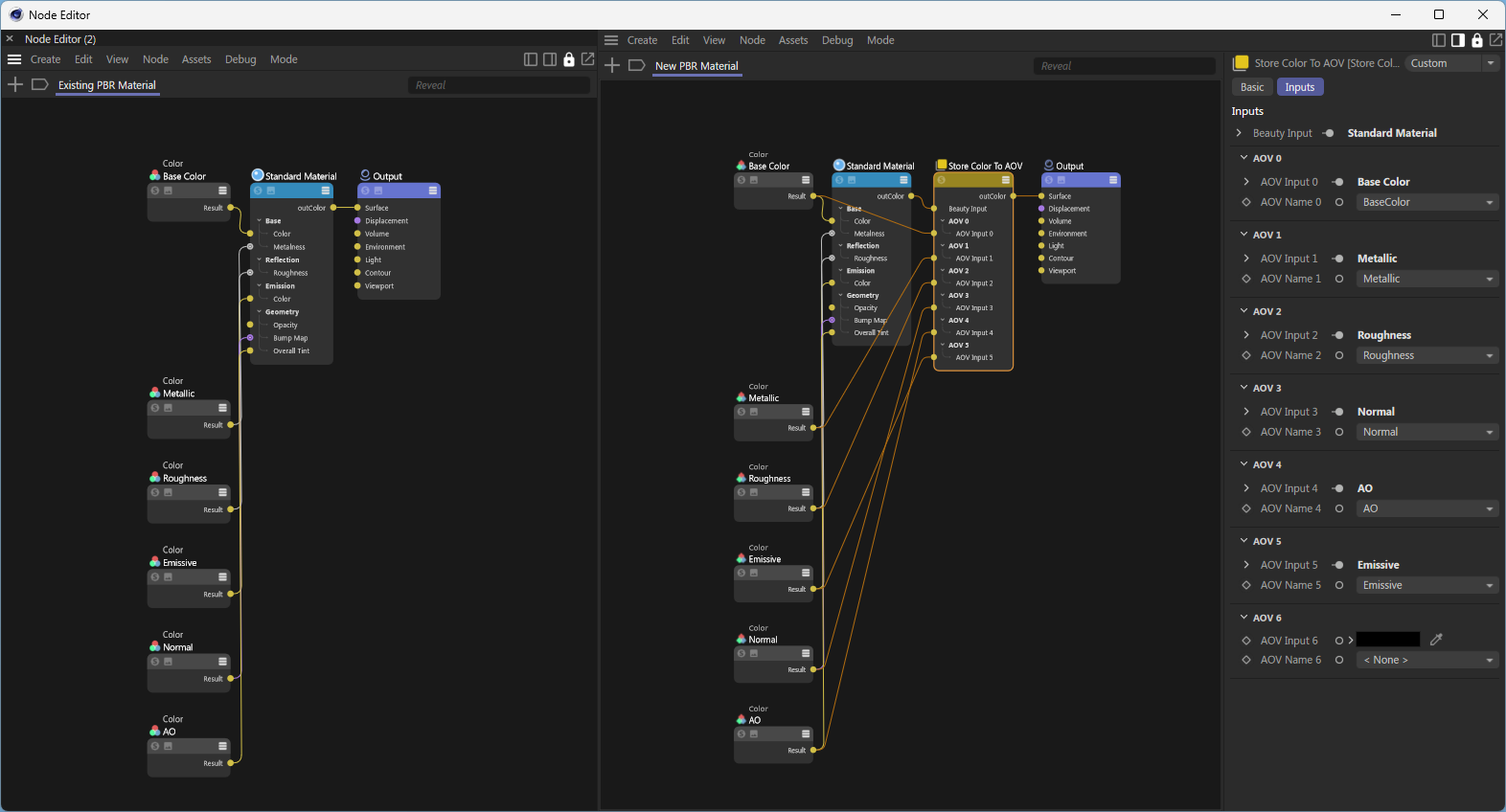
sorry for the delay. So, here is how you could do this. It is not the pretiest solution, but the only that works at the moment for graph descriptions. You could of course also use the full Nodes API to do this.
I hope this helps and cheers,
Ferdinand
import c4d
import maxon
import mxutils
doc: c4d.documents.BaseDocument # The active Cinema 4D document.
def CreateMaterials(count: int) -> None:
"""Creates #count materials with relevant "Store Color To AOV" setup.
"""
mxutils.CheckType(count, int)
for i in range(count):
graph: maxon.NodesGraphModelRef = maxon.GraphDescription.GetGraph(
name=f"AovSetup.{i}", nodeSpaceId=maxon.NodeSpaceIdentifiers.RedshiftMaterial)
maxon.GraphDescription.ApplyDescription(graph,
[
{
"$type": "Color",
"Basic/Name": "Base Color",
"Inputs/Color": maxon.Vector(1, 1, 1),
"$id": "base_color"
},
{
"$type": "Color",
"Basic/Name": "Metallic",
"Inputs/Color": maxon.Vector(0.0, 0.0, 0.0),
"$id": "metallic_color"
},
{
"$type": "Color",
"Basic/Name": "Roughness",
"Inputs/Color": maxon.Vector(0.5, 0.5, 0.5),
"$id": "roughness_color"
},
{
"$type": "Color",
"Basic/Name": "Normal",
"Inputs/Color": maxon.Vector(0.5, 0.5, 1),
"$id": "normal_color"
},
{
"$type": "Color",
"Basic/Name": "AO",
"Inputs/Color": maxon.Vector(1, 1, 1),
"$id": "ao_color"
},
{
"$type": "Color",
"Basic/Name": "Emissive",
"Inputs/Color": maxon.Vector(0, 0, 0),
"$id": "emissive_color"
},
{
"$type": "Output",
"Surface": {
"$type": "Store Color To AOV",
"AOV Input 0": "#base_color",
"AOV Name 0": "BaseColor",
"AOV Input 1": "#metallic_color",
"AOV Name 1": "Metallic",
"AOV Input 2": "#roughness_color",
"AOV Name 2": "Roughness",
"AOV Input 3": "#normal_color",
"AOV Name 3": "Normal",
"AOV Input 4": "#ao_color",
"AOV Name 4": "AO",
"AOV Input 5": "#emissive_color",
"AOV Name 5": "Emissive",
"Beauty Input": {
"$type": "Standard Material",
"Base/Color": "#base_color",
"Base/Metalness": "#metallic_color",
"Reflection/Roughness": "#roughness_color",
"Geometry/Bump Map": "#normal_color",
"Geometry/Overall Tint": "#ao_color",
"Emission/Color": "#emissive_color",
}
}
}
]
)
def ModifyMaterials() -> None:
"""Modifies all materials in the scene, with the goal of removing the "Store Color To AOV" node
in material setups as created above.
"""
for graph in maxon.GraphDescription.GetMaterialGraphs(doc, maxon.NodeSpaceIdentifiers.RedshiftMaterial):
try:
# Remove a "Store Color To AOV" node from the graph that matches the given AOV names.
nodes: dict[maxon.Id, maxon.GraphNode] = maxon.GraphDescription.ApplyDescription(graph,
{
"$query": {
# Match the fist node of type "Store Color To AOV" ...
"$qmode": maxon.GraphDescription.QUERY_FLAGS.MATCH_FIRST,
"$type": "Store Color To AOV",
# ... that has the following AOV names. Graph queries currently do not yet
# support nested queries, i.e., query to which nodes a node is connected to.
# This will come with the next major version of Cinema 4D/the SDK.
"AOV Name 0": "BaseColor",
"AOV Name 1": "Metallic",
"AOV Name 2": "Roughness",
"AOV Name 3": "Normal",
"AOV Name 4": "AO",
"AOV Name 5": "Emissive",
},
"$commands": "$cmd_remove"
}
)
# At this point we have to cheat a little bit, as the query abilities of graph
# descriptions are not yet up to the task of what we would have to do here, as we
# would have to query for a node by its type and at the same time set its ID, which is
# not possible yet (I will also add this in a future version, but I am not yet sure when).
# So what we do, is exploit the fact that #GraphDescription.ApplyDescription() will turn
# dictionary/map of id:node relations and we can predict how a Redshift Output and
# Standard Material will start (with "output@" and "standardmaterial@").
outputNodeId: str | None = next(
str(key) for key in nodes if str(key).startswith("output@"))
standardMaterialNodeId: str | None = next(
str(key) for key in nodes if str(key).startswith("standardmaterial@"))
if not outputNodeId or not standardMaterialNodeId:
raise ValueError("Could not find Output or Standard Material node in the graph.")
# Now that we have this information, we could either use the traditional Nodes API to
# wire these two nodes together, or we can use the GraphDescription API to do this.
# Connect the existing Output node to the existing Standard Material node.
maxon.GraphDescription.ApplyDescription(graph,
{
"$query": {
"$qmode": maxon.GraphDescription.QUERY_FLAGS.MATCH_FIRST,
"$id": outputNodeId,
},
"Surface": f"#{standardMaterialNodeId}"
}
)
except Exception as e:
print(e)
continue
# Some concluding thoughts: This task, although it might look trivial, has actually some
# complexities. The main issue is that while we have the quasi-guarantee that there will
# only be one Output (i.e., 'end node') in a Redshift material graph, we cannot
# guarantee that there will only be one Standard Material node in the graph.
#
# To truly solve all this, we would need the 2026.0.0 graph query capabilities, so that we
# can more precisely select which nodes we mean.
#
# What occurred to me while writing this, is that it would also be very nice to have a
# command like "$cmd_remove_smart" which attempts to remove a node while maintaining the
# connection flow, in your case wire the Standard Material node to the Output node.
#
# In general, this an unsolvable riddle, but many node relations in a material graph are
# trivial, i.e., there is only one ingoing and one outgoing connection, so that it would
# be easy to try to connect these two nodes together. In your case, deleting the
# "Store Color To AOV" node, this would however never be possible as we have here seven
# color inputs and one color output. From an abstract API perspective, it is impossible to
# determine which one of the seven inputs should be connected to the output, as we do not
# have the higher human insight to determine that the Standard Material node is the relevant
# node to connect to the Output node.
if __name__ == '__main__':
CreateMaterials(5) # Create five materials with the "Store Color To AOV" setup.
ModifyMaterials() # Remove the "Store Color To AOV" node from all materials.
c4d.EventAdd() # Refresh Cinema 4D to show changes