• Type Error when inserting geometry from a loaded file

    python 2023 windows
    3
    0 Votes
    3 Posts
    613 Views
    D
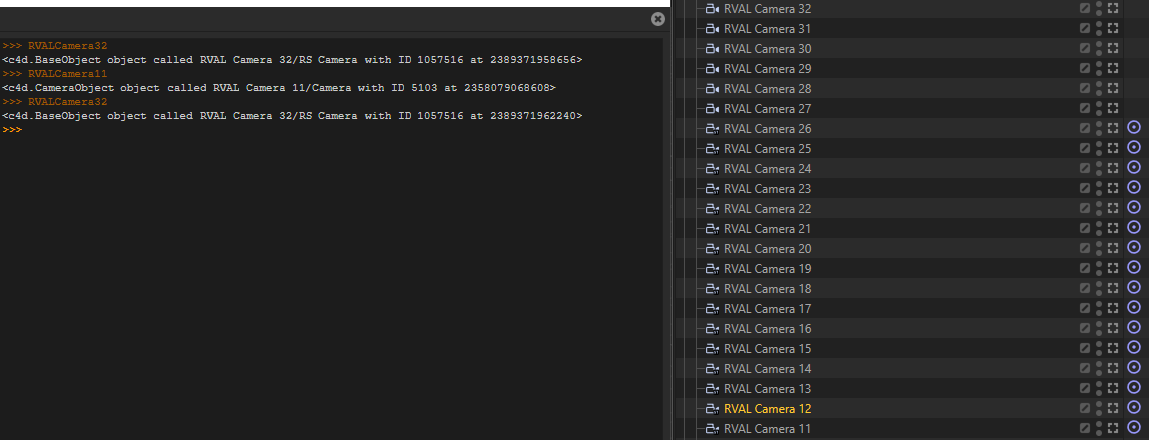
    @i_mazlov thanks ilia!!! ok that was truly obvious actually had to use 'c4d.documents.GetActiveDocument()' to make it work in my case ...
  • Capture the dragging and release of a marker via python

    2024 python
    4
    0 Votes
    4 Posts
    831 Views
    B
    Follow up but slightly unrelated question. If I have a GeDialog plugin with an edit field(for changing the Frame of a marker for example), is it possible to have it update while dragging vs on release? Is that some sort of CoreMessage thing? Right now I have a call inside of my Command function that basically says if the ID matches the edit field then set the marker frame. But I would like to be able to click and drag and see the marker's position move as I drag. Is that possible
  • Need help with python field - infection

    python 2024
    6
    0 Votes
    6 Posts
    1k Views
    ferdinandF
    Hey @SweepingMotion, first of all, I did not want to discourage you as such this would be only possible in C++. All I am saying here is that having points in a mesh which look up their neighbors and then do a possible iterative spreading algorithm per iteration sounds costly. You can certainly do this in Python, you should just brace for really bad performance when you run this on complex meshes with complex settings. That I used the modelling command for the growing part was not only based in my laziness but also the fact that the modelling command will run in C++ nice and fast. Your Problem Regarding your problem, I think I understand what you want. You want a field to (persistently) paint a vertex map to use this as a seed to run your simulation; think of a paint brush (the field) on canvas and the paint then spreading (the simulation). First of all, fields are not really meant to be persistent in that manner as that would be required here. Or to use your example, you would want your ballon tearing to continue even when the field on the tip of the needle is not touching any ballon vertex anymore after the ballon started tearing appart. Fields are also not meant to do these whole field space computations a simulation implies. I.e., you get the point x and the field sampler spit out values for its weight and vector. A field modifier layer would be better suited for running a simulation as they focus more on all values in a field. The problem is that modifiers do not do the sampling part for a transform with a falloff. So you would kind of need both. One could certainly do all this when motivated enough. You could for example simply precompute all values and then sample from a look-up table/cache when your field is sampled. But this all seems very complicated for no good reason. Recommendation I would still recommend using at least a Python TagData plugin. C++ would be better, using a Programming tag also works, but you must be hackier, be more knowledgeable to make it work. There are two ways how you could realize the field/brush influence thing you want: Ignore Mograph fields altogether. Here you would implement your own ObjectData plugin which does the painting. You would have two parts, the object(s) which are continuously painting sees into a vertex map, and your spider-in-the-net tag which then runs a simulation on that map. You would only need one vertex map in this case but would also have to reimplement falloffs and noise for the fields/brushes to the degree you need it. You use Mograph fields but you do not mix them with the simulation directly. The idea is to have two vertex maps. One seed vertex map is driven by MoGraph fields and you can go ham there, use all of MoMgraph to your liking. Your plugin tag would then copy from that seed map into a simulation map on each iteration and advance the simulation. For example by either blending values or taking the max value of both maps. On that other map you then run the simulation. This would have the advantage that you have the temporal persistence for free (since you copy from a volatile seed map into the persistent simulation map). You would also side step the fact that you would have to somehow weave the simulation into fields. If you wanted then wanted to pretty this up, you could make it so that your tag has field list and for the user it looks like that there is only the one output vertex map while the tag uses internally a hidden vertex map into which it feed the field list which is part of its UI. Number two is in my opinion the more sensible solution, number one would give you more freedom but would also be much more work. Cheers, Ferdinand

  • Python field error

    python 2024
    9
    0 Votes
    9 Posts
    2k Views
    S
    @m_adam said in Python field error: A fix is coming in one of the next version of Cinema 4D, so that OutputBlockSize == InputBlockSize and therefor you will not need to add this "useless" values at the end to fullfill the outValues. That's great news. I'll hold off till then.
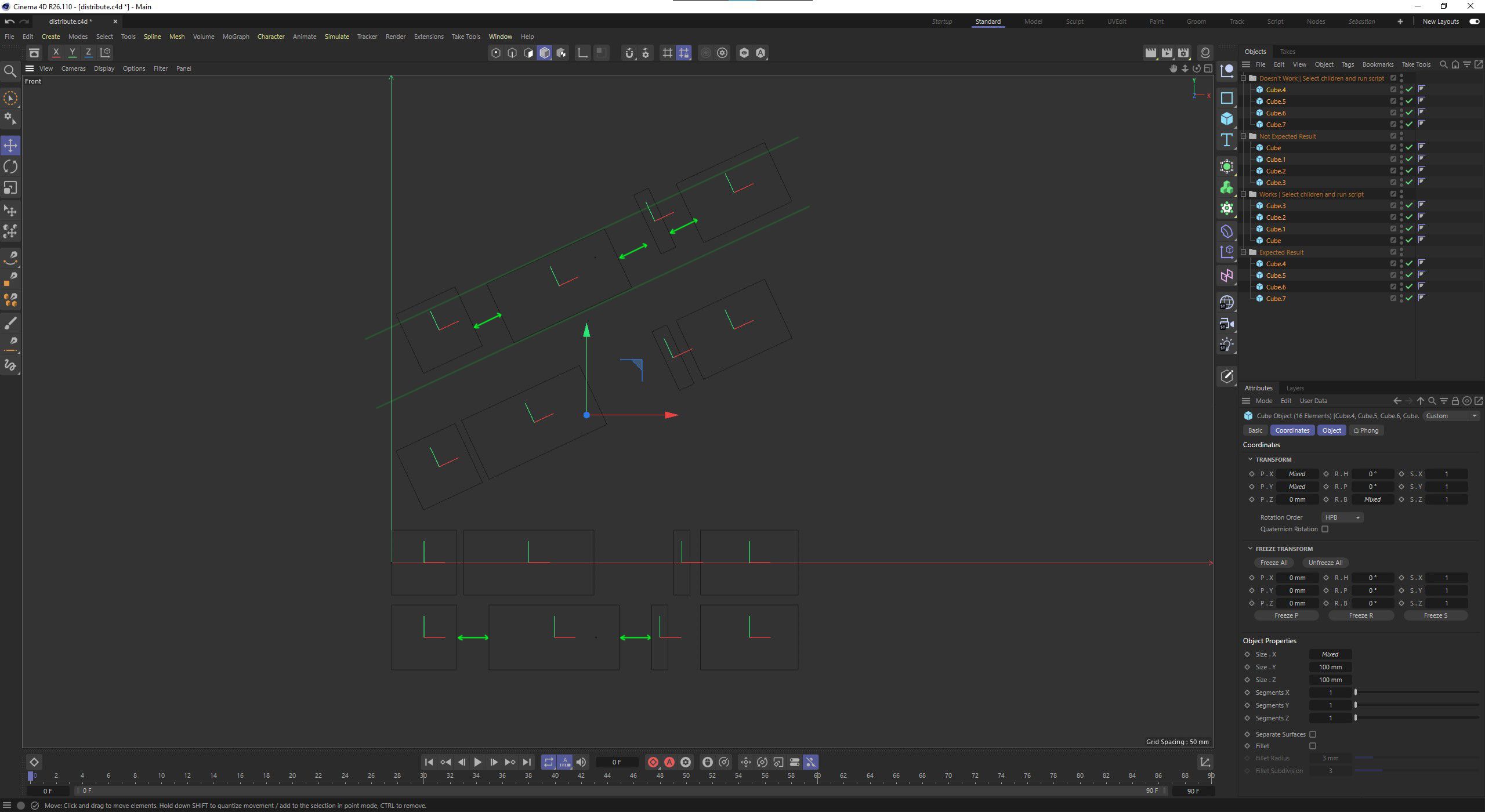
  • How to evenly distribute objects of different 'width'

    python s26 windows
    6
    1
    0 Votes
    6 Posts
    2k Views
    i_mazlovI
    Hi @gsmetzer, please have a look at the related thread (How to get the bounding box for the whole scene) where your issue was explained in details by @ferdinand @ferdinand said in How to get the bounding box for the whole scene: a BaseObject will also not include its descendants in its bounding box computation So, one must carry out such computations oneself Cheers, Ilia
  • C4D crashes when removing node via MSG_MENUPREPARE

    python
    3
    0 Votes
    3 Posts
    814 Views
    M
    Hi @merkvilson I would say what you are trying to do is not well supported and MSG_MENUPREPARE was never designed for the current node to be removed. The correct way to do so, is to return False within your NodeData.Init method, this way the object is not created and therefor you do not have to remove it. Cheers, Maxime.
  • 0 Votes
    3 Posts
    721 Views
    M
    Thanks you answered my question, if it solves my problem we will see.
  • How to resize a rectangular spline to fit text using Python?

    2023 windows python
    4
    0 Votes
    4 Posts
    1k Views
    S
    @i_mazlov I tried the GetRad() method. This is exactly what I need, thanks!
  • Python generation script doesn't work

    python windows 2024
    2
    2
    0 Votes
    2 Posts
    531 Views
    ferdinandF
    Hello @eegoridze, Welcome to the Maxon developers forum and its community, it is great to have you with us! Getting Started Before creating your next postings, we would recommend making yourself accustomed with our forum and support procedures. You did not do anything wrong, we point all new users to these rules. Forum Overview: Provides a broad overview of the fundamental structure and rules of this forum, such as the purpose of the different sub-forums or the fact that we will ban users who engage in hate speech or harassment. Support Procedures: Provides a more in detail overview of how we provide technical support for APIs here. This topic will tell you how to ask good questions and limits of our technical support. Forum Features: Provides an overview of the technical features of this forum, such as Markdown markup or file uploads. It is strongly recommended to read the first two topics carefully, especially the section Support Procedures: Asking Questions. About your First Question I would like to point you to four sections in our Support Procedures: Scope of Support: "It doesn't work" is not a support request and we cannot debug your code for you, but instead provide answers to specific problems. Asking Questions: Repeatable: Your claims or problem should be repeatable for us. In most cases this means posting executable code which demonstrates your problem, with the emphasis being on executable. We should be able to paste this code into an editor and then run or compile it without having to write code ourselves. When you just post snippets, this usually means that we will not run your code, as we do not have the time to invent all the code around it. Ignoring this also comes with the substantial risk that you do not post the code which contains your actual mistake/problem.. Asking Questions: Sparseness: Your problems should be sparse, or in other words you should spend some time on boiling down more complex problems. When you, for example, are writing a plugin with which one can create trees with physics and all sorts of fancy things, and you run into a problem, you should spend time on removing as many fancy things as possible, so that we have an easier time helping you. Code examples should only very rarely have more than one thousand lines of code. Reporting Bugs & Crashes: The whole section applies here. While it is understandable that users sometimes violate some of these rules, it is here a bit much. Sparseness: You certainly could have spent some time on pruning your script from things you can remove without removing your problem. Repeatable: We cannot run your code. While you have provided the source code, you have not provided the scene file and possibly other files which are necessary to run this. Reporting Bugs & Crashes: When you have provided (2), you should follow the pattern we require to report bugs and crashes, even when they are your own. It is all about reproducibility and clear instructions. General Advice It is obvious that you have put quite some work into your script and also work into your question here. Thousands lines of code do not write themself and screenshots also do not make themself. But my major advice would be here: "Be more strategic about how you approach things." Writing software is all about breaking things into manageable problems and you seem to try to do everything at once. Which is fine if you are a pro and never make mistakes, but it usually bites you royally in the butt when you run into problems. Remove Non-Const Code from Module Scope In the first 100 lines you have a lot of code in the module scope. You can initialize global constants in the module scope, but you should certainly not open dialogs there. This is just a big no-no as it not only makes your code hard to read - when is happening what, you cannot just start reading in the main function -, but also comes with the problem that some of the code will run when the module is initialized and some when the execution context __name__ is "__main__". [image: 1707760026417-2189247f-36d5-4980-a0ca-aa44f1a95f40-image.png] Divide and Conquer & Abstract There is very little abstraction in your code, which again is fine when you are pro who never makes mistakes, but becomes a problem when you must debug things, as you then have to deal a monolithic piece of code where it is hard to turn off things or understand what is happening. When I take the first lines of your main function: [image: 1707764358023-223b2359-9eec-48c0-9f7b-51bc9a774c4e-image.png] If I would rewrite this, it would look like this: import c4d import mxutils class ObjectGroup: """A class to group objects and set their visibility. """ def __init__(self, groupName: str, parent: c4d.BaseObject) -> None: """Initializes the class. """ self.groupName = groupName self.objects = mxutils.CheckType(parent, c4d.BaseObject).GetChildren() # It seems a bit questionable to me to store the names of the objects in a separate list, # since the data is so easy to access on a node, but I went with it here. self.names = [i.GetName() for i in self.objects] self.SetVisibility() def SetVisibility(self, state: int) -> None: """Sets the editor and render visibility of the objects in the group. """ for obj in self.objects: obj[c4d.ID_BASEOBJECT_VISIBILITY_EDITOR] = state obj[c4d.ID_BASEOBJECT_VISIBILITY_RENDER] = state def __iter__(self) -> tuple[str, c4d.BaseObject]: """Iterates over name, object pairs. """ for name, obj in zip(self.names, self.objects): yield name, obj def __getitem__(self, index: int) -> tuple[str, c4d.BaseObject]: """Gets the name, object tuple at the given index. """ if index < 0 or index >= len(self.objects): raise IndexError("Index out of range.") return self.names[index], self.objects[index] def GetObjects(doc: c4d.documents.BaseDocument) -> dict[str, ObjectGroup]: """Gets the objects from the document. """ # Get the objects from the document, be defensive about our assumptions, here we assume that # the document contains at least eight objects, but we should check it. objects: list[c4d.BaseObject] = doc.GetObjects() if len(objects) < 8: raise ValueError("The document must contain at least eight objects.") # Now we create one data structure to hold all the object groups, this makes it easier to use. # I personally would crate a class to hold the object groups, but I went with a dictionary here # to keep it simple. return { "glasses": ObjectGroup("glasses", objects[0]), "masks": ObjectGroup("masks", objects[1]), "jewelery": ObjectGroup("jewelery", objects[2]), "headgear": ObjectGroup("headgear", objects[3]), "clothes": ObjectGroup("clothes", objects[4]), "hairs": ObjectGroup("hairs", objects[5]), "eyes": ObjectGroup("eyes", objects[6]), "special_accessories": ObjectGroup("special_accessories", objects[7]) } def main(): """ """ # Now can just call #GetObjects and get the data we need. data: dict[str, ObjectGroup] = GetObjects(doc) # Now we continue in this style, where we "divide and conquer" the problem, i.e., split things # into sub-problems and solve them one by one. So that we can have here in the main function only # the high-level logic. restrictions: list[str] = GetRestrictions(RESTRICTIONS_FILE) ApplyRestrictions(data, restrictions) # ... Doing this will help you to help yourself, as you would get more control over your own code. Conclusion Some of my colleagues are a bit less squeamish than me when I comes to spaghetti code, but I doubt that they are willing to debug your 800 lines of single letter variables. Try to make your code more abstract and clean, you will likely fix the problem yourself in the process. For me it is currently not really possible to follow your code and with that give you meaningful advice. If not, come back with a pruned version of your code, provide all data, and reproduction steps. And with pruning I mean really prune it. Try to remove as many things as possible. You should also be verbose about what your problem is. I think you are encountering freezes, "the program just hangs" but you only mention that somewhere in the middle of your posting. Cheers, Ferdinand
  • How to get sphere coordinates

    s26 c++ windows
    6
    2
    0 Votes
    6 Posts
    1k Views
    i_mazlovI
    Hi @pchg , This thread is almost a full duplicate of your adjacent thread: How to preserve the animation of a sphere. The answer is provided there. Cheers, Ilia
  • Prevent selection

    python
    2
    0 Votes
    2 Posts
    759 Views
    i_mazlovI
    Hi @merkvilson , If I understand your goal correctly, you would like to have your object/tag plugin being "unselectable" in the object manager, such that any previously selected objects would stay selected. Unfortunately, this is not directly possible. What you would like to have is the same behavior of your plugin like it was on a locked layer. There was already an adjacent discussion about this: How to hide object local coordinates. However, you can theoretically emulate such behavior by tracking current selection in cinema and catching the event of your plugin being selected. At this point you could "undo" the selection by unselecting your plugin and selecting back what was selected before. However, for that you would need a SceneHook, which is only available in the C++ SDK. What is more, such approach does not sound like something robust and reliable, especially when used with some 3rd party plugins that you're not aware of beforehand. Cheers, Ilia
  • 0 Votes
    2 Posts
    1k Views
    ferdinandF
    Hello @GillesKontrol, Thank you for reaching out to us. Jesus Christ, that is a lot of tags! While we do have quite a few topics on selections here on the forum, we have no dedicated Python code examples for selections on GitHub (we probably should change that). Selections are merged with BaseSelect.Merge. But there are some hoops to jump through here, which is why I have written a code example. Although my example is probably pretty close to what you want, I must remind you that we do not provide solutions in the SDK group. Any modification or improvement must be done by yourself. You should also show your code in the future, no matter how little your progress has been. Cheers, Ferdinand Scene: select.c4d Before: [image: 1707503136122-15ec7661-afbb-4fe0-889c-dd5ee6d3622b-image.png] After: [image: 1707503174138-cb1ed039-3e64-4da1-8e01-653ac47dc953-image.png] Code: """Consolidates material assignments on all selected objects. Run with at least one object selected. The script will merge all texture tags using a restriction, i.e., a selection tag, that reference the same material. The operation will be wrapped into one undo item. Note: As always, the SDK group does not provide finished solutions. If you want things to be changed, that would be up to you. Here are some short-comings. * I did not deal with the case that there is a material M referenced on an object both as a texture tag with and without a restriction. Does not make too much sense but I ignored it. * I also ignored differences in projections. The script assumes that all material assignments are just unmodified UVW projections. * Finally, I determine the "sameness" of materials by identity and not by (quasi)-equality. When there are two absolutely identical materials in a scene, or two materials which are only differentiated by their name, they and their tags will not be merged. """ import c4d import mxutils import time doc: c4d.documents.BaseDocument # The active document. def ConsolidateMaterialsOnObject(op: c4d.BaseObject) -> None: """Consolidates the texture tags and selection tags used by them on #op by reference of material. Note: In the API material tags are called texture tags. """ # The first thing we do, is build a map where we associate materials assigned to #op with the # texture tags of #op assigning them. I.e., we collect the texture tags which should be # consolidated as they are assigning the same material. # # NOTE: We use here a 2023.2 feature, C4DAtom.__hash__, to insert the materials as keys into the # dict. In earlier versions we would have to use node UUIDs for that. groups: dict[c4d.BaseMaterial, list[c4d.TextureTag]] = {} # Iterate over all texture tags in #op and store them under the material they assign. for tag in [t for t in op.GetTags() if t.CheckType(c4d.Ttexture)]: material: c4d.BaseMaterial = tag[c4d.TEXTURETAG_MATERIAL] groups[material] = groups.get(material, []) + [tag] # Now we iterate over our build mappings as pairs of a material and the texture tags which # assign it. for material, textureTags in groups.items(): # Step over materials which are assigned by less than two tags. if len(textureTags) < 2: continue # Now we pull all the selection tags of #op which are referenced in the texture tags. selectionTags: list[c4d.SelectionTag] = [] for tag in textureTags: # Since selection tags are referenced a bit weirdly as a string in texture tags, # we cannot just grab their base link and instead must search for them. restriction: str = tag[c4d.TEXTURETAG_RESTRICTION] candidates: list[c4d.SelectionTag] = [t for t in op.GetTags() if t.CheckType(c4d.Tpolygonselection) and t.GetName() == restriction] if len(candidates) != 1: raise RuntimeError( f"Found texture tag {tag} with ambiguous restriction '{restriction}'.") selectionTags.append(candidates[0]) # Now we have all the input data we need. The first thing we do is establish a unique name # for the new selection tag, the 'restriction' referenced in the texture tag, and then # create the selection tag. restriction: str = f"{material.GetName()}_{time.perf_counter_ns()}" selectionTag: c4d.SelectionTag = op.MakeTag(c4d.Tpolygonselection) selectionTag.SetName(restriction) doc.AddUndo(c4d.UNDOTYPE_NEWOBJ, selectionTag) # Now we get the BaseSelect for our new selection tag and copy over all the selection states # of the selection tags we have collected. selection: c4d.BaseSelect = selectionTag.GetBaseSelect() res: bool = all([selection.Merge(t.GetBaseSelect()) for t in selectionTags]) if not res: raise RuntimeError(f"Copying a selection tag for {material} failed.") # We do not need the old selection and texture tags anymore and therefore remove them. for t in (selectionTags + textureTags): doc.AddUndo(c4d.UNDOTYPE_DELETE, t) t.Remove() # We create a new texture tag and reference the current material from the loop and our new # selection tag in it. textureTag: c4d.TextureTag = op.MakeTag(c4d.Ttexture) textureTag[c4d.TEXTURETAG_MATERIAL] = material textureTag[c4d.TEXTURETAG_RESTRICTION] = restriction doc.AddUndo(c4d.UNDOTYPE_NEWOBJ, textureTag) def main() -> None: """ """ # Get all directly selected objects in the scene, bail when there is no selection. selection: list[c4d.BaseObject] = doc.GetActiveObjects(c4d.GETACTIVEOBJECTFLAGS_NONE) if not selection: print ("no objects selected to consolidate selection tags for.") return # Wrapped in an undo, iterate over them and compact the material assignments on them. doc.StartUndo() for obj in doc.GetActiveObjects(c4d.GETACTIVEOBJECTFLAGS_CHILDREN): ConsolidateMaterialsOnObject(obj) doc.EndUndo() # Push an update event. c4d.EventAdd() if __name__ == "__main__": main()
  • How can I use a render token to indicate the render type?

    r25 python windows
    4
    0 Votes
    4 Posts
    1k Views
    ferdinandF
    Hey @GordOrb, This is not possible. You are not really meant to distinguish the file names you are writing for. I also do not understand the purpose of doing what you want to do. You can already name the beauty file and the multipass file differently in the UI. And when you write out each pass on its own, Cinema 4D will already name them differently for you. There will be singular token call for all pass layers, and before that a call for the RGB/beauty layer. None of the calls for naming the file contains pass information. The inner logic of it seems to be that you first get the call for evaluating the token for a filename and after that the actual passes. The purpose of some fields in the passed data is probably more of internal than public nature, since you cannot really do much with that info due to how the token calls are coming in. In some contexts these fields might be useful when you use the Token System (C++ Manual) more manually. But at least for the passes case, this is not really true either, because when you start to render manually, you will have to fill in the pass data on your own when constructing a RenderPathData. So, long story short: this is not really possible, at least in the intended way. Upon having a closer look at the time stamps and my file output, I realized that you could try to rely on the rule 'the call after the call for the RGB pass', because that is at least how it works in my example. isMultipass: '1', pname: ' ', ptype: ' ', pid: ' -1', t: 9366346949848 // First call, irrelevant isMultipass: '1', pname: ' ', ptype: ' ', pid: ' -1', t: 9367113676312 // Time stamp of saved RGB/beauty. isMultipass: '1', pname: ' RGB', ptype: ' RGB', pid: ' -1', t: 9367113987757 // RGB/beauty pass isMultipass: '1', pname: ' ', ptype: ' ', pid: ' -1', t: 9367114252401 // Time stamp of all passes. ... If this works, this would be hack, and it would be then up to you establish if that holds true or not. To establish "what is the last call", you could have some global list into which you push things. Make sure not to store any Cinema 4D rendering data in that global list (BaseDocument, BaseContainer, RenderData) or you might end up in world of hurt. Cheers, Ferdinand Written Files: [image: 1707477127170-fc970227-90fb-437e-b5d7-b7a25a9e2da0-image-resized.png] My console dump, here I search for the time stamp 9367114252401 of my files, it is the fourth call, long before we get the calls for the passes. The only thing that comes before is a call for the RGB, i. e., the beauty pass. [image: 1707477097394-b5e92449-2ffa-4d4b-a0b7-de02968635d8-image-resized.png] Code: """ """ import c4d import mxutils import time def get_render_type(data: c4d.BaseContainer) -> str: """Dumps information about #data into the token and the console. """ # Get the render document #rdoc, and build a string for the UUID of rdoc as well as its memory # location and #data. Unsurprisingly, the mem locs are meaningless here in Python as everything # must be wrapped by Python objects in each call. In C++ you might be able to establish "sameness" # between calls by the location of #data (the rendering document which is used is always the # same as shown by its UUID). But I doubt that you will have luck with #data in C++, because it # is likely constructed for each call there too (and not reused). rdoc: c4d.documents.BaseDocument = mxutils.CheckType(data[0], c4d.documents.BaseDocument) uuid: bytes = bytes(rdoc.FindUniqueID(c4d.MAXON_CREATOR_ID)) ident: str = f"doc-uuid: {uuid}, doc-mem: {id(rdoc)}, bc-mem: {id(data)}" # Build the token. token: str = (f"isMultipass: '{rdoc.GetActiveRenderData()[c4d.RDATA_MULTIPASS_ENABLE]}', " f"pname: '{data[5]:>20}', ptype: '{data[6]:>10}', pid: '{data[7]:>3}', t: {time.perf_counter_ns()}") print (ident, token) return token if __name__ == "__main__": if "r_type" not in set(item["_token"] for item in c4d.modules.tokensystem.GetAllTokenEntries()): c4d.plugins.RegisterToken("r_type", "[Render] Type", "reg/multi", get_render_type)
  • Crash from processing too many xrefs.

    r25 python macos
    6
    0 Votes
    6 Posts
    2k Views
    ferdinandF
    Hey @Visualride-0, you seem to run into some form of memory leak. That you open that many files in a row on one Cinema 4D instance is of course not really intended. This could either be a l smaller leak in our API that simply manifests more or only at all when you load that many files. Generally, you could separate out the file iteration into an external script, a shell script or a vanilla Python script if you want, and then simply run c4dpy with your script per file or for batches of 10 or 100 files. Starting and shutting down c4dpy 8000 times in a row will of course take its toll in time, so one would be incentivized to bundle up more files to bring down that number of starts and shutdowns. I had a look at your code, and apart from your redundant document insertion, I do not see much wrong with it, as it is basically just the loop on fileList. Cinema 4D should have caught your mistake there and prevented you from opening the same file twice, but I have not tested it. for f in filesList: # This line will load #f into a BaseDocument, insert it into the opened files, and make it the # active document. Unlike for BaseDocument.LoadDocument, the following lines are therefore # redundant. c4d.documents.LoadFile(f) # doc = c4d.documents.GetActiveDocument() # c4d.documents.InsertBaseDocument(doc) # c4d.documents.SetActiveDocument(doc) c4d.documents.SaveDocument(c4d.documents.GetActiveDocument(), f, c4d.SAVEDOCUMENTFLAGS_0, c4d.FORMAT_C4DEXPORT) # This does what it should do, close the active document, and create a new one. But to be # ultra safe, you could also call c4d.documents.CloseAllDocuments(). c4d.documents.KillDocument(doc) What escapes mea bit too, is the purpose of what we are doing here, since we just overwrite files with itself. But I guess this is minimized code, so it is only meant to demonstrate the problem. For my own understanding, the files in fileList are all *.c4d files, right? Fixing your code as shown above will likely not fix the problem, it seems more likely to me that there is a memory leak somewhere. For an intermediate solution, you will probably have to do what I proposed above, split this into batches of Cinema 4D or c4dpy instances to flush your memory by shutting down Cinema 4D. But we would like to have a look at the problem. Could you provide a sample of the documents, something between 10 or 100 files, so that we can test it with your data? You can send me a cloud storage link via a PM on the forum or via a mail to sdk_support(at)maxon(dot)net. Mail attachments will not work here due to the 50MB limitation. We strive for Cinema 4D being memory leak free, and if there is a severe leak we are not aware of, we should fix it. But this might take time. Cheers, Ferdinand
  • Material node plugin

    python
    2
    0 Votes
    2 Posts
    568 Views
    ferdinandF
    Hello @merkvilson, Thank you for reaching out to us. No, that is not possible and we are currently not planning to change that. You cannot implement materials in Python, you cannot implement GraphView (i.e., Xpresso) nodes, and you also cannot implement Nodes API nodes, i.e., Node Editor nodes, including the material nodes. But you can do all this in the C++ API Nodes API. But that is not nothing you do on the side, even as an experienced C++ developer. What you can do however, is implement a node using the Node Editor itself, i.e., you can just plug something together using existing nodes and the Resource Editor to give your node a more finished feeling. To ship that node, you would have to save it into an asset database and then ship that database. Cheers, Ferdinand
  • 0 Votes
    3 Posts
    650 Views
    DunhouD
    Thanks @i_mazlov , The msg[c4d.BFM_ACTION_VALUE] is all I want, Thanks for that. Cheers~ DunHou
  • Getting radius of text during rendering

    2024 python
    2
    0 Votes
    2 Posts
    654 Views
    i_mazlovI
    Hi @gsmetzer , Thank you for providing the scene that shows the problem! Your code in the Python generator should be scoped with functions and classes. The code outside of main() function is only run once. Please also make sure you're familiar with cinema threading restrictions: Threading Manual. Once you cover the code into a separate function it starts working (check the code below). Although, you are kind of misusing the python generator object (as it doesn't generate any cache). The Python Tag could probably be a better fit here. Another note is that although changing other object's attributes is somewhat acceptable, you can still fall into a trap of changes being delayed, because of lacking the recalculate pass after you've changed the value. It might be worth trying to store your text in a user data attribute of python generator. And for the text object just create an xpresso tag that drives the text value from the string in the user data attribute of python generator. This way you can fine tune the execution priority order: documentation. One more thing. I've also received the missing font error upon loading your test scene, make sure it is fixed to have the code working. Cheers, Ilia Code for your python generator: import c4d def foo(): children = op.GetChildren() widths = [] for i in range(len(children)): radius = children[i].GetRad() widths.append(round(radius.x)) return widths def main(): op[c4d.ID_USERDATA,1][c4d.PRIM_TEXT_TEXT] = str(foo()) return
  • Effector plugin is only executing in deformation mode

    Moved c++
    7
    0 Votes
    7 Posts
    1k Views
    aghiad322A
    @ferdinand Thanks a lot it worked
  • GUI Bitmap Button Properties

    python
    6
    1
    0 Votes
    6 Posts
    1k Views
    ferdinandF
    @merkvilson said in GUI Bitmap Button Properties: @ferdinand said in GUI Bitmap Button Properties: How to change BITMAPBUTTON_BACKCOLOR via the Command? I am not sure if I am understanding your question here correctly. You want to change the background color of a button after CreateLayout ran? That is not possible. You can flush layout groups and rebuild them at runtime (with buttons with a new color for example). I showed here once the pattern of a dynamic dialog. Is it possible to change the background color based on the toggle state? Thanks for your answers! It depends on how you define 'possible'. Dialogs in itself are static GUIs, you cannot change any of the settings you have set in CreateLayout after the method ran. It does not matter if it is the spacing of a group, the width of a text field, or the background color of a bitmap toggle button. What you can do in addition to defining the 2nd icon of the toggle button, is flush a layout group and then rebuild that group with a button which has the color you like. So, you wrap all your buttons in a group, and whenever a button is toggled on or off, you change a color in an array of button colors and then flush the buttons and rebuild them using your array of colors to set the background colors (and you also have to reapply the states then). The posting I linked to in my previous example lines out the details of how to do such dynamic dialog GUIs. Cheers, Ferdinand
  • Get the Neighboring Keys from a Selected Key?

    2024 2023 python
    5
    1
    0 Votes
    5 Posts
    1k Views
    B
    Hi @ferdinand Apologies for the late response. RE: You should show me how you access that key. My bad. But it's on the previous thread you answered by manually selecting a keyframe and storign it in a variable. https://developers.maxon.net/forum/topic/15344/get-selected-keyframes/3 RE: I just showed you above how to operate with percentage values in Cinema 4D. My bad. I missed it. I was looking immediately at the declaration. keyA: c4d.CKey keyB: c4d.CKey which I only want one key to be declared. === In summary, the GetNext() and GetPred() solved the problem in getting the Neighboring Keys from a Selected Key.