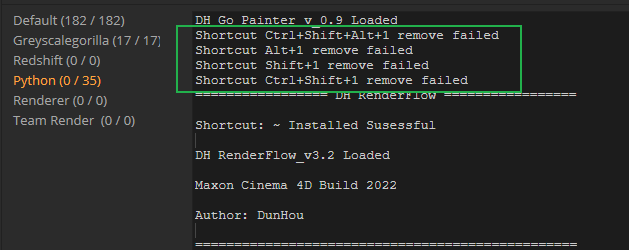
• Remove Shortcut failed

    Cinema 4D SDK
    3
    1
    0 Votes
    3 Posts
    456 Views
    DunhouD
    @ferdinand Thank you for detailed explain . It's great to add a shortcut container document update and small examples , actually , more examples on sdk or Github is really helpful. After reading I try to re-write it and add some functions like add shortcut or check plugin's shortcut list, It's all worked as expected . Shortcut BaseContainer explain is that great to move on . By the way , from those examples , I learned and try to keep code style as easy to read and repair like yours at the same time . So much appreciated.
  • 0 Votes
    5 Posts
    722 Views
    DunhouD
    @m_magalhaes Thanks for that explain.
  • 0 Votes
    7 Posts
    831 Views
    DunhouD
    @m_magalhaes Hey, It's hard to change python to c++ to me now, I type the code in vs2019, and It is a lot of bugs like :: after has a class namelike this or something like this. I also check Logerr topic form kbar, And all of it is bit hard to me to approach it, I guess since I can log some text to ohers Logger like Rendererwith maxon.Loggers , It probly can work for me -- Maybe the most dowside is I can not custom the logger name . As bad obsessional it is a little anosing. Will python can do this or a Logger example for cpp githubin the furture if give a code out of box is not the purpose of the blog? Sorry to that , I tried since a read this post and I realized I cann't make C++ works for me as soon.
  • 0 Votes
    14 Posts
    1k Views
    DunhouD
    @ferdinand Thaks for all of that explains . With your detailed and friendly explains , A new habbitor like me can code within Cinema 4D as well . Thanks for that !
  • 0 Votes
    4 Posts
    839 Views
    ferdinandF
    Hello @kng_ito, I agree that it is odd, or as you nicely put it, unkind. The problem is also that the meaning of segments in the context of a SplineObject (the data count of the Tsegment tag) and a LineObject (the data count of its Tline tag) is being mixed up. B(Cache).GetSegmentCount() = 2 <- A LineObject instance. B(Cache).GetTags() = [ <c4d.VariableTag object called with ID 5712 ... <- The Tline tag. <c4d.VariableTag object called with ID 5680 ... <c4d.SegmentTag object called with ID 5672 ... <- The Tsegment tag for the host. <c4d.PointTag object called with ID 5600 ... ] The problem of this design is that LineObject.GetSegmentCount returns the segment count in the sense of its host object, the SplineObject, as the number of disjunct curve sections in the spline (segment tag). The segments in the sense of a LineObject, the number of line segments the hosting spline object has been quantized into in the LineObject (line tag), is only indirectly accessible over getting the Tline tag of that object. Which in turn might confuse users why they cannot get a specific segment as you wanted to. But this design was apparently intentional and aims at minimizing the number of tags in the traverseable scene-graph (things inside caches are out of sight so to speak and not a problem). It is therefore unlikely that we will change this. The best I can do for now, is adding a note to LineObject.GetSegmentCount and SplineObject.GetSegmentCount which hints at the problem. Cheers, Ferdinand
  • How to detect a new light and pram change?

    Cinema 4D SDK s26 sdk python windows
    6
    0 Votes
    6 Posts
    2k Views
    DunhouD
    @bentraje Thanks a lot ! I always want to spend some thing to do this , but unfortunately I am struggling to work with rendering . If I have some time hopes I can change this a bit more
  • 0 Votes
    15 Posts
    3k Views
    M
    Hi with the Release 2023.1 the bug with maxon.AssetInterface.GetAssetUrl have been resolved. Cheers, Maxime.
  • Making a PolygonObject-like object plugin

    Cinema 4D SDK python r23 windows
    3
    0 Votes
    3 Posts
    566 Views
    J
    First of all, thanks for your support. It is not possible, at least not without A LOT of work, to implement polygonal geometry that is driven by Attribute Manger parameters and can maintain vertex-by-vertex manipulations of users. You must reimplement all its vertex/edge/polygon interactions OBJECT_POLYGONOBJECT is sort of uncharted territory. That answers my question. My approach was trying if I could use the already implemented geometry interactions and add from that point. Since I found no example for OBJECT_POLYGONOBJECT, thought that could be it, but seems not. If you just want to some information being displayed for objects, I would recommend implementing a tag which does that. If you want to, you could hide that tag from the users view, and also write a plugin which automatically distributes that tag in a scene My plan B was along these lines, with a dialog to show the info. Thanks, Oscar
  • Get parameter value at given time.

    Cinema 4D SDK r25 windows c++
    8
    0 Votes
    8 Posts
    2k Views
    D
    Hi @ferdinand and @Cairyn, thanks for the answers. There may be a simpler way to achieve an effect similar to what we want (for example, by caching the world matrix at the time t) but I'm still thinking of alternate ways to be able to access the full mesh information at time t. Caching the full mesh is probably not a good option since we would have to update that cache every time the mesh is changed at any time before t (since this might change the mesh at t). A possible option is to restrict the usability a bit and always evaluate the mesh at time 0, I'm checking if this is something we can do. Feedback loops could be an issue, but it should never happen that (using the example @ferdinand wrote) P relies on T and T also relies on P in this specific plugin. Also, t should always be a time before the current time, although that might not alleviate this particular problem. In any case, I'm going to go ahead and mark this as solved, I think I got all the information I need to find a solution. Thank you both very much for helping me out, Daniel
  • Why are there no Sketch and Toon shaders?

    Cinema 4D SDK windows python s26
    3
    0 Votes
    3 Posts
    620 Views
    ferdinandF
    Hello @blastframe, without any further questions or other postings, we will consider this topic as solved and flag it as such by Friday, 17/06/2022. Thank you for your understanding, Ferdinand
  • Using Path Selection

    Cinema 4D SDK python r23 windows
    3
    1
    0 Votes
    3 Posts
    685 Views
    ferdinandF
    Hello @DGLopez, without any further questions or other postings, we will consider this topic as solved and flag it as such by Friday, 17/06/2022. Thank you for your understanding, Ferdinand
  • Python Field - Object Data Update

    Cinema 4D SDK python r21 windows
    3
    1
    0 Votes
    3 Posts
    895 Views
    C
    Hello @m_magalhaes , Thanks a lot for the tip, works perfectly as you said [image: 1652754301818-cinema_4d_f7fynzcvz4.gif]
  • 0 Votes
    3 Posts
    724 Views
    W
    Hi! One more question, why does it process the command gui.MessageDialog('Hide Object[s]') first, is it pretty much last in the order of commands?? How do I have to install the command so that the program runs according to the order in which it was entered? Thank you very much!
  • Question: Takesystem...changing texture for each take

    Moved Bugs windows r23
    3
    4
    0 Votes
    3 Posts
    1k Views
    ThomasBT
    First thank you Ferdinand, as always, you put so much effort in your answers, this is so great.. Related to my code, yes there are of course weird things going on sometimes :-), I am not professional and the API is sometimes like a jungle and so Python, so I am messing up a few things...This process is called "learning" But anyways thank you for your detailed and quick answer.... Sincerely Thomas
  • Thinking Particles in ParallelFor

    Cinema 4D SDK r20 c++ windows sdk
    5
    0 Votes
    5 Posts
    1k Views
    N
    Hello @ferdinand, thank you again for this very detailed and helpful reply! I tried both methods, allocating beforehand and like the previous setup, just have it after the ParallelFor altogether. Both worked, although allocating beforehand introduced some weird flickering in the particles and was (at least it feels that way) more unstable. Which is why I opted to go for the second solution as with some exstensive testing it didn't seem to cause any issues. For anyone maybe reading this in the future and having the same issues: Do not allocate the particle group inside the plugin but use a link field and have the user handle the particle group creation inside c4d, that solved a lot of weird behaviours and seemed to work better/more stable. (at least in my not so intended usecase) I will mark this thread as solved, as it works now and I can fix the main-thread issue as well without too much trouble. So thank you very much for your quick and very detailed replies! Best Regards, Florian
  • 0 Votes
    3 Posts
    799 Views
    D
    Thank you ferdidand, Sorry for not giving more contextual code... Yeah "potential ports" is what I would be interested in. Thanks for confirming that there is nothing in the API that would help me though!
  • 0 Votes
    3 Posts
    1k Views
    ferdinandF
    Hello @davidweidemann, Thank you for reaching out to us and solving your own question :). To give a bit of background information, parameters can be composed in Cinema 4D. The simplest example is a parameter of type c4d.Vector. You can access the relative position of an object like this: >>> Cube[c4d.ID_BASEOBJECT_REL_POSITION] Vector(0, 0, 0) But as users might want to access and animate the components of that vector individually, the vector is dealt with and represented as a parameter actually as a set of sub-channels, one for each of its components. >>> Cube[c4d.ID_BASEOBJECT_REL_POSITION,c4d.VECTOR_X] 0.0 >>> Cube[c4d.ID_BASEOBJECT_REL_POSITION,c4d.VECTOR_Y] 0.0 >>> Cube[c4d.ID_BASEOBJECT_REL_POSITION,c4d.VECTOR_Z] 0.0 >>> This is why DescId are composed out of up to three DescLevel. To access the component of a vector you need two DescLevel, e.g., c4d.ID_BASEOBJECT_REL_POSITION and c4d.VECTOR_X. And while you might not be able to deal with the enclosing parameter, you might be able to deal with its subchannels. The input and output ports of an RSColorAbs Redshift node are of type RsColorAlpha, a parameter type that is composed of a Vector and a float, so it is effectively a four-component vector. This parameter type is not exposed to the Python API, so the API has no clue what to do with it. But it can deal with the subchannels. # Python has no clue about that parameter type at REDSHIFT_SHADER_RSMATHABSCOLOR_INPUT. >>> RSColorAbs[c4d.REDSHIFT_SHADER_RSMATHABSCOLOR_INPUT] Traceback (most recent call last): File "console", line 1, in <module> AttributeError: Parameter value not accessible (object unknown in Python) # But we can access the subchannels which are standard types. This is a two DescLevel access >>> RSColorAbs[c4d.REDSHIFT_SHADER_RSMATHABSCOLOR_INPUT,c4d.REDSHIFT_COLORALPHA_COLOR] Vector(0, 0, 0) # We can even reach into the subchannels of a subchannel, here for example to access the red # component of the RGBA vector tuple that is represented by the type RsColorAlpha. >>> RSColorAbs[c4d.REDSHIFT_SHADER_RSMATHABSCOLOR_INPUT,c4d.REDSHIFT_COLORALPHA_COLOR, c4d.VECTOR_X] 0.0 Cheers, Ferdinand
  • R25 project tool

    Cinema 4D SDK c++ windows project tool r25 sdk
    6
    0 Votes
    6 Posts
    1k Views
    ManuelM
    hxx files are created by the preprocesssor when you compile.They are created in the Generate subfolder of each project. Frameworks should work out of the box (even if sometimes, we have some bugs_ Cheers, manuel
  • UserData

    Moved Cinema 4D SDK python r25 windows
    4
    1
    0 Votes
    4 Posts
    1k Views
    ferdinandF
    Hello @bokibo, without any further questions or postings, we will consider this thread as solved by Friday the 4th, February 2022. Thank you for your understanding, Ferdinand
  • 0 Votes
    5 Posts
    2k Views
    H
    Many thanks for your help and thorough explanations, Ferdinand! Much appreciated! I'll go create a temp document and clones, and don't expect much more resistance from this particular issue. Thanks again, and have a happy holiday season!