• Crash when apply a Tag plugin.

    Cinema 4D SDK 2023 python windows
    7
    0 Votes
    7 Posts
    1k Views
    DunhouD
    Hey @ferdinand ,Thanks for your detailed explains forever. Now it is clear to read the res files , and you show me the Agent Ransack last year, I use this software for learn something , and the C++ document is also good for the res file, but some of the data is distribute anywhere , like BITMAPMUTTON , I remember that I search for no fading option for a long time, but in python document it has a user friendly position in sdk. Maybe a document improvement or more Github examples are both welcomed( seems lots of works ) Thanks for your patience! Cheers~ DunHou
  • 0 Votes
    3 Posts
    792 Views
    H
    Hi @m_adam, thanks for the explanation and your example code. That will absolutely suffice my needs. Good to know though that additional information may be available in the future. Cheers, Sebastian
  • 0 Votes
    4 Posts
    952 Views
    ferdinandF
    Hello @HerrMay, Funny enough DrawPoints seems to internally use the "same points" to draw, one gets to see when one edits the points of a polygon object. In S26 the points are round (thats probably why I was thinking of circles) while in R20 they are squares. No question here, just an observation. As you can see, in the script I retrieve the cache of the object we are going to draw. # Get the cache of the object representing the plugin in the object manager, i.e., more or # less what we returned in GetContour, Cinema 4D has however exhausted the cache for us, and # the cache is not a SplineObject but a LineObject (i.e, the cache of a SplineObject). cache: c4d.LineObject = op.GetDeformCache() or op.GetCache() if not isinstance(cache, c4d.LineObject): return c4d.DRAWRESULT_O This not only enables us to deal with splines affected by a deformer correctly, but also and more importantly with spline generators as for example the Circle spline generator. Such generators do not have any control points one could retrieve, their cache will always contain LineObject instances and not SplineObject instances (when they have been implemented correctly). This is also what I was referring to in my comment, because OffsetYSpline returns a SplineObject as its cache in GetContour, but Cinema 4D will 'exhaust' that cache for us by returning the cache of the cache, the LineObject. A LineObject represents a SplineObject over its current interpolation settings. What is actually weird though is that the color gradient you used here to color the points doesn't work in R20. The points are simply drawn black there. Possibly a Python 2/3 issue caused by integer/float division differences? Yes, this is Python 3 code. In Python 2 integers divide by default as integers. Simply wrap one of the numbers into a float, e.g., f: float = float(i)/float(count). Allow one follow up question. How can I draw only the control points of the spline? In your example you use a circle primitive which has - when made editable - exactly four points making up the shape via tangents. Where as the drawn points using the intermediate points of the circle as well. You can use BaseObject.GetRealSpline to get the underlying editable spline object for a spline. So, when you would replace the section quoted above with this: cache: c4d.SplineObject = op.GetRealSpline() if not isinstance(cache, c4d.SplineObject): return c4d.DRAWRESULT_OK You would now draw the control points of the SplineObject representing the spline generator rather than the vertices of its underlying LineObject. The problem in this case is that the plugin you have chosen is calling 'Current State to Object' (CSTO) on the input object which it is cloning and returning offset-ed (see line 130 in your code listing). CSTO is of course just replacing an object with its cache state. So, when you put a circle spline below the offset spline, it will still be drawn as in the LineObject cache version because the cache and the BaseObject.GetRealSpline representation are in this case identical. Cheers, Ferdinand

  • 0 Votes
    6 Posts
    716 Views
    ferdinandF
    Hello @dunhou, ah that was the critical bit of information for me, that is you plugin at work there Well, as always without code it is hard to say what is going wrong there. the main code about this function is like : SetBit() doc.InsertMaterial() c4d.CallCommand(12252) # Render Materials doc.GetActiveMaterial() textag.SetMaterial() and some undo and call the Node Editor for certain renderer or rules for the function ... Out of this selection, I would put my money on CallCommand and undo handling. Setting bits and calling the mentioned methods are far less likely candidates. But that is pure guess work. actually, I checked the c4d.IsCommandChecked(id) The first thing I would do, is search for the command ID of the Material Manager (12159) in your code and add a print statement to each place where either this command ID is invoked with CallCommand or places where an ID determined at runtime is invoked (silly example : CallCommand(random.randint(1000, 1000000))) Then run your plugin again. When you see 12159 being printed when the undesired behaviour happens, you know it must be your plugin which misfiring. When not, it might be a bug in Cinama 4D or one of its APIs. Cheers, Ferdinand
  • 0 Votes
    13 Posts
    3k Views
    ferdinandF
    Hey @thomasb, no worries, don't be too concerned about it. And you should not be ashamed, that was certainly not what I wanted to convey. "Every person his or her book", the second so called law of library science, is something I truly believe in. Everyone has valid information needs and we are trying to help users on their individual journey. You should not feel discouraged, we are and were all once in your place. But at the same time, I sometimes have to regulate a bit forum conduct as we, the Maxon SDK group, and other users are human too. And people tend to get confused, when they are being hit with a stream-of-conscious like threads were a user comments diary-style-like on his or her development state. It is not that I would not understand people are doing that. When one is in that situation, one is overwhelmed by the possible routes one can take, the amount of information to traverse. And verbalizing that does indeed help. But for someone who tries to help you or for people who later search for similar information, this "stream-of-conscious/diary" is then an obstacle rather than a help. So, sometimes I try to regulate both interests a bit. But as I said, please do not feel discouraged. Cheers, Ferdinand
  • 0 Votes
    4 Posts
    1k Views
    ThomasBT
    @ferdinand Yes you are right, in relation to this the self.spline etc is unnecessary that could also be a normal local variable. Is correct. But basically if I load a profile spline in my init method, for example, I can already save it in such a variable. I need to be able to access it from anywhere in the class. But here it is totally superfluous....sorry
  • How to "permanently" store data?

    Cinema 4D SDK
    4
    0 Votes
    4 Posts
    770 Views
    ferdinandF
    Hello @herrmay, Yes, it can be a bit cumbersome to write a whole abstraction layer, but most of the time it is avoidable to do that in the first place. In your case it should be pretty simple. Iterate over all layers you want to save to disk. Get the MAXON_CREATOR_ID UUID of each layer and its data container. Write the UUID and the data container to disk using JSON or HyperFile, I would recommend the latter as it will be less work. You only must convert the UUID bytes to a string, put the string into the file, then the data container and you are done. If you want to, you could also store all layer data in one file per document, or just have one giant file for all documents. Later load these hyper file fragments back and do what you want with the data. When you need the original node, traverse the layers in the active document for a node with the stored UUID. You could also make things fancier and search in all open documents or even store the document path in your serialized data and load that document. Saving things in the document container is a possibility too, you should make sure though to use a plugin ID for that. Cheers, Ferdinand
  • 0 Votes
    11 Posts
    2k Views
    ThomasBT
    @manuel Thank you very much!
  • 0 Votes
    5 Posts
    675 Views
    DunhouD
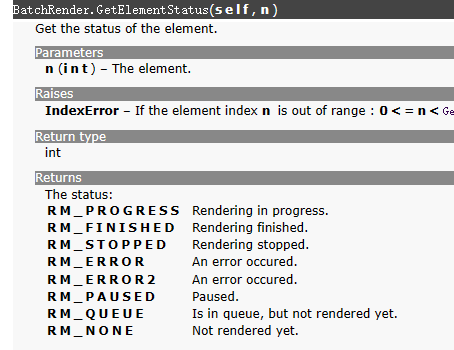
    @ferdinand Thanks for your help. I did search on web and find the Unicode string, and Chinese characters is so much complicated ,when most user use Chinese for the GUI language, Maybe sometime the translation of the world "在队列中" witch means "in the queue" in English has changed ( I belive now Chinese translation is response to IHDT so it won't randomly changed). That is not a big problem but maybe a little "uniform" with the "ID" And the "brief moment" is I don't sure why does it happend. In another word ,I think the initializing render process can be also called "rendering" . so it is a bit of counterintuitive for me , maybe I should add an additional check to make sure the spying will not break while the brief. Cheers~
  • 0 Votes
    26 Posts
    21k Views
    M
    Hello @ThomasB , without further questions or postings, we will consider this topic as solved by Friday 02/06/2023 and flag it accordingly. Thank you for your understanding, Maxime.
  • Cinema crashes renaming items in a TreeView

    Moved Bugs r20 s26 python windows macos
    11
    0 Votes
    11 Posts
    3k Views
    ferdinandF
    Hello @HerrMay, Thank you for your reply, and please excuse that I have overlooked it. Maybe a little bit off topic but since we're already talking Treeviews. There seems to be a bug too when it comes to multi-selecting objects in the Treeview. At least when using c4ds native BaseList2D objects. Without wanting to be rude, that statement is too vague to make a bug report out of it. The thread is quite old and therefore not the most reliable source of information, geared towards C++, and from what I see, not even conclusive in the assessment if there is a bug or not. I see there a user claiming that there is a bug, and another user, probably a Maxon employee, being skeptical about it. We are happy to file bugs, but we need a reproducible case. And just as a heads up, us filing a bug does not necessarily mean that we will fix soon or at all. I understand that this can be disheartening, but we must prioritize where our bug fixing efforts are most needed, which can lead to minor bugs being pushed for a long time. I have closed this thread due to its age, please feel free to open a new thread when you want to discuss that other bug. The thread is still be tracked due to its to_fix tag. Cheers, Ferdinand
  • 0 Votes
    6 Posts
    822 Views
    ferdinandF
    Hey @thomasb, Thank you for the clarification. Yeah, this setup requires you modifying the cache. So, the slow performance version with disabling the optimization is the best you can do when approaching things in such brutish manner. FYI: I do not have much time this week, so this is all the help you will get this week from me, but I am happy to help you next week if you still need help then. Things you can do: Turning off the optimization will calculate the cache every time Cinema 4D asks for it. Depending on how your blinking works, you might not have to calculate the cache every frame. Just determine when a new cache is needed and when not, as demonstrated in my first posting. When in 99% of the cases 99% of your old invalid cache is still good, nothing prevents you from either caching expensive to compute parts yourself or modifying the existing cache and return that as the new one. Changing a selection state is such an example of where 99.9% of the expensive work is still valid. It would be quite easy to do, when selection tags could reach into caches, but they cannot. So, you cannot have a selection tag on a generator (in Python) which indexes elements of the cache. But you can have a selection tag inside the cache which is referenced by for example a material on the generator holding the cache. With this knowledge, you can: Write a solution following (2.) where everything happens in the object, but in most cases, you just modify an existing cache instead of creating a new one. Do the same, but here you use a tag to modify the cache. This is a little bit dicey, as you should not mess with caches. But in this specific form, where we only change the selection state of a selection tag inside the cache, it should be okay. All other external cache modifications are off limits and can lead to crashes when you do not know what you are doing. In a nicer variant, you would implement the tag as a TagData plugin, but I provided a simple Python programming tag version below. The shader solution is not viable in Python; it will be too slow. You will also need quite some math knowledge and reverse engineering skills, as you would have to sort of reimplement texture mapping. PS: In your more complex setup, this could mean that you just change the materials on things. Although consolidating things inside caches is always advantageous. The more generators your cache contains, the more expensive it will be to evaluate the cache of your object. When possible, it is always better to return a single polygon object as your cache result, or at least a tree which contains only null objects and polygon objects, and no generator objects as the Sphere object, instance-objects, cloners, etc., i.e., things which must be cached themselves. When the cache for an object is being built, all that stuff is converted to polygons anyway. But when you return one hundred instance objects which reference a sphere generator each, cinema will have to build 102 caches in total: one for your object, one for the sphere object, and one hundred for the instance objects. When you just return one polygon object which contains all the geometry, Cinema 4D must build only one cache. In Python this fact is a little bit mitigated by the slowness of Python, and it can be advantageous to push things to C++, but your cache is too complicated IMHO. Just construct your LED once, then build the cache for it, copy the cache thirty-five times, modify the position and material of each copy, and return these thirty-five copies under a null object as your object cache. Cheers, Ferdinand File: led.c4d Result:[image: 1674038759398-led_ani.gif] Python Generator object: import c4d op: c4d.BaseObject # The Python Generator object containing this code. def main() -> c4d.BaseObject: """Returns a clone of the polygon object linked in its first user data field. """ source: c4d.PolygonObject = op[c4d.ID_USERDATA, 1] if not isinstance(source, c4d.PolygonObject): return c4d.BaseObject(c4d.Onull) clone: c4d.PolygonObject = source.GetClone(c4d.COPYFLAGS_NO_HIERARCHY | c4d.COPYFLAGS_NO_BITS) clone.SetMg(c4d.Matrix()) return clone Python Programming tag: import c4d doc: c4d.documents.BaseDocument # The document evaluating this tag. op: c4d.BaseTag # They Python Programming tag containing this code. def main(): """Reaches into the cache of its host object and modifies it. """ # Get the host object, its cache, and find the polygon selection tag on it. obj: c4d.BaseObject = op.GetMain() if not isinstance(obj, c4d.BaseObject): return cache: c4d.BaseObject = obj.GetCache() if not isinstance(cache, c4d.PolygonObject): return tag: c4d.SelectionTag = cache.GetTag(c4d.Tpolygonselection) if not isinstance(tag, c4d.SelectionTag): return # Get the current document frame and the selection of the tag and flush it. In practice you could # also make this parameter driven, but for expressions, tags, it is also fine to make things # automatic as such. frame: int = doc.GetTime().GetFrame(doc.GetFps()) bs: c4d.BaseSelect = tag.GetBaseSelect() bs.DeselectAll() # Define the indices of 100 cap polygons, and pick the polygon which matches the current time. states: list[int] = [n for n in range(4, 599, 6)] i: int = states[frame % 100] # Set the new selected element. bs.Select(i)
  • Make Description Parameter Uneditable

    Cinema 4D SDK r23 2023 python windows
    3
    1
    0 Votes
    3 Posts
    627 Views
    ThomasBT
    @ferdinand As always thank you very much Ferdinand, it works as expected
  • How to read a bugreport?

    Cinema 4D SDK r23 windows
    2
    0 Votes
    2 Posts
    2k Views
    ferdinandF
    Hello @fss, thank you for reaching out to us. I would first point out three things: We cannot help users with bugs caused by third party plugins or libraries. We cannot disclose how to read our crash reports in detail, both from a practical and willingness standpoint. I also have difficulties following what you are here talking about in all detail; it is just a little bit too much tech jargon for my librarian brain. Information about Cinema 4D Crash Reports The primary data provided by a crash report is the _BugReport.txt file. It contains a stack trace for the list of stack frames which led up to the exception/crash. Our traces are organized bottom-up, i.e., the first entry in the stack is the thing which led to the crash. Stack traces mostly make sense in an environment where you have also access to the source code (or debug symbols) of the binary you are debugging. You can debug against our SDK, or more specifically the frameworks contained in them, to get more meaningful stack traces when debugging, however: We cannot provide the full declarations of the Cinema 4D API (i.e., the private frameworks and core modules) or debug symbols for them. When you want to debug a binary that is not port of Cinema 4D, e.g., the Corona plugin binary, you will either need at least the declarations of entities (a.k.a. "frameworks") or the debug symbols for it. So, when a crash happens in our core, you will also not get too much useful information out of a debugger attached to the binary with the public frameworks included. Because they do not contain information about our core. In its serialized form a trace (a _BugReport.txt) does not provide too much useful information. // The stack trace container. CINEMA_4D_Crash_Report_WINDOWS { // The thread container in the trace. Call_Stacks { // The thread in which the exception did occur. Call_Stack_Thread_9180 { // The stack frame which caused the exception which led to the crash. Here it happened // in the binary which handles a CPython virtual machine for Cinema 4D. pythonvm.module.xdl64: Ordinal0 + 0x14ae32 (SP: 0x000000BD342F8850, PC: 0x00007FFADC16AE32) // The frame before that in the same binary. pythonvm.module.xdl64: Ordinal0 + 0x145db3 (SP: 0x000000BD342F8950, PC: 0x00007FFADC165DB3) // The call before that came from the CPython binary, it yields a bit more descriptive // information without a debugger attached, as we get here function names and not just some // memory offset to the binary. python39.dll: PyUnicode_InternInPlace + 0x461 (SP: 0x000000BD342F89B0, PC: 0x00007FFAD8221DDD) // ... } // A stack trace for another thread which has been executed. Call_Stack_Thread_BLAHBLAH { // ... } //... } } I do not really understand where you get your information from regarding logos, 'KernelLand', and the 'hexadress of the position in the dump that corresponds to the error number'. But without the source code or debug symbols you cannot make much sense of it. It could be that Corona is using a lot of Windows libraries, but in general, our code is very OS agnostic. So, it seems unlikely that you found a crash in a Windows binary. Cheers, Ferdinand
  • Retrieving take data and overrides.

    Cineware SDK c++ windows sdk
    3
    1
    0 Votes
    3 Posts
    1k Views
    A
    Hi Manuel, Thank you. I've been expecting this. Hope such support will be added sooner or later Our app: finalmesh.com Alex
  • c4d.MatAssignData can't link.

    Cinema 4D SDK python windows
    4
    0 Votes
    4 Posts
    533 Views
    M
    Hello @Dunhou , without further questions or postings, we will consider this topic as solved by Thursday 01/06/2023 and flag it accordingly. Thank you for your understanding, Maxime.
  • A SetBit problem aka cann't select node.

    Cinema 4D SDK python windows
    5
    2
    0 Votes
    5 Posts
    586 Views
    DunhouD
    @ferdinand Thanks for the new solution for SetActiveObject . It works as expected. Much appreciated !
  • 0 Votes
    3 Posts
    548 Views
    DunhouD
    @ferdinand Thanks for that solution. It's happy to hear that , I do try to make win-win clear post as I can to don't waste our time , hope it's a worthy work I tested the new GetUpdatedInexcludeData function , it worked well , The "click twice" thing never happen again . It's the None condition I didn't realize before . It does happend when no or single object in the list . And for the "odd place" and the "exception ", it is a test to make sure all the things above work well( after that are all the settings ) . I forgot move to the right place . sorry to that Thanks for the caring code for c4d.utils.DegToRad(360) , I haven't notice this before and just stupid import radians
  • Plug-in running fine on one OS but not another

    Cinema 4D SDK windows sdk
    13
    1
    0 Votes
    13 Posts
    3k Views
    Y
    @ferdinand Yes. it's solved. Thank you.