• Pycharm - Invalid Python SDK

    Cinema 4D SDK r20 python sdk
    3
    1
    0 Votes
    3 Posts
    12k Views
    ?
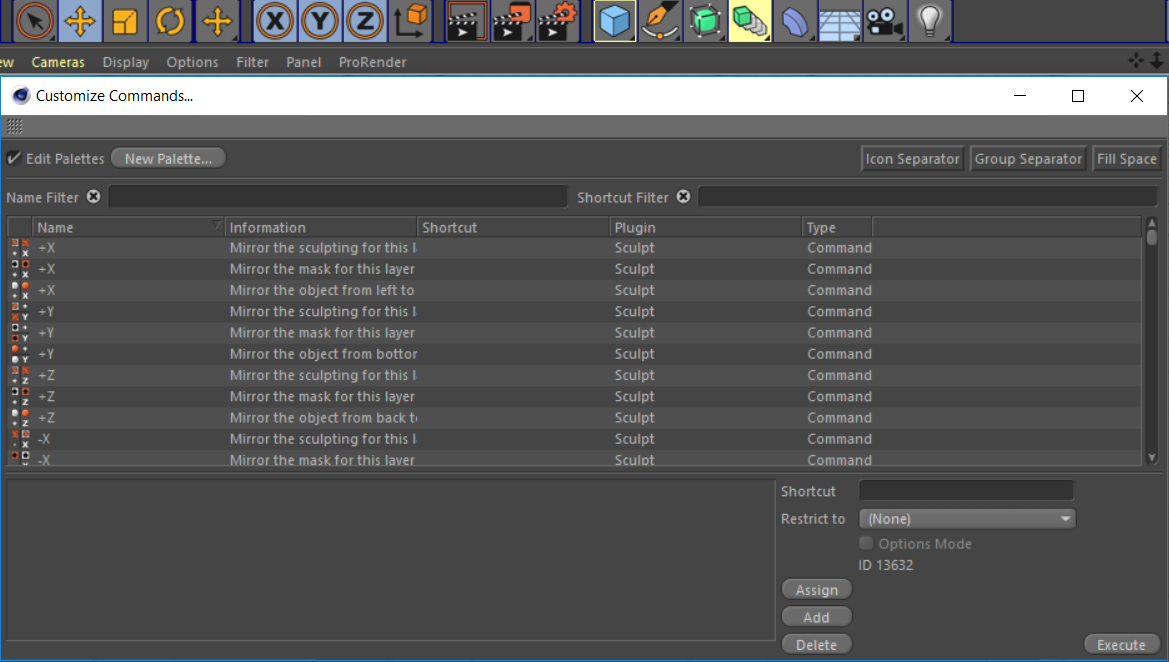
    @m_adam said in Pycharm - Invalid Python SDK: Hi, @blastframe thanks for contact us. So far we never encounter this issue and we are not able to reproduce it so few ideas to try: Make sure you have permission to write in the Cinema 4D folder and subfolder. Flush the cache, https://stackoverflow.com/a/45099651. Send us your PyCharm log, see https://intellij-support.jetbrains.com/hc/en-us/articles/207241085-Locating-IDE-log-files Cheers, Maxime. Hi @m_adam, Thank you for the reply. I ran PyCharm as an Administrator and flushed the cache. I still received the same error. When I looked at the log, I found a lot of missing file errors, which made me think I had the python.exe (c4dpy.exe) file in the wrong location. When I moved the file to the same folder as the R20 .exe, PyCharm started working. I was confused about the file location because, while in the Install instructions from the C4D Python SDK Documentation has the c4dpy in the C4D folder, this image made it seem like it could exist in a separate folder: [image: 1558553507512-c4dpy_pycharm_win2.png] I would have expected a file location similar to the default Windows location: C:\Program Files\MAXON\Cinema 4D R20\python.exe Thank you again. I have one follow-up question that I'll ask as a new topic.
  • Customizing the Layout and Palettes

    Cinema 4D SDK r20 windows sdk
    3
    1
    0 Votes
    3 Posts
    1k Views
    O
    Hello @m_adam I see, I will have to use one of the other alternatives then. Thank you.
  • 0 Votes
    7 Posts
    2k Views
    fwilleke80F
    Thank YOU
  • Calling Bevel tool and setting parametrs

    Cinema 4D SDK python r19 sdk
    9
    0 Votes
    9 Posts
    3k Views
    M
    settings[c4d.MDATA_BEVEL_RADIUS] = 0.5 Works fine here.
  • Data Dump Python Function

    Cinema 4D SDK
    9
    0 Votes
    9 Posts
    2k Views
    ManuelM
    hello, if you don't have anything else to add, i'll mark this topic as "solved" Cheers Manuel
  • Cinema Gradient, weird behaviour

    Cinema 4D SDK r20 sdk python
    7
    0 Votes
    7 Posts
    2k Views
    M
    Don't feel sorry yes this is the issue and since Knot ID are not ordered from right to left but from creation order its why it's confused you. Moreover, using a for loop will make way more sense and help you to avoid this kind of stuff. grad1 = shdr1[c4d.SLA_GRADIENT_GRADIENT] grad2 = shdr2[c4d.SLA_GRADIENT_GRADIENT] for knotId in xrange(grad1.GetKnotCount()): knot = grad1.GetKnot(knotId) grad2.InsertKnot(col=knot['col'], pos=knot['pos'],index=knot['index']) grad2.FlushKnots() shdr2[c4d.SLA_GRADIENT_GRADIENT] = grad2 Finally, a BaseShader is derived from BaseList2D which is derived from C4DAtom that mean you can use GetClone to retrieves a clone of this shader so your code can look like. import c4d def main(): mat = doc.GetFirstMaterial() colorShader = mat[c4d.MATERIAL_COLOR_SHADER] if colorShader is None: return copyColor = colorShader.GetClone() mat[c4d.MATERIAL_DIFFUSION_SHADER] = copyColor mat.InsertShader(copyColor) mat.Message(c4d.MSG_UPDATE) mat.Update(True, True) c4d.EventAdd() # Execute main() if __name__=='__main__': main() Cheers, Maxime.
  • Node-Based Materials

    Cinema 4D SDK r20 sdk windows
    6
    0 Votes
    6 Posts
    1k Views
    M
    As stated before, we are working on it and it will be released in the future. I can't say more. Regarding your question @Aaron this will be possible.
  • The python SDK is running in error

    Cinema 4D SDK sdk c++ python
    2
    1
    0 Votes
    2 Posts
    636 Views
    r_giganteR
    Hi panney, thanks for reaching out us. With regard to the issue you're experiencing, it's pretty likely that the cause is a different revision between the c4dpy executable and the Cinema 4D revision. Please be sure that they both matches (20.059 c4dpy is available here[URL-REMOVED]). Last but not least, here you can find more detail on the c4dpy executable. Best, R. [URL-REMOVED] @maxon: This section contained a non-resolving link which has been removed.
  • Precise float parameters in UI

    Cinema 4D SDK c++ r20 sdk
    4
    0 Votes
    4 Posts
    1k Views
    rsodreR
    Shouldn't STEP be used to set this precision? Or is there a limit for STEP?
  • Updating old code: Vector > LONG

    Cinema 4D SDK c++ sdk
    4
    0 Votes
    4 Posts
    764 Views
    fwilleke80F
    Yeah, definitely. When porting old code that I didn't write to new C4D releases, I always add lots of comments, so people who come after me won't have the same problems
  • Shader-Material Linking

    Cinema 4D SDK c++ r20 sdk classic api
    2
    0 Votes
    2 Posts
    507 Views
    M
    Hi @Ogers, unfortunately, there is no direct way to do so. The only working solution is to retrieves the host of the shader (using BaseList2D.GetMain) Then iterates the description of this element and all its children to see where the shader is used. Cheers, Maxime.
  • GetRealSpline() not returning a result

    Cinema 4D SDK c++ r20 sdk
    13
    0 Votes
    13 Posts
    4k Views
    ManuelM
    hello, @baca To help us keep things clear and organized (and tracked), can you please open your own thread referring to this one and ask your question there. Thanks and Cheers. Manuel
  • 0 Votes
    5 Posts
    1k Views
    M
    thanks solved: self.data = {'sphere_size': 15, 'extension_ratio': 1, 'extend_vector': False} kind regards
  • 0 Votes
    3 Posts
    1k Views
    M
    Hi @Fransua welcome in the plugincafe community. Do not worry since it's your first post but please read and follow these rules (I've setup your post correctly) How to Post Questions especially the tagging part. Q&A New Functionality. Unfortunately, a complete list is not available for the moment. But if you are looking only for object there is this page Object Types and Fields Object Types which refer to all symbols available to describe an object. To know a specific object id, you can drag and drop this object/element to the console, for more information see Python Console, Scene Elements. Finally, you can also retrieve for the full list of id by their type with c4d.plugins.FilterPluginList Cheers, Maxime.
  • GetVirtualObjects or GetContour

    Cinema 4D SDK c++ sdk r20
    3
    0 Votes
    3 Posts
    1k Views
    J
    Thank you for your answer. That was exactly what I was looking for. John Thomas
  • 0 Votes
    3 Posts
    597 Views
    O
    Hello @r_gigante Thank you for your time and answer. I will try the other way then. Best, Ogers
  • Ovolumeloader

    Cinema 4D SDK r20 c++ sdk
    3
    0 Votes
    3 Posts
    1k Views
    kbarK
    Thanks Sebastian. I did not realize it was a generator. Couldn't find it mentioned in the docs. However I was searching for VolumeLoader in the docs and on here, and I think the official docs searching system doesn't always return the results. Anyway, all good now. Thanks again.
  • InitResourceBitmap issues

    Cinema 4D SDK
    3
    0 Votes
    3 Posts
    779 Views
    merkvilsonM
    Thanks, Andreas! I was looking for interface_icons_2x for a while
  • urllib2.urlopen fails on C4D for Mac

    Cinema 4D SDK
    32
    0 Votes
    32 Posts
    27k Views
    M
    Hi @SolarPH please open a new topic with your code and the exact error. Cheers, Maxime.
  • Get Active Light Parameters

    Cinema 4D SDK sdk c++ r20
    2
    0 Votes
    2 Posts
    563 Views
    r_giganteR
    Hi Ogers, thanks for reaching us. With regard to your question, I need some further explanation since I actually don't get what you mean by: to get these parameters from c4d lights Which parameters are you referring to? What is the final intent of the Light Translator plugin? Best, Riccardo